change time SAAB 9-7X 2005 User Guide
[x] Cancel search | Manufacturer: SAAB, Model Year: 2005, Model line: 9-7X, Model: SAAB 9-7X 2005Pages: 398, PDF Size: 2.42 MB
Page 157 of 398
Average Fuel Economy:Press the fuel information
button until AVG. ECON appears on the display.
This mode shows how many miles per gallon (MPG),
kilometers per liter (km/L), or liters per 100 kilometers
(L/100 km) your vehicle is getting based on current and
past driving conditions.
Press and hold the select button for one second while
AVG. ECON is displayed to reset the average fuel
economy. Average fuel economy will then be calculated
starting from that point. If the average fuel economy
is not reset, it will be continually updated each time
you drive.
Engine Oil Life System:Press the fuel information
button until ENGINE OIL LIFE appears on the display.
The engine oil life system shows an estimate of the
oil’s remaining useful life. It will show 100% when the
system is reset after an oil change. It will alert you
to change your oil on a schedule consistent with your
driving conditions.
Always reset the engine oil life system after an oil
change. To reset the engine oil life system, seeEngine
Oil Life System on page 5-17.
In addition to the engine oil life system monitoring the
oil life, additional maintenance is recommended in
the Maintenance Schedule in this manual. SeeEngine
Oil on page 5-14andScheduled Maintenance on
page 6-4.Trip Information Button
3
(Trip Information):Press this button to scroll
through the odometer, trip odometers, and timer.
Odometer:Press the trip information button until
ODOMETER appears on the display. This mode shows
the total distance the vehicle has been driven in
either miles or kilometers. Pressing the trip stem located
on the instrument panel cluster with the vehicle off
will also display the odometer.
Trip A:Press the trip information button until TRIP A
appears on the display. This mode shows the current
distance traveled since the last reset for TRIP A in either
miles or kilometers.
Trip B:Press the trip information button until TRIP B
appears on the display. This mode shows the current
distance traveled since the last reset for TRIP B in either
miles or kilometers.
To reset TRIP A or TRIP B information, press and hold
the select button for one second while in one of the
trip modes. This will reset the information for TRIP A or
TRIP B.
3-45
2005 - Saab 97X Owner Manual
ProCarManuals.com
Page 158 of 398
You can also reset the TRIP A or TRIP B while they are
displayed by pressing the trip stem. If you press and
hold the trip stem or the select button for four seconds,
the display will show the distance traveled since the
last ignition cycle for TRIP A or TRIP B.
Timer:The DIC can be used as a timer. Press the
select button while TIMER is displayed to start the timer.
The display will show the amount of time that has
passed since the timer was last reset, not including time
the ignition is off. Time will continue to be counted as
long as the ignition is on, even if another display is being
shown on the DIC. The timer will record up to 99 hours,
59 minutes, and 59 seconds (99:59:59), after which
the display will roll back to zero.
To stop the counting of time, press the select button
briey while TIMER is displayed.
To reset the timer to zero, press and hold the select
button while TIMER is displayed.
Customization Button
q
(Customization):Press this button to access the
VEHICLE SETTINGS menu and customize the settings
to your vehicle. SeeDIC Vehicle Customization on
page 3-50for more information.
Select Button
r
(Select):Press this button to reset certain DIC
functions, turn off or acknowledge messages on the DIC
display, and set your customization settings. For
example, this button will allow you to reset the trip
odometers, turn off the FUEL LEVEL LOW message,
and scroll through and select the desired language
information is displayed in the DIC.
DIC Warnings and Messages
Messages are displayed on the DIC to notify the driver
that the status of the vehicle has changed and that
some action may be needed by the driver to correct the
condition. More than one message may appear at
one time. They will appear one after the other. Some
messages may not require immediate action but
you should press the trip stem on the instrument panel
cluster or any of the DIC buttons to acknowledge
that you received the message and clear it from the
display. Some messages cannot be cleared from
the display because they are more urgent. These
messages require action before they can be removed
from the DIC display. The following are the possible
messages that can be displayed and some information
about them.
3-46
2005 - Saab 97X Owner Manual
ProCarManuals.com
Page 169 of 398
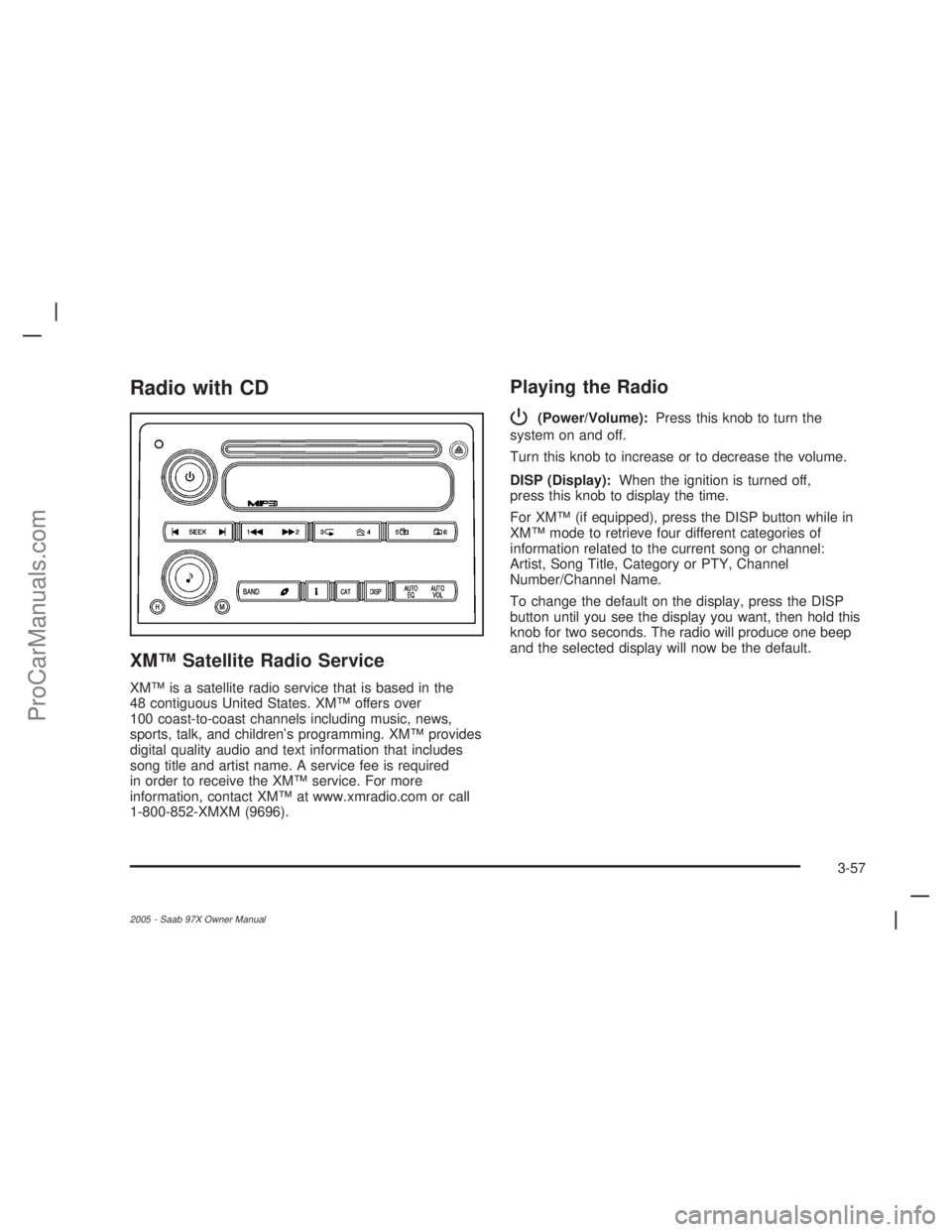
Radio with CD
XM™ Satellite Radio Service
XM™ is a satellite radio service that is based in the
48 contiguous United States. XM™ offers over
100 coast-to-coast channels including music, news,
sports, talk, and children’s programming. XM™ provides
digital quality audio and text information that includes
song title and artist name. A service fee is required
in order to receive the XM™ service. For more
information, contact XM™ at www.xmradio.com or call
1-800-852-XMXM (9696).
Playing the Radio
P
(Power/Volume):Press this knob to turn the
system on and off.
Turn this knob to increase or to decrease the volume.
DISP (Display):When the ignition is turned off,
press this knob to display the time.
For XM™ (if equipped), press the DISP button while in
XM™ mode to retrieve four different categories of
information related to the current song or channel:
Artist, Song Title, Category or PTY, Channel
Number/Channel Name.
To change the default on the display, press the DISP
button until you see the display you want, then hold this
knob for two seconds. The radio will produce one beep
and the selected display will now be the default.
3-57
2005 - Saab 97X Owner Manual
ProCarManuals.com
Page 176 of 398
3N(Repeat):Press this pushbutton to hear a track
over again. RPT ON will appear on the display.
The current track will continue to repeat. Press this
pushbutton again to turn off repeat play. RPT OFF will
appear on the display.
4
y(Random):Press this pushbutton to hear the
tracks in random, rather than sequential, order. RDM ON
will appear on the display. Press this pushbutton
again to turn off random play. RDM OFF will appear on
the display.
oSEEKp:Press the left arrow to go to the start of
the current or the previous track. Press the right
arrow to go to the start of the next track. If a track is
approximately 10 seconds into its song, press either
the left or right arrow twice to get to the previous or
next track.
To scan tracks, press either arrow for more than
two seconds until SCAN appears on the display.
The CD will search the previous or next tracks at
two seconds per track. Press either arrow to stop
scanning.DISP (Display):Press this button to see how long the
current track has been playing. The elapsed time of
the track will appear on the display. To change
the default on the display, track or elapsed time, press
this button until you see the display you want, then
hold the button for two seconds. The radio will produce
one beep and the selected display will now be the
default.
BAND:Press this button to listen to the radio when a
CD is playing. The inactive CD will remain safely
inside the radio for future listening.B(CD):Press this button to play a CD when listening
to the radio. The CD symbol will appear on the display
when a CD is loaded.
AUTO EQ (Automatic Equalization):Press EQ to
select an equalization setting while playing a CD.
The equalization will be set whenever a CD is played.
See “EQ” listed previously for more information.
If you select an EQ setting for your CD, it will be
activated each time you play a CD.
Z(Eject):Press this button to eject a CD. Eject may
be activated with either the ignition or radio off. CDs
may be loaded with the ignition and radio off if this
button is pressed rst.
3-64
2005 - Saab 97X Owner Manual
ProCarManuals.com
Page 180 of 398
©SEEK¨:Press the left arrow to go to the start of
the previous track. Press the right arrow to go to the
start of the next track. Press either arrow for more than
two seconds and SCAN will appear on display. The
radio will scan the previous or next tracks at two tracks
per second. Release the arrow to stop scanning and
to play the track.
DISP (Display):Press this knob to switch between
track mode, folder/playlist mode, and time of day mode.
The display will show only eight characters, but there
can be up to four pages of text. If there are more
than eight characters in the song, folder, or playlist
name, pressing this knob within two seconds will take
you to the next page of text. If there are no other pages
to be shown, pressing this knob within two seconds
will take you to the next display mode.
Track mode will display the current track number
and the ID3 tag song name.
Folder/playlist mode will display the current folder or
playlist number and the folder/playlist name.
Time of day mode will display the time of day and
the ID3 tag song name.
To change the default on the display, press the DISP
knob until you see the display you want, then hold
this knob for two seconds. The radio will produce one
beep and the selected display will now be the default.
4(Information):INFO will appear on the display
whenever a current track has ID3 tag information.
Press this button to display the artist name and album
contained in the tag. INFO will disappear from the
display when the information in the ID3 tag has nished.
BAND:Press this button to listen to the radio when a
CD is playing. The inactive CD will remain safely
inside the radio for future listening.
B(CD):Press this button to play a CD when listening
to the radio. The CD symbol will appear on the display
when a CD is loaded.
AUTO EQ (Automatic Equalization):Press EQ to
select an equalization setting while playing a CD.
The equalization will be set whenever a CD is played.
See “EQ” listed previously for more information.
If you select an EQ setting for your CD, it will be
activated each time you play a CD.
Z(Eject):Press this button to eject a CD. Eject may
be activated with either the ignition or radio off. CDs
may be loaded with the ignition and radio off if this
button is pressed rst.
3-68
2005 - Saab 97X Owner Manual
ProCarManuals.com
Page 182 of 398
Playing the Radio
P
(Power):Press this knob to turn the system on
and off.
Turn this knob to increase or to decrease the volume.
DISP (Display):When the ignition is turned off,
press this knob to display the time.
For XM™ (if equipped), press the DISP knob while in
XM™ mode to retrieve four different categories of
information related to the current song or channel:
Artist, Song Title, Category or PTY, Channel
Number/Channel Name.
To change the default on the display, press the DISP
knob until you see the display you want, then hold
this knob for two seconds. The radio will produce one
beep and the selected display will now be the default.
AUTO VOL (Automatic Volume):With automatic
volume, the audio system adjusts automatically to make
up for road and wind noise as you drive.
Set the volume at the desired level. Press this button to
select LOW, MEDIUM, or HIGH. Each higher setting
will allow for more volume compensation at faster
vehicle speeds. Then as you drive, automatic volume
increases the volume, as necessary, to overcome noise
at any speed. The volume level should always sound
the same to you as you drive.NONE will appear on the display if the radio cannot
determine the vehicle speed. To turn automatic volume
off, press this button until AVOL OFF appears on
the display.
Finding a Station
BAND:Press this button to switch between FM1, FM2,
AM, or XM1 or XM2 (if equipped). The display will
show the selection.
e(Tune):Turn this knob to select radio stations.
tSEEKu:Press and release the right or the left
arrow to go to the next or to the previous station
and stay there.
The radio will only seek stations with a strong signal
that are in the selected band.
Press and hold either arrow for more than two seconds.
SCAN will appear on the display and the radio will
produce one beep. The radio will go to a station, play
for a few seconds, then go on to the next station. Press
either arrow again or one of the pushbuttons to stop
scanning presets.
The radio will only scan stations with a strong signal
that are in the selected band.
3-70
2005 - Saab 97X Owner Manual
ProCarManuals.com
Page 190 of 398
N(Repeat):With repeat, one track or an entire CD
can be repeated.
To use repeat, do the following:
To repeat the track you are listening to, press and
release the repeat button. RPT ON will appear on
the display. Press this button again to turn off repeat
play. RPT OFF will appear on the display.
To repeat the CD you are listening to, press and
hold the repeat button for two seconds. RPT ON
will appear on the display. Press this button again
to turn off repeat play. RPT OFF will appear on
the display.
y(Random):With random, you can listen to the
tracks in random, rather than sequential, order, on one
CD or on all of the CDs. To use random, do one of
the following:
To play the tracks on the CD you are listening to in
random order, press and release the random
button. RANDOM ONE will appear on the display.
Press this button again to turn off random play.
To play the tracks on all of the CDs that are loaded
in random order, press and hold this button for
more than two seconds. You will hear a beep and
RANDOM ALL will appear on the display. Press this
button again to turn off random play.
tSEEKu:Press the left arrow to go to the start of
the current track, if more than ten seconds have
played. Press the right arrow to go to the next track.
If either arrow is held or pressed more than once,
the player will continue moving backward or forward
through the CD.
To scan one CD, press and hold either arrow for more
than two seconds until SCAN appears on the display
and you hear a beep. The radio will go to the next track,
play for 10 seconds, then go on to the next track.
Press either arrow again, to stop scanning.
To scan all loaded CDs, press and hold either arrow for
more than four seconds until CD SCAN appears on
the display and you hear a beep. Use this feature
to listen to 10 seconds of the rst track of each loaded
CD. Press either arrow again, to stop scanning.
DISP (Display):Press this knob to see how long the
current track has been playing. The elapsed time of the
track will appear on the display. To change the
default on the display, track or elapsed time, press this
knob until you see the display you want, then hold
the knob for two seconds. The radio will produce one
beep and the selected display will now be the default.
BAND:Press this button to listen to the radio when
a CD is playing. The inactive CD(s) will remain safely
inside the radio for future listening.
3-78
2005 - Saab 97X Owner Manual
ProCarManuals.com
Page 191 of 398
B(CD):Press this button to play a CD when listening
to the radio. The CD symbol will appear on the display
when a CD is loaded.
AUTO EQ (Automatic Equalization):Press EQ to
select an equalization setting while playing a CD.
The equalization will be set whenever a CD is played.
See “EQ” listed previously for more information.
If you select an EQ setting for your CD, it will be
activated each time you play a CD.
Using Song List Mode
R
(Song List):The six-disc CD changer has a
feature called song list. This feature is capable of saving
20 track selections.
To save tracks into the song list feature, perform the
following steps:
1. Turn the CD player on and load it with at least one
CD. See “LOAD CD” listed previously in this section
for more information.
2. Check to see that the CD changer is not in song
list mode. S-LIST should not appear on the
display. If S-LIST is present, press the song list
button to turn it off.3. Select the desired CD by pressing the numbered
pushbutton and then use the SEEK SCAN right
arrow to locate the track to be saved. the track will
begin to play.
4. Press and hold the song list button to save the
track into memory. When the song list button is
pressed, one beep will be heard immediately. After
two seconds of continuously pressing the song
list button, two beeps will sound to conrm the track
has been saved.
5. Repeat Steps 3 and 4 for saving other selections.
S-LIST FULL will appear on the display if you try to save
more than 20 selections.
To play the song list, press the song list button.
One beep will be heard and S-LIST will appear on the
display. The recorded tracks will begin to play in
the order they were saved.
Seek through the song list by using the SEEK SCAN
arrows. Seeking past the last saved track will return to
the rst saved track.
3-79
2005 - Saab 97X Owner Manual
ProCarManuals.com
Page 194 of 398
Headphones
The RSE system includes two sets of wireless
headphones.
Each set of headphones has an ON/OFF control.
An indicator light will illuminate on the headphones
when they are on. If the light does not illuminate, the
batteries may need to be replaced. See “Battery
Replacement” following for more information.
Each set of headphones has a volume knob.
To adjust the volume, adjust this knob.
The transmitters are located below the video display
screen. The headphones will shut off automatically
if they lose the signal from the system after about four
minutes to save battery power. The signal may be lost if
the system is turned off or if the headphones are out
of range of the transmitters.
When using the wired headphones, if the front seat
passengers play a CD in the Radio with Six-Disc CD
(if equipped) or use XM™ Satellite Radio Service
(if equipped), you will hear the audio for these sources,
instead of the DVD or CD that is currently playing
through the RSE.
Notice:Do not store the headphones in heat or
direct sunlight. This could damage the headphones
and repairs would not be covered by your warranty.
Keep the headphones stored in a cool, dry place.
Battery Replacement
To change the batteries, do the following:
1. Loosen the screw on the battery compartment door
located on the left side of the headphone earpiece.
2. Replace the two AAA batteries in the compartment.
Make sure that they are installed correctly, using
the diagram on the inside of the battery
compartment.
3. Tighten the screw to close the compartment door.
If the headphones are to be stored for a long period
of time, remove the batteries and keep them in a cool,
dry place.
Stereo RCA Jacks
The RCA jacks are located behind the video screen.
The RCA jacks allow audio and video signals to
be connected from an auxiliary device such as a
camcorder or a video game unit to the RSE system.
Standard RCA cables, not included, are needed
to connect the auxiliary device to the RCA jacks.
The yellow connector inputs video and the red and white
connectors input right and left audio. Refer to the
manufacturer’s instructions for proper connection of the
auxiliary device.
3-82
2005 - Saab 97X Owner Manual
ProCarManuals.com
Page 197 of 398
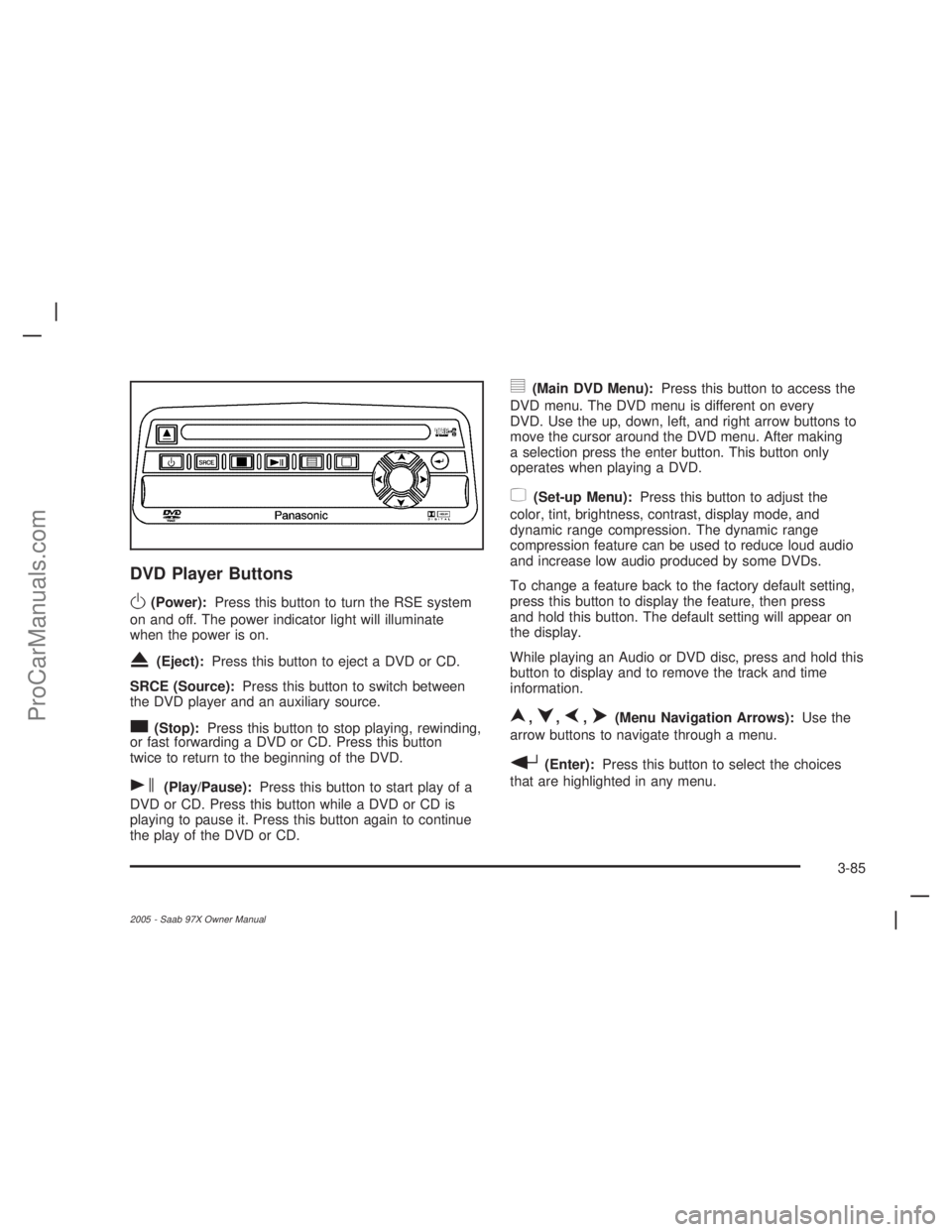
DVD Player Buttons
O(Power):Press this button to turn the RSE system
on and off. The power indicator light will illuminate
when the power is on.
X(Eject):Press this button to eject a DVD or CD.
SRCE (Source):Press this button to switch between
the DVD player and an auxiliary source.
c(Stop):Press this button to stop playing, rewinding,
or fast forwarding a DVD or CD. Press this button
twice to return to the beginning of the DVD.
s(Play/Pause):Press this button to start play of a
DVD or CD. Press this button while a DVD or CD is
playing to pause it. Press this button again to continue
the play of the DVD or CD.
y(Main DVD Menu):Press this button to access the
DVD menu. The DVD menu is different on every
DVD. Use the up, down, left, and right arrow buttons to
move the cursor around the DVD menu. After making
a selection press the enter button. This button only
operates when playing a DVD.
z(Set-up Menu):Press this button to adjust the
color, tint, brightness, contrast, display mode, and
dynamic range compression. The dynamic range
compression feature can be used to reduce loud audio
and increase low audio produced by some DVDs.
To change a feature back to the factory default setting,
press this button to display the feature, then press
and hold this button. The default setting will appear on
the display.
While playing an Audio or DVD disc, press and hold this
button to display and to remove the track and time
information.
n,q,p,o(Menu Navigation Arrows):Use the
arrow buttons to navigate through a menu.
r(Enter):Press this button to select the choices
that are highlighted in any menu.
3-85
2005 - Saab 97X Owner Manual
ProCarManuals.com