audio SAAB 9-7X 2005 Owner's Manual
[x] Cancel search | Manufacturer: SAAB, Model Year: 2005, Model line: 9-7X, Model: SAAB 9-7X 2005Pages: 398, PDF Size: 2.42 MB
Page 195 of 398
To use the auxiliary inputs on the RSE system, connect
an external auxiliary device to the color-coded RCA
jacks and turn both the auxiliary device and the
RSE system power on. If the RSE system had been
previously in the DVD player mode, pressing the SRCE
button on the faceplate or the remote control will
switch the RSE system between the auxiliary device
and the DVD player.
How to Change the Video Format when in
the Auxiliary Mode
The auxiliary input video format is preset to NTSC.
In some countries, the video format may be in the PAL
system. To change the video format, perform the
following:
1. Press the display menu button.
2. Press the down arrow button to highlight the Video
Format option.
3. Press the enter button to select Video Format.
4. Press the right or left arrow button to select
the desired video format.
5. Press the enter button to accept the change.
Audio Output
Audio from the DVD player or auxiliary inputs may be
heard through the following possible sources:
Wireless Headphones
Vehicle Speakers
Vehicle wired headphone jacks on the Rear Seat
Audio system (if equipped)
The RSE system will always transmit the audio signal by
infrared to the wireless headphones, if there is audio
available. See “Headphones” previously for more
information.
The RSE system is capable of outputting audio to the
vehicle speakers by using the radio. The RSE system
may be selected as an audio source on the radio if the
RSE system power is on. Once the RSE system is
selected as an audio source on the radio, adjust the
speaker volume on the radio, if necessary. If the RSE
system power is not on, the RSE system will not be an
available source on the radio. Refer to the radio
information for the radio that your vehicle has for more
information.
The RSE system is capable of outputting audio to the
wired headphone jacks on the rear seat audio system
(if equipped). The RSE system may be selected as an
audio source on the rear seat audio system if the RSE
system power is on. Refer toRear Seat Audio (RSA)
on page 3-92for more information.
3-83
2005 - Saab 97X Owner Manual
ProCarManuals.com
Page 196 of 398
Video Screen
The video screen is located in the overhead console.
To use the video screen, push forward on the release
latch and the screen will fold down. Adjust the screen’s
position as desired. When the video screen is not in
use, push it up into its latched position.
The DVD player and display will continue to operate
when the screen is in the up or the down position.
The video screen contains the transmitters for the
wireless headphones and the remote control. If the
screen is in the closed position, the signals will not be
available for the operation of the headphones or the
remote control.
Notice:Directly touching the video screen may
damage it. Do not touch the screen. See “Cleaning
the Video Screen” later in this section for more
information.
DVD Player
The DVD player is located in the overhead console.
The DVD player can be controlled by the buttons on the
DVD player and/or by the buttons on the remote
control. See “Remote Control” later in this section for
more information.The DVD player power may be turned on when the
ignition is in RUN, ACCESSORY, or when Retained
Accessory Power (RAP) is active.
The RSE system DVD player is only compatible with
DVDs of the appropriate region code for the country that
the vehicle was sold in. The DVD region code is
printed on the jacket of most DVDs.
Standard audio CDs, CD-R, CD-RW, Video CD and
Photo CD/CD-R media are fully supported by this DVD
player. DVD-R and DVD-RW media is supported if
formatted as DVD-Video. DVD+R and DVD+RW media
may or may not be supported by the DVD player.
The DVD player does not support DVD-RAM,
DVD-ROM, and DVD Audio media. An error message
will appear on the display if this type of media is inserted
into the DVD player.
When using the wired headphones, not included, if the
front seat passengers play a CD in the Radio with
Six-Disc CD (if equipped) or use XM™ Satellite Radio
Service (if equipped), you will hear the audio for
these sources, instead of the DVD or CD that is currently
playing through the RSE.
If an error message appears on the video screen,
see “DVD Messages” later in this section.
3-84
2005 - Saab 97X Owner Manual
ProCarManuals.com
Page 197 of 398
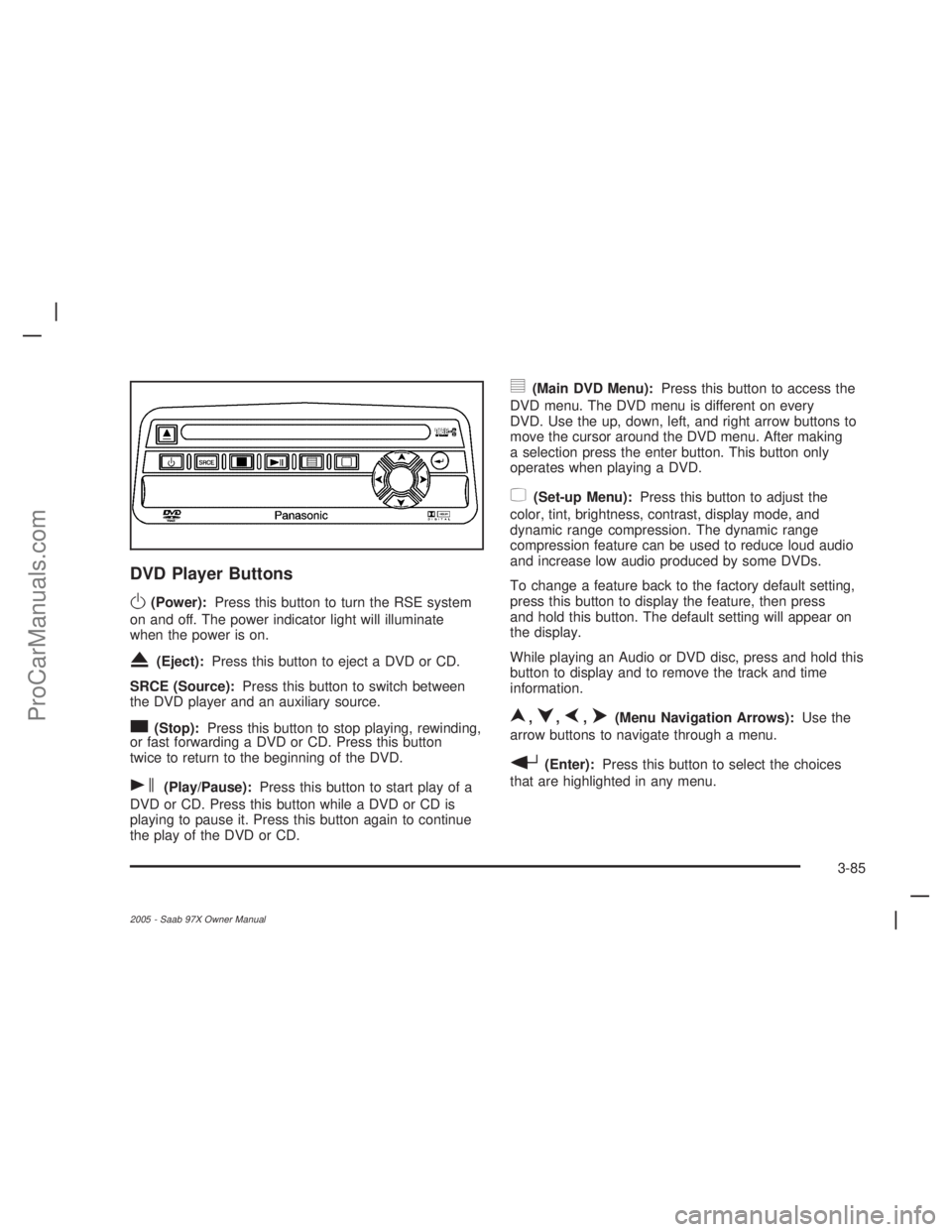
DVD Player Buttons
O(Power):Press this button to turn the RSE system
on and off. The power indicator light will illuminate
when the power is on.
X(Eject):Press this button to eject a DVD or CD.
SRCE (Source):Press this button to switch between
the DVD player and an auxiliary source.
c(Stop):Press this button to stop playing, rewinding,
or fast forwarding a DVD or CD. Press this button
twice to return to the beginning of the DVD.
s(Play/Pause):Press this button to start play of a
DVD or CD. Press this button while a DVD or CD is
playing to pause it. Press this button again to continue
the play of the DVD or CD.
y(Main DVD Menu):Press this button to access the
DVD menu. The DVD menu is different on every
DVD. Use the up, down, left, and right arrow buttons to
move the cursor around the DVD menu. After making
a selection press the enter button. This button only
operates when playing a DVD.
z(Set-up Menu):Press this button to adjust the
color, tint, brightness, contrast, display mode, and
dynamic range compression. The dynamic range
compression feature can be used to reduce loud audio
and increase low audio produced by some DVDs.
To change a feature back to the factory default setting,
press this button to display the feature, then press
and hold this button. The default setting will appear on
the display.
While playing an Audio or DVD disc, press and hold this
button to display and to remove the track and time
information.
n,q,p,o(Menu Navigation Arrows):Use the
arrow buttons to navigate through a menu.
r(Enter):Press this button to select the choices
that are highlighted in any menu.
3-85
2005 - Saab 97X Owner Manual
ProCarManuals.com
Page 199 of 398
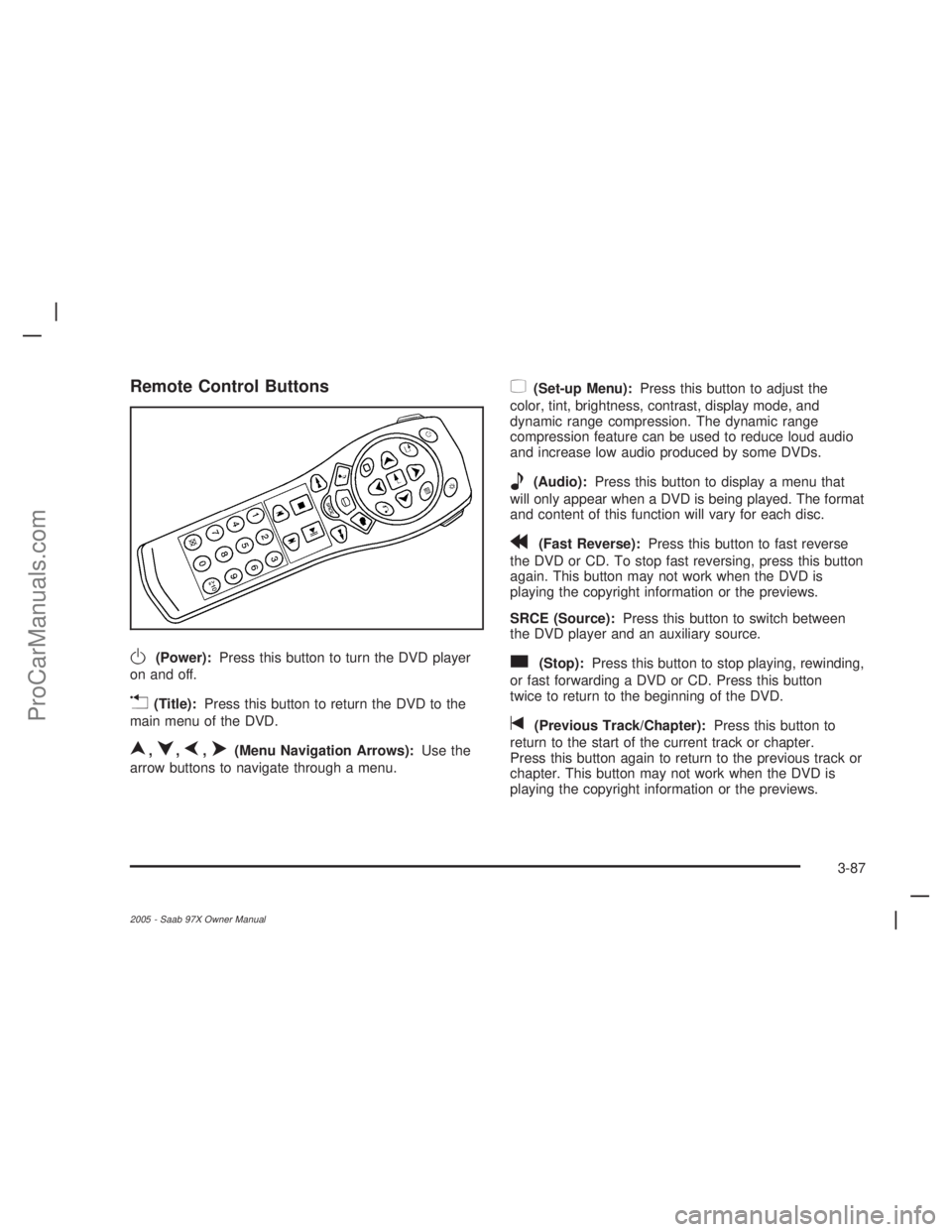
Remote Control Buttons
O(Power):Press this button to turn the DVD player
on and off.
v(Title):Press this button to return the DVD to the
main menu of the DVD.
n,q,p,o(Menu Navigation Arrows):Use the
arrow buttons to navigate through a menu.
z(Set-up Menu):Press this button to adjust the
color, tint, brightness, contrast, display mode, and
dynamic range compression. The dynamic range
compression feature can be used to reduce loud audio
and increase low audio produced by some DVDs.
e(Audio):Press this button to display a menu that
will only appear when a DVD is being played. The format
and content of this function will vary for each disc.
r(Fast Reverse):Press this button to fast reverse
the DVD or CD. To stop fast reversing, press this button
again. This button may not work when the DVD is
playing the copyright information or the previews.
SRCE (Source):Press this button to switch between
the DVD player and an auxiliary source.
c(Stop):Press this button to stop playing, rewinding,
or fast forwarding a DVD or CD. Press this button
twice to return to the beginning of the DVD.
t(Previous Track/Chapter):Press this button to
return to the start of the current track or chapter.
Press this button again to return to the previous track or
chapter. This button may not work when the DVD is
playing the copyright information or the previews.
3-87
2005 - Saab 97X Owner Manual
ProCarManuals.com
Page 202 of 398
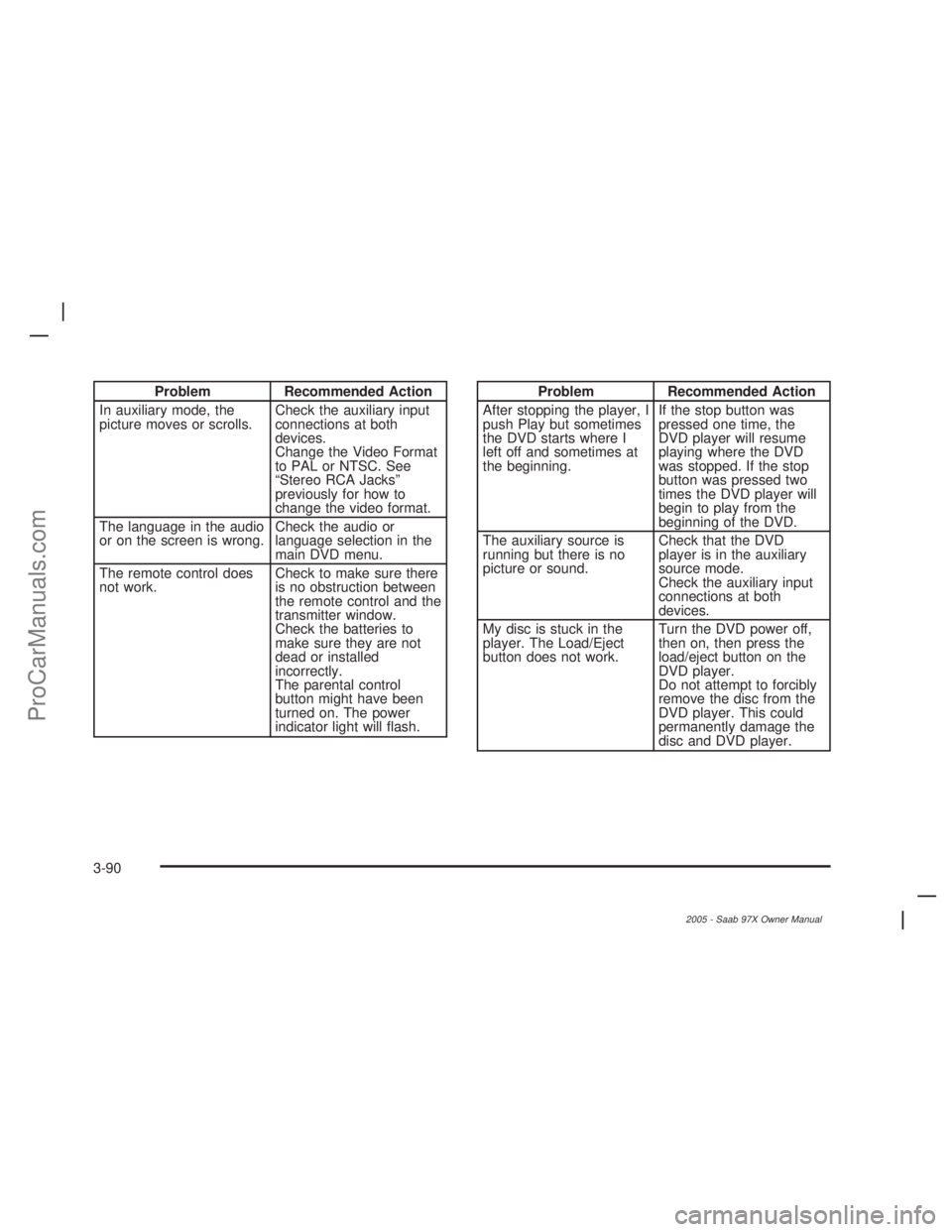
Problem Recommended Action
In auxiliary mode, the
picture moves or scrolls.Check the auxiliary input
connections at both
devices.
Change the Video Format
to PAL or NTSC. See
“Stereo RCA Jacks”
previously for how to
change the video format.
The language in the audio
or on the screen is wrong.Check the audio or
language selection in the
main DVD menu.
The remote control does
not work.Check to make sure there
is no obstruction between
the remote control and the
transmitter window.
Check the batteries to
make sure they are not
dead or installed
incorrectly.
The parental control
button might have been
turned on. The power
indicator light will ash.Problem Recommended Action
After stopping the player, I
push Play but sometimes
the DVD starts where I
left off and sometimes at
the beginning.If the stop button was
pressed one time, the
DVD player will resume
playing where the DVD
was stopped. If the stop
button was pressed two
times the DVD player will
begin to play from the
beginning of the DVD.
The auxiliary source is
running but there is no
picture or sound.Check that the DVD
player is in the auxiliary
source mode.
Check the auxiliary input
connections at both
devices.
My disc is stuck in the
player. The Load/Eject
button does not work.Turn the DVD power off,
then on, then press the
load/eject button on the
DVD player.
Do not attempt to forcibly
remove the disc from the
DVD player. This could
permanently damage the
disc and DVD player.
3-90
2005 - Saab 97X Owner Manual
ProCarManuals.com
Page 203 of 398
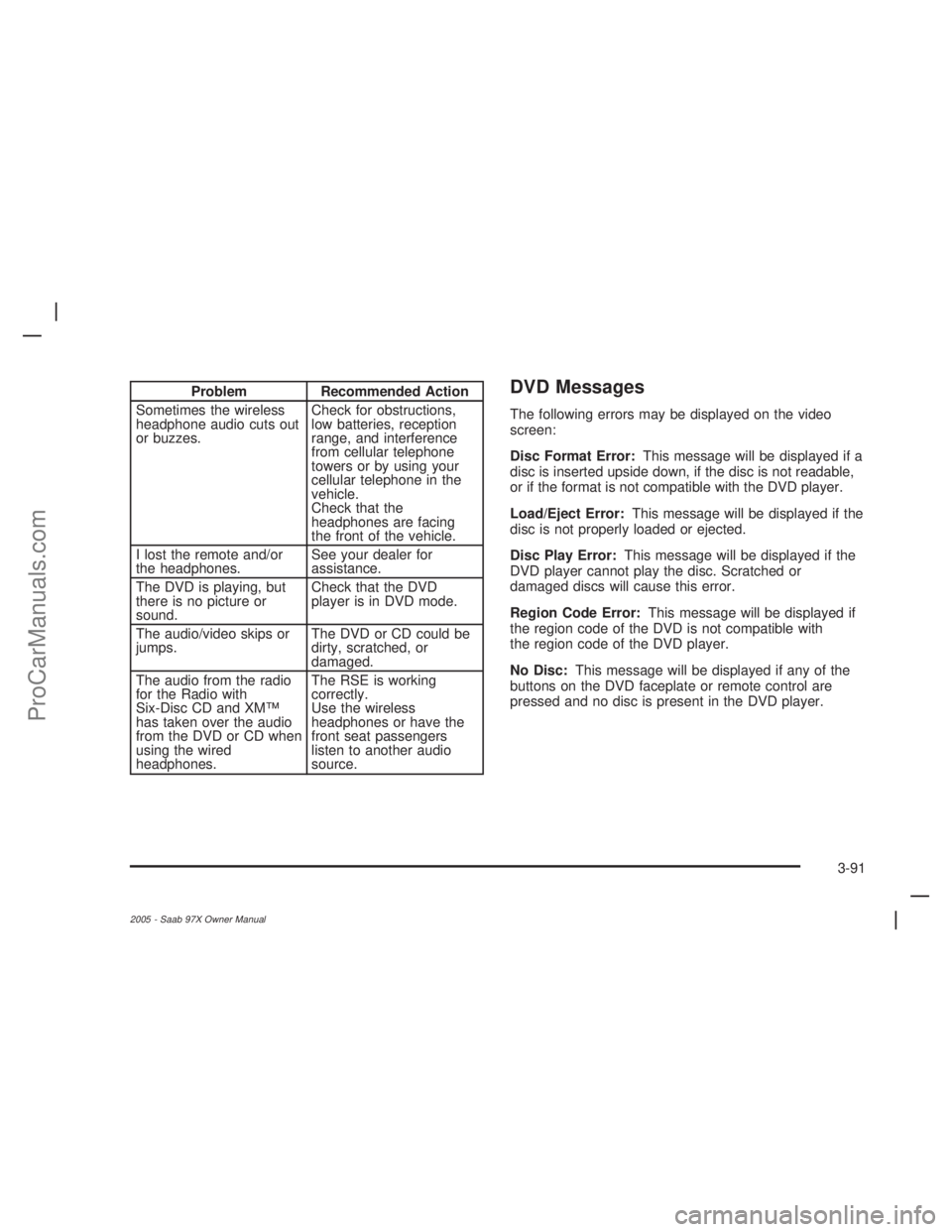
Problem Recommended Action
Sometimes the wireless
headphone audio cuts out
or buzzes.Check for obstructions,
low batteries, reception
range, and interference
from cellular telephone
towers or by using your
cellular telephone in the
vehicle.
Check that the
headphones are facing
the front of the vehicle.
I lost the remote and/or
the headphones.See your dealer for
assistance.
The DVD is playing, but
there is no picture or
sound.Check that the DVD
player is in DVD mode.
The audio/video skips or
jumps.The DVD or CD could be
dirty, scratched, or
damaged.
The audio from the radio
for the Radio with
Six-Disc CD and XM™
has taken over the audio
from the DVD or CD when
using the wired
headphones.The RSE is working
correctly.
Use the wireless
headphones or have the
front seat passengers
listen to another audio
source.DVD Messages
The following errors may be displayed on the video
screen:
Disc Format Error:This message will be displayed if a
disc is inserted upside down, if the disc is not readable,
or if the format is not compatible with the DVD player.
Load/Eject Error:This message will be displayed if the
disc is not properly loaded or ejected.
Disc Play Error:This message will be displayed if the
DVD player cannot play the disc. Scratched or
damaged discs will cause this error.
Region Code Error:This message will be displayed if
the region code of the DVD is not compatible with
the region code of the DVD player.
No Disc:This message will be displayed if any of the
buttons on the DVD faceplate or remote control are
pressed and no disc is present in the DVD player.
3-91
2005 - Saab 97X Owner Manual
ProCarManuals.com
Page 204 of 398
DVD Distortion
There may be an experience with audio distortion in the
wireless headphones when operating cellular phones,
scanners, CB radios, Global Positioning Systems
(GPS)*, two-way radios, mobile fax, or walkie talkies.
It may be necessary to turn off the DVD player
when operating one of these devices in or near the
vehicle.
* Excludes the OnStar
®System.
Cleaning the Video Screen
Pour some isopropyl or rubbing alcohol on a clean cloth
and gently wipe the video screen. Do not spray
directly onto the screen and do not press too hard or
too long on the video screen.
Rear Seat Audio (RSA)
This feature allows rear seat passengers to select and
listen to any of the available radio sources: AM/FM,
XM, CD, or DVD. However, a rear seat passenger
cannot control a source selected on the radio by
someone in the front of the vehicle. For example, the
RSA cannot be used to change CD tracks if the radio is
set to CD. Also, if the radio is switched to a source
the RSA has control of, sound will not be lost, but the
RSA will lose control of that sourse.Rear seat passengers always have control of the
volume for each set of headphones.
The RSA will run when the radio is off if the ignition key
is positioned in the power mode, seeIgnition Positions
on page 2-20in this manual.
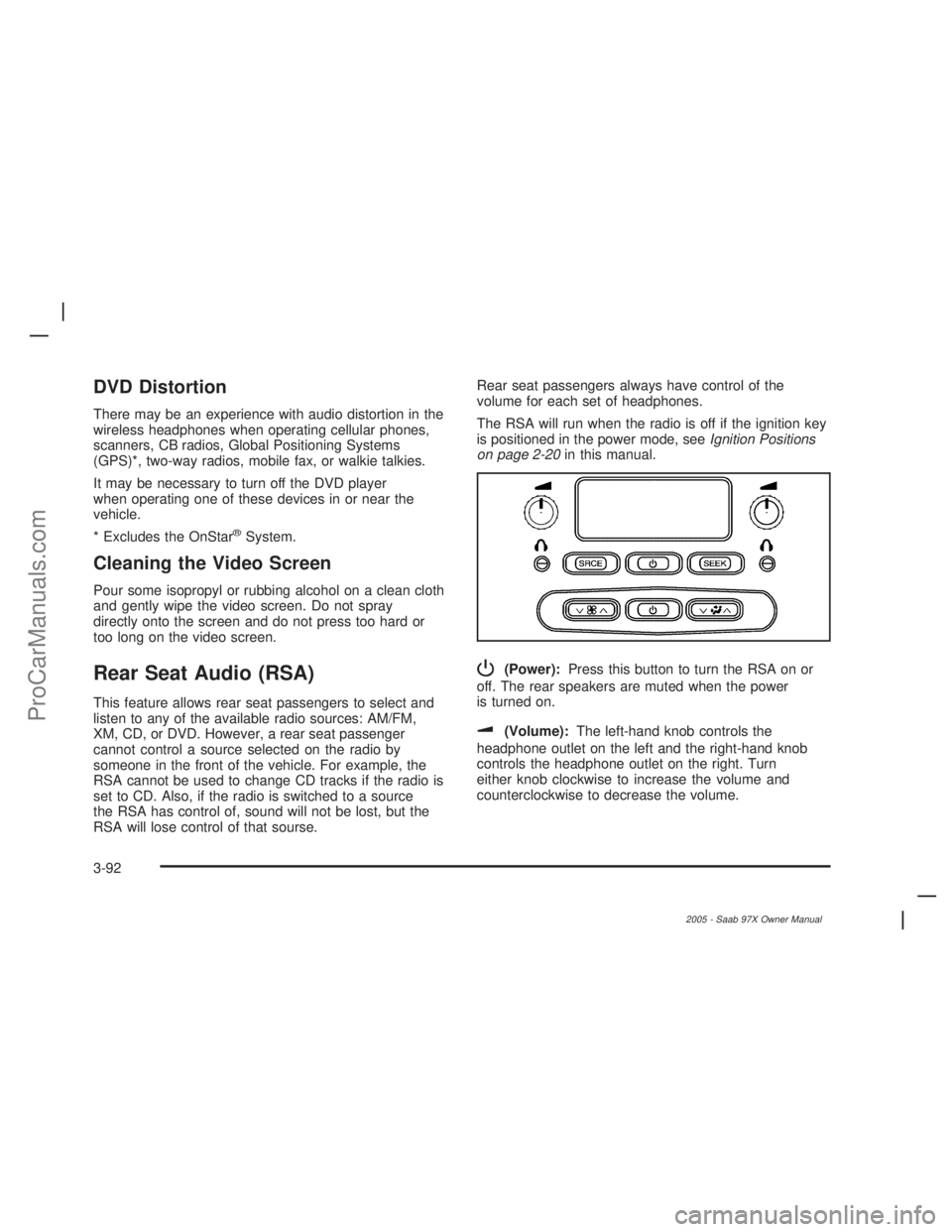
P(Power):Press this button to turn the RSA on or
off. The rear speakers are muted when the power
is turned on.
u(Volume):The left-hand knob controls the
headphone outlet on the left and the right-hand knob
controls the headphone outlet on the right. Turn
either knob clockwise to increase the volume and
counterclockwise to decrease the volume.
3-92
2005 - Saab 97X Owner Manual
ProCarManuals.com
Page 205 of 398
SRCE (Source):Press this button to select an audio
source: AM/FM, XM, CD, or DVD. The inactive CD,
or DVD will remain safely inside the radio for future
listening. There are sources that are internal to the radio,
such as AM/FM, and CD and other sources to radio
that are external, such as XM™, DVD, and OnStar
®.If
an external source has been selected, the rear seat
passengers cannot select a different external source.
SEEK:Press this button to go to the next station or CD
track and stay there. The display will show the
selection. This function is inactive if the radio is set to
the same source.
To scan preset radio stations, press and hold the SEEK
button for two seconds and the radio will go to the
next preset station. Hold this button down and the radio
will continue to go through all available preset stations.
This function is inactive if the front seat passengers
are listening to the radio.When a CD is playing, press the SEEK button to go to
the next track on the CD. This function is inactive if
the front seat passengers are listening to a CD.
When a CD is playing in the six-disc CD player, press and
hold the SEEK button for two seconds to go you to the
next CD, if multiple CDs are loaded. This function is
inactive if the front seat passengers are listening to a CD.
Theft-Deterrent Feature
THEFTLOCK®is designed to discourage theft of your
vehicle’s radio. The feature works automatically by
learning a portion of the Vehicle Identication Number
(VIN). If the radio is moved to a different vehicle, it
will not operate and LOCKED will appear on the display.
When the radio and vehicle are turned off, the blinking
red light indicates that THEFTLOCK
®is armed.
With THEFTLOCK
®activated, the radio will not operate
if stolen.
3-93
2005 - Saab 97X Owner Manual
ProCarManuals.com
Page 206 of 398
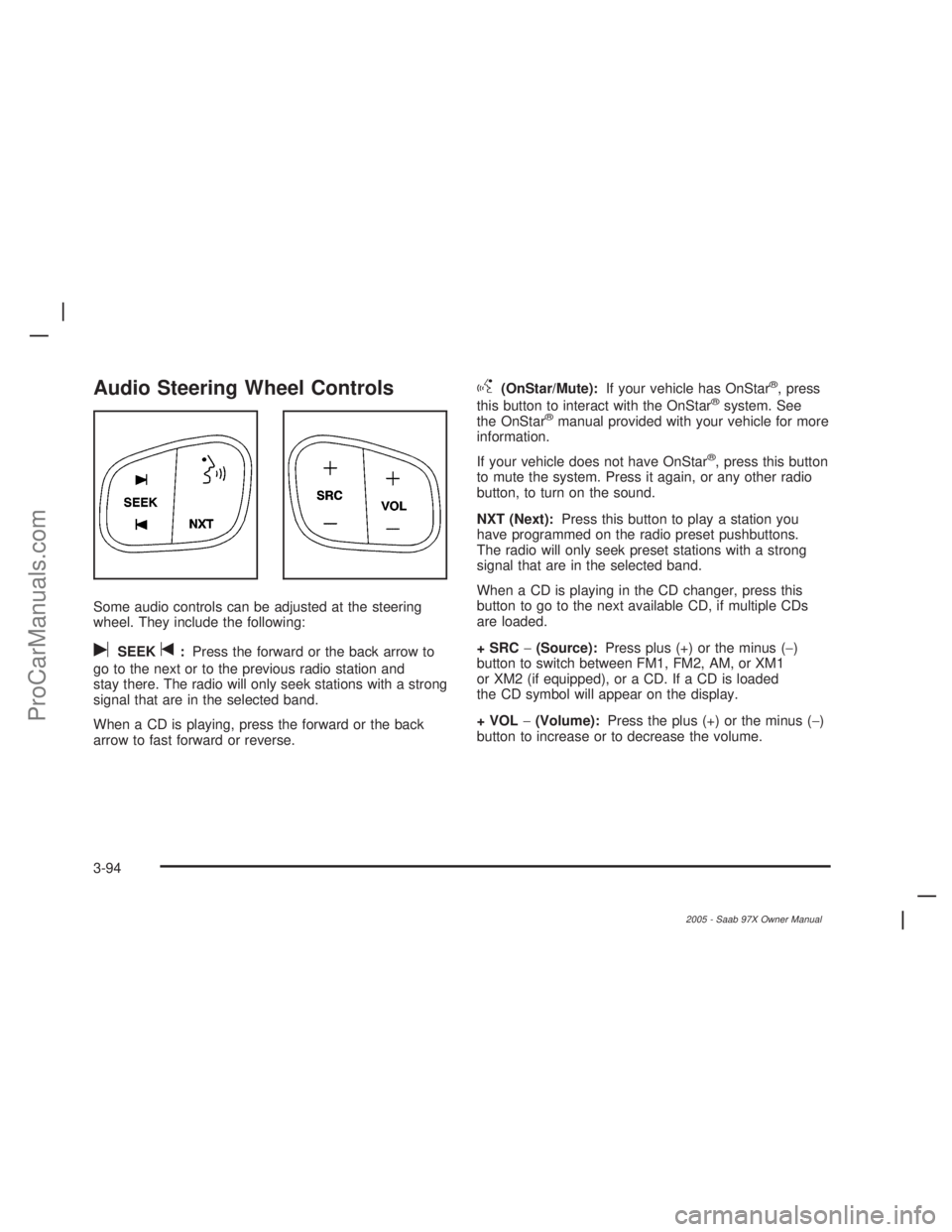
Audio Steering Wheel Controls
Some audio controls can be adjusted at the steering
wheel. They include the following:
uSEEKt:Press the forward or the back arrow to
go to the next or to the previous radio station and
stay there. The radio will only seek stations with a strong
signal that are in the selected band.
When a CD is playing, press the forward or the back
arrow to fast forward or reverse.
g(OnStar/Mute):If your vehicle has OnStar®, press
this button to interact with the OnStar®system. See
the OnStar®manual provided with your vehicle for more
information.
If your vehicle does not have OnStar
®, press this button
to mute the system. Press it again, or any other radio
button, to turn on the sound.
NXT (Next):Press this button to play a station you
have programmed on the radio preset pushbuttons.
The radio will only seek preset stations with a strong
signal that are in the selected band.
When a CD is playing in the CD changer, press this
button to go to the next available CD, if multiple CDs
are loaded.
+ SRC−(Source):Press plus (+) or the minus (−)
button to switch between FM1, FM2, AM, or XM1
or XM2 (if equipped), or a CD. If a CD is loaded
the CD symbol will appear on the display.
+ VOL−(Volume):Press the plus (+) or the minus (−)
button to increase or to decrease the volume.
3-94
2005 - Saab 97X Owner Manual
ProCarManuals.com
Page 385 of 398
A
Accessory Inator...........................................5-68
Accessory Power Outlet(s)...............................3-19
Adding Equipment to Your Airbag-Equipped
Vehicle.......................................................1-58
Additives, Fuel................................................. 5-5
Add-On Electrical Equipment............................5-94
Adjustable Throttle and Brake Pedal..................2-22
Air Cleaner/Filter, Engine.................................5-19
Air Conditioning..............................................3-20
Air Suspension...............................................4-34
Airbag
Passenger Status Indicator...........................3-30
Readiness Light..........................................3-29
Airbag Sensing and Diagnostic Module (SDM)...... 7-5
Airbag System................................................1-45
Adding Equipment to Your Airbag-Equipped
Vehicle...................................................1-58
How Does an Airbag Restrain?......................1-52
Passenger Sensing System...........................1-54
Servicing Your Airbag-Equipped Vehicle..........1-58
What Makes an Airbag Inate?......................1-51
What Will You See After an Airbag Inates?....1-52
When Should an Airbag Inate?....................1-50
Where Are the Airbags?...............................1-47
All-Wheel Drive...............................................5-44
All-Wheel-Drive (AWD) System........................... 4-8All-Wheel-Drive Service Light............................3-41
Antenna, Fixed Mast.......................................3-96
Antenna, XM™ Satellite Radio Antenna System.....3-96
Anti-Lock Brake System (ABS)........................... 4-6
Anti-Lock Brake, System Warning Light..............3-34
Appearance Care............................................5-85
Aluminum Wheels........................................5-91
Care of Safety Belts....................................5-88
Chemical Paint Spotting...............................5-92
Cleaning Exterior Lamps/Lenses....................5-89
Cleaning the Inside of Your Vehicle................5-85
Fabric/Carpet..............................................5-87
Finish Care.................................................5-89
Finish Damage............................................5-92
Instrument Panel, Vinyl, and Other Plastic
Surfaces.................................................5-88
Leather......................................................5-87
Sheet Metal Damage...................................5-92
Tires..........................................................5-91
Underbody Maintenance...............................5-92
Vehicle Care/Appearance Materials................5-93
Washing Your Vehicle...................................5-89
Weatherstrips..............................................5-88
Windshield, Backglass, and Wiper Blades.......5-90
Audio System(s).............................................3-56
Audio Steering Wheel Controls......................3-94
Care of Your CD and DVD Player..................3-95
Care of Your CDs and DVDs........................3-95
1
2005 - Saab 97X Owner Manual
ProCarManuals.com