roof SAAB 9-7X 2006 User Guide
[x] Cancel search | Manufacturer: SAAB, Model Year: 2006, Model line: 9-7X, Model: SAAB 9-7X 2006Pages: 434, PDF Size: 2.89 MB
Page 76 of 434

Automatic Dimming Rearview Mirror
with OnStar®, Compass and
Temperature Display..................................2-34
Automatic Dimming Rearview Mirror with
Compass.................................................2-37
Automatic Dimming Rearview Mirror with
Compass and Temperature Display..............2-38
Outside Power Mirror....................................2-42
Outside Curb View Assist Mirror.....................2-42
Outside Convex Mirror...................................2-43
Outside Heated Mirrors..................................2-43
OnStar
®System.............................................2-43
Universal Home Remote System......................2-46
Universal Home Remote System Operation......2-47Storage Areas................................................2-50
Glove Box...................................................2-50
Cupholder(s)................................................2-50
Overhead Console........................................2-51
Center Console Storage Area.........................2-51
Luggage Carrier...........................................2-52
Rear Floor Storage Lid..................................2-53
Cargo Cover................................................2-53
Cargo Tie Downs..........................................2-54
Moonroof.......................................................2-55
Vehicle Personalization...................................2-55
Memory Seat...............................................2-55
Section 2 Features and Controls
2-2
ProCarManuals.com
Page 95 of 434

ACC (Accessory):This position lets you use things
like the radio and the windshield wipers when the engine
is off.
Notice:Lengthy operation of features such as the
radio in the accessory ignition position may drain the
battery and prevent your vehicle from starting. Do not
operate your vehicle in the accessory ignition
position for a long period of time.
R(RUN):This is the position for driving.
/(START):This position starts the engine.
Retained Accessory Power (RAP)
Your vehicle is equipped with a Retained Accessory
Power (RAP) feature which will allow certain features
of your vehicle to continue to work up to 10 minutes
after the ignition key is turned to OFF/LOCK.
Your radio, power windows, DVD player, sunroof (option)
and overhead console will work when the ignition key is in
RUN or ACCESSORY. Once the key is turned from RUN
to OFF/LOCK, these features will continue to work for up
to 10 minutes or until a door is opened.
Starting the Engine
Move your shift lever to PARK (P) or NEUTRAL (N).
Your engine will not start in any other position — that
is a safety feature. To restart when you are already
moving, use NEUTRAL (N) only.
Notice:Do not try to shift to PARK (P) if your
vehicle is moving. If you do, you could damage
the transmission. Shift to PARK (P) only when
your vehicle is stopped.
1. With your foot off the accelerator pedal, turn the
ignition key to START. When the engine starts,
let go of the key. The idle speed will go down as
your engine gets warm.
Notice:Holding your key in START for longer than
15 seconds at a time will cause your battery to be
drained much sooner. And the excessive heat can
damage your starter motor. Wait about 15 seconds
between each try to help avoid draining your battery
or damaging your starter.
2. If it does not start within 10 seconds, push the
accelerator pedal all the way to the oor, while you
hold the ignition key in START. When the engine
starts, let go of the key and let up on the accelerator
pedal. Wait about 15 seconds between each try.
2-21
ProCarManuals.com
Page 125 of 434
Overhead Console
Your vehicle may have this feature. The overhead
console may include reading lamps, a Universal Home
Remote, and a moonroof switch. See the following
for more information:
Reading Lamps on page 3-18
Universal Home Remote System on page 2-46
Moonroof on page 2-55
Center Console Storage Area
If equipped, squeeze the front lever while lifting the top
to open it.
The console may contain one or more of the following
components:
Rear Seat Audio Controls. SeeRear Seat Audio
(RSA) on page 3-96for more information.
Rear Climate Control. SeeRear Climate Control
System on page 3-24for more information.
Accessory Power Outlets. SeeAccessory Power
Outlet(s) on page 3-18for more information.
Ignition Switch. SeeIgnition Positions on page 2-20.
If your vehicle has the center armrest compartment,
lift the cover by pulling up on the latch handle located
underneath the front edge of the armrest.
2-51
ProCarManuals.com
Page 126 of 434
Luggage Carrier
{CAUTION:
If you try to carry something on top of your
vehicle that is longer or wider than the luggage
carrier — like paneling, plywood, a mattress and
so forth — the wind can catch it as you drive
along. This can cause you to lose control. What
you are carrying could be violently torn off, and
this could cause you or other drivers to have a
collision, and of course damage your vehicle.
You may be able to carry something like this
inside. But, never carry something longer or
wider than the luggage carrier on top of your
vehicle.
Your vehicle may be equipped with a luggage carrier
that allows you to load things on top of your vehicle. The
luggage carrier, if equipped, has side rails attached to the
roof, and places to use for tying things down. These let
you load some other things on top of your vehicle, as long
as they are not wider or longer than the luggage carrier.Crossrails can be purchased from your dealer.
Notice:Loading cargo on the luggage carrier that
weighs more than 200 lbs (91 kg) or hangs over the
rear or sides of the vehicle may damage your vehicle.
Load cargo so that it rests on the slats as far forward
as possible and against the side rails, making sure to
fasten it securely.
Do not exceed the maximum vehicle capacity when
loading your vehicle. For more information on vehicle
capacity and loading, seeLoading Your Vehicle on
page 4-33.
To prevent damage or loss of cargo as you are driving,
check now and then to make sure the luggage carrier
is locked and cargo is still securely fastened.
When the luggage carrier is not in use, place the
crossrails at the following positions for reduced wind
noise. Place one crossrail at the rear most point of the
vehicle and the other crossrail above the opening of
the rear door.
2-52
ProCarManuals.com
Page 129 of 434
Moonroof
The vehicle may be equipped with a power sliding
moonroof. The ignition must be on, or turned to ACC,
or Retained Accessory Power (RAP) must be active
to operate it. SeeRetained Accessory Power (RAP)
on page 2-21.
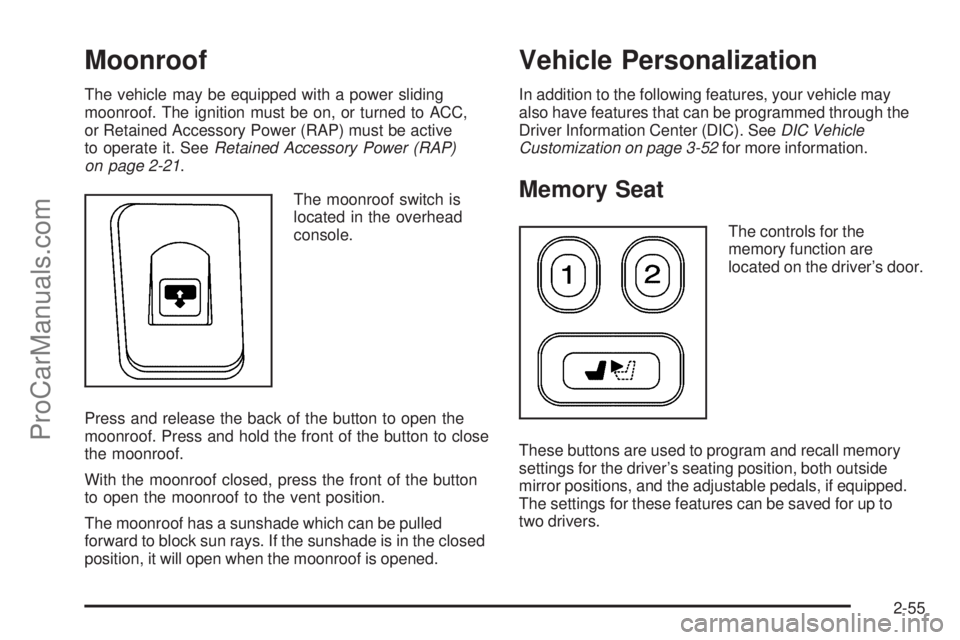
The moonroof switch is
located in the overhead
console.
Press and release the back of the button to open the
moonroof. Press and hold the front of the button to close
the moonroof.
With the moonroof closed, press the front of the button
to open the moonroof to the vent position.
The moonroof has a sunshade which can be pulled
forward to block sun rays. If the sunshade is in the closed
position, it will open when the moonroof is opened.
Vehicle Personalization
In addition to the following features, your vehicle may
also have features that can be programmed through the
Driver Information Center (DIC). SeeDIC Vehicle
Customization on page 3-52for more information.
Memory Seat
The controls for the
memory function are
located on the driver’s door.
These buttons are used to program and recall memory
settings for the driver’s seating position, both outside
mirror positions, and the adjustable pedals, if equipped.
The settings for these features can be saved for up to
two drivers.
2-55
ProCarManuals.com
Page 218 of 434
The RSE system DVD player is only compatible with
DVDs of the appropriate region code for the country that
the vehicle was sold in. The DVD region code is
printed on the jacket of most DVDs.
Standard audio CDs, CD-R, CD-RW, Video CD and
Photo CD/CD-R media are fully supported by this DVD
player. DVD-R and DVD-RW media is supported if
formatted as DVD-Video. DVD+R and DVD+RW media
may or may not be supported by the DVD player.
The DVD player does not support DVD-RAM,
DVD-ROM, and DVD Audio media. An error message
will appear on the display if this type of media is inserted
into the DVD player.
When using the wired headphones, not included, if the
front seat passengers play a CD in the Radio with
Six-Disc CD (if equipped) or use XM™ Satellite Radio
Service (if equipped), you will hear the audio for
these sources, instead of the DVD or CD that is currently
playing through the RSE.
If an error message appears on the video screen, see
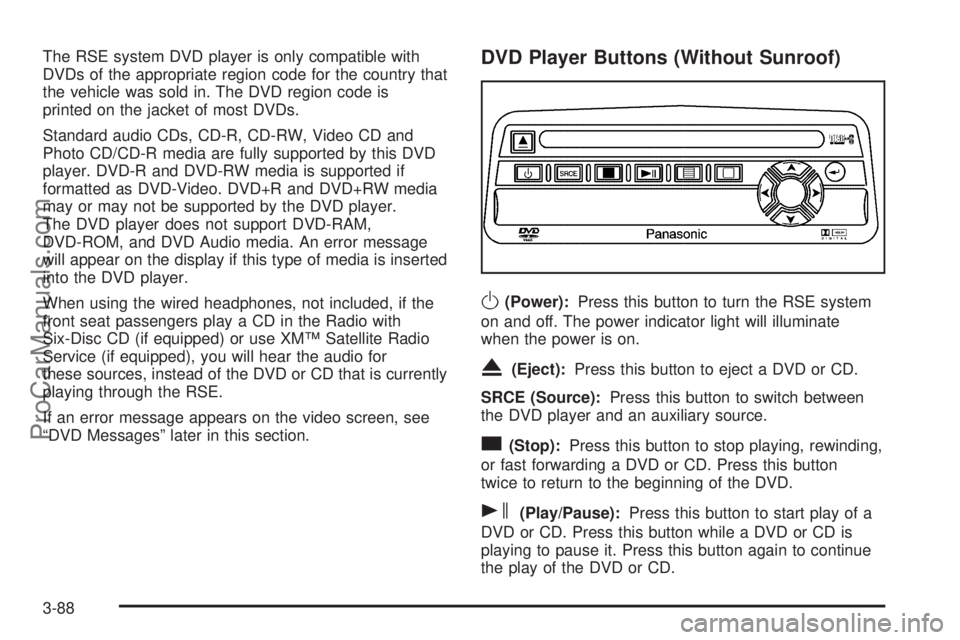
“DVD Messages” later in this section.DVD Player Buttons (Without Sunroof)
O(Power):Press this button to turn the RSE system
on and off. The power indicator light will illuminate
when the power is on.
X(Eject):Press this button to eject a DVD or CD.
SRCE (Source):Press this button to switch between
the DVD player and an auxiliary source.
c(Stop):Press this button to stop playing, rewinding,
or fast forwarding a DVD or CD. Press this button
twice to return to the beginning of the DVD.
s(Play/Pause):Press this button to start play of a
DVD or CD. Press this button while a DVD or CD is
playing to pause it. Press this button again to continue
the play of the DVD or CD.
3-88
ProCarManuals.com
Page 219 of 434
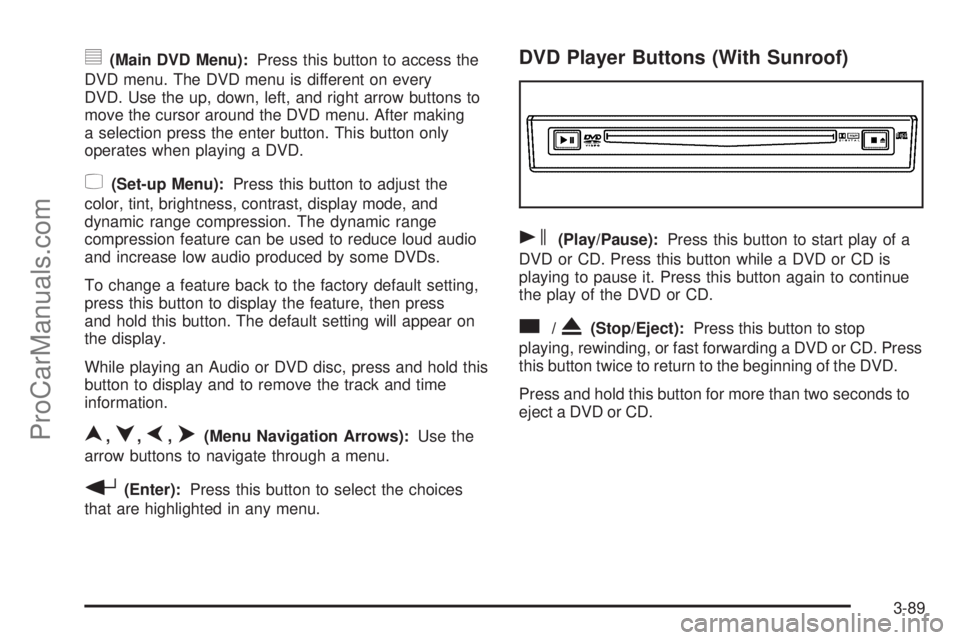
y(Main DVD Menu):Press this button to access the
DVD menu. The DVD menu is different on every
DVD. Use the up, down, left, and right arrow buttons to
move the cursor around the DVD menu. After making
a selection press the enter button. This button only
operates when playing a DVD.
z(Set-up Menu):Press this button to adjust the
color, tint, brightness, contrast, display mode, and
dynamic range compression. The dynamic range
compression feature can be used to reduce loud audio
and increase low audio produced by some DVDs.
To change a feature back to the factory default setting,
press this button to display the feature, then press
and hold this button. The default setting will appear on
the display.
While playing an Audio or DVD disc, press and hold this
button to display and to remove the track and time
information.
n,q,p,o(Menu Navigation Arrows):Use the
arrow buttons to navigate through a menu.
r(Enter):Press this button to select the choices
that are highlighted in any menu.
DVD Player Buttons (With Sunroof)
s(Play/Pause):Press this button to start play of a
DVD or CD. Press this button while a DVD or CD is
playing to pause it. Press this button again to continue
the play of the DVD or CD.
c/X(Stop/Eject):Press this button to stop
playing, rewinding, or fast forwarding a DVD or CD. Press
this button twice to return to the beginning of the DVD.
Press and hold this button for more than two seconds to
eject a DVD or CD.
3-89
ProCarManuals.com
Page 230 of 434
Care of the CD and DVD Player
The use of CD lens cleaners for CDs is not advised,
due to the risk of contaminating the lens of the CD optics
with lubricants internal to the CD mechanism.
Fixed Mast Antenna
The xed mast antenna can withstand most car washes
without being damaged. If the mast should ever
become slightly bent, straighten it out by hand. If the
mast is badly bent, replace it.
Check occasionally to make sure the mast is still
tightened to the antenna base located on the hood of
the vehicle. If tightening is required, tighten by hand.
XM™ Satellite Radio Antenna
System
The XM™ Satellite Radio antenna is located on the roof
of your vehicle. Keep this antenna clear of snow and
ice build up for clear radio reception.
If your vehicle has a sunroof, the performance of the
XM™ system may be affected if the sunroof is open.
Loading items onto the roof of your vehicle can interfere
with the performance of the XM™ system. Make sure
the XM™ Satellite Radio antenna is not obstructed.
3-100
ProCarManuals.com
Page 388 of 434
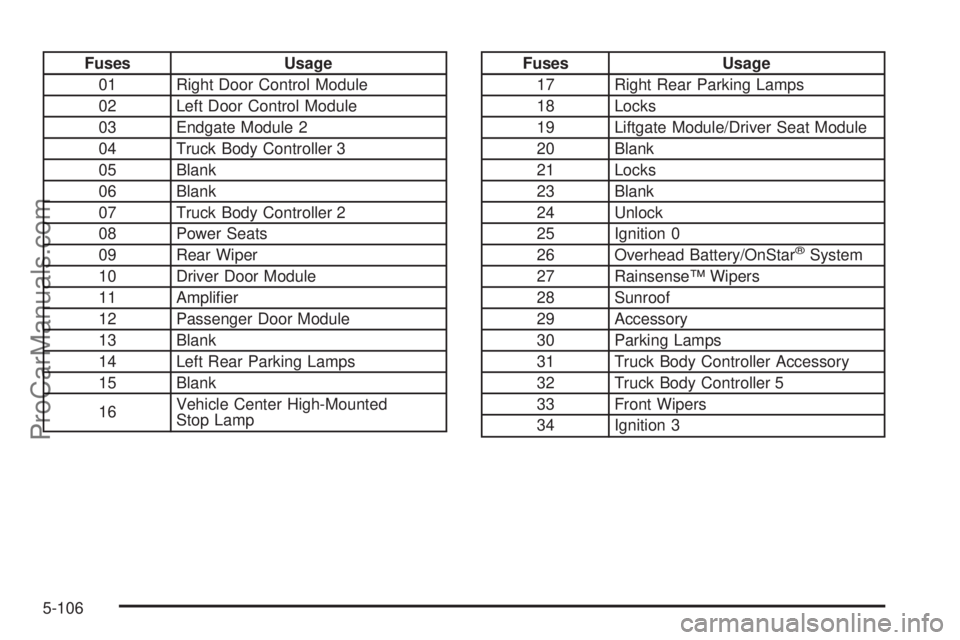
Fuses Usage
01 Right Door Control Module
02 Left Door Control Module
03 Endgate Module 2
04 Truck Body Controller 3
05 Blank
06 Blank
07 Truck Body Controller 2
08 Power Seats
09 Rear Wiper
10 Driver Door Module
11 Amplier
12 Passenger Door Module
13 Blank
14 Left Rear Parking Lamps
15 Blank
16Vehicle Center High-Mounted
Stop LampFuses Usage
17 Right Rear Parking Lamps
18 Locks
19 Liftgate Module/Driver Seat Module
20 Blank
21 Locks
23 Blank
24 Unlock
25 Ignition 0
26 Overhead Battery/OnStar
®System
27 Rainsense™ Wipers
28 Sunroof
29 Accessory
30 Parking Lamps
31 Truck Body Controller Accessory
32 Truck Body Controller 5
33 Front Wipers
34 Ignition 3
5-106
ProCarManuals.com
Page 429 of 434
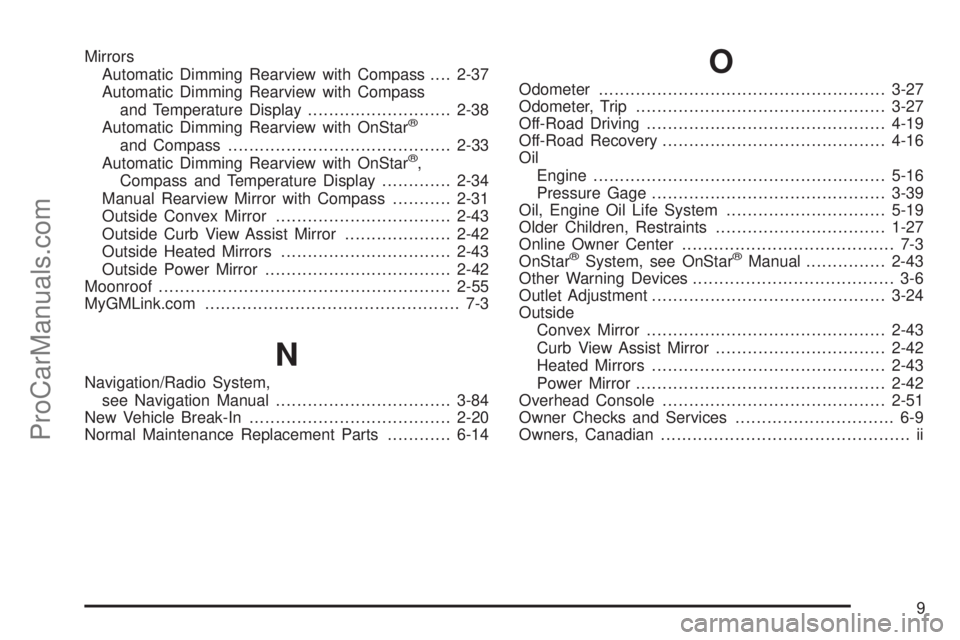
Mirrors
Automatic Dimming Rearview with Compass....2-37
Automatic Dimming Rearview with Compass
and Temperature Display...........................2-38
Automatic Dimming Rearview with OnStar
®
and Compass..........................................2-33
Automatic Dimming Rearview with OnStar®,
Compass and Temperature Display.............2-34
Manual Rearview Mirror with Compass...........2-31
Outside Convex Mirror.................................2-43
Outside Curb View Assist Mirror....................2-42
Outside Heated Mirrors................................2-43
Outside Power Mirror...................................2-42
Moonroof.......................................................2-55
MyGMLink.com................................................ 7-3
N
Navigation/Radio System,
see Navigation Manual.................................3-84
New Vehicle Break-In......................................2-20
Normal Maintenance Replacement Parts............6-14
O
Odometer......................................................3-27
Odometer, Trip...............................................3-27
Off-Road Driving.............................................4-19
Off-Road Recovery..........................................4-16
Oil
Engine.......................................................5-16
Pressure Gage............................................3-39
Oil, Engine Oil Life System..............................5-19
Older Children, Restraints................................1-27
Online Owner Center........................................ 7-3
OnStar
®System, see OnStar®Manual...............2-43
Other Warning Devices...................................... 3-6
Outlet Adjustment............................................3-24
Outside
Convex Mirror.............................................2-43
Curb View Assist Mirror................................2-42
Heated Mirrors............................................2-43
Power Mirror...............................................2-42
Overhead Console..........................................2-51
Owner Checks and Services.............................. 6-9
Owners, Canadian............................................... ii
9
ProCarManuals.com