ECO mode SAAB 9-7X 2006 Owner's Manual
[x] Cancel search | Manufacturer: SAAB, Model Year: 2006, Model line: 9-7X, Model: SAAB 9-7X 2006Pages: 434, PDF Size: 2.89 MB
Page 212 of 434
tSEEKu:Press the left arrow to go to the start of
the current track, if more than ten seconds have played.
Press the right arrow to go to the next track. If either
arrow is held or pressed more than once, the player will
continue moving backward or forward through the CD.
To scan one CD, press and hold either arrow for more
than two seconds until SCAN appears on the display and
you hear a beep. The radio will go to the next track, play
for 10 seconds, then go on to the next track. Press either
arrow again, to stop scanning.
To scan all loaded CDs, press and hold either arrow for
more than four seconds until CD SCAN appears on the
display and you hear a beep. Use this feature to listen to
10 seconds of the rst track of each loaded CD. Press
either arrow again, to stop scanning.
DISP (Display):Press this knob to see how long the
current track has been playing. The elapsed time of the
track will appear on the display. To change the
default on the display, track or elapsed time, press this
knob until you see the display you want, then hold
the knob for two seconds. The radio will produce one
beep and the selected display will now be the default.
BAND:Press this button to listen to the radio when
a CD is playing. The inactive CD(s) will remain safely
inside the radio for future listening.B(CD):Press this button to play a CD when listening
to the radio. The CD symbol will appear on the display
when a CD is loaded.
AUTO EQ (Automatic Equalization):Press AUTO EQ
to select an equalization setting while playing a CD.
The equalization will be set whenever a CD is played.
See “AUTO EQ” listed previously for more information.
If you select an EQ setting for your CD, it will be
activated each time you play a CD.
Using Song List Mode
R
(Song List):The six-disc CD changer has a
feature called song list. This feature is capable of saving
20 track selections.
To save tracks into the song list feature, perform the
following steps:
1. Turn the CD player on and load it with at least one
CD. See “LOAD CD” listed previously in this section
for more information.
2. Check to see that the CD changer is not in song list
mode. S-LIST should not appear on the display. If
S-LIST is present, press the song list button to
turn it off.
3-82
ProCarManuals.com
Page 214 of 434
If a CD is ejected, and the song list contains saved
tracks from that CD, those tracks are automatically
deleted from the song list. Any tracks saved to the song
list again are added to the bottom of the list.
To end song list mode, press the song list button.
One beep will be heard and S-LIST will be removed
from the display.
CD Messages
CHECK CD:If this message appears on the display
and/or the CD comes out, it could be for one of the
following reasons:
It is very hot. When the temperature returns to
normal, the CD should play.
You are driving on a very rough road. When the
road becomes smoother, the CD should play.
The CD is dirty, scratched, wet, or upside down.
The air is very humid. If so, wait about an hour and
try again.
There may have been a problem while burning
the CD.
The label may be caught in the CD player.If the CD is not playing correctly, for any other reason,
try a known good CD.
If any error occurs repeatedly or if an error cannot be
corrected, contact your dealer. If the radio displays
an error message, write it down and provide it to your
dealer when reporting the problem.
Navigation/Radio System
Your vehicle may have a navigation radio system.
The navigation system has built-in features intended to
minimize driver distraction. Technology alone, no matter
how advanced, can never replace your own judgment.
See the navigation system manual for some tips to help
you reduce distractions while driving.
Rear Seat Entertainment System
Your vehicle may have a DVD Rear Seat Entertainment
(RSE) system. The RSE system includes a DVD
player, a video display screen, two sets of wireless
headphones, and a remote control.
3-84
ProCarManuals.com
Page 219 of 434
y(Main DVD Menu):Press this button to access the
DVD menu. The DVD menu is different on every
DVD. Use the up, down, left, and right arrow buttons to
move the cursor around the DVD menu. After making
a selection press the enter button. This button only
operates when playing a DVD.
z(Set-up Menu):Press this button to adjust the
color, tint, brightness, contrast, display mode, and
dynamic range compression. The dynamic range
compression feature can be used to reduce loud audio
and increase low audio produced by some DVDs.
To change a feature back to the factory default setting,
press this button to display the feature, then press
and hold this button. The default setting will appear on
the display.
While playing an Audio or DVD disc, press and hold this
button to display and to remove the track and time
information.
n,q,p,o(Menu Navigation Arrows):Use the
arrow buttons to navigate through a menu.
r(Enter):Press this button to select the choices
that are highlighted in any menu.
DVD Player Buttons (With Sunroof)
s(Play/Pause):Press this button to start play of a
DVD or CD. Press this button while a DVD or CD is
playing to pause it. Press this button again to continue
the play of the DVD or CD.
c/X(Stop/Eject):Press this button to stop
playing, rewinding, or fast forwarding a DVD or CD. Press
this button twice to return to the beginning of the DVD.
Press and hold this button for more than two seconds to
eject a DVD or CD.
3-89
ProCarManuals.com
Page 222 of 434

1 through 0 (Numeric Keypad):The numeric keypad
provides you with the capability of direct chapter,
title, and track number selection.
}10 (Double Digit Entries):Press this button to
select chapter, title, and track numbers greater than 9.
Press this button before inputting the number.
\(Clear):Press this button within three seconds after
inputting a number to clear the number(s).
P(Illumination):Press this button to turn the remote
control backlight on. The backlight will time out after
about 7 to 10 seconds if no other button is pressed while
the backlight is on.
y(Main DVD Menu):Press this button to access the
DVD menu. The DVD menu is different on every
DVD. Use the up, down, left, and right arrow buttons to
move the cursor around the DVD menu. After making
a selection press the enter button. This button only
operates when playing a DVD.
r(Enter):Press this button to select the choices
that are highlighted in any menu.
q(Return):Press this button to exit the current
active menu and return to the previous menu. This
button will operate only when a DVD is playing and a
menu is active.
|(Camera Angle):Press this button to change
camera angles on DVDs that have this feature when a
DVD is playing. The format and content of this
function will vary for each disc.
{(Subtitle):Press this button to turn on subtitles and
to move through subtitle options when a DVD is playing.
The format and content of this function will vary for
each disc.
[(Fast Forward):Press this button to fast forward
the DVD or CD. To stop fast forwarding, press this
button again. This button may not work when the DVD
is playing the copyright information or the previews.
s(Play/Pause):Press this button to start play of a
DVD or CD. Press this button while a DVD or CD is
playing to pause it. Press this button again to continue
the play of the DVD or CD.
When the DVD is playing, press the pause button then
press the fast forward button. The DVD will continue
playing in a slow play mode. To cancel slow play mode,
press the play/pause button.
u(Next Track/Chapter):Press this button to advance
to the beginning of the next track or chapter. This
button may not work when the DVD is playing the
copyright information or the previews.
3-92
ProCarManuals.com
Page 223 of 434
Battery Replacement
To change the batteries, do the following:
1. Remove the battery compartment door located on
the bottom of the remote control.
2. Replace the two AA batteries in the compartment.
Make sure that they are installed correctly, using
the diagram on the inside of the battery
compartment.
3. Close the battery door securely.
If the remote control is to be stored for a long period of
time, remove the batteries and keep them in a cool,
dry place.
Problem Recommended Action
No power. The ignition might not be
in on or accessory.
The parental control button
might have been turned
on. The power indicator
light will ash.
Disc will not play. The system might be off.
The parental control button
might have been turned
on. The power indicator
light will ash.
The system might be in
auxiliary mode.
The disc is upside down or
is not compatible.
Problem Recommended Action
The picture does not ll the
screen. There are black
borders on the top and
bottom or on both sides or
it looks stretched out.Check the display
mode settings in the
display menu.
The disc was ejected, but
it was pulled back into the
DVD player.The disc is being stored in
the DVD player. Press the
eject button again to eject
the disc.
In auxiliary mode, the
picture moves or scrolls.Check the auxiliary input
connections at both
devices.
Change the Video Format
to PAL or NTSC. See
“Stereo RCA Jacks”
previously for how to
change the video format.
The language in the audio
or on the screen is wrong.Check the audio or
language selection in the
main DVD menu.
3-93
ProCarManuals.com
Page 224 of 434

Problem Recommended Action
The remote control does
not work.Check to make sure there
is no obstruction between
the remote control and the
transmitter window.
Check the batteries to
make sure they are not
dead or installed
incorrectly.
The parental control
button might have been
turned on. The power
indicator light will ash.
After stopping the player, I
push Play but sometimes
the DVD starts where I
left off and sometimes at
the beginning.If the stop button was
pressed one time, the
DVD player will resume
playing where the DVD
was stopped. If the stop
button was pressed two
times the DVD player will
begin to play from the
beginning of the DVD.Problem Recommended Action
The auxiliary source is
running but there is no
picture or sound.Check that the DVD
player is in the auxiliary
source mode.
Check the auxiliary input
connections at both
devices.
My disc is stuck in the
player. The Load/Eject
button does not work.Turn the DVD power off,
then on, then press the
load/eject button on the
DVD player.
Do not attempt to forcibly
remove the disc from the
DVD player. This could
permanently damage the
disc and DVD player.
Sometimes the wireless
headphone audio cuts out
or buzzes.Check for obstructions,
low batteries, reception
range, and interference
from cellular telephone
towers or by using your
cellular telephone in the
vehicle.
Check that the
headphones are facing
the front of the vehicle.
3-94
ProCarManuals.com
Page 225 of 434
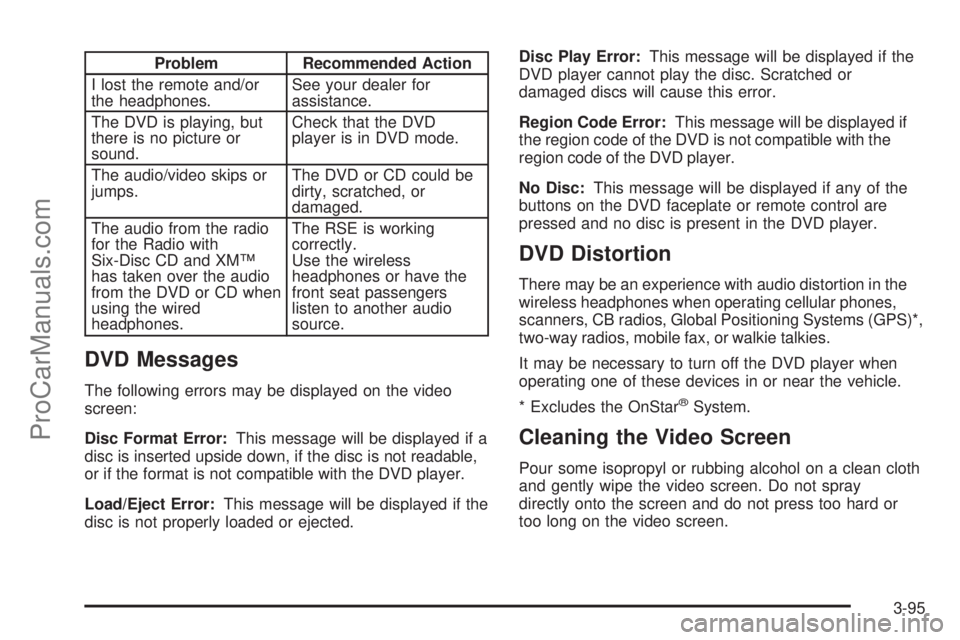
Problem Recommended Action
I lost the remote and/or
the headphones.See your dealer for
assistance.
The DVD is playing, but
there is no picture or
sound.Check that the DVD
player is in DVD mode.
The audio/video skips or
jumps.The DVD or CD could be
dirty, scratched, or
damaged.
The audio from the radio
for the Radio with
Six-Disc CD and XM™
has taken over the audio
from the DVD or CD when
using the wired
headphones.The RSE is working
correctly.
Use the wireless
headphones or have the
front seat passengers
listen to another audio
source.
DVD Messages
The following errors may be displayed on the video
screen:
Disc Format Error:This message will be displayed if a
disc is inserted upside down, if the disc is not readable,
or if the format is not compatible with the DVD player.
Load/Eject Error:This message will be displayed if the
disc is not properly loaded or ejected.Disc Play Error:This message will be displayed if the
DVD player cannot play the disc. Scratched or
damaged discs will cause this error.
Region Code Error:This message will be displayed if
the region code of the DVD is not compatible with the
region code of the DVD player.
No Disc:This message will be displayed if any of the
buttons on the DVD faceplate or remote control are
pressed and no disc is present in the DVD player.
DVD Distortion
There may be an experience with audio distortion in the
wireless headphones when operating cellular phones,
scanners, CB radios, Global Positioning Systems (GPS)*,
two-way radios, mobile fax, or walkie talkies.
It may be necessary to turn off the DVD player when
operating one of these devices in or near the vehicle.
* Excludes the OnStar
®System.
Cleaning the Video Screen
Pour some isopropyl or rubbing alcohol on a clean cloth
and gently wipe the video screen. Do not spray
directly onto the screen and do not press too hard or
too long on the video screen.
3-95
ProCarManuals.com
Page 240 of 434
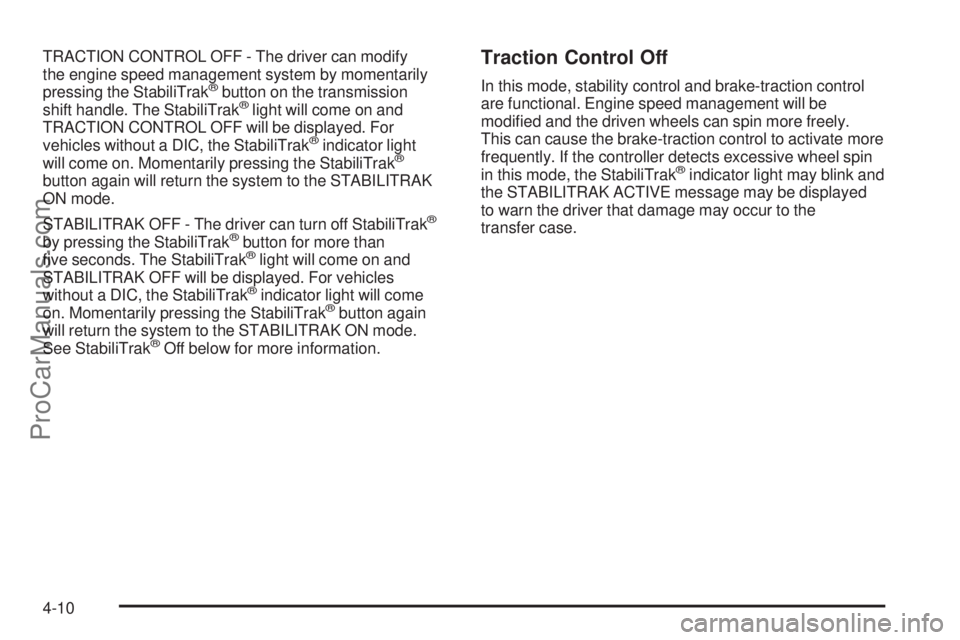
TRACTION CONTROL OFF - The driver can modify
the engine speed management system by momentarily
pressing the StabiliTrak
®button on the transmission
shift handle. The StabiliTrak®light will come on and
TRACTION CONTROL OFF will be displayed. For
vehicles without a DIC, the StabiliTrak
®indicator light
will come on. Momentarily pressing the StabiliTrak®
button again will return the system to the STABILITRAK
ON mode.
STABILITRAK OFF - The driver can turn off StabiliTrak
®
by pressing the StabiliTrak®button for more than
ve seconds. The StabiliTrak®light will come on and
STABILITRAK OFF will be displayed. For vehicles
without a DIC, the StabiliTrak
®indicator light will come
on. Momentarily pressing the StabiliTrak®button again
will return the system to the STABILITRAK ON mode.
See StabiliTrak
®Off below for more information.
Traction Control Off
In this mode, stability control and brake-traction control
are functional. Engine speed management will be
modied and the driven wheels can spin more freely.
This can cause the brake-traction control to activate more
frequently. If the controller detects excessive wheel spin
in this mode, the StabiliTrak
®indicator light may blink and
the STABILITRAK ACTIVE message may be displayed
to warn the driver that damage may occur to the
transfer case.
4-10
ProCarManuals.com
Page 241 of 434
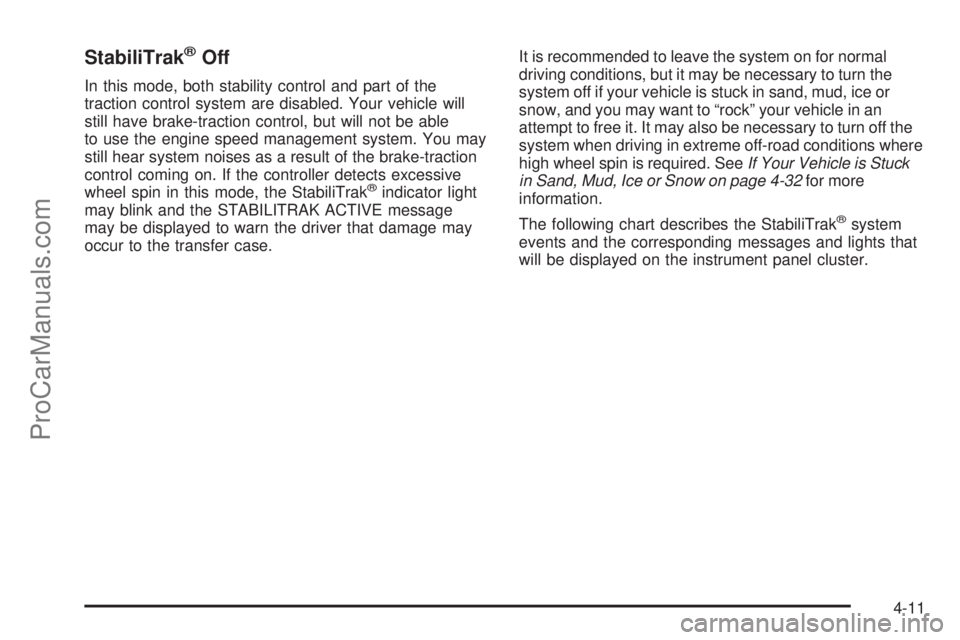
StabiliTrak®Off
In this mode, both stability control and part of the
traction control system are disabled. Your vehicle will
still have brake-traction control, but will not be able
to use the engine speed management system. You may
still hear system noises as a result of the brake-traction
control coming on. If the controller detects excessive
wheel spin in this mode, the StabiliTrak
®indicator light
may blink and the STABILITRAK ACTIVE message
may be displayed to warn the driver that damage may
occur to the transfer case.It is recommended to leave the system on for normal
driving conditions, but it may be necessary to turn the
system off if your vehicle is stuck in sand, mud, ice or
snow, and you may want to “rock” your vehicle in an
attempt to free it. It may also be necessary to turn off the
system when driving in extreme off-road conditions where
high wheel spin is required. SeeIf Your Vehicle is Stuck
in Sand, Mud, Ice or Snow on page 4-32for more
information.
The following chart describes the StabiliTrak
®system
events and the corresponding messages and lights that
will be displayed on the instrument panel cluster.
4-11
ProCarManuals.com
Page 270 of 434
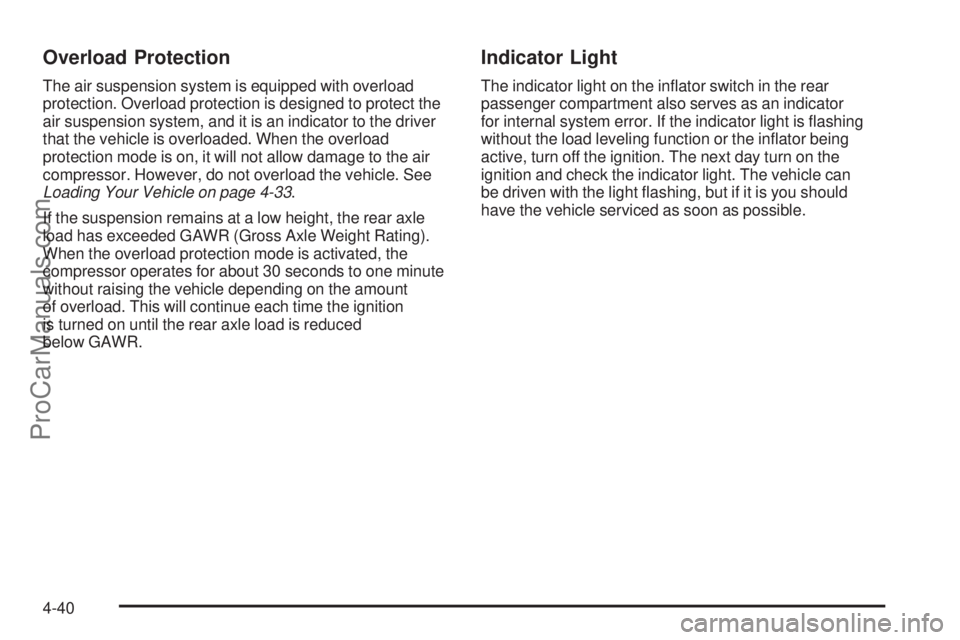
Overload Protection
The air suspension system is equipped with overload
protection. Overload protection is designed to protect the
air suspension system, and it is an indicator to the driver
that the vehicle is overloaded. When the overload
protection mode is on, it will not allow damage to the air
compressor. However, do not overload the vehicle. See
Loading Your Vehicle on page 4-33.
If the suspension remains at a low height, the rear axle
load has exceeded GAWR (Gross Axle Weight Rating).
When the overload protection mode is activated, the
compressor operates for about 30 seconds to one minute
without raising the vehicle depending on the amount
of overload. This will continue each time the ignition
is turned on until the rear axle load is reduced
below GAWR.
Indicator Light
The indicator light on the inator switch in the rear
passenger compartment also serves as an indicator
for internal system error. If the indicator light is ashing
without the load leveling function or the inator being
active, turn off the ignition. The next day turn on the
ignition and check the indicator light. The vehicle can
be driven with the light ashing, but if it is you should
have the vehicle serviced as soon as possible.
4-40
ProCarManuals.com