ignition SAAB 9-7X 2006 Workshop Manual
[x] Cancel search | Manufacturer: SAAB, Model Year: 2006, Model line: 9-7X, Model: SAAB 9-7X 2006Pages: 434, PDF Size: 2.89 MB
Page 185 of 434

HEADLAMP DELAY: 2 MIN
HEADLAMP DELAY: 3 MIN
HEADLAMP DELAY: OFF
The amount of time you choose will be the amount of
time that the headlamps stay on after you turn off
the vehicle. If you choose OFF, the headlamps will turn
off as soon as you turn off the vehicle.
Choose one of the available options and press the
customization button while it is displayed on the DIC to
select it and move on to the next feature.
Perimeter Lights
Press the customization button until PERIMETER
LIGHTS: ON appears in the display. To select your
preference for perimeter lighting, press the select button
while PERIMETER LIGHTS: ON is displayed on the
DIC. Pressing the select button will scroll through
the following choices:
PERIMETER LIGHTS: ON (default):The headlamps
and back-up lamps will come on for 40 seconds, if
it is dark enough outside, when you unlock the vehicle
with the remote keyless entry transmitter.PERIMETER LIGHTS: OFF:The perimeter lights will
not come on when you unlock the vehicle with the
remote keyless entry transmitter.
Choose one of the available options and press the
customization button while it is displayed on the DIC to
select it and move on to the next feature.
Easy Exit Seat
Press the customization button until EASY EXIT SEAT:
OFF appears in the display. To select your preference
for seat position exit, press the select button while EASY
EXIT SEAT: OFF is displayed on the DIC. Pressing
the select button will scroll through the following choices:
EASY EXIT SEAT: OFF (default):No seat exit recall
will occur.
EASY EXIT SEAT: ON:The driver’s seat will move to
the exit position when the key is removed from the
ignition.
Choose one of the available options and press the
customization button while it is displayed on the DIC to
select it and move on to the next feature. For more
information on seat position exit, see “Easy Exit Seat”
underMemory Seat on page 2-55.
3-55
ProCarManuals.com
Page 189 of 434
Here are some ways in which you can help avoid
distraction while driving.
While your vehicle is parked:
Familiarize yourself with all of its controls.
Familiarize yourself with its operation.
Set up your audio system by presetting your
favorite radio stations, setting the tone, and
adjusting the speakers. Then, when driving
conditions permit, you can tune to your favorite
radio stations using the presets and steering wheel
controls (if equipped).
Notice:Before adding any sound equipment to your
vehicle, such as an audio system, CD player, CB
radio, mobile telephone, or two-way radio, make sure
that it can be added by checking with your dealer.
Also, check federal rules covering mobile radio and
telephone units. If sound equipment can be added,
it is very important to do it properly. Added sound
equipment may interfere with the operation of your
vehicle’s engine, radio, or other systems, and even
damage them. Your vehicle’s systems may interfere
with the operation of sound equipment that has been
added.Notice:The chime signals related to safety belts,
parking brake, and other functions of your vehicle
operate through the radio/entertainment system.
If that equipment is replaced or additional equipment
is added to your vehicle, the chimes may not
work. Make sure that replacement or additional
equipment is compatible with your vehicle before
installing it. SeeAccessories and Modifications
on page 5-3.
Figure out which audio system is in your vehicle, nd
out what your audio system can do, and how to operate
all of its controls.
Setting the Time
Press and hold H until the correct hour appears on the
display. AM or PM will appear on the display (Radio with
CD (UpLevel, MP3, and Six-Disc CD)). Press and hold M
until the correct minute appears on the display. The time
can be set with the ignition on or off.
3-59
ProCarManuals.com
Page 190 of 434
Radio with CD
XM™ Satellite Radio Service
XM™ is a satellite radio service that is based in
the 48 contiguous United States and in Canada
(if available). XM™ offers over 100 coast-to-coast
channels including music, news, sports, talk, and
children’s programming. XM™ provides digital quality
audio and text information that includes song title
and artist name. A service fee is required in order to
receive the XM™ service. For more information,
contact XM™ at www.xmradio.com or call
1-800-852-XMXM (9696).
Playing the Radio
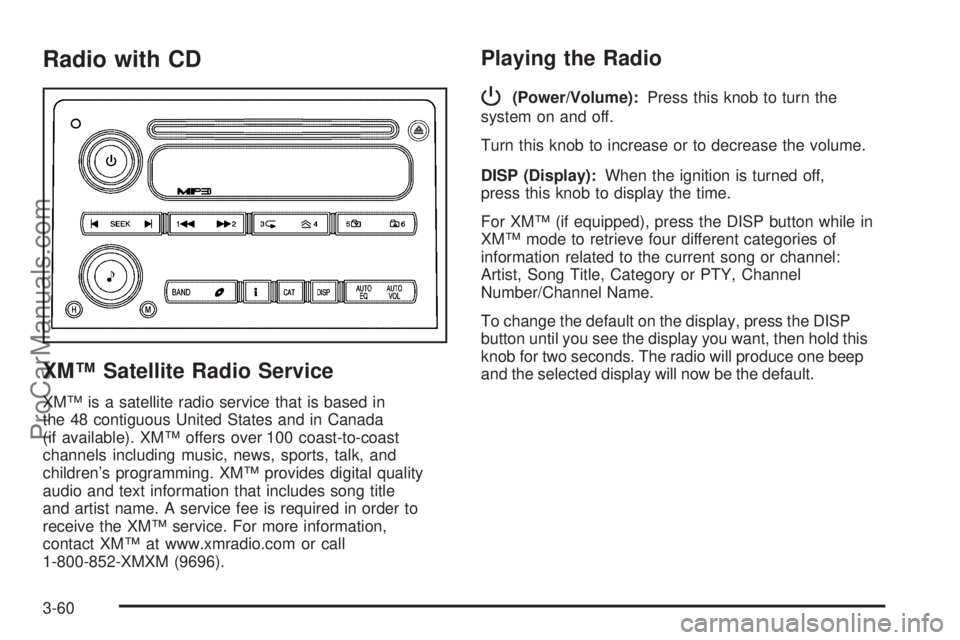
P
(Power/Volume):Press this knob to turn the
system on and off.
Turn this knob to increase or to decrease the volume.
DISP (Display):When the ignition is turned off,
press this knob to display the time.
For XM™ (if equipped), press the DISP button while in
XM™ mode to retrieve four different categories of
information related to the current song or channel:
Artist, Song Title, Category or PTY, Channel
Number/Channel Name.
To change the default on the display, press the DISP
button until you see the display you want, then hold this
knob for two seconds. The radio will produce one beep
and the selected display will now be the default.
3-60
ProCarManuals.com
Page 196 of 434
Playing a CD
Insert a CD partway into the slot, label side up. The
player will pull it in and the CD should begin playing. If
you want to insert a CD with the ignition off, rst
press the eject button or the DISP knob.
If the ignition or radio is turned off with a CD in the
player it will stay in the player. When the ignition or radio
is turned on, the CD will start to play where it stopped,
if it was the last selected audio source.
When the CD is inserted, READING and the CD symbol
will appear on display. As each new track starts to
play, the track number will appear on the display.
The CD player can play the smaller 3 inch (8 cm) single
CDs with an adapter ring. Full-size CDs and the
smaller CDs are loaded in the same manner.
If playing a CD-R, the sound quality may be reduced
due to CD-R quality, the method of recording, the quality
of the music that has been recorded, and the way the
CD-R has been handled. There may be an increase
in skipping, difficulty in nding tracks, and/or difficulty in
loading and ejecting. If these problems occur, check
the bottom surface of the CD. If the surface of the CD is
damaged, such as cracked, broken, or scratched, the
CD will not play properly. If the surface of the CD
is soiled, seeCare of Your CDs and DVDs on page 3-99
for more information.If there is no apparent damage, try a known good CD.
Do not add any label to a CD, it could get caught in the
CD player. If a CD is recorded on a personal computer
and a description label is needed, try labeling the top of
the recorded CD with a marking pen instead.
Notice:If you add any label to a CD, insert more
than one CD into the slot at a time, or attempt to play
scratched or damaged CDs, you could damage the
CD player. When using the CD player, use only CDs
in good condition without any label, load one CD at a
time, and keep the CD player and the loading slot free
of foreign materials, liquids, and debris.
If an error appears on the display, see “CD Messages”
later in this section.
1
r(Previous):Press this pushbutton to reverse
within the track.
2
[(Next):Press this pushbutton to fast forward
within the track.
3
N(Repeat):Press this pushbutton to hear a track
over again. RPT ON will appear on the display. The
current track will continue to repeat. Press this
pushbutton again to turn off repeat play. RPT OFF will
appear on the display.
3-66
ProCarManuals.com
Page 197 of 434
4y(Random):Press this pushbutton to hear the
tracks in random, rather than sequential, order. RDM ON
will appear on the display. Press this pushbutton
again to turn off random play. RDM OFF will appear on
the display.
tSEEKu:Press the left arrow to go to the start of
the current or the previous track. Press the right arrow to
go to the start of the next track. If a track is approximately
10 seconds into its song, press either the left or right
arrow twice to get to the previous or next track.
To scan tracks, press either arrow for more than
two seconds until you hear one beep and SCAN appears
on the display. The CD will search the previous or next
tracks at two seconds per track. Press either arrow to
stop scanning.
DISP (Display):Press this button to see how long the
current track has been playing. The elapsed time of the
track will appear on the display. To change the default on
the display, track or elapsed time, press this button until
you see the display you want, then hold the button for
two seconds. The radio will produce one beep and the
selected display will now be the default.BAND:Press this button to listen to the radio when a
CD is playing. The inactive CD will remain safely
inside the radio for future listening.
B(CD):Press this button to play a CD when listening
to the radio. The CD symbol will appear on the display
when a CD is loaded.
AUTO EQ (Automatic Equalization):Press AUTO EQ
to select an equalization setting while playing a CD.
The equalization will be set whenever a CD is played.
See “AUTO EQ” listed previously for more information. If
you select an EQ setting for your CD, it will be
activated each time you play a CD.
Z(Eject):Press this button to eject a CD. Eject may
be activated with either the ignition or radio off. CDs
may be loaded with the ignition and radio off if this
button is pressed rst.
3-67
ProCarManuals.com
Page 199 of 434
When the CD contains only playlists and compressed
audio les, but no folders, all les will be located under
the root folder. The folder down and the folder up
buttons will search playlists (Px) rst and then go to the
root folder. When the radio displays the name of the
folder the radio will display ROOT.
Order of Play
Tracks will be played in the following order:
Play will begin from the rst track in the rst playlist
and will continue sequentially through all tracks in
each playlist. When the last track of the last playlist
has been played, play will continue from the rst
track of the rst playlist.
If the CD does not contain any playlists, then play
will begin from the rst track under the root
directory. When all tracks from the root directory
have been played, play will continue from les
according to their numerical listing. After playing the
last track from the last folder, play will begin
again at the rst track of the rst folder or root
directory.
When play enters a new folder, the display will not
automatically show the new folder name unless
you have chosen the folder mode as the default display.
See DISP later in this section for more information.
The new track name will appear on the display.
File System and Naming
The song name that will be displayed will be the song
name that is contained in the ID3 tag. If the song
name is not present in the ID3 tag, then the radio will
display the le name without the extension (such
as .mp3) as the track name.
Track names longer than 32 characters or four pages
will be shortened. The display will not show parts
of words on the last page of text and the extension of
the le name will not be displayed.
Preprogrammed Playlists
You can access preprogrammed playlists which were
created by WinAmp™, MusicMatch™, or Real
Jukebox™ software, however, you will not have editing
capability. These playlists will be treated as special
folders containing compressed audio song les.
Playing an MP3
Insert a CD partway into the slot, label side up. The
player will pull it in, and READING will appear on
the display. The CD should begin playing and the CD
symbol will appear on the display. If you want to insert a
CD with the ignition off, rst press the eject button or
the DISP knob.
3-69
ProCarManuals.com
Page 200 of 434
If the ignition or radio is turned off with a CD in the
player it will stay in the player. When the ignition or radio
is turned on, the CD will start to play where it stopped,
if it was the last selected audio source.
As each new track starts to play, the track number will
appear on the display.
The CD player can play the smaller 3 inch (8 cm) single
CDs with an adapter ring. Full-size CDs and the
smaller CDs are loaded in the same manner.
If playing a CD-R, the sound quality may be reduced
due to CD-R quality, the method of recording, the quality
of the music that has been recorded, and the way the
CD-R has been handled. There may be an increase
in skipping, difficulty in nding tracks, and/or difficulty in
loading and ejecting. If these problems occur, check
the bottom surface of the CD. If the surface of the CD is
damaged, such as cracked, broken, or scratched, the
CD will not play properly. If the surface of the CD
is soiled, seeCare of Your CDs and DVDs on page 3-99
for more information.
If there is no apparent damage, try a known good CD.
Do not add any label to a CD, it could get caught in the
CD player. If a CD is recorded on a personal computer
and a description label is needed, try labeling the top of
the recorded CD with a marking pen instead.Notice:If you add any label to a CD, insert more
than one CD into the slot at a time, or attempt
to play scratched or damaged CDs, you could
damage the CD player. When using the CD player,
use only CDs in good condition without any
label, load one CD at a time, and keep the CD player
and the loading slot free of foreign materials,
liquids, and debris.
If an error appears on the display, see “CD Messages”
later in this section.
1
r(Reverse):Press this pushbutton to reverse
within the same track. If this pushbutton is held
or pressed more than once, the player will continue
moving backward through the CD.
2
[(Fast Forward):Press this pushbutton to fast
forward within the track. If this pushbutton is held
or pressed more than once, the player will continue
moving forward through the CD.
3
N(Repeat):Press this pushbutton to hear a track
over again. RPT On will appear on the display. The
current track will continue to repeat. Press this
pushbutton again to turn off repeat play. RPT OFF will
appear on the display.
3-70
ProCarManuals.com
Page 202 of 434
4(Information):INFO will appear on the display
whenever a current track has ID3 tag information. Press
this button to display the artist name and album
contained in the tag. INFO will disappear from the
display when the information in the ID3 tag has nished.
BAND:Press this button to listen to the radio when a
CD is playing. The inactive CD will remain safely
inside the radio for future listening.
B(CD):Press this button to play a CD when listening
to the radio. The CD symbol will appear on the display
when a CD is loaded.
AUTO EQ (Automatic Equalization):Press AUTO EQ
to select an equalization setting while playing a CD.
The equalization will be set whenever a CD is played.
See “AUTO EQ” listed previously for more information. If
you select an EQ setting for your CD, it will be
activated each time you play a CD.
Z(Eject):Press this button to eject a CD. Eject may
be activated with either the ignition or radio off. CDs
may be loaded with the ignition and radio off if this
button is pressed rst.
CD Messages
CHECK CD:If this message appears on the display
and/or the CD comes out, it could be for one of the
following reasons:
It is very hot. When the temperature returns to
normal, the CD should play.
You are driving on a very rough road. When the
road becomes smoother, the CD should play.
The CD is dirty, scratched, wet, or upside down.
The air is very humid. If so, wait about an hour and
try again.
The format of the CD may not be compatible. See
“MP3 Format” earlier in this section.
There may have been a problem while burning
the CD.
The label may be caught in the CD player.
If the CD is not playing correctly, for any other reason,
try a known good CD.
If any error occurs repeatedly or if an error cannot be
corrected, contact your dealer. If the radio displays
an error message, write it down and provide it to your
dealer when reporting the problem.
3-72
ProCarManuals.com
Page 203 of 434
Radio with Six-Disc CD
XM™ Satellite Radio Service
XM™ is a satellite radio service that is based in
the 48 contiguous Untied States and in Canada
(if available). XM™ offers over 100 coast-to-coast
channels including music, news, sports, talk, and
children’s programming. XM™ provides digital quality
audio and text information that includes song title
and artist name. A service fee is required in order to
receive the XM™ service. For more information,
contact XM™ at www.xmradio.com or call
1-800-852-XMXM (9696).
Playing the Radio
P
(Power):Press this knob to turn the system on
and off.
Turn this knob to increase or to decrease the volume.
DISP (Display):When the ignition is turned off,
press this knob to display the time.
For XM™ (if equipped), press the DISP knob while in
XM™ mode to retrieve four different categories of
information related to the current song or channel:
Artist, Song Title, Category or PTY, Channel
Number/Channel Name.
To change the default on the display, press the DISP
knob until you see the display you want, then hold
this knob for two seconds. The radio will produce
one beep and the selected display will now be the
default.
AUTO VOL (Automatic Volume):With automatic
volume, the audio system adjusts automatically to make
up for road and wind noise as you drive.
Set the volume at the desired level. Press this button to
select LOW, MEDIUM, or HIGH. Each higher setting
will allow for more volume compensation at faster
vehicle speeds. Then as you drive, automatic volume
increases the volume, as necessary, to overcome noise
at any speed. The volume level should always sound
the same to you as you drive.
3-73
ProCarManuals.com
Page 209 of 434
Playing a CD
If the ignition or radio is turned off, with a CD in the
player, it will stay in the player. When the ignition
or radio is turned on, the CD will start playing where it
stopped, if it was the last selected audio source.
When a CD is inserted, READING and the CD symbol
will appear on display. As each new track starts to
play, the track number will appear on the display.
The CD player can play the smaller 3 inch (8 cm) single
CDs with an adapter ring. Full-size CDs and the
smaller CDs are loaded in the same manner.
If playing a CD-R, the sound quality may be reduced
due to CD-R quality, the method of recording, the quality
of the music that has been recorded, and the way the
CD-R has been handled. There may be an increase
in skipping, difficulty in nding tracks, and/or difficulty in
loading and ejecting. If these problems occur, check
the bottom surface of the CD. If the surface of the CD is
damaged, such as cracked, broken, or scratched, the
CD will not play properly. If the surface of the CD
is soiled, seeCare of Your CDs and DVDs on page 3-99
for more information.
If there is no apparent damage, try a known good CD.Do not add any label to a CD, it could get caught in the
CD player. If a CD is recorded on a personal computer
and a description label is needed, try labeling the top of
the recorded CD with a marking pen instead.
Notice:If you add any label to a CD, insert more
than one CD into the slot at a time, or attempt
to play scratched or damaged CDs, you could
damage the CD player. When using the CD player,
use only CDs in good condition without any
label, load one CD at a time, and keep the CD player
and the loading slot free of foreign materials,
liquids, and debris.
If an error appears on the display, see “CD Messages”
later in this section.
LOAD:Press this button to load CDs into the CD
player. This CD player will hold up to six CDs.
To insert one CD, do the following:
1. Turn the ignition on.
2. Press and release the LOAD button.
3. Wait for the indicator light, located to the right of the
slot, to turn green.
4. Load a CD. Insert the CD partway into the slot,
label side up. The player will pull the CD in.
3-79
ProCarManuals.com