lock SAAB 9-7X 2006 Workshop Manual
[x] Cancel search | Manufacturer: SAAB, Model Year: 2006, Model line: 9-7X, Model: SAAB 9-7X 2006Pages: 434, PDF Size: 2.89 MB
Page 185 of 434

HEADLAMP DELAY: 2 MIN
HEADLAMP DELAY: 3 MIN
HEADLAMP DELAY: OFF
The amount of time you choose will be the amount of
time that the headlamps stay on after you turn off
the vehicle. If you choose OFF, the headlamps will turn
off as soon as you turn off the vehicle.
Choose one of the available options and press the
customization button while it is displayed on the DIC to
select it and move on to the next feature.
Perimeter Lights
Press the customization button until PERIMETER
LIGHTS: ON appears in the display. To select your
preference for perimeter lighting, press the select button
while PERIMETER LIGHTS: ON is displayed on the
DIC. Pressing the select button will scroll through
the following choices:
PERIMETER LIGHTS: ON (default):The headlamps
and back-up lamps will come on for 40 seconds, if
it is dark enough outside, when you unlock the vehicle
with the remote keyless entry transmitter.PERIMETER LIGHTS: OFF:The perimeter lights will
not come on when you unlock the vehicle with the
remote keyless entry transmitter.
Choose one of the available options and press the
customization button while it is displayed on the DIC to
select it and move on to the next feature.
Easy Exit Seat
Press the customization button until EASY EXIT SEAT:
OFF appears in the display. To select your preference
for seat position exit, press the select button while EASY
EXIT SEAT: OFF is displayed on the DIC. Pressing
the select button will scroll through the following choices:
EASY EXIT SEAT: OFF (default):No seat exit recall
will occur.
EASY EXIT SEAT: ON:The driver’s seat will move to
the exit position when the key is removed from the
ignition.
Choose one of the available options and press the
customization button while it is displayed on the DIC to
select it and move on to the next feature. For more
information on seat position exit, see “Easy Exit Seat”
underMemory Seat on page 2-55.
3-55
ProCarManuals.com
Page 193 of 434
Adjusting the Speakers (Balance/Fade)
e
(Balance/Fade):To adjust the balance between the
right and the left speakers, push and release this knob
until BAL appears on the display. Turn the knob to move
the sound toward the right or the left speakers.
To adjust the fade between the front and the rear
speakers, push and release the speaker knob until FADE
appears on the display. Turn the knob to move the sound
toward the front or the rear speakers.
To adjust the balance and the fade to the middle position,
while in fade or balance, push the tone knob, then push it
again and hold it until you hear one beep.
To adjust all tone and speaker controls to the middle
position, push and hold the tone knob when no tone or
speaker control is displayed. ALL CENTERED will appear
on the display and you will hear a beep.
Finding a Category (CAT) Station
(XM™ Satellite Radio Service Only)
To select and nd a desired category perform the
following:
1. Press the CAT button to activate category select
mode. The current category will appear on the
display.
2. Turn the tune knob to select a category.3. Once the desired category is displayed, press either
SEEK arrow to take you to that category’s rst
station.
4. To go to another station within that category and
the category is displayed, press either SEEK
arrow again. If CAT times out and is no longer on
the display, go back to Step 1.
5. Press CAT to exit category select mode or wait for
CAT to time out.
If the radio cannot nd the desired category, NOT
FOUND will appear on the display and the radio will
return to the last station you were listening to.
Radio Messages
CAL ERR (Calibration Error):The audio system has
been calibrated for your vehicle from the factory. If
CAL ERR appears on the display it means that the radio
has not been congured properly for your vehicle and
it must be returned to your dealer for service.
LOC (Locked):This message is displayed when the
THEFTLOCK
®system has locked up. Take your vehicle
to your dealer for service.
If any error occurs repeatedly or if an error cannot be
corrected, contact your dealer.
3-63
ProCarManuals.com
Page 194 of 434
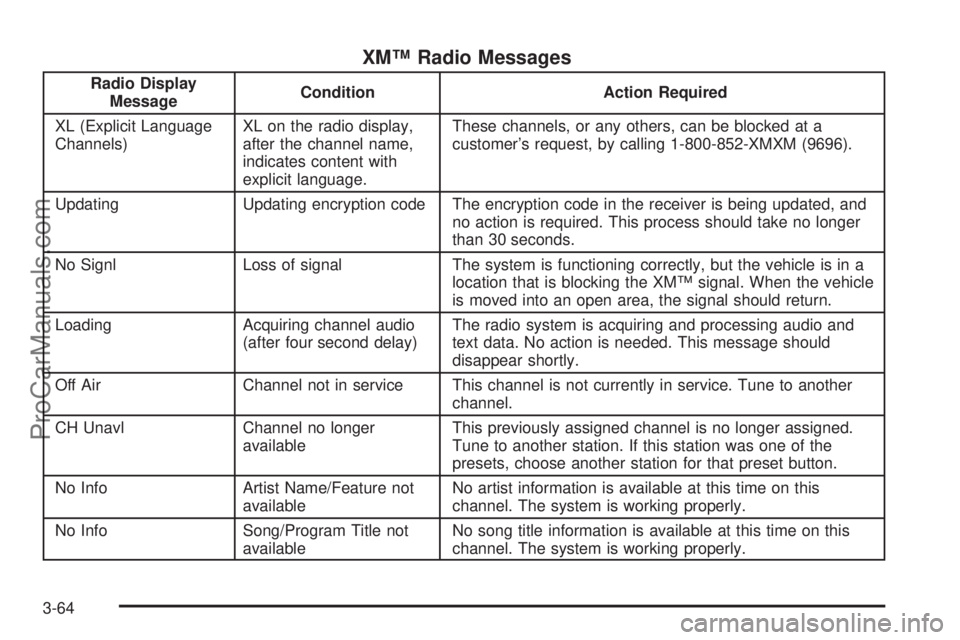
XM™ Radio Messages
Radio Display
MessageCondition Action Required
XL (Explicit Language
Channels)XL on the radio display,
after the channel name,
indicates content with
explicit language.These channels, or any others, can be blocked at a
customer’s request, by calling 1-800-852-XMXM (9696).
Updating Updating encryption code The encryption code in the receiver is being updated, and
no action is required. This process should take no longer
than 30 seconds.
No Signl Loss of signal The system is functioning correctly, but the vehicle is in a
location that is blocking the XM™ signal. When the vehicle
is moved into an open area, the signal should return.
Loading Acquiring channel audio
(after four second delay)The radio system is acquiring and processing audio and
text data. No action is needed. This message should
disappear shortly.
Off Air Channel not in service This channel is not currently in service. Tune to another
channel.
CH Unavl Channel no longer
availableThis previously assigned channel is no longer assigned.
Tune to another station. If this station was one of the
presets, choose another station for that preset button.
No Info Artist Name/Feature not
availableNo artist information is available at this time on this
channel. The system is working properly.
No Info Song/Program Title not
availableNo song title information is available at this time on this
channel. The system is working properly.
3-64
ProCarManuals.com
Page 195 of 434
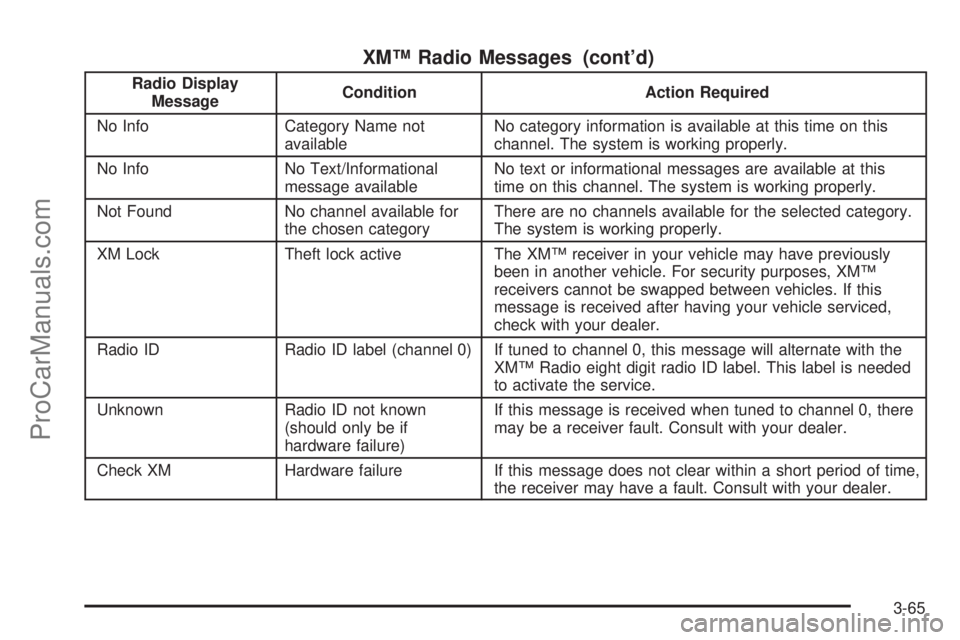
XM™ Radio Messages (cont’d)
Radio Display
MessageCondition Action Required
No Info Category Name not
availableNo category information is available at this time on this
channel. The system is working properly.
No Info No Text/Informational
message availableNo text or informational messages are available at this
time on this channel. The system is working properly.
Not Found No channel available for
the chosen categoryThere are no channels available for the selected category.
The system is working properly.
XM Lock Theft lock active The XM™ receiver in your vehicle may have previously
been in another vehicle. For security purposes, XM™
receivers cannot be swapped between vehicles. If this
message is received after having your vehicle serviced,
check with your dealer.
Radio ID Radio ID label (channel 0) If tuned to channel 0, this message will alternate with the
XM™ Radio eight digit radio ID label. This label is needed
to activate the service.
Unknown Radio ID not known
(should only be if
hardware failure)If this message is received when tuned to channel 0, there
may be a receiver fault. Consult with your dealer.
Check XM Hardware failure If this message does not clear within a short period of time,
the receiver may have a fault. Consult with your dealer.
3-65
ProCarManuals.com
Page 206 of 434
Adjusting the Speakers (Balance/Fade)
e
(Balance/Fade):To adjust the balance between the
right and the left speakers, push and release this knob
until BAL appears on the display. Turn the knob to move
the sound toward the right or the left speakers.
To adjust the fade between the front and the rear
speakers, push and release the tone knob until FADE
appears on the display. Turn the knob to move the sound
toward the front or the rear speakers.
To adjust the balance and the fade to the middle position,
push the tone knob, then push it again and hold it until
you hear one beep.
To adjust all tone and speaker controls to the middle
position, while in fade or balance, push and hold the tone
knob when no tone or speaker control is displayed. ALL
CENTERED will appear on the display and you will hear
a beep.
Finding a Category (CAT) Station
(XM™ Satellite Radio Service Only)
To select and nd a desired category perform the
following:
1. Press the CAT button to activate category select
mode. The current category will appear on the
display.
2. Turn the tune knob to select a category.3. Once the desired category is displayed, press either
SEEK arrow to take you to that category’s rst
station.
4. To go to another station within that category and
the category is displayed, press either SEEK
arrow again. If CAT times out and is no longer
on the display, go back to Step 1.
5. Press CAT to exit category select mode or wait for
CAT to time out.
If the radio cannot nd the desired category, NOT
FOUND will appear on the display and the radio will
return to the last station you were listening to.
Radio Messages
CAL ERR (Calibration Error):The audio system has
been calibrated for your vehicle from the factory. If
CAL ERR appears on the display it means that the radio
has not been congured properly for your vehicle and
it must be returned to your dealer for service.
LOC (Locked):This message is displayed when the
THEFTLOCK
®system has locked up. Take your vehicle
to your dealer for service.
If any error occurs repeatedly or if an error cannot be
corrected, contact your dealer.
3-76
ProCarManuals.com
Page 207 of 434
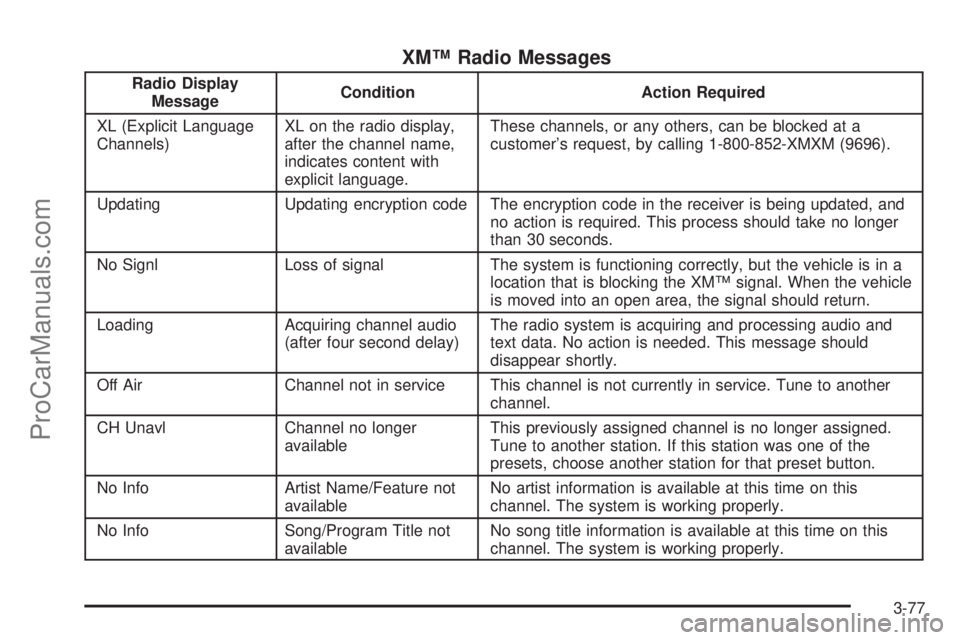
XM™ Radio Messages
Radio Display
MessageCondition Action Required
XL (Explicit Language
Channels)XL on the radio display,
after the channel name,
indicates content with
explicit language.These channels, or any others, can be blocked at a
customer’s request, by calling 1-800-852-XMXM (9696).
Updating Updating encryption code The encryption code in the receiver is being updated, and
no action is required. This process should take no longer
than 30 seconds.
No Signl Loss of signal The system is functioning correctly, but the vehicle is in a
location that is blocking the XM™ signal. When the vehicle
is moved into an open area, the signal should return.
Loading Acquiring channel audio
(after four second delay)The radio system is acquiring and processing audio and
text data. No action is needed. This message should
disappear shortly.
Off Air Channel not in service This channel is not currently in service. Tune to another
channel.
CH Unavl Channel no longer
availableThis previously assigned channel is no longer assigned.
Tune to another station. If this station was one of the
presets, choose another station for that preset button.
No Info Artist Name/Feature not
availableNo artist information is available at this time on this
channel. The system is working properly.
No Info Song/Program Title not
availableNo song title information is available at this time on this
channel. The system is working properly.
3-77
ProCarManuals.com
Page 208 of 434
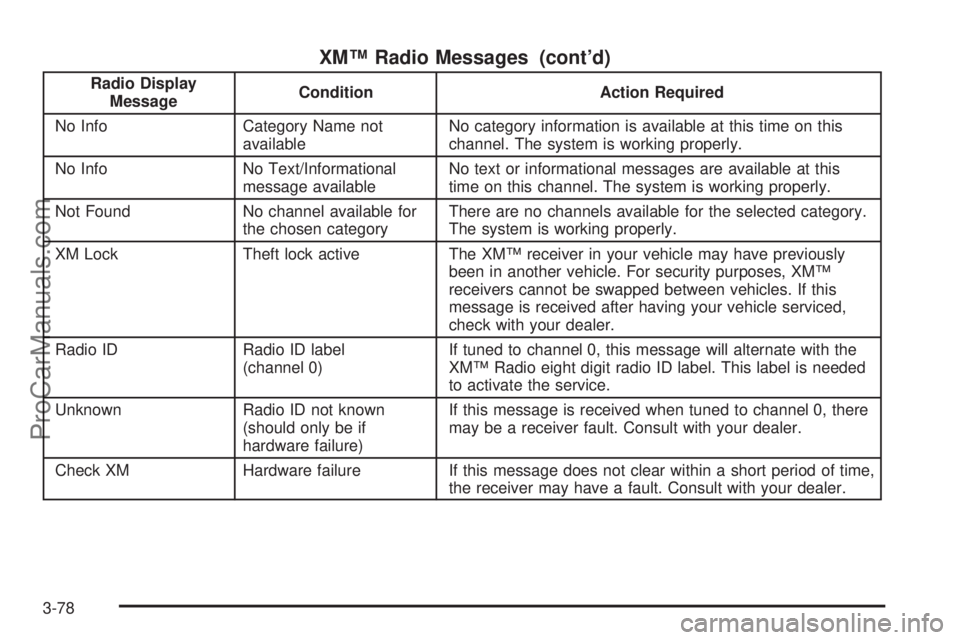
XM™ Radio Messages (cont’d)
Radio Display
MessageCondition Action Required
No Info Category Name not
availableNo category information is available at this time on this
channel. The system is working properly.
No Info No Text/Informational
message availableNo text or informational messages are available at this
time on this channel. The system is working properly.
Not Found No channel available for
the chosen categoryThere are no channels available for the selected category.
The system is working properly.
XM Lock Theft lock active The XM™ receiver in your vehicle may have previously
been in another vehicle. For security purposes, XM™
receivers cannot be swapped between vehicles. If this
message is received after having your vehicle serviced,
check with your dealer.
Radio ID Radio ID label
(channel 0)If tuned to channel 0, this message will alternate with the
XM™ Radio eight digit radio ID label. This label is needed
to activate the service.
Unknown Radio ID not known
(should only be if
hardware failure)If this message is received when tuned to channel 0, there
may be a receiver fault. Consult with your dealer.
Check XM Hardware failure If this message does not clear within a short period of time,
the receiver may have a fault. Consult with your dealer.
3-78
ProCarManuals.com
Page 220 of 434

Playing a Disc
To play a disc, gently insert the disc with the label side
up into the loading slot. The DVD player will continue
loading the disc and the player will automatically start, if
the vehicle is in RUN, ACCESSORY, or when RAP is
active.
If a disc is already in the player, press the play/pause
button on the DVD player faceplate or on the remote
control.
Some DVDs will not allow fast forwarding or skipping of
the copyright information or the previews. Some
DVDs will begin playing after the previews have nished.
If the DVD does not begin to play the main title, refer
to the on-screen instructions.
Stopping and Resuming Playback
To stop playing a disc, press and release the stop
button on the DVD player faceplate or the remote
control.
To resume playback, press the play/pause button on
the DVD player faceplate or the remote control.
The movie should resume play from where it was last
stopped, if the disc has not been ejected and the
stop button has not been pressed twice. If the disc has
been ejected or if the stop button has been pressed
twice, the disc will resume play at the beginning.
Ejecting a Disc
Press the eject button on the DVD player faceplate to
eject the disc. There is not an eject button on the remote
control.
If a disc is ejected from the player, but is not removed,
the DVD player will reload the disc after a short
period of time. The disc will be stored in the DVD player.
The DVD player will not resume play of the disc
automatically.
Remote Control
To use the remote control, aim it at the transmitter
window below the video screen and press the desired
button. Direct sunlight or very bright light may affect the
ability of the RSE system to receive signals from the
remote control. If the remote control does not seem to
be working, the batteries may need to be replaced.
See “Battery Replacement” later in this section.
Objects blocking the line of sight may also affect the
function of the remote control.
Notice:Storing the remote control in a hot area or
in direct sunlight may damage it, and the repairs
will not be covered by your warranty. Keep the
remote control stored in a cool, dry place.
To extend the life of the batteries, the remote control
does not have a press and hold feature.
3-90
ProCarManuals.com
Page 226 of 434
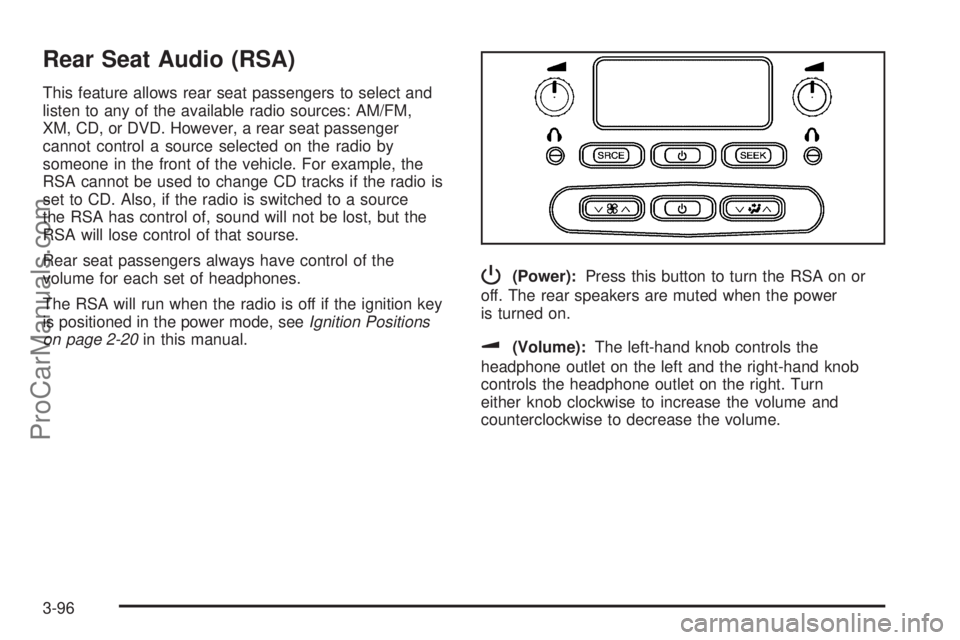
Rear Seat Audio (RSA)
This feature allows rear seat passengers to select and
listen to any of the available radio sources: AM/FM,
XM, CD, or DVD. However, a rear seat passenger
cannot control a source selected on the radio by
someone in the front of the vehicle. For example, the
RSA cannot be used to change CD tracks if the radio is
set to CD. Also, if the radio is switched to a source
the RSA has control of, sound will not be lost, but the
RSA will lose control of that sourse.
Rear seat passengers always have control of the
volume for each set of headphones.
The RSA will run when the radio is off if the ignition key
is positioned in the power mode, seeIgnition Positions
on page 2-20in this manual.
P(Power):Press this button to turn the RSA on or
off. The rear speakers are muted when the power
is turned on.
u(Volume):The left-hand knob controls the
headphone outlet on the left and the right-hand knob
controls the headphone outlet on the right. Turn
either knob clockwise to increase the volume and
counterclockwise to decrease the volume.
3-96
ProCarManuals.com
Page 227 of 434
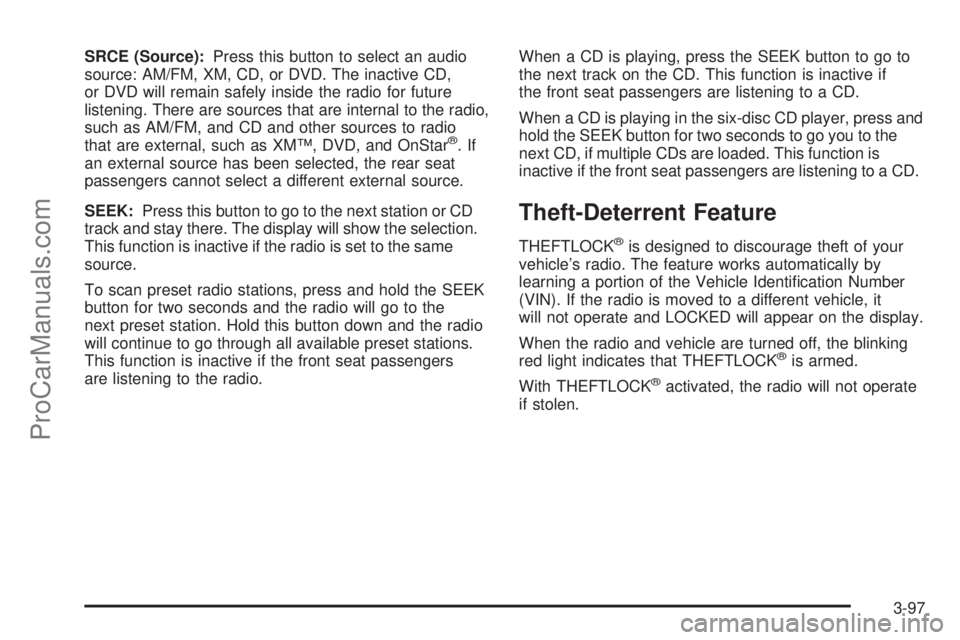
SRCE (Source):Press this button to select an audio
source: AM/FM, XM, CD, or DVD. The inactive CD,
or DVD will remain safely inside the radio for future
listening. There are sources that are internal to the radio,
such as AM/FM, and CD and other sources to radio
that are external, such as XM™, DVD, and OnStar
®.If
an external source has been selected, the rear seat
passengers cannot select a different external source.
SEEK:Press this button to go to the next station or CD
track and stay there. The display will show the selection.
This function is inactive if the radio is set to the same
source.
To scan preset radio stations, press and hold the SEEK
button for two seconds and the radio will go to the
next preset station. Hold this button down and the radio
will continue to go through all available preset stations.
This function is inactive if the front seat passengers
are listening to the radio.When a CD is playing, press the SEEK button to go to
the next track on the CD. This function is inactive if
the front seat passengers are listening to a CD.
When a CD is playing in the six-disc CD player, press and
hold the SEEK button for two seconds to go you to the
next CD, if multiple CDs are loaded. This function is
inactive if the front seat passengers are listening to a CD.
Theft-Deterrent Feature
THEFTLOCK®is designed to discourage theft of your
vehicle’s radio. The feature works automatically by
learning a portion of the Vehicle Identication Number
(VIN). If the radio is moved to a different vehicle, it
will not operate and LOCKED will appear on the display.
When the radio and vehicle are turned off, the blinking
red light indicates that THEFTLOCK
®is armed.
With THEFTLOCK
®activated, the radio will not operate
if stolen.
3-97
ProCarManuals.com