manual radio set SAAB 9-7X 2007 User Guide
[x] Cancel search | Manufacturer: SAAB, Model Year: 2007, Model line: 9-7X, Model: SAAB 9-7X 2007Pages: 498, PDF Size: 3.13 MB
Page 224 of 498
tSEEKu:Press and release the right or the
left arrow to go to the next or to the previous
station and stay there.
The radio only seeks stations with a strong signal
that are in the selected band.
Press and hold either arrow for more than
two seconds. SCAN displays and one beep
sounds. The radio goes to a station, plays for a
few seconds, then goes to the next station. Press
either arrow again or one of the pushbuttons to
stop scanning presets.
The radio only scans stations with a strong signal
that are in the selected band.
Press and hold this button until PSCN displays and
two beeps sound. The radio goes to a preset
station, plays for a few seconds, then goes to the
next preset station. Press either arrow again or
one of the pushbuttons to stop scanning presets.
The radio only scans preset stations with a strong
signal that are in the selected band.4(Information) (XM™ Satellite Radio
Service):If the current station has a message,
the information symbol displays. Press this button
to see the message. The message can display
the artist, song title, call in phone numbers, etc.
If the entire message is not displayed, parts of the
message displays every three seconds. To scroll
through the message, press and release the INFO
button. A new group of words display after every
press of this button. Once the complete message
displays, the information symbol disappears until
another new message is received. The last
message can be displayed by pressing the INFO
button. The last message can be viewed until a new
message is received or if you tune to a different
station.
When a message is not available from a station, No
Info displays.
1-6 (Preset Pushbuttons):Press this button to
play stations that are programmed on the
radio preset pushbuttons.
The radio only seeks preset stations with a strong
signal that are in the selected band.
224
ProCarManuals.com
Page 225 of 498
Setting Preset Stations
Up to 30 stations (six FM1, six FM2, and six AM,
six XM1 and six XM2 (if equipped)), can be
programmed on the six numbered pushbuttons, by
performing the following steps:
1. Turn the radio on.
2. Press BAND to select FM1, FM2, AM, or XM1
or XM2.
3. Tune in the desired station.
4. Press AUTO EQ (automatic equalization) to
select the equalization.
5. Press and hold one of the six numbered
pushbuttons until a beep sounds. Whenever
that numbered pushbutton is pressed,
the station that was set, returns and the
equalization that was selected is stored for
that pushbutton.
6. Repeat the steps for each pushbutton.
Setting the Tone (Bass/Treble)
e
(Bass/Treble):Push and release this knob
until BASS or TREB (treble) displays. Turn
this knob to increase or to decrease the tone. The
display shows the bass or the treble level. If a
station is weak or has static, decrease the treble.
To adjust the bass and the treble to the middle
position, while in bass or treble, push and hold the
tone knob. One beep sounds.
To adjust all tone and speaker controls to the
middle position, push and hold the tone knob when
no tone or speaker control is displayed. ALL
CENTERED displays and a beep sounds.
AUTO EQ (Automatic Equalization):Press this
button to select customized equalization settings
designed for country/western, jazz, talk, pop,
rock and classical.
The equalization one through seven options
are included only if your vehicle has the Bose
®
system. Press the AUTO EQ button to select
equalization settings designed for equalization
one through seven.
To return the bass and treble to the manual mode,
push and release the tone knob until BASS and
TREB displays.
225
ProCarManuals.com
Page 229 of 498
To load more than one CD but less than six,
complete Steps 1 through 3. When nished loading
CDs, press the LOAD button to cancel the
loading function. The radio begins to play the last
CD loaded.
If more than one CD has been loaded, a number
for each CD displays.
Playing a Specic Loaded CD
For every CD loaded, a number will appear on the
display. To play a specic CD, rst press the
CD button, then press the numbered pushbutton
that corresponds to the CD. A small bar appears
under the CD number that is playing and the
track number appears on the display.
If an error appears on the display, see “CD
Messages” later in this section.
Z(Eject):Press this button to eject CD(s).
To eject the CD that is currently playing, press and
release this button.To eject multiple CDs, do the following:
1. Press and hold the CD eject button for
ve seconds.
A beep sounds and the indicator light, located
to the right of the slot, ashes and EJECT
ALL displays.
2. Once the light stops ashing and turns green,
REMOVE CD # displays. The CD ejects and
can be removed.
Once the CD is removed, the indicator light
ashes again and another CD ejects.
To stop ejecting the CDs, press the LOAD or
the eject button.
If the CD is not removed, after 25 seconds, the CD
automatically pulls back into the player. If CD is
pushed back into the player, before the 25 second
time ends, the player senses an error and tries to
eject the CD several times before stopping.
Do not repeatedly press the CD eject button to
eject a CD after you have tried to push it in
manually. The player’s 25-second eject timer
resets at each press of the eject button, causing
the player to not eject the CD until the 25-second
time period has elapsed.
229
ProCarManuals.com
Page 230 of 498
r(Reverse):Press this button to reverse within
the track.
[(Fast Forward):Press this button to fast
forward within the track.
N(Repeat):With the repeat setting, one track
or an entire CD can be repeated.
To use repeat, do the following:
To repeat the track you are listening to, press
and release the repeat button. RPT ON
displays. Press this button again to turn off
repeat play. RPT OFF displays.
To repeat the CD you are listening to, press
and hold the repeat button for two seconds.
RPT ON displays. Press this button again
to turn off repeat play. RPT OFF displays.
y(Random):With the random setting, you can
listen to the tracks in random, rather than
sequential, order, on one CD or on all of the CDs.
To use random, do one of the following:
To play the tracks on the CD you are listening
to in random order, press and release the
random button. RANDOM ONE displays.
Press this button again to turn off random play.
To play the tracks on all of the CDs that
are loaded in random order, press and
hold this button for more than two seconds.
A beep sounds and RANDOM ALL displays.
Press this button again to turn off random play.
tSEEKu:Press the left arrow to go to the
start of the current track, if more than ten seconds
have played. Press the right arrow to go to the next
track. If either arrow is held or pressed more than
once, the player continues moving backward or
forward through the CD.
To scan one CD, press and hold either arrow for
more than two seconds until SCAN a displays and a
beep sounds. The radio goes to the next track,
plays for 10 seconds, then goes to the next track.
Press either arrow again, to stop scanning.
230
ProCarManuals.com
Page 231 of 498
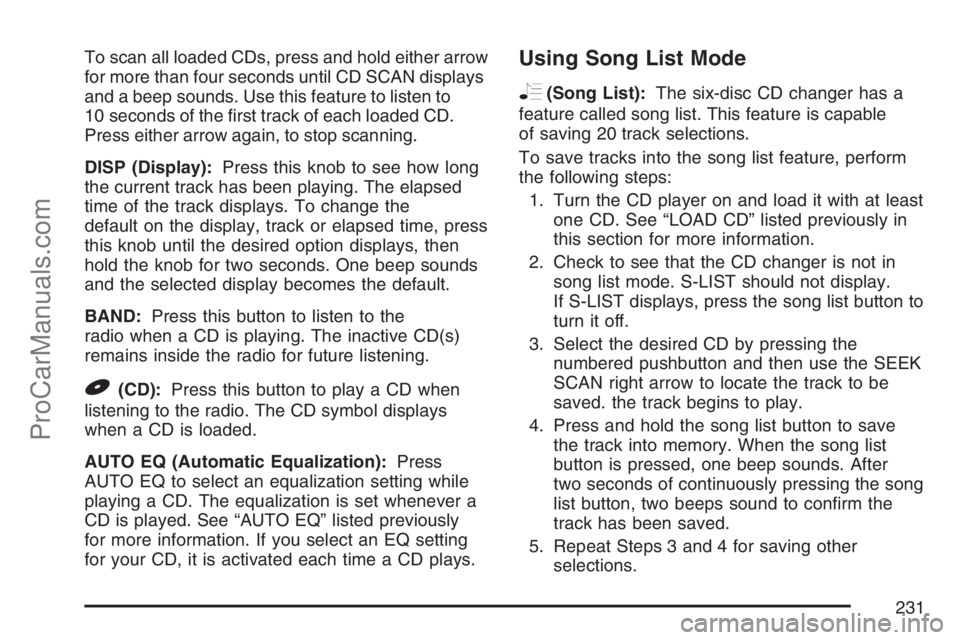
To scan all loaded CDs, press and hold either arrow
for more than four seconds until CD SCAN displays
and a beep sounds. Use this feature to listen to
10 seconds of the rst track of each loaded CD.
Press either arrow again, to stop scanning.
DISP (Display):Press this knob to see how long
the current track has been playing. The elapsed
time of the track displays. To change the
default on the display, track or elapsed time, press
this knob until the desired option displays, then
hold the knob for two seconds. One beep sounds
and the selected display becomes the default.
BAND:Press this button to listen to the
radio when a CD is playing. The inactive CD(s)
remains inside the radio for future listening.
B(CD):Press this button to play a CD when
listening to the radio. The CD symbol displays
when a CD is loaded.
AUTO EQ (Automatic Equalization):Press
AUTO EQ to select an equalization setting while
playing a CD. The equalization is set whenever a
CD is played. See “AUTO EQ” listed previously
for more information. If you select an EQ setting
for your CD, it is activated each time a CD plays.
Using Song List Mode
R
(Song List):The six-disc CD changer has a
feature called song list. This feature is capable
of saving 20 track selections.
To save tracks into the song list feature, perform
the following steps:
1. Turn the CD player on and load it with at least
one CD. See “LOAD CD” listed previously in
this section for more information.
2. Check to see that the CD changer is not in
song list mode. S-LIST should not display.
If S-LIST displays, press the song list button to
turn it off.
3. Select the desired CD by pressing the
numbered pushbutton and then use the SEEK
SCAN right arrow to locate the track to be
saved. the track begins to play.
4. Press and hold the song list button to save
the track into memory. When the song list
button is pressed, one beep sounds. After
two seconds of continuously pressing the song
list button, two beeps sound to conrm the
track has been saved.
5. Repeat Steps 3 and 4 for saving other
selections.
231
ProCarManuals.com
Page 238 of 498
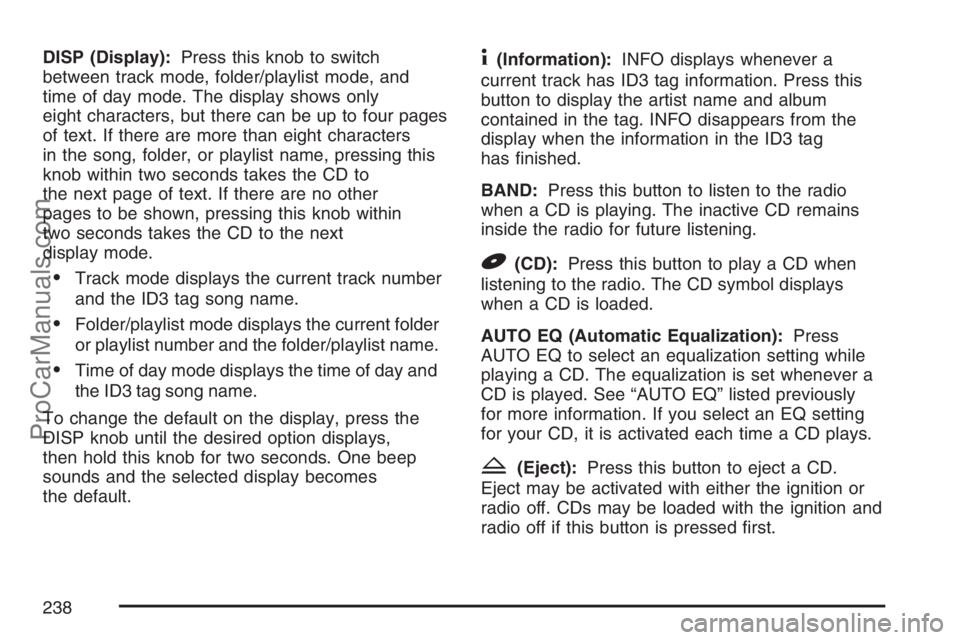
DISP (Display):Press this knob to switch
between track mode, folder/playlist mode, and
time of day mode. The display shows only
eight characters, but there can be up to four pages
of text. If there are more than eight characters
in the song, folder, or playlist name, pressing this
knob within two seconds takes the CD to
the next page of text. If there are no other
pages to be shown, pressing this knob within
two seconds takes the CD to the next
display mode.
Track mode displays the current track number
and the ID3 tag song name.
Folder/playlist mode displays the current folder
or playlist number and the folder/playlist name.
Time of day mode displays the time of day and
the ID3 tag song name.
To change the default on the display, press the
DISP knob until the desired option displays,
then hold this knob for two seconds. One beep
sounds and the selected display becomes
the default.
4(Information):INFO displays whenever a
current track has ID3 tag information. Press this
button to display the artist name and album
contained in the tag. INFO disappears from the
display when the information in the ID3 tag
has nished.
BAND:Press this button to listen to the radio
when a CD is playing. The inactive CD remains
inside the radio for future listening.
B(CD):Press this button to play a CD when
listening to the radio. The CD symbol displays
when a CD is loaded.
AUTO EQ (Automatic Equalization):Press
AUTO EQ to select an equalization setting while
playing a CD. The equalization is set whenever a
CD is played. See “AUTO EQ” listed previously
for more information. If you select an EQ setting
for your CD, it is activated each time a CD plays.
Z(Eject):Press this button to eject a CD.
Eject may be activated with either the ignition or
radio off. CDs may be loaded with the ignition and
radio off if this button is pressed rst.
238
ProCarManuals.com
Page 239 of 498
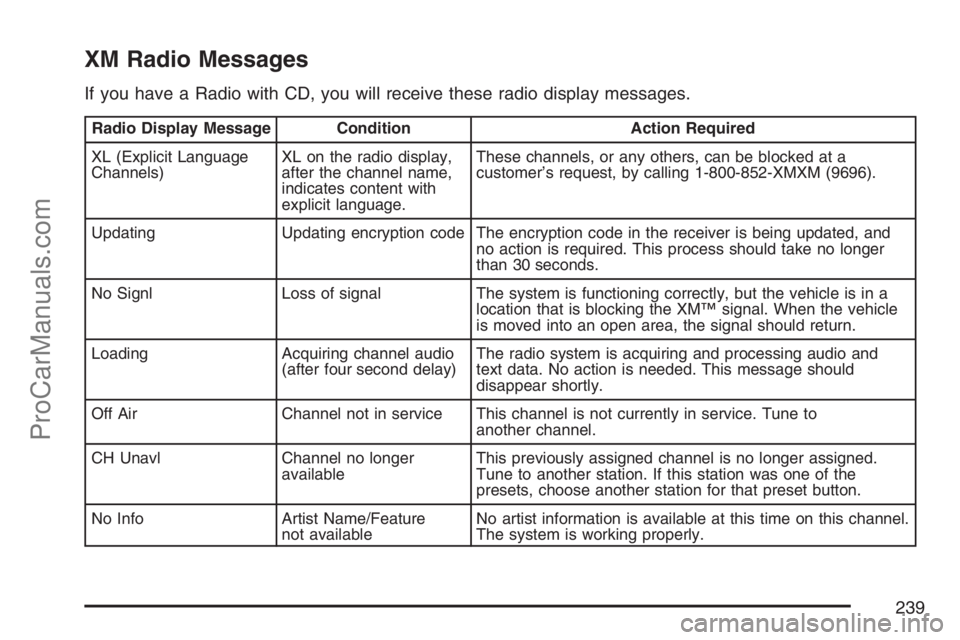
XM Radio Messages
If you have a Radio with CD, you will receive these radio display messages.
Radio Display Message Condition Action Required
XL (Explicit Language
Channels)XL on the radio display,
after the channel name,
indicates content with
explicit language.These channels, or any others, can be blocked at a
customer’s request, by calling 1-800-852-XMXM (9696).
Updating Updating encryption code The encryption code in the receiver is being updated, and
no action is required. This process should take no longer
than 30 seconds.
No Signl Loss of signal The system is functioning correctly, but the vehicle is in a
location that is blocking the XM™ signal. When the vehicle
is moved into an open area, the signal should return.
Loading Acquiring channel audio
(after four second delay)The radio system is acquiring and processing audio and
text data. No action is needed. This message should
disappear shortly.
Off Air Channel not in service This channel is not currently in service. Tune to
another channel.
CH Unavl Channel no longer
availableThis previously assigned channel is no longer assigned.
Tune to another station. If this station was one of the
presets, choose another station for that preset button.
No Info Artist Name/Feature
not availableNo artist information is available at this time on this channel.
The system is working properly.
239
ProCarManuals.com
Page 241 of 498
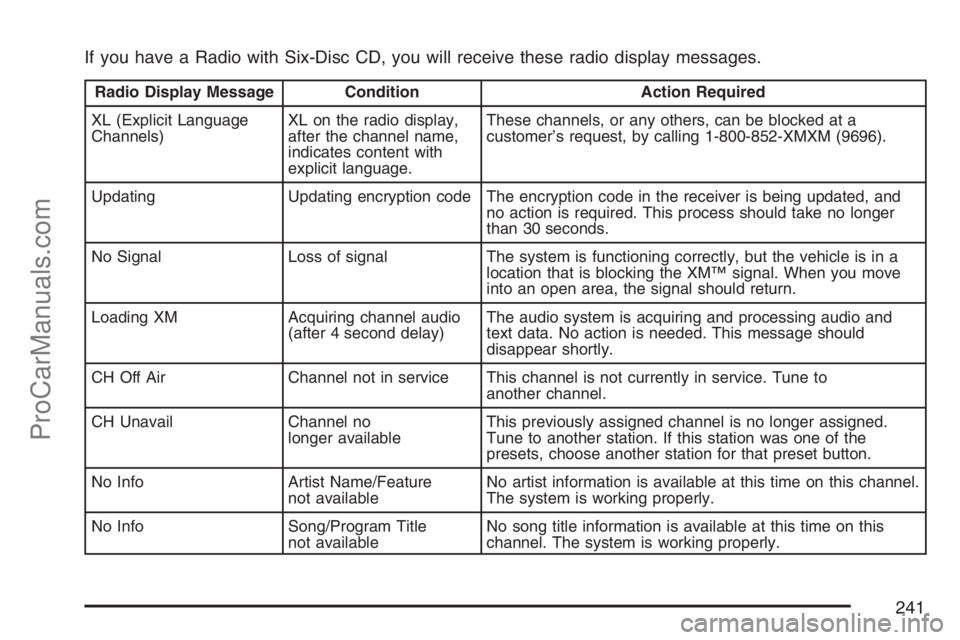
If you have a Radio with Six-Disc CD, you will receive these radio display messages.
Radio Display Message Condition Action Required
XL (Explicit Language
Channels)XL on the radio display,
after the channel name,
indicates content with
explicit language.These channels, or any others, can be blocked at a
customer’s request, by calling 1-800-852-XMXM (9696).
Updating Updating encryption code The encryption code in the receiver is being updated, and
no action is required. This process should take no longer
than 30 seconds.
No Signal Loss of signal The system is functioning correctly, but the vehicle is in a
location that is blocking the XM™ signal. When you move
into an open area, the signal should return.
Loading XM Acquiring channel audio
(after 4 second delay)The audio system is acquiring and processing audio and
text data. No action is needed. This message should
disappear shortly.
CH Off Air Channel not in service This channel is not currently in service. Tune to
another channel.
CH Unavail Channel no
longer availableThis previously assigned channel is no longer assigned.
Tune to another station. If this station was one of the
presets, choose another station for that preset button.
No Info Artist Name/Feature
not availableNo artist information is available at this time on this channel.
The system is working properly.
No Info Song/Program Title
not availableNo song title information is available at this time on this
channel. The system is working properly.
241
ProCarManuals.com
Page 243 of 498
Navigation/Radio System
Your vehicle may have a navigation radio system.
The navigation system has built-in features
intended to minimize driver distraction. Technology
alone, no matter how advanced, can never
replace your own judgment. See the Navigation
System manual for some tips to help you
reduce distractions while driving.
Rear Seat Entertainment System
Your vehicle may have a DVD Rear Seat
Entertainment (RSE) system. The RSE system
includes a DVD player, a video display screen,
two sets of wireless headphones, and a remote
control.
Parental Control
This button is located behind the video screen.
Press this button while a DVD or CD is playing to
freeze the video and mute the audio. The video
screen will display Parental Control ON and the
power indicator light on the DVD player will ash. It
will also disable all other button operations from the
remote control and the DVD player, with the
exception of the eject button. Press this button
again to restore operation of the DVD player.
This button may also be used to turn the DVD
player power on and automatically resume play if
the ignition is in RUN, ACC, or if RAP is active.
Before You Drive
The RSE system is for rear seat passengers only.
The driver cannot safely view the video screen
while driving and should not try to do so.
243
ProCarManuals.com
Page 244 of 498
Headphones
The RSE system includes two sets of wireless
headphones.
Each set of headphones has an ON/OFF control.
An indicator light will illuminate on the headphones
when they are on. If the light does not illuminate,
the batteries may need to be replaced. See “Battery
Replacement” following for more information.
Each set of headphones has a volume knob.
To adjust the volume, adjust this knob.
The transmitters are located below the video
display screen. The headphones will shut
off automatically if they lose the signal from the
system after about four minutes to save battery
power. The signal may be lost if the system
is turned off or if the headphones are out of
range of the transmitters.
When using the wired headphones, if the front
seat passengers play a CD in the Radio with
Six-Disc CD (if equipped) or use XM™ Satellite
Radio Service (if equipped), you will hear the audio
for these sources, instead of the DVD or CD
that is currently playing through the RSE.Notice:Do not store the headphones in heat
or direct sunlight. This could damage the
headphones and repairs will not be covered by
your warranty. Keep the headphones stored
in a cool, dry place.
Battery Replacement
To change the batteries, do the following:
1. Loosen the screw on the battery compartment
door located on the left side of the headphone
earpiece.
2. Replace the two AAA batteries in the
compartment. Make sure that they are
installed correctly, using the diagram on the
inside of the battery compartment.
3. Tighten the screw to close the
compartment door.
If the headphones are to be stored for a long
period of time, remove the batteries and keep them
in a cool, dry place.
244
ProCarManuals.com