transmission SAAB 9-7X 2007 User Guide
[x] Cancel search | Manufacturer: SAAB, Model Year: 2007, Model line: 9-7X, Model: SAAB 9-7X 2007Pages: 498, PDF Size: 3.13 MB
Page 118 of 498
Torque Lock
If you are parking on a hill and you do not shift your
transmission into PARK (P) properly, the weight of
the vehicle may put too much force on the parking
pawl in the transmission. You may nd it difficult to
pull the shift lever out of PARK (P). This is called
“torque lock.” To prevent torque lock, set the
parking brake and then shift into PARK (P) properly
before you leave the driver’s seat. To nd out how,
seeShifting Into Park (P) on page 117.
When you are ready to drive, move the shift lever
out of PARK (P) before you release the parking
brake.
If torque lock does occur, you may need to have
another vehicle push yours a little uphill to
take some of the pressure from the parking pawl
in the transmission, so you can pull the shift
lever out of PARK (P).
Shifting Out of Park (P)
Your vehicle has an automatic transmission shift
lock control system. You have to fully apply
the regular brakes rst and then press the shift
lever button before you can shift from PARK (P)
when the ignition is in RUN. SeeAutomatic
Transmission Operation on page 112.
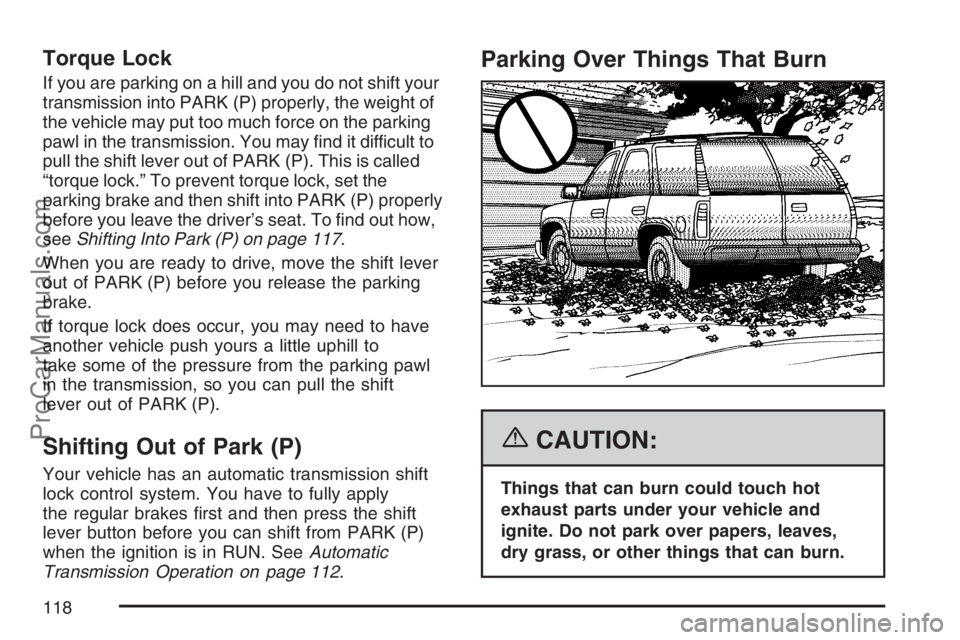
Parking Over Things That Burn
{CAUTION:
Things that can burn could touch hot
exhaust parts under your vehicle and
ignite. Do not park over papers, leaves,
dry grass, or other things that can burn.
118
ProCarManuals.com
Page 136 of 498
Read the instructions completely before attempting
to program the Universal Home Remote.
Because of the steps involved, it may be helpful to
have another person available to assist you in
the programming steps.
Keep the original hand-held transmitter for use in
other vehicles as well as for future Universal
Home Remote programming. It is also
recommended that upon the sale of the vehicle,
the programmed Universal Home Remote buttons
should be erased for security purposes. See
“Erasing Universal Home Remote Buttons” later in
this section or, for assistance, seeCustomer
Assistance Offices on page 468.
Be sure that people and objects are clear of the
garage door or gate operator you are
programming. When programming a garage door,
it is advised to park outside of the garage.
It is recommended that a new battery be
installed in your hand-held transmitter for
quicker and more accurate transmission of the
radio-frequency signal.Programming Universal Home Remote
Follow these steps to program up to three channels:
1. Press and hold down the two outside
Universal Home Remote buttons, releasing
only when the Universal Home Remote
indicator light begins to ash, after
20 seconds. Do not hold down the buttons for
longer than 30 seconds and do not repeat
this step to program a second and/or
third hand-held transmitter to the remaining
two Universal Home Remote buttons.
2. Position the end of your hand-held transmitter
about 1 to 3 inches (3 to 8 cm) away from the
Universal Home Remote buttons while
keeping the indicator light in view.
3. Simultaneously press and hold both the
desired Universal Home Remote button
and the hand-held transmitter button. Do not
release the buttons until Step 4 has been
completed.
Some entry gates and garage door openers
may require you to substitute Step 3 with
the procedure noted in “Gate Operator and
Canadian Programming” later in this section.
136
ProCarManuals.com
Page 138 of 498
Gate Operator and Canadian
Programming
Canadian radio-frequency laws require transmitter
signals to time out or quit after several seconds
of transmission. This may not be long enough
for Universal Home Remote to pick up the signal
during programming. Similarly, some U.S. gate
operators are manufactured to time out in
the same manner.
If you live in Canada, or you are having difficulty
programming a gate operator or garage door
opener by using the “Programming Universal
Home Remote” procedures, regardless of where
you live, replace Step 3 under “Programming
Universal Home Remote” with the following:
Continue to press and hold the Universal Home
Remote button while you press and release every
two seconds (cycle) the hand-held transmitter
button until the frequency signal has been
successfully accepted by the Universal Home
Remote. The Universal Home Remote indicator
light will ash slowly at rst and then rapidly.
Proceed with Step 4 under “Programming
Universal Home Remote” to complete.
Using Universal Home Remote
Press and hold the appropriate Universal Home
Remote button for at least half of a second.
The indicator light will come on while the signal is
being transmitted.
Erasing Universal Home Remote
Buttons
To erase programming from the three Universal
Home Remote buttons do the following:
1. Press and hold down the two outside buttons
until the indicator light begins to ash, after
20 seconds. Do not hold the two outside
buttons for longer than 30 seconds.
2. Release both buttons.
The Universal Home Remote is now in the training
(learning) mode and can be programmed at any
time beginning with Step 2 under “Programming
Universal Home Remote” shown earlier in
this section.
Individual buttons cannot be erased, but they can
be reprogrammed. See “Reprogramming a
Single Universal Home Remote Button” following
this section.
138
ProCarManuals.com
Page 149 of 498
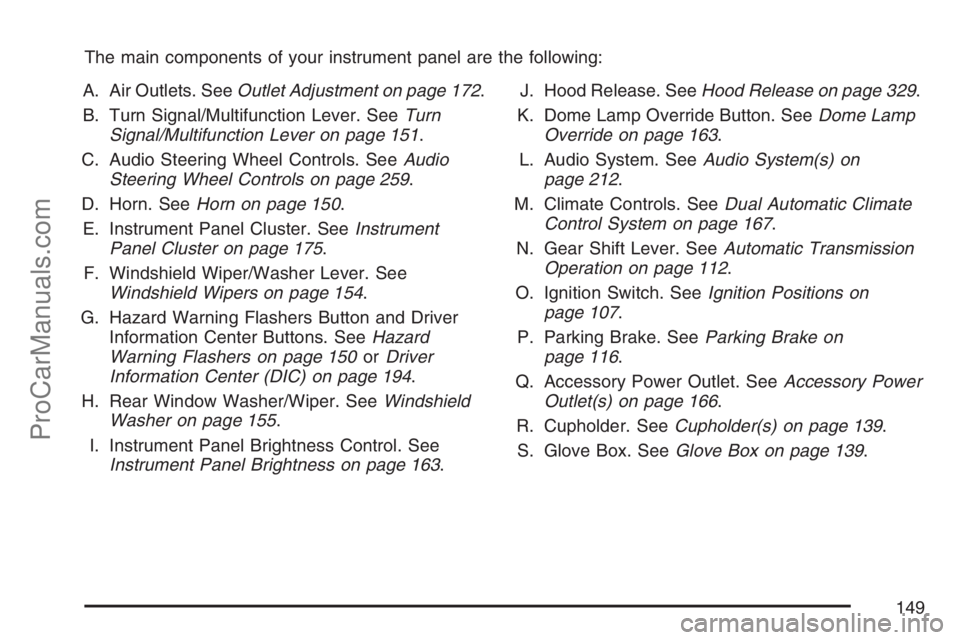
The main components of your instrument panel are the following:
A. Air Outlets. SeeOutlet Adjustment on page 172.
B. Turn Signal/Multifunction Lever. SeeTurn
Signal/Multifunction Lever on page 151.
C. Audio Steering Wheel Controls. SeeAudio
Steering Wheel Controls on page 259.
D. Horn. SeeHorn on page 150.
E. Instrument Panel Cluster. SeeInstrument
Panel Cluster on page 175.
F. Windshield Wiper/Washer Lever. See
Windshield Wipers on page 154.
G. Hazard Warning Flashers Button and Driver
Information Center Buttons. SeeHazard
Warning Flashers on page 150orDriver
Information Center (DIC) on page 194.
H. Rear Window Washer/Wiper. SeeWindshield
Washer on page 155.
I. Instrument Panel Brightness Control. See
Instrument Panel Brightness on page 163.J. Hood Release. SeeHood Release on page 329.
K. Dome Lamp Override Button. SeeDome Lamp
Override on page 163.
L. Audio System. SeeAudio System(s) on
page 212.
M. Climate Controls. SeeDual Automatic Climate
Control System on page 167.
N. Gear Shift Lever. SeeAutomatic Transmission
Operation on page 112.
O. Ignition Switch. SeeIgnition Positions on
page 107.
P. Parking Brake. SeeParking Brake on
page 116.
Q. Accessory Power Outlet. SeeAccessory Power
Outlet(s) on page 166.
R. Cupholder. SeeCupholder(s) on page 139.
S. Glove Box. SeeGlove Box on page 139.
149
ProCarManuals.com
Page 159 of 498
Passing Another Vehicle While Using
Cruise Control
Use the accelerator pedal to increase your speed.
When you take your foot off the pedal, your
vehicle will slow down to the cruise control speed
you set earlier.
Using Cruise Control on Hills
How well your cruise control will work on hills
depends upon your speed, load and the steepness
of the hills. When going up steep hills, you may
want to step on the accelerator pedal to maintain
your speed. When going downhill, you may
have to brake or shift to a lower gear to keep your
speed down. Of course, applying the brake
takes you out of cruise control. Many drivers nd
this to be too much trouble and do not use
cruise control on steep hills.
Ending Cruise Control
To turn off the cruise control, do one of the
following:
Step lightly on the brake pedal,
move the cruise control switch to off, or
shift the transmission to NEUTRAL (N).
If your vehicle has the StabiliTrak®feature,
cruise control will turn off if road conditions
cause StabiliTrak
®to activate.
If the accelerator pedal is held longer than
60 seconds, cruise control will turn off.
The cruise control will turn off automatically if the
traction control system or StabiliTrak
®system
activate, if your vehicle is equipped with either
feature.
Erasing Speed Memory
When you turn off the cruise control or the ignition,
your cruise control set speed memory is erased.
159
ProCarManuals.com
Page 161 of 498
Daytime Running Lamps (DRL)
Daytime Running Lamps (DRL) can make it easier
for others to see the front of your vehicle during
the day. DRL can be helpful in many different
driving conditions, but they can be especially
helpful in the short periods after dawn and before
sunset. Fully functional daytime running lamps
are required on all vehicles rst sold in Canada.
The DRL will activate when the following
conditions are met:
The ignition is on.
The exterior lamps knob is in automatic
headlamp mode.
The light sensor detects daytime light.
The transmission is not in PARK (P).
When DRL are on, either your turn signal lamps or
headlamps will be on. If your vehicle is equipped
with the High Intensity Discharge (HID) lighting
system option, the DRL system will turn on your
turn signal lamps. If your vehicle is not equipped
with HID, the DRL system will turn on yourheadlamps at reduced brightness. The taillamps,
sidemarker and other lamps won’t be on. The
instrument panel won’t be lit up either.
When it begins to get dark, the headlamps will
automatically switch from DRL to the regular
headlamps.
Automatic Headlamp System
When it is dark enough outside, the Automatic
Headlamp System turns on the headlamps when
the vehicle is started and after the transaxle
has been shifted out of the PARK (P) position.
The headlamps, taillamps, sidemarker, and parking
lamps will come on. The instrument panel lights
and radio lights will also turn on at normal
brightness. Once on, the system remains on
during these conditions even if the vehicle
is shifted back into PARK (P).
The vehicle has a light sensor on the top of the
instrument panel. Make sure it is not covered
or the system may come on whenever the
ignition is on and the vehicle is shifted out of the
PARK (P) position.
The system could also turn on the lamps when
driving through a parking garage, heavy overcast
weather or a tunnel. This is normal.
161
ProCarManuals.com
Page 162 of 498
There is a delay in the transition between the
daytime and nighttime operation of the Daytime
Running Lamps (DRL) and the automatic headlamp
systems, so that driving under bridges or bright
overhead street lights does not affect the system.
The DRL and automatic headlamp system are only
affected when the light sensor sees a change in
lighting lasting longer than the delay.
If you start your vehicle in a dark garage, the
automatic headlamp system comes on after the
transmission is shifted out of PARK (P). Once you
leave the garage, it will take about one minute
for the automatic headlamp system to change to
DRL if it is light outside. During that delay, the
instrument panel cluster might not be as bright as
usual. Make sure the instrument panel brightness
control is in the full bright position.
If the vehicle is running and the automatic
headlamp system is already on, it can be turned
off by turning and releasing the headlamp
control at the off position. The automatic headlamp
system stays off until you turn and release the
headlamp control at the off position again.
SeeHeadlamps on page 160.Fog Lamps
The fog lamp control is located on the turn
signal/multifunction lever.
Use the fog lamps for better vision in foggy or
misty conditions.
-:The band with this symbol is used to turn the
fog lamps on and off.
When the fog lamps are turned on, the parking
lamps also turn on. A message will also display on
the DIC when the fog lamps are turned on or off.
SeeDriver Information Center (DIC) on page 194.
To turn the fog lamps on or off, turn the fog
lamp band on the lever up to the dot and
release it. The band will return to its original
position.
If you turn on the high-beam headlamps, the
fog lamps will turn off. They will turn back on
again when you switch back to low-beam
headlamps.
When the Fog Lamps are turned on or off, a
message will appear on the Driver Information
Center. SeeDIC Warnings and Messages
on page 199.
Some localities have laws that require the
headlamps to be on along with the fog lamps.
162
ProCarManuals.com
Page 187 of 498
Malfunction Indicator Lamp
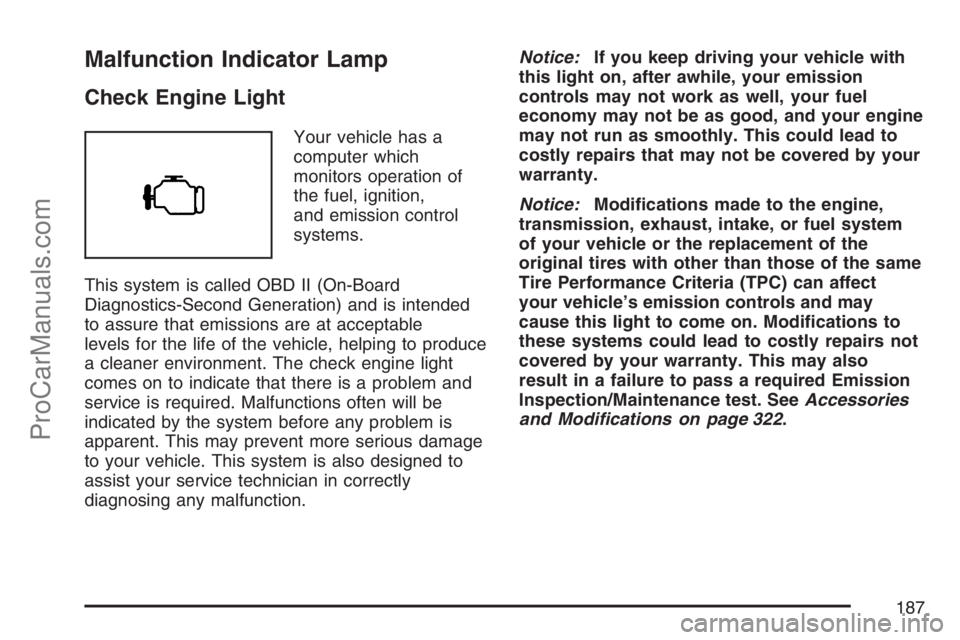
Check Engine Light
Your vehicle has a
computer which
monitors operation of
the fuel, ignition,
and emission control
systems.
This system is called OBD II (On-Board
Diagnostics-Second Generation) and is intended
to assure that emissions are at acceptable
levels for the life of the vehicle, helping to produce
a cleaner environment. The check engine light
comes on to indicate that there is a problem and
service is required. Malfunctions often will be
indicated by the system before any problem is
apparent. This may prevent more serious damage
to your vehicle. This system is also designed to
assist your service technician in correctly
diagnosing any malfunction.Notice:If you keep driving your vehicle with
this light on, after awhile, your emission
controls may not work as well, your fuel
economy may not be as good, and your engine
may not run as smoothly. This could lead to
costly repairs that may not be covered by your
warranty.
Notice:Modications made to the engine,
transmission, exhaust, intake, or fuel system
of your vehicle or the replacement of the
original tires with other than those of the same
Tire Performance Criteria (TPC) can affect
your vehicle’s emission controls and may
cause this light to come on. Modications to
these systems could lead to costly repairs not
covered by your warranty. This may also
result in a failure to pass a required Emission
Inspection/Maintenance test. SeeAccessories
and Modifications on page 322.
187
ProCarManuals.com
Page 204 of 498

SERVICE TIRE MONITOR
This message displays if a part on the Tire
Pressure Monitor (TPM) system is not working
properly. If you drive your vehicle while any of the
four sensors are missing or inoperable, the
warning comes on in about 20 minutes. A sensor
would be missing, for example, if you put
different wheels on your vehicle without
transferring the sensors. If the warning comes on
and stays on, there may be a problem with the
TPM. See your dealer.
STABILITRAK ACTIVE
This message displays anytime the StabiliTrak®
system activates to maintain vehicle stability.
Any combination of engine speed management,
brake traction control, and stability control displays
this message.
STABILITRAK NOT READY
This message may display if driving conditions
delay StabiliTrak®system initialization. This
is normal. Once the system initializes, this
message will no longer be displayed on the DIC.
STABILITRAK OFF
This message displays when you press the
StabiliTrak®button for more than ve seconds or
when stability control has been automatically
disabled. The StabiliTrak
®button is located on the
transmission shift handle. To limit wheel spin
and realize the full benets of the stability
enhancement system, you should normally leave
StabiliTrak
®on. However, you should turn
StabiliTrak®off if your vehicle gets stuck in sand,
mud, ice, or snow and you want to rock your
vehicle to attempt to free it, or if you are driving in
extreme off-road conditions and require more
wheel spin. SeeIf Your Vehicle is Stuck in Sand,
Mud, Ice, or Snow on page 295. To turn the
StabiliTrak
®system back on, press the
StabiliTrak®button again.
The message may display if the brake system
warning light is on. SeeBrake System Warning
Light on page 183.
The message turns off as soon as the conditions
that caused the message to be displayed are
no longer present.
204
ProCarManuals.com
Page 205 of 498
TIGHTEN FUEL CAP
This message may display and a chime may sound
if the vehicle’s fuel cap is not tightened properly.
Fully reinstall the fuel cap. SeeFilling the Tank on
page 326. The diagnostic system can determine if
the fuel cap has been left off or improperly installed.
A loose or missing fuel cap allows fuel to evaporate
into the atmosphere. This message remains on until
it is acknowledged and cleared from the DIC display
by pressing any of the DIC buttons or the trip stem.
The DIC message is also cancelled if the ignition is
turned off.
The DIC message and the Service Engine Soon
light may come on again during a second trip if
the fuel cap is still not tightened properly. See
Malfunction Indicator Lamp on page 187for
more information.
TRACTION CONTROL OFF
This message displays when you momentarily
press the StabiliTrak®button located on the
transmission shift handle. In this mode, stability
control and the brake-traction control are
functional. Engine speed management will be
modied and the driven wheels can spin more
freely. For more details on this mode, see
StabiliTrak
®System on page 271.
TURN SIGNAL ON
This message displays and a chime sounds if a
turn signal is left on for 3/4 of a mile (1.2 km).
Move the turn signal/multifunction lever to the off
position. Press any of the DIC buttons, or the
trip stem, to acknowledge this message and clear
it from the DIC display.
DIC Vehicle Customization
Your vehicle may have customization capabilities
that allow you to program some features to
one setting based on your preference. All of the
customizable options listed may not be available
on your vehicle. Only the options available display
on the Driver Information Center (DIC).
The default settings for the customization features
were set when your vehicle left the factory, but
may have been changed from their default
state since then.
To change feature preferences, make sure the
ignition is on and the vehicle is in PARK (P).
To avoid excessive drain on the battery, it is
recommended that the headlamps are turned off.
205
ProCarManuals.com