audio SAAB 9-7X 2007 Owner's Guide
[x] Cancel search | Manufacturer: SAAB, Model Year: 2007, Model line: 9-7X, Model: SAAB 9-7X 2007Pages: 498, PDF Size: 3.13 MB
Page 255 of 498
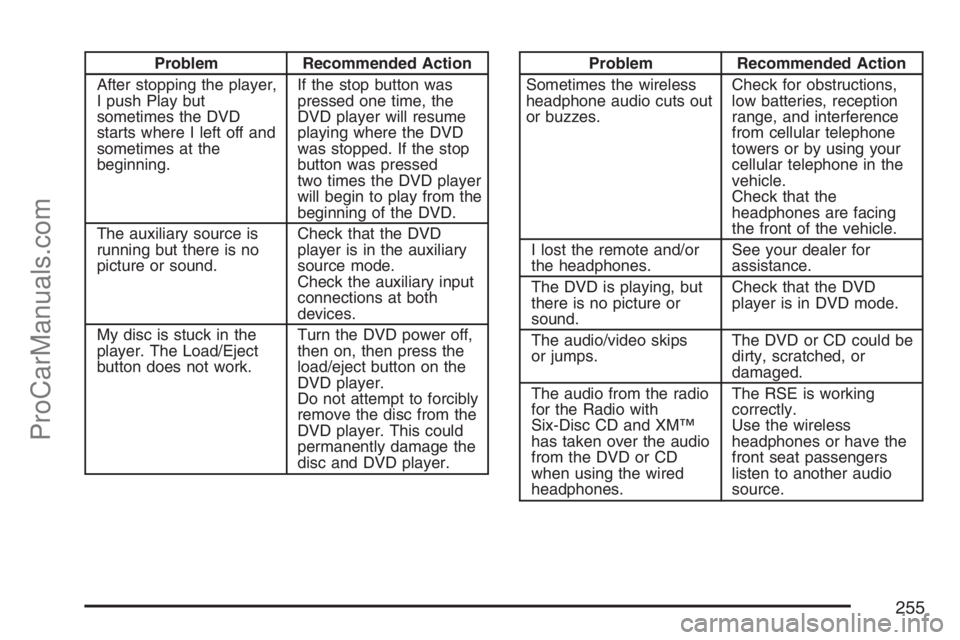
Problem Recommended Action
After stopping the player,
I push Play but
sometimes the DVD
starts where I left off and
sometimes at the
beginning.If the stop button was
pressed one time, the
DVD player will resume
playing where the DVD
was stopped. If the stop
button was pressed
two times the DVD player
will begin to play from the
beginning of the DVD.
The auxiliary source is
running but there is no
picture or sound.Check that the DVD
player is in the auxiliary
source mode.
Check the auxiliary input
connections at both
devices.
My disc is stuck in the
player. The Load/Eject
button does not work.Turn the DVD power off,
then on, then press the
load/eject button on the
DVD player.
Do not attempt to forcibly
remove the disc from the
DVD player. This could
permanently damage the
disc and DVD player.Problem Recommended Action
Sometimes the wireless
headphone audio cuts out
or buzzes.Check for obstructions,
low batteries, reception
range, and interference
from cellular telephone
towers or by using your
cellular telephone in the
vehicle.
Check that the
headphones are facing
the front of the vehicle.
I lost the remote and/or
the headphones.See your dealer for
assistance.
The DVD is playing, but
there is no picture or
sound.Check that the DVD
player is in DVD mode.
The audio/video skips
or jumps.The DVD or CD could be
dirty, scratched, or
damaged.
The audio from the radio
for the Radio with
Six-Disc CD and XM™
has taken over the audio
from the DVD or CD
when using the wired
headphones.The RSE is working
correctly.
Use the wireless
headphones or have the
front seat passengers
listen to another audio
source.
255
ProCarManuals.com
Page 256 of 498
DVD Messages
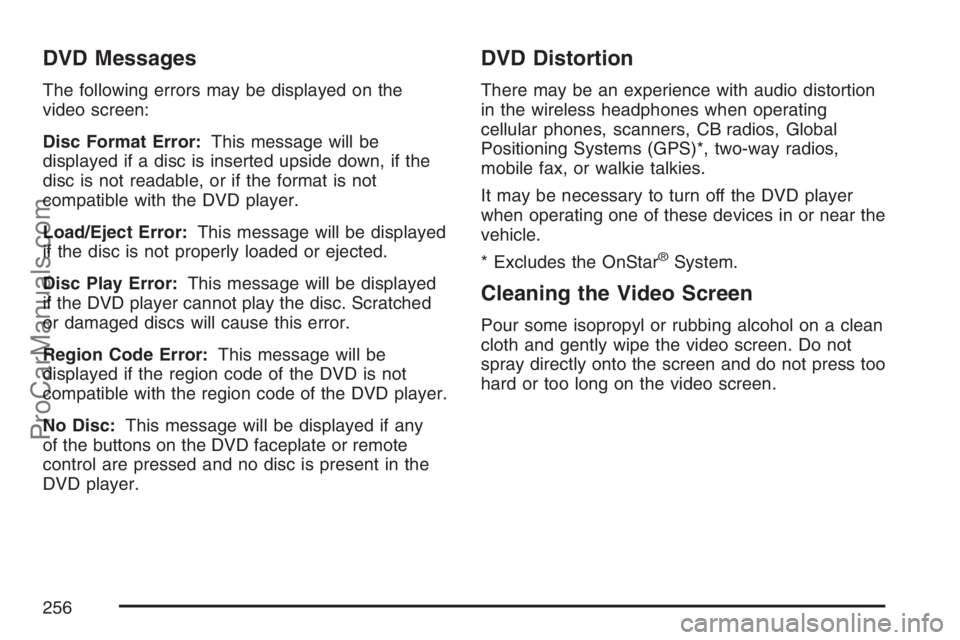
The following errors may be displayed on the
video screen:
Disc Format Error:This message will be
displayed if a disc is inserted upside down, if the
disc is not readable, or if the format is not
compatible with the DVD player.
Load/Eject Error:This message will be displayed
if the disc is not properly loaded or ejected.
Disc Play Error:This message will be displayed
if the DVD player cannot play the disc. Scratched
or damaged discs will cause this error.
Region Code Error:This message will be
displayed if the region code of the DVD is not
compatible with the region code of the DVD player.
No Disc:This message will be displayed if any
of the buttons on the DVD faceplate or remote
control are pressed and no disc is present in the
DVD player.
DVD Distortion
There may be an experience with audio distortion
in the wireless headphones when operating
cellular phones, scanners, CB radios, Global
Positioning Systems (GPS)*, two-way radios,
mobile fax, or walkie talkies.
It may be necessary to turn off the DVD player
when operating one of these devices in or near the
vehicle.
* Excludes the OnStar
®System.
Cleaning the Video Screen
Pour some isopropyl or rubbing alcohol on a clean
cloth and gently wipe the video screen. Do not
spray directly onto the screen and do not press too
hard or too long on the video screen.
256
ProCarManuals.com
Page 257 of 498
Rear Seat Audio (RSA)
This feature allows rear seat passengers to select
and listen to any of the available radio sources:
AM/FM, XM, CD, or DVD. However, a rear
seat passenger cannot control a source selected
on the radio by someone in the front of the
vehicle. For example, the RSA cannot be used to
change CD tracks if the radio is set to CD.
Also, if the radio is switched to a source the RSA
has control of, sound will not be lost, but the
RSA will lose control of that sourse.
Rear seat passengers always have control of the
volume for each set of headphones.
The RSA will run when the radio is off if the
ignition key is positioned in the power mode, see
XXX in this manual.
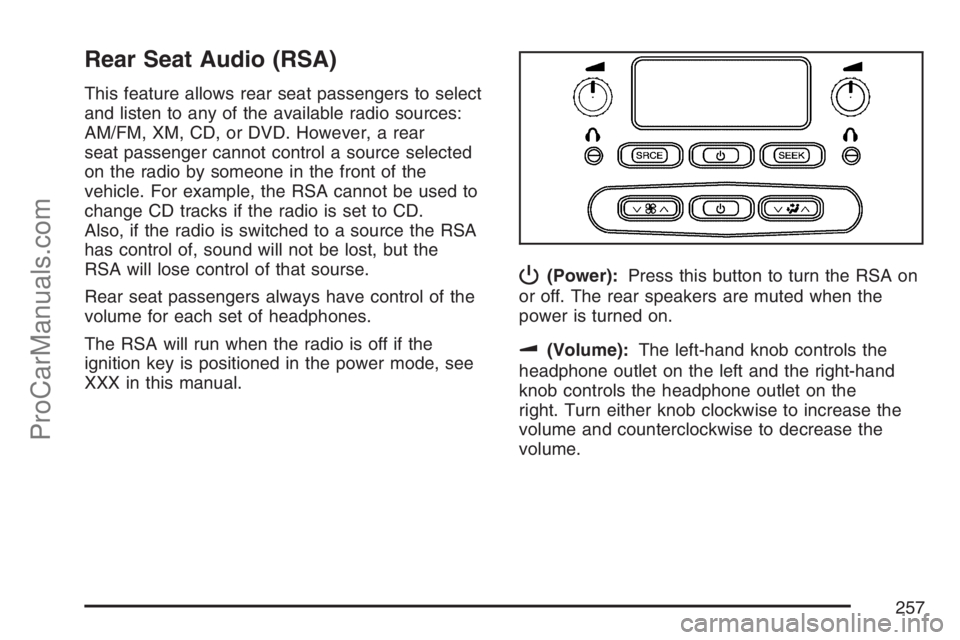
P(Power):Press this button to turn the RSA on
or off. The rear speakers are muted when the
power is turned on.
u(Volume):The left-hand knob controls the
headphone outlet on the left and the right-hand
knob controls the headphone outlet on the
right. Turn either knob clockwise to increase the
volume and counterclockwise to decrease the
volume.
257
ProCarManuals.com
Page 258 of 498
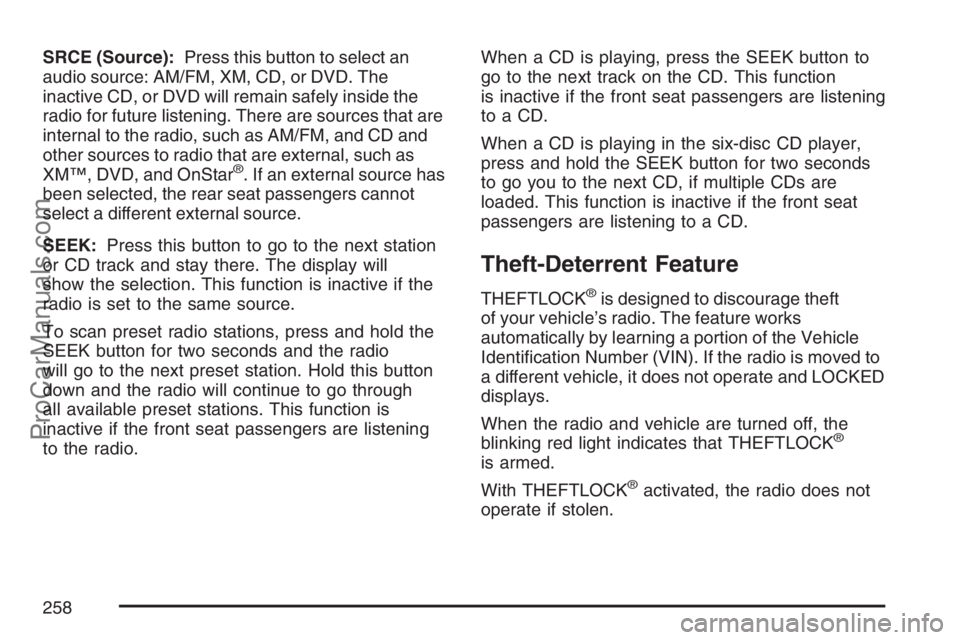
SRCE (Source):Press this button to select an
audio source: AM/FM, XM, CD, or DVD. The
inactive CD, or DVD will remain safely inside the
radio for future listening. There are sources that are
internal to the radio, such as AM/FM, and CD and
other sources to radio that are external, such as
XM™, DVD, and OnStar
®. If an external source has
been selected, the rear seat passengers cannot
select a different external source.
SEEK:Press this button to go to the next station
or CD track and stay there. The display will
show the selection. This function is inactive if the
radio is set to the same source.
To scan preset radio stations, press and hold the
SEEK button for two seconds and the radio
will go to the next preset station. Hold this button
down and the radio will continue to go through
all available preset stations. This function is
inactive if the front seat passengers are listening
to the radio.When a CD is playing, press the SEEK button to
go to the next track on the CD. This function
is inactive if the front seat passengers are listening
to a CD.
When a CD is playing in the six-disc CD player,
press and hold the SEEK button for two seconds
to go you to the next CD, if multiple CDs are
loaded. This function is inactive if the front seat
passengers are listening to a CD.
Theft-Deterrent Feature
THEFTLOCK®is designed to discourage theft
of your vehicle’s radio. The feature works
automatically by learning a portion of the Vehicle
Identication Number (VIN). If the radio is moved to
a different vehicle, it does not operate and LOCKED
displays.
When the radio and vehicle are turned off, the
blinking red light indicates that THEFTLOCK
®
is armed.
With THEFTLOCK
®activated, the radio does not
operate if stolen.
258
ProCarManuals.com
Page 259 of 498
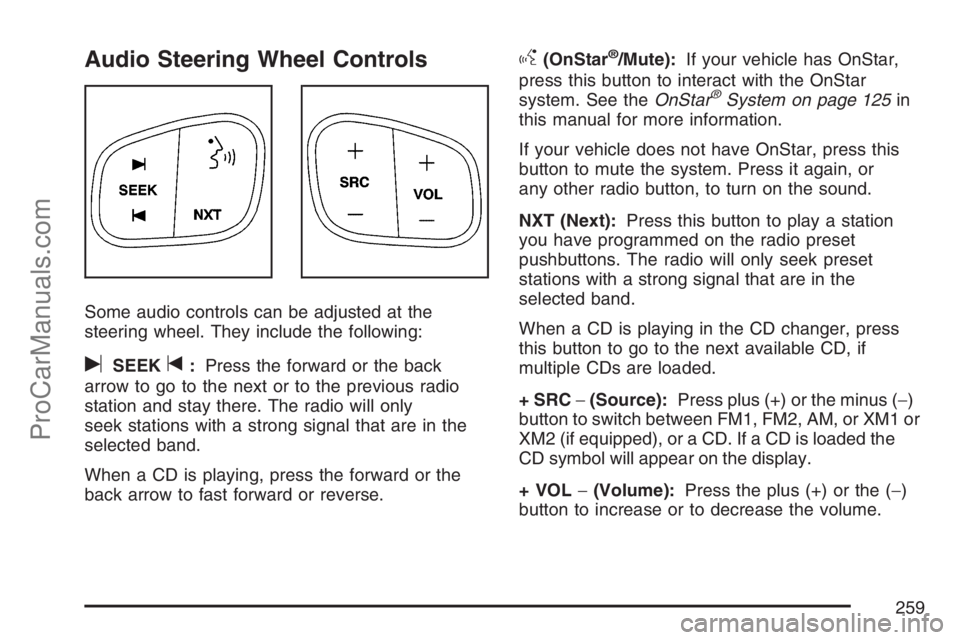
Audio Steering Wheel Controls
Some audio controls can be adjusted at the
steering wheel. They include the following:
uSEEKt:Press the forward or the back
arrow to go to the next or to the previous radio
station and stay there. The radio will only
seek stations with a strong signal that are in the
selected band.
When a CD is playing, press the forward or the
back arrow to fast forward or reverse.
g(OnStar®/Mute):If your vehicle has OnStar,
press this button to interact with the OnStar
system. See theOnStar
®System on page 125in
this manual for more information.
If your vehicle does not have OnStar, press this
button to mute the system. Press it again, or
any other radio button, to turn on the sound.
NXT (Next):Press this button to play a station
you have programmed on the radio preset
pushbuttons. The radio will only seek preset
stations with a strong signal that are in the
selected band.
When a CD is playing in the CD changer, press
this button to go to the next available CD, if
multiple CDs are loaded.
+ SRC−(Source):Press plus (+) or the minus (−)
button to switch between FM1, FM2, AM, or XM1 or
XM2 (if equipped), or a CD. If a CD is loaded the
CD symbol will appear on the display.
+ VOL−(Volume):Press the plus (+) or the (−)
button to increase or to decrease the volume.
259
ProCarManuals.com
Page 484 of 498
Appearance Care (cont.)
Vehicle Care/Appearance Materials.......... 432
Washing Your Vehicle.............................. 427
Weatherstrips........................................... 427
Windshield, Backglass, and
Wiper Blades........................................ 429
Audio System(s).......................................... 212
Audio Steering Wheel Controls................. 259
Care of Your CD and DVD Player............ 261
Care of Your CDs and DVDs................... 261
Fixed Mast Antenna................................. 261
Navigation/Radio System,
see Navigation Manual......................... 243
Radio with CD......................................... 214
Radio with Six-Disc CD............................ 222
Rear Seat Audio (RSA)............................ 257
Setting the Time...................................... 213
Theft-Deterrent Feature............................ 258
Understanding Radio Reception............... 260
XM™ Satellite Radio Antenna System...... 261
Automatic Headlamp System....................... 161
Automatic Transmission
Fluid........................................................ 341
Operation................................................. 112B
Battery........................................................ 361
Electric Power Management..................... 164
Run-Down Protection............................... 165
Before Leaving on a Long Trip.................... 287
Brake
Anti-Lock Brake System (ABS)................. 269
Emergencies............................................ 271
Parking.................................................... 116
System Warning Light.............................. 183
Brake Pedal, Throttle................................... 110
Brakes........................................................ 358
Braking....................................................... 268
Braking in Emergencies............................... 271
Break-In, New Vehicle................................. 106
Bulb Replacement....................................... 371
Front Turn Signal, Sidemarker and
Parking Lamps..................................... 374
Halogen Bulbs......................................... 372
Headlamp Aiming..................................... 371
Headlamps............................................... 372
High Intensity Discharge (HID) Lighting.... 371
License Plate Lamps................................ 376
484
ProCarManuals.com
Page 493 of 498
P
Paint, Damage............................................ 430
Park (P)
Shifting Into............................................. 117
Shifting Out of......................................... 118
Parking
Brake....................................................... 116
Over Things That Burn............................ 118
Passenger Airbag Status Indicator............... 179
Passenger Sensing System........................... 74
Passing....................................................... 278
PASS-Key
®III ............................................. 103
PASS-Key®III Operation............................. 104
Personalization, Climate Controls................. 173
Power
Accessory Outlet(s).................................. 166
Door Locks................................................ 93
Electrical System..................................... 435
Lumbar Controls.......................................... 9
Reclining Seatbacks................................... 13
Reduced Engine Light.............................. 191
Retained Accessory (RAP)....................... 108
Seat............................................................ 9Power (cont.)
Steering Fluid.......................................... 356
Windows.................................................. 100
Pretensioners, Safety Belt............................. 37
Programmable Automatic Door Locks............ 94
Q
Questions and Answers About Safety Belts...... 22
R
Radiator Pressure Cap................................ 347
Radios........................................................ 212
Care of Your CD and DVD Player............ 261
Care of Your CDs and DVDs................... 261
Navigation/Radio System,
see Navigation Manual......................... 243
Radio with CD......................................... 214
Radio with Six-Disc CD............................ 222
Rear Seat Audio...................................... 257
Setting the Time...................................... 213
Theft-Deterrent......................................... 258
Understanding Reception......................... 260
493
ProCarManuals.com
Page 494 of 498
Reading Lamps........................................... 164
Rear Axle.................................................... 369
Limited-Slip.............................................. 271
Rear Climate Control System...................... 173
Rear Door Security Locks............................. 97
Rear Floor Storage Lid................................ 142
Rear Safety Belt Comfort Guides.................. 35
Rear Seat Audio (RSA)............................... 257
Rear Seat Entertainment System................. 243
Rear Seat Operation..................................... 16
Rear Seat Passengers, Safety Belts.............. 32
Rear Windshield Washer/Wiper.................... 155
Rearview Mirror, Automatic Dimming
with Compass.......................................... 123
Rearview Mirror, Automatic Dimming
with OnStar
®and Compass..................... 121
Reclining Seatbacks, Power.......................... 13
Recommended Fluids and Lubricants.......... 458
Recreational Vehicle Towing........................ 302
Reduced Engine Power Light...................... 191
Remote Keyless Entry (RKE) System............ 89
Remote Keyless Entry (RKE) System,
Operation................................................... 90Removing the Flat Tire and Installing
the Spare Tire.......................................... 410
Removing the Spare Tire and Tools............ 408
Replacement Bulbs..................................... 376
Replacement, Windshield............................. 377
Reporting Safety Defects
Canadian Government............................. 479
Saab........................................................ 480
United States Government....................... 479
Restraint System Check
Checking the Restraint Systems................. 82
Replacing Restraint System Parts
After a Crash......................................... 83
Retained Accessory Power (RAP)................ 108
Right Front Passenger Position,
Safety Belts............................................... 32
Roadside
Assistance Program................................. 469
Rocking Your Vehicle to Get it Out.............. 296
Routing, Engine Drive Belt.......................... 461
Running the Engine While Parked............... 120
494
ProCarManuals.com
Page 496 of 498
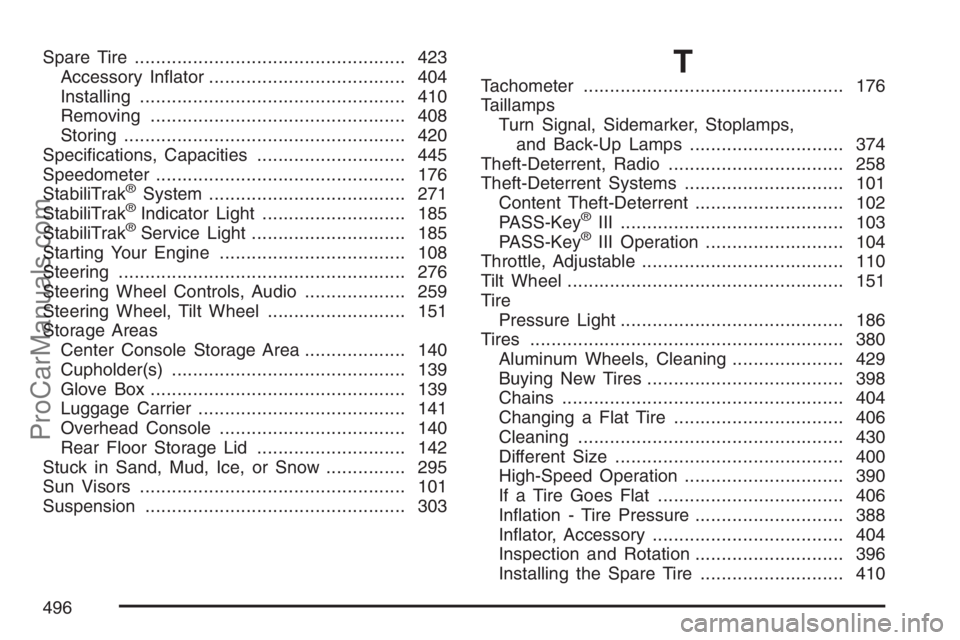
Spare Tire................................................... 423
Accessory Inator..................................... 404
Installing.................................................. 410
Removing................................................ 408
Storing..................................................... 420
Specications, Capacities............................ 445
Speedometer............................................... 176
StabiliTrak
®System..................................... 271
StabiliTrak®Indicator Light........................... 185
StabiliTrak®Service Light............................. 185
Starting Your Engine................................... 108
Steering...................................................... 276
Steering Wheel Controls, Audio................... 259
Steering Wheel, Tilt Wheel.......................... 151
Storage Areas
Center Console Storage Area................... 140
Cupholder(s)............................................ 139
Glove Box................................................ 139
Luggage Carrier....................................... 141
Overhead Console................................... 140
Rear Floor Storage Lid............................ 142
Stuck in Sand, Mud, Ice, or Snow............... 295
Sun Visors.................................................. 101
Suspension................................................. 303
T
Tachometer................................................. 176
Taillamps
Turn Signal, Sidemarker, Stoplamps,
and Back-Up Lamps............................. 374
Theft-Deterrent, Radio................................. 258
Theft-Deterrent Systems.............................. 101
Content Theft-Deterrent............................ 102
PASS-Key
®III .......................................... 103
PASS-Key®III Operation.......................... 104
Throttle, Adjustable...................................... 110
Tilt Wheel.................................................... 151
Tire
Pressure Light.......................................... 186
Tires........................................................... 380
Aluminum Wheels, Cleaning..................... 429
Buying New Tires..................................... 398
Chains..................................................... 404
Changing a Flat Tire................................ 406
Cleaning.................................................. 430
Different Size........................................... 400
High-Speed Operation.............................. 390
If a Tire Goes Flat................................... 406
Ination - Tire Pressure............................ 388
Inator, Accessory.................................... 404
Inspection and Rotation............................ 396
Installing the Spare Tire........................... 410
496
ProCarManuals.com