fuel pressure SAAB 9-7X 2007 Owners Manual
[x] Cancel search | Manufacturer: SAAB, Model Year: 2007, Model line: 9-7X, Model: SAAB 9-7X 2007Pages: 498, PDF Size: 3.13 MB
Page 146 of 498
Tire Pressure Light.................................... 186
Malfunction Indicator Lamp........................ 187
Oil Pressure Gage..................................... 190
Security Light............................................ 191
Cruise Control Light.................................. 191
Reduced Engine Power Light.................... 191
Highbeam On Light................................... 192
Service All-Wheel Drive Light.................... 192
Check Gages Warning Light...................... 192
Gate Ajar Light.......................................... 193
Fuel Gage................................................. 193
Low Fuel Warning Light............................ 194
Check Gas Cap Light................................ 194
Driver Information Center (DIC).................. 194
DIC Operation and Displays...................... 195
DIC Warnings and Messages.................... 199
DIC Vehicle Customization........................ 205Audio System(s)......................................... 212
Setting the Time........................................ 213
Radio with CD........................................... 214
Radio with Six-Disc CD............................. 222
Using an MP3........................................... 233
XM Radio Messages................................. 239
Navigation/Radio System........................... 243
Rear Seat Entertainment System............... 243
Rear Seat Audio (RSA)............................. 257
Theft-Deterrent Feature............................. 258
Audio Steering Wheel Controls.................. 259
Radio Reception........................................ 260
Care of Your CDs and DVDs.................... 261
Care of the CD and DVD Player............... 261
Fixed Mast Antenna.................................. 261
XM™ Satellite Radio Antenna System....... 261
Section 3 Instrument Panel
146
ProCarManuals.com
Page 198 of 498
Tire Pressures:Press the trip information button
until TIRE PRESSURES appears on the display.
This mode shows the tire pressure in pounds
per square inch (psi) or kilopascals (kPa). Press
the select button to scroll through the following
information:
LF TIRE shows the tire pressure for the front
driver’s side tire.
RF TIRE shows the tire pressure for the front
passenger’s side tire.
LR TIRE shows the tire pressure for the rear
driver’s side tire.
RR TIRE shows the tire pressure for the rear
passenger’s side tire.
Timer:The DIC can be used as a timer. Press
the select button while TIMER is displayed to start
the timer. The display will show the amount of
time that has passed since the timer was
last reset, not including time the ignition is off.
Time will continue to be counted as long as
the ignition is on, even if another display is being
shown on the DIC. The timer will record up to
99 hours, 59 minutes, and 59 seconds (99:59:59),
after which the display will roll back to zero.To stop the counting of time, press the select
button briey while TIMER is displayed.
To reset the timer to zero, press and hold the
select button while TIMER is displayed.
Customization Button
q
(Customization):Press this button to access
the VEHICLE SETTINGS menu and customize
the settings to your vehicle. SeeDIC Vehicle
Customization on page 205for more information.
Select Button
r
(Select):Press the select button to reset
certain DIC functions, turn off or acknowledge
messages on the DIC display, and set your
customization settings. For example, this button
will allow you to reset the trip odometers, turn
off the FUEL LEVEL LOW message, and enables
you to scroll through and select the language
in which the DIC information will appear.
198
ProCarManuals.com
Page 287 of 498
Once you are moving on the freeway, make
certain you allow a reasonable following distance.
Expect to move slightly slower at night.
When you want to leave the freeway, move to the
proper lane well in advance. If you miss your
exit, do not, under any circumstances, stop and
back up. Drive on to the next exit.
The exit ramp can be curved, sometimes quite
sharply. The exit speed is usually posted.
Reduce your speed according to your
speedometer, not to your sense of motion.
After driving for any distance at higher speeds,
you may tend to think you are going slower than
you actually are.
Before Leaving on a Long Trip
Make sure you are ready. Try to be well rested.
If you must start when you are not fresh — such as
after a day’s work — do not plan to make too
many miles that rst part of the journey. Wear
comfortable clothing and shoes you can easily
drive in.Is your vehicle ready for a long trip? If you keep it
serviced and maintained, it is ready to go. If it needs
service, have it done before starting out. Of course,
you will nd experienced and able service experts
in dealerships all across North America. They will
be ready and willing to help if you need it.
Here are some things you can check before a trip:
Windshield Washer Fluid:Is the reservoir
full? Are all windows clean inside and outside?
Wiper Blades:Are they in good shape?
Fuel, Engine Oil, Other Fluids:Have you
checked all levels?
Lamps:Are they all working? Are the lenses
clean?
Tires:They are vitally important to a safe,
trouble-free trip. Is the tread good enough
for long-distance driving? Are the tires
all inated to the recommended pressure?
Weather Forecasts:What is the weather
outlook along your route? Should you
delay your trip a short time to avoid a major
storm system?
Maps:Do you have up-to-date maps?
287
ProCarManuals.com
Page 319 of 498
Service........................................................ 322
Accessories and Modications................... 322
California Proposition 65 Warning.............. 322
Doing Your Own Service Work.................. 323
Adding Equipment to the Outside of
Your Vehicle.......................................... 323
Fuel............................................................. 324
Gasoline Octane........................................ 324
Gasoline Specications.............................. 324
California Fuel........................................... 324
Additives................................................... 325
Fuels in Foreign Countries........................ 326
Filling the Tank......................................... 326
Filling a Portable Fuel Container............... 328
Checking Things Under the Hood.............. 329
Hood Release........................................... 329
Engine Compartment Overview.................. 330
Engine Oil................................................. 334
Engine Oil Life System.............................. 337
Engine Air Cleaner/Filter............................ 339
Automatic Transmission Fluid.................... 341
Engine Coolant.......................................... 344
Radiator Pressure Cap.............................. 347Engine Overheating................................... 347
Cooling System......................................... 349
Engine Fan Noise..................................... 355
Power Steering Fluid ................................. 356
Windshield Washer Fluid........................... 357
Brakes...................................................... 358
Battery...................................................... 361
Jump Starting............................................ 362
All-Wheel Drive........................................... 368
Rear Axle.................................................... 369
Front Axle................................................... 370
Headlamp Aiming........................................ 371
Bulb Replacement....................................... 371
High Intensity Discharge (HID) Lighting........ 371
Halogen Bulbs........................................... 372
Headlamps................................................ 372
Front Turn Signal, Sidemarker and
Parking Lamps....................................... 374
Taillamps, Turn Signal, Sidemarker,
Stoplamps and Back-up Lamps.............. 374
License Plate Lamp................................... 376
Replacement Bulbs................................... 376
Section 5 Service and Appearance Care
319
ProCarManuals.com
Page 355 of 498
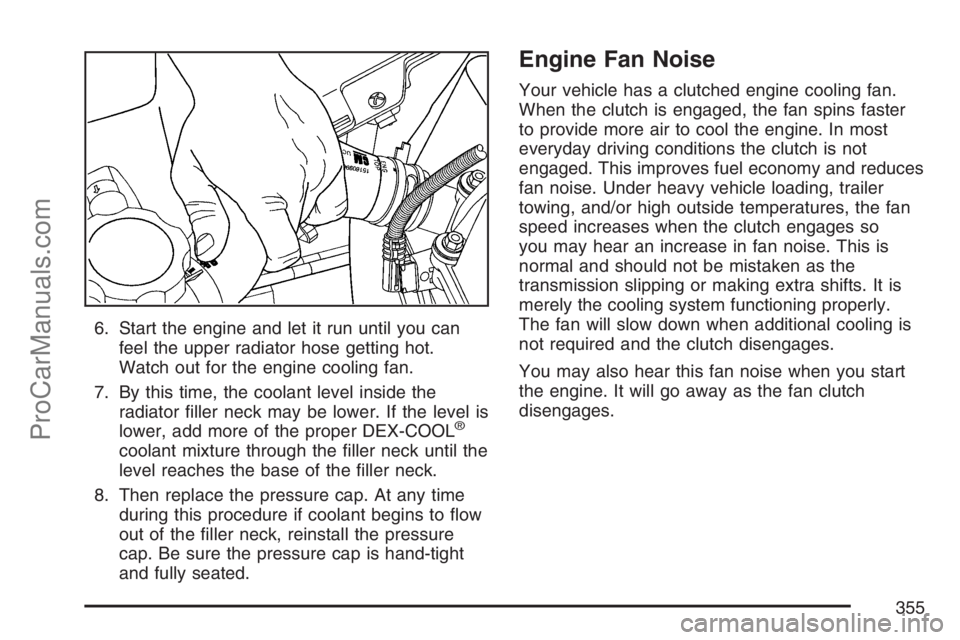
6. Start the engine and let it run until you can
feel the upper radiator hose getting hot.
Watch out for the engine cooling fan.
7. By this time, the coolant level inside the
radiator ller neck may be lower. If the level is
lower, add more of the proper DEX-COOL
®
coolant mixture through the ller neck until the
level reaches the base of the ller neck.
8. Then replace the pressure cap. At any time
during this procedure if coolant begins to ow
out of the ller neck, reinstall the pressure
cap. Be sure the pressure cap is hand-tight
and fully seated.
Engine Fan Noise
Your vehicle has a clutched engine cooling fan.
When the clutch is engaged, the fan spins faster
to provide more air to cool the engine. In most
everyday driving conditions the clutch is not
engaged. This improves fuel economy and reduces
fan noise. Under heavy vehicle loading, trailer
towing, and/or high outside temperatures, the fan
speed increases when the clutch engages so
you may hear an increase in fan noise. This is
normal and should not be mistaken as the
transmission slipping or making extra shifts. It is
merely the cooling system functioning properly.
The fan will slow down when additional cooling is
not required and the clutch disengages.
You may also hear this fan noise when you start
the engine. It will go away as the fan clutch
disengages.
355
ProCarManuals.com
Page 385 of 498
Tire Terminology and Denitions
Air Pressure:The amount of air inside the tire
pressing outward on each square inch of the
tire. Air pressure is expressed in pounds
per square inch (psi) or kilopascal (kPa).
Accessory Weight:This means the combined
weight of optional accessories. Some examples
of optional accessories are, automatic
transmission/transaxle, power steering, power
brakes, power windows, power seats, and
air conditioning.
Aspect Ratio:The relationship of a tire’s height
to its width.
Belt:A rubber coated layer of cords that is located
between the plies and the tread. Cords may be
made from steel or other reinforcing materials.
Bead:The tire bead contains steel wires wrapped
by steel cords that hold the tire onto the rim.
Bias Ply Tire:A pneumatic tire in which the plies
are laid at alternate angles less than 90 degrees
to the centerline of the tread.Cold Tire Pressure:The amount of air pressure in
a tire, measured in pounds per square inch (psi) or
kilopascals (kPa) before a tire has built up heat
from driving. SeeInation - Tire Pressure on
page 388.
Curb Weight:This means the weight of a motor
vehicle with standard and optional equipment
including the maximum capacity of fuel, oil, and
coolant, but without passengers and cargo.
DOT Markings:A code molded into the sidewall
of a tire signifying that the tire is in compliance
with the U.S. Department of Transportation (DOT)
motor vehicle safety standards. The DOT code
includes the Tire Identication Number (TIN),
an alphanumeric designator which can also identify
the tire manufacturer, production plant, brand,
and date of production.
GVWR:Gross Vehicle Weight Rating.
SeeLoading Your Vehicle on page 296.
GAWR FRT:Gross Axle Weight Rating for the
front axle. SeeLoading Your Vehicle on page 296.
GAWR RR:Gross Axle Weight Rating for the
rear axle. SeeLoading Your Vehicle on page 296.
385
ProCarManuals.com
Page 388 of 498
Ination - Tire Pressure
Tires need the correct amount of air pressure to
operate effectively.
Notice:Do not let anyone tell you that
under-ination or over-ination is all right.
It is not. If your tires do not have enough air
(under-ination), you can get the following:
Too much exing
Too much heat
Tire overloading
Premature or irregular wear
Poor handling
Reduced fuel economy
If your tires have too much air (over-ination),
you can get the following:
Unusual wear
Poor handling
Rough ride
Needless damage from road hazardsA Tire and Loading Information label is attached to
the vehicle’s center pillar (B-pillar), below the
driver’s door latch. This label shows your vehicle’s
original equipment tires and the correct ination
pressures for your tires when they are cold.
The recommended cold tire ination pressure,
shown on the label, is the minimum amount of air
pressure needed to support your vehicle’s
maximum load carrying capacity.
For additional information regarding how much
weight your vehicle can carry, and an example
of the tire and loading information label, see
Loading Your Vehicle on page 296. How you load
your vehicle affects vehicle handling and ride
comfort, never load your vehicle with more weight
than it was designed to carry.
388
ProCarManuals.com
Page 392 of 498
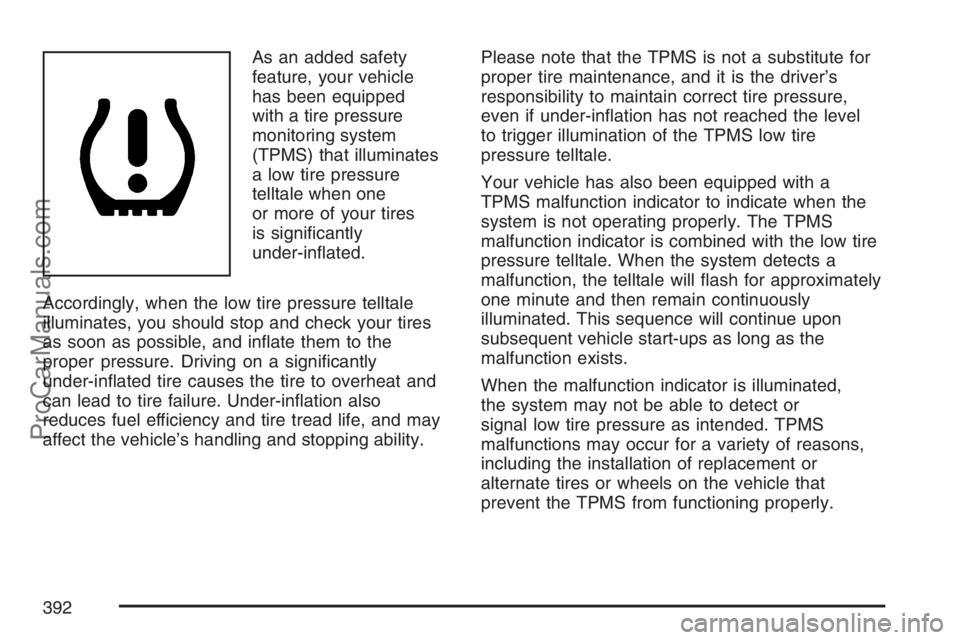
As an added safety
feature, your vehicle
has been equipped
with a tire pressure
monitoring system
(TPMS) that illuminates
a low tire pressure
telltale when one
or more of your tires
is signicantly
under-inated.
Accordingly, when the low tire pressure telltale
illuminates, you should stop and check your tires
as soon as possible, and inate them to the
proper pressure. Driving on a signicantly
under-inated tire causes the tire to overheat and
can lead to tire failure. Under-ination also
reduces fuel efficiency and tire tread life, and may
affect the vehicle’s handling and stopping ability.Please note that the TPMS is not a substitute for
proper tire maintenance, and it is the driver’s
responsibility to maintain correct tire pressure,
even if under-ination has not reached the level
to trigger illumination of the TPMS low tire
pressure telltale.
Your vehicle has also been equipped with a
TPMS malfunction indicator to indicate when the
system is not operating properly. The TPMS
malfunction indicator is combined with the low tire
pressure telltale. When the system detects a
malfunction, the telltale will ash for approximately
one minute and then remain continuously
illuminated. This sequence will continue upon
subsequent vehicle start-ups as long as the
malfunction exists.
When the malfunction indicator is illuminated,
the system may not be able to detect or
signal low tire pressure as intended. TPMS
malfunctions may occur for a variety of reasons,
including the installation of replacement or
alternate tires or wheels on the vehicle that
prevent the TPMS from functioning properly.
392
ProCarManuals.com
Page 454 of 498
(e)Make sure the safety belt reminder light and all
your belts, buckles, latch plates, retractors, and
anchorages are working properly. Look for
any other loose or damaged safety belt system
parts. If you see anything that might keep a safety
belt system from doing its job, have it repaired.
Have any torn or frayed safety belts replaced. Also
look for any opened or broken airbag coverings,
and have them repaired or replaced. The airbag
system does not need regular maintenance.
(f)Lubricate all key lock cylinders, hood latch
assembly, secondary latch, pivots, spring anchor,
release pawl, rear compartment hinges, outer
liftgate handle pivot points, rear door detent link,
roller mechanism, liftgate handle pivot points, latch
bolt, fuel door hinge, cargo door hinge, locks,
and folding seat hardware. More frequent
lubrication may be required when exposed to a
corrosive environment. Applying silicone grease on
weatherstrips with a clean cloth will make them
last longer, seal better, and not stick or squeak.
(g)Inspect hoses for cracks, chang, leaks, kinks,
and proper installation.(h)Change automatic transmission uid and lter
if the vehicle is mainly driven under one or
more of these conditions:
In heavy city traffic where the outside
temperature regularly reaches 90°F (32°C)
or higher.
In hilly or mountainous terrain.
When doing frequent trailer towing.
Uses such as found in taxi, police, or delivery
service.
(i)Drain, ush, and rell cooling system.
This service can be complex; you should have
your dealer perform this service. See Engine
Coolant on page 344 for what to use. Inspect
hoses. Clean radiator, condenser, pressure cap,
and ller neck. Pressure test the cooling
system and pressure cap.
(j)A uid loss in any vehicle system could indicate
a problem. Have the system inspected and repaired
and the uid level checked. Add uid if needed.
(k)If you drive regularly under dusty conditions,
inspect the lter at each engine oil change.
(l)Visually inspect belt for fraying, excessive cracks,
or obvious damage. Replace belt if necessary.
454
ProCarManuals.com
Page 455 of 498
Owner Checks and Services
These owner checks and services should be
performed at the intervals specied to help ensure
the safety, dependability, and emission control
performance of your vehicle. Your dealer can
assist you with these checks and services.
Be sure any necessary repairs are completed at
once. Whenever any uids or lubricants are added
to your vehicle, make sure they are the proper
ones, as shown inRecommended Fluids and
Lubricants on page 458.
At Each Fuel Fill
It is important to perform these underhood checks
at each fuel ll.
Engine Oil Level Check
Check the engine oil level and add the proper oil if
necessary. SeeEngine Oil on page 334for
further details.
Notice:It is important to check your oil
regularly and keep it at the proper level. Failure
to keep your engine oil at the proper level can
cause damage to your engine not covered by
your warranty.
Engine Coolant Level Check
Check the engine coolant level and add
DEX-COOL®coolant mixture if necessary. See
Engine Coolant on page 344for further details.
Windshield Washer Fluid Level Check
Check the windshield washer uid level in
the windshield washer uid reservoir and add the
proper uid if necessary.
At Least Once a Month
Tire Ination Check
Visually inspect your vehicle’s tires and make sure
they are inated to the correct pressures. Do not
forget to check the spare tire. SeeInation - Tire
Pressure on page 388. Check to make sure the
spare tire is stored securely. SeeChanging a Flat
Tire on page 406.
Tire Wear Inspection
Tire rotation may be required for high mileage
highway drivers prior to the Engine Oil Life System
service notication. Check the tires for wear
and, if necessary, rotate the tires. SeeTire
Inspection and Rotation on page 396.
455
ProCarManuals.com