lights SAAB 9-7X 2008 User Guide
[x] Cancel search | Manufacturer: SAAB, Model Year: 2008, Model line: 9-7X, Model: SAAB 9-7X 2008Pages: 426, PDF Size: 2.77 MB
Page 178 of 426

Headlamp Delay
Press the customization button until HEADLAMP
DELAY: 10 SEC appears in the display. To select your
preference for how long the headlamps will stay on
after you turn off the vehicle, press the select button
while HEADLAMP DELAY: 10 SEC is displayed on
the DIC. Pressing the select button will scroll through
the following settings:
HEADLAMP DELAY: 10 SEC (Seconds) (default):
The headlamps will stay on for 10 seconds.
HEADLAMP DELAY: 20 SEC:The headlamps will
stay on for 20 seconds.
HEADLAMP DELAY: 40 SEC:The headlamps will
stay on for 40 seconds.
HEADLAMP DELAY: 1 MIN (Minute):The headlamps
will stay on for 1 minute.
HEADLAMP DELAY: 2 MIN:The headlamps will
stay on for 2 minutes.
HEADLAMP DELAY: 3 MIN:The headlamps will
stay on for 3 minutes.
HEADLAMP DELAY: OFF:The headlamps will
not turn on.To select a setting and move on to the next feature,
press the customization button while the desired setting
is displayed on the DIC.
Perimeter Lights
Press the customization button until PERIMETER
LIGHTS: ON appears in the display. To select your
preference for perimeter lighting, press the select button
while PERIMETER LIGHTS: ON is displayed on the
DIC. Pressing the select button will scroll through
the following settings:
PERIMETER LIGHTS: ON (default):The headlamps
and back-up lamps will come on for 40 seconds, if
it is dark enough outside, when you unlock the vehicle
with the Remote Keyless Entry (RKE) transmitter.
PERIMETER LIGHTS: OFF:The perimeter lights will
not come on when you unlock the vehicle with the
RKE transmitter.
To select a setting and move on to the next feature,
press the customization button while the desired setting
is displayed on the DIC.
3-56
ProCarManuals.com
Page 218 of 426
And, of course, actual stopping distances vary greatly
with the surface of the road, whether it is pavement
or gravel; the condition of the road, whether it is
wet, dry, or icy; tire tread; the condition of the brakes;
the weight of the vehicle; and the amount of brake force
applied.
Avoid needless heavy braking. Some people drive
in spurts — heavy acceleration followed by heavy
braking — rather than keeping pace with traffic. This is
a mistake. The brakes might not have time to cool
between hard stops. The brakes will wear out much
faster if you do a lot of heavy braking. If you keep pace
with the traffic and allow realistic following distances,
you will eliminate a lot of unnecessary braking.
That means better braking and longer brake life.
If your vehicle’s engine ever stops while you are driving,
brake normally but do not pump the brakes. If you do,
the pedal could get harder to push down. If the
engine stops, you will still have some power brake
assist. But you will use it when you brake. Once the
power assist is used up, it can take longer to stop and
the brake pedal will be harder to push.
Adding non-dealer/non-retailer accessories can affect
your vehicle’s performance. SeeAccessories and
Modifications on page 5-3.Antilock Brake System (ABS)
Your vehicle has the Antilock Brake System (ABS),
an advanced electronic braking system that will
help prevent a braking skid.
When you start the engine and begin to drive away,
ABS will check itself. You might hear a momentary
motor or clicking noise while this test is going on.
This is normal.
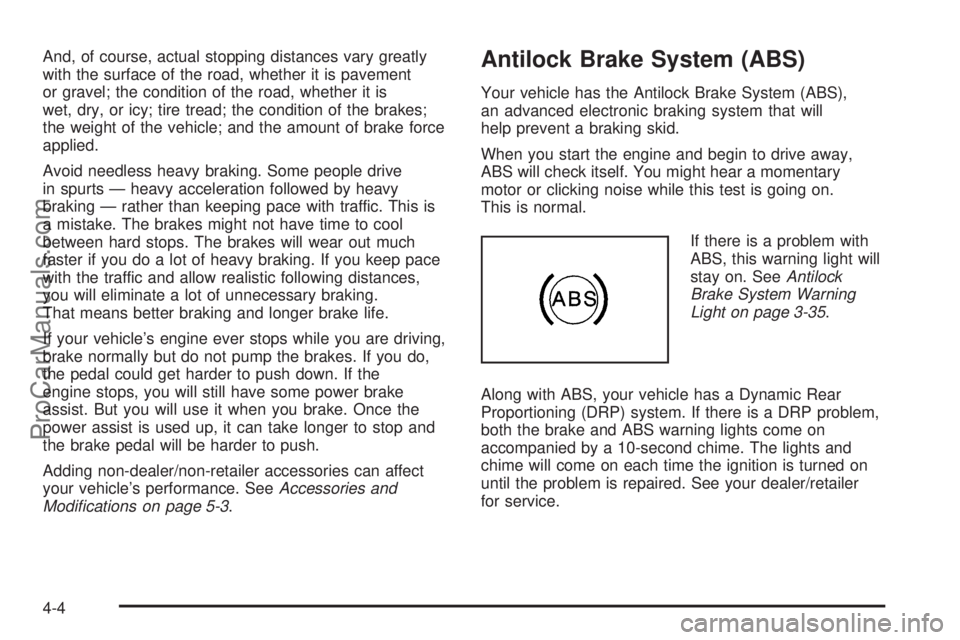
If there is a problem with
ABS, this warning light will
stay on. SeeAntilock
Brake System Warning
Light on page 3-35.
Along with ABS, your vehicle has a Dynamic Rear
Proportioning (DRP) system. If there is a DRP problem,
both the brake and ABS warning lights come on
accompanied by a 10-second chime. The lights and
chime will come on each time the ignition is turned on
until the problem is repaired. See your dealer/retailer
for service.
4-4
ProCarManuals.com
Page 222 of 426
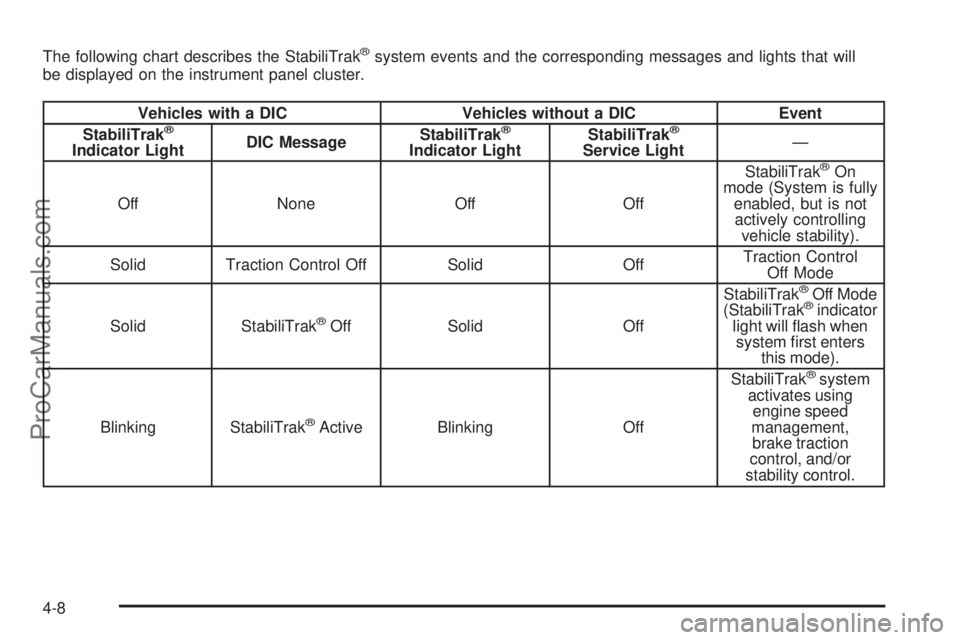
The following chart describes the StabiliTrak®system events and the corresponding messages and lights that will
be displayed on the instrument panel cluster.
Vehicles with a DIC Vehicles without a DIC Event
StabiliTrak®
Indicator LightDIC MessageStabiliTrak
®
Indicator LightStabiliTrak
®
Service Light—
Off None Off OffStabiliTrak®On
mode (System is fully
enabled, but is not
actively controlling
vehicle stability).
Solid Traction Control Off Solid OffTraction Control
Off Mode
Solid StabiliTrak
®Off Solid OffStabiliTrak
®Off Mode
(StabiliTrak®indicator
light will ash when
system rst enters
this mode).
Blinking StabiliTrak
®Active Blinking OffStabiliTrak
®system
activates using
engine speed
management,
brake traction
control, and/or
stability control.
4-8
ProCarManuals.com
Page 223 of 426
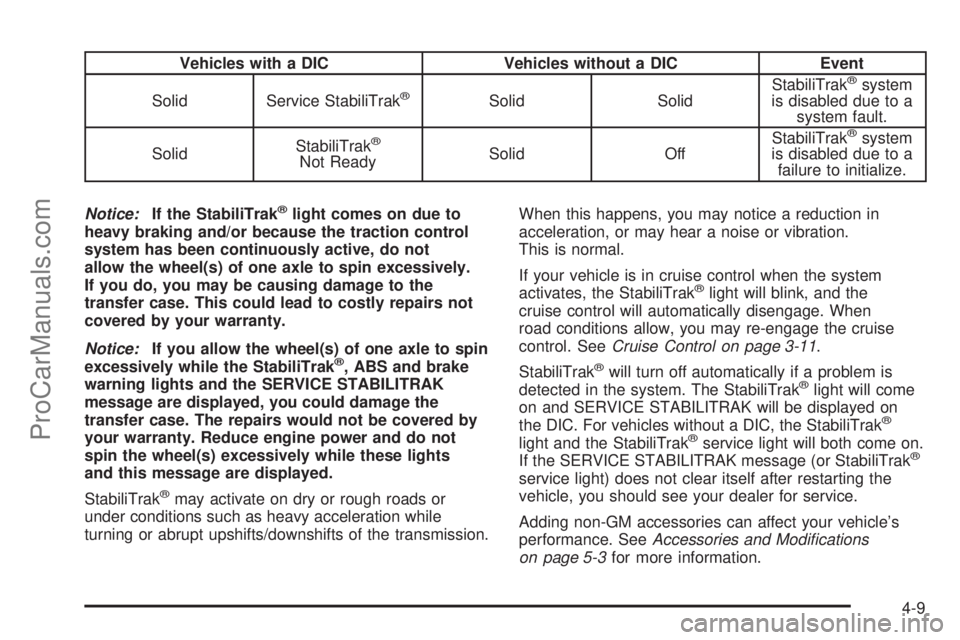
Vehicles with a DIC Vehicles without a DIC Event
Solid Service StabiliTrak
®Solid SolidStabiliTrak
®system
is disabled due to a
system fault.
SolidStabiliTrak
®
Not ReadySolid OffStabiliTrak
®system
is disabled due to a
failure to initialize.
Notice:If the StabiliTrak
®light comes on due to
heavy braking and/or because the traction control
system has been continuously active, do not
allow the wheel(s) of one axle to spin excessively.
If you do, you may be causing damage to the
transfer case. This could lead to costly repairs not
covered by your warranty.
Notice:If you allow the wheel(s) of one axle to spin
excessively while the StabiliTrak
®, ABS and brake
warning lights and the SERVICE STABILITRAK
message are displayed, you could damage the
transfer case. The repairs would not be covered by
your warranty. Reduce engine power and do not
spin the wheel(s) excessively while these lights
and this message are displayed.
StabiliTrak
®may activate on dry or rough roads or
under conditions such as heavy acceleration while
turning or abrupt upshifts/downshifts of the transmission.When this happens, you may notice a reduction in
acceleration, or may hear a noise or vibration.
This is normal.
If your vehicle is in cruise control when the system
activates, the StabiliTrak
®light will blink, and the
cruise control will automatically disengage. When
road conditions allow, you may re-engage the cruise
control. SeeCruise Control on page 3-11.
StabiliTrak
®will turn off automatically if a problem is
detected in the system. The StabiliTrak®light will come
on and SERVICE STABILITRAK will be displayed on
the DIC. For vehicles without a DIC, the StabiliTrak
®
light and the StabiliTrak®service light will both come on.
If the SERVICE STABILITRAK message (or StabiliTrak®
service light) does not clear itself after restarting the
vehicle, you should see your dealer for service.
Adding non-GM accessories can affect your vehicle’s
performance. SeeAccessories and Modifications
on page 5-3for more information.
4-9
ProCarManuals.com
Page 282 of 426
How to Add Automatic
Transmission Fluid
Refer to the Maintenance Schedule to determine what
kind of transmission uid to use. SeeRecommended
Fluids and Lubricants on page 6-12.
Add uid only after checking the transmission uid
while it is hot. A cold check is used only as a reference.
If the uid level is low, add only enough of the proper
uid to bring the level up to the HOT area for a hot
check. It does not take much uid, generally less than
one pint (0.5 L). Do not overll.
Notice:Use of the incorrect automatic transmission
uid may damage your vehicle, and the damages
may not be covered by your warranty. Always
use the automatic transmission uid listed in
Recommended Fluids and Lubricants on page 6-12.
After adding uid, recheck the uid level as
described under “How to Check Automatic
Transmission Fluid,” earlier in this section.
When the correct uid level is obtained, push the
dipstick back in all the way; then ip the handle
down to lock the dipstick in place.
Engine Coolant
The cooling system in your vehicle is lled with
DEX-COOL®engine coolant. This coolant is designed
to remain in your vehicle for ve years or 150,000 miles
(240 000 km), whichever occurs rst, if you add only
DEX-COOL
®extended life coolant.
The following explains your cooling system and how
to add coolant when it is low. If you have a problem
with engine overheating, seeEngine Overheating
on page 5-30.
A 50/50 mixture of clean, drinkable water and
DEX-COOL
®coolant will:
Give freezing protection down to−34°F (−37°C).
Give boiling protection up to 265°F (129°C).
Protect against rust and corrosion.
Help keep the proper engine temperature.
Let the warning lights and gages work as they
should.
Notice:Using coolant other than DEX-COOL
®may
cause premature engine, heater core, or radiator
corrosion. In addition, the engine coolant may
require changing sooner, at the rst maintenance
service after each 30,000 miles (50 000 km) or
24 months, whichever occurs rst. Any repairs
would not be covered by your warranty. Always use
DEX-COOL
®(silicate-free) coolant in your vehicle.
5-28
ProCarManuals.com
Page 419 of 426
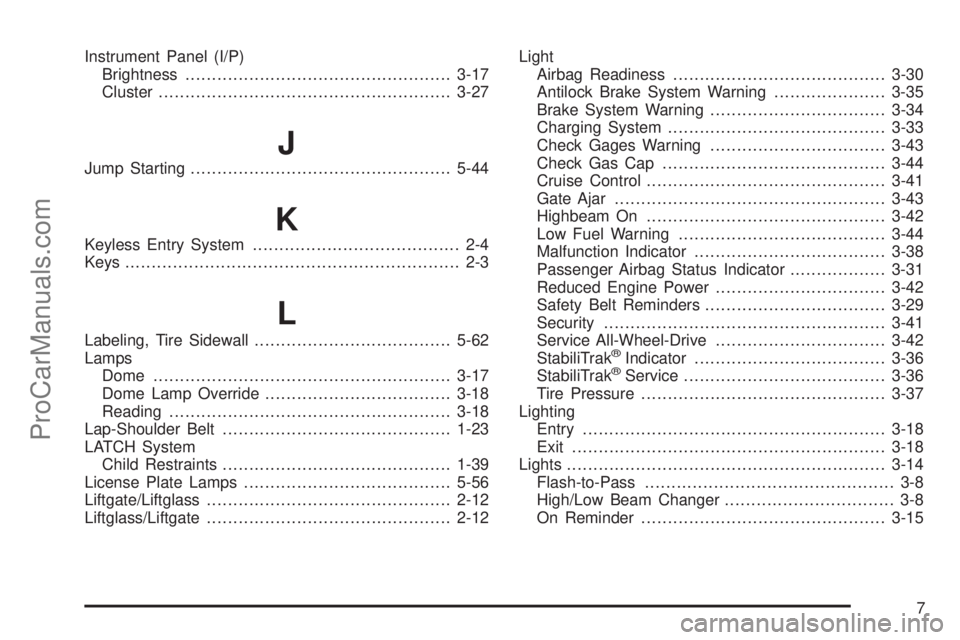
Instrument Panel (I/P)
Brightness..................................................3-17
Cluster.......................................................3-27
J
Jump Starting.................................................5-44
K
Keyless Entry System....................................... 2-4
Keys............................................................... 2-3
L
Labeling, Tire Sidewall.....................................5-62
Lamps
Dome........................................................3-17
Dome Lamp Override...................................3-18
Reading.....................................................3-18
Lap-Shoulder Belt...........................................1-23
LATCH System
Child Restraints...........................................1-39
License Plate Lamps.......................................5-56
Liftgate/Liftglass..............................................2-12
Liftglass/Liftgate..............................................2-12Light
Airbag Readiness........................................3-30
Antilock Brake System Warning.....................3-35
Brake System Warning.................................3-34
Charging System.........................................3-33
Check Gages Warning.................................3-43
Check Gas Cap..........................................3-44
Cruise Control.............................................3-41
Gate Ajar...................................................3-43
Highbeam On.............................................3-42
Low Fuel Warning.......................................3-44
Malfunction Indicator....................................3-38
Passenger Airbag Status Indicator..................3-31
Reduced Engine Power................................3-42
Safety Belt Reminders..................................3-29
Security.....................................................3-41
Service All-Wheel-Drive................................3-42
StabiliTrak®Indicator....................................3-36
StabiliTrak®Service......................................3-36
Tire Pressure..............................................3-37
Lighting
Entry.........................................................3-18
Exit...........................................................3-18
Lights............................................................3-14
Flash-to-Pass............................................... 3-8
High/Low Beam Changer................................ 3-8
On Reminder..............................................3-15
7
ProCarManuals.com
Page 426 of 426

W
Warning Lights, Gages and Indicators................3-26
Warnings
DIC Warnings and Messages........................3-48
Hazard Warning Flashers............................... 3-6
Other Warning Devices.................................. 3-6
Safety and Symbols......................................... iii
Vehicle Damage.............................................. iv
Washer, Headlamps........................................3-11
Wheels
Alignment and Tire Balance..........................5-81
Different Size..............................................5-79
Replacement...............................................5-81
Where to Put the Restraint...............................1-38
Windows.......................................................2-13
Power........................................................2-14
Windshield
Backglass, and Wiper Blades, Cleaning........5-106
Replacement...............................................5-57Windshield (cont.)
Washer......................................................3-10
Washer Fluid..............................................5-39
Wiper Blade Replacement.............................5-57
Wiper Fuses.............................................5-111
Wipers......................................................... 3-9
Windshield, Rear Washer/Wiper........................3-10
Winter Driving................................................4-17
X
XM Radio Messages.......................................3-74
XM™ Satellite Radio Antenna System................3-92
Y
Your Vehicle and the Environment....................... 6-2
14
ProCarManuals.com