mirror SAAB 9-7X 2008 User Guide
[x] Cancel search | Manufacturer: SAAB, Model Year: 2008, Model line: 9-7X, Model: SAAB 9-7X 2008Pages: 426, PDF Size: 2.77 MB
Page 109 of 426
Outside Power Mirror
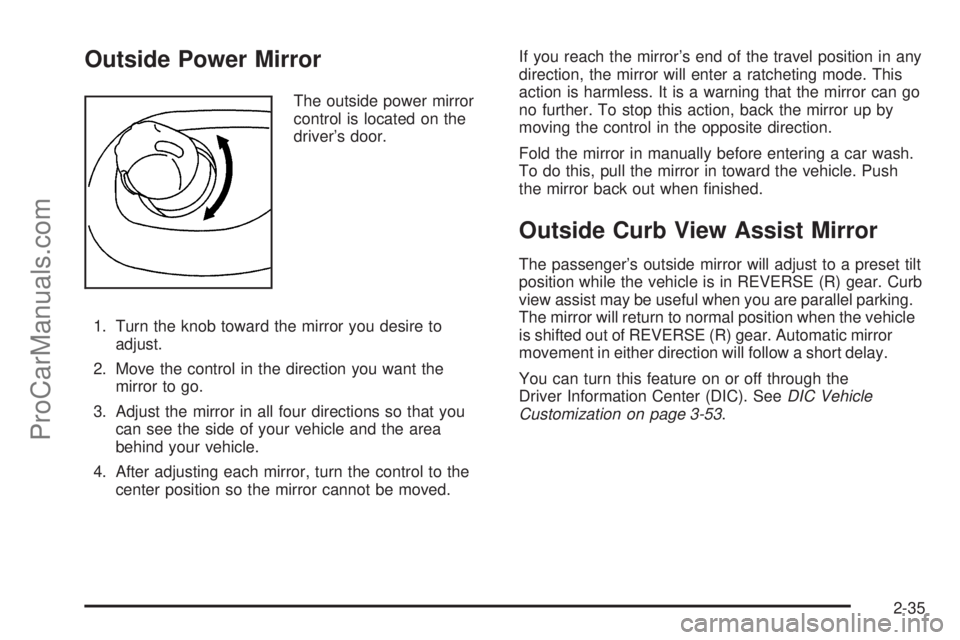
The outside power mirror
control is located on the
driver’s door.
1. Turn the knob toward the mirror you desire to
adjust.
2. Move the control in the direction you want the
mirror to go.
3. Adjust the mirror in all four directions so that you
can see the side of your vehicle and the area
behind your vehicle.
4. After adjusting each mirror, turn the control to the
center position so the mirror cannot be moved.If you reach the mirror’s end of the travel position in any
direction, the mirror will enter a ratcheting mode. This
action is harmless. It is a warning that the mirror can go
no further. To stop this action, back the mirror up by
moving the control in the opposite direction.
Fold the mirror in manually before entering a car wash.
To do this, pull the mirror in toward the vehicle. Push
the mirror back out when nished.
Outside Curb View Assist Mirror
The passenger’s outside mirror will adjust to a preset tilt
position while the vehicle is in REVERSE (R) gear. Curb
view assist may be useful when you are parallel parking.
The mirror will return to normal position when the vehicle
is shifted out of REVERSE (R) gear. Automatic mirror
movement in either direction will follow a short delay.
You can turn this feature on or off through the
Driver Information Center (DIC). SeeDIC Vehicle
Customization on page 3-53.
2-35
ProCarManuals.com
Page 110 of 426
Outside Convex Mirror
{CAUTION:
A convex mirror can make things (like other
vehicles) look farther away than they really are.
If you cut too sharply into the right lane, you
could hit a vehicle on your right. Check your
inside mirror or glance over your shoulder
before changing lanes.
The passenger side mirror is convex. A convex mirror’s
surface is curved so more can be seen from the driver
seat. It also makes things, like other vehicles, look farther
away than they really are.
Outside Heated Mirrors
Your vehicle may have this feature. When you operate
the rear window defogger, the defogger also warms
the heated driver’s and passenger’s outside rearview
mirrors to help clear them of ice, snow and
condensation.
OnStar®System
OnStar uses several innovative technologies and live
advisors to provide you with a wide range of safety,
security, information, and convenience services. If your
airbags deploy, the system is designed to make an
automatic call to OnStar Emergency advisors who can
request emergency services be sent to your location.
If you lock your keys in the vehicle, call OnStar at
1-888-4-ONSTAR and they can send a signal to
unlock your doors. If you need roadside assistance,
press the OnStar button and they can contact
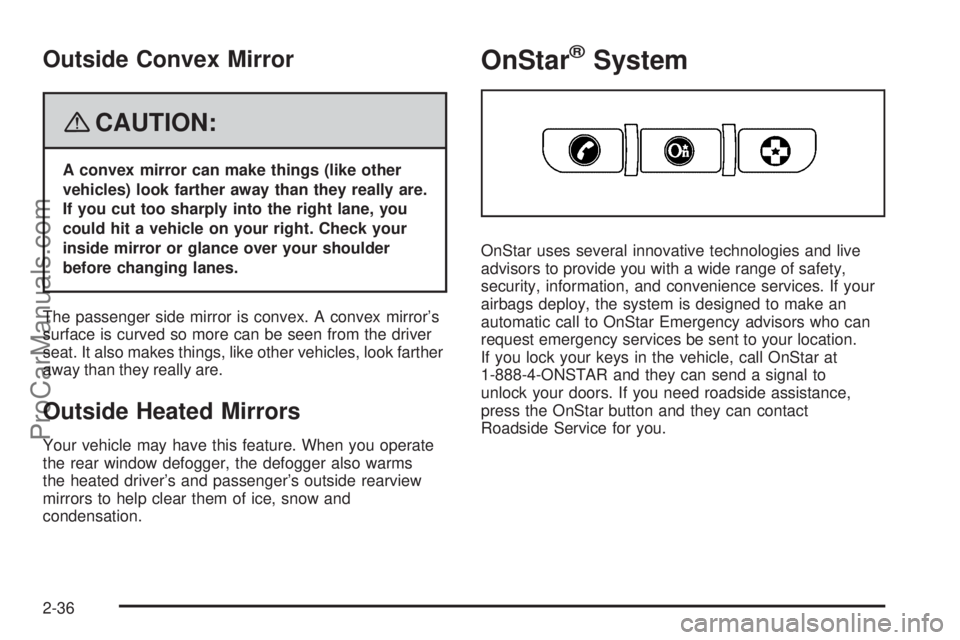
Roadside Service for you.
2-36
ProCarManuals.com
Page 146 of 426
Rear Window Defogger
The rear window defogger uses a warming grid to
remove fog from the rear window.
<(Rear):Press this button to turn the rear window
defogger on or off.
An indicator light in the button will come on to let you
know that the rear window defogger is activated.
The rear window defogger will turn off approximately
10 minutes after the button is pressed. If you need
additional warming time, press the button again.
The heated mirrors will also come on when you press
this button. SeeOutside Heated Mirrors on page 2-36.
Notice:Do not use a razor blade or sharp object
to clear the inside rear window. Do not adhere
anything to the defogger grid lines in the rear glass.
These actions may damage the rear defogger.
Repairs would not be covered by your warranty.
Outlet Adjustment
Use the air outlets located in the center and on the
sides of your instrument panel to direct the airow.
Operation Tips
Keep the hood and front air inlets free of ice, snow,
or any other obstruction, such as leaves. The
heater and defroster will work far better, reducing
the chance of fogging the inside of your windows.
When you enter a vehicle in cold weather, select
maximum blower speed for a few moments
before driving. This helps clear the intake ducts
of snow and moisture, and reduces the chance of
fogging the inside of your window.
Keep the air path under the front seats clear of
objects. This helps air to circulate throughout
your vehicle.
Adding outside equipment to the front of your
vehicle, such as hood-air deectors, may affect the
performance of the heating and air conditioning
system. Check with your dealer before adding
equipment to the outside of your vehicle.
Rear Climate Control System
The lower buttons on the rear seat audio are used to
adjust the rear seat climate controls. The temperature
of the air coming through the rear outlets is determined
by the front passenger’s temperature setting.
3-24
ProCarManuals.com
Page 153 of 426
Passenger Airbag Status Indicator
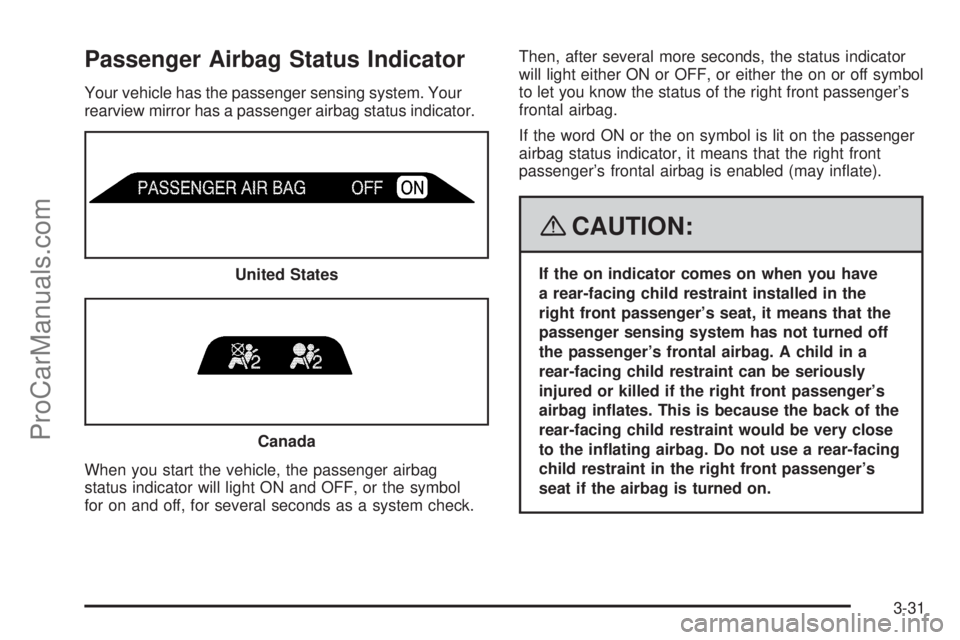
Your vehicle has the passenger sensing system. Your
rearview mirror has a passenger airbag status indicator.
When you start the vehicle, the passenger airbag
status indicator will light ON and OFF, or the symbol
for on and off, for several seconds as a system check.Then, after several more seconds, the status indicator
will light either ON or OFF, or either the on or off symbol
to let you know the status of the right front passenger’s
frontal airbag.
If the word ON or the on symbol is lit on the passenger
airbag status indicator, it means that the right front
passenger’s frontal airbag is enabled (may inate).
{CAUTION:
If the on indicator comes on when you have
a rear-facing child restraint installed in the
right front passenger’s seat, it means that the
passenger sensing system has not turned off
the passenger’s frontal airbag. A child in a
rear-facing child restraint can be seriously
injured or killed if the right front passenger’s
airbag inates. This is because the back of the
rear-facing child restraint would be very close
to the inating airbag. Do not use a rear-facing
child restraint in the right front passenger’s
seat if the airbag is turned on. United States
Canada
3-31
ProCarManuals.com
Page 171 of 426

SeeDIC Operation and Displays on page 3-45.Ifthe
tire pressure is low, the low tire pressure warning
light comes on. SeeTire Pressure Light on page 3-37.
CHECK WASHER FLUID
This message displays if the washer uid level is low.
Adding washer uid to the windshield washer uid
reservoir clears this message. SeeWindshield Washer
Fluid on page 5-39. This message clears itself after
10 seconds, or you can manually clear it from the
DIC display.
CURB VIEW ACTIVATED
This message displays when the passenger outside
rearview mirror moves into the curb view position.
SeeOutside Curb View Assist Mirror on page 2-35
for more information.
DRIVER DOOR AJAR
This message displays and a chime sounds if the driver
door is not fully closed. Stop and turn off the vehicle,
check the door for obstructions, and close the door
again. Check to see if the message still appears
on the DIC.
ENGINE COOLANT HOT/ENGINE
OVERHEATED
Notice:If you drive your vehicle while the engine
is overheating, severe engine damage may occur.
If an overheat warning appears on the instrument
panel cluster and/or DIC, stop the vehicle as soon
as possible. Do not increase the engine speed
above normal idling speed. SeeEngine Overheating
on page 5-30for more information.
This message displays and a chime sounds if the
cooling system temperature gets hot. SeeEngine
Overheating on page 5-30for the proper course
of action. This message clears when the coolant
temperature drops to a safe operating temperature.
FRONT FOG LAMPS OFF
This message displays if the fog lamps are turned off.
The message clears after 10 seconds. If you turn on
the high-beam headlamps, the fog lamps also turn
off and this message appears on the DIC. The fog
lamps turn back on again when you switch back
to low-beam headlamps. SeeFog Lamps on page 3-17
andTurn Signal/Multifunction Lever on page 3-7for
more information.
3-49
ProCarManuals.com
Page 179 of 426
Easy Exit Seat
Press the customization button until EASY EXIT
SEAT: OFF appears in the display. To select your
preference for seat position exit, press the select
button while EASY EXIT SEAT: OFF is displayed on
the DIC. Pressing the select button will scroll through
the following settings:
EASY EXIT SEAT: OFF (default):No seat exit recall
will occur.
EASY EXIT SEAT: ON:The driver’s seat will move
to the exit position when the key is removed from
the ignition.
To select a setting and move on to the next feature,
press the customization button while the desired setting
is displayed on the DIC.
See “Easy Exit Seat” underMemory Seat, Mirrors,
and Pedals on page 1-3for more information.
Seat Recall
Press the customization button until SEAT RECALL:
OFF appears in the display. To select your preference
for recall of the driver’s memory seat and adjustable
pedals, if your vehicle has this feature, press the select
button while SEAT RECALL: OFF is displayed on
the DIC. Pressing the select button will scroll through
the following settings:
SEAT RECALL: OFF (default):The driver’s memory
seat and adjustable pedals position you saved will
only be recalled when the memory button 1 or 2
is pressed.
SEAT RECALL: AT KEY IN:The driver’s memory
seat and adjustable pedals position you saved will be
recalled when you put the key in the ignition.
SEAT RECALL: ON REMOTE:The driver’s memory
seat and adjustable pedals position you saved will
be recalled when you unlock the vehicle with the
Remote Keyless Entry (RKE) transmitter.
To select a setting and move on to the next feature,
press the customization button while the desired setting
is displayed on the DIC.
SeeMemory Seat, Mirrors, and Pedals on page 1-3
for more information.
3-57
ProCarManuals.com
Page 180 of 426

Curb View
Press the customization button until CURB VIEW: OFF
appears in the display. To select your preference for
curb view, press the select button while CURB VIEW:
OFF is displayed on the DIC. Pressing the select button
will scroll through the following settings:
CURB VIEW: OFF (default):The passenger’s outside
mirror will not be tilted down when the vehicle is
shifted into REVERSE (R).
CURB VIEW: PASSENGER:The passenger’s outside
mirror will be tilted down when the vehicle is shifted
into REVERSE (R).
When the vehicle is placed in PARK (P) or in any
forward gear, the mirror will return to the normal driving
position, following a short delay.
To select a setting and move on to the next feature,
press the customization button while the desired setting
is displayed on the DIC.
SeeOutside Curb View Assist Mirror on page 2-35for
more information.
Alarm Warning
Press the customization button until ALARM WARNING:
BOTH appears in the display. To select your preference
for alarm warning, press the select button while
ALARM WARNING: BOTH is displayed on the DIC.
Pressing the select button will scroll through the
following settings:
ALARM WARNING: BOTH (default):The headlamps
will ash and the horn will chirp when the alarm is
active.
ALARM WARNING: HORN:The horn will chirp when
the alarm is active.
ALARM WARNING: LAMPS:The headlamps will ash
when the alarm is active.
ALARM WARNING: OFF:There will be no alarm
warning on activation.
To select a setting and move on to the next feature,
press the customization button while the desired setting
is displayed on the DIC.
SeeContent Theft-Deterrent on page 2-16for more
information.
3-58
ProCarManuals.com
Page 227 of 426
Skidding
In a skid, a driver can lose control of the vehicle.
Defensive drivers avoid most skids by taking reasonable
care suited to existing conditions, and by not overdriving
those conditions. But skids are always possible.
The three types of skids correspond to your vehicle’s
three control systems. In the braking skid, the wheels are
not rolling. In the steering or cornering skid, too much
speed or steering in a curve causes tires to slip and lose
cornering force. And in the acceleration skid, too much
throttle causes the driving wheels to spin.
A cornering skid is best handled by easing your foot off
the accelerator pedal.
If your vehicle starts to slide, ease your foot off the
accelerator pedal and quickly steer the way you want
the vehicle to go. If you start steering quickly enough,
your vehicle may straighten out. Always be ready
for a second skid if it occurs.
Of course, traction is reduced when water, snow, ice,
gravel, or other material is on the road. For safety,
you want to slow down and adjust your driving to these
conditions. It is important to slow down on slippery
surfaces because stopping distance is longer and
vehicle control more limited.While driving on a surface with reduced traction, try
your best to avoid sudden steering, acceleration,
or braking, including reducing vehicle speed by shifting
to a lower gear. Any sudden changes could cause
the tires to slide. You might not realize the surface
is slippery until your vehicle is skidding. Learn to
recognize warning clues — such as enough water,
ice, or packed snow on the road to make a mirrored
surface — and slow down when you have any doubt.
Remember: Any Antilock Brake System (ABS) helps
avoid only the braking skid.
Off-Road Driving
Your vehicle does not have features like added ground
clearance, special underbody shielding, and a transfer
case low gear range, things that are necessary for
extended or severe off-road service. You should
not drive off-road unless you are on a level, solid
surface.
4-13
ProCarManuals.com
Page 228 of 426

Driving at Night
Night driving is more dangerous than day driving because
some drivers are likely to be impaired — by alcohol or
drugs, with night vision problems, or by fatigue.
Night driving tips include:
Drive defensively.
Do not drink and drive.
Reduce headlamp glare by adjusting the inside
rearview mirror.
Slow down and keep more space between you and
other vehicles because your headlamps can only
light up so much road ahead.
Watch for animals.
When tired, pull off the road.
Do not wear sunglasses.
Avoid staring directly into approaching headlamps.
Keep the windshield and all glass on your vehicle
clean — inside and out.
Keep your eyes moving, especially during turns
or curves.
No one can see as well at night as in the daytime.
But, as we get older, these differences increase.
A 50-year-old driver might need at least twice as much
light to see the same thing at night as a 20-year-old.
Driving in Rain and on Wet Roads
Rain and wet roads can reduce vehicle traction
and affect your ability to stop and accelerate. Always
drive slower in these types of driving conditions
and avoid driving through large puddles and
deep-standing or owing water.
{CAUTION:
Wet brakes can cause crashes. They might not
work as well in a quick stop and could cause
pulling to one side. You could lose control of
the vehicle.
After driving through a large puddle of water
or a car/vehicle wash, lightly apply the brake
pedal until the brakes work normally.
Flowing or rushing water creates strong
forces. Driving through owing water could
cause your vehicle to be carried away. If this
happens, you and other vehicle occupants
could drown. Do not ignore police warnings
and be very cautious about trying to drive
through owing water.
4-14
ProCarManuals.com
Page 230 of 426
Highway Hypnosis
Always be alert and pay attention to your surroundings
while driving. If you become tired or sleepy, nd a
safe place to park your vehicle and rest.
Other driving tips include:
Keep the vehicle well ventilated.
Keep interior temperature cool.
Keep your eyes moving — scan the road ahead
and to the sides.
Check the rearview mirror and vehicle
instruments often.
Hill and Mountain Roads
Driving on steep hills or through mountains is different
than driving on at or rolling terrain. Tips for driving
in these conditions include:
Keep your vehicle serviced and in good shape.
Check all uid levels and brakes, tires, cooling
system, and transmission.
Going down steep or long hills, shift to a
lower gear.
{CAUTION:
If you do not shift down, the brakes could get
so hot that they would not work well. You
would then have poor braking or even none
going down a hill. You could crash. Shift down
to let the engine assist the brakes on a steep
downhill slope.
4-16
ProCarManuals.com