roof SAAB 9-7X 2008 User Guide
[x] Cancel search | Manufacturer: SAAB, Model Year: 2008, Model line: 9-7X, Model: SAAB 9-7X 2008Pages: 426, PDF Size: 2.77 MB
Page 76 of 426
Mirrors...........................................................2-33
Automatic Dimming Rearview Mirror
with OnStar
®and Compass........................2-33
Outside Power Mirror....................................2-35
Outside Curb View Assist Mirror.....................2-35
Outside Convex Mirror...................................2-36
Outside Heated Mirrors..................................2-36
OnStar
®System.............................................2-36
Universal Home Remote System......................2-40
Universal Home Remote System.....................2-40
Universal Home Remote System Operation
(With One Triangular LED)...........................2-40Storage Areas................................................2-44
Glove Box...................................................2-44
Cupholder(s)................................................2-45
Overhead Console........................................2-45
Center Console Storage.................................2-45
Luggage Carrier...........................................2-46
Rear Floor Storage Lid..................................2-47
Cargo Cover................................................2-47
Cargo Tie Downs..........................................2-48
Moonroof.......................................................2-48
Section 2 Features and Controls
2-2
ProCarManuals.com
Page 95 of 426
R(ON/RUN):This is the position for driving.
The battery could be drained if you leave the key in the
ACC/ACCESSORY or ON/RUN position with the engine
off. You may not be able to start your vehicle if the battery
is allowed to drain for an extended period of time.
/(START):This position starts the engine.
Key In the Ignition
Never leave your vehicle with the keys inside, as it
is an easy target for joy riders or thieves. If you leave
the key in the ignition and park your vehicle, a chime
will sound, when you open the driver’s door. Always
remember to remove your key from the ignition and take
it with you. This will lock your ignition and transmission.
Also, always remember to lock the doors.
The battery could be drained if you leave the key in the
ignition while your vehicle is parked. You may not be
able to start your vehicle after it has been parked for an
extended period of time.
Retained Accessory Power (RAP)
These vehicle accessories may be used for up to
10 minutes after the engine is turned off:
Audio System
DVD Player
Power Windows
Overhead console
Sunroof (if equipped)
These features work when the key is in RUN or ACC.
Once the key is turned from RUN to LOCK, these
features will continue to work up to 10 minutes or
until a door is opened.
2-21
ProCarManuals.com
Page 119 of 426
Cupholder(s)
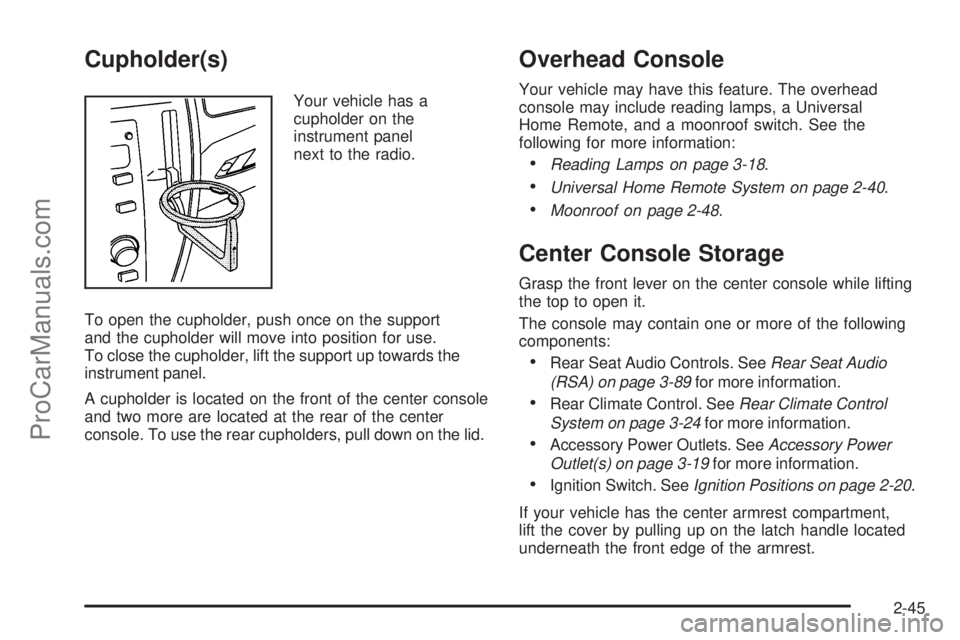
Your vehicle has a
cupholder on the
instrument panel
next to the radio.
To open the cupholder, push once on the support
and the cupholder will move into position for use.
To close the cupholder, lift the support up towards the
instrument panel.
A cupholder is located on the front of the center console
and two more are located at the rear of the center
console. To use the rear cupholders, pull down on the lid.
Overhead Console
Your vehicle may have this feature. The overhead
console may include reading lamps, a Universal
Home Remote, and a moonroof switch. See the
following for more information:
Reading Lamps on page 3-18.
Universal Home Remote System on page 2-40.
Moonroof on page 2-48.
Center Console Storage
Grasp the front lever on the center console while lifting
the top to open it.
The console may contain one or more of the following
components:
Rear Seat Audio Controls. SeeRear Seat Audio
(RSA) on page 3-89for more information.
Rear Climate Control. SeeRear Climate Control
System on page 3-24for more information.
Accessory Power Outlets. SeeAccessory Power
Outlet(s) on page 3-19for more information.
Ignition Switch. SeeIgnition Positions on page 2-20.
If your vehicle has the center armrest compartment,
lift the cover by pulling up on the latch handle located
underneath the front edge of the armrest.
2-45
ProCarManuals.com
Page 120 of 426
Luggage Carrier
{CAUTION:
If you try to carry something on top of your
vehicle that is longer or wider than the luggage
carrier — like paneling, plywood, a mattress
and so forth — the wind can catch it as you
drive along. This can cause you to lose
control. What you are carrying could be
violently torn off, and this could cause you
or other drivers to have a collision, and of
course damage your vehicle. You may be able
to carry something like this inside. But, never
carry something longer or wider than the
luggage carrier on top of your vehicle.
Your vehicle may be equipped with a luggage carrier
that allows you to load things on top of your vehicle. The
luggage carrier, if equipped, has side rails attached to the
roof, and places to use for tying things down. These let
you load some other things on top of your vehicle, as long
as they are not wider or longer than the luggage carrier.Crossrails can be purchased from your dealer.
Notice:Loading cargo on the luggage carrier that
weighs more than 200 lbs (91 kg) or hangs over
the rear or sides of the vehicle may damage your
vehicle. Load cargo so that it rests on the slats
as far forward as possible and against the side rails,
making sure to fasten it securely.
Do not exceed the maximum vehicle capacity when
loading your vehicle. For more information on vehicle
capacity and loading, seeLoading Your Vehicle on
page 4-22.
To prevent damage or loss of cargo as you are driving,
check now and then to make sure the luggage carrier
is locked and cargo is still securely fastened.
When the luggage carrier is not in use, place the
crossrails at the following positions for reduced wind
noise. Place one crossrail at the rear most point of the
vehicle and the other crossrail above the opening of
the rear door.
2-46
ProCarManuals.com
Page 122 of 426
To remove the cargo cover, do the following:
1. Release the cover from the latch posts and carefully
roll it back up.
2. Squeeze one endcap and remove it from the
pocket in the trim panel.
3. Remove the cargo cover from the other endcap so
that you can remove the shade from the vehicle.
{CAUTION:
An improperly stored cargo cover could be
thrown about the vehicle during a collision or
sudden maneuver. You or others could be
injured. If you remove the cover, always store
it in the proper storage location. When you
put it back, always be sure that it is securely
reattached.
Cargo Tie Downs
Cargo tie-downs located in the rear of the vehicle are
used to secure small loads.
Moonroof
The vehicle may be equipped with a power sliding
moonroof. The ignition must be turned to RUN, ACC,
or Retained Accessory Power (RAP) must be active
to operate it. SeeRetained Accessory Power (RAP)
on page 2-21.
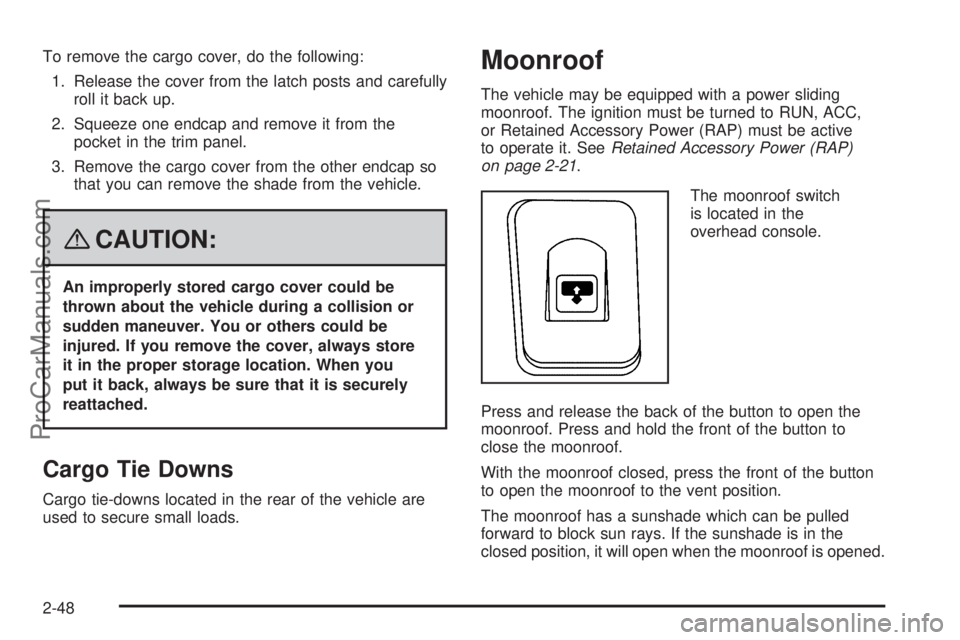
The moonroof switch
is located in the
overhead console.
Press and release the back of the button to open the
moonroof. Press and hold the front of the button to
close the moonroof.
With the moonroof closed, press the front of the button
to open the moonroof to the vent position.
The moonroof has a sunshade which can be pulled
forward to block sun rays. If the sunshade is in the
closed position, it will open when the moonroof is opened.
2-48
ProCarManuals.com
Page 203 of 426
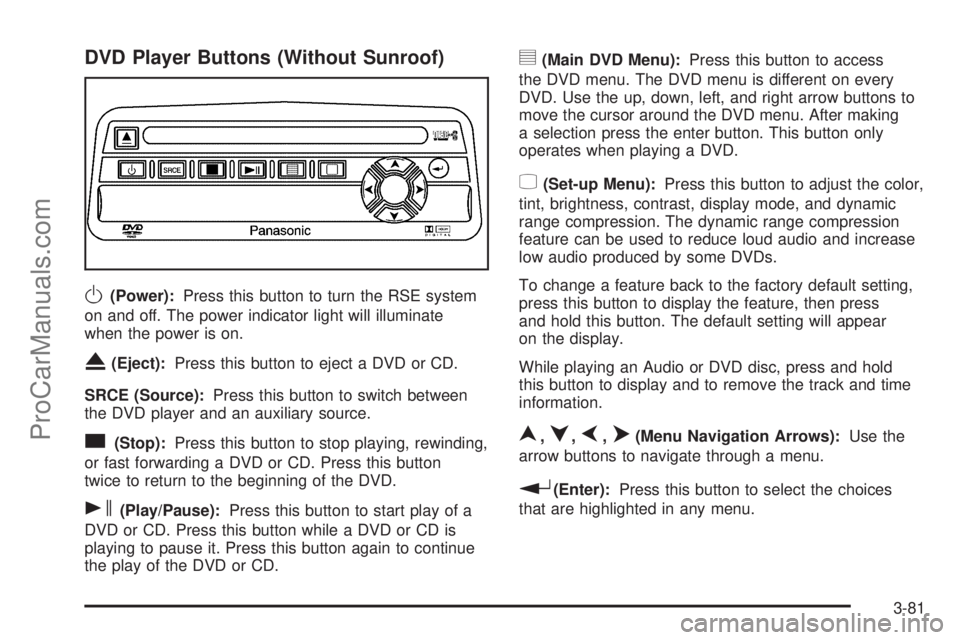
DVD Player Buttons (Without Sunroof)
O(Power):Press this button to turn the RSE system
on and off. The power indicator light will illuminate
when the power is on.
X(Eject):Press this button to eject a DVD or CD.
SRCE (Source):Press this button to switch between
the DVD player and an auxiliary source.
c(Stop):Press this button to stop playing, rewinding,
or fast forwarding a DVD or CD. Press this button
twice to return to the beginning of the DVD.
s(Play/Pause):Press this button to start play of a
DVD or CD. Press this button while a DVD or CD is
playing to pause it. Press this button again to continue
the play of the DVD or CD.
y(Main DVD Menu):Press this button to access
the DVD menu. The DVD menu is different on every
DVD. Use the up, down, left, and right arrow buttons to
move the cursor around the DVD menu. After making
a selection press the enter button. This button only
operates when playing a DVD.
z(Set-up Menu):Press this button to adjust the color,
tint, brightness, contrast, display mode, and dynamic
range compression. The dynamic range compression
feature can be used to reduce loud audio and increase
low audio produced by some DVDs.
To change a feature back to the factory default setting,
press this button to display the feature, then press
and hold this button. The default setting will appear
on the display.
While playing an Audio or DVD disc, press and hold
this button to display and to remove the track and time
information.
n,q,p,o(Menu Navigation Arrows):Use the
arrow buttons to navigate through a menu.
r(Enter):Press this button to select the choices
that are highlighted in any menu.
3-81
ProCarManuals.com
Page 204 of 426
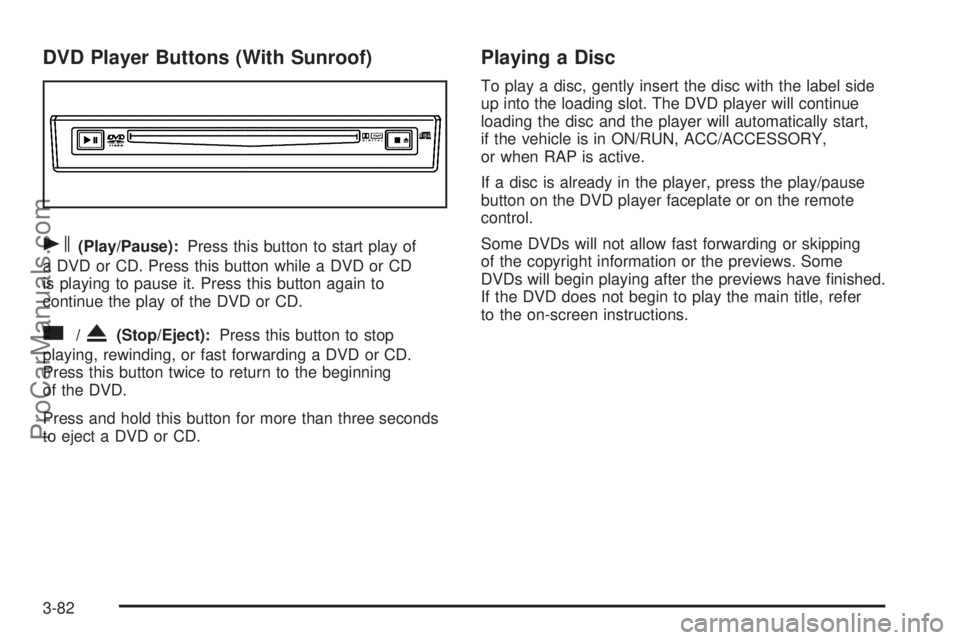
DVD Player Buttons (With Sunroof)
s(Play/Pause):Press this button to start play of
a DVD or CD. Press this button while a DVD or CD
is playing to pause it. Press this button again to
continue the play of the DVD or CD.
c/X(Stop/Eject):Press this button to stop
playing, rewinding, or fast forwarding a DVD or CD.
Press this button twice to return to the beginning
of the DVD.
Press and hold this button for more than three seconds
to eject a DVD or CD.
Playing a Disc
To play a disc, gently insert the disc with the label side
up into the loading slot. The DVD player will continue
loading the disc and the player will automatically start,
if the vehicle is in ON/RUN, ACC/ACCESSORY,
or when RAP is active.
If a disc is already in the player, press the play/pause
button on the DVD player faceplate or on the remote
control.
Some DVDs will not allow fast forwarding or skipping
of the copyright information or the previews. Some
DVDs will begin playing after the previews have nished.
If the DVD does not begin to play the main title, refer
to the on-screen instructions.
3-82
ProCarManuals.com
Page 214 of 426
AM
The range for most AM stations is greater than for FM,
especially at night. The longer range can cause station
frequencies to interfere with each other. For better radio
reception, most AM radio stations boost the power levels
during the day, and then reduce these levels during the
night. Static can also occur when things like storms and
power lines interfere with radio reception. When this
happens, try reducing the treble on your radio.
FM Stereo
FM stereo gives the best sound, but FM signals reach
only about 10 to 40 miles (16 to 65 km). Tall buildings or
hills can interfere with FM signals, causing the sound
to fade in and out.
XM™ Satellite Radio Service
XM™ Satellite Radio Service gives digital radio reception
from coast-to-coast in the 48 contiguous United States,
and in Canada. Just as with FM, tall buildings or hills can
interfere with satellite radio signals, causing the sound to
fade in and out. In addition, traveling or standing under
heavy foliage, bridges, garages, or tunnels may cause
loss of the XM™ signal for a period of time. The radio
may display NO SIGNAL to indicate interference.
Fixed Mast Antenna
The xed mast antenna can withstand most car
washes without being damaged. If the mast should
ever become slightly bent, straighten it out by hand.
If the mast is badly bent, replace it.
Check occasionally to make sure the mast is still
tightened to the antenna base. If tightening is required,
tighten by hand.
XM™ Satellite Radio Antenna
System
The XM™ Satellite Radio antenna is located on the
roof of your vehicle. Keep this antenna clear of snow
and ice build up for clear radio reception.
If your vehicle has a sunroof, the performance of the
XM™ system may be affected if the sunroof is open.
Loading items onto the roof of your vehicle can interfere
with the performance of the XM™ system. Make sure
the XM™ Satellite Radio antenna is not obstructed.
3-92
ProCarManuals.com
Page 375 of 426
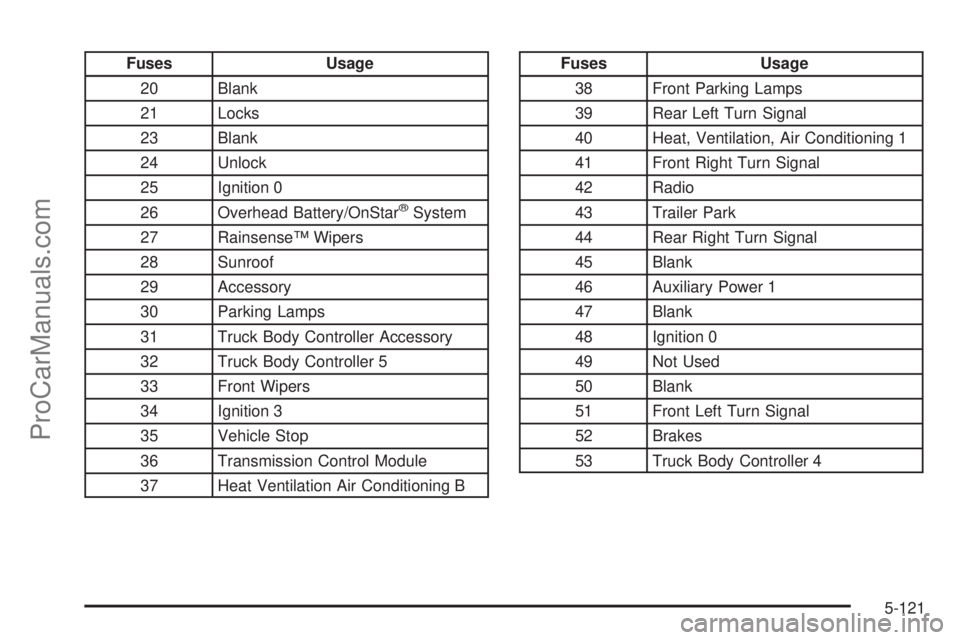
Fuses Usage
20 Blank
21 Locks
23 Blank
24 Unlock
25 Ignition 0
26 Overhead Battery/OnStar
®System
27 Rainsense™ Wipers
28 Sunroof
29 Accessory
30 Parking Lamps
31 Truck Body Controller Accessory
32 Truck Body Controller 5
33 Front Wipers
34 Ignition 3
35 Vehicle Stop
36 Transmission Control Module
37 Heat Ventilation Air Conditioning B
Fuses Usage
38 Front Parking Lamps
39 Rear Left Turn Signal
40 Heat, Ventilation, Air Conditioning 1
41 Front Right Turn Signal
42 Radio
43 Trailer Park
44 Rear Right Turn Signal
45 Blank
46 Auxiliary Power 1
47 Blank
48 Ignition 0
49 Not Used
50 Blank
51 Front Left Turn Signal
52 Brakes
53 Truck Body Controller 4
5-121
ProCarManuals.com
Page 420 of 426
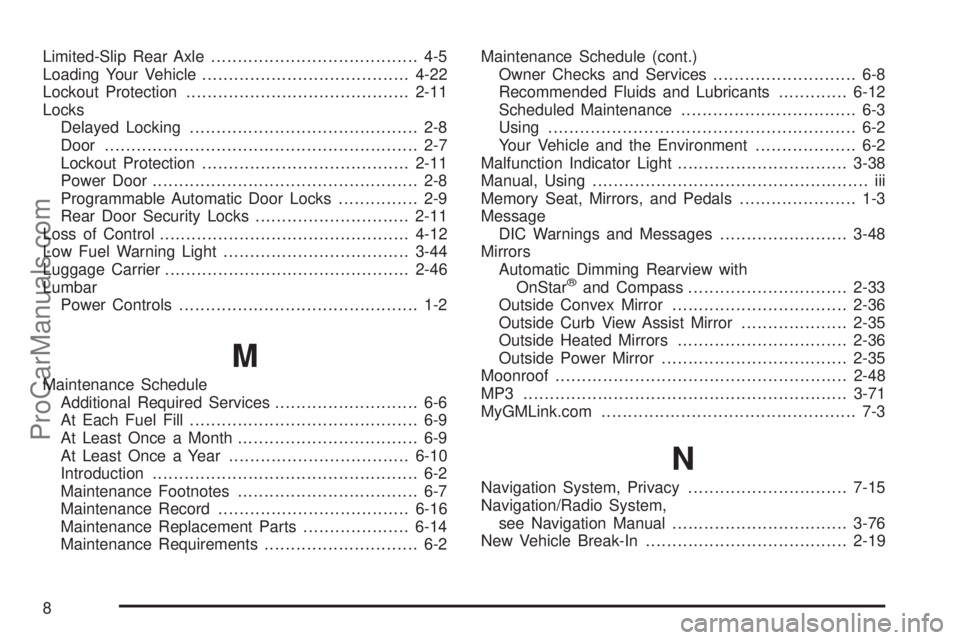
Limited-Slip Rear Axle....................................... 4-5
Loading Your Vehicle.......................................4-22
Lockout Protection..........................................2-11
Locks
Delayed Locking........................................... 2-8
Door........................................................... 2-7
Lockout Protection.......................................2-11
Power Door.................................................. 2-8
Programmable Automatic Door Locks............... 2-9
Rear Door Security Locks.............................2-11
Loss of Control...............................................4-12
Low Fuel Warning Light...................................3-44
Luggage Carrier..............................................2-46
Lumbar
Power Controls............................................. 1-2
M
Maintenance Schedule
Additional Required Services........................... 6-6
At Each Fuel Fill........................................... 6-9
At Least Once a Month.................................. 6-9
At Least Once a Year..................................6-10
Introduction.................................................. 6-2
Maintenance Footnotes.................................. 6-7
Maintenance Record....................................6-16
Maintenance Replacement Parts....................6-14
Maintenance Requirements............................. 6-2Maintenance Schedule (cont.)
Owner Checks and Services........................... 6-8
Recommended Fluids and Lubricants.............6-12
Scheduled Maintenance................................. 6-3
Using.......................................................... 6-2
Your Vehicle and the Environment................... 6-2
Malfunction Indicator Light................................3-38
Manual, Using.................................................... iii
Memory Seat, Mirrors, and Pedals...................... 1-3
Message
DIC Warnings and Messages........................3-48
Mirrors
Automatic Dimming Rearview with
OnStar
®and Compass..............................2-33
Outside Convex Mirror.................................2-36
Outside Curb View Assist Mirror....................2-35
Outside Heated Mirrors................................2-36
Outside Power Mirror...................................2-35
Moonroof.......................................................2-48
MP3 .............................................................3-71
MyGMLink.com................................................ 7-3
N
Navigation System, Privacy..............................7-15
Navigation/Radio System,
see Navigation Manual.................................3-76
New Vehicle Break-In......................................2-19
8
ProCarManuals.com