clock SAAB 9-7X 2008 Owner's Manual
[x] Cancel search | Manufacturer: SAAB, Model Year: 2008, Model line: 9-7X, Model: SAAB 9-7X 2008Pages: 426, PDF Size: 2.77 MB
Page 349 of 426
{CAUTION:
Before beginning this procedure read all the
instructions. Failure to read and follow the
instructions could damage the hoist assembly
and you and others could get hurt. Read and
follow the instructions listed next.
{CAUTION:
Someone standing too close during the
procedure could be injured by the jack.
If the spare tire does not slide off the jack
completely, make sure no one is behind you or
on either side of you as you pull the jack out
from the under spare.To release the spare tire from the secondary latch:
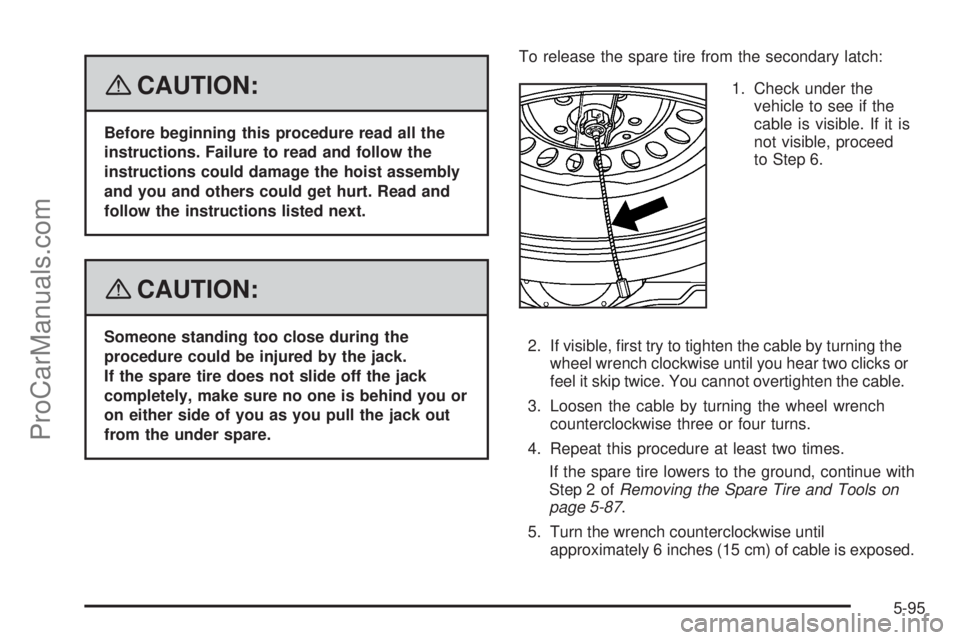
1. Check under the
vehicle to see if the
cable is visible. If it is
not visible, proceed
to Step 6.
2. If visible, rst try to tighten the cable by turning the
wheel wrench clockwise until you hear two clicks or
feel it skip twice. You cannot overtighten the cable.
3. Loosen the cable by turning the wheel wrench
counterclockwise three or four turns.
4. Repeat this procedure at least two times.
If the spare tire lowers to the ground, continue with
Step 2 ofRemoving the Spare Tire and Tools on
page 5-87.
5. Turn the wrench counterclockwise until
approximately 6 inches (15 cm) of cable is exposed.
5-95
ProCarManuals.com
Page 350 of 426
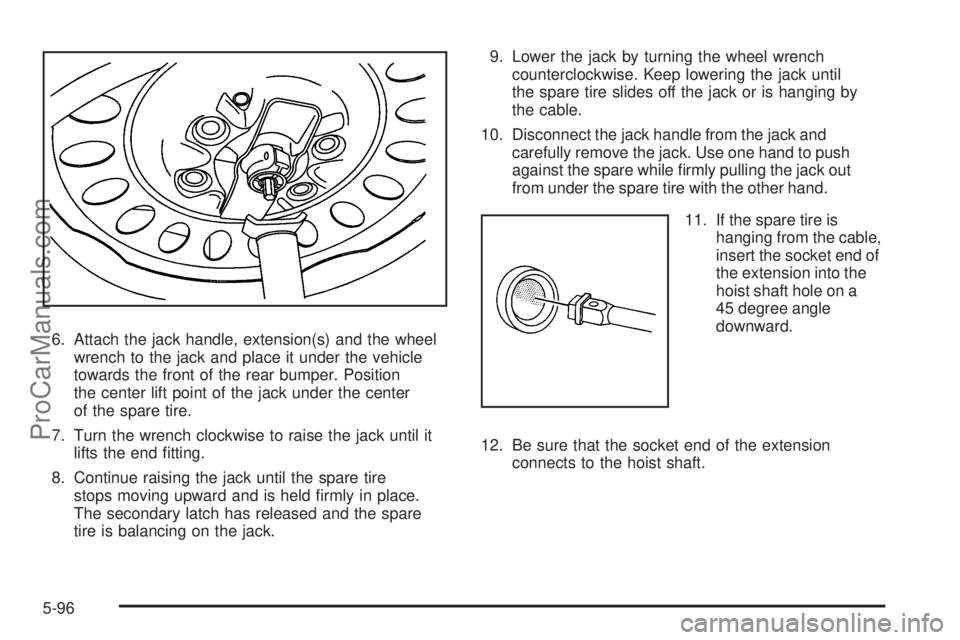
6. Attach the jack handle, extension(s) and the wheel
wrench to the jack and place it under the vehicle
towards the front of the rear bumper. Position
the center lift point of the jack under the center
of the spare tire.
7. Turn the wrench clockwise to raise the jack until it
lifts the end tting.
8. Continue raising the jack until the spare tire
stops moving upward and is held rmly in place.
The secondary latch has released and the spare
tire is balancing on the jack.9. Lower the jack by turning the wheel wrench
counterclockwise. Keep lowering the jack until
the spare tire slides off the jack or is hanging by
the cable.
10. Disconnect the jack handle from the jack and
carefully remove the jack. Use one hand to push
against the spare while rmly pulling the jack out
from under the spare tire with the other hand.
11. If the spare tire is
hanging from the cable,
insert the socket end of
the extension into the
hoist shaft hole on a
45 degree angle
downward.
12. Be sure that the socket end of the extension
connects to the hoist shaft.
5-96
ProCarManuals.com
Page 351 of 426
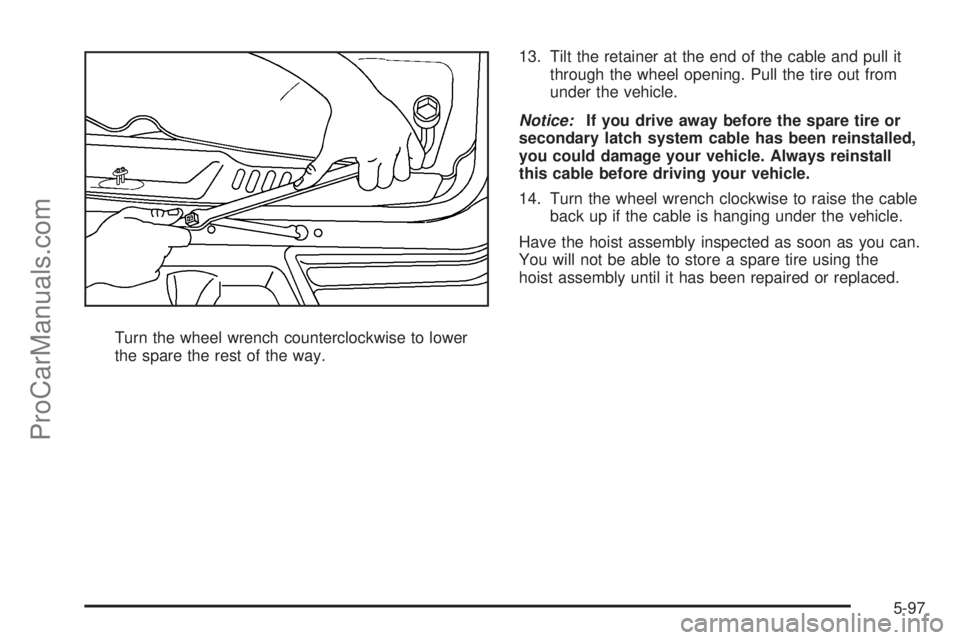
Turn the wheel wrench counterclockwise to lower
the spare the rest of the way.13. Tilt the retainer at the end of the cable and pull it
through the wheel opening. Pull the tire out from
under the vehicle.
Notice:If you drive away before the spare tire or
secondary latch system cable has been reinstalled,
you could damage your vehicle. Always reinstall
this cable before driving your vehicle.
14. Turn the wheel wrench clockwise to raise the cable
back up if the cable is hanging under the vehicle.
Have the hoist assembly inspected as soon as you can.
You will not be able to store a spare tire using the
hoist assembly until it has been repaired or replaced.
5-97
ProCarManuals.com
Page 353 of 426
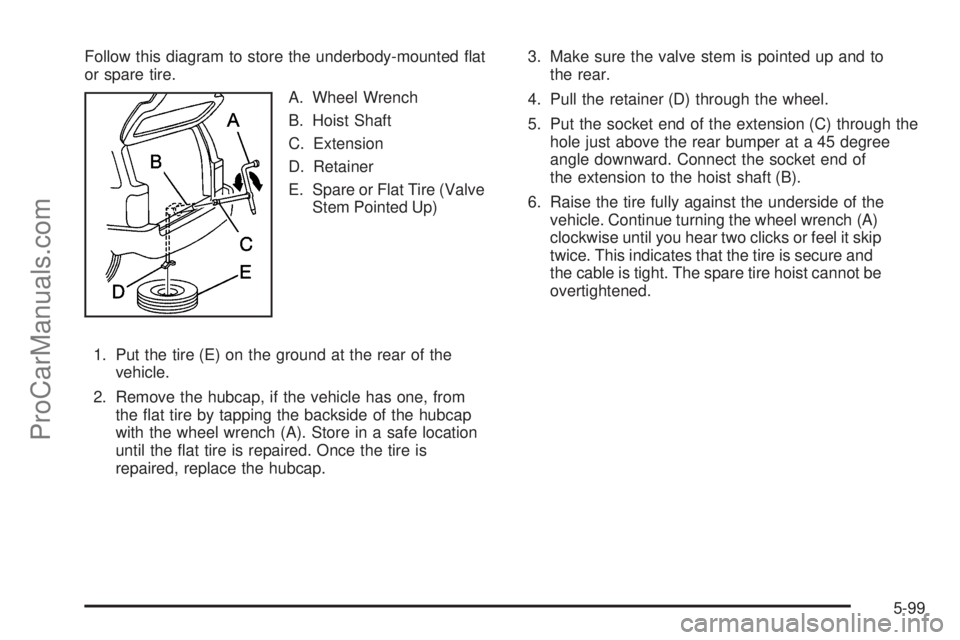
Follow this diagram to store the underbody-mounted at
or spare tire.
A. Wheel Wrench
B. Hoist Shaft
C. Extension
D. Retainer
E. Spare or Flat Tire (Valve
Stem Pointed Up)
1. Put the tire (E) on the ground at the rear of the
vehicle.
2. Remove the hubcap, if the vehicle has one, from
the at tire by tapping the backside of the hubcap
with the wheel wrench (A). Store in a safe location
until the at tire is repaired. Once the tire is
repaired, replace the hubcap.3. Make sure the valve stem is pointed up and to
the rear.
4. Pull the retainer (D) through the wheel.
5. Put the socket end of the extension (C) through the
hole just above the rear bumper at a 45 degree
angle downward. Connect the socket end of
the extension to the hoist shaft (B).
6. Raise the tire fully against the underside of the
vehicle. Continue turning the wheel wrench (A)
clockwise until you hear two clicks or feel it skip
twice. This indicates that the tire is secure and
the cable is tight. The spare tire hoist cannot be
overtightened.
5-99
ProCarManuals.com
Page 354 of 426
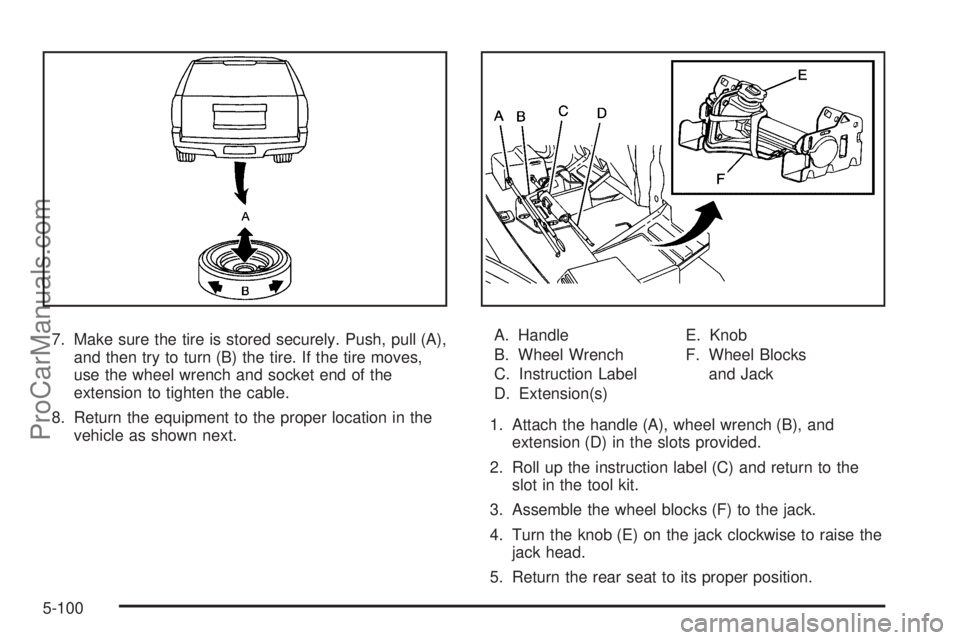
7. Make sure the tire is stored securely. Push, pull (A),
and then try to turn (B) the tire. If the tire moves,
use the wheel wrench and socket end of the
extension to tighten the cable.
8. Return the equipment to the proper location in the
vehicle as shown next.A. Handle
B. Wheel Wrench
C. Instruction Label
D. Extension(s)E. Knob
F. Wheel Blocks
and Jack
1. Attach the handle (A), wheel wrench (B), and
extension (D) in the slots provided.
2. Roll up the instruction label (C) and return to the
slot in the tool kit.
3. Assemble the wheel blocks (F) to the jack.
4. Turn the knob (E) on the jack clockwise to raise the
jack head.
5. Return the rear seat to its proper position.
5-100
ProCarManuals.com
Page 413 of 426
A
Accessories and Modications............................ 5-3
Adding Equipment to Your Airbag-Equipped
Vehicle.......................................................1-66
Additives, Fuel................................................. 5-6
Add-On Electrical Equipment...........................5-111
Adjustable Throttle and Brake Pedal..................2-23
Air Cleaner/Filter, Engine.................................5-24
Air Conditioning..............................................3-20
Airbag
Passenger Status Indicator...........................3-31
Readiness Light..........................................3-30
Airbag System................................................1-52
What Will You See After an Airbag Inates?....1-60
When Should an Airbag Inate?....................1-57
Where Are the Airbags?...............................1-55
Airbag Systems
Adding Equipment to Your Airbag-Equipped
Vehicle...................................................1-66
How Does an Airbag Restrain?......................1-59
Passenger Sensing System...........................1-61
Servicing Your Airbag-Equipped Vehicle..........1-66
What Makes an Airbag Inate?......................1-59
All-Wheel Drive...............................................5-49
All-Wheel-Drive (AWD) System.........................4-10
All-Wheel-Drive Service Light............................3-42
Antenna, Fixed Mast.......................................3-92
Antenna, XM™ Satellite Radio Antenna
System......................................................3-92Antilock Brake System (ABS)............................. 4-4
Antilock Brake, System Warning Light................3-35
Appearance Care
Aluminum Wheels......................................5-107
Care of Safety Belts...................................5-104
Chemical Paint Spotting..............................5-108
Cleaning Exterior Lamps/Lenses..................5-105
Fabric/Carpet............................................5-103
Finish Care...............................................5-106
Finish Damage..........................................5-108
Instrument Panel, Vinyl, and Other
Plastic Surfaces.....................................5-104
Interior Cleaning........................................5-101
Leather....................................................5-103
Sheet Metal Damage..................................5-108
Tires........................................................5-107
Underbody Maintenance.............................5-108
Vehicle Care/Appearance Materials...............5-109
Washing Your Vehicle.................................5-105
Weatherstrips............................................5-104
Windshield, Backglass, and Wiper Blades......5-106
Appointments, Scheduling Service....................... 7-7
Audio System.................................................3-60
Audio Steering Wheel Controls......................3-91
Fixed Mast Antenna.....................................3-92
Navigation/Radio System,
see Navigation Manual..............................3-76
Radio Reception..........................................3-91
Rear Seat Audio (RSA)................................3-89
Setting the Clock.........................................3-60
1
ProCarManuals.com
Page 415 of 426
Checking Things Under the Hood......................5-10
Chemical Paint Spotting.................................5-108
Child Restraints
Child Restraint Systems...............................1-35
Infants and Young Children...........................1-32
Lower Anchors and Tethers for Children..........1-39
Older Children.............................................1-28
Securing a Child Restraint in a
Rear Outside Seat Position........................1-46
Securing a Child Restraint in the
Center Rear Seat Position.........................1-48
Securing a Child Restraint in the
Right Front Seat Position..........................1-49
Where to Put the Restraint...........................1-38
Cleaning
Aluminum Wheels......................................5-107
Exterior Lamps/Lenses................................5-105
Fabric/Carpet............................................5-103
Finish Care...............................................5-106
Instrument Panel, Vinyl, and Other
Plastic Surfaces.....................................5-104
Interior.....................................................5-101
Leather....................................................5-103
Tires........................................................5-107
Underbody Maintenance.............................5-108
Washing Your Vehicle.................................5-105
Weatherstrips............................................5-104
Windshield, Backglass, and Wiper Blades......5-106Climate Control System
Climate Controls Personalization....................3-25
Dual Automatic............................................3-20
Outlet Adjustment........................................3-24
Rear..........................................................3-24
Clock, Setting.................................................3-60
Collision Damage Repair................................... 7-9
Compass.......................................................2-33
Content Theft-Deterrent....................................2-16
Control of a Vehicle.......................................... 4-3
Coolant
Engine Temperature Gage............................3-36
Heater, Engine............................................2-23
Cooling System..............................................5-32
Cruise Control................................................3-11
Cruise Control Light........................................3-41
Cupholder(s)..................................................2-45
Customer Assistance Information
Courtesy Transportation.................................. 7-7
Customer Assistance for Text
Telephone (TTY) Users............................... 7-4
Customer Assistance Offices........................... 7-4
Customer Satisfaction Procedure..................... 7-2
Reporting Safety Defects to Saab..................7-12
Reporting Safety Defects to the
Canadian Government..............................7-12
Reporting Safety Defects to the
United States Government.........................7-12
3
ProCarManuals.com
Page 422 of 426
Privacy..........................................................7-14
Event Data Recorders..................................7-14
Navigation System.......................................7-15
OnStar.......................................................7-15
Radio Frequency Identication.......................7-15
Programmable Automatic Door Locks.................. 2-9
R
Radiator Pressure Cap....................................5-30
Radio Frequency Identication (RFID),
Privacy......................................................7-15
Radios..........................................................3-60
Radio(s)........................................................3-61
Radios
Navigation/Radio System,
see Navigation Manual..............................3-76
Rear Seat Audio..........................................3-89
Reception...................................................3-91
Setting the Clock.........................................3-60
Theft-Deterrent............................................3-90
Reading Lamps..............................................3-18
Rear Axle......................................................5-50
Limited-Slip.................................................. 4-5
Rear Climate Control System............................3-24Rear Door Security Locks................................2-11
Rear Floor Storage Lid....................................2-47
Rear Seat Audio (RSA)....................................3-89
Rear Seat Entertainment System.......................3-77
Rear Seat Operation......................................... 1-8
Rear Windshield Washer/Wiper.........................3-10
Rearview Mirror, Automatic Dimming
with OnStar
®and Compass..........................2-33
Reclining Seatbacks, Power............................... 1-5
Recommended Fluids and Lubricants.................6-12
Recreational Vehicle Towing.............................4-28
Reduced Engine Power Light............................3-42
Remote Keyless Entry (RKE) System.................. 2-4
Remote Keyless Entry (RKE) System,
Operation..................................................... 2-5
Removing the Flat Tire and Installing
the Spare Tire.............................................5-90
Removing the Spare Tire and Tools...................5-87
Replacement Bulbs.........................................5-57
Replacement Parts, Maintenance......................6-14
Replacement, Windshield.................................5-57
Reporting Safety Defects
Canadian Government..................................7-12
Saab.........................................................7-12
United States Government............................7-12
10
ProCarManuals.com