reset SAAB 9-7X 2008 Owner's Manual
[x] Cancel search | Manufacturer: SAAB, Model Year: 2008, Model line: 9-7X, Model: SAAB 9-7X 2008Pages: 426, PDF Size: 2.77 MB
Page 212 of 426
SRCE (Source):Press this button to select an audio
source: AM/FM, XM, CD, or DVD. The inactive CD,
or DVD will remain safely inside the radio for future
listening. There are sources that are internal to the radio,
such as AM/FM, and CD and other sources to radio
that are external, such as XM™, DVD, and OnStar
®.
If an external source has been selected, the rear
seat passengers cannot select a different external
source.
SEEK:Press this button to go to the next station or
CD track and stay there. The display will show the
selection. This function is inactive if the radio is set to
the same source.
To scan preset radio stations, press and hold the
SEEK button for two seconds and the radio will go
to the next preset station. Hold this button down and
the radio will continue to go through all available
preset stations. This function is inactive if the front
seat passengers are listening to the radio.When a CD is playing, press the SEEK button to go
to the next track on the CD. This function is inactive if
the front seat passengers are listening to a CD.
When a CD is playing in the six-disc CD player, press
and hold the SEEK button for two seconds to go you to
the next CD, if multiple CDs are loaded. This function is
inactive if the front seat passengers are listening to a CD.
Theft-Deterrent Feature
THEFTLOCK®is designed to discourage theft of
your vehicle’s radio. The feature works automatically
by learning a portion of the Vehicle Identication
Number (VIN). If the radio is moved to a different
vehicle, it does not operate and LOCKED displays.
When the radio and vehicle are turned off, the blinking
red light indicates that THEFTLOCK
®is armed.
With THEFTLOCK
®activated, the radio does not
operate if stolen.
3-90
ProCarManuals.com
Page 213 of 426
Audio Steering Wheel Controls
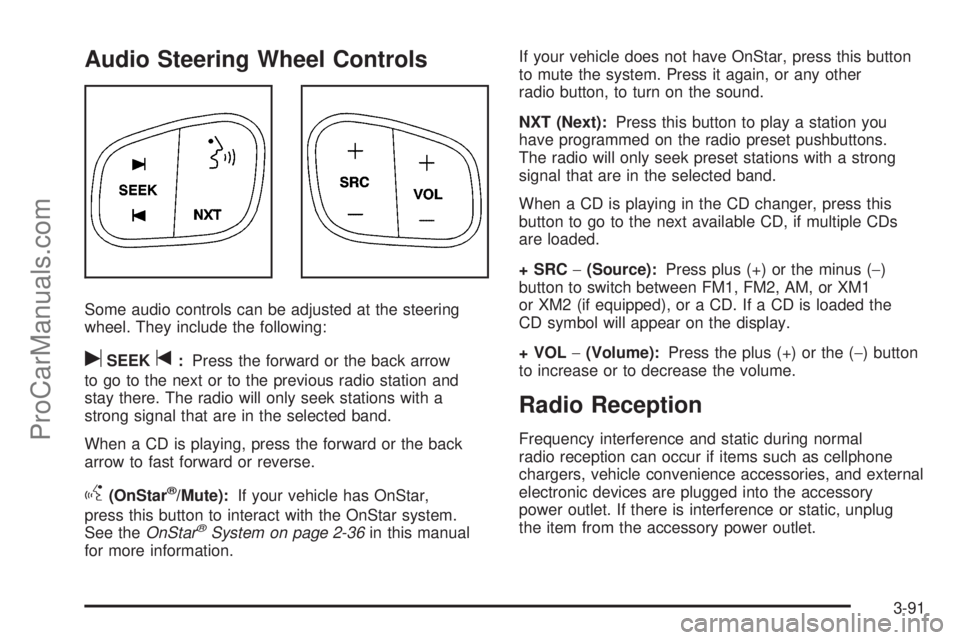
Some audio controls can be adjusted at the steering
wheel. They include the following:
uSEEKt:Press the forward or the back arrow
to go to the next or to the previous radio station and
stay there. The radio will only seek stations with a
strong signal that are in the selected band.
When a CD is playing, press the forward or the back
arrow to fast forward or reverse.
g(OnStar®/Mute):If your vehicle has OnStar,
press this button to interact with the OnStar system.
See theOnStar
®System on page 2-36in this manual
for more information.If your vehicle does not have OnStar, press this button
to mute the system. Press it again, or any other
radio button, to turn on the sound.
NXT (Next):Press this button to play a station you
have programmed on the radio preset pushbuttons.
The radio will only seek preset stations with a strong
signal that are in the selected band.
When a CD is playing in the CD changer, press this
button to go to the next available CD, if multiple CDs
are loaded.
+ SRC−(Source):Press plus (+) or the minus (−)
button to switch between FM1, FM2, AM, or XM1
or XM2 (if equipped), or a CD. If a CD is loaded the
CD symbol will appear on the display.
+ VOL−(Volume):Press the plus (+) or the (−) button
to increase or to decrease the volume.
Radio Reception
Frequency interference and static during normal
radio reception can occur if items such as cellphone
chargers, vehicle convenience accessories, and external
electronic devices are plugged into the accessory
power outlet. If there is interference or static, unplug
the item from the accessory power outlet.
3-91
ProCarManuals.com
Page 276 of 426
Substitute Engine Oil: When adding oil to maintain
engine oil level, oil meeting GM Standard GM4718M
may not be available. You can add substitute oil
designated SAE 5W-30 with the starburst symbol at all
temperatures. Substitute oil not meeting GM Standard
GM4718M should not be used for an oil change.
Engine Oil Additives
Do not add anything to the oil. The recommended oils
with the starburst symbol that meet GM standards are all
you need for good performance and engine protection.
Engine Oil Life System
When to Change Engine Oil
Your vehicle has a computer system that lets you know
when to change the engine oil and lter. This is based
on engine revolutions and engine temperature, and not
on mileage. Based on driving conditions, the mileage
at which an oil change will be indicated can vary
considerably. For the oil life system to work properly,
you must reset the system every time the oil is changed.When the system has calculated that oil life has been
diminished, it will indicate that an oil change is necessary.
A CHANGE ENGINE OIL message will come on in the
Driver Information Center (DIC). SeeDIC Warnings and
Messages on page 3-48. Change the oil as soon as
possible within the next 600 miles (1 000 km). It is
possible that, if you are driving under the best conditions,
the oil life system might not indicate that an oil change is
necessary for over a year. However, the engine oil and
lter must be changed at least once a year and at this
time the system must be reset. Your dealer/retailer has
trained service people who will perform this work and
reset the system. It is also important to check the oil
regularly and keep it at the proper level.
If the system is ever reset accidentally, you must
change the oil at 3,000 miles (5 000 km) since the
last oil change. Remember to reset the oil life system
whenever the oil is changed.
5-22
ProCarManuals.com
Page 277 of 426
How to Reset the Engine Oil Life
System
The Engine Oil Life System calculates when to change
the engine oil and lter based on vehicle use. Whenever
the oil is changed, reset the system so it can calculate
when the next oil change is required. If a situation occurs
where you change the oil prior to a CHANGE ENGINE
OIL message being turned on, reset the system.
To reset the Engine Oil Life System:
1. Use the fuel button on the Driver Information Center
to reach the ENGINE OIL LIFE screen.
2. Press and hold the select button on the Driver
Information Center ve seconds while ENGINE
OIL LIFE is displayed.
3. OIL LIFE RESET will appear on the Driver
Information Center (DIC) display for 10 seconds
to let you know the system is reset.
If the CHANGE ENGINE OIL message comes back on
when you start your vehicle, the engine oil life system
has not reset. Repeat the procedure.
What to Do with Used Oil
Used engine oil contains certain elements that can be
unhealthy for your skin and could even cause cancer.
Do not let used oil stay on your skin for very long. Clean
your skin and nails with soap and water, or a good
hand cleaner. Wash or properly dispose of clothing or
rags containing used engine oil. See the manufacturer’s
warnings about the use and disposal of oil products.
Used oil can be a threat to the environment. If you
change your own oil, be sure to drain all the oil from the
lter before disposal. Never dispose of oil by putting it in
the trash, pouring it on the ground, into sewers, or into
streams or bodies of water. Instead, recycle it by taking it
to a place that collects used oil. If you have a problem
properly disposing of used oil, ask your dealer/retailer,
a service station, or a local recycling center for help.
5-23
ProCarManuals.com
Page 306 of 426

Headlamp Aiming
Headlamp aim has been preset at the factory and
should need no further adjustment.
However, if your vehicle is damaged in a crash, the
headlamp aim may be affected. Aim adjustment to the
low-beam headlamps may be necessary if oncoming
drivers ash their high-beam headlamps at you
(for vertical aim).
If the headlamps need to be re-aimed, it is
recommended that you take the vehicle to your
dealer/retailer for service.
Bulb Replacement
For the proper type of replacement bulbs,
seeReplacement Bulbs on page 5-57.
For any bulb changing procedure not listed in this
section, contact your dealer/retailer.
High Intensity Discharge (HID)
Lighting
{CAUTION:
The low beam high intensity discharge lighting
system operates at a very high voltage. If you
try to service any of the system components,
you could be seriously injured. Have your
dealer/retailer or a qualied technician
service them.
Your vehicle has HID headlamps. After your vehicle’s
HID headlamp bulb has been replaced, you may notice
that the beam is a slightly different shade than it was
originally. This is normal.
5-52
ProCarManuals.com
Page 329 of 426
8. Proceed to the driver side rear tire, and repeat the
procedure in Step 5.
9. After hearing the conrming horn chirp for the
driver’s side rear tire, check to see if the TPMS
warning light is still ashing. If yes, turn the ignition
switch to LOCK/OFF to exit the sensor matching
process. If the TPMS warning light is not ashing,
the ve minute time limit has passed and you
will need to start the process over beginning with
Step 1.
10. Set all four tires to the recommended air pressure
level as indicated on the Tire and Loading
Information label.
11. Put the valve caps back on the valve stems
Tire Inspection and Rotation
We recommend that you regularly inspect your
vehicle’s tires, including the spare tire, for signs of
wear or damage. SeeWhen It Is Time for New
Tires on page 5-76for more information.
Tires should be rotated every 5,000 to 8,000 miles
(8 000 to 13 000 km). SeeScheduled Maintenance
on page 6-3.
The purpose of a regular tire rotation is to
achieve a uniform wear for all tires on the vehicle.
This will ensure that your vehicle continues to
perform most like it did when the tires were new.Any time you notice unusual wear, rotate your tires
as soon as possible and check wheel alignment.
Also check for damaged tires or wheels. SeeWhen
It Is Time for New Tires on page 5-76andWheel
Replacement on page 5-81.
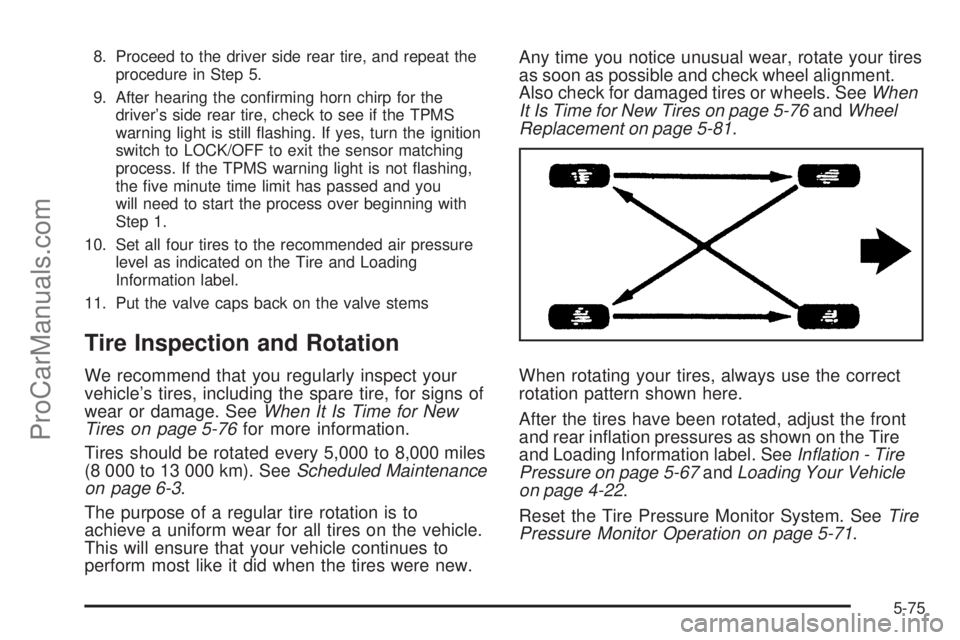
When rotating your tires, always use the correct
rotation pattern shown here.
After the tires have been rotated, adjust the front
and rear ination pressures as shown on the Tire
and Loading Information label. SeeInflation - Tire
Pressure on page 5-67andLoading Your Vehicle
on page 4-22.
Reset the Tire Pressure Monitor System. SeeTire
Pressure Monitor Operation on page 5-71.
5-75
ProCarManuals.com
Page 381 of 426
The services inScheduled Maintenance on page 6-3
should be performed when indicated. SeeAdditional
Required Services on page 6-6andMaintenance
Footnotes on page 6-7for further information.
{CAUTION:
Performing maintenance work on a vehicle
can be dangerous. In trying to do some jobs,
you can be seriously injured. Do your own
maintenance work only if you have the
required know-how and the proper tools and
equipment for the job. If you have any doubt,
see your dealer/retailer to have a qualied
technician do the work. SeeDoing Your Own
Service Work on page 5-4.
Some maintenance services can be complex. So,
unless you are technically qualied and have the
necessary equipment, you should have your dealer/
retailer do these jobs.
When you go to your dealer/retailer for your service
needs, you will know that trained and supported service
technicians will perform the work using genuine parts.Owner Checks and Services on page 6-8tells you what
should be checked, when to check it, and what you can
easily do to help keep your vehicle in good condition.
The proper replacement parts, uids, and lubricants to
use are listed inRecommended Fluids and Lubricants
on page 6-12andMaintenance Replacement Parts
on page 6-14. When your vehicle is serviced, make sure
these are used. All parts should be replaced and all
necessary repairs done before you or anyone else
drives the vehicle. We recommend the use of genuine
parts from your dealer/retailer.
Scheduled Maintenance
When the CHANGE ENGINE OIL DIC message comes
on, it means that service is required for your vehicle.
SeeDIC Warnings and Messages on page 3-48. Have
your vehicle serviced as soon as possible within the
next 600 miles (1 000 km). It is possible that, if you
are driving under the best conditions, the engine oil
life system may not indicate that vehicle service is
necessary for over a year. However, your engine oil and
lter must be changed at least once a year and at this
time the system must be reset. Your dealer/retailer has
trained service technicians who will perform this work
using genuine parts and reset the system.
6-3
ProCarManuals.com
Page 382 of 426
If the engine oil life system is ever reset accidentally,
you must service your vehicle within 3,000 miles
(5 000 km) since your last service. Remember to reset
the oil life system whenever the oil is changed. See
Engine Oil Life System on page 5-22for information on
the Engine Oil Life System and resetting the system.
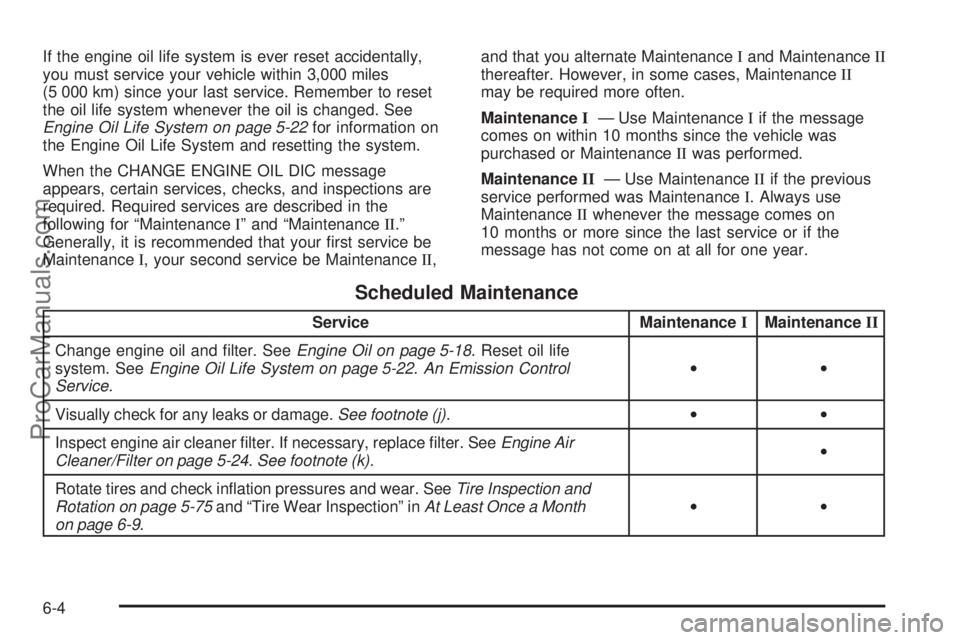
When the CHANGE ENGINE OIL DIC message
appears, certain services, checks, and inspections are
required. Required services are described in the
following for “MaintenanceI” and “MaintenanceII.”
Generally, it is recommended that your rst service be
MaintenanceI, your second service be MaintenanceII,and that you alternate MaintenanceIand MaintenanceII
thereafter. However, in some cases, MaintenanceII
may be required more often.
MaintenanceI— Use MaintenanceIif the message
comes on within 10 months since the vehicle was
purchased or MaintenanceIIwas performed.
MaintenanceII— Use MaintenanceIIif the previous
service performed was MaintenanceI. Always use
MaintenanceIIwhenever the message comes on
10 months or more since the last service or if the
message has not come on at all for one year.
Scheduled Maintenance
Service MaintenanceIMaintenanceII
Change engine oil and lter. SeeEngine Oil on page 5-18. Reset oil life
system. SeeEngine Oil Life System on page 5-22.An Emission Control
Service.••
Visually check for any leaks or damage.See footnote (j).••
Inspect engine air cleaner lter. If necessary, replace lter. SeeEngine Air
Cleaner/Filter on page 5-24.See footnote (k).•
Rotate tires and check ination pressures and wear. SeeTire Inspection and
Rotation on page 5-75and “Tire Wear Inspection” inAt Least Once a Month
on page 6-9.••
6-4
ProCarManuals.com