wheel SAAB 9-7X 2008 Owner's Manual
[x] Cancel search | Manufacturer: SAAB, Model Year: 2008, Model line: 9-7X, Model: SAAB 9-7X 2008Pages: 426, PDF Size: 2.77 MB
Page 174 of 426
SERVICE STABILITRAK
If this message displays, it means there may be a
problem with the StabiliTrak®system. If this message
appears, try to reset the system by performing the
following: stop; turn off the engine; then start the
engine again. If this message still comes on, it means
there is a problem. You should see your dealer/retailer
for service. The vehicle is safe to drive, however,
you do not have the benet of StabiliTrak
®, so reduce
your speed and drive accordingly.
SERVICE TIRE MONITOR
This message displays if a part on the Tire Pressure
Monitor System (TPMS) is not working properly. The tire
pressure light also ashes and then remains on during
the same ignition cycle. SeeTire Pressure Light on
page 3-37. Several conditions may cause this message
to appear. SeeTire Pressure Monitor Operation on
page 5-71for more information. If the warning comes on
and stays on, there may be a problem with the TPMS.
See your dealer/retailer.
STABILITRAK ACTIVE
This message displays anytime the StabiliTrak®system
activates to maintain vehicle stability. Any combination
of engine speed management, brake traction control,
and stability control displays this message.
STABILITRAK NOT READY
This message may display if driving conditions delay
StabiliTrak®system initialization. This is normal.
Once the system initializes, this message will no
longer be displayed on the DIC.
STABILITRAK OFF
This message displays when you press the StabiliTrak®
button for more than ve seconds or when stability
control has been automatically disabled. The StabiliTrak®
button is located on the transmission shift handle.
To limit wheel spin and realize the full benets of the
stability enhancement system, you should normally leave
StabiliTrak
®on. However, you should turn StabiliTrak®off
if your vehicle gets stuck in sand, mud, ice, or snow and
you want to rock your vehicle to attempt to free it, or if you
are driving in extreme off-road conditions and require
more wheel spin. SeeIf Your Vehicle is Stuck in Sand,
Mud, Ice, or Snow on page 4-21. To turn the StabiliTrak
®
system back on, press the StabiliTrak®button again.
The message may display if the brake system warning
light is on. SeeBrake System Warning Light on
page 3-34.
The message turns off as soon as the conditions that
caused the message to be displayed are no longer
present.
3-52
ProCarManuals.com
Page 175 of 426

TIGHTEN FUEL CAP
This message may display and a chime may sound if
the vehicle’s fuel cap is not tightened properly. Fully
reinstall the fuel cap. SeeFilling the Tank on page 5-7.
The diagnostic system can determine if the fuel cap
has been left off or improperly installed. A loose
or missing fuel cap allows fuel to evaporate into the
atmosphere. This message remains on until it is
manually cleared from the DIC display. The DIC
message is also cancelled if the ignition is turned off.
The DIC message and the Service Engine Soon light
may come on again during a second trip if the fuel cap
is still not tightened properly. SeeMalfunction Indicator
Lamp on page 3-38for more information.
TRACTION CONTROL OFF
This message displays when you momentarily press
the StabiliTrak®button located on the transmission
shift handle. In this mode, stability control and the
brake-traction control are functional. Engine speed
management will be modied and the driven wheels
can spin more freely. For more details on this mode,
seeStabiliTrak
®System on page 4-5.
TURN SIGNAL ON
This message displays and a chime sounds if a turn
signal is left on for 3/4 of a mile (1.2 km). Move the
turn signal/multifunction lever to the off position.
DIC Vehicle Customization
Your vehicle may have customization capabilities that
allow you to program some features to one setting
based on your preference. All of the customizable
options listed may not be available on your vehicle.
Only the options available display on the Driver
Information Center (DIC).
The default settings for the customization features were
set when your vehicle left the factory, but may have
been changed from their default state since then.
To change feature preferences, make sure the ignition
is on and the vehicle is in PARK (P). To avoid excessive
drain on the battery, it is recommended that the
headlamps are turned off.
Press the customization button to scroll through the
available customizable options.
After pressing the customization button, VEHICLE
SETTINGS momentarily displays before going to a
customization option.
3-53
ProCarManuals.com
Page 182 of 426
Audio System(s)
Determine which radio your vehicle has and then
read the pages following to familiarize yourself with
its features.
{CAUTION:
This system provides you with far greater
access to audio stations and song listings.
Giving extended attention to entertainment
tasks while driving can cause a crash and
you or others can be injured or killed. Always
keep your eyes on the road and your mind
on the drive — avoid engaging in extended
searching while driving.
Keeping your mind on the drive is important for
safe driving. SeeDefensive Driving on page 4-2.
Here are some ways in which you can help avoid
distraction while driving.
While your vehicle is parked:
Familiarize yourself with all of its controls.
Familiarize yourself with its operation.
Set up your audio system by presetting your
favorite radio stations, setting the tone, and
adjusting the speakers. Then, when driving
conditions permit, you can tune to your favorite
radio stations using the presets and steering wheel
controls if the vehicle has them.
Notice:Before adding any sound equipment to
your vehicle, such as an audio system, CD player,
CB radio, mobile telephone, or two-way radio, make
sure that it can be added by checking with your
dealer/retailer. Also, check federal rules covering
mobile radio and telephone units. If sound
equipment can be added, it is very important to do
it properly. Added sound equipment may interfere
with the operation of your vehicle’s engine, radio,
or other systems, and even damage them. Your
vehicle’s systems may interfere with the operation
of sound equipment that has been added.
Your vehicle has a feature called Retained Accessory
Power (RAP). With RAP, the audio system can be
played even after the ignition is turned off. SeeRetained
Accessory Power (RAP) on page 2-21for more
information.
Setting the Clock
Press and hold H until the correct hour and AM or PM
displays. Press and hold M until the correct minute
displays. The time can be set with the ignition on or off.
3-60
ProCarManuals.com
Page 213 of 426
Audio Steering Wheel Controls
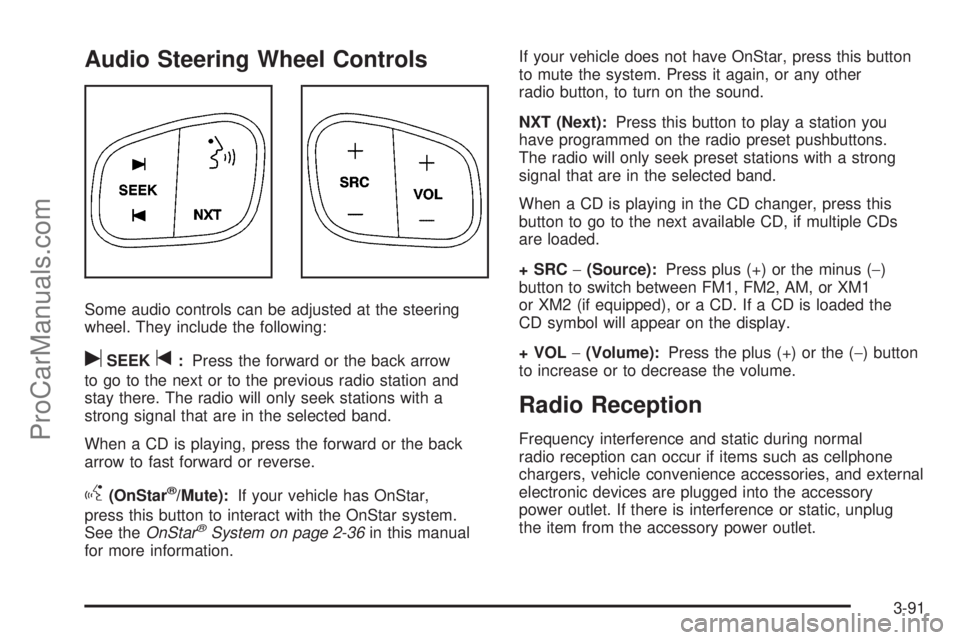
Some audio controls can be adjusted at the steering
wheel. They include the following:
uSEEKt:Press the forward or the back arrow
to go to the next or to the previous radio station and
stay there. The radio will only seek stations with a
strong signal that are in the selected band.
When a CD is playing, press the forward or the back
arrow to fast forward or reverse.
g(OnStar®/Mute):If your vehicle has OnStar,
press this button to interact with the OnStar system.
See theOnStar
®System on page 2-36in this manual
for more information.If your vehicle does not have OnStar, press this button
to mute the system. Press it again, or any other
radio button, to turn on the sound.
NXT (Next):Press this button to play a station you
have programmed on the radio preset pushbuttons.
The radio will only seek preset stations with a strong
signal that are in the selected band.
When a CD is playing in the CD changer, press this
button to go to the next available CD, if multiple CDs
are loaded.
+ SRC−(Source):Press plus (+) or the minus (−)
button to switch between FM1, FM2, AM, or XM1
or XM2 (if equipped), or a CD. If a CD is loaded the
CD symbol will appear on the display.
+ VOL−(Volume):Press the plus (+) or the (−) button
to increase or to decrease the volume.
Radio Reception
Frequency interference and static during normal
radio reception can occur if items such as cellphone
chargers, vehicle convenience accessories, and external
electronic devices are plugged into the accessory
power outlet. If there is interference or static, unplug
the item from the accessory power outlet.
3-91
ProCarManuals.com
Page 215 of 426
Your Driving, the Road, and Your Vehicle..........4-2
Defensive Driving...........................................4-2
Drunk Driving.................................................4-2
Control of a Vehicle........................................4-3
Braking.........................................................4-3
Antilock Brake System (ABS)...........................4-4
Braking in Emergencies...................................4-5
Limited-Slip Rear Axle.....................................4-5
StabiliTrak
®System........................................4-5
All-Wheel Drive (AWD) System.......................4-10
Steering......................................................4-10
Off-Road Recovery.......................................4-12
Passing.......................................................4-12
Loss of Control.............................................4-12
Off-Road Driving...........................................4-13
Driving at Night............................................4-14Driving in Rain and on Wet Roads..................4-14
Before Leaving on a Long Trip.......................4-15
Highway Hypnosis........................................4-16
Hill and Mountain Roads................................4-16
Winter Driving..............................................4-17
If Your Vehicle is Stuck in Sand, Mud,
Ice, or Snow.............................................4-21
Rocking Your Vehicle to Get It Out.................4-22
Loading Your Vehicle....................................4-22
Towing..........................................................4-28
Towing Your Vehicle.....................................4-28
Recreational Vehicle Towing...........................4-28
Electronically Controlled Air Suspension
System....................................................4-28
Towing a Trailer...........................................4-30
Section 4 Driving Your Vehicle
4-1
ProCarManuals.com
Page 219 of 426
Let us say the road is wet and you are driving safely.
Suddenly, an animal jumps out in front of you. You slam
on the brakes and continue braking. Here is what
happens with ABS:
A computer senses that wheels are slowing down. If
one of the wheels is about to stop rolling, the computer
will separately work the brakes at each front wheel
and at both rear wheels.
ABS can change the brake pressure faster than any
driver could. The computer is programmed to make the
most of available tire and road conditions. This can
help you steer around the obstacle while braking hard.
As you brake, the computer keeps receiving updates
on wheel speed and controls braking pressure
accordingly.
Remember: ABS does not change the time you need to
get your foot up to the brake pedal or always decrease
stopping distance. If you get too close to the vehicle
in front of you, you will not have time to apply the brakes
if that vehicle suddenly slows or stops. Always leave
enough room up ahead to stop, even though you
have ABS.
Using ABS
Do not pump the brakes. Just hold the brake pedal down
rmly and let antilock work for you. You might feel the
brakes vibrate or notice some noise, but this is normal.
Braking in Emergencies
With ABS, you can steer and brake at the same time.
In many emergencies, steering can help you more than
even the very best braking.
Limited-Slip Rear Axle
Your vehicle may have this feature. A limited-slip rear
axle can give you additional traction on snow, mud, ice,
sand or gravel. It works like a standard axle most of
the time, but when one of the rear wheels has no
traction and the other does, this feature will allow the
wheel with traction to move the vehicle.
StabiliTrak®System
Your vehicle is equipped with StabiliTrak®, Electronic
Stability Control (ESC) which combines antilock
brake, traction and stability control systems and helps
the driver maintain directional control of the vehicle
in most driving conditions.
Traction control activates when the controller senses
wheel spin. StabiliTrak
®will selectively apply the brakes
and reduce engine torque to help regain traction.
4-5
ProCarManuals.com
Page 221 of 426
STABILITRAK OFF — The driver can turn off
StabiliTrak®by pressing the StabiliTrak®button for
more than ve seconds. The StabiliTrak®light will come
on and STABILITRAK OFF will be displayed. For
vehicles without a DIC, the StabiliTrak
®indicator light
will come on. Momentarily pressing the StabiliTrak®
button again will return the system to the STABILITRAK
ON mode. See StabiliTrak®Off below for more
information.
Traction Control Off
In this mode, stability control and brake-traction control
are functional. Engine speed management will be
modied and the driven wheels can spin more freely.
This can cause the brake-traction control to activate
more frequently. If the controller detects excessive wheel
spin in this mode, the StabiliTrak
®indicator light may
blink and the STABILITRAK ACTIVE message may be
displayed to warn the driver that damage may occur
to the transfer case.
StabiliTrak®Off
In this mode, both stability control and part of the
traction control system are disabled. Your vehicle will
still have brake-traction control, but will not be able
to use the engine speed management system. You may
still hear system noises as a result of the brake-traction
control coming on. If the controller detects excessive
wheel spin in this mode, the StabiliTrak
®indicator light
may blink and the STABILITRAK ACTIVE message
may be displayed to warn the driver that damage may
occur to the transfer case.
It is recommended to leave the system on for normal
driving conditions, but it may be necessary to turn
the system off if your vehicle is stuck in sand, mud,
ice or snow, and you may want to “rock” your vehicle
in an attempt to free it. It may also be necessary to
turn off the system when driving in extreme off-road
conditions where high wheel spin is required. See
If Your Vehicle is Stuck in Sand, Mud, Ice, or Snow
on page 4-21for more information.
4-7
ProCarManuals.com
Page 223 of 426
Vehicles with a DIC Vehicles without a DIC Event
Solid Service StabiliTrak
®Solid SolidStabiliTrak
®system
is disabled due to a
system fault.
SolidStabiliTrak
®
Not ReadySolid OffStabiliTrak
®system
is disabled due to a
failure to initialize.
Notice:If the StabiliTrak
®light comes on due to
heavy braking and/or because the traction control
system has been continuously active, do not
allow the wheel(s) of one axle to spin excessively.
If you do, you may be causing damage to the
transfer case. This could lead to costly repairs not
covered by your warranty.
Notice:If you allow the wheel(s) of one axle to spin
excessively while the StabiliTrak
®, ABS and brake
warning lights and the SERVICE STABILITRAK
message are displayed, you could damage the
transfer case. The repairs would not be covered by
your warranty. Reduce engine power and do not
spin the wheel(s) excessively while these lights
and this message are displayed.
StabiliTrak
®may activate on dry or rough roads or
under conditions such as heavy acceleration while
turning or abrupt upshifts/downshifts of the transmission.When this happens, you may notice a reduction in
acceleration, or may hear a noise or vibration.
This is normal.
If your vehicle is in cruise control when the system
activates, the StabiliTrak
®light will blink, and the
cruise control will automatically disengage. When
road conditions allow, you may re-engage the cruise
control. SeeCruise Control on page 3-11.
StabiliTrak
®will turn off automatically if a problem is
detected in the system. The StabiliTrak®light will come
on and SERVICE STABILITRAK will be displayed on
the DIC. For vehicles without a DIC, the StabiliTrak
®
light and the StabiliTrak®service light will both come on.
If the SERVICE STABILITRAK message (or StabiliTrak®
service light) does not clear itself after restarting the
vehicle, you should see your dealer for service.
Adding non-GM accessories can affect your vehicle’s
performance. SeeAccessories and Modifications
on page 5-3for more information.
4-9
ProCarManuals.com
Page 224 of 426
All-Wheel Drive (AWD) System
Your vehicle has this feature. There is no lever or
switch to engage or disengage the front axle. It is fully
automatic and adjusts as needed for road conditions.
Your vehicle has an active transfer case allowing
two-wheel-drive operation on dry roads. The transfer
case will shift automatically into all-wheel drive on
slippery surfaces. You may feel an extra shift when
the all-wheel drive engages.
Steering
Power Steering
If you lose power steering assist because the engine
stops or the system is not functioning, you can steer
but it will take much more effort.
Steering Tips
It is important to take curves at a reasonable speed.
A lot of the “driver lost control” accidents mentioned
on the news happen on curves. Here is why:
Experienced driver or beginner, each of us is subject
to the same laws of physics when driving on curves.
The traction of the tires against the road surface
makes it possible for the vehicle to change its path
when you turn the front wheels.If there is no traction, inertia will keep the vehicle going
in the same direction. If you have ever tried to steer
a vehicle on wet ice, you will understand this.
The traction you can get in a curve depends on the
condition of the tires and the road surface, the angle at
which the curve is banked, and your speed. While you
are in a curve, speed is the one factor you can control.
Suppose you are steering through a sharp curve.
Then you suddenly accelerate. Both control
systems — steering and acceleration — have to do
their work where the tires meet the road. Adding
the sudden acceleration can demand too much of
those places. You can lose control.
What should you do if this ever happens? Ease up on
the accelerator pedal, steer the vehicle the way you
want it to go, and slow down.
Speed limit signs near curves warn that you should
adjust your speed. Of course, the posted speeds
are based on good weather and road conditions. Under
less favorable conditions you will want to go slower.
If you need to reduce your speed as you approach
a curve, do it before you enter the curve, while the
front wheels are straight ahead.
4-10
ProCarManuals.com
Page 225 of 426
Try to adjust your speed so you can drive through the
curve. Maintain a reasonable, steady speed. Wait
to accelerate until you are out of the curve, and then
accelerate gently into the straightaway.
Adding non-dealer/non-retailer accessories can affect
your vehicle’s performance. SeeAccessories and
Modifications on page 5-3.
Steering in Emergencies
There are times when steering can be more effective than
braking. For example, you come over a hill and nd a
truck stopped in your lane, or a car suddenly pulls out
from nowhere, or a child darts out from between parked
cars and stops right in front of you. You can avoid these
problems by braking — if you can stop in time. But
sometimes you cannot; there is not room. That is the time
for evasive action — steering around the problem.
Your vehicle can perform very well in emergencies like
these. First apply the brakes. SeeBraking on page 4-3.
It is better to remove as much speed as you can from a
possible collision. Then steer around the problem, to the
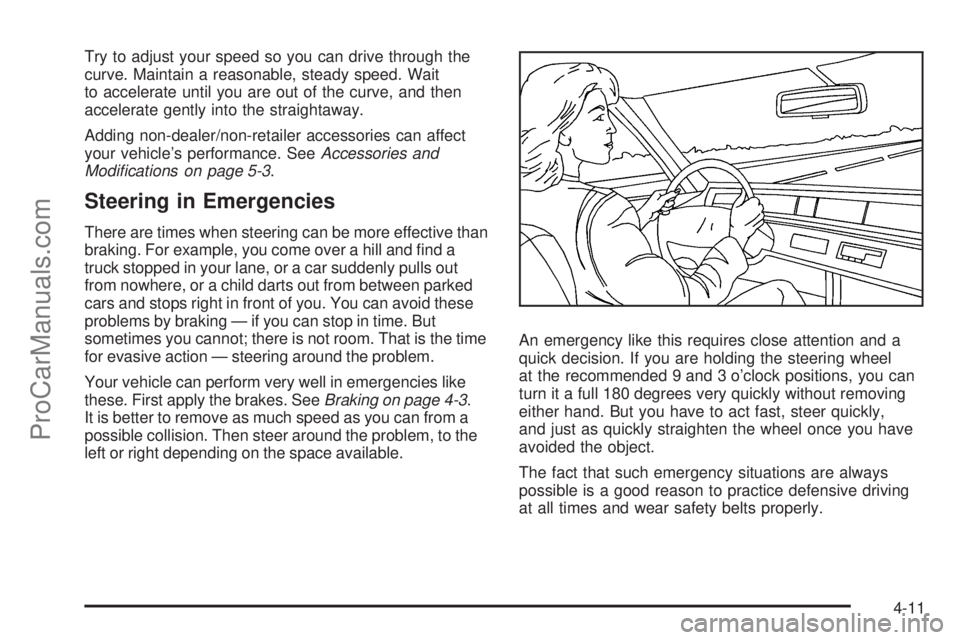
left or right depending on the space available.An emergency like this requires close attention and a
quick decision. If you are holding the steering wheel
at the recommended 9 and 3 o’clock positions, you can
turn it a full 180 degrees very quickly without removing
either hand. But you have to act fast, steer quickly,
and just as quickly straighten the wheel once you have
avoided the object.
The fact that such emergency situations are always
possible is a good reason to practice defensive driving
at all times and wear safety belts properly.
4-11
ProCarManuals.com