brake SAAB 9-7X 2008 Owner's Guide
[x] Cancel search | Manufacturer: SAAB, Model Year: 2008, Model line: 9-7X, Model: SAAB 9-7X 2008Pages: 426, PDF Size: 2.77 MB
Page 223 of 426
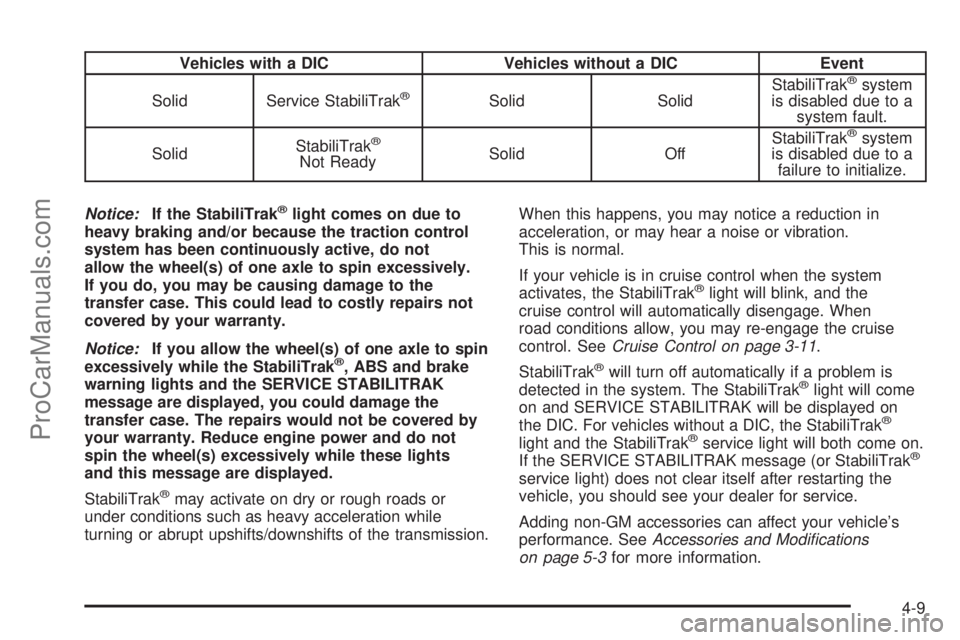
Vehicles with a DIC Vehicles without a DIC Event
Solid Service StabiliTrak
®Solid SolidStabiliTrak
®system
is disabled due to a
system fault.
SolidStabiliTrak
®
Not ReadySolid OffStabiliTrak
®system
is disabled due to a
failure to initialize.
Notice:If the StabiliTrak
®light comes on due to
heavy braking and/or because the traction control
system has been continuously active, do not
allow the wheel(s) of one axle to spin excessively.
If you do, you may be causing damage to the
transfer case. This could lead to costly repairs not
covered by your warranty.
Notice:If you allow the wheel(s) of one axle to spin
excessively while the StabiliTrak
®, ABS and brake
warning lights and the SERVICE STABILITRAK
message are displayed, you could damage the
transfer case. The repairs would not be covered by
your warranty. Reduce engine power and do not
spin the wheel(s) excessively while these lights
and this message are displayed.
StabiliTrak
®may activate on dry or rough roads or
under conditions such as heavy acceleration while
turning or abrupt upshifts/downshifts of the transmission.When this happens, you may notice a reduction in
acceleration, or may hear a noise or vibration.
This is normal.
If your vehicle is in cruise control when the system
activates, the StabiliTrak
®light will blink, and the
cruise control will automatically disengage. When
road conditions allow, you may re-engage the cruise
control. SeeCruise Control on page 3-11.
StabiliTrak
®will turn off automatically if a problem is
detected in the system. The StabiliTrak®light will come
on and SERVICE STABILITRAK will be displayed on
the DIC. For vehicles without a DIC, the StabiliTrak
®
light and the StabiliTrak®service light will both come on.
If the SERVICE STABILITRAK message (or StabiliTrak®
service light) does not clear itself after restarting the
vehicle, you should see your dealer for service.
Adding non-GM accessories can affect your vehicle’s
performance. SeeAccessories and Modifications
on page 5-3for more information.
4-9
ProCarManuals.com
Page 225 of 426
Try to adjust your speed so you can drive through the
curve. Maintain a reasonable, steady speed. Wait
to accelerate until you are out of the curve, and then
accelerate gently into the straightaway.
Adding non-dealer/non-retailer accessories can affect
your vehicle’s performance. SeeAccessories and
Modifications on page 5-3.
Steering in Emergencies
There are times when steering can be more effective than
braking. For example, you come over a hill and nd a
truck stopped in your lane, or a car suddenly pulls out
from nowhere, or a child darts out from between parked
cars and stops right in front of you. You can avoid these
problems by braking — if you can stop in time. But
sometimes you cannot; there is not room. That is the time
for evasive action — steering around the problem.
Your vehicle can perform very well in emergencies like
these. First apply the brakes. SeeBraking on page 4-3.
It is better to remove as much speed as you can from a
possible collision. Then steer around the problem, to the
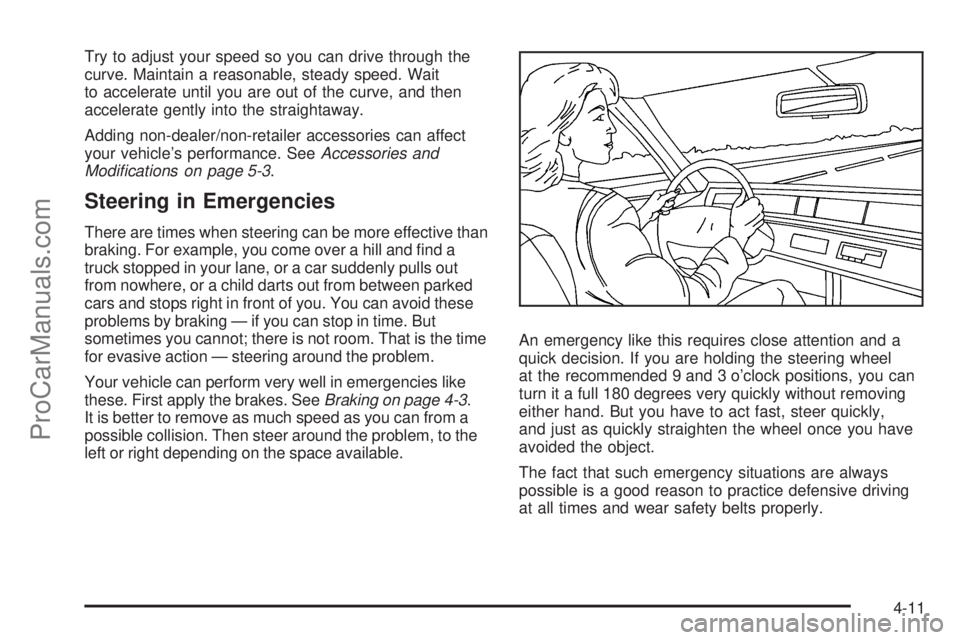
left or right depending on the space available.An emergency like this requires close attention and a
quick decision. If you are holding the steering wheel
at the recommended 9 and 3 o’clock positions, you can
turn it a full 180 degrees very quickly without removing
either hand. But you have to act fast, steer quickly,
and just as quickly straighten the wheel once you have
avoided the object.
The fact that such emergency situations are always
possible is a good reason to practice defensive driving
at all times and wear safety belts properly.
4-11
ProCarManuals.com
Page 226 of 426
Off-Road Recovery
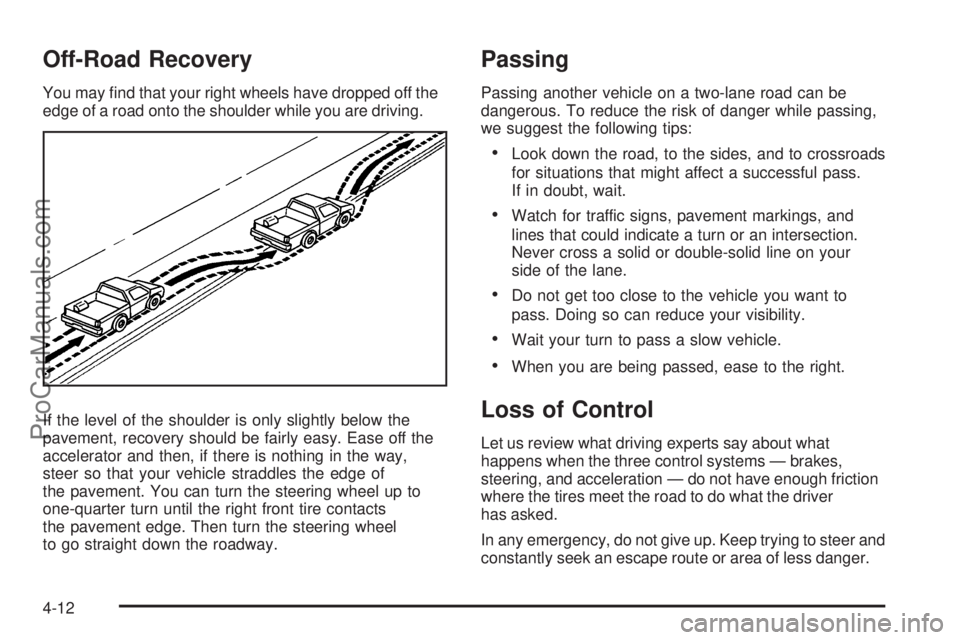
You may nd that your right wheels have dropped off the
edge of a road onto the shoulder while you are driving.
If the level of the shoulder is only slightly below the
pavement, recovery should be fairly easy. Ease off the
accelerator and then, if there is nothing in the way,
steer so that your vehicle straddles the edge of
the pavement. You can turn the steering wheel up to
one-quarter turn until the right front tire contacts
the pavement edge. Then turn the steering wheel
to go straight down the roadway.
Passing
Passing another vehicle on a two-lane road can be
dangerous. To reduce the risk of danger while passing,
we suggest the following tips:
Look down the road, to the sides, and to crossroads
for situations that might affect a successful pass.
If in doubt, wait.
Watch for traffic signs, pavement markings, and
lines that could indicate a turn or an intersection.
Never cross a solid or double-solid line on your
side of the lane.
Do not get too close to the vehicle you want to
pass. Doing so can reduce your visibility.
Wait your turn to pass a slow vehicle.
When you are being passed, ease to the right.
Loss of Control
Let us review what driving experts say about what
happens when the three control systems — brakes,
steering, and acceleration — do not have enough friction
where the tires meet the road to do what the driver
has asked.
In any emergency, do not give up. Keep trying to steer and
constantly seek an escape route or area of less danger.
4-12
ProCarManuals.com
Page 227 of 426
Skidding
In a skid, a driver can lose control of the vehicle.
Defensive drivers avoid most skids by taking reasonable
care suited to existing conditions, and by not overdriving
those conditions. But skids are always possible.
The three types of skids correspond to your vehicle’s
three control systems. In the braking skid, the wheels are
not rolling. In the steering or cornering skid, too much
speed or steering in a curve causes tires to slip and lose
cornering force. And in the acceleration skid, too much
throttle causes the driving wheels to spin.
A cornering skid is best handled by easing your foot off
the accelerator pedal.
If your vehicle starts to slide, ease your foot off the
accelerator pedal and quickly steer the way you want
the vehicle to go. If you start steering quickly enough,
your vehicle may straighten out. Always be ready
for a second skid if it occurs.
Of course, traction is reduced when water, snow, ice,
gravel, or other material is on the road. For safety,
you want to slow down and adjust your driving to these
conditions. It is important to slow down on slippery
surfaces because stopping distance is longer and
vehicle control more limited.While driving on a surface with reduced traction, try
your best to avoid sudden steering, acceleration,
or braking, including reducing vehicle speed by shifting
to a lower gear. Any sudden changes could cause
the tires to slide. You might not realize the surface
is slippery until your vehicle is skidding. Learn to
recognize warning clues — such as enough water,
ice, or packed snow on the road to make a mirrored
surface — and slow down when you have any doubt.
Remember: Any Antilock Brake System (ABS) helps
avoid only the braking skid.
Off-Road Driving
Your vehicle does not have features like added ground
clearance, special underbody shielding, and a transfer
case low gear range, things that are necessary for
extended or severe off-road service. You should
not drive off-road unless you are on a level, solid
surface.
4-13
ProCarManuals.com
Page 228 of 426

Driving at Night
Night driving is more dangerous than day driving because
some drivers are likely to be impaired — by alcohol or
drugs, with night vision problems, or by fatigue.
Night driving tips include:
Drive defensively.
Do not drink and drive.
Reduce headlamp glare by adjusting the inside
rearview mirror.
Slow down and keep more space between you and
other vehicles because your headlamps can only
light up so much road ahead.
Watch for animals.
When tired, pull off the road.
Do not wear sunglasses.
Avoid staring directly into approaching headlamps.
Keep the windshield and all glass on your vehicle
clean — inside and out.
Keep your eyes moving, especially during turns
or curves.
No one can see as well at night as in the daytime.
But, as we get older, these differences increase.
A 50-year-old driver might need at least twice as much
light to see the same thing at night as a 20-year-old.
Driving in Rain and on Wet Roads
Rain and wet roads can reduce vehicle traction
and affect your ability to stop and accelerate. Always
drive slower in these types of driving conditions
and avoid driving through large puddles and
deep-standing or owing water.
{CAUTION:
Wet brakes can cause crashes. They might not
work as well in a quick stop and could cause
pulling to one side. You could lose control of
the vehicle.
After driving through a large puddle of water
or a car/vehicle wash, lightly apply the brake
pedal until the brakes work normally.
Flowing or rushing water creates strong
forces. Driving through owing water could
cause your vehicle to be carried away. If this
happens, you and other vehicle occupants
could drown. Do not ignore police warnings
and be very cautious about trying to drive
through owing water.
4-14
ProCarManuals.com
Page 230 of 426
Highway Hypnosis
Always be alert and pay attention to your surroundings
while driving. If you become tired or sleepy, nd a
safe place to park your vehicle and rest.
Other driving tips include:
Keep the vehicle well ventilated.
Keep interior temperature cool.
Keep your eyes moving — scan the road ahead
and to the sides.
Check the rearview mirror and vehicle
instruments often.
Hill and Mountain Roads
Driving on steep hills or through mountains is different
than driving on at or rolling terrain. Tips for driving
in these conditions include:
Keep your vehicle serviced and in good shape.
Check all uid levels and brakes, tires, cooling
system, and transmission.
Going down steep or long hills, shift to a
lower gear.
{CAUTION:
If you do not shift down, the brakes could get
so hot that they would not work well. You
would then have poor braking or even none
going down a hill. You could crash. Shift down
to let the engine assist the brakes on a steep
downhill slope.
4-16
ProCarManuals.com
Page 231 of 426
{CAUTION:
Coasting downhill in NEUTRAL (N) or with the
ignition off is dangerous. The brakes will have
to do all the work of slowing down and they
could get so hot that they would not work well.
You would then have poor braking or even
none going down a hill. You could crash.
Always have the engine running and your
vehicle in gear when you go downhill.
Stay in your own lane. Do not swing wide or cut
across the center of the road. Drive at speeds
that let you stay in your own lane.
Top of hills: Be alert — something could be in your
lane (stalled car, accident).
Pay attention to special road signs (falling rocks
area, winding roads, long grades, passing or
no-passing zones) and take appropriate action.
Winter Driving
Here are some tips for winter driving:
Have your vehicle in good shape for winter.
You might want to put winter emergency
supplies in your vehicle.
Include an ice scraper, a small brush or broom,
a supply of windshield washer uid, a rag, some
winter outer clothing, a small shovel, a ashlight,
a red cloth, and reective warning triangles. And,
if you will be driving under severe conditions,
include a small bag of sand, a piece of old carpet,
or a couple of burlap bags to help provide traction.
Be sure you properly secure these items in
your vehicle.
Also seeTires on page 5-60.
4-17
ProCarManuals.com
Page 233 of 426
Accelerate gently. Try not to break the fragile traction.
If you accelerate too fast, the drive wheels will spin and
polish the surface under the tires even more.
The Antilock Brake System (ABS) improves your
vehicle’s stability when you make a hard stop on a
slippery road. Even though you have ABS, begin
stopping sooner than you would on dry pavement.
SeeAntilock Brake System (ABS) on page 4-4.
Allow greater following distance on any
slippery road.
Watch for slippery spots. The road might be
ne until you hit a spot that is covered with ice.
On an otherwise clear road, ice patches can appear
in shaded areas where the sun cannot reach,
such as around clumps of trees, behind buildings,
or under bridges. Sometimes the surface of a curve
or an overpass can remain icy when the surrounding
roads are clear. If you see a patch of ice ahead
of you, brake before you are on it. Try not to
brake while you are actually on the ice, and avoid
sudden steering maneuvers.
If You Are Caught in a Blizzard
If you are stopped by heavy snow, you could be in
a serious situation. You should probably stay with your
vehicle unless you know for sure that you are near
help and you can hike through the snow. Here are some
things to do to summon help and keep yourself and
your passengers safe:
Turn on the hazard warning ashers.
Tie a red cloth to your vehicle to alert police that
you have been stopped by the snow.
Put on extra clothing or wrap a blanket around you.
If you do not have blankets or extra clothing, make
body insulators from newspapers, burlap bags,
rags, oor mats — anything you can wrap around
yourself or tuck under your clothing to keep warm.
4-19
ProCarManuals.com
Page 244 of 426
Towing a Trailer
{CAUTION:
If you do not use the correct equipment and
drive properly, you can lose control when you
pull a trailer. For example, if the trailer is too
heavy, the brakes may not work well — or even
at all. You and your passengers could be
seriously injured. You may also damage your
vehicle; the resulting repairs would not be
covered by your warranty. Pull a trailer only
if you have followed all the steps in this
section. Ask your dealer/retailer for advice
and information about towing a trailer with
your vehicle.Notice:Pulling a trailer improperly can damage
your vehicle and result in costly repairs that would
not be covered by your warranty. Always follow
the instructions in this section and check with your
dealer/retailer for more information about towing
a trailer with your vehicle.
To identify the trailering capacity of your vehicle, you
should read the information in “Weight of the Trailer” that
appears later in this section.
Trailering is different than just driving your vehicle by
itself. Trailering means changes in acceleration, braking,
handling, durability and fuel economy. Successful,
safe trailering takes correct equipment, and it has to
be used properly.
That’s the reason for this part. In it are many time-tested,
important trailering tips and safety rules. Many of
these are important for your safety and that of your
passengers. So please read this section carefully before
you pull a trailer.
4-30
ProCarManuals.com
Page 250 of 426
when driving. Always use a sway control if the trailer will
weigh more than these limits. You can ask a hitch
dealer about sway controls.
Safety Chains
You should always attach chains between your vehicle
and your trailer. Cross the safety chains under the
tongue of the trailer to help prevent the tongue
from contacting the road if it becomes separated
from the hitch. Instructions about safety chains
may be provided by the hitch manufacturer or by
the trailer manufacturer. Follow the manufacturer’s
recommendation for attaching safety chains and
do not attach them to the bumper. Always leave
just enough slack so you can turn with your rig.
Never allow safety chains to drag on the ground.
Trailer Brakes
If your trailer weighs more than 1,500 lbs (680 kg)
loaded, then it needs its own brakes — and they
must be adequate. Be sure to read and follow the
instructions for the trailer brakes so you’ll be able
to install, adjust and maintain them properly.
Since your vehicle is equipped with StabiliTrak
®, your
trailer brakes cannot tap into the vehicle’s hydraulic
brake system.
Driving with a Trailer
{CAUTION:
If you have a rear-most window open and
you pull a trailer with your vehicle, carbon
monoxide (CO) could come into your vehicle.
You cannot see or smell CO. It can cause
unconsciousness or death. SeeEngine
Exhaust on page 2-31. To maximize your safety
when towing a trailer:
Have your exhaust system inspected for
leaks, and make necessary repairs before
starting on your trip.
Keep the rear-most windows closed.
If exhaust does come into your vehicle
through a window in the rear or another
opening, drive with your front, main
heating or cooling system on and with the
fan on any speed. This will bring fresh,
outside air into your vehicle. Do not use
the climate control setting for maximum air
because it only recirculates the air inside
your vehicle. SeeDual Automatic Climate
Control System on page 3-20.
4-36
ProCarManuals.com