instrument panel SAAB 9-7X 2008 Owner's Guide
[x] Cancel search | Manufacturer: SAAB, Model Year: 2008, Model line: 9-7X, Model: SAAB 9-7X 2008Pages: 426, PDF Size: 2.77 MB
Page 152 of 426
Airbag Readiness Light
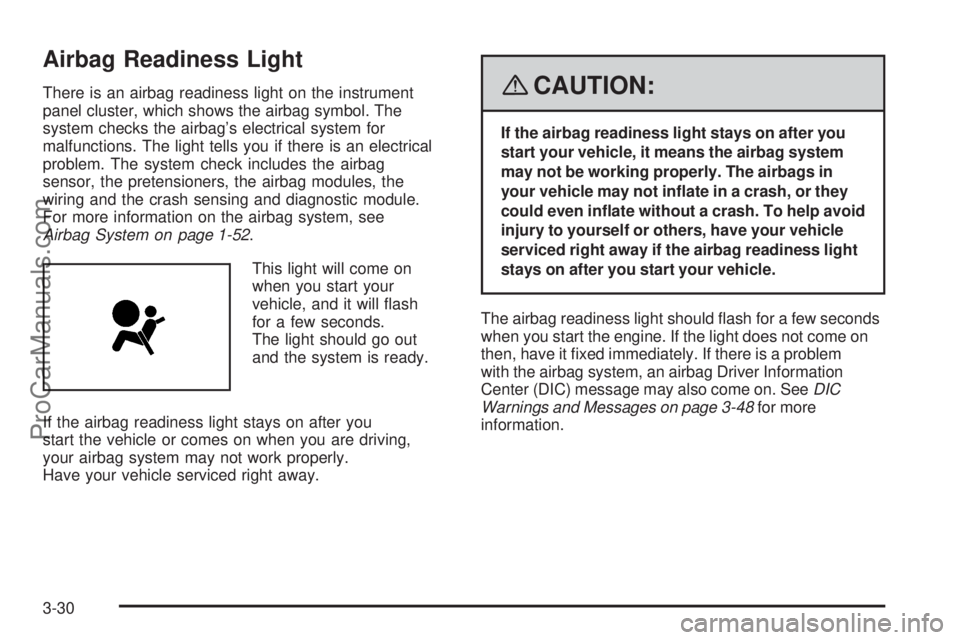
There is an airbag readiness light on the instrument
panel cluster, which shows the airbag symbol. The
system checks the airbag’s electrical system for
malfunctions. The light tells you if there is an electrical
problem. The system check includes the airbag
sensor, the pretensioners, the airbag modules, the
wiring and the crash sensing and diagnostic module.
For more information on the airbag system, see
Airbag System on page 1-52.
This light will come on
when you start your
vehicle, and it will ash
for a few seconds.
The light should go out
and the system is ready.
If the airbag readiness light stays on after you
start the vehicle or comes on when you are driving,
your airbag system may not work properly.
Have your vehicle serviced right away.{CAUTION:
If the airbag readiness light stays on after you
start your vehicle, it means the airbag system
may not be working properly. The airbags in
your vehicle may not inate in a crash, or they
could even inate without a crash. To help avoid
injury to yourself or others, have your vehicle
serviced right away if the airbag readiness light
stays on after you start your vehicle.
The airbag readiness light should ash for a few seconds
when you start the engine. If the light does not come on
then, have it xed immediately. If there is a problem
with the airbag system, an airbag Driver Information
Center (DIC) message may also come on. SeeDIC
Warnings and Messages on page 3-48for more
information.
3-30
ProCarManuals.com
Page 154 of 426
{CAUTION:
Even though the passenger sensing system is
designed to turn off the right front passenger’s
frontal airbag if the system detects a rear-facing
child restraint, no system is fail-safe, and
no one can guarantee that an airbag will not
deploy under some unusual circumstance,
even though it is turned off. We recommend
that rear-facing child restraints be secured in
the rear seat, even if the airbag is off.
If the word OFF or the off symbol is lit on the airbag
status indicator, it means that the passenger sensing
system has turned off the right front passenger’s frontal
airbag. SeePassenger Sensing System on page 1-61
for more on this, including important safety information.If, after several seconds, both status indicator lights
remain on, or if there are no lights at all, there may
be a problem with the lights or the passenger sensing
system. See your dealer/retailer for service.
{CAUTION:
If the airbag readiness light in the instrument
panel cluster ever comes on and stays on,
it means that something may be wrong with
the airbag system. If this ever happens, have
the vehicle serviced promptly, because an
adult-size person sitting in the right front
passenger’s seat may not have the protection
of the airbag(s). SeeAirbag Readiness Light
on page 3-30for more on this, including
important safety information.
3-32
ProCarManuals.com
Page 167 of 426
Driver Information Center (DIC)
The Driver Information Center (DIC) display is located
on the instrument panel cluster, below the speedometer.
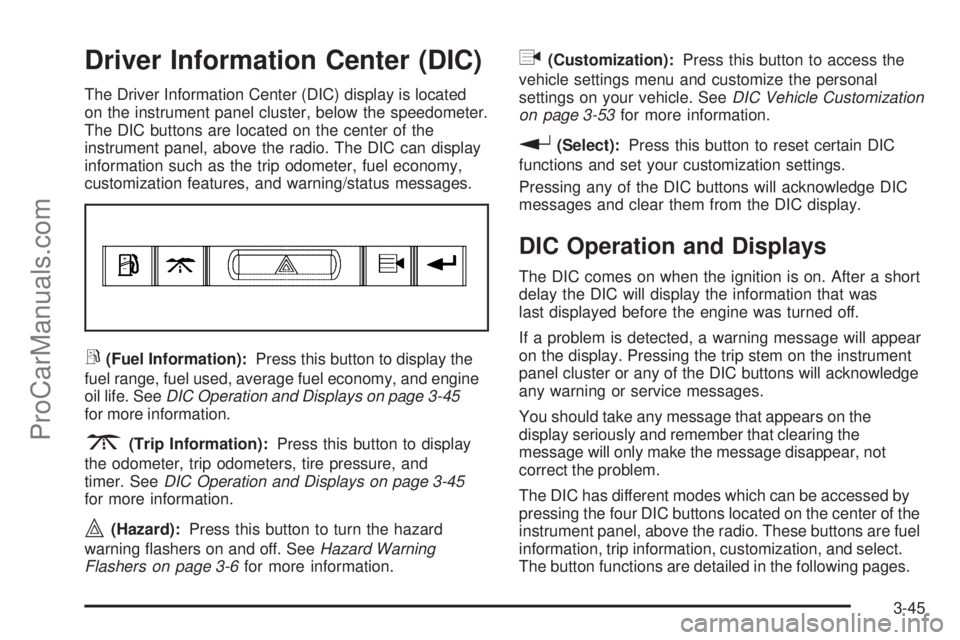
The DIC buttons are located on the center of the
instrument panel, above the radio. The DIC can display
information such as the trip odometer, fuel economy,
customization features, and warning/status messages.
r(Fuel Information):Press this button to display the
fuel range, fuel used, average fuel economy, and engine
oil life. SeeDIC Operation and Displays on page 3-45
for more information.
3(Trip Information):Press this button to display
the odometer, trip odometers, tire pressure, and
timer. SeeDIC Operation and Displays on page 3-45
for more information.
|(Hazard):Press this button to turn the hazard
warning ashers on and off. SeeHazard Warning
Flashers on page 3-6for more information.
q(Customization):Press this button to access the
vehicle settings menu and customize the personal
settings on your vehicle. SeeDIC Vehicle Customization
on page 3-53for more information.
r(Select):Press this button to reset certain DIC
functions and set your customization settings.
Pressing any of the DIC buttons will acknowledge DIC
messages and clear them from the DIC display.
DIC Operation and Displays
The DIC comes on when the ignition is on. After a short
delay the DIC will display the information that was
last displayed before the engine was turned off.
If a problem is detected, a warning message will appear
on the display. Pressing the trip stem on the instrument
panel cluster or any of the DIC buttons will acknowledge
any warning or service messages.
You should take any message that appears on the
display seriously and remember that clearing the
message will only make the message disappear, not
correct the problem.
The DIC has different modes which can be accessed by
pressing the four DIC buttons located on the center of the
instrument panel, above the radio. These buttons are fuel
information, trip information, customization, and select.
The button functions are detailed in the following pages.
3-45
ProCarManuals.com
Page 169 of 426
Odometer:Press the trip information button until
ODOMETER appears on the display. This mode
shows the total distance the vehicle has been driven
in either miles or kilometers. Pressing the trip stem
located on the instrument panel cluster with the vehicle
off will also display the odometer.
Trip A:Press the trip information button until TRIP A
appears on the display. This mode shows the current
distance traveled since the last reset for TRIP A in either
miles or kilometers.
Trip B:Press the trip information button until TRIP B
appears on the display. This mode shows the current
distance traveled since the last reset for TRIP B in
either miles or kilometers.
To reset TRIP A or TRIP B information, press and hold
the select button for one second while in one of the
trip modes. This will reset the information for TRIP A
or TRIP B.
You can also reset the TRIP A or TRIP B while they are
displayed by pressing the trip stem. If you press and
hold the trip stem or the select button for more than
four seconds, the display will show the distance traveled
since the last ignition cycle for TRIP A or TRIP B.Tire Pressures:Press the trip information button
until TIRE PRESSURES appears on the display. This
mode shows the tire pressure in pounds per square
inch (psi) or kilopascals (kPa). Press the select button
to scroll through the following information:
LF TIRE shows the tire pressure for the front
driver’s side tire.
RF TIRE shows the tire pressure for the front
passenger’s side tire.
LR TIRE shows the tire pressure for the rear
driver’s side tire.
RR TIRE shows the tire pressure for the rear
passenger’s side tire.
Timer:The DIC can be used as a timer. Press the
select button while TIMER is displayed to start the timer.
The display will show the amount of time that has passed
since the timer was last reset, not including time the
ignition is off. Time will continue to be counted as long
as the ignition is on, even if another display is being
shown on the DIC. The timer will record up to 99 hours,
59 minutes, and 59 seconds (99:59:59), after which the
display will roll back to zero.
To stop the counting of time, press the select button
briey while TIMER is displayed.
To reset the timer to zero, press and hold the select
button while TIMER is displayed.
3-47
ProCarManuals.com
Page 170 of 426
Customization Button
q
(Customization):Press this button to access
the VEHICLE SETTINGS menu and customize
the settings to your vehicle. SeeDIC Vehicle
Customization on page 3-53for more information.
Select Button
r
(Select):Press the select button to reset certain
DIC functions, turn off or acknowledge messages on
the DIC display, and set your customization settings.
For example, this button will allow you to reset the trip
odometers, turn off the FUEL LEVEL LOW message,
and enables you to scroll through and select the
language in which the DIC information will appear.
DIC Warnings and Messages
Messages are displayed on the DIC to notify the driver
that the status of the vehicle has changed and that
some action may be needed to correct the condition.
Multiple messages may appear one after another.
Some messages may not require immediate action.
Press any of the DIC buttons on the instrument panel
or the trip odometer reset stem on the instrument panel
cluster to acknowledge that you received the messages
and to clear them from the display.Some messages cannot be cleared from the display
because they are more urgent. These messages require
action before they can be removed from the DIC display.
Take any messages that appear on the display seriously
and remember that clearing the messages will only make
the messages disappear, not correct the problem.
The following are the possible messages that can be
displayed and some information about them.
CHANGE ENGINE OIL
This message displays when the engine oil needs to
be changed and service is required for your vehicle.
SeeScheduled Maintenance on page 6-3andEngine
Oil on page 5-18for more information. Also see
Engine Oil Life System on page 5-22for information
on how to reset the message. This message clears
itself after 10 seconds until the next ignition cycle.
CHECK TIRE PRESSURE
This message displays when the pressure in one or
more of the vehicle’s tires needs to be checked.
If a tire pressure message appears on the DIC,
stop as soon as you can. Have the tire pressures
checked and set to those shown on the Tire Loading
Information label. SeeTires on page 5-60,Loading Your
Vehicle on page 4-22, andInflation - Tire Pressure on
page 5-67. The DIC also shows the tire pressure values.
3-48
ProCarManuals.com
Page 171 of 426

SeeDIC Operation and Displays on page 3-45.Ifthe
tire pressure is low, the low tire pressure warning
light comes on. SeeTire Pressure Light on page 3-37.
CHECK WASHER FLUID
This message displays if the washer uid level is low.
Adding washer uid to the windshield washer uid
reservoir clears this message. SeeWindshield Washer
Fluid on page 5-39. This message clears itself after
10 seconds, or you can manually clear it from the
DIC display.
CURB VIEW ACTIVATED
This message displays when the passenger outside
rearview mirror moves into the curb view position.
SeeOutside Curb View Assist Mirror on page 2-35
for more information.
DRIVER DOOR AJAR
This message displays and a chime sounds if the driver
door is not fully closed. Stop and turn off the vehicle,
check the door for obstructions, and close the door
again. Check to see if the message still appears
on the DIC.
ENGINE COOLANT HOT/ENGINE
OVERHEATED
Notice:If you drive your vehicle while the engine
is overheating, severe engine damage may occur.
If an overheat warning appears on the instrument
panel cluster and/or DIC, stop the vehicle as soon
as possible. Do not increase the engine speed
above normal idling speed. SeeEngine Overheating
on page 5-30for more information.
This message displays and a chime sounds if the
cooling system temperature gets hot. SeeEngine
Overheating on page 5-30for the proper course
of action. This message clears when the coolant
temperature drops to a safe operating temperature.
FRONT FOG LAMPS OFF
This message displays if the fog lamps are turned off.
The message clears after 10 seconds. If you turn on
the high-beam headlamps, the fog lamps also turn
off and this message appears on the DIC. The fog
lamps turn back on again when you switch back
to low-beam headlamps. SeeFog Lamps on page 3-17
andTurn Signal/Multifunction Lever on page 3-7for
more information.
3-49
ProCarManuals.com
Page 173 of 426
PASSENGER DOOR AJAR
This message displays and a chime sounds if the
passenger door is not fully closed. Stop and turn off
the vehicle, check the door for obstructions, and close
the door again. Check to see if the message still
appears on the DIC.
REAR ACCESS OPEN
This message displays and a chime sounds if the
liftgate or liftglass is open while the ignition is in
ON/RUN. Turn off the vehicle and check the liftgate
and liftglass. SeeLiftgate/Liftglass on page 2-12.
Restart the vehicle and check for the message on
the DIC display.
RIGHT REAR DOOR AJAR
This message displays and a chime sounds if the
passenger side rear door is not fully closed. Stop and
turn off the vehicle, check the door for obstructions,
and close the door again. Check to see if the message
still appears on the DIC.
SERVICE AIR BAG
This message displays if there is a problem with
the airbag system. Have your dealer/retailer inspect
the system for problems. SeeAirbag Readiness Light
on page 3-30andAirbag System on page 1-52for
more information.
SERVICE BRAKE SYSTEM
This message displays if a problem occurs with the
brake system. If this message appears, stop as soon
as possible and turn off the vehicle. Restart the vehicle
and check for the message on the DIC display. If the
message is still displayed, or appears again when
you begin driving, the brake system needs service.
See your dealer/retailer.
SERVICE CHARGING SYS (System)
This message displays if there is a problem with the
battery charging system. Under certain conditions, the
charging system light may also turn on in the instrument
panel cluster. SeeCharging System Light on page 3-33.
The battery will not be charging at an optimal rate and
the vehicle will lose the ability to enter the fuel economy
mode. The vehicle is safe to drive, however you should
have the electrical system checked by your
dealer/retailer.
3-51
ProCarManuals.com
Page 222 of 426
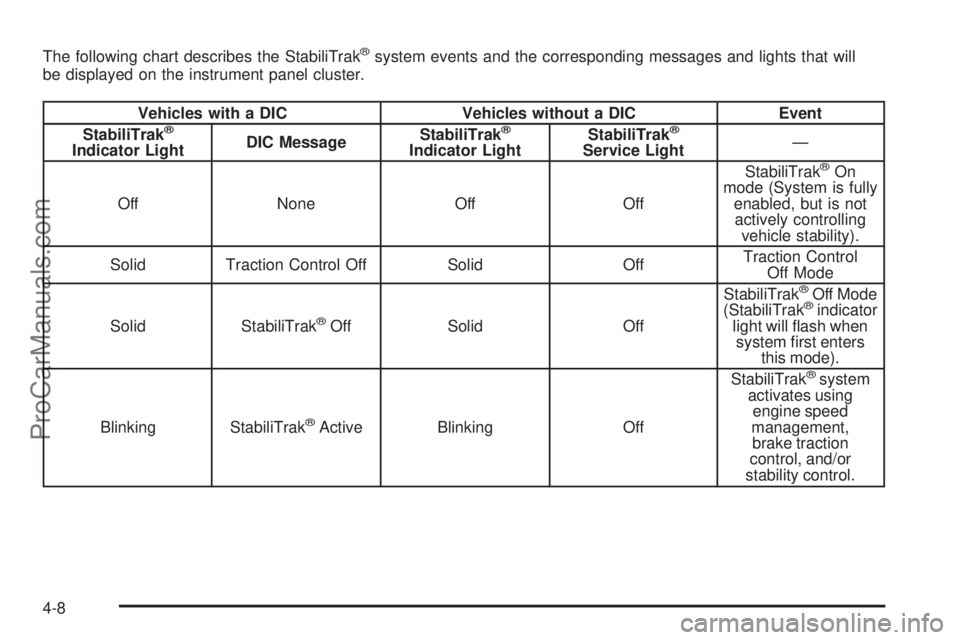
The following chart describes the StabiliTrak®system events and the corresponding messages and lights that will
be displayed on the instrument panel cluster.
Vehicles with a DIC Vehicles without a DIC Event
StabiliTrak®
Indicator LightDIC MessageStabiliTrak
®
Indicator LightStabiliTrak
®
Service Light—
Off None Off OffStabiliTrak®On
mode (System is fully
enabled, but is not
actively controlling
vehicle stability).
Solid Traction Control Off Solid OffTraction Control
Off Mode
Solid StabiliTrak
®Off Solid OffStabiliTrak
®Off Mode
(StabiliTrak®indicator
light will ash when
system rst enters
this mode).
Blinking StabiliTrak
®Active Blinking OffStabiliTrak
®system
activates using
engine speed
management,
brake traction
control, and/or
stability control.
4-8
ProCarManuals.com
Page 252 of 426
Making Turns
Notice:Making very sharp turns while trailering
could cause the trailer to come in contact with
the vehicle. Your vehicle could be damaged.
Avoid making very sharp turns while trailering.
When you’re turning with a trailer, make wider turns
than normal. Do this so your trailer won’t strike
soft shoulders, curbs, road signs, trees or other objects.
Avoid jerky or sudden maneuvers. Signal well in
advance.
Turn Signals When Towing a Trailer
The arrows on your instrument panel will ash whenever
you signal a turn or lane change. Properly hooked up,
the trailer lamps will also ash, telling other drivers
you’re about to turn, change lanes or stop.
When towing a trailer, the arrows on your instrument
panel will ash for turns even if the bulbs on the
trailer are burned out. Thus, you may think drivers
behind you are seeing your signal when they are not.
It’s important to check occasionally to be sure the
trailer bulbs are still working.
Driving On Grades
Reduce speed and shift to a lower gearbeforeyou
start down a long or steep downgrade. If you don’t shift
down, you might have to use your brakes so much
that they would get hot and no longer work well.
You can tow in DRIVE (D). You may want to shift the
transmission to THIRD (3) or a lower gear, under heavy
loads or hilly conditions.
When towing at high altitude on steep uphill grades,
consider the following: Engine coolant will boil at a lower
temperature than at normal altitudes. If you turn your
engine off immediately after towing at high altitude
on steep uphill grades, your vehicle may show signs
similar to engine overheating. To avoid this, let the
engine run while parked (preferably on level ground)
with the automatic transmission in PARK (P) for a
few minutes before turning the engine off. If you do
get the overheat warning, seeEngine Overheating
on page 5-30.
4-38
ProCarManuals.com
Page 254 of 426

Trailer Wiring Harness
Your vehicle is equipped with a seven-wire trailer
towing harness. This harness has a seven-pin universal
heavy-duty trailer connector (if equipped with the
trailering package) that is attached to a bracket on
the hitch platform. If your vehicle is not equipped with
the heavy-duty trailer connector, you can purchase
one from your Saab dealer.
The seven-wire harness contains the following
trailer circuits:
Yellow: Left Stop/Turn Signal
Dark Green: Right Stop/Turn Signal
Brown: Running Lamps
White: Ground
Light Green: Back-up Lamps
Dark Blue: Electric Brakes
Red: Battery Feed (The chassis wiring ring terminal
must be fastened to a stud on the underhood
electrical center before the trailer feed will
become active.)
If you need to tow a light-duty trailer with a standard
four-way round pin connector, an adapter connector
is available from your dealer.
If you are charging a remote (non-vehicle) battery,
turn on the headlamps to boost the vehicle system
voltage and properly charge the battery.
Your vehicle is also equipped with wiring for an
electric trailer brake controller. These wires are
located inside the vehicle on the driver’s side under
the instrument panel. These wires should be connected
to an electric trailer brake controller by your dealer or
a qualied service center.
4-40
ProCarManuals.com