ignition SAAB 9-7X 2008 Service Manual
[x] Cancel search | Manufacturer: SAAB, Model Year: 2008, Model line: 9-7X, Model: SAAB 9-7X 2008Pages: 426, PDF Size: 2.77 MB
Page 167 of 426
Driver Information Center (DIC)
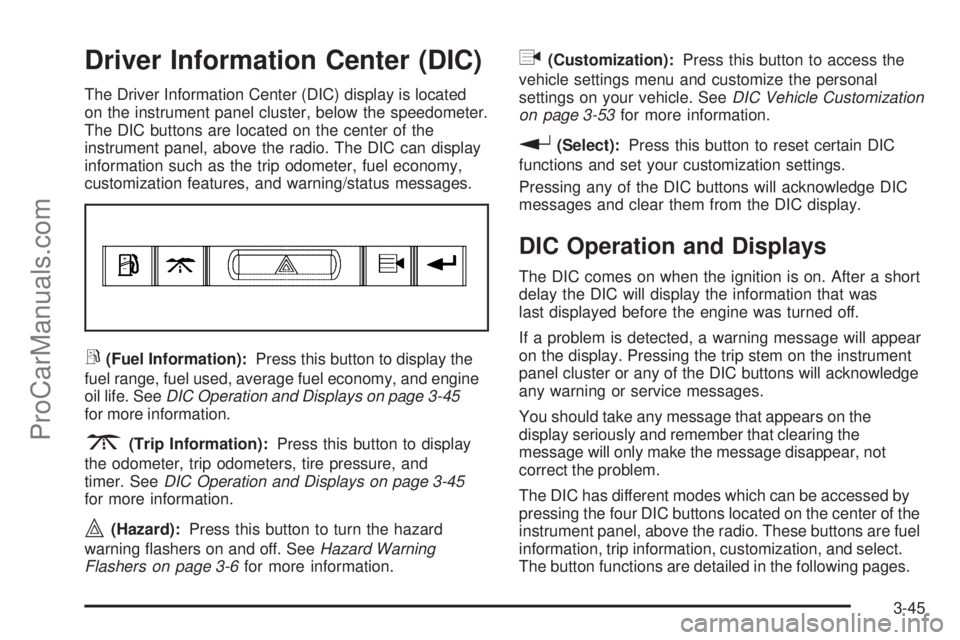
The Driver Information Center (DIC) display is located
on the instrument panel cluster, below the speedometer.
The DIC buttons are located on the center of the
instrument panel, above the radio. The DIC can display
information such as the trip odometer, fuel economy,
customization features, and warning/status messages.
r(Fuel Information):Press this button to display the
fuel range, fuel used, average fuel economy, and engine
oil life. SeeDIC Operation and Displays on page 3-45
for more information.
3(Trip Information):Press this button to display
the odometer, trip odometers, tire pressure, and
timer. SeeDIC Operation and Displays on page 3-45
for more information.
|(Hazard):Press this button to turn the hazard
warning ashers on and off. SeeHazard Warning
Flashers on page 3-6for more information.
q(Customization):Press this button to access the
vehicle settings menu and customize the personal
settings on your vehicle. SeeDIC Vehicle Customization
on page 3-53for more information.
r(Select):Press this button to reset certain DIC
functions and set your customization settings.
Pressing any of the DIC buttons will acknowledge DIC
messages and clear them from the DIC display.
DIC Operation and Displays
The DIC comes on when the ignition is on. After a short
delay the DIC will display the information that was
last displayed before the engine was turned off.
If a problem is detected, a warning message will appear
on the display. Pressing the trip stem on the instrument
panel cluster or any of the DIC buttons will acknowledge
any warning or service messages.
You should take any message that appears on the
display seriously and remember that clearing the
message will only make the message disappear, not
correct the problem.
The DIC has different modes which can be accessed by
pressing the four DIC buttons located on the center of the
instrument panel, above the radio. These buttons are fuel
information, trip information, customization, and select.
The button functions are detailed in the following pages.
3-45
ProCarManuals.com
Page 169 of 426
Odometer:Press the trip information button until
ODOMETER appears on the display. This mode
shows the total distance the vehicle has been driven
in either miles or kilometers. Pressing the trip stem
located on the instrument panel cluster with the vehicle
off will also display the odometer.
Trip A:Press the trip information button until TRIP A
appears on the display. This mode shows the current
distance traveled since the last reset for TRIP A in either
miles or kilometers.
Trip B:Press the trip information button until TRIP B
appears on the display. This mode shows the current
distance traveled since the last reset for TRIP B in
either miles or kilometers.
To reset TRIP A or TRIP B information, press and hold
the select button for one second while in one of the
trip modes. This will reset the information for TRIP A
or TRIP B.
You can also reset the TRIP A or TRIP B while they are
displayed by pressing the trip stem. If you press and
hold the trip stem or the select button for more than
four seconds, the display will show the distance traveled
since the last ignition cycle for TRIP A or TRIP B.Tire Pressures:Press the trip information button
until TIRE PRESSURES appears on the display. This
mode shows the tire pressure in pounds per square
inch (psi) or kilopascals (kPa). Press the select button
to scroll through the following information:
LF TIRE shows the tire pressure for the front
driver’s side tire.
RF TIRE shows the tire pressure for the front
passenger’s side tire.
LR TIRE shows the tire pressure for the rear
driver’s side tire.
RR TIRE shows the tire pressure for the rear
passenger’s side tire.
Timer:The DIC can be used as a timer. Press the
select button while TIMER is displayed to start the timer.
The display will show the amount of time that has passed
since the timer was last reset, not including time the
ignition is off. Time will continue to be counted as long
as the ignition is on, even if another display is being
shown on the DIC. The timer will record up to 99 hours,
59 minutes, and 59 seconds (99:59:59), after which the
display will roll back to zero.
To stop the counting of time, press the select button
briey while TIMER is displayed.
To reset the timer to zero, press and hold the select
button while TIMER is displayed.
3-47
ProCarManuals.com
Page 170 of 426
Customization Button
q
(Customization):Press this button to access
the VEHICLE SETTINGS menu and customize
the settings to your vehicle. SeeDIC Vehicle
Customization on page 3-53for more information.
Select Button
r
(Select):Press the select button to reset certain
DIC functions, turn off or acknowledge messages on
the DIC display, and set your customization settings.
For example, this button will allow you to reset the trip
odometers, turn off the FUEL LEVEL LOW message,
and enables you to scroll through and select the
language in which the DIC information will appear.
DIC Warnings and Messages
Messages are displayed on the DIC to notify the driver
that the status of the vehicle has changed and that
some action may be needed to correct the condition.
Multiple messages may appear one after another.
Some messages may not require immediate action.
Press any of the DIC buttons on the instrument panel
or the trip odometer reset stem on the instrument panel
cluster to acknowledge that you received the messages
and to clear them from the display.Some messages cannot be cleared from the display
because they are more urgent. These messages require
action before they can be removed from the DIC display.
Take any messages that appear on the display seriously
and remember that clearing the messages will only make
the messages disappear, not correct the problem.
The following are the possible messages that can be
displayed and some information about them.
CHANGE ENGINE OIL
This message displays when the engine oil needs to
be changed and service is required for your vehicle.
SeeScheduled Maintenance on page 6-3andEngine
Oil on page 5-18for more information. Also see
Engine Oil Life System on page 5-22for information
on how to reset the message. This message clears
itself after 10 seconds until the next ignition cycle.
CHECK TIRE PRESSURE
This message displays when the pressure in one or
more of the vehicle’s tires needs to be checked.
If a tire pressure message appears on the DIC,
stop as soon as you can. Have the tire pressures
checked and set to those shown on the Tire Loading
Information label. SeeTires on page 5-60,Loading Your
Vehicle on page 4-22, andInflation - Tire Pressure on
page 5-67. The DIC also shows the tire pressure values.
3-48
ProCarManuals.com
Page 173 of 426
PASSENGER DOOR AJAR
This message displays and a chime sounds if the
passenger door is not fully closed. Stop and turn off
the vehicle, check the door for obstructions, and close
the door again. Check to see if the message still
appears on the DIC.
REAR ACCESS OPEN
This message displays and a chime sounds if the
liftgate or liftglass is open while the ignition is in
ON/RUN. Turn off the vehicle and check the liftgate
and liftglass. SeeLiftgate/Liftglass on page 2-12.
Restart the vehicle and check for the message on
the DIC display.
RIGHT REAR DOOR AJAR
This message displays and a chime sounds if the
passenger side rear door is not fully closed. Stop and
turn off the vehicle, check the door for obstructions,
and close the door again. Check to see if the message
still appears on the DIC.
SERVICE AIR BAG
This message displays if there is a problem with
the airbag system. Have your dealer/retailer inspect
the system for problems. SeeAirbag Readiness Light
on page 3-30andAirbag System on page 1-52for
more information.
SERVICE BRAKE SYSTEM
This message displays if a problem occurs with the
brake system. If this message appears, stop as soon
as possible and turn off the vehicle. Restart the vehicle
and check for the message on the DIC display. If the
message is still displayed, or appears again when
you begin driving, the brake system needs service.
See your dealer/retailer.
SERVICE CHARGING SYS (System)
This message displays if there is a problem with the
battery charging system. Under certain conditions, the
charging system light may also turn on in the instrument
panel cluster. SeeCharging System Light on page 3-33.
The battery will not be charging at an optimal rate and
the vehicle will lose the ability to enter the fuel economy
mode. The vehicle is safe to drive, however you should
have the electrical system checked by your
dealer/retailer.
3-51
ProCarManuals.com
Page 174 of 426
SERVICE STABILITRAK
If this message displays, it means there may be a
problem with the StabiliTrak®system. If this message
appears, try to reset the system by performing the
following: stop; turn off the engine; then start the
engine again. If this message still comes on, it means
there is a problem. You should see your dealer/retailer
for service. The vehicle is safe to drive, however,
you do not have the benet of StabiliTrak
®, so reduce
your speed and drive accordingly.
SERVICE TIRE MONITOR
This message displays if a part on the Tire Pressure
Monitor System (TPMS) is not working properly. The tire
pressure light also ashes and then remains on during
the same ignition cycle. SeeTire Pressure Light on
page 3-37. Several conditions may cause this message
to appear. SeeTire Pressure Monitor Operation on
page 5-71for more information. If the warning comes on
and stays on, there may be a problem with the TPMS.
See your dealer/retailer.
STABILITRAK ACTIVE
This message displays anytime the StabiliTrak®system
activates to maintain vehicle stability. Any combination
of engine speed management, brake traction control,
and stability control displays this message.
STABILITRAK NOT READY
This message may display if driving conditions delay
StabiliTrak®system initialization. This is normal.
Once the system initializes, this message will no
longer be displayed on the DIC.
STABILITRAK OFF
This message displays when you press the StabiliTrak®
button for more than ve seconds or when stability
control has been automatically disabled. The StabiliTrak®
button is located on the transmission shift handle.
To limit wheel spin and realize the full benets of the
stability enhancement system, you should normally leave
StabiliTrak
®on. However, you should turn StabiliTrak®off
if your vehicle gets stuck in sand, mud, ice, or snow and
you want to rock your vehicle to attempt to free it, or if you
are driving in extreme off-road conditions and require
more wheel spin. SeeIf Your Vehicle is Stuck in Sand,
Mud, Ice, or Snow on page 4-21. To turn the StabiliTrak
®
system back on, press the StabiliTrak®button again.
The message may display if the brake system warning
light is on. SeeBrake System Warning Light on
page 3-34.
The message turns off as soon as the conditions that
caused the message to be displayed are no longer
present.
3-52
ProCarManuals.com
Page 175 of 426

TIGHTEN FUEL CAP
This message may display and a chime may sound if
the vehicle’s fuel cap is not tightened properly. Fully
reinstall the fuel cap. SeeFilling the Tank on page 5-7.
The diagnostic system can determine if the fuel cap
has been left off or improperly installed. A loose
or missing fuel cap allows fuel to evaporate into the
atmosphere. This message remains on until it is
manually cleared from the DIC display. The DIC
message is also cancelled if the ignition is turned off.
The DIC message and the Service Engine Soon light
may come on again during a second trip if the fuel cap
is still not tightened properly. SeeMalfunction Indicator
Lamp on page 3-38for more information.
TRACTION CONTROL OFF
This message displays when you momentarily press
the StabiliTrak®button located on the transmission
shift handle. In this mode, stability control and the
brake-traction control are functional. Engine speed
management will be modied and the driven wheels
can spin more freely. For more details on this mode,
seeStabiliTrak
®System on page 4-5.
TURN SIGNAL ON
This message displays and a chime sounds if a turn
signal is left on for 3/4 of a mile (1.2 km). Move the
turn signal/multifunction lever to the off position.
DIC Vehicle Customization
Your vehicle may have customization capabilities that
allow you to program some features to one setting
based on your preference. All of the customizable
options listed may not be available on your vehicle.
Only the options available display on the Driver
Information Center (DIC).
The default settings for the customization features were
set when your vehicle left the factory, but may have
been changed from their default state since then.
To change feature preferences, make sure the ignition
is on and the vehicle is in PARK (P). To avoid excessive
drain on the battery, it is recommended that the
headlamps are turned off.
Press the customization button to scroll through the
available customizable options.
After pressing the customization button, VEHICLE
SETTINGS momentarily displays before going to a
customization option.
3-53
ProCarManuals.com
Page 176 of 426
Lock Doors
Press the customization button until LOCK DOORS:
IN GEAR appears in the display. To select your
preference for automatic locking, press the select button
while LOCK DOORS: IN GEAR is displayed on the
DIC. Pressing the select button will scroll through the
following settings:
LOCK DOORS: IN GEAR (default):The doors will lock
when the vehicle is shifted out of PARK (P).
LOCK DOORS: WITH SPEED:The doors will lock
when the vehicle speed is above 8 mph (13 km/h)
for three seconds.
To select a setting and move on to the next feature,
press the customization button while the desired
setting is displayed on the DIC.
SeeProgrammable Automatic Door Locks on page 2-9
for more information.
Unlock Doors
Press the customization button until UNLOCK DOORS:
IN PARK appears in the display. To select your
preference for automatic unlocking, press the select
button while UNLOCK DOORS: IN PARK is displayed
on the DIC. Pressing the select button will scroll
through the following settings:
UNLOCK DOORS: IN PARK (default):All of the doors
will unlock when the vehicle is shifted into PARK (P).
UNLOCK DRIVER: IN PARK:The driver’s door will be
unlocked when the vehicle is shifted into PARK (P).
UNLOCK DOORS: KEY OUT:All of the doors
will unlock when the key is taken out of the ignition.
UNLOCK DOORS: MANUALLY:The doors will not be
unlocked automatically.
To select a setting and move on to the next feature,
press the customization button while the desired setting
is displayed on the DIC.
SeeProgrammable Automatic Door Locks on page 2-9
for more information.
3-54
ProCarManuals.com
Page 179 of 426
Easy Exit Seat
Press the customization button until EASY EXIT
SEAT: OFF appears in the display. To select your
preference for seat position exit, press the select
button while EASY EXIT SEAT: OFF is displayed on
the DIC. Pressing the select button will scroll through
the following settings:
EASY EXIT SEAT: OFF (default):No seat exit recall
will occur.
EASY EXIT SEAT: ON:The driver’s seat will move
to the exit position when the key is removed from
the ignition.
To select a setting and move on to the next feature,
press the customization button while the desired setting
is displayed on the DIC.
See “Easy Exit Seat” underMemory Seat, Mirrors,
and Pedals on page 1-3for more information.
Seat Recall
Press the customization button until SEAT RECALL:
OFF appears in the display. To select your preference
for recall of the driver’s memory seat and adjustable
pedals, if your vehicle has this feature, press the select
button while SEAT RECALL: OFF is displayed on
the DIC. Pressing the select button will scroll through
the following settings:
SEAT RECALL: OFF (default):The driver’s memory
seat and adjustable pedals position you saved will
only be recalled when the memory button 1 or 2
is pressed.
SEAT RECALL: AT KEY IN:The driver’s memory
seat and adjustable pedals position you saved will be
recalled when you put the key in the ignition.
SEAT RECALL: ON REMOTE:The driver’s memory
seat and adjustable pedals position you saved will
be recalled when you unlock the vehicle with the
Remote Keyless Entry (RKE) transmitter.
To select a setting and move on to the next feature,
press the customization button while the desired setting
is displayed on the DIC.
SeeMemory Seat, Mirrors, and Pedals on page 1-3
for more information.
3-57
ProCarManuals.com
Page 182 of 426
Audio System(s)
Determine which radio your vehicle has and then
read the pages following to familiarize yourself with
its features.
{CAUTION:
This system provides you with far greater
access to audio stations and song listings.
Giving extended attention to entertainment
tasks while driving can cause a crash and
you or others can be injured or killed. Always
keep your eyes on the road and your mind
on the drive — avoid engaging in extended
searching while driving.
Keeping your mind on the drive is important for
safe driving. SeeDefensive Driving on page 4-2.
Here are some ways in which you can help avoid
distraction while driving.
While your vehicle is parked:
Familiarize yourself with all of its controls.
Familiarize yourself with its operation.
Set up your audio system by presetting your
favorite radio stations, setting the tone, and
adjusting the speakers. Then, when driving
conditions permit, you can tune to your favorite
radio stations using the presets and steering wheel
controls if the vehicle has them.
Notice:Before adding any sound equipment to
your vehicle, such as an audio system, CD player,
CB radio, mobile telephone, or two-way radio, make
sure that it can be added by checking with your
dealer/retailer. Also, check federal rules covering
mobile radio and telephone units. If sound
equipment can be added, it is very important to do
it properly. Added sound equipment may interfere
with the operation of your vehicle’s engine, radio,
or other systems, and even damage them. Your
vehicle’s systems may interfere with the operation
of sound equipment that has been added.
Your vehicle has a feature called Retained Accessory
Power (RAP). With RAP, the audio system can be
played even after the ignition is turned off. SeeRetained
Accessory Power (RAP) on page 2-21for more
information.
Setting the Clock
Press and hold H until the correct hour and AM or PM
displays. Press and hold M until the correct minute
displays. The time can be set with the ignition on or off.
3-60
ProCarManuals.com
Page 184 of 426
XM™ Satellite Radio Service
XM™ is a satellite radio service that is based in the
48 contiguous United States and 10 Canadian provinces.
XM™ Satellite Radio has a wide variety of programming
and commercial-free music, coast-to-coast, and in
digital-quality sound. During your trial or when you
subscribe, you will get unlimited access to XM™ Radio
Online for when you are not in your vehicle. A service
fee is required to receive the XM™ service. For more
information, contact XM™ at www.xmradio.com or
call 1-800-929-2100 in the U.S. and www.xmradio.ca
or call 1-877-438-9677 in Canada.
Playing the Radio
P
(Power/Volume):Press this knob to turn the
system on and off.
Turn this knob clockwise or counterclockwise to increase
or to decrease the volume.
DISP (Display):Press this knob to display the time,
while the ignition is turned off.
For XM™ (if equipped), press the DISP button while
in XM™ mode to retrieve four different categories
of information related to the current song or
channel: Artist, Song Title, Category or PTY,
Channel Number/Channel Name.To change the default on the display, press the DISP
button until the desired option displays, then hold
this knob for two seconds. One beep sounds and the
selected display becomes the default.
AUTO VOL (Automatic Volume):With automatic
volume, the audio system adjusts automatically to
make up for road and wind noise as you drive.
Set the volume at the desired level. Press this button to
select LOW, MEDIUM, or HIGH. Each higher setting
allows for more volume compensation at faster vehicle
speeds. Then as you drive, automatic volume increases
the volume, as necessary, to overcome noise at any
speed. The volume level should always sound the
same while driving. NONE displays if the radio cannot
determine the vehicle speed. To turn automatic volume
off, press this button until AVOL OFF (automatic
volume off) displays.
Finding a Station
BAND:Press this button to switch between FM1,
FM2, AM, or XM1 or XM2 (if equipped). The selection
displays.
e(Tune):Turn this knob to select radio stations.
tSEEKu:Press and release the right or the
left arrow to go to the next or to the previous station
and stay there.
3-62
ProCarManuals.com