instrument cluster SAAB 9-7X 2009 User Guide
[x] Cancel search | Manufacturer: SAAB, Model Year: 2009, Model line: 9-7X, Model: SAAB 9-7X 2009Pages: 424, PDF Size: 2.75 MB
Page 146 of 424
Speedometer and Odometer
The speedometer the vehicle speed in both miles per
hour (mph) and kilometers per hour (km/h).
The odometer shows how far the vehicle has been
driven, in either miles (used in the United States)
or kilometers (used in Canada).
The odometer mileage can be checked without the
vehicle running. Press the trip stem located on
the instrument panel cluster.
If the vehicle needs a new odometer installed, the new
one will be set to the correct mileage total of the old
odometer.
Trip Odometer
The trip odometer can tell you how far your vehicle has
been driven since you last set the trip odometer to zero.
The odometer works together with the Driver Information
Center (DIC). You can set a Trip A and Trip B odometer.
See “Trip Information” underDIC Operation and Displays
on page 3-42.
The odometer mileage can be checked without the
vehicle running. Press the trip stem on the instrument
panel cluster.
Tachometer
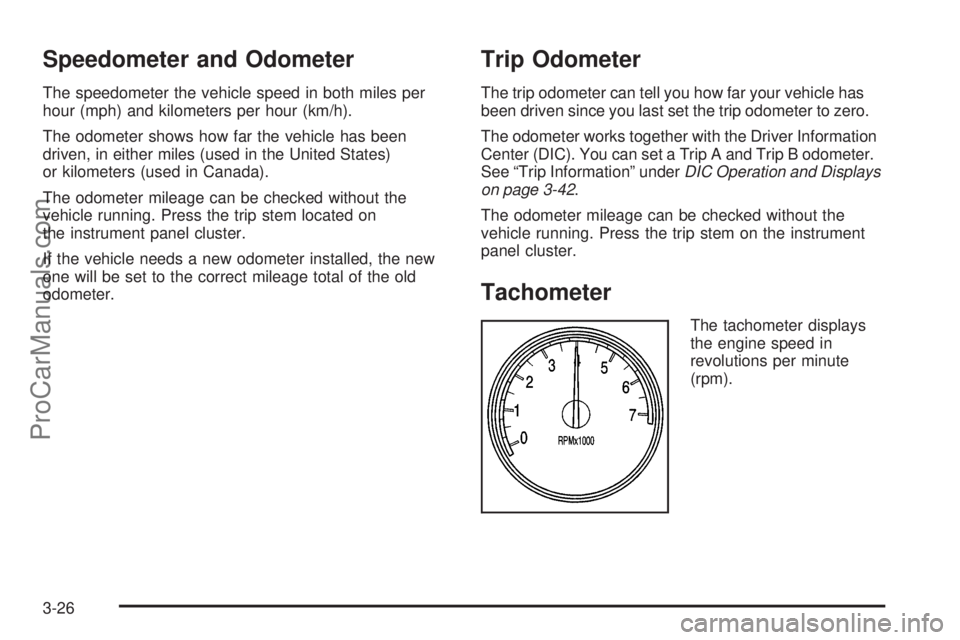
The tachometer displays
the engine speed in
revolutions per minute
(rpm).
3-26
ProCarManuals.com
Page 162 of 424
Driver Information Center (DIC)
The Driver Information Center (DIC) display is located
on the instrument panel cluster, below the speedometer.
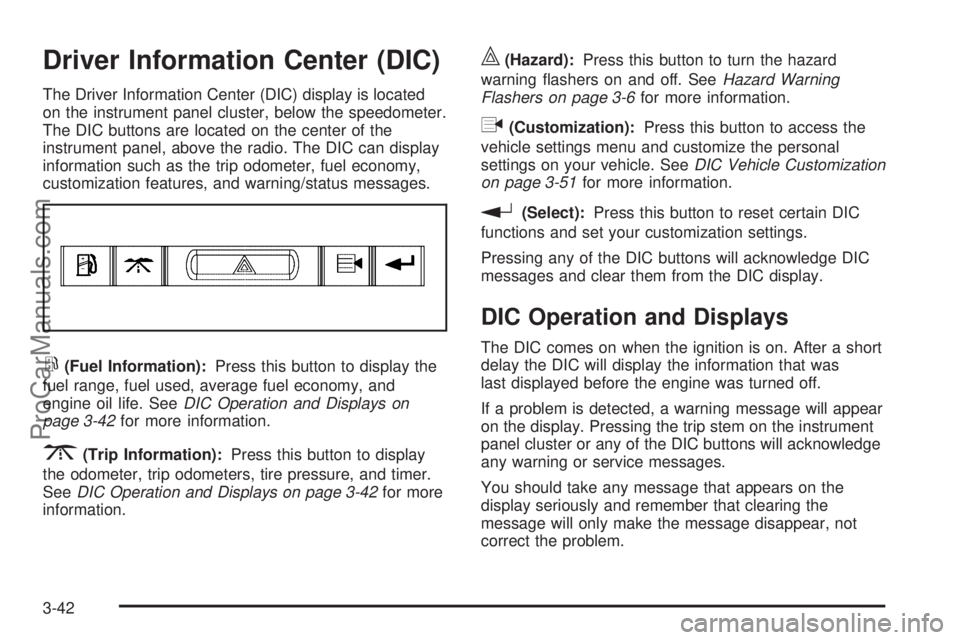
The DIC buttons are located on the center of the
instrument panel, above the radio. The DIC can display
information such as the trip odometer, fuel economy,
customization features, and warning/status messages.
r(Fuel Information):Press this button to display the
fuel range, fuel used, average fuel economy, and
engine oil life. SeeDIC Operation and Displays on
page 3-42for more information.
3(Trip Information):Press this button to display
the odometer, trip odometers, tire pressure, and timer.
SeeDIC Operation and Displays on page 3-42for more
information.
|(Hazard):Press this button to turn the hazard
warning ashers on and off. SeeHazard Warning
Flashers on page 3-6for more information.
q(Customization):Press this button to access the
vehicle settings menu and customize the personal
settings on your vehicle. SeeDIC Vehicle Customization
on page 3-51for more information.
r(Select):Press this button to reset certain DIC
functions and set your customization settings.
Pressing any of the DIC buttons will acknowledge DIC
messages and clear them from the DIC display.
DIC Operation and Displays
The DIC comes on when the ignition is on. After a short
delay the DIC will display the information that was
last displayed before the engine was turned off.
If a problem is detected, a warning message will appear
on the display. Pressing the trip stem on the instrument
panel cluster or any of the DIC buttons will acknowledge
any warning or service messages.
You should take any message that appears on the
display seriously and remember that clearing the
message will only make the message disappear, not
correct the problem.
3-42
ProCarManuals.com
Page 164 of 424
Trip Information Button
3
(Trip Information):Press this button to scroll
through the odometer, trip odometers, tire pressures,
and timer.
Odometer:Press the trip information button until
ODOMETER appears on the display. This mode shows
the total distance the vehicle has been driven in
either miles or kilometers. Pressing the trip stem located
on the instrument panel cluster with the vehicle off
will also display the odometer.
Trip A:Press the trip information button until TRIP A
appears on the display. This mode shows the current
distance traveled since the last reset for TRIP A in either
miles or kilometers.
Trip B:Press the trip information button until TRIP B
appears on the display. This mode shows the current
distance traveled since the last reset for TRIP B in either
miles or kilometers.
To reset TRIP A or TRIP B information, press and hold
the select button for one second while in one of the
trip modes. This will reset the information for TRIP A
or TRIP B.You can also reset the TRIP A or TRIP B while they are
displayed by pressing the trip stem. If you press and
hold the trip stem or the select button for more than
four seconds, the display will show the distance traveled
since the last ignition cycle for TRIP A or TRIP B.
Tire Pressures:On vehicles with the Tire Pressure
Monitor System (TPMS), press the trip information
button until TIRE PRESSURES appears on the display.
This mode shows the tire pressure in pounds per
square inch (psi) or kilopascals (kPa). Press the select
button to scroll through the following information:
LF TIRE shows the tire pressure for the front
driver’s side tire.
RF TIRE shows the tire pressure for the front
passenger’s side tire.
LR TIRE shows the tire pressure for the rear
driver’s side tire.
RR TIRE shows the tire pressure for the rear
passenger’s side tire.
Timer:The DIC can be used as a timer. Press the
select button while TIMER is displayed to start the timer.
The display will show the amount of time that has
passed since the timer was last reset, not including time
3-44
ProCarManuals.com
Page 165 of 424
the ignition is off. Time will continue to be counted as
long as the ignition is on, even if another display is being
shown on the DIC. The timer will record up to 99 hours,
59 minutes, and 59 seconds (99:59:59), after which
the display will roll back to zero.
To stop the counting of time, press the select button
briey while TIMER is displayed.
To reset the timer to zero, press and hold the select
button while TIMER is displayed.
Customization Button
q
(Customization):Press this button to access
the VEHICLE SETTINGS menu and customize the
settings to your vehicle. SeeDIC Vehicle Customization
on page 3-51for more information.
Select Button
r
(Select):Press the select button to reset certain
DIC functions, turn off or acknowledge messages
on the DIC display, and set your customization settings.
For example, this button will allow you to reset the
trip odometers, turn off the FUEL LEVEL LOW message,
and enables you to scroll through and select the
language in which the DIC information will appear.
DIC Warnings and Messages
Messages are displayed on the DIC to notify the driver
that the status of the vehicle has changed and that
some action may be needed to correct the condition.
Multiple messages may appear one after another.
Some messages may not require immediate action.
Press any of the DIC buttons on the instrument panel or
the trip odometer reset stem on the instrument panel
cluster to acknowledge that you received the messages
and to clear them from the display.
Some messages cannot be cleared from the display
because they are more urgent. These messages require
action before they can be removed from the DIC
display. Take any messages that appear on the display
seriously and remember that clearing the messages
will only make the messages disappear, not correct the
problem.
The following are the possible messages that can be
displayed and some information about them.
3-45
ProCarManuals.com
Page 166 of 424
CHANGE ENGINE OIL
This message displays when the engine oil needs to
be changed and service is required for your vehicle.
SeeScheduled Maintenance on page 6-4andEngine
Oil on page 5-18for more information. Also seeEngine
Oil Life System on page 5-22for information on how
to reset the message. This message clears itself
after 10 seconds until the next ignition cycle.
CHECK TIRE PRESSURE
On vehicles with the Tire Pressure Monitor System
(TPMS), this message displays when the pressure in
one or more of the vehicle’s tires needs to be checked.
If a tire pressure message appears on the DIC, stop
as soon as you can. Have the tire pressures checked
and set to those shown on the Tire Loading Information
label. SeeTires on page 5-59,Loading the Vehicle
on page 4-21, andInflation - Tire Pressure on
page 5-65. The DIC also shows the tire pressure
values. SeeDIC Operation and Displays on page 3-42.
If the tire pressure is low, the low tire pressure
warning light comes on. SeeTire Pressure Light on
page 3-34.
CHECK WASHER FLUID
This message displays if the washer uid level is low.
Adding washer uid to the windshield washer uid
reservoir clears this message. SeeWindshield Washer
Fluid on page 5-38. This message clears itself after
10 seconds, or you can manually clear it from the
DIC display.
DRIVER DOOR AJAR
This message displays and a chime sounds if the driver
door is not fully closed. Stop and turn off the vehicle,
check the door for obstructions, and close the door
again. Check to see if the message still appears on
the DIC.
ENGINE COOLANT HOT/ENGINE
OVERHEATED
Notice:If you drive your vehicle while the engine
is overheating, severe engine damage may occur.
If an overheat warning appears on the instrument
panel cluster and/or DIC, stop the vehicle as soon as
possible. Do not increase the engine speed above
normal idling speed. SeeEngine Overheating
on page 5-34for more information.
3-46
ProCarManuals.com
Page 169 of 424
If the message is still displayed, or appears again when
you begin driving, the brake system needs service.
See your dealer/retailer.
SERVICE CHARGING SYS (System)
This message displays if there is a problem with
the battery charging system. Under certain conditions,
the charging system light may also turn on in the
instrument panel cluster. SeeCharging System Light
on page 3-30. The battery will not be charging at
an optimal rate and the vehicle will lose the ability to
enter the fuel economy mode. The vehicle is safe
to drive, however you should have the electrical system
checked by your dealer/retailer.
SERVICE STABILITRAK
If this message displays, it means there may be a
problem with the StabiliTrak system. If this message
appears, try to reset the system by performing the
following: stop; turn off the engine; then start the engine
again. If this message still comes on, it means there
is a problem. You should see your dealer/retailer
for service. The vehicle is safe to drive, however, you
do not have the benet of StabiliTrak, so reduce
your speed and drive accordingly.
SERVICE TIRE MONITOR
On vehicles with the Tire Pressure Monitor System
(TPMS), this message displays if a part on the TPMS
is not working properly. The tire pressure light also
ashes and then remains on during the same ignition
cycle. SeeTire Pressure Light on page 3-34. Several
conditions may cause this message to appear. SeeTire
Pressure Monitor Operation on page 5-69for more
information. If the warning comes on and stays on,
there may be a problem with the TPMS. See your
dealer/retailer.
STABILITRAK ACTIVE
This message displays anytime the StabiliTrak system
activates to maintain vehicle stability. Any combination of
engine speed management, brake traction control,
and stability control displays this message.
STABILITRAK NOT READY
This message may display if driving conditions delay
StabiliTrak system initialization. This is normal. Once the
system initializes, this message will no longer be
displayed on the DIC.
3-49
ProCarManuals.com
Page 228 of 424
StabiliTrak Off
In this mode, both stability control and part of the
traction control system are disabled. The vehicle will still
have brake-traction control, but will not be able to use
the engine speed management system. System
noises maybe heard as a result of the brake-traction
control coming on. If the controller detects excessive
wheel spin in this mode, the StabiliTrak indicator
light may blink and the STABILITRAK ACTIVE message
may be displayed to warn the driver that damage
may occur to the transfer case.It is recommended to leave the system on for normal
driving conditions, but it may be necessary to turn the
system off if the vehicle is stuck in sand, mud, ice or
snow, and you may want to “rock” the vehicle in an
attempt to free it. It may also be necessary to turn off the
system when driving in extreme off-road conditions where
high wheel spin is required. SeeIf Your Vehicle is Stuck
in Sand, Mud, Ice, or Snow on page 4-20for more
information.
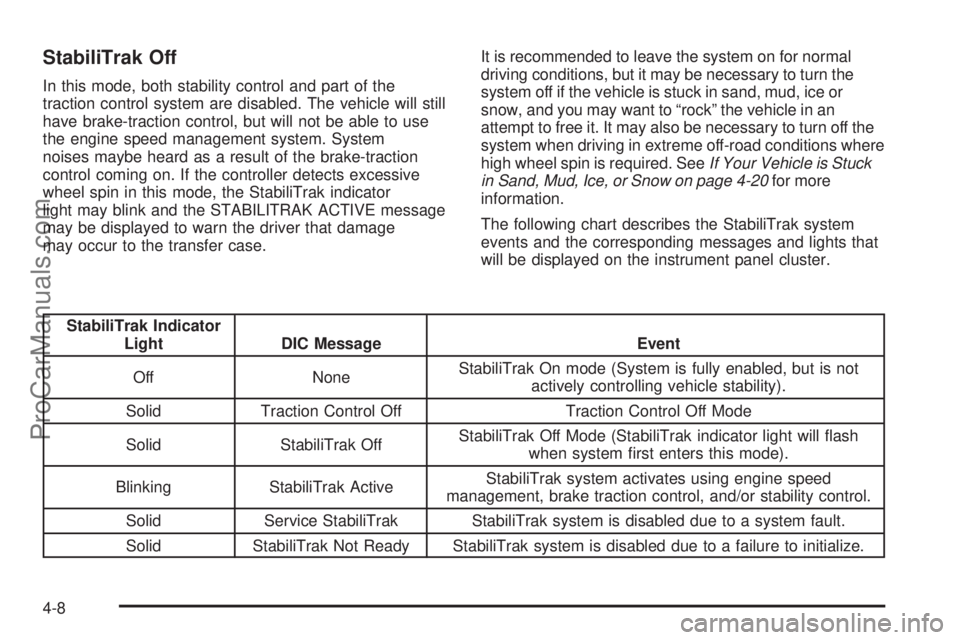
The following chart describes the StabiliTrak system
events and the corresponding messages and lights that
will be displayed on the instrument panel cluster.
StabiliTrak Indicator
Light DIC Message Event
Off NoneStabiliTrak On mode (System is fully enabled, but is not
actively controlling vehicle stability).
Solid Traction Control Off Traction Control Off Mode
Solid StabiliTrak OffStabiliTrak Off Mode (StabiliTrak indicator light will ash
when system rst enters this mode).
Blinking StabiliTrak ActiveStabiliTrak system activates using engine speed
management, brake traction control, and/or stability control.
Solid Service StabiliTrak StabiliTrak system is disabled due to a system fault.
Solid StabiliTrak Not Ready StabiliTrak system is disabled due to a failure to initialize.
4-8
ProCarManuals.com
Page 329 of 424
Tire Pressure Monitor Operation
This vehicle may have a Tire Pressure Monitor System
(TPMS). The TPMS is designed to warn the driver when
a low tire pressure condition exists. TPMS sensors are
mounted onto each tire and wheel assembly, excluding
the spare tire and wheel assembly. The TPMS sensors
monitor the air pressure in the vehicle’s tires and
transmits the tire pressure readings to a receiver
located in the vehicle.
The TPMS is designed to alert the driver if a low tire
pressure condition exists. Tire pressure levels may also
be checked using the Driver Information Center (DIC)
steering wheel control buttons. See “Tire Pressures”
underDIC Operation and Displays on page 3-42.
When a low tire pressure
condition is detected, the
TPMS will illuminate the
low tire pressure warning
light located on the
instrument panel cluster.
At the same time a message to check the pressure in a
specic tire appears on the Driver Information Center
(DIC) display. The low tire pressure warning light and the
DIC warning message come on at each ignition cycle
until the tires are inated to the correct ination pressure.For additional information and details about the DIC
operation and displays seeDIC Operation and Displays
on page 3-42andDIC Warnings and Messages on
page 3-45.
The low tire pressure warning light may come on in
cool weather when the vehicle is rst started, and then
turn off as you start to drive. This could be an early
indicator that the air pressure in the tire(s) are getting
low and need to be inated to the proper pressure.
A Tire and Loading Information label, attached to
your vehicle, shows the size of your vehicle’s original
equipment tires and the correct ination pressure for your
vehicle’s tires when they are cold. SeeInflation - Tire
Pressure on page 5-65. For the location of the Tire and
Loading Information label, seeLoading the Vehicle on
page 4-21. Also seeInflation - Tire Pressure on
page 5-65.
Your vehicle’s TPMS can alert you about a low tire
pressure condition but it does not replace normal tire
maintenance. SeeTire Inspection and Rotation on
page 5-72andTires on page 5-59.
Notice:Using non-approved tire sealants could
damage the Tire Pressure Monitor System (TPMS)
sensors. TPMS sensor damage caused by using
an incorrect tire sealant is not covered by the
vehicle warranty. Always use the GM approved tire
sealant available through your dealer/retailer.
5-69
ProCarManuals.com
Page 369 of 424
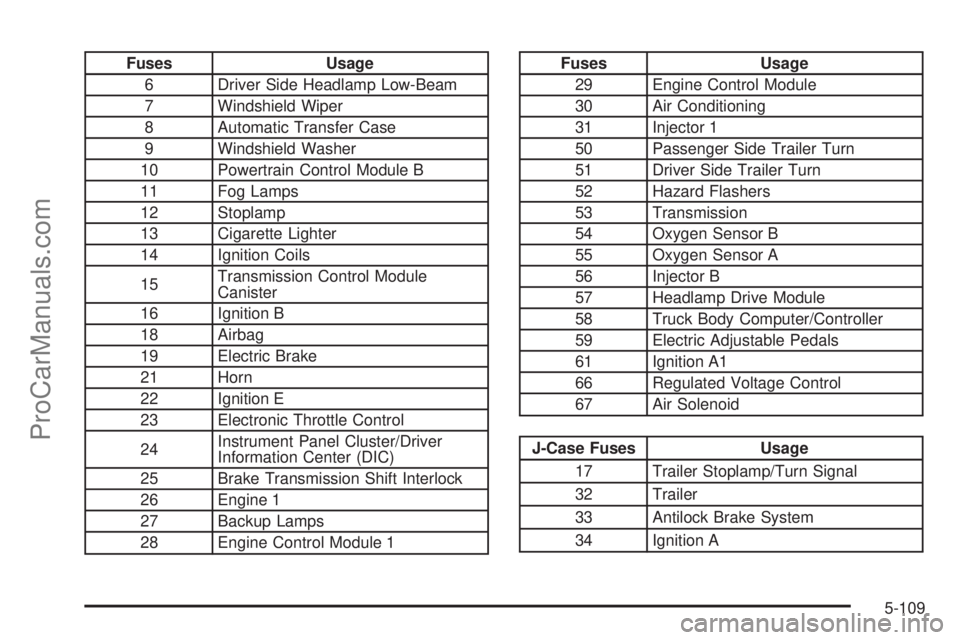
Fuses Usage
6 Driver Side Headlamp Low-Beam
7 Windshield Wiper
8 Automatic Transfer Case
9 Windshield Washer
10 Powertrain Control Module B
11 Fog Lamps
12 Stoplamp
13 Cigarette Lighter
14 Ignition Coils
15Transmission Control Module
Canister
16 Ignition B
18 Airbag
19 Electric Brake
21 Horn
22 Ignition E
23 Electronic Throttle Control
24Instrument Panel Cluster/Driver
Information Center (DIC)
25 Brake Transmission Shift Interlock
26 Engine 1
27 Backup Lamps
28 Engine Control Module 1Fuses Usage
29 Engine Control Module
30 Air Conditioning
31 Injector 1
50 Passenger Side Trailer Turn
51 Driver Side Trailer Turn
52 Hazard Flashers
53 Transmission
54 Oxygen Sensor B
55 Oxygen Sensor A
56 Injector B
57 Headlamp Drive Module
58 Truck Body Computer/Controller
59 Electric Adjustable Pedals
61 Ignition A1
66 Regulated Voltage Control
67 Air Solenoid
J-Case Fuses Usage
17 Trailer Stoplamp/Turn Signal
32 Trailer
33 Antilock Brake System
34 Ignition A
5-109
ProCarManuals.com
Page 417 of 424
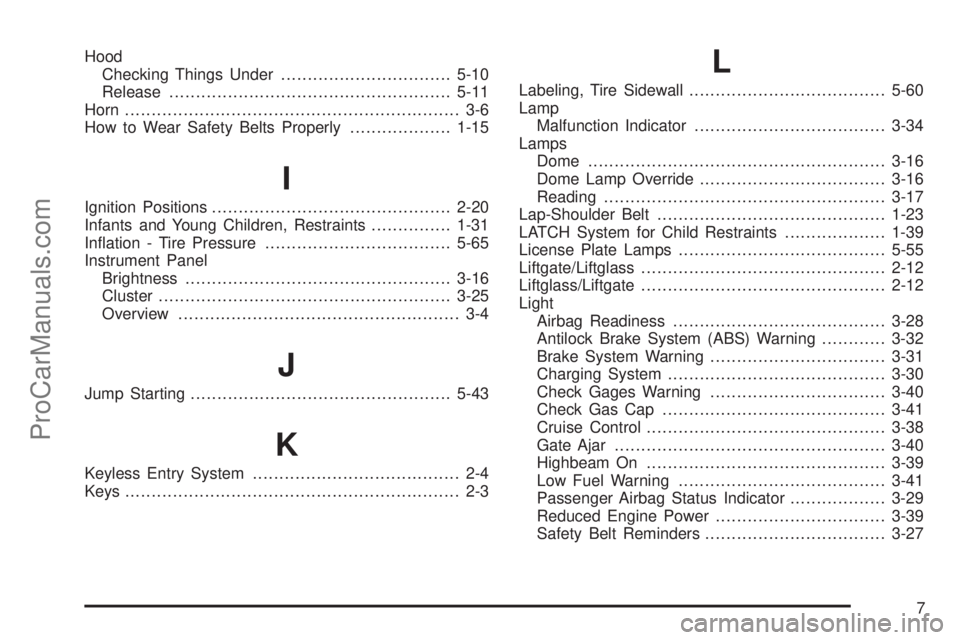
Hood
Checking Things Under................................5-10
Release.....................................................5-11
Horn ............................................................... 3-6
How to Wear Safety Belts Properly...................1-15
I
Ignition Positions.............................................2-20
Infants and Young Children, Restraints...............1-31
Ination - Tire Pressure...................................5-65
Instrument Panel
Brightness..................................................3-16
Cluster.......................................................3-25
Overview..................................................... 3-4
J
Jump Starting.................................................5-43
K
Keyless Entry System....................................... 2-4
Keys............................................................... 2-3
L
Labeling, Tire Sidewall.....................................5-60
Lamp
Malfunction Indicator....................................3-34
Lamps
Dome ........................................................3-16
Dome Lamp Override...................................3-16
Reading.....................................................3-17
Lap-Shoulder Belt...........................................1-23
LATCH System for Child Restraints...................1-39
License Plate Lamps.......................................5-55
Liftgate/Liftglass..............................................2-12
Liftglass/Liftgate..............................................2-12
Light
Airbag Readiness........................................3-28
Antilock Brake System (ABS) Warning............3-32
Brake System Warning.................................3-31
Charging System.........................................3-30
Check Gages Warning.................................3-40
Check Gas Cap..........................................3-41
Cruise Control.............................................3-38
Gate Ajar...................................................3-40
Highbeam On.............................................3-39
Low Fuel Warning.......................................3-41
Passenger Airbag Status Indicator..................3-29
Reduced Engine Power................................3-39
Safety Belt Reminders..................................3-27
7
ProCarManuals.com