phone SAAB 9-7X 2009 Owner's Manual
[x] Cancel search | Manufacturer: SAAB, Model Year: 2009, Model line: 9-7X, Model: SAAB 9-7X 2009Pages: 424, PDF Size: 2.75 MB
Page 207 of 424
Video Screen
The video screen is located in the overhead console.
To use the video screen, push forward on the release
latch and the screen will fold down. Adjust the screen’s
position as desired. When the video screen is not in
use, push it up into its latched position.
The DVD player and display will continue to operate
when the screen is in the up or the down position. The
video screen contains the transmitters for the wireless
headphones and the remote control. If the screen is in the
closed position, the signals will not be available for the
operation of the headphones or the remote control.
Notice:Avoid directly touching the video screen,
as damage may occur. See “Cleaning the Video
Screen” later in this section for more information.
DVD Player
The DVD player is located in the overhead console.
The DVD player can be controlled by the buttons on
the DVD player and/or by the buttons on the remote
control. See “Remote Control” later in this section
for more information.
The DVD player power may be turned on when the
ignition is in ON/RUN, ACC/ACCESSORY, or when
Retained Accessory Power (RAP) is active.The RSE system DVD player is only compatible with
DVDs of the appropriate region code for the country that
the vehicle was sold in. The DVD region code is printed
on the jacket of most DVDs.
Standard audio CDs, CD-R, CD-RW, Video CD and
Photo CD/CD-R media are fully supported by this DVD
player. DVD-R and DVD-RW media is supported if
formatted as DVD-Video. DVD+R and DVD+RW media
may or may not be supported by the DVD player.
The DVD player does not support DVD-RAM,
DVD-ROM, and DVD Audio media. An error message
will appear on the display if this type of media is inserted
into the DVD player.
When using the wired headphones, not included, if the
front seat passengers play a CD in the Radio with
Six-Disc CD or use XM Satellite Radio Service,
the audio for these sources is heard, instead of the
DVD or CD that is currently playing through the RSE.
If an error message appears on the video screen,
see “DVD Messages” later in this section.
3-87
ProCarManuals.com
Page 214 of 424
Problem Recommended Action
Sometimes the wireless
headphone audio cuts out
or buzzes.Check for obstructions,
low batteries, reception
range, and interference
from cellular telephone
towers or by using a
cellular telephone in
the vehicle.
Check that the
headphones are facing
the front of the vehicle.
I lost the remote and/or
the headphones.See your dealer/retailer
for assistance.
The DVD is playing, but
there is no picture or
sound.Check that the DVD
player is in DVD mode.
The audio/video skips
or jumps.The DVD or CD could be
dirty, scratched, or
damaged.
The audio from the radio
for the Radio with
Six-Disc CD and XM™
has taken over the audio
from the DVD or CD
when using the wired
headphones.The RSE is working
correctly.
Use the wireless
headphones or have the
front seat passengers
listen to another audio
source.DVD Display Error Messages
The following errors may be displayed on the video
screen:
Disc Format Error:This message will be displayed if a
disc is inserted upside down, if the disc is not readable,
or if the format is not compatible with the DVD player.
Load/Eject Error:This message will be displayed if the
disc is not properly loaded or ejected.
Disc Play Error:This message will be displayed if the
DVD player cannot play the disc. Scratched or
damaged discs will cause this error.
Region Code Error:This message will be displayed if
the region code of the DVD is not compatible with
the region code of the DVD player.
No Disc:This message will be displayed if any of the
buttons on the DVD faceplate or remote control are
pressed and no disc is present in the DVD player.
3-94
ProCarManuals.com
Page 215 of 424
DVD Distortion
There may be an experience with audio distortion in the
wireless headphones when operating cellular phones,
scanners, CB radios, Global Positioning Systems
(GPS)*, two-way radios, mobile fax, or walkie talkies.
It might be necessary to turn off the DVD player
when operating one of these devices in or near the
vehicle.
* Excludes the OnStar
®System.
Cleaning the Video Screen
Pour some isopropyl or rubbing alcohol on a clean cloth
and gently wipe the video screen. Do not spray
directly onto the screen and do not press too hard or
too long on the video screen.
Rear Seat Audio (RSA)
This feature allows rear seat passengers to select and
listen to any of the available radio sources: AM/FM,
XM, CD, or DVD. However, a rear seat passenger
cannot control a source selected on the radio by
someone in the front of the vehicle. For example, the
RSA cannot be used to change CD tracks if the radio is
set to CD. Also, if the radio is switched to a source
the RSA has control of, sound will not be lost, but the
RSA will lose control of that source.
Rear seat passengers always have control of the
volume for each set of headphones.
The RSA will run when the radio is off if the ignition key
is positioned in the power mode.
3-95
ProCarManuals.com
Page 216 of 424
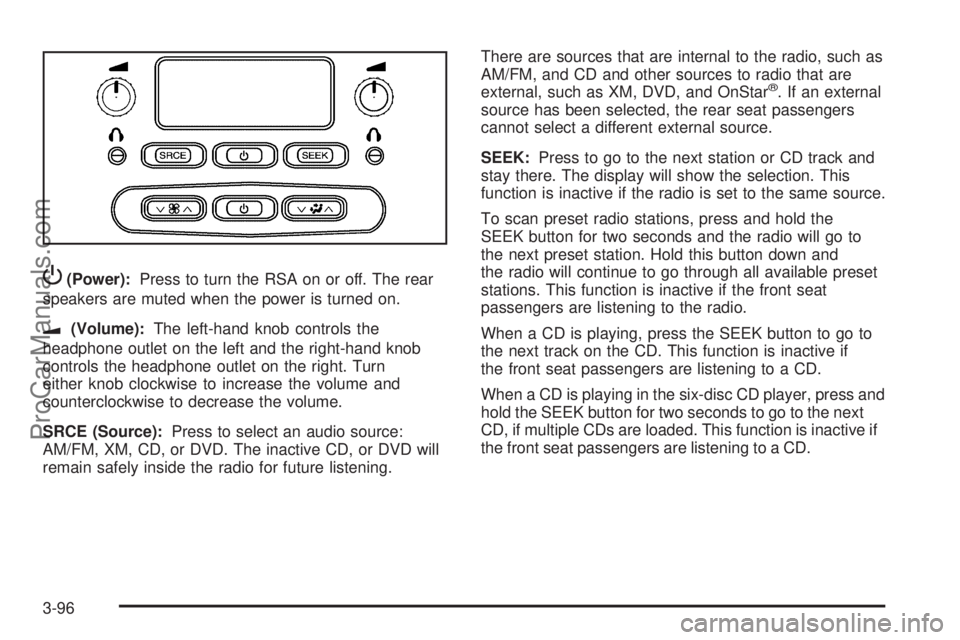
P(Power):Press to turn the RSA on or off. The rear
speakers are muted when the power is turned on.
u(Volume):The left-hand knob controls the
headphone outlet on the left and the right-hand knob
controls the headphone outlet on the right. Turn
either knob clockwise to increase the volume and
counterclockwise to decrease the volume.
SRCE (Source):Press to select an audio source:
AM/FM, XM, CD, or DVD. The inactive CD, or DVD will
remain safely inside the radio for future listening.There are sources that are internal to the radio, such as
AM/FM, and CD and other sources to radio that are
external, such as XM, DVD, and OnStar
®. If an external
source has been selected, the rear seat passengers
cannot select a different external source.
SEEK:Press to go to the next station or CD track and
stay there. The display will show the selection. This
function is inactive if the radio is set to the same source.
To scan preset radio stations, press and hold the
SEEK button for two seconds and the radio will go to
the next preset station. Hold this button down and
the radio will continue to go through all available preset
stations. This function is inactive if the front seat
passengers are listening to the radio.
When a CD is playing, press the SEEK button to go to
the next track on the CD. This function is inactive if
the front seat passengers are listening to a CD.
When a CD is playing in the six-disc CD player, press and
hold the SEEK button for two seconds to go to the next
CD, if multiple CDs are loaded. This function is inactive if
the front seat passengers are listening to a CD.
3-96
ProCarManuals.com
Page 218 of 424
Radio Reception
Frequency interference and static can occur during
normal radio reception if items such as cell phone
chargers, vehicle convenience accessories, and external
electronic devices are plugged into the accessory
power outlet. If there is interference or static, unplug the
item from the accessory power outlet.
AM
The range for most AM stations is greater than for FM,
especially at night. The longer range can cause
station frequencies to interfere with each other.
For better radio reception, most AM radio stations
boost the power levels during the day, and then reduce
these levels during the night. Static can also occur
when things like storms and power lines interfere with
radio reception. When this happens, try reducing
the treble on the radio.
FM Stereo
FM signals only reach about 10 to 40 miles
(16 to 65 km). Although the radio has a built-in electronic
circuit that automatically works to reduce interference,
some static can occur, especially around tall buildings or
hills, causing the sound to fade in and out.
XM Satellite Radio Service
XM Satellite Radio Service gives digital radio reception
from coast-to-coast in the 48 contiguous United
States, and in Canada. Just as with FM, tall buildings or
hills can interfere with satellite radio signals, causing
the sound to fade in and out. In addition, traveling
or standing under heavy foliage, bridges, garages, or
tunnels may cause loss of the XM signal for a period
of time.
3-98
ProCarManuals.com
Page 219 of 424
Cellular Phone Usage
Cellular phone usage may cause interference with the
vehicle’s radio. This interference may occur when
making or receiving phone calls, charging the phone’s
battery, or simply having the phone on. This interference
causes an increased level of static while listening to
the radio. If static is received while listening to the radio,
unplug the cellular phone and turn it off.
Fixed Mast Antenna
The xed mast antenna can withstand most car washes
without being damaged. If the mast becomes slightly
bent, straighten it out by hand. If the mast is badly bent,
replace it.
Occasionally check to make sure the antenna is
tightened to its base. If tightening is required, tighten by
hand until fully seated plus one quarter turn.
XM™ Satellite Radio Antenna
System
The XM Satellite Radio antenna is located on the roof of
the vehicle. Keep the antenna clear of obstructions for
clear radio reception.
If the vehicle has a sunroof, the performance of the
XM system may be affected if the sunroof is open.
3-99
ProCarManuals.com
Page 268 of 424
Filling the Tank
{CAUTION:
Fuel vapor burns violently and a fuel re can
cause bad injuries. To help avoid injuries to you
and others, read and follow all the instructions on
the pump island. Turn off the engine when you are
refueling. Do not smoke if you are near fuel or
refueling the vehicle. Do not use cellular phones.
Keep sparks, ames, and smoking materials away
from fuel. Do not leave the fuel pump unattended
when refueling the vehicle. This is against the law
in some places. Do not re-enter the vehicle while
pumping fuel. Keep children away from the fuel
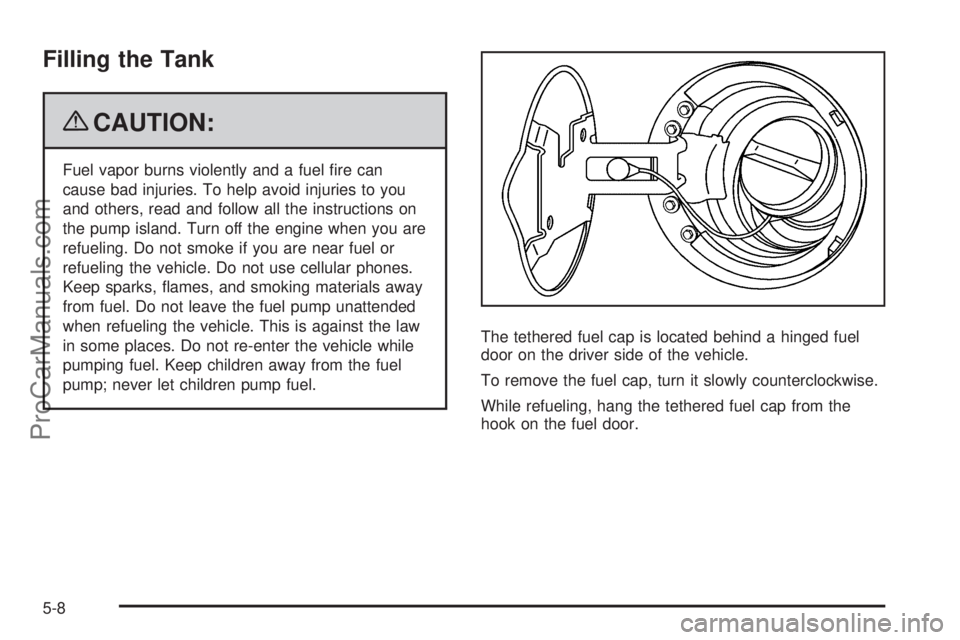
pump; never let children pump fuel.The tethered fuel cap is located behind a hinged fuel
door on the driver side of the vehicle.
To remove the fuel cap, turn it slowly counterclockwise.
While refueling, hang the tethered fuel cap from the
hook on the fuel door.
5-8
ProCarManuals.com
Page 270 of 424
Filling a Portable Fuel Container
{CAUTION:
Never ll a portable fuel container while it is in the
vehicle. Static electricity discharge from the
container can ignite the fuel vapor. You can be
badly burned and the vehicle damaged if this
occurs. To help avoid injury to you and others:
Dispense fuel only into approved containers.
Do not ll a container while it is inside a
vehicle, in a vehicle’s trunk, pickup bed, or on
any surface other than the ground.
Bring the ll nozzle in contact with the inside
of the ll opening before operating the nozzle.
Contact should be maintained until the lling
is complete.
Do not smoke while pumping fuel.
Do not use a cellular phone while
pumping fuel.
Checking Things Under
the Hood
{CAUTION:
Things that burn can get on hot engine parts and
start a re. These include liquids like fuel, oil,
coolant, brake uid, windshield washer and other
uids, and plastic or rubber. You or others could
be burned. Be careful not to drop or spill things
that will burn onto a hot engine.
5-10
ProCarManuals.com
Page 393 of 424
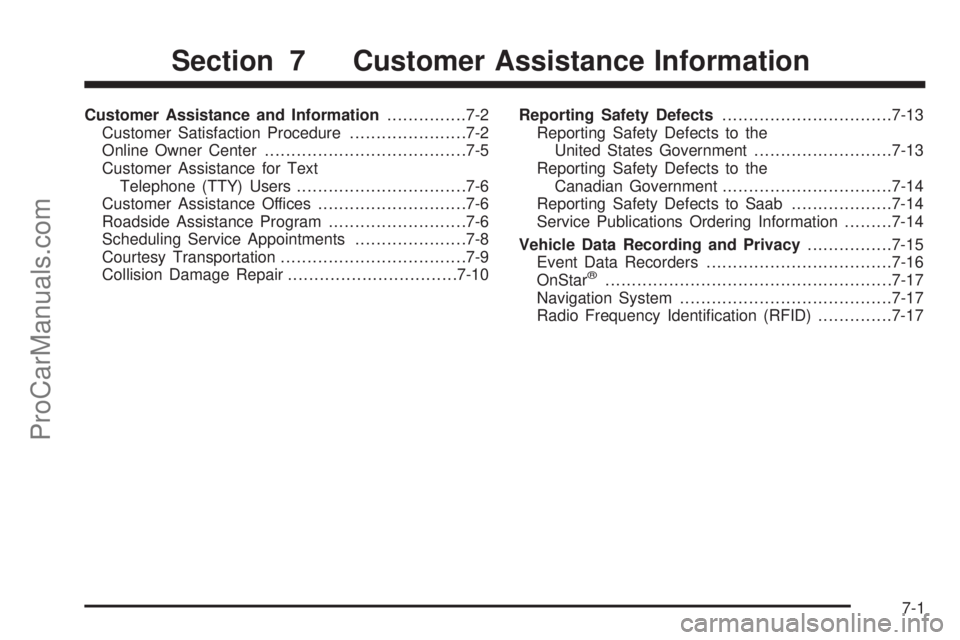
Customer Assistance and Information...............7-2
Customer Satisfaction Procedure......................7-2
Online Owner Center......................................7-5
Customer Assistance for Text
Telephone (TTY) Users................................7-6
Customer Assistance Offices............................7-6
Roadside Assistance Program..........................7-6
Scheduling Service Appointments.....................7-8
Courtesy Transportation...................................7-9
Collision Damage Repair................................7-10Reporting Safety Defects................................7-13
Reporting Safety Defects to the
United States Government..........................7-13
Reporting Safety Defects to the
Canadian Government................................7-14
Reporting Safety Defects to Saab...................7-14
Service Publications Ordering Information.........7-14
Vehicle Data Recording and Privacy................7-15
Event Data Recorders...................................7-16
OnStar
®......................................................7-17
Navigation System........................................7-17
Radio Frequency Identication (RFID)..............7-17
Section 7 Customer Assistance Information
7-1
ProCarManuals.com
Page 395 of 424
STEP THREE:Both Saab and your Saab dealer are
committed to making sure you are completely satised
with your new vehicle. However, if you continue to
remain unsatised after following the procedure outlined
in Steps One and Two, you can le with the Better
Business Bureau (BBB) Auto Line Program to enforce
any additional rights you may have.
The BBB Auto Line Program is an out of court program
administered by the Council of Better Business
Bureaus to settle automotive disputes regarding vehicle
repairs or the interpretation of the New Vehicle
Limited Warranty. Although you may be required to
resort to this informal dispute resolution program prior
to ling a court action, use of the program is free of
charge and your case will generally be heard within
40 days. If you do not agree with the decision given in
your case, you may reject it and proceed with any other
venue for relief available to you.You may contact the BBB Auto Line Program using
the toll-free telephone number or write them at the
following address:
BBB Auto Line Program
Council of Better Business Bureaus, Inc.
4200 Wilson Boulevard
Suite 800
Arlington, VA 22203-1804
Telephone: 1-800-955-5100
www.dr.bbb.org/goauto
This program is available in all 50 states and the
District of Columbia. Eligibility is limited by vehicle age,
mileage, and other factors. Saab reserves the right
to change eligibility limitations and/or to discontinue
its participation in this program.
7-3
ProCarManuals.com