service SAAB 9-7X 2009 Service Manual
[x] Cancel search | Manufacturer: SAAB, Model Year: 2009, Model line: 9-7X, Model: SAAB 9-7X 2009Pages: 424, PDF Size: 2.75 MB
Page 193 of 424
CH Off Air:This channel is not currently in service.
Tune in to another channel.
Off Air:This channel is not currently in service.
Tune to another channel.
CH Unauth:This channel is blocked or cannot be
received with your XM Subscription package.
Unauth:This channel is blocked or cannot be received
with your XM Subscription package.
CH Unavail:This previously assigned channel is no
longer assigned. Tune to another station. If this station
was one of the presets, choose another station for
that preset button.
CH Unavl:This previously assigned channel is no
longer assigned. Tune to another station. If this station
was one of the presets, choose another station for
that preset button.
No Info:No artist, song title, category, or text
information is available at this time on this channel.
The system is working properly.
Not Found:There are no channels available for the
selected category. The system is working properly.XM Locked:The XM receiver in the vehicle may have
previously been in another vehicle. For security
purposes, XM receivers cannot be swapped between
vehicles. If this message is received after having
the vehicle serviced, check with your dealer/retailer.
XM Lock:The XM receiver in your vehicle could have
previously been in another vehicle. For security
purposes, XM receivers cannot be swapped between
vehicles. If this message is received after having
your vehicle serviced, check with your dealer/retailer.
Radio ID:If tuned to channel 0, there could be a
receiver fault., this message will alternate with the
XM Radio 8 digit radio ID label. This label is needed to
activate the service. Consult with your dealer/retailer.
Unknown:If this message is received when tuned
to channel 0, there could be a receiver fault. Consult
with your dealer/retailer.
Chk XMRcvr:If this message does not clear within a
short period of time, the receiver may have a fault.
Consult with your dealer/retailer.
Check XM:If this message does not clear within
a short period of time, the receiver could have a fault.
Consult with your dealer/retailer.
3-73
ProCarManuals.com
Page 201 of 424
Receiving a Call
When an incoming call is received, the audio system
mutes and a ring tone is heard in the vehicle. Press
g
and begin speaking to answer the call.
Call Waiting
Call waiting must be supported on the Bluetooth phone
and enabled by the wireless service carrier to work.
Pressgto answer an incoming call when another
call is active. The original call is placed on hold.
Pressgagain to return to the original call.
To ignore the incoming call, continue with the
original call with no action.
Three-Way Calling
Three-Way Calling must be supported on the Bluetooth
phone and enabled by the wireless service carrier
to work.
1. While on a call press
g. The system responds
with “Ready” followed by a tone.
2. Say “Three-way call”. The system responds with
“Three-way call, please say dial or call”.3. Use the dial or call command to dial the number of
the third party to be called.
4. Once the call is connected, press
gto link all the
callers together.
Ending a Call
To end a call:
1. Press
g. The system responds with “Ready”
followed by a tone.
2. Say “End Call”. The call is then ended.
Muting a Call
During a call, all sounds from inside the vehicle can be
muted so that the person on the other end of the
call cannot hear them.
To Mute a call
1. Pressg. The system responds with “Ready”
followed by a tone.
2. Say “Mute Call”. The system responds with
“Call muted”.
3-81
ProCarManuals.com
Page 204 of 424
Other Information
The Bluetooth®word mark and logos are owned by the
Bluetooth®SIG, Inc. and any use of such marks by
General Motors is under license. Other trademarks and
trade names are those of their respective owners.
This device complies with Part 15 of the FCC Rules.
Operation is subject to the following two conditions:
1. This device may not cause harmful interference.
2. This device must accept any interference received,
including interference that may cause undesired
operation.
This device complies with RSS-210 of Industry Canada.
Operation is subject to the following two conditions:
1. This device may not cause interference.
2. This device must accept any interference received,
including interference that may cause undesired
operation of the device.
Changes or modications to this system by other than
an authorized service facility could void authorization to
use this equipment.
Rear Seat Entertainment (RSE)
System
The vehicle may have a DVD Rear Seat Entertainment
(RSE) system. The RSE system includes a DVD player,
a video display screen, two sets of wireless headphones,
and a remote control.
Before You Drive
The RSE system is for rear seat passengers only,
not intended for the driver while driving.
Parental Control
This button is located behind the video screen. Press
this button while a DVD or CD is playing to freeze
the video and mute the audio. The video screen will
display Parental Control ON and the power indicator
light on the DVD player will ash. It will also disable all
other button operations from the remote control and
the DVD player, with the exception of the eject button.
Press this button again to restore operation of the
DVD player.
This button can also be used to turn the DVD player
power on and automatically resume play if the ignition
is in ON/RUN, ACC/ACCESSORY, or if Retained
Accessory Power (RAP) is active.
3-84
ProCarManuals.com
Page 205 of 424
Headphones
The RSE system includes two sets of wireless
headphones.
Each set of headphones has an ON/OFF control.
An indicator light will illuminate on the headphones
when they are on. If the light does not illuminate,
the batteries may need to be replaced. See “Battery
Replacement” following for more information.
Each set of headphones has a volume knob. To adjust
the volume, adjust this knob.
The transmitters are located below the video display
screen. The headphones will shut off automatically
if they lose the signal from the system after about
four minutes to save battery power. The signal may be
lost if the system is turned off or if the headphones
are out of range of the transmitters.
When using the wired headphones, if the front seat
passengers play a CD in the Radio with Six-Disc CD
or use XM Satellite Radio Service, the audio for
these sources is heard, instead of the DVD or CD that
is currently playing through the RSE.
Notice:Do not store the headphones in heat or
direct sunlight. This could damage the headphones
and repairs will not be covered by the warranty.
Storage in extreme cold can weaken the batteries.
Keep the headphones stored in a cool, dry place.
Battery Replacement
To change the batteries on the headphones:
1. Turn the screw to loosen the battery door located
on the left side of the headphones. Slide the
battery door open.
2. Replace the two batteries in the compartment.
Make sure that they are installed correctly, using the
diagram on the inside of the battery compartment.
3. Replace the battery door and tighten the door
screw.
If the headphones are to be stored for a long period of
time, remove the batteries and keep them in a cool,
dry place.
Stereo RCA Jacks
The RCA jacks are located behind the video screen.
The RCA jacks allow audio and video signals to
be connected from an auxiliary device such as a
camcorder or a video game unit to the RSE system.
Standard RCA cables, not included, are needed
to connect the auxiliary device to the RCA jacks.
The yellow connector inputs video and the red and white
connectors input right and left audio. Refer to the
manufacturer’s instructions for proper connection of the
auxiliary device.
3-85
ProCarManuals.com
Page 207 of 424
Video Screen
The video screen is located in the overhead console.
To use the video screen, push forward on the release
latch and the screen will fold down. Adjust the screen’s
position as desired. When the video screen is not in
use, push it up into its latched position.
The DVD player and display will continue to operate
when the screen is in the up or the down position. The
video screen contains the transmitters for the wireless
headphones and the remote control. If the screen is in the
closed position, the signals will not be available for the
operation of the headphones or the remote control.
Notice:Avoid directly touching the video screen,
as damage may occur. See “Cleaning the Video
Screen” later in this section for more information.
DVD Player
The DVD player is located in the overhead console.
The DVD player can be controlled by the buttons on
the DVD player and/or by the buttons on the remote
control. See “Remote Control” later in this section
for more information.
The DVD player power may be turned on when the
ignition is in ON/RUN, ACC/ACCESSORY, or when
Retained Accessory Power (RAP) is active.The RSE system DVD player is only compatible with
DVDs of the appropriate region code for the country that
the vehicle was sold in. The DVD region code is printed
on the jacket of most DVDs.
Standard audio CDs, CD-R, CD-RW, Video CD and
Photo CD/CD-R media are fully supported by this DVD
player. DVD-R and DVD-RW media is supported if
formatted as DVD-Video. DVD+R and DVD+RW media
may or may not be supported by the DVD player.
The DVD player does not support DVD-RAM,
DVD-ROM, and DVD Audio media. An error message
will appear on the display if this type of media is inserted
into the DVD player.
When using the wired headphones, not included, if the
front seat passengers play a CD in the Radio with
Six-Disc CD or use XM Satellite Radio Service,
the audio for these sources is heard, instead of the
DVD or CD that is currently playing through the RSE.
If an error message appears on the video screen,
see “DVD Messages” later in this section.
3-87
ProCarManuals.com
Page 218 of 424
Radio Reception
Frequency interference and static can occur during
normal radio reception if items such as cell phone
chargers, vehicle convenience accessories, and external
electronic devices are plugged into the accessory
power outlet. If there is interference or static, unplug the
item from the accessory power outlet.
AM
The range for most AM stations is greater than for FM,
especially at night. The longer range can cause
station frequencies to interfere with each other.
For better radio reception, most AM radio stations
boost the power levels during the day, and then reduce
these levels during the night. Static can also occur
when things like storms and power lines interfere with
radio reception. When this happens, try reducing
the treble on the radio.
FM Stereo
FM signals only reach about 10 to 40 miles
(16 to 65 km). Although the radio has a built-in electronic
circuit that automatically works to reduce interference,
some static can occur, especially around tall buildings or
hills, causing the sound to fade in and out.
XM Satellite Radio Service
XM Satellite Radio Service gives digital radio reception
from coast-to-coast in the 48 contiguous United
States, and in Canada. Just as with FM, tall buildings or
hills can interfere with satellite radio signals, causing
the sound to fade in and out. In addition, traveling
or standing under heavy foliage, bridges, garages, or
tunnels may cause loss of the XM signal for a period
of time.
3-98
ProCarManuals.com
Page 225 of 424
Antilock Brake System (ABS)
This vehicle has the Antilock Brake System (ABS),
an advanced electronic braking system that will
help prevent a braking skid.
When the engine is started and the vehicle begins to
drive away, ABS checks itself. A momentary motor
or clicking noise might be heard while this test is going
on. This is normal.
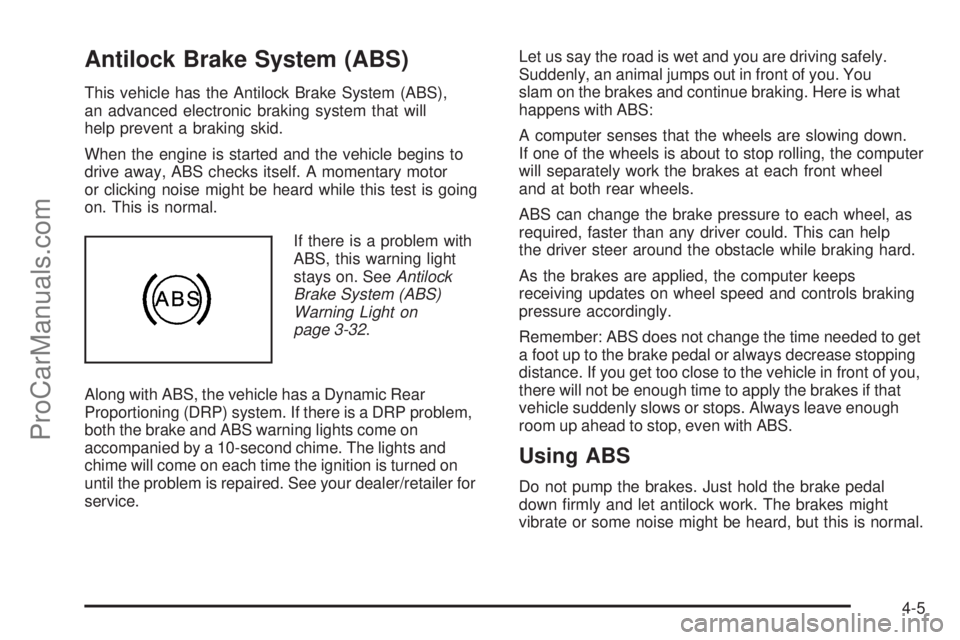
If there is a problem with
ABS, this warning light
stays on. SeeAntilock
Brake System (ABS)
Warning Light on
page 3-32.
Along with ABS, the vehicle has a Dynamic Rear
Proportioning (DRP) system. If there is a DRP problem,
both the brake and ABS warning lights come on
accompanied by a 10-second chime. The lights and
chime will come on each time the ignition is turned on
until the problem is repaired. See your dealer/retailer for
service.Let us say the road is wet and you are driving safely.
Suddenly, an animal jumps out in front of you. You
slam on the brakes and continue braking. Here is what
happens with ABS:
A computer senses that the wheels are slowing down.
If one of the wheels is about to stop rolling, the computer
will separately work the brakes at each front wheel
and at both rear wheels.
ABS can change the brake pressure to each wheel, as
required, faster than any driver could. This can help
the driver steer around the obstacle while braking hard.
As the brakes are applied, the computer keeps
receiving updates on wheel speed and controls braking
pressure accordingly.
Remember: ABS does not change the time needed to get
a foot up to the brake pedal or always decrease stopping
distance. If you get too close to the vehicle in front of you,
there will not be enough time to apply the brakes if that
vehicle suddenly slows or stops. Always leave enough
room up ahead to stop, even with ABS.
Using ABS
Do not pump the brakes. Just hold the brake pedal
down rmly and let antilock work. The brakes might
vibrate or some noise might be heard, but this is normal.
4-5
ProCarManuals.com
Page 228 of 424
StabiliTrak Off
In this mode, both stability control and part of the
traction control system are disabled. The vehicle will still
have brake-traction control, but will not be able to use
the engine speed management system. System
noises maybe heard as a result of the brake-traction
control coming on. If the controller detects excessive
wheel spin in this mode, the StabiliTrak indicator
light may blink and the STABILITRAK ACTIVE message
may be displayed to warn the driver that damage
may occur to the transfer case.It is recommended to leave the system on for normal
driving conditions, but it may be necessary to turn the
system off if the vehicle is stuck in sand, mud, ice or
snow, and you may want to “rock” the vehicle in an
attempt to free it. It may also be necessary to turn off the
system when driving in extreme off-road conditions where
high wheel spin is required. SeeIf Your Vehicle is Stuck
in Sand, Mud, Ice, or Snow on page 4-20for more
information.
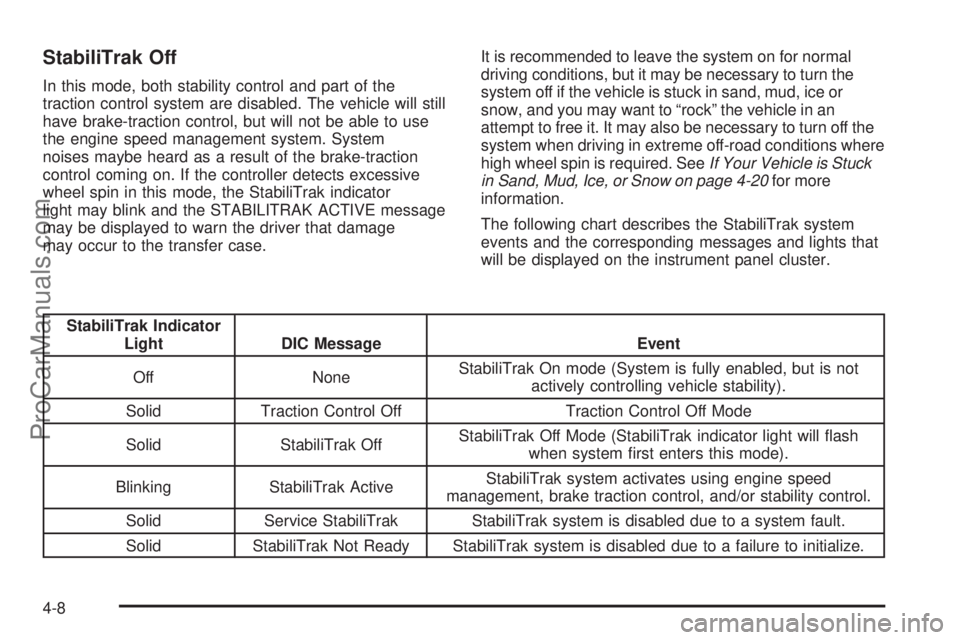
The following chart describes the StabiliTrak system
events and the corresponding messages and lights that
will be displayed on the instrument panel cluster.
StabiliTrak Indicator
Light DIC Message Event
Off NoneStabiliTrak On mode (System is fully enabled, but is not
actively controlling vehicle stability).
Solid Traction Control Off Traction Control Off Mode
Solid StabiliTrak OffStabiliTrak Off Mode (StabiliTrak indicator light will ash
when system rst enters this mode).
Blinking StabiliTrak ActiveStabiliTrak system activates using engine speed
management, brake traction control, and/or stability control.
Solid Service StabiliTrak StabiliTrak system is disabled due to a system fault.
Solid StabiliTrak Not Ready StabiliTrak system is disabled due to a failure to initialize.
4-8
ProCarManuals.com
Page 229 of 424
Notice:If the StabiliTrak®light comes on due to
heavy braking and/or because the traction control
system has been continuously active, do not allow
the wheel(s) of one axle to spin excessively. This
could lead to damage to the transfer case and costly
repairs not covered by the vehicle warranty.
Notice:If the wheel(s) of one axle is allowed to spin
excessively while the StabiliTrak, ABS and brake
warning lights and any relevant DIC messages are
displayed, the transfer case could be damaged. The
repairs would not be covered by the vehicle warranty.
Reduce engine power and do not spin the wheel(s)
excessively while these lights and messages are
displayed.
StabiliTrak may activate on dry or rough roads or under
conditions such as heavy acceleration while turning or
abrupt upshifts/downshifts of the transmission. When this
happens, a reduction in acceleration may be noticed, or a
noise or vibration may be heard. This is normal.If cruise control is being used when the system activates,
the StabiliTrak light will ash and cruise control will
automatically disengage. Cruise control may be
reengaged when road conditions allow. SeeCruise
Control on page 3-10.
StabiliTrak will turn off automatically if a problem is
detected in the system. The StabiliTrak light will come
on and SERVICE STABILITRAK will be displayed on the
DIC. If the SERVICE STABILITRAK message does
not clear itself after restarting the vehicle, see your
dealer/retailer for service.
Adding non-GM accessories can affect the vehicle’s
performance. SeeAccessories and Modifications
on page 5-3for more information.
4-9
ProCarManuals.com
Page 233 of 424
Skidding
In a skid, a driver can lose control of the vehicle.
Defensive drivers avoid most skids by taking reasonable
care suited to existing conditions, and by not overdriving
those conditions. But skids are always possible.
The three types of skids correspond to the vehicle’s three
control systems. In the braking skid, the wheels are not
rolling. In the steering or cornering skid, too much speed
or steering in a curve causes tires to slip and lose
cornering force. And in the acceleration skid, too much
throttle causes the driving wheels to spin.
If the vehicle starts to slide, ease your foot off the
accelerator pedal and quickly steer the way you want
the vehicle to go. If you start steering quickly enough,
the vehicle may straighten out. Always be ready for
a second skid if it occurs.
Of course, traction is reduced when water, snow, ice,
gravel, or other material is on the road. For safety, slow
down and adjust your driving to these conditions. It is
important to slow down on slippery surfaces because
stopping distance is longer and vehicle control more
limited.While driving on a surface with reduced traction, try
your best to avoid sudden steering, acceleration, or
braking, including reducing vehicle speed by shifting to a
lower gear. Any sudden changes could cause the tires to
slide. You might not realize the surface is slippery until
the vehicle is skidding. Learn to recognize warning
clues — such as enough water, ice, or packed snow on
the road to make a mirrored surface — and slow down
when you have any doubt.
Remember: Any Antilock Brake System (ABS) helps
avoid only the braking skid.
Off-Road Driving
Your vehicle does not have features like added ground
clearance, special underbody shielding, and a transfer
case low gear range, things that are necessary for
extended or severe off-road service. You should not
drive off-road unless you are on a level, solid surface.
4-13
ProCarManuals.com