change time SATURN ASTRA 2008 User Guide
[x] Cancel search | Manufacturer: SATURN, Model Year: 2008, Model line: ASTRA, Model: SATURN ASTRA 2008Pages: 304, PDF Size: 1.92 MB
Page 136 of 304
Overlay Menus
Additional notes and information on
the audio system or other vehicle
components may appear on
the display as an overlay in some
cases. The current menu is overlaid
with the information box. Some
settings have to be conrmed,
others are automatically enabled
after a short time.
Audio Settings
The audio settings can be set
for each audio source and are
stored separately for each radio
station and the CD player.
Adjusting the Tone (Bass/Treble)
To adjust the Bass:
1. Press SOUND and select the
Sound menu item.
2. Select Treble - Bass.3. Select Bass from the menu and
turn the multifunction knob to
adjust the level.
4. Press the multifunction knob to
save the setting.
Bass tones are automatically
adjusted to the driving speed to
compensate for rolling and ambient
noise. The setting cannot be
changed.
To adjust the Treble:
1. Press SOUND and select the
Sound menu item.
2. Select Treble - Bass.
3. Select Treble from the menu and
turn the multifunction knob to
adjust the level.
4. Press the multifunction knob to
save the setting.Adjusting the Equalizer
The equalizer allows changes to be
made to seven frequencies.
To adjust the equalizer:
1. Press SOUND and select the
Sound menu item.
2. Select Equalizer.
3. Select the desired frequency and
turn the multifunction knob to
adjust the level.
4. Press the multifunction knob to
save the setting.
5. Repeat these steps for each
frequency.
After making changes to the
equalizer, the user option in the
Sound menu is enabled.
6-14 Infotainment
ProCarManuals.com
Page 141 of 304

Display Options
The display can be changed
depending on what type of CD
is in the CD player. The display
options are:
Disabled (o): Track number,
CD number, album number
and playing time for an audio CD.
Enabled (a): CD name,
track name, artist name,
and album name for an audio CD
with CD text.
To change the display:
1. Select Extras from the CD Menu.
2. Enable or disable the Display
track box.
Playing a CD
CDC:Press to play a CD that
is already loaded into the CD player
while the radio is playing. The
CD Menu displays.Selecting a Track
Tracks can be selected using the
four-way switch or the CD menu
functions.
Selecting a track using the four-way
switch:
\or]:Press to go to the next or
previous track within a CD.
Selecting a track using the CD
menu and the
torufunction:
1. Turn the multifunction knob until
Track is highlighted.
2. Press the multifunction knob until
the desired track is displayed.
Selecting a track using the CD menu
and the Track function:
1. Select Track from the CD menu.
2. Select the desired track from
the menu.Searching Within a Track
To search within a track using the
four-way switch or the CD menu
functions:
To search using the four-way
switch:
1. Press and hold
\or].
2. Release
\or]when the
desired point in the track is
reached.
To search using the CD menu
1. Select
ror[.
2. Select
ror[again when the
desired point in the track is
reached.
Infotainment 6-19
ProCarManuals.com
Page 145 of 304

Tracks play in the following order for
Random play CD:
MP3 CD: If there are ve or
fewer albums on an MP3
CD, four tracks per album are
played in random order. If there
are more than ve albums on
the MP3 CD, one track is played
per album. Tracks from the
selected album are played
randomly.
Mixed Mode CD: On a Mixed
Mode CD, the tracks from the
audio part are played rst
in random order. Then the tracks
from the MP3 part are played
as described above.
To use Random play CD:
1. Select Extras from the CD menu.
2. Select Random CD,
T
displays.Tracks play in the following order for
Random magazine:
MP3 CD: If there are ve or
fewer albums on an MP3
CD, four tracks per album are
played before changing to
the next CD. If there are more
than ve albums, one track
per album is played before
changing to the next CD.
Mixed Mode CD: On a Mixed
Mode CD, the rst of all four
tracks from the audio part
are played in random order and
then the system changes to
the next CD. The next time the
system changes to the Mixed
Mode CD, the tracks from
the MP3 part are played as
described above.
To use random for all CDs:
1. Select Extras from the CD menu.
2. Select Random Magazine,
Udisplays.
Care of CD’s and the CD
Player
Care of CDs
Store CDs in their original cases or
other protective cases and away
from direct sunlight and dust. The CD
player scans the bottom of the disc.
If the bottom of a CD is damaged it
may not play properly or at all. Do not
touch the bottom of a CD while
handling it. Pick up CDs by grasping
the outer edges or the edge of the
hole and the outer edge.
If the surface of a CD is dirty, take
a soft, lint free cloth or dampen a
clean, soft cloth in a mild, neutral
detergent solution mixed with water,
and clean it. Make sure the wiping
process starts from the center to
the edge.
Infotainment 6-23
ProCarManuals.com
Page 156 of 304
Your vehicle has a
Computer-Controlled Cranking
System. This feature assists in
starting the engine and protects
components. If the ignition key is
turned to the START position,
and then released when the
engine begins cranking, the
engine will continue cranking for a
few seconds or until the vehicle
starts. If the engine does not start
and the key is held in START for
many seconds, cranking will be
stopped after 15 seconds to
prevent cranking motor damage.
To prevent gear damage, this
system also prevents cranking if
the engine is already running.
Engine cranking can be stopped
by turning the ignition switch to
STEERING UNLOCKED/
IGNITION OFF or LOCK/OFF.
Notice:Cranking the engine for
long periods of time, by returning
the key to the START position
immediately after cranking has
ended, can overheat and damage
the cranking motor, and drain thebattery. Wait at least 15 seconds
between each try, to let the
cranking motor cool down.
2. If the engine does not start after
5-10 seconds, especially in very
cold weather (below 0°F or
−18°C), it could be ooded with
too much gasoline. Try pushing
the accelerator pedal all the way
to the oor and holding it there as
you hold the key in START for up
to a maximum of 15 seconds.
Wait at least 15 seconds between
each try, to let the cranking motor
cool down. When the engine
starts, let go of the key and
accelerator. If the vehicle starts
briey but then stops again, do
the same thing. This clears the
extra gasoline from the engine.
Do not race the engine
immediately after starting it.
Operate the engine and
transmission gently until the oil
warms up and lubricates all
moving parts.Notice:The engine is designed
to work with the electronics in the
vehicle. If you add electrical parts
or accessories, you could change
the way the engine operates.
Before adding electrical
equipment, check with your
dealer/retailer. If you do not,
the engine might not perform
properly. Any resulting damage
would not be covered by the
vehicle warranty.
Engine Heater
The engine heater can provide
easier starting and better fuel
economy during engine warm-up
in cold weather conditions at or
below−4°F (−20°C). Vehicles with
an engine heater should be plugged
in at least four hours before starting.
8-4 Driving and Operating
ProCarManuals.com
Page 171 of 304
Remember: ABS does not change
the time you need to get your foot
up to the brake pedal or always
decrease stopping distance. If you
get too close to the vehicle in front of
you, you will not have time to apply
the brakes if that vehicle suddenly
slows or stops. Always leave enough
room up ahead to stop, even though
you have ABS.
Using ABS
Do not pump the brakes. Just hold
the brake pedal down rmly and
let antilock work for you. You might
hear the antilock pump or motor
operate, and feel the brake
pedal pulsate, but this is normal.
Braking in Emergencies
With ABS, you can steer and
brake at the same time. In many
emergencies, steering can help
you more than even the very best
braking.
StabiliTrak®System
Your vehicle may have StabiliTrak
which combines antilock brake,
traction and stability control systems
and helps the driver maintain
directional control of the vehicle
in most driving conditions.
When you rst start your vehicle and
begin to drive away, the system
performs several diagnostic checks
to ensure there are no problems.
You may hear or feel the system
working. This is normal and does not
mean there is a problem with your
vehicle. The system should initialize
before the vehicle reaches 20 mph
(32 km/h).
The system monitors vehicle
movements, and helps the driver
maintain control of the vehicle in
most driving situations. When the
vehicle’s stability is affected the
engine output is reduced, and the
brakes are applied to individual
wheels.When you turn the ignition on,
this light on the instrument panel
cluster will come on for a few
seconds, then go out when the
system is ready.
You may also feel or hear the
system working; this is normal.
StabiliTrak is automatically enabled
whenever you start your vehicle.
To assist the driver with vehicle
directional control, especially in
slippery road conditions, you should
always leave the system on. But, you
can turn it off if you ever need to.
Driving and Operating 8-19
ProCarManuals.com
Page 176 of 304

If your vehicle starts to slide, ease
your foot off the accelerator pedal
and quickly steer the way you want
the vehicle to go. If you start steering
quickly enough, your vehicle may
straighten out. Always be ready for a
second skid if it occurs.
Of course, traction is reduced when
water, snow, ice, gravel, or other
material is on the road. For safety,
you want to slow down and
adjust your driving to these
conditions. It is important to slow
down on slippery surfaces because
stopping distance is longer and
vehicle control more limited.
While driving on a surface with
reduced traction, try your best to
avoid sudden steering, acceleration,
or braking, including reducing
vehicle speed by shifting to a lower
gear. Any sudden changes could
cause the tires to slide. You
might not realize the surface isslippery until your vehicle is
skidding. Learn to recognize warning
clues — such as enough water,
ice, or packed snow on the road to
make a mirrored surface — and
slow down when you have any
doubt.
Remember: Any Antilock Brake
System (ABS) helps avoid only the
braking skid.
Driving at Night
Night driving is more dangerous
than day driving because some
drivers are likely to be impaired — by
alcohol or drugs, with night vision
problems, or by fatigue.
Night driving tips include:
Drive defensively.
Do not drink and drive.
Reduce headlamp glare by
adjusting the inside rearview
mirror.
Slow down and keep more space
between you and other vehicles
because headlamps can only
light up so much road ahead.
Watch for animals.
When tired, pull off the road.
Do not wear sunglasses.
Avoid staring directly into
approaching headlamps.
Keep the windshield and all glass
on your vehicle clean — inside
and out.
Keep your eyes moving,
especially during turns or curves.
No one can see as well at night as
in the daytime. But, as we get
older, these differences increase.
A 50-year-old driver might need
at least twice as much light to see
the same thing at night as a
20-year-old.
8-24 Driving and Operating
ProCarManuals.com
Page 199 of 304
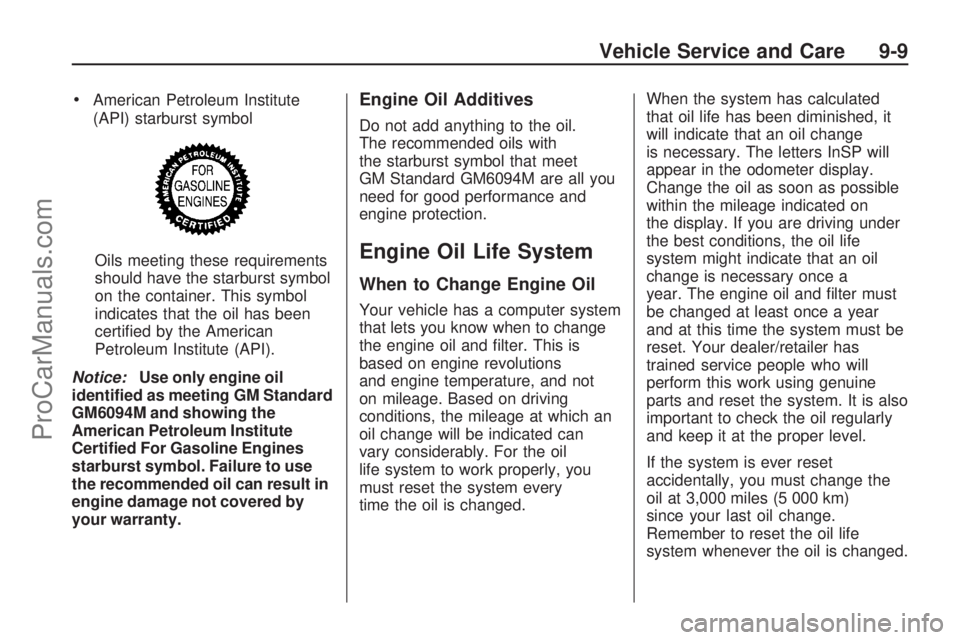
American Petroleum Institute
(API) starburst symbol
Oils meeting these requirements
should have the starburst symbol
on the container. This symbol
indicates that the oil has been
certied by the American
Petroleum Institute (API).
Notice:Use only engine oil
identied as meeting GM Standard
GM6094M and showing the
American Petroleum Institute
Certied For Gasoline Engines
starburst symbol. Failure to use
the recommended oil can result in
engine damage not covered by
your warranty.Engine Oil Additives
Do not add anything to the oil.
The recommended oils with
the starburst symbol that meet
GM Standard GM6094M are all you
need for good performance and
engine protection.
Engine Oil Life System
When to Change Engine Oil
Your vehicle has a computer system
that lets you know when to change
the engine oil and lter. This is
based on engine revolutions
and engine temperature, and not
on mileage. Based on driving
conditions, the mileage at which an
oil change will be indicated can
vary considerably. For the oil
life system to work properly, you
must reset the system every
time the oil is changed.When the system has calculated
that oil life has been diminished, it
will indicate that an oil change
is necessary. The letters InSP will
appear in the odometer display.
Change the oil as soon as possible
within the mileage indicated on
the display. If you are driving under
the best conditions, the oil life
system might indicate that an oil
change is necessary once a
year. The engine oil and lter must
be changed at least once a year
and at this time the system must be
reset. Your dealer/retailer has
trained service people who will
perform this work using genuine
parts and reset the system. It is also
important to check the oil regularly
and keep it at the proper level.
If the system is ever reset
accidentally, you must change the
oil at 3,000 miles (5 000 km)
since your last oil change.
Remember to reset the oil life
system whenever the oil is changed.
Vehicle Service and Care 9-9
ProCarManuals.com
Page 215 of 304

Replacing Brake System Parts
The braking system on a vehicle
is complex. Its many parts have to
be of top quality and work well
together if the vehicle is to have
really good braking. Your vehicle
was designed and tested with
top-quality brake parts. When you
replace parts of the braking
system — for example, when the
brake linings wear down and
you need new ones put in — be
sure you get new approved
replacement parts. If you do not,
the brakes might not work properly.
For example, if someone puts in
brake linings that are wrong for
your vehicle, the balance between
the front and rear brakes can
change — for the worse. The
braking performance you have
come to expect can change in many
other ways if someone puts in the
wrong replacement brake parts.
Battery
Your vehicle has a maintenance
free battery. When it is time
for a new battery, see your
dealer/retailer for one that has the
replacement number shown on
the original battery’s label.
SeeEngine Compartment Overview
on page 9-6for battery location.
Warning:Battery posts, terminals,
and related accessories contain
lead and lead compounds,
chemicals known to the State of
California to cause cancer and
reproductive harm. Wash hands
after handling.
Vehicle Storage
{CAUTION
Batteries have acid that can
burn you and gas that can
explode. You can be badly hurt
if you are not careful. SeeJump
Starting on page 9-68for tips
on working around a battery
without getting hurt.
Infrequent Usage: If you drive your
vehicle infrequently, remove the
black, negative (−) cable from
the battery. This will help keep the
battery from running down.
Extended Storage: For extended
storage of your vehicle, remove the
black, negative (−) cable from
the battery or use a battery trickle
charger. This will help maintain
the charge of the battery over an
extended period of time.
Vehicle Service and Care 9-25
ProCarManuals.com
Page 242 of 304
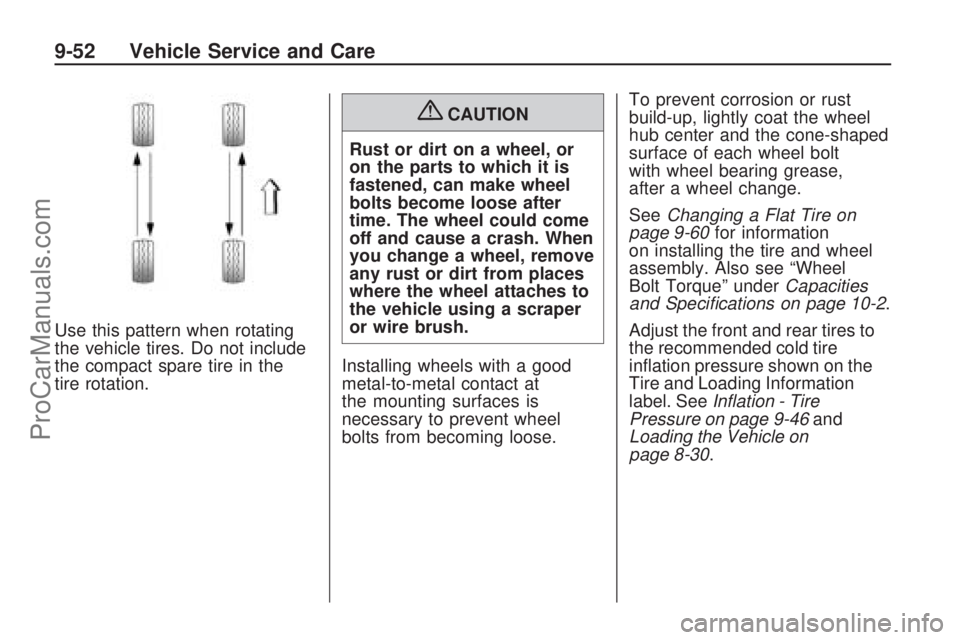
Use this pattern when rotating
the vehicle tires. Do not include
the compact spare tire in the
tire rotation.
{CAUTION
Rust or dirt on a wheel, or
on the parts to which it is
fastened, can make wheel
bolts become loose after
time. The wheel could come
off and cause a crash. When
you change a wheel, remove
any rust or dirt from places
where the wheel attaches to
the vehicle using a scraper
or wire brush.
Installing wheels with a good
metal-to-metal contact at
the mounting surfaces is
necessary to prevent wheel
bolts from becoming loose.To prevent corrosion or rust
build-up, lightly coat the wheel
hub center and the cone-shaped
surface of each wheel bolt
with wheel bearing grease,
after a wheel change.
SeeChanging a Flat Tire on
page 9-60for information
on installing the tire and wheel
assembly. Also see “Wheel
Bolt Torque” underCapacities
and Specifications on page 10-2.
Adjust the front and rear tires to
the recommended cold tire
ination pressure shown on the
Tire and Loading Information
label. SeeInflation - Tire
Pressure on page 9-46and
Loading the Vehicle on
page 8-30.
9-52 Vehicle Service and Care
ProCarManuals.com
Page 254 of 304
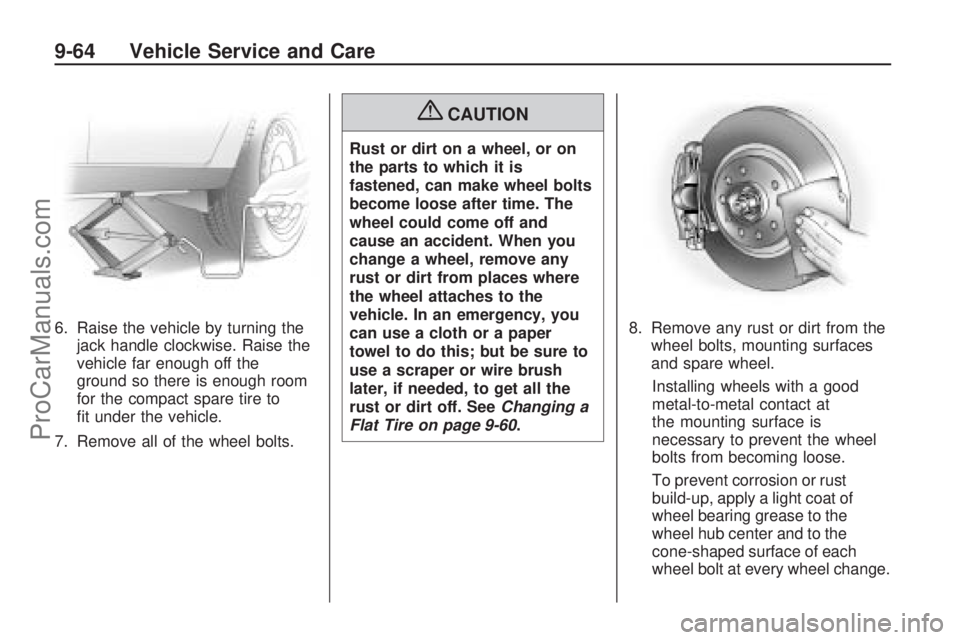
6. Raise the vehicle by turning the
jack handle clockwise. Raise the
vehicle far enough off the
ground so there is enough room
for the compact spare tire to
t under the vehicle.
7. Remove all of the wheel bolts.
{CAUTION
Rust or dirt on a wheel, or on
the parts to which it is
fastened, can make wheel bolts
become loose after time. The
wheel could come off and
cause an accident. When you
change a wheel, remove any
rust or dirt from places where
the wheel attaches to the
vehicle. In an emergency, you
can use a cloth or a paper
towel to do this; but be sure to
use a scraper or wire brush
later, if needed, to get all the
rust or dirt off. SeeChanging a
Flat Tire on page 9-60.8. Remove any rust or dirt from the
wheel bolts, mounting surfaces
and spare wheel.
Installing wheels with a good
metal-to-metal contact at
the mounting surface is
necessary to prevent the wheel
bolts from becoming loose.
To prevent corrosion or rust
build-up, apply a light coat of
wheel bearing grease to the
wheel hub center and to the
cone-shaped surface of each
wheel bolt at every wheel change.
9-64 Vehicle Service and Care
ProCarManuals.com