fuel SATURN ASTRA 2008 User Guide
[x] Cancel search | Manufacturer: SATURN, Model Year: 2008, Model line: ASTRA, Model: SATURN ASTRA 2008Pages: 304, PDF Size: 1.92 MB
Page 110 of 304
Day / Night
The vehicle may have this feature.
The display can be adjusted to
best match the lighting conditions.
To adjust this setting:
1. Select Day / Night from the
Settings menu.
The available options are
displayed:
Auto:Adjusts the display
automatically based on
the lighting conditions.
Day:Black or colored text on
a light background.
Night:White or colored text
on a dark background.
2. Make the desired selection.
When selected, a
Oappears next
to the item.
Ignition Logic
If the vehicle has this feature, see
Audio System(s) on page 6-1
for more information.
Trip Computer
The vehicle may have a trip
computer. The trip computer
provides information on driving
data. This information is
continually recorded and
evaluated electronically. If power
has been interrupted or if the battery
voltage has dropped too low, the
values stored in the trip computer
will be lost.
The trip computer main page
provides information on range
and instantaneous consumption.
To access other trip computer
vehicle data, do one of the following:
Press the BC button on the
audio system, if your vehicle
has this feature.
Press the left thumbwheel, if your
vehicle has this feature, on the
steering wheel.
Select the trip computer menu
front display.The functions are displayed in the
following order:
Range
This display shows the approximate
number of remaining miles (mi)
or kilometers (km) the vehicle
can be driven without refueling.
The message “Range” displays if
less than 31 miles (50 km) can be
driven with the fuel remaining in
the tank.
SeeDIC Warnings and Messages
(Base and Uplevel Systems) on
page 4-37for information on
acknowledging the message.
The fuel range estimate is based
on an average of the vehicle’s fuel
economy over recent driving history
and the amount of fuel remaining in
the fuel tank. This estimate will
change if driving conditions change.
4-34 Instruments and Controls
ProCarManuals.com
Page 111 of 304
For example, if driving in traffic and
making frequent stops, this display
may read one number, but if the
vehicle is driven on a freeway,
the number may change even
though the same amount of fuel
is in the fuel tank. This is because
different driving conditions produce
different fuel economies. Generally,
freeway driving produces better
fuel economy than city driving.
Fuel range cannot be reset.
Instantaneous Consumption
This display shows the current fuel
economy at a particular moment and
will change frequently as driving
conditions change. This display
shows the instantaneous fuel
economy in miles per gallon (mpg) or
liters per 100 kilometers (l/100 km).The metric display changes
depending on speed:
Below 8 mph (13 km/h), displays
in l/h.
Above 8 mph (13 km/h), displays
in l/100 km.
This screen cannot be reset.
Distance Travelled
This display shows the current
distance traveled in either miles (mi)
or kilometers (km) since the last
reset.
The measurement can be reset to
zero at any time and restarted.
See “Reset” later in this section.Average Speed
This display shows the average
speed of the vehicle in miles per
hour (mph) or kilometers per
hour (km/h). This average is
calculated based on the various
vehicle speeds recorded since
the last reset of this value.
The measurement can be reset to
zero at any time and restarted.
See “Reset” later in this section.
Trip Consumption
This display shows the number
of gallons (gal) or liters (l) of
fuel used since the last reset.
The measurement can be reset to
zero at any time and restarted.
See “Reset” later in this section.
Instruments and Controls 4-35
ProCarManuals.com
Page 150 of 304

Y(Vent):This mode directs air to
the instrument panel outlets.
X(Defog):This mode directs air
to the windshield and front door
windows. To reduce fogging, press
#to turn on the air conditioner.
The fan must also be on.
W(Defog/Floor):This mode
directs air to the windshield, front
door windows, and oor outlets.
To reduce fogging, press
#to turn
on the air conditioner. The fan
must also be on.
[(Floor):This mode directs
most of the air to the oor outlets.Temperature Control Knob
Turn the center knob clockwise or
counterclockwise to increase or
decrease the temperature inside the
vehicle.
Fan Speed Control Knob
Turn the right knob clockwise or
counterclockwise to increase
or decrease the fan speed. The
speed settings can be adjusted
between 1 (Low) and 4 (High).
When the fan is off, the air
conditioning compressor is also off.
There will be some airow from
the outlets when driving, even with
the fan in the off position.
A(Fan):Select this position to
turn the fan off.
Air Conditioning
For vehicles with air conditioning.
#(Air Conditioning):Press
to turn the air conditioning system
on or off. An indicator light inside
the button comes on when the air
conditioning is activated. The air
conditioning can only be operated
if the engine is on and the fan is
running.
When the air conditioning is on
the air is cooled and dehumidied.
If cooling or dehumidication is not
desired, turn off the air conditioning
to save fuel.
On hot days, open the windows
briey to let the hot inside air
escape, then close them. This helps
to reduce the time it takes for the
vehicle to cool down.
7-2 Climate Controls
ProCarManuals.com
Page 153 of 304

Driving and
Operating
Starting and Operating
Your Vehicle
New Vehicle Break-In.........8-2
Ignition Positions................8-2
Retained Accessory
Power (RAP).....................8-3
Starting the Engine.............8-3
Engine Heater....................8-4
Automatic Transmission
Operation..........................8-5
Manual Transmission
Operation..........................8-9
Parking Brake...................8-10
Shifting Into Park..............8-11
Shifting Out of Park..........8-13
Parking the Vehicle...........8-13
Parking Over Things
That Burn........................8-13
Engine Exhaust.................8-14
Running the Vehicle
While Parked..................8-14
Driving Your Vehicle
Defensive Driving..............8-16
Drunk Driving....................8-16
Control of a Vehicle..........8-17
Braking.............................8-17
Antilock Brake
System (ABS).................8-18
StabiliTrak®System..........8-19
Steering............................8-20
Off-Road Recovery............8-22
Passing.............................8-23
Loss of Control.................8-23
Driving at Night.................8-24
Driving in Rain and on
Wet Roads......................8-25
Before Leaving on a
Long Trip........................8-26
Highway Hypnosis.............8-26
Hill and Mountain
Roads.............................8-26
Winter Driving...................8-27
If Your Vehicle is Stuck
in Sand, Mud, Ice,
or Snow
..........................8-29
Rocking Your Vehicle to
Get It Out.......................8-30
Loading the Vehicle..........8-30
Fuel
Fuel..................................8-35
Gasoline Octane...............8-35
Gasoline Specications.....8-35
California Fuel..................8-35
Additives...........................8-36
Fuels in Foreign
Countries........................8-36
Filling the Tank.................8-37
Filling a Portable Fuel
Container........................8-38
Driving and Operating 8-1
ProCarManuals.com
Page 156 of 304
Your vehicle has a
Computer-Controlled Cranking
System. This feature assists in
starting the engine and protects
components. If the ignition key is
turned to the START position,
and then released when the
engine begins cranking, the
engine will continue cranking for a
few seconds or until the vehicle
starts. If the engine does not start
and the key is held in START for
many seconds, cranking will be
stopped after 15 seconds to
prevent cranking motor damage.
To prevent gear damage, this
system also prevents cranking if
the engine is already running.
Engine cranking can be stopped
by turning the ignition switch to
STEERING UNLOCKED/
IGNITION OFF or LOCK/OFF.
Notice:Cranking the engine for
long periods of time, by returning
the key to the START position
immediately after cranking has
ended, can overheat and damage
the cranking motor, and drain thebattery. Wait at least 15 seconds
between each try, to let the
cranking motor cool down.
2. If the engine does not start after
5-10 seconds, especially in very
cold weather (below 0°F or
−18°C), it could be ooded with
too much gasoline. Try pushing
the accelerator pedal all the way
to the oor and holding it there as
you hold the key in START for up
to a maximum of 15 seconds.
Wait at least 15 seconds between
each try, to let the cranking motor
cool down. When the engine
starts, let go of the key and
accelerator. If the vehicle starts
briey but then stops again, do
the same thing. This clears the
extra gasoline from the engine.
Do not race the engine
immediately after starting it.
Operate the engine and
transmission gently until the oil
warms up and lubricates all
moving parts.Notice:The engine is designed
to work with the electronics in the
vehicle. If you add electrical parts
or accessories, you could change
the way the engine operates.
Before adding electrical
equipment, check with your
dealer/retailer. If you do not,
the engine might not perform
properly. Any resulting damage
would not be covered by the
vehicle warranty.
Engine Heater
The engine heater can provide
easier starting and better fuel
economy during engine warm-up
in cold weather conditions at or
below−4°F (−20°C). Vehicles with
an engine heater should be plugged
in at least four hours before starting.
8-4 Driving and Operating
ProCarManuals.com
Page 159 of 304

Notice:Shifting out of P (Park)
or N (Neutral) with the engine
running at high speed may
damage the transmission. The
repairs would not be covered by
the vehicle warranty. Be sure the
engine is not running at high
speed when shifting the vehicle.
DRIVE (D):This position is for
normal driving.
Notice:If your vehicle seems to
start up rather slowly or not shift
gears when you go faster, and you
continue to drive your vehicle that
way, you could damage the
transmission. Have your vehicle
serviced right away.THIRD (3):This position is also
used for normal driving, however, it
offers more power and lower fuel
economy than DRIVE (D). Here are
some times you might choose
THIRD (3) instead of DRIVE (D):
When driving on hilly, winding
roads.
When going down a steep hill.
SECOND (2):This position gives
you more power but lower fuel
economy. Use SECOND (2) on hills.
It can help control the vehicles speed
as you go down steep mountain
roads, but then you would also want
to use your brakes off and on.
Notice:Driving in FIRST (1) for
more than 25 miles (40 km) or at
speeds over 55 mph (90 km/h)
may damage the transmission.
Also, shifting into FIRST (1) at
speeds above 65 mph (105 km/h)
can cause damage. Drive in
THIRD (3) or DRIVE (D) instead
of FIRST (1).FIRST (1):This position gives you
even more power but lower fuel
economy than SECOND (2). Use it
on very steep hills, or in deep snow
or mud. If the shift lever is put in
FIRST (1), the transmission does not
shift into rst gear until the vehicle is
going slowly enough.
Notice:Spinning the tires
or holding the vehicle in one
place on a hill using only
the accelerator pedal may
damage the transmission. The
repair will not be covered by your
warranty. If you are stuck, do
not spin the tires. When stopping
on a hill, use the brakes to
hold the vehicle in place.
Driving and Operating 8-7
ProCarManuals.com
Page 160 of 304
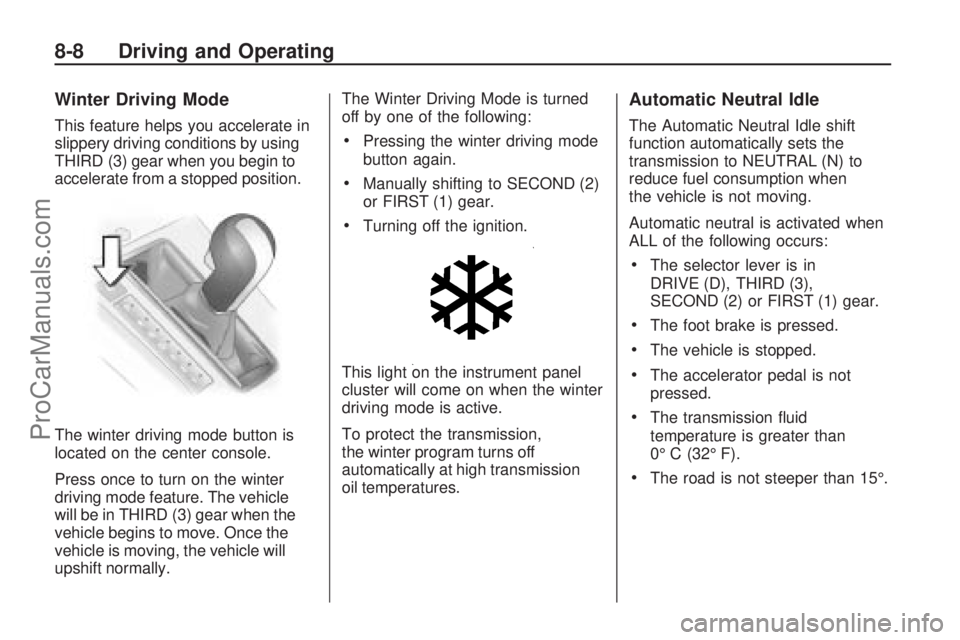
Winter Driving Mode
This feature helps you accelerate in
slippery driving conditions by using
THIRD (3) gear when you begin to
accelerate from a stopped position.
The winter driving mode button is
located on the center console.
Press once to turn on the winter
driving mode feature. The vehicle
will be in THIRD (3) gear when the
vehicle begins to move. Once the
vehicle is moving, the vehicle will
upshift normally.The Winter Driving Mode is turned
off by one of the following:Pressing the winter driving mode
button again.
Manually shifting to SECOND (2)
or FIRST (1) gear.
Turning off the ignition.
This light on the instrument panel
cluster will come on when the winter
driving mode is active.
To protect the transmission,
the winter program turns off
automatically at high transmission
oil temperatures.
Automatic Neutral Idle
The Automatic Neutral Idle shift
function automatically sets the
transmission to NEUTRAL (N) to
reduce fuel consumption when
the vehicle is not moving.
Automatic neutral is activated when
ALL of the following occurs:
The selector lever is in
DRIVE (D), THIRD (3),
SECOND (2) or FIRST (1) gear.
The foot brake is pressed.
The vehicle is stopped.
The accelerator pedal is not
pressed.
The transmission uid
temperature is greater than
0° C (32° F).
The road is not steeper than 15°.
8-8 Driving and Operating
ProCarManuals.com
Page 178 of 304
Before Leaving on a
Long Trip
To prepare your vehicle for a long
trip, consider having it serviced by
your dealer/retailer before departing.
Things to check on your own
include:
Windshield Washer Fluid:
Reservoir full? Windows
clean — inside and outside?
Wiper Blades:In good shape?
Fuel, Engine Oil, Other Fluids:All
levels checked?
Lamps:Do they all work and are
lenses clean?
Tires:Are treads good? Are tires
inated to recommended
pressure?
Weather and Maps:Safe to
travel? Have up-to-date maps?
Highway Hypnosis
Always be alert and pay attention
to your surroundings while driving.
If you become tired or sleepy, nd
a safe place to park your vehicle
and rest.
Other driving tips include:
Keep the vehicle well ventilated.
Keep interior temperature cool.
Keep your eyes moving — scan
the road ahead and to the sides.
Check the rearview mirror and
vehicle instruments often.
Hill and Mountain Roads
Driving on steep hills or through
mountains is different than driving
on at or rolling terrain. Tips for
driving in these conditions include:
Keep the vehicle serviced
and in good shape.
Check all uid levels and brakes,
tires, cooling system, and
transmission.
Going down steep or long hills,
shift to a lower gear.
{CAUTION
If you do not shift down, the
brakes could get so hot that
they would not work well. You
would then have poor braking
or even none going down a hill.
You could crash. Shift down to
let the engine assist the brakes
on a steep downhill slope.
8-26 Driving and Operating
ProCarManuals.com
Page 181 of 304
{CAUTION
Snow can trap exhaust gases
under your vehicle. This can
cause deadly CO (carbon
monoxide) gas to get inside.
CO could overcome you and
kill you. You cannot see it or
smell it, so you might not know
it is in your vehicle. Clear away
snow from around the base of
your vehicle, especially any
that is blocking the exhaust
pipe. And check around again
from time to time to be sure
snow does not collect there.
Open a window just a little on
the side of the vehicle that is
away from the wind. This will
help keep CO out.Run your engine only as long as you
must. This saves fuel. When you run
the engine, make it go a little faster
than just idle. That is, push the
accelerator slightly. This uses less
fuel for the heat that you get and it
keeps the battery charged. You will
need a well-charged battery to
restart the vehicle, and possibly
for signaling later on with the
headlamps. Let the heater run
for a while.
Then, shut the engine off and close
the window almost all the way to
preserve the heat. Start the engine
again and repeat this only when
you feel really uncomfortable from
the cold. But do it as little as
possible. Preserve the fuel as long
as you can. To help keep warm,
you can get out of the vehicle and
do some fairly vigorous exercises
every half hour or so until help
comes.
If Your Vehicle is
Stuck in Sand, Mud, Ice,
or Snow
Slowly and cautiously spin the
wheels to free the vehicle when
stuck in sand, mud, ice, or snow.
SeeRocking Your Vehicle to Get It
Out on page 8-30.
{CAUTION
If you let your vehicle’s tires
spin at high speed, they can
explode, and you or others
could be injured. The vehicle
can overheat, causing an
engine compartment re or
other damage. Spin the wheels
as little as possible and avoid
going above 35 mph (55 km/h)
as shown on the speedometer.
For information about using tire
chains on the vehicle, seeTire
Chains on page 9-59.
Driving and Operating 8-29
ProCarManuals.com
Page 186 of 304

The GVWR includes the weight
of the vehicle, all occupants,
fuel, and cargo. Never exceed
the GVWR for your vehicle,
or the Gross Axle Weight Rating
(GAWR) for either the front or
rear axle.
And, if you do have a heavy
load, you should spread it out.
See “Steps for Determining
Correct Load Limit” earlier in
this section.
{CAUTION
Do not load the vehicle any
heavier than the Gross
Vehicle Weight Rating
(GVWR), or either the
maximum front or rear Gross
Axle Weight Rating (GAWR).
(Continued)
CAUTION (Continued)
If you do, parts on the
vehicle can break, and it can
change the way your vehicle
handles. These could cause
you to lose control and
crash. Also, overloading
can shorten the life of the
vehicle.
If you put things inside your
vehicle — like suitcases,
tools, packages, or anything
else — they will go as fast as
the vehicle goes. If you have
to stop or turn quickly, or if
there is a crash, they will
keep going.{CAUTION
Things you put inside the
vehicle can strike and injure
people in a sudden stop or
turn, or in a crash.
Put things in the trunk of
your vehicle. In a trunk,
put them as far forward as
you can. Try to spread the
weight evenly.
Never stack heavier
things, like suitcases,
inside the vehicle so that
some of them are above
the tops of the seats.
Do not leave an
unsecured child restraint
in the vehicle.
When you carry
something inside the
vehicle, secure it
whenever you can.
Do not leave a seat folded
down unless you need to.
8-34 Driving and Operating
ProCarManuals.com