ignition SATURN ASTRA 2009 Owner's Manual
[x] Cancel search | Manufacturer: SATURN, Model Year: 2009, Model line: ASTRA, Model: SATURN ASTRA 2009Pages: 314, PDF Size: 1.94 MB
Page 107 of 314
On some vehicles, if a warning
message appears, the display is
blocked from other functions.
SeeDIC Warnings and Messages
(Base and Uplevel Systems) on
page 4-36for information on
acknowledging the message.
System Settings
To enter the Settings menu:
1. Press SETTINGS on the audio
system.
Audio or System will appear.
2. Press the left arrow button on
the audio system or use the
thumbwheel on the steering
wheel, if the vehicle has one,
to reach menu item System.
After pressing the OK button,
the rst function of the System
menu is shown.The following functions are
available:
Time, setting hours
Time, setting minutes
Date, setting day
Date, setting month
Date, setting year
Ignition Logic
Language selection
Setting units of measure
Setting Date and Time
To set the date and time:
1. Select time and date from the
Settings menu.
2. Make the desired selections.
The setting is saved when
the menu item is exited.Ignition Logic
If the vehicle has this feature,
seeAudio System(s) on page 6-1
for more information.
Language Selection
To select the display language for
some functions:
1. Select language from the
Settings menu.
2. Make the desired selection.
Setting Units of Measure
To select which units of measure
are to be used:
1. Select units from the
Settings menu.
2. Make the desired selection.
Instruments and Controls 4-33
ProCarManuals.com
Page 115 of 314

Lighting
Lighting
Exterior Lamps Controls.....5-1
Daytime Running
Lamps (DRL)....................5-2
Delayed Headlamps............5-2
Fog Lamps.........................5-2
Instrument Panel
Brightness.........................5-3
Dome Lamp(s)....................5-3
Entry Lighting.....................5-3
Reading Lamps..................5-3
Trunk Lamp........................5-4
Battery Run-Down
Protection.........................5-4
Lighting
Exterior Lamps Controls
The exterior lamp control is
located on the instrument panel to
the left of the steering wheel.
Turn the exterior lamp control to the
following positions:
T(Off):Turns off the exterior lamps.AUTO (Automatic):Turns the
exterior lamps on and off
automatically, depending upon
outside lighting.
;(Parking Lamps):Turns on the
parking lamps together with the
following:
Taillamps
Sidemarkers
License Plate Lamps
2(Headlamps):Turns on the
headlamps, together with the
previously listed lamps.
After 15 minutes with the ignition
switched off and the low-beam
headlamps on, the parking lamps
turn on.
Lighting 5-1
ProCarManuals.com
Page 116 of 314

Daytime Running
Lamps (DRL)
Daytime Running Lamps (DRL) can
make it easier for others to see
the front of your vehicle during the
day. DRL can be helpful in many
different driving conditions, but they
can be especially helpful in the
short periods after dawn and before
sunset. Fully functional daytime
running lamps are required on all
vehicles rst sold in Canada.
The DRL system makes the
low-beam headlamps turn on at a
reduced brightness when the
following conditions are met:
The engine is running.
The light sensor determines it is
night and the exterior lamps
control is in the off position.
The light sensor determines it is
daytime.
The taillamps and other lamps will
be off.The DRL turns off when the engine
is not running.
The regular headlamps or parking
lamps should be used when needed.
Delayed Headlamps
Vehicles with headlamp exit delay,
keep the headlamps and taillamps
on for 30 seconds.
To activate:
1. Turn the ignition off and remove
the key from the ignition.
2. Open the driver door.
3. Pull the multifunction lever
toward the steering wheel.
To deactivate, do either of the
following:
Insert the key into the ignition.
Pull the multifunction lever toward
the steering wheel again while
the driver door is open.
Fog Lamps
For vehicles with fog lamps, the
button is located on the instrument
panel, to the left of the steering
wheel.
The ignition and headlamps or
parking lamps must be on to use
the fog lamps. The fog lamps will not
turn on if the high beam headlamps
or ash to pass are active.
#:Press to turn the fog lamps on
or off. An indicator light on the
instrument panel cluster comes on
when the fog lamps are on.
Some localities have laws that
require the headlamps to be
on along with the fog lamps.
5-2 Lighting
ProCarManuals.com
Page 117 of 314

Instrument Panel
Brightness
D
(Instrument Panel
Brightness):The knob with this
symbol on it is located next to
the exterior lamps control to the left
of the steering wheel. Push the
knob in all the way until it extends
out and then turn the knob clockwise
or counterclockwise to brighten or
dim the lights. Push the knob
back in when nished.
Dome Lamp(s)
There are two dome lamps. The rear
dome lamp turns on automatically
with the front dome lamp.
+(On/Off):Press to turn the front
dome lamp on or off while the
doors are closed.
Entry Lighting
With entry lighting, the interior of the
vehicle is illuminated while entering
the vehicle. The interior lamps
turn on briey when the door
is unlocked using the key or the
Remote Keyless Entry (RKE)
transmitter and the ignition is in
LOCK/OFF. After a few seconds
have passed, the interior lamps will
slowly fade out.
Reading Lamps
Front Reading Lamps
The front reading lamps, located on
the headliner, can be controlled
separately by the buttons located
near each lamp.
\(On/Off):Press to turn the lamp
on or off.
Lighting 5-3
ProCarManuals.com
Page 118 of 314
Rear Reading Lamps
The rear seat reading lamps can be
turned on while the ignition is on.
9(Off):Press to turn the lamp off.
R(On):Press to turn the lamp on.
Trunk Lamp
The trunk lamp comes on when the
trunk is opened and turns off
when the trunk is closed.
Battery Run-Down
Protection
This feature helps prevent the
battery from being drained, if the
courtesy lamps, reading lamps, sun
visor, glovebox or rear compartment
lamp are left on. If any of these
lamps are left on, they automatically
turn off after approximately
20 minutes, if the ignition is off.
5-4 Lighting
ProCarManuals.com
Page 120 of 314
Radio(s)
System Operation
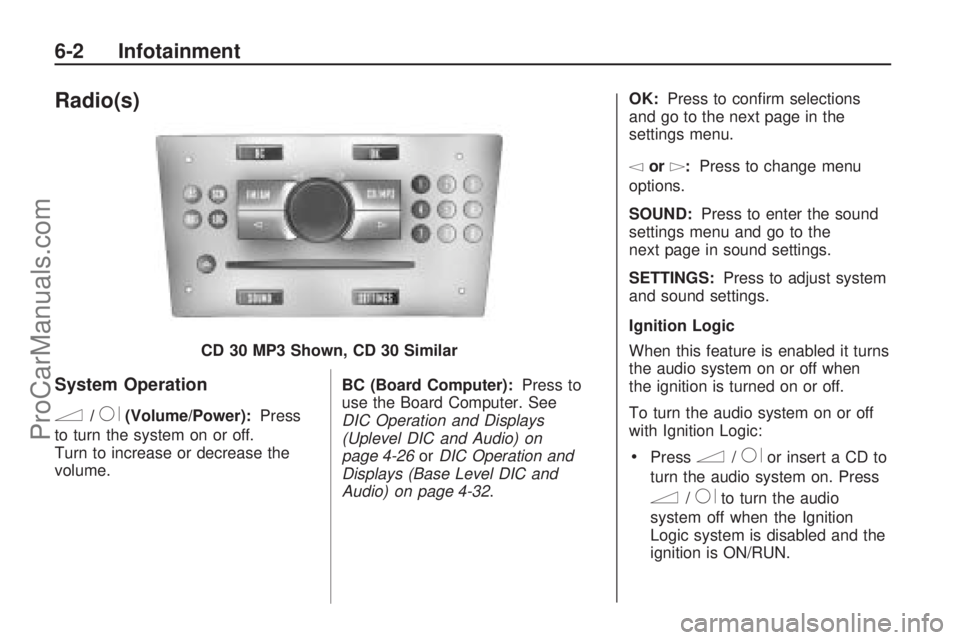
n/R(Volume/Power):Press
to turn the system on or off.
Turn to increase or decrease the
volume. BC (Board Computer):
Press to
use the Board Computer. See
DIC Operation and Displays
(Uplevel DIC and Audio) on
page 4-26 orDIC Operation and
Displays (Base Level DIC and
Audio) on page 4-32. OK:
Press to conrm selections
and go to the next page in the
settings menu.
\or]: Press to change menu
options.
SOUND: Press to enter the sound
settings menu and go to the
next page in sound settings.
SETTINGS: Press to adjust system
and sound settings.
Ignition Logic
When this feature is enabled it turns
the audio system on or off when
the ignition is turned on or off.
To turn the audio system on or off
with Ignition Logic:
Pressn/Ror insert a CD to
turn the audio system on. Press
n/Rto turn the audio
system off when the Ignition
Logic system is disabled and the
ignition is ON/RUN.
CD 30 MP3 Shown, CD 30 Similar
6-2 Infotainment
ProCarManuals.com
Page 121 of 314
For vehicles with OnStar®, the
audio system will only turn off
if the ignition is OFF and OnStar
is not in use when the Ignition
Logic system is enabled.
The Ignition Logic is preset to turn
off the audio system when the
ignition is turned off. To enable or
disable Ignition Logic:
1. Press SETTINGS until Audio
displays.
2. Press
\until System displays.
3. Press OK until Ign. Logic
ON or Ign. Logic OFF displays.
4. Press
\or]to select the
setting. The setting is saved
automatically.
Press SETTINGS again to
move back one level in
the menu.
Press FM/AM, CD/MP3, or
BC to turn on that feature.Audio displays and the system
starts to play if SETTINGS, FM/AM,
CD/MP3, or BC is not pressed
within ve seconds after the setting
is saved.
System Display
The following information shows on
the system display:
FM or AM, and the current
station frequency if the radio is
active.
The station name displays if RDS
is activated.
AS displays if the AS level is
activated.
CD displays, and the CD title
number or the CD title name
if the CD player is active.
MP3 displays if the CD is an
MP3 CD.
RDM displays if the CD is being
played in random mode.
The most recent selected audio
source plays when the audio system
is turned on and the display is lit.The outside temperature, time, and
date display when the audio
system is turned off and the ignition
is ON/RUN, seeDriver Information
Center (DIC) on page 4-25.
Audio Settings
The audio settings can be set for
each audio source and are
stored separately for each radio
station and the CD player.
Adjusting the Tone (Bass/Treble)
To adjust the Bass:
1. Press SOUND until Bass
appears.
2. Press
\or]to adjust the level
from -12 through +12. The
setting is saved automatically.
Press SETTINGS again to go
back one level in the menu.
Press FM/AM, CD/MP3, or BC to
display that function.
Infotainment 6-3
ProCarManuals.com
Page 124 of 314

On Volume
The On Volume is used to set the
maximum initial volume level for the
audio system when it is turned on.
The maximum initial volume level is
used only if the volume level
before turning the audio system off
was higher than the maximum
initial volume level set. This will work
when the audio system has been
off for at least ve minutes and the
ignition is OFF.
To set the On Volume level:
1. Press SETTINGS until Audio
appears.
2. Press OK until On Volume
appears.
3. Press
\or]to adjust the level
from -12 through 12. The setting
is saved automatically.
Press SETTINGS again to go
back one level in the menu.
Press FM/AM, CD/MP3, or BC to
display that function.
Using the Radio
FM/AM:Press to select between
FM, FM-AS, AM, and AM-AS,
or to listen to the radio while a CD
is playing.
RDS (Radio Data System):Press
to identify stations by name
instead of the radio frequency.
LOC (LOCAL/DX Function):Press
to change between LOC ON or LOC
OFF. When the LOC function is on, it
searches for the strongest radio
frequency. If none is found, it
automatically search for a weaker
radio frequency. If no frequency is
found after the second search, the
radio returns to the last active
frequency. If a new station search is
not started within one minute, the low
sensitivity (LOCAL) is set when the
next search is started. When LOC
OFF is set, a search is carried out
using the high sensitivity (DX).Finding an FM/AM Station
1 - 9 (Station Preset Buttons):
Press to play stations that are
programmed to the radio preset
pushbuttons.
SCN (Station Preset Scan):Press
to start station preset scan. The
radio goes to the rst preset station,
plays for a few seconds, then
goes to the next preset station.
Press SCN again to stop scanning
preset stations.
\or]:Press to nd radio stations
using the automatic station search
or the manual station search.
Automatic Station Search:Use
automatic station search when
the radio frequency is unknown.
Press
\or]for more then
one second to have the radio search
for the next station. Seek is shown
on the display and the radio is
muted until a station is found.
6-6 Infotainment
ProCarManuals.com
Page 129 of 314

Ignition Logic
When this feature is enabled it turns
the audio system on or off when the
ignition is turned on or off.
To turn the audio system on or off
with the Ignition Logic:
PressRorZto turn the audio
system on. Press
Rto turn the
audio system off when the Ignition
Logic system is disabled and the
ignition is ON/RUN.
For vehicles with OnStar®, the
audio system will only turn off if
the ignition is OFF and OnStar is
not in use when the Ignition Logic
system is enabled.The Ignition Logic is preset to turn off
the audio system when the ignition is
turned off. To enable or disable
Ignition Logic:
1. Press SETTINGS, System
Settings displays.
2. Turn the multifunction knob to
select Ign. Logic and press the
multifunction knob to select or
un-select the option.
System Display
The following information shows on
the system display:
FM or AM displays, and the
current station frequency or
station name if the radio is active.
The station name displays
when RDS stations are active.
The station name displays if RDS
is activated.
AS displays if AS is activated.
CD displays along with the
CD number, CD track number,
CD title, artists name oralbum name plus track time and
track name, if the CD player
is active.
CD in displays if more than one
CD is inserted.
MP3 displays if the CD is an
MP3 CD.
RDM displays if the CD is being
played back in random mode.
Tdisplays if Random CD is on.
Udisplays if Random
Magazine is on.
Sdisplays if repeat track is on.
udisplays if Scan CD is on.
The most recent selected audio
source plays when the audio system
is turned on and the display is lit.
The outside temperature, time, and
date display when the audio
system is turned off and the ignition
is ON/RUN, seeDriver Information
Center (DIC) on page 4-25.
Infotainment 6-11
ProCarManuals.com
Page 145 of 314

For quicker cool down, do the
following:
1. Press
#to turn on the air
conditioning.
2. Select
Ymode.
3. Set the temperature knob to the
coldest temperature.
4. Set the fan knob to 4.
5. Open all vents.
Recirculation
^(Recirculation):Press to
turn the recirculation mode on or off.
An indicator light inside the button
comes on when the recirculation
mode is active. This mode
recirculates air inside the passenger
compartment and prevents outside
air from entering the vehicle.
The quality of the passenger
compartment air may decrease
since the amount of outside
air entering the vehicle is reduced.When the recirculation mode is
used without air conditioning, the air
humidity increases, and the
windows may fog. Avoid using the
recirculation mode during high
periods of humidity or cool outside
temperatures since this may
result in increased window fogging.
If window fogging is experienced,
select the defrost mode.
Rear Window Defogger
The rear window defogger uses a
warming grid to remove fog from the
rear window.
The rear window defogger will only
work when the ignition is in
ON/RUN.
=(Rear Window Defogger):
Press to turn the rear window
defogger on or off. An indicator light
inside the button will be lit when
in use.If the vehicle has heated mirrors,
they turn on when the rear window
defogger button is pressed.
Press the button again to turn them
off. For more information, see
Outside Power Mirror(s) on
page 2-12.
The rear window defogger will stay
on for approximately 15 minutes
after the button is pressed, unless
the ignition is turned off.
Notice:Do not use anything
sharp on the inside of the rear
window. If you do, you could cut
or damage the warming grid, and
the repairs would not be covered
by the vehicle warranty. Do not
attach a temporary vehicle
license, tape, a decal or anything
similar to the defogger grid.
Climate Controls 7-3
ProCarManuals.com