oil change SATURN ASTRA 2009 Owners Manual
[x] Cancel search | Manufacturer: SATURN, Model Year: 2009, Model line: ASTRA, Model: SATURN ASTRA 2009Pages: 314, PDF Size: 1.94 MB
Page 4 of 314
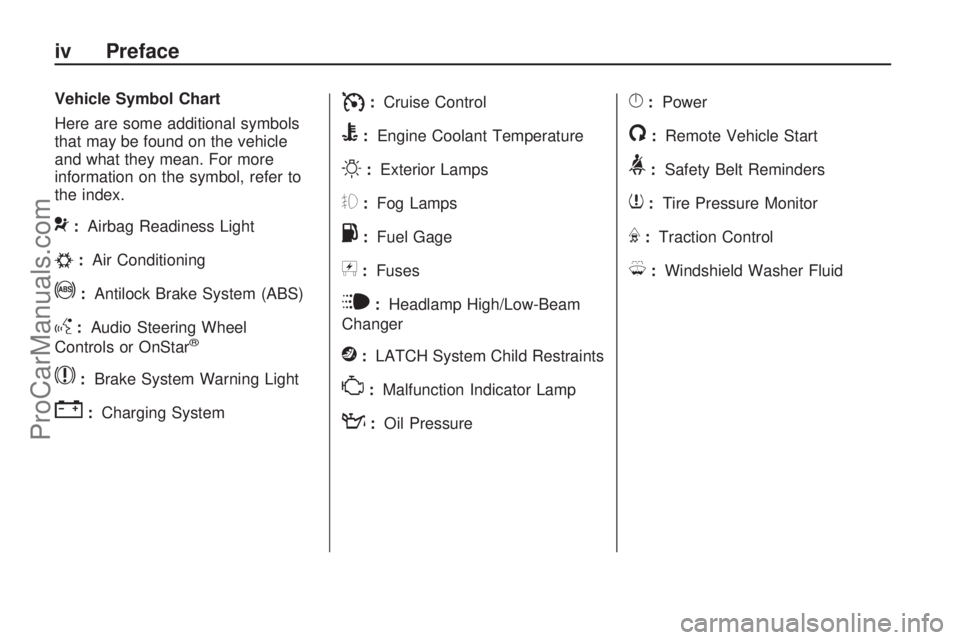
Vehicle Symbol Chart
Here are some additional symbols
that may be found on the vehicle
and what they mean. For more
information on the symbol, refer to
the index.
9:Airbag Readiness Light
#:Air Conditioning
!:Antilock Brake System (ABS)
g:Audio Steering Wheel
Controls or OnStar®
$:Brake System Warning Light
":Charging System
I:Cruise Control
B:Engine Coolant Temperature
O:Exterior Lamps
#:Fog Lamps
.:Fuel Gage
+:Fuses
i:Headlamp High/Low-Beam
Changer
j:LATCH System Child Restraints
*:Malfunction Indicator Lamp
::Oil Pressure
}:Power
/:Remote Vehicle Start
>:Safety Belt Reminders
7:Tire Pressure Monitor
F:Traction Control
M:Windshield Washer Fluid
iv Preface
ProCarManuals.com
Page 75 of 314

Instruments and
Controls
Instrument Panel
Overview
Instrument Panel
Overview...........................4-2
Hazard Warning Flashers. . .4-4
Horn...................................4-4
Tilt Wheel...........................4-4
Turn Signal/Multifunction
Lever................................4-4
Cruise Control....................4-5
Turn and Lane-Change
Signals.............................4-8
Headlamp High/
Low-Beam Changer..........4-8
Flash-to-Pass......................4-8
Windshield Wipers..............4-8
Windshield Washer.............4-9
Rear Window Wiper/
Washer.............................4-9
Accessory Power
Outlet(s)..........................4-10
Warning Lights, Gages,
and Indicators
Warning Lights, Gages,
and Indicators.................4-11
Instrument Panel Cluster. . .4-12
Speedometer and
Odometer........................4-13
Trip Odometer(s)...............4-13Tachometer.......................4-13
Safety Belt Reminders......4-13
Airbag Readiness Light.....4-14
Passenger Airbag Status
Indicator..........................4-15
Charging System Light......4-16
Brake System Warning
Light................................4-16
Antilock Brake System
(ABS) Warning Light.......4-17
StabiliTrak®Indicator
Light................................4-17
Engine Coolant
Temperature Warning
Light
................................4-18
Tire Pressure Light...........4-18
Malfunction
Indicator Lamp................4-18
Oil Pressure Light.............4-21
Low Oil Level Light...........4-22
Winter Driving Mode
Light................................4-22
Fog Lamp Light................4-22
Exterior Lamps Off
Reminder........................4-23
Cruise Control Light..........4-23
Highbeam On Light...........4-23
Door Ajar Light.................4-23
Service Vehicle Soon
Light................................4-23
Fuel Gage........................4-24
Low Fuel Warning Light. . . .4-24
Driver Information
Center (DIC)
Driver Information
Center (DIC)...................4-25
DIC Operation and
Displays (Uplevel DIC
and Audio)
.......................4-26
DIC Operation and
Displays (Base Level
DIC and Audio)
...............4-32
DIC Warnings and
Messages (Base and
Uplevel Systems)
............4-36
OnStar®System
OnStar®System................4-38
Instruments and Controls 4-1
ProCarManuals.com
Page 150 of 314
Starting Procedure
1. With your foot off the accelerator
pedal, turn the ignition key to
START. When the engine starts,
let go of the key. The idle speed
will go down as the engine gets
warm. Do not race the engine
immediately after starting it.
Operate the engine and
transmission gently to allow the
oil to warm up and lubricate all
moving parts.
The vehicle has a
Computer-Controlled Cranking
System. This feature assists in
starting the engine and protects
components. If the ignition key is
turned to the START position,
and then released when the
engine begins cranking, the
engine will continue cranking for a
few seconds or until the vehicle
starts. If the engine does not start
and the key is held in START for
many seconds, cranking will be
stopped after 15 seconds to
prevent cranking motor damage.To prevent gear damage, this
system also prevents cranking if
the engine is already running.
Engine cranking can be stopped
by turning the ignition switch to
STEERING UNLOCKED/
IGNITION OFF or LOCK/OFF.
Notice:Cranking the engine for
long periods of time, by returning
the key to the START position
immediately after cranking has
ended, can overheat and damage
the cranking motor, and drain the
battery. Wait at least 15 seconds
between each try, to let the
cranking motor cool down.
2. If the engine does not start
after 5-10 seconds, especially
in very cold weather (below 0°F
or−18°C), it could be ooded with
too much gasoline. Try pushing
the accelerator pedal all the way
to the oor and holding it there as
you hold the key in START for up
to a maximum of 15 seconds.Wait at least 15 seconds between
each try, to let the cranking motor
cool down. When the engine
starts, let go of the key and
accelerator. If the vehicle starts
briey but then stops again, do
the same thing. This clears the
extra gasoline from the engine.
Do not race the engine
immediately after starting it.
Operate the engine and
transmission gently until the oil
warms up and lubricates all
moving parts.
Notice:The engine is designed to
work with the electronics in the
vehicle. If you add electrical parts
or accessories, you could change
the way the engine operates.
Before adding electrical
equipment, check with your
dealer/retailer. If you do not, the
engine might not perform
properly. Any resulting damage
would not be covered by the
vehicle warranty.
8-4 Driving and Operating
ProCarManuals.com
Page 181 of 314

For customers who do not use
TOP TIER Detergent Gasoline
regularly, one bottle of GM Fuel
System Treatment PLUS, added to
the fuel tank at every engine oil
change, can help clean deposits
from fuel injectors and intake valves.
GM Fuel System Treatment PLUS is
the only gasoline additive
recommended by General Motors.
Also, your dealer/retailer has
additives that will help correct and
prevent most deposit-related
problems.
Gasolines containing oxygenates,
such as ethers and ethanol, and
reformulated gasolines might be
available in your area. We
recommend that you use these
gasolines, if they comply with the
specications described earlier.
However, E85 (85% ethanol) and
other fuels containing more than
10% ethanol must not be used in
vehicles that were not designed for
those fuels.Notice:This vehicle was not
designed for fuel that contains
methanol. Do not use fuel
containing methanol. It can
corrode metal parts in the fuel
system and also damage plastic
and rubber parts. That damage
would not be covered under
the vehicle warranty.
Some gasolines that are
not reformulated for low
emissions can contain an
octane-enhancing additive called
methylcyclopentadienyl manganese
tricarbonyl (MMT); ask the attendant
where you buy gasoline whether the
fuel contains MMT. We recommend
against the use of such gasolines.
Fuels containing MMT can reduce
the life of spark plugs and the
performance of the emission control
system could be affected. The
malfunction indicator lamp might
turn on. If this occurs, return to your
dealer/retailer for service.Fuels in Foreign
Countries
If you plan on driving in another
country outside the United States or
Canada, the proper fuel might be
hard to nd. Never use leaded
gasoline or any other fuel not
recommended in the previous text
on fuel. Costly repairs caused
by use of improper fuel would not
be covered by the vehicle warranty.
To check the fuel availability, ask
an auto club, or contact a major oil
company that does business in
the country where you will be
driving.
Driving and Operating 8-35
ProCarManuals.com
Page 193 of 314

Notice:Use only engine oil
identied as meeting GM Standard
GM6094M and showing the
American Petroleum Institute
Certied For Gasoline Engines
starburst symbol. Failure to use
the recommended oil can result
in engine damage not covered by
the vehicle warranty.
Cold Temperature Operation
If in an area of extreme cold, where
the temperature falls below−20°F
(−29°C), use either an SAE 5W-30
synthetic oil or an SAE 0W-30
engine oil. Both provide easier cold
starting for the engine at extremely
low temperatures. Always use
an oil that meets the required
specication, GM6094M.
See “What Kind of Engine Oil to
Use” for more information.
Engine Oil Additives / Engine
Oil Flushes
Do not add anything to the oil.
The recommended oils with
the starburst symbol that meet
GM Standard GM6094M are all that
is needed for good performance
and engine protection.
Engine oil system ushes are not
recommended and could cause
engine damage not covered by the
vehicle warranty.
Engine Oil Life System
When to Change Engine Oil
This vehicle has a computer system
that indicates when to change the
engine oil and lter. This is based on
engine revolutions and engine
temperature, and not on mileage.
Based on driving conditions,
the mileage at which an oil change
is indicated can vary considerably.
For the oil life system to work
properly, the system must be reset
every time the oil is changed.When the system has calculated
that oil life has been diminished,
it indicates that an oil change
is necessary. The letters InSP will
appear in the odometer display.
Change the oil as soon as possible
within the mileage indicated on
the display. If driving under the
best conditions, the oil life system
might indicate that an oil change
is necessary once a year.
The engine oil and lter must be
changed at least once a year and
at this time the system must be
reset. Your dealer/retailer has
trained service people who will
perform this work using genuine
parts and reset the system. It is also
important to check the oil regularly
and keep it at the proper level.
If the system is ever reset
accidentally, the oil must be
changed at 3,000 miles (5 000 km)
since the last oil change.
Remember to reset the oil life
system whenever the oil is changed.
Vehicle Service and Care 9-9
ProCarManuals.com
Page 194 of 314

How to Reset the Engine Oil
Life System
The Engine Oil Life System
calculates when to change the
engine oil and lter based on vehicle
use. Whenever the oil is changed,
reset the system so it can calculate
when the next oil change is required.
If a situation occurs where the oil is
changed prior to the letters InSP
appearing in the odometer display,
reset the system.
After changing the engine oil, reset
the system:
1. Turn the ignition key to
LOCK/OFF.
2. Press the instrument panel
cluster stem until the odometer is
displayed, then release the stem.3. Re-press and hold the cluster
stem until the letters InSP are
displayed.
4. Press and hold the brake pedal
down, hold the cluster stem
down, and turn the ignition key
to ON/RUN.
5. The letters InSP in the instrument
panel cluster display will ash.
6. Keep the cluster stem down for
at least 10 seconds and release
the stem and the brake pedal
when the message “new
remaining milage” is displayed.
What to Do with Used Oil
Used engine oil contains certain
elements that can be unhealthy for
your skin and could even cause
cancer. Do not let used oil stay on
your skin for very long. Clean your
skin and nails with soap and water,
or a good hand cleaner. Wash or
properly dispose of clothing or rags
containing used engine oil. See the
manufacturer’s warnings about the
use and disposal of oil products.
Used oil can be a threat to the
environment. If you change your own
oil, be sure to drain all the oil from the
lter before disposal. Never dispose
of oil by putting it in the trash, pouring
it on the ground, into sewers, or into
streams or bodies of water. Recycle
it by taking it to a place that collects
used oil.
9-10 Vehicle Service and Care
ProCarManuals.com
Page 195 of 314
Engine Air Cleaner/Filter
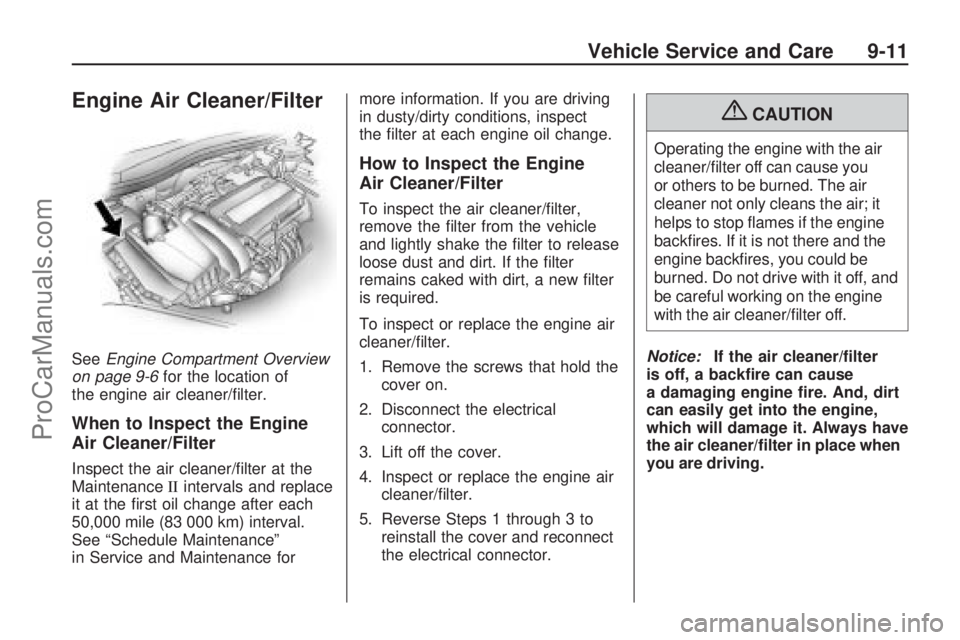
SeeEngine Compartment Overview
on page 9-6for the location of
the engine air cleaner/lter.
When to Inspect the Engine
Air Cleaner/Filter
Inspect the air cleaner/lter at the
MaintenanceIIintervals and replace
it at the rst oil change after each
50,000 mile (83 000 km) interval.
See “Schedule Maintenance”
in Service and Maintenance formore information. If you are driving
in dusty/dirty conditions, inspect
the lter at each engine oil change.
How to Inspect the Engine
Air Cleaner/Filter
To inspect the air cleaner/lter,
remove the lter from the vehicle
and lightly shake the lter to release
loose dust and dirt. If the lter
remains caked with dirt, a new lter
is required.
To inspect or replace the engine air
cleaner/lter.
1. Remove the screws that hold the
cover on.
2. Disconnect the electrical
connector.
3. Lift off the cover.
4. Inspect or replace the engine air
cleaner/lter.
5. Reverse Steps 1 through 3 to
reinstall the cover and reconnect
the electrical connector.
{CAUTION
Operating the engine with the air
cleaner/lter off can cause you
or others to be burned. The air
cleaner not only cleans the air; it
helps to stop ames if the engine
backres. If it is not there and the
engine backres, you could be
burned. Do not drive with it off, and
be careful working on the engine
with the air cleaner/lter off.
Notice:If the air cleaner/lter
is off, a backre can cause
a damaging engine re. And, dirt
can easily get into the engine,
which will damage it. Always have
the air cleaner/lter in place when
you are driving.
Vehicle Service and Care 9-11
ProCarManuals.com
Page 196 of 314
Automatic Transmission
Fluid
It is not necessary to check
the transmission uid level.
A transmission uid leak is the
only reason for uid loss. If a leak
occurs, take your vehicle to the
dealer/retailer service department
and have it repaired as soon
as possible.
Change the uid and lter at the
intervals listed in the Maintenance
Schedule. See “Additional
Required Services” in Service and
Maintenance. Be sure to use
the transmission uid listed in
“Recommended Fluids and
Lubricants” in Service and
Maintenance.
Notice:Use of the incorrect
automatic transmission uid
may damage your vehicle, and
the damages may not be
covered by your warranty.See “Recommended Fluids and
Lubricants” in the Limited
Warranty, Maintenance and Owner
Assistance Information manual.
Manual Transmission
Fluid
It is not necessary to check the
manual transmission uid level.
A transmission uid leak is the
only reason for uid loss. If a leak
occurs, take the vehicle to the
dealer/retailer service department
and have it repaired as soon
as possible. You may also have
your uid level checked by your
dealer/retailer when you have
your oil changed. See “Part D:
Recommended Fluids and
Lubricants” in Service and
Maintenance for the proper uid
to use.
Hydraulic Clutch
The hydraulic clutch linkage in
your vehicle is self-adjusting.
This system does not have its own
reservoir. It receives uid from
the brake master cylinder reservoir.
SeeBrakes on page 9-22for
more information.
Cooling System
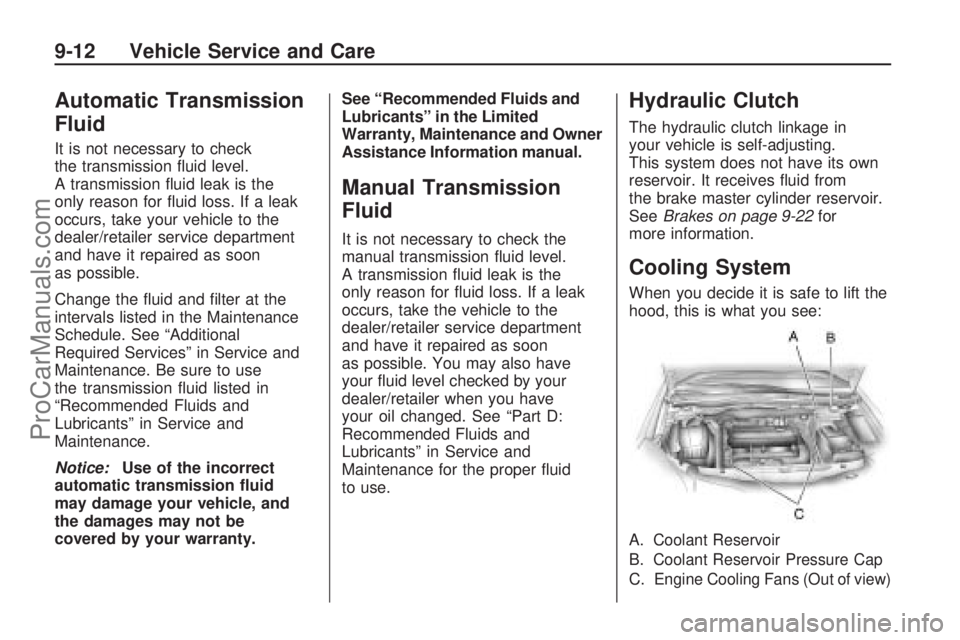
When you decide it is safe to lift the
hood, this is what you see:
A.
Coolant Reservoir
B.Coolant Reservoir Pressure Cap
C.Engine Cooling Fans (Out of view)
9-12 Vehicle Service and Care
ProCarManuals.com
Page 269 of 314
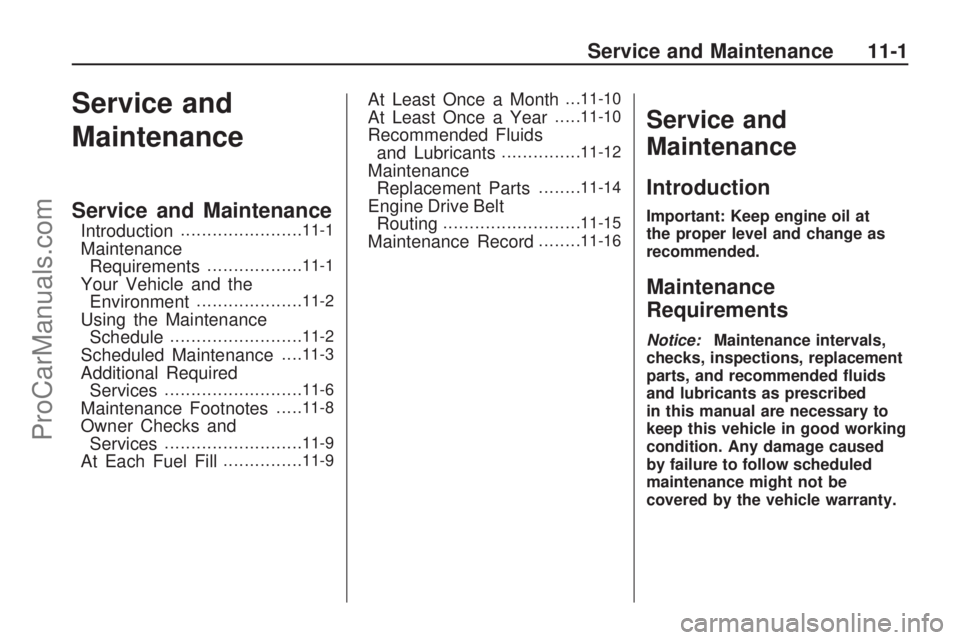
Service and
Maintenance
Service and Maintenance
Introduction.......................11-1
Maintenance
Requirements..................11-1
Your Vehicle and the
Environment....................11-2
Using the Maintenance
Schedule.........................11-2
Scheduled Maintenance. . . .11-3
Additional Required
Services..........................11-6
Maintenance Footnotes.....11-8
Owner Checks and
Services..........................11-9
At Each Fuel Fill...............11-9
At Least Once a Month. . .11-10
At Least Once a Year.....11-10
Recommended Fluids
and Lubricants...............11-12
Maintenance
Replacement Parts........11-14
Engine Drive Belt
Routing..........................11-15
Maintenance Record........11-16
Service and
Maintenance
Introduction
Important: Keep engine oil at
the proper level and change as
recommended.
Maintenance
Requirements
Notice:Maintenance intervals,
checks, inspections, replacement
parts, and recommended uids
and lubricants as prescribed
in this manual are necessary to
keep this vehicle in good working
condition. Any damage caused
by failure to follow scheduled
maintenance might not be
covered by the vehicle warranty.
Service and Maintenance 11-1
ProCarManuals.com
Page 271 of 314

{CAUTION
Performing maintenance work on
a vehicle can be dangerous.
In trying to do some jobs, you can
be seriously injured. Do your own
maintenance work only if you
have the required know-how and
the proper tools and equipment
for the job. If you have any doubt,
see your dealer/retailer to have a
qualied technician do the work.
SeeDoing Your Own Service
Work on page 9-4.
Some maintenance services can be
complex. So, unless you are
technically qualied and have the
necessary equipment, have
your dealer/retailer do these jobs.
When you go to your dealer/retailer
for service, trained and supported
service technicians will perform
the work using genuine parts.To purchase service information,
seeService Publications Ordering
Information on page 12-15.
Owner Checks and Services on
page 11-9tells what should
be checked, when to check it, and
what can easily be done to help
keep the vehicle in good condition.
The proper replacement parts,
uids, and lubricants to use
are listed inRecommended Fluids
and Lubricants on page 11-12
andMaintenance Replacement
Parts on page 11-14. When
the vehicle is serviced, make sure
these are used. All parts should
be replaced and all necessary
repairs done before you or anyone
else drives the vehicle. We
recommend the use of genuine
parts from your dealer/retailer.
Scheduled Maintenance
When the letters InSP appear in
the odometer display, service
is required for the vehicle. Have the
vehicle serviced as soon as
possible within the mileage indicated
on the display. The engine oil and
lter must be changed at least once
a year and at this time the system
must be reset. Your dealer/retailer
has trained service technicians
who will perform this work using
genuine parts and reset the system.
If the engine oil life system is
ever reset accidentally, service
the vehicle within 3,000 miles
(5 000 km) since the last service.
Remember to reset the oil life
system whenever the oil is changed.
SeeEngine Oil Life System on
page 9-9for information on the oil
life system and resetting the system.
Service and Maintenance 11-3
ProCarManuals.com