lights SATURN AURA 2008 User Guide
[x] Cancel search | Manufacturer: SATURN, Model Year: 2008, Model line: AURA, Model: SATURN AURA 2008Pages: 362, PDF Size: 2.29 MB
Page 142 of 362
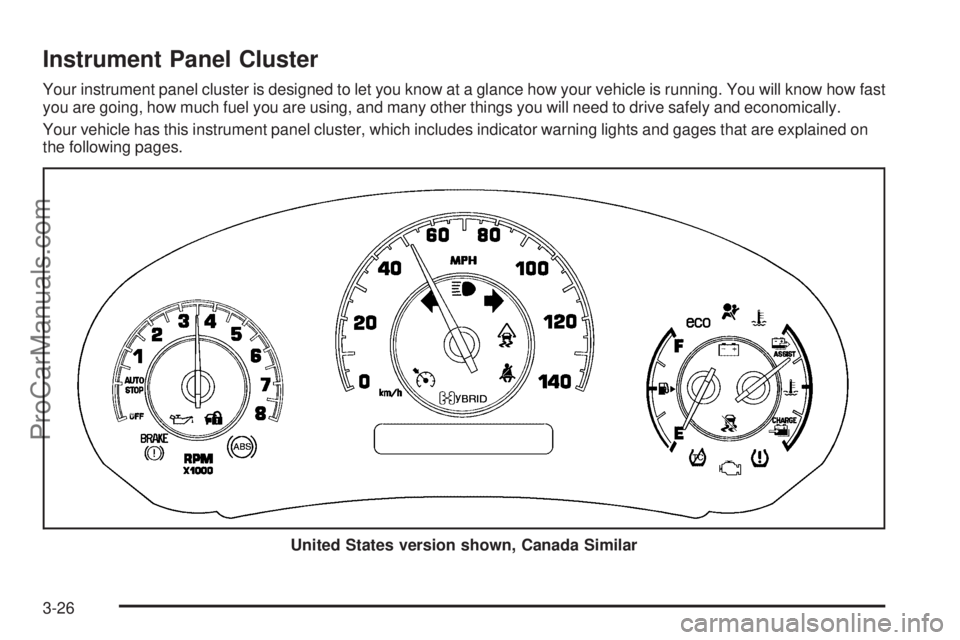
Instrument Panel Cluster
Your instrument panel cluster is designed to let you know at a glance how your vehicle is running. You will know how fast
you are going, how much fuel you are using, and many other things you will need to drive safely and economically.
Your vehicle has this instrument panel cluster, which includes indicator warning lights and gages that are explained on
the following pages.
United States version shown, Canada Similar
3-26
ProCarManuals.com
Page 147 of 362
{CAUTION:
Even though the passenger sensing system is
designed to turn off the right front passenger’s
frontal airbag and seat-mounted side impact
airbag (if equipped) if the system detects
a rear-facing child restraint, no system is
fail-safe, and no one can guarantee that an
airbag will not deploy under some unusual
circumstance, even though it is turned off.
We recommend that rear-facing child restraints
be secured in a rear seat, even if the airbag
is or airbags are off.
If the word OFF or the off symbol is lit on the passenger
airbag status indicator, it means that the passenger
sensing system has turned off the right front passenger’s
frontal airbag and seat-mounted side impact airbag.
SeePassenger Sensing System on page 1-63for more
on this, including important safety information.If, after several seconds, both status indicator lights
remain on, or if there are no lights at all, there may
be a problem with the lights or the passenger sensing
system. See your dealer/retailer for service.
{CAUTION:
If the airbag readiness light in the instrument
panel cluster ever comes on and stays on,
it means that something may be wrong with
the airbag system. If this ever happens, have
the vehicle serviced promptly, because an
adult-size person sitting in the right front
passenger’s seat may not have the protection
of the airbag(s). SeeAirbag Readiness Light
on page 3-29for more on this, including
important safety information.
3-31
ProCarManuals.com
Page 162 of 362
Tire Pressure
The pressure for each tire can be viewed in the DIC.
The tire pressure is shown in either pounds per square
inch (psi) or kilopascals (kPa). Press the information
button until LF ## PSI (kPa) ## RF displays for the front
tires. Press the information button again until
LR ## PSI (kPa) ## RR displays for the rear tires.
If a low tire pressure condition is detected by the system
while driving, a message advising you to check the
tire pressure appears in the display. SeeInflation - Tire
Pressure on page 5-52andDIC Warnings and
Messages on page 3-46for more information.
DIC Warnings and Messages
These messages appear if there is a problem detected
in one of your vehicle’s systems.
A message clears when the vehicle’s condition is no
longer present. To acknowledge a message and clear
it from the display, press and hold any of the DIC
buttons. If the condition is still present, the warning
message comes back on the next time the vehicle
is turned off and back on. With most messages,
a warning chime sounds when the message displays.
Your vehicle may have other warning messages.
AUTO (Automatic) LIGHTS OFF
This message displays if the automatic headlamp
system is disabled with the headlamp switch. See
Automatic Headlamp System on page 3-15for more
information.
AUTO (Automatic) LIGHTS ON
This message displays if the automatic headlamp
system is enabled with the headlamp switch. See
Automatic Headlamp System on page 3-15for more
information.
BRAKE FLUID
This message displays, while the ignition is on, when
the brake uid level is low. The brake system warning
light on the instrument panel cluster also comes on.
SeeBrake System Warning Light on page 3-32for more
information. Have the brake system serviced by your
dealer/retailer as soon as possible.
3-46
ProCarManuals.com
Page 171 of 362
EXT (Exterior) LIGHTS
This feature, which allows the vehicle’s exterior
perimeter lighting to turn on each time the unlock button
on the Remote Keyless Entry (RKE) transmitter is
pressed, can be enabled or disabled. When EXT
LIGHTS appears on the display, press and hold the
reset button for at least one second to scroll through
the available settings:
OFF:The exterior perimeter lighting will not turn on
when the unlock button on the RKE transmitter is
pressed.
ON (default):The exterior perimeter lighting will turn
on when the unlock button on the RKE transmitter
is pressed.
SeeRemote Keyless Entry (RKE) System Operation
on page 2-4for more information.
To select a setting and move on to the next feature,
press the information button while the desired setting
is displayed on the DIC.
LANGUAGE
This feature allows you to select the language in which
the DIC will display. When LANGUAGE appears on
the display, press and hold the reset button for at least
one second to scroll through the available settings:
ENGLISH (default):All messages will appear in
English.
FRENCH:All messages will appear in French.
SPANISH:All messages will appear in Spanish.
GERMAN:All messages will appear in German.
To select a setting and exit out of the personalization
menu mode, press the information button while the
desired setting is displayed on the DIC.
Exiting Personalization Menu
The personalization menu will be exited when any of
the following conditions occur:
A ten second time period has elapsed.
The ignition is turned off.
The end of the personalization menu list is reached.
3-55
ProCarManuals.com
Page 197 of 362
To turn the system off or
on, press and release this
button located on the
instrument panel.
The DIC will display the appropriate message as
described previously when you press the button.
Traction Control Operation
Traction control limits wheel spin by reducing engine
power to the wheels (engine speed management)
and by applying brakes to each individual wheel
(brake-traction control) as necessary.
The traction control system is enabled automatically
when you start your vehicle, and it will activate and ash
the ESC/TCS light and display the LOW TRACTION
message if it senses either of the front wheels are
spinning or beginning to lose traction while driving. For
more information on the LOW TRACTION message,
seeDriver Information Center (DIC) on page 3-43.
Notice:If you allow the wheel(s) of one axle
to spin excessively while the ESC/TCS, ABS and
Brake warning lights and the SERVICE ESC
and/or SERVICE TRACTION messages are
displayed, you could damage the differential.The repairs would not be covered by your warranty.
Reduce engine power and do not spin the wheel(s)
excessively while these lights and this message
are displayed.
Notice:When traction control is turned off, it is
possible to lose traction. If you attempt to shift with
the front wheels spinning with a loss of traction,
it is possible to cause damage to the transmission.
Do not attempt to shift when the front wheels do
not have traction. Damage caused by misuse of the
vehicle is not covered. See your warranty book
for additional information.
The traction control system may activate on dry or
rough roads or under conditions such as heavy
acceleration while turning or abrupt upshifts/downshifts
of the transmission. When this happens, you may
notice a reduction in acceleration, or may hear a noise
or vibration. This is normal.
If your vehicle is in cruise control when the system
activates, the ESC/TCS light will ash and the cruise
control will automatically disengage. When road
conditions allow you to use cruise control again,
you may re-engage the cruise control. SeeCruise
Control on page 3-10.
Adding non-dealer/non-retailer accessories can affect
your vehicle’s performance. SeeAccessories and
Modifications on page 5-3for more information.
4-7
ProCarManuals.com
Page 242 of 362
Automatic Transmission Fluid
It is not necessary to check the transmission uid level.
A transmission uid leak is the only reason for uid
loss. If a leak occurs, take your vehicle to the
dealer/retailer and have it repaired as soon as possible.
Change the uid and lter at the intervals listed in
Additional Required Services on page 6-6, and be sure
to use the transmission uid listed inRecommended
Fluids and Lubricants on page 6-12.
Notice:Use of the incorrect automatic transmission
uid may damage your vehicle, and the damages
may not be covered by your warranty. Always
use the automatic transmission uid listed in
Recommended Fluids and Lubricants on page 6-12.
Engine Coolant
The cooling system in your vehicle is lled with
DEX-COOL®engine coolant. This coolant is designed
to remain in your vehicle for ve years or 150,000 miles
(240 000 km), whichever occurs rst, if you add only
DEX-COOL
®extended life coolant.The following explains your cooling system and how
to add coolant when it is low. If you have a problem
with engine overheating, seeEngine Overheating
on page 5-26.
A 50/50 mixture of clean, drinkable water and
DEX-COOL
®coolant will:
Give freezing protection down to−34°F (−37°C).
Give boiling protection up to 265°F (129°C).
Protect against rust and corrosion.
Help keep the proper engine temperature.
Let the warning lights and gages work
as they should.
Notice:Using coolant other than DEX-COOL
®may
cause premature engine, heater core, or radiator
corrosion. In addition, the engine coolant may
require changing sooner, at the rst maintenance
service after each 30,000 miles (50 000 km) or
24 months, whichever occurs rst. Any repairs
would not be covered by your warranty. Always use
DEX-COOL
®(silicate-free) coolant in your vehicle.
5-22
ProCarManuals.com
Page 309 of 362
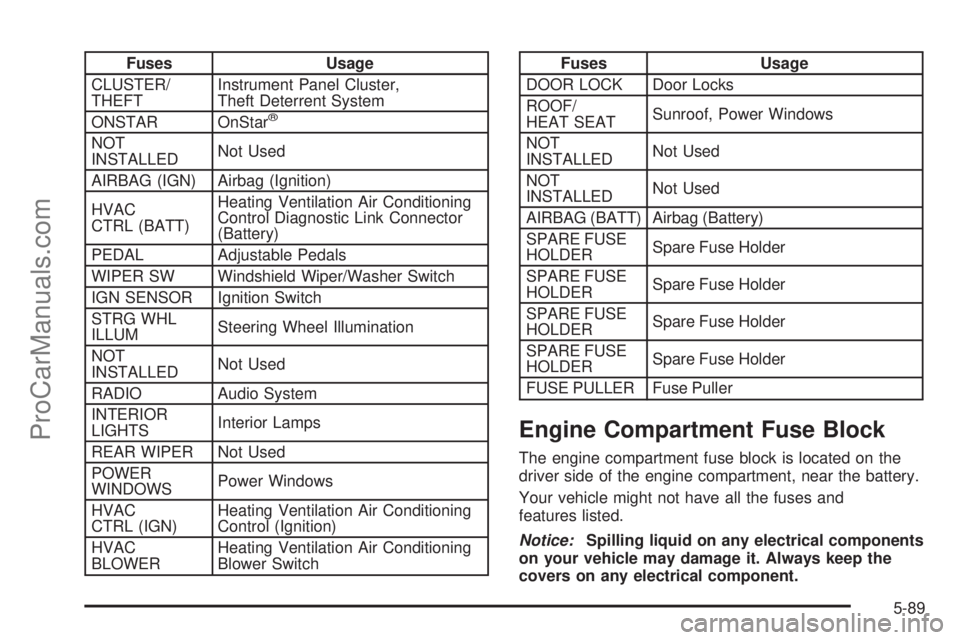
Fuses Usage
CLUSTER/
THEFTInstrument Panel Cluster,
Theft Deterrent System
ONSTAR OnStar
®
NOT
INSTALLEDNot Used
AIRBAG (IGN) Airbag (Ignition)
HVAC
CTRL (BATT)Heating Ventilation Air Conditioning
Control Diagnostic Link Connector
(Battery)
PEDAL Adjustable Pedals
WIPER SW Windshield Wiper/Washer Switch
IGN SENSOR Ignition Switch
STRG WHL
ILLUMSteering Wheel Illumination
NOT
INSTALLEDNot Used
RADIO Audio System
INTERIOR
LIGHTSInterior Lamps
REAR WIPER Not Used
POWER
WINDOWSPower Windows
HVAC
CTRL (IGN)Heating Ventilation Air Conditioning
Control (Ignition)
HVAC
BLOWERHeating Ventilation Air Conditioning
Blower Switch
Fuses Usage
DOOR LOCK Door Locks
ROOF/
HEAT SEATSunroof, Power Windows
NOT
INSTALLEDNot Used
NOT
INSTALLEDNot Used
AIRBAG (BATT) Airbag (Battery)
SPARE FUSE
HOLDERSpare Fuse Holder
SPARE FUSE
HOLDERSpare Fuse Holder
SPARE FUSE
HOLDERSpare Fuse Holder
SPARE FUSE
HOLDERSpare Fuse Holder
FUSE PULLER Fuse Puller
Engine Compartment Fuse Block
The engine compartment fuse block is located on the
driver side of the engine compartment, near the battery.
Your vehicle might not have all the fuses and
features listed.
Notice:Spilling liquid on any electrical components
on your vehicle may damage it. Always keep the
covers on any electrical component.
5-89
ProCarManuals.com
Page 357 of 362
Light (cont.)
Oil Pressure...............................................3-39
Passenger Airbag Status Indicator..................3-30
Safety Belt Reminders..................................3-28
Security.....................................................3-40
Tire Pressure..............................................3-35
Light, Auto Stop Mode.....................................3-42
Lighting
Entry/Exit...................................................3-16
Parade Dimming..........................................3-17
Lights............................................................3-13
Flash-to-Pass............................................... 3-8
High/Low Beam Changer................................ 3-8
On Reminder..............................................3-14
Loading Your Vehicle.......................................4-22
Lockout Protection..........................................2-10
Locks
Delayed Locking........................................... 2-8
Door........................................................... 2-7
Lockout Protection.......................................2-10
Power Door.................................................. 2-7
Programmable Automatic Door Locks............... 2-8
Rear Door Security Locks............................... 2-9
Loss of Control...............................................4-12
Lumbar
Manual Controls............................................ 1-3M
Maintenance Schedule
Additional Required Services........................... 6-6
At Each Fuel Fill........................................... 6-9
At Least Once a Month.................................. 6-9
At Least Once a Year..................................6-10
Introduction.................................................. 6-2
Maintenance Footnotes.................................. 6-7
Maintenance Record....................................6-14
Maintenance Replacement Parts....................6-13
Maintenance Requirements............................. 6-2
Owner Checks and Services........................... 6-9
Recommended Fluids and Lubricants.............6-12
Scheduled Maintenance................................. 6-4
Using.......................................................... 6-2
Your Vehicle and the Environment................... 6-2
Malfunction Indicator Light................................3-36
Manual Lumbar Controls.................................... 1-3
Manual Seats................................................... 1-2
Manual, Using.................................................... iii
Message
DIC Warnings and Messages........................3-46
Mirrors
Manual Rearview Mirror................................2-34
Manual Rearview Mirror with OnStar
®.............2-34
7
ProCarManuals.com
Page 362 of 362
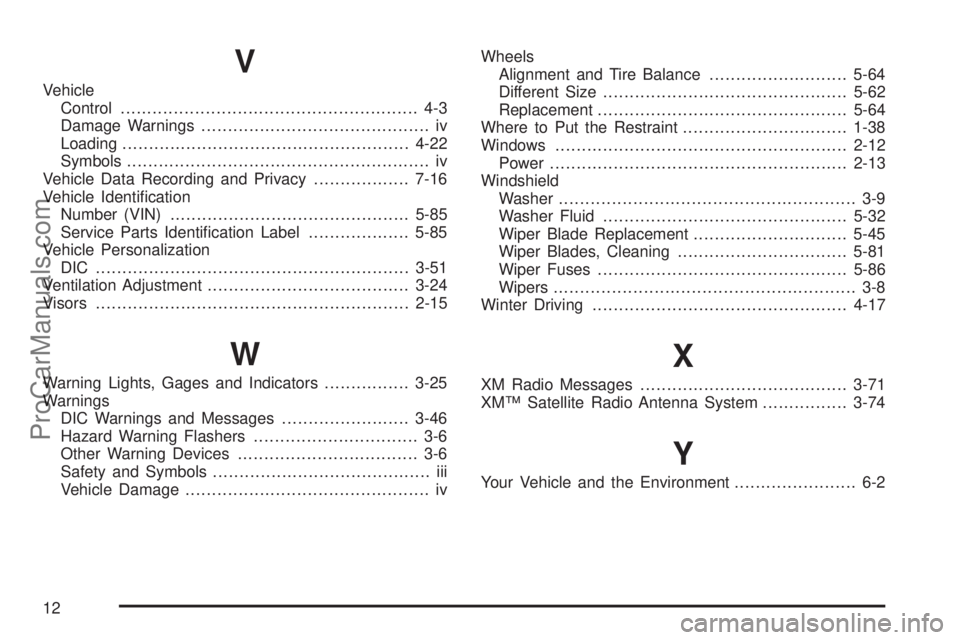
V
Vehicle
Control........................................................ 4-3
Damage Warnings........................................... iv
Loading......................................................4-22
Symbols......................................................... iv
Vehicle Data Recording and Privacy..................7-16
Vehicle Identication
Number (VIN).............................................5-85
Service Parts Identication Label...................5-85
Vehicle Personalization
DIC ...........................................................3-51
Ventilation Adjustment......................................3-24
Visors...........................................................2-15
W
Warning Lights, Gages and Indicators................3-25
Warnings
DIC Warnings and Messages........................3-46
Hazard Warning Flashers............................... 3-6
Other Warning Devices.................................. 3-6
Safety and Symbols......................................... iii
Vehicle Damage.............................................. ivWheels
Alignment and Tire Balance..........................5-64
Different Size..............................................5-62
Replacement...............................................5-64
Where to Put the Restraint...............................1-38
Windows.......................................................2-12
Power........................................................2-13
Windshield
Washer........................................................ 3-9
Washer Fluid..............................................5-32
Wiper Blade Replacement.............................5-45
Wiper Blades, Cleaning................................5-81
Wiper Fuses...............................................5-86
Wipers......................................................... 3-8
Winter Driving................................................4-17
X
XM Radio Messages.......................................3-71
XM™ Satellite Radio Antenna System................3-74
Y
Your Vehicle and the Environment....................... 6-2
12
ProCarManuals.com