AUX SATURN AURA 2008 Owners Manual
[x] Cancel search | Manufacturer: SATURN, Model Year: 2008, Model line: AURA, Model: SATURN AURA 2008Pages: 362, PDF Size: 2.29 MB
Page 134 of 362
Accessory Power Outlet(s)
Accessory power outlets can be used to connect
auxiliary electrical equipment such as a cellular
telephone or CB radio.
There are two accessory power outlets. One accessory
power outlet is inside the center storage console and
the other is located on the center storage console below
the climate controls.
To use an outlet, lift the protective cap. When not in
use, always cover the outlet with the protective cap.
The accessory power outlet is operational at all times.
Notice:Leaving electrical equipment plugged in for
an extended period of time while the vehicle is off
will drain the battery. Power is always supplied
to the outlets. Always unplug electrical equipment
when not in use and do not plug in equipment
that exceeds the maximum 20 ampere rating.
Certain electrical accessories may not be compatible
with the accessory power outlet and could result
in blown vehicle or adapter fuses. If you experience a
problem, see your retailer for additional information
on the accessory power outlet.Notice:Adding any electrical equipment to your
vehicle can damage it or keep other components
from working as they should. The repairs would not
be covered by your warranty. Do not use equipment
exceeding maximum amperage rating of 20 amperes.
Check with your dealer/retailer before adding
electrical equipment.
When adding electrical equipment, be sure to follow
the proper installation instructions included with
the equipment.
Notice:Improper use of the power outlet can cause
damage not covered by your warranty. Do not
hang any type of accessory or accessory bracket
from the plug because the power outlets are
designed for accessory power plugs only.
3-18
ProCarManuals.com
Page 180 of 362
Care of Your CD Player
Do not add any label to a CD, it could get caught in the
CD player. If a CD is recorded on a personal computer
and a description label is needed, try labeling the top
of the recorded CD with a marking pen.
The use of CD lens cleaners for CDs is not advised,
due to the risk of contaminating the lens of the CD optics
with lubricants internal to the CD player mechanism.
Notice:If a label is added to a CD, or more than one
CD is inserted into the slot at a time, or an attempt is
made to play scratched or damaged CDs, the CD
player could be damaged. While using the CD player,
use only CDs in good condition without any label,
load one CD at a time, and keep the CD player and
the loading slot free of foreign materials, liquids,
and debris.
If an error displays, see “CD Messages” later in this
section.
ZEJECT:Press to eject a CD. To eject the CD that is
currently playing, press and release this button. A beep
sounds and Ejecting Disc displays. Once the disc is
ejected, Remove Disc displays. The CD can be removed.
If the CD is not removed, after several seconds, the CD
automatically pulls back into the player and begins
playing.
f(Tune):Turn to select tracks on the CD currently
playing.
©SEEK¨:Press the left arrow to go to the start
of the current track, if more than ten seconds have
played. Press the right arrow to go to the next track.
If either arrow is held, or pressed multiple times,
the player continues moving backward or forward
through the tracks on the CD.
sREV (Fast Reverse):Press and hold to reverse
playback quickly within a track. Sound is heard at
a reduced volume. Release to resume playing the track.
The elapsed time of the track displays.
\FWD (Fast Forward):Press and hold to advance
playback quickly within a track. Sound is heard at a
reduced volume. Release to resume playing the track.
The elapsed time of the track displays.
RDM (Random):With the random setting, the tracks can
be listened to in random, rather than sequential order.
To use random, do one of the following:
Press the CD/AUX button and insert a disc partway
into the slot of the CD player. The RDM label
displays.
Press the pushbutton positioned under the RDM
label until Random Current Disc displays.
Press the pushbutton again to turn off random play.
3-64
ProCarManuals.com
Page 181 of 362
BAND:Press to listen to the radio while a CD is playing.
The CD remains inside the radio for future listening.
CD/AUX (CD/Auxiliary):Press to play a CD while
listening to the radio. The CD icon and a message
showing disc and/or track number displays when a CD is
in the player. Press again and the system automatically
searches for an auxiliary input device, such as a portable
audio player. If a portable audio player is not connected,
No Input Device Found displays.
Playing an MP3 CD-R or CD-RW Disc
Your radio system has a single CD (MP3) player,
it is capable of playing an MP3 CD-R or CD-RW disc.
For more information on how to play an MP3 CD-R
or CD-RW disc, seeUsing an MP3 on page 3-66later
in this section.
CD Messages
CHECK DISC:If this message displays and/or the CD
ejects, it could be for one of the following reasons:
It is very hot. When the temperature returns
to normal, the CD should play.
You are driving on a very rough road. When the
road becomes smoother, the CD should play.
The CD is dirty, scratched, wet, or upside down.
The air is very humid. If so, wait about an hour and
try again.
There could have been a problem while burning
the CD.
The label could be caught in the CD player.
If the CD is not playing correctly, for any other reason,
try a known good CD.
If any error occurs repeatedly or if an error cannot be
corrected, contact your dealer/retailer. If the radio
displays an error message, write it down and provide it
to your dealer/retailer while reporting the problem.
Using the Auxiliary Input Jack
The radio system has an auxiliary input jack located
on the lower right side of the faceplate. This is not
an audio output; do not plug the headphone set into the
front auxiliary input jack. However, an external audio
device such as an iPod, laptop computer, MP3 player,
CD changer, etc. can be connected to the auxiliary
input jack for use as another source for audio listening.
Drivers are encouraged to set up any auxiliary device
while the vehicle is in PARK (P). SeeDefensive Driving
on page 4-2for more information on driver distraction.
3-65
ProCarManuals.com
Page 182 of 362
To use a portable audio player, connect a 3.5 mm
(1/8 inch) cable to the radio’s front auxiliary input jack.
When a device is connected, press the radio CD/AUX
button to begin playing audio from the device over
the vehicle speakers.
O(Power/Volume):Turn clockwise or
counterclockwise to increase or decrease the volume
of the portable player. Additional volume adjustments
can be made from the portable device if the volume
is not loud or soft enough.
BAND:Press to listen to the radio while a portable
audio device is playing. The portable audio device
continues playing, so you might want to stop it or
turn it off.
CD/AUX (CD/Auxiliary):Press to play a CD while a
portable audio device is playing. Press again and
the system begins playing audio from the connected
portable audio player. If a portable audio player is
not connected, No Input Device Found displays.
Using an MP3
MP3 CD-R or CD-RW Disc
The radio plays MP3 les that were recorded on a
CD-R or CD-RW disc. The les can be recorded with
the following xed bit rates: 32 kbps, 40 kbps, 56 kbps,
64 kbps, 80 kbps, 96 kbps, 112 kbps, 128 kbps,
160 kbps, 192 kbps, 224 kbps, 256 kbps, and
320 kbps or a variable bit rate. Song title, artist name,
and album are available for display by the radio
when recorded using ID3 tags version 1 and 2.
Compressed Audio
The radio also plays discs that contain both
uncompressed CD audio (.CDA les) and MP3 les.
By default the radio reads only the uncompressed
audio and ignore the MP3 les. Pressing the CAT
button toggles between compressed and uncompressed
audio format.
3-66
ProCarManuals.com
Page 186 of 362
RDM (Random):With the random setting, MP3 les on
the CD-R or CD-RW can be listened to in random,
rather than sequential order. To play MP3 les from a
CD-R or CD-RW in random order, press the pushbutton
positioned under the RDM label until Random Current
Disc displays. Press the same pushbutton again to turn
off random play.
h(Music Navigator):Use the music navigator
feature to play MP3 les on the CD-R or CD-RW in order
by artist or album. Press the pushbutton located below
the music navigator label. The player scans the disc to
sort the les by artist and album ID3 tag information. It
can take several minutes to scan the disc depending on
the number of MP3 les recorded to the CD-R or CD-RW.
The radio can begin playing while it is scanning the disc
in the background. When the scan is nished, the CD-R
or CD-RW begins playing again.
Once the disc has scanned, the player defaults to playing
MP3 les in order by artist. The current artist playing is
shown on the second line of the display between the
arrows. Once all songs by that artist are played, the
player moves to the next artist in alphabetical order on
the CD-R or CD-RW and begins playing MP3 les by that
artist. To listen to MP3 les by another artist, press the
pushbutton located below either arrow button. The disc
goes to the next or previous artist in alphabetical order.
Continue pressing either button until the desired artist
displays.To change from playback by artist to playback by album,
press the pushbutton located below the Sort By label.
From the sort screen, push one of the buttons below the
album button. Press the pushbutton below the back label
to return to the main music navigator screen. Now the
album name is displayed on the second line between the
arrows and songs from the current album begins to play.
Once all songs from that album are played, the player
moves to the next album in alphabetical order on the
CD-R or CD-RW and begins playing MP3 les from
that album.
To exit the music navigator mode, press the pushbutton
below the Back label to return to normal MP3 playback.
BAND:Press this button to listen to the radio while a
CD is playing. The inactive CD remains inside the radio
for future listening.
CD/AUX (CD/Auxiliary):Press this button to play a
CD while listening to the radio. The CD icon and
a message showing disc and/or track number displays
while a CD is in the player. Press this button again
and the system automatically searches for an auxiliary
input device such as a portable audio player. If a
portable audio player is not connected, No Input
Device Found displays.
3-70
ProCarManuals.com
Page 314 of 362
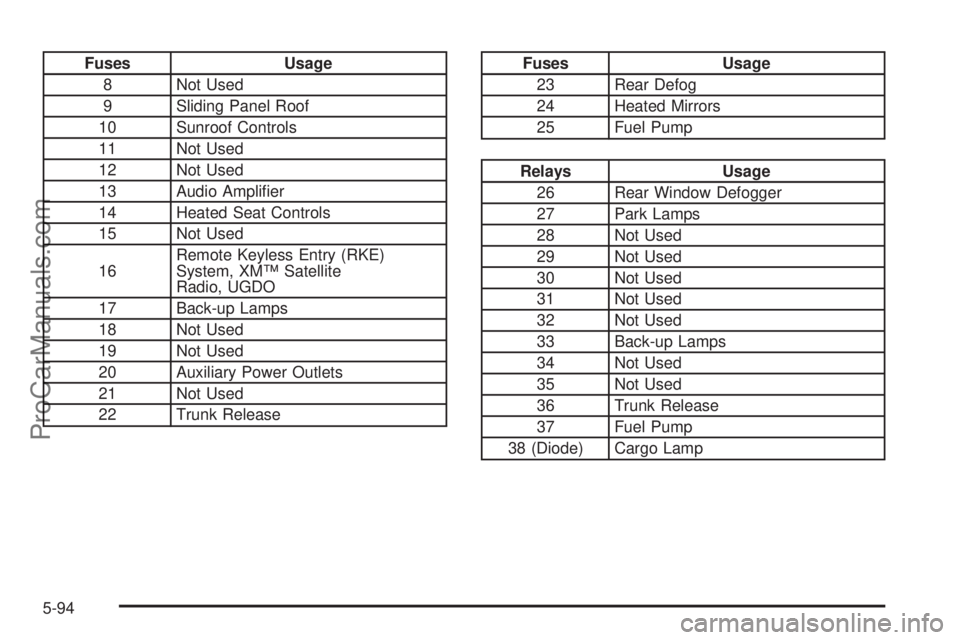
Fuses Usage
8 Not Used
9 Sliding Panel Roof
10 Sunroof Controls
11 Not Used
12 Not Used
13 Audio Amplier
14 Heated Seat Controls
15 Not Used
16Remote Keyless Entry (RKE)
System, XM™ Satellite
Radio, UGDO
17 Back-up Lamps
18 Not Used
19 Not Used
20 Auxiliary Power Outlets
21 Not Used
22 Trunk ReleaseFuses Usage
23 Rear Defog
24 Heated Mirrors
25 Fuel Pump
Relays Usage
26 Rear Window Defogger
27 Park Lamps
28 Not Used
29 Not Used
30 Not Used
31 Not Used
32 Not Used
33 Back-up Lamps
34 Not Used
35 Not Used
36 Trunk Release
37 Fuel Pump
38 (Diode) Cargo Lamp
5-94
ProCarManuals.com