open SATURN AURA 2009 Owner's Guide
[x] Cancel search | Manufacturer: SATURN, Model Year: 2009, Model line: AURA, Model: SATURN AURA 2009Pages: 408, PDF Size: 2.61 MB
Page 153 of 408

On hot days, open the windows long enough to let hot
inside air escape. This reduces the time it takes for the
vehicle to cool down. Then keep the windows closed for
the air conditioner to work its best.
On cool, but sunny days while using manual operation
of the automatic system, use bi-level to deliver warm air
to the oor and cooler air to the instrument panel outlets.
To warm or cool the air delivered, press the temperature
buttons to the desired setting.
In AUTO mode the system cools and dehumidies the air
inside the vehicle. Also while in AUTO mode, the system
maximizes its performance by using recirculation as
necessary.
Heating:On cold days when using manual operation
of the automatic system, use oor mode to deliver air
to the oor outlets. To warm or cool the air delivered,
press
xorwto the desired temperature setting.
To use the automatic mode, turn the knob to AUTO and
press
xorwto adjust the temperature.
:(Outside Air):Press to turn the outside air mode
on. An indicator light comes on to show it is on. Air from
outside the vehicle will circulate throughout the vehicle.
The outside air mode can be used with all modes, but it
cannot be used with the recirculation mode. Pressing this
button cancels the recirculation mode.
h(Recirculation):Press to turn the recirculation
mode on. An indicator light above the button comes on to
show it is on. This mode recirculates and helps to quickly
cool the air inside the vehicle. It can be used to help
prevent outside air and odors from entering the vehicle.
The recirculation indicator light blinks three times if you
try to use recirculation in a mode in which it cannot
function.
Pressing this button cancels the auto recirculation
feature. Each time the vehicle is started, the system
reverts to the auto recirculation function.
The recirculation mode cannot be used with the oor,
defrost, or defog modes. If recirculation is selected in
these modes, the indicator ashes three times and turns
off to indicate that this is not allowed. This is to prevent
window fogging.
When the weather is cool or damp, operating the system
in recirculation for extended periods of time can cause
fogging of the vehicle’s windows. To clear the fog, select
either defog or defrost. Make sure the air conditioning is
on. Allow the air conditioning to run automatically to help
dehumidify the air.
3-25
ProCarManuals.com
Page 202 of 408

<(Shuffle Album):Press the softkey below>to
shuffle all songs in the current album on an iPod.
=(Shuffle Folder):Press the softkey below>to
shuffle all songs in the current folder on a USB storage
device.
XM Radio Messages
XL (Explicit Language Channels):These channels, or
any others, can be blocked at a customer’s request,
by calling 1-800-852-XMXM (9696).
XM Updating:The encryption code in the receiver is
being updated, and no action is required. This process
should take no longer than 30 seconds.
No XM Signal:The system is functioning correctly, but
the vehicle is in a location that is blocking the XM™
signal. When the vehicle is moved into an open area,
the signal should return.
Loading XM:The audio system is acquiring and
processing audio and text data. No action is needed.
This message should disappear shortly.
Channel Off Air:This channel is not currently in
service. Tune in to another channel.
Channel Unauth:This channel is blocked or cannot be
received with your XM Subscription package.Channel Unavail:This previously assigned channel is
no longer assigned. Tune to another station. If this
station was one of the presets, choose another station
for that preset button.
No Artist Info:No artist information is available at this
time on this channel. The system is working properly.
No Title Info:No song title information is available
at this time on this channel. The system is working
properly.
No CAT Info:No category information is available at
this time on this channel. The system is working properly.
No Information:No text or informational messages are
available at this time on this channel. The system is
working properly.
CAT Not Found:There are no channels available for
the selected category. The system is working properly.
XM Theftlocked:The XM receiver in the vehicle could
have previously been in another vehicle. For security
purposes, XM receivers cannot be swapped between
vehicles. If this message is received after having the
vehicle serviced, check with your dealer/retailer.
XM Radio ID:If tuned to channel 0, this message
alternates with the XM™ Radio 8 digit radio ID label.
This label is needed to activate the service.
3-74
ProCarManuals.com
Page 217 of 408
Battery Replacement
To change the batteries on the headphones, do the
following:
1. Turn the screw to loosen the battery door located on
the left side of the headphones. Slide the battery
door open.
2. Replace the two batteries in the compartment. Make
sure that they are installed correctly, using the
diagram on the inside of the battery compartment.
3. Replace the battery door and tighten the door
screw.
If the headphones are to be stored for a long period of
time, remove the batteries and keep them in a cool,
dry place.
Theft-Deterrent Feature
THEFTLOCK®is designed to discourage theft of the
vehicle’s radio by learning a portion of the Vehicle
Identication Number (VIN). The radio does not operate
if it is stolen or moved to a different vehicle.
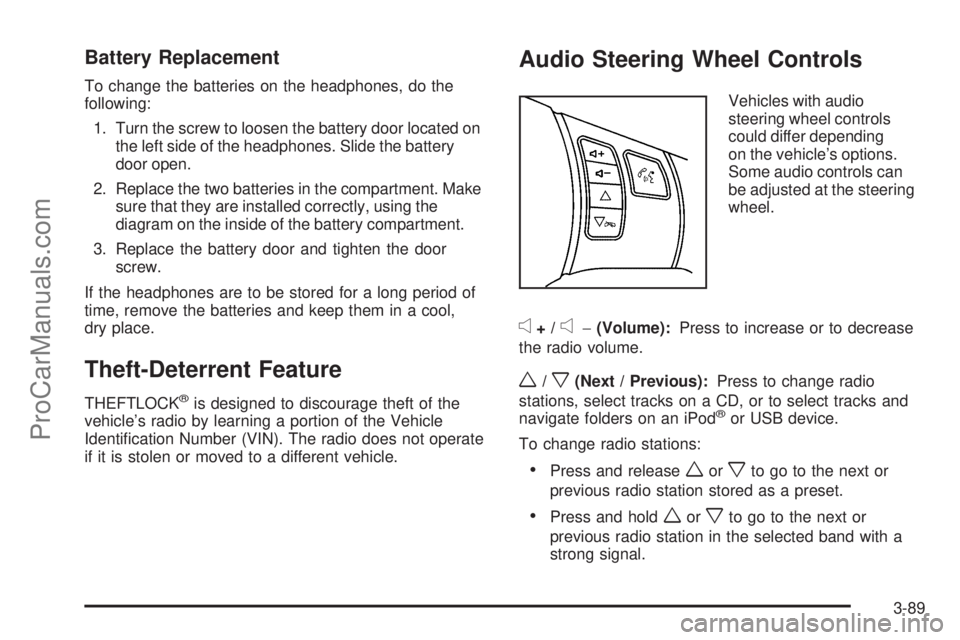
Audio Steering Wheel Controls
Vehicles with audio
steering wheel controls
could differ depending
on the vehicle’s options.
Some audio controls can
be adjusted at the steering
wheel.
e+/e−(Volume):Press to increase or to decrease
the radio volume.
w/x(Next / Previous):Press to change radio
stations, select tracks on a CD, or to select tracks and
navigate folders on an iPod
®or USB device.
To change radio stations:
Press and releaseworxto go to the next or
previous radio station stored as a preset.
Press and holdworxto go to the next or
previous radio station in the selected band with a
strong signal.
3-89
ProCarManuals.com
Page 220 of 408
Backglass Antenna
The AM-FM antenna is integrated with the rear window
defogger, located in the rear window. Make sure that
the inside surface of the rear window is not scratched
and that the lines on the glass are not damaged. If the
inside surface is damaged, it could interfere with radio
reception. For proper radio reception, the antenna
connector needs to be properly attached to the post
on the glass.
If a cellular telephone antenna needs to be attached to
the glass, make sure that the grid lines for the AM-FM
antenna are not damaged. There is enough space
between the grid lines to attach a cellular telephone
antenna without interfering with radio reception.
Notice:Using a razor blade or sharp object to clear
the inside rear window can damage the rear window
antenna and/or the rear window defogger. Repairs
would not be covered by the vehicle warranty. Do not
clear the inside rear window with sharp objects.
Notice:Do not apply aftermarket glass tinting with
metallic lm. The metallic lm in some tinting
materials will interfere with or distort the incoming
radio reception. Any damage caused to your
backglass antenna due to metallic tinting materials
will not be covered by the vehicle warranty.
XM™ Satellite Radio Antenna
System
The XM Satellite Radio antenna is located on the roof of
the vehicle. Keep the antenna clear of obstructions for
clear radio reception.
If the vehicle has a sunroof, the performance of the XM
system may be affected if the sunroof is open.
Chime Level Adjustment
The radio may be used to adjust the vehicle’s chime level.
If the radio can be used to change the volume level of the
chime, press and hold the sixth FAV softkey with the
ignition on and the radio power off. The volume level
changes between Normal and Loud. The selected
volume level appears on the radio display.
Removing the radio and not replacing it with a factory
radio or chime module will disable vehicle chimes.
3-92
ProCarManuals.com
Page 239 of 408

Blizzard Conditions
Being stuck in snow can be in a serious situation. Stay
with the vehicle unless there is help nearby. If possible,
use theRoadside Assistance Program on page 7-7.
To get help and keep everyone in the vehicle safe:
Turn on theHazard Warning Flashers on page 3-6.
Tie a red cloth to an outside mirror.
{CAUTION:
Snow can trap engine exhaust under the vehicle.
This may cause exhaust gases to get inside.
Engine exhaust contains carbon monoxide (CO)
which cannot be seen or smelled. It can cause
unconsciousness and even death.
If the vehicle is stuck in the snow:
Clear away snow from around the base of
your vehicle, especially any that is blocking
the exhaust pipe.
Check again from time to time to be sure
snow does not collect there.
CAUTION: (Continued)
CAUTION: (Continued)
Open a window about two inches (5 cm) on
the side of the vehicle that is away from the
wind to bring in fresh air.
Fully open the air outlets on or under the
instrument panel.
Adjust the Climate Control system to a setting
that circulates the air inside the vehicle and
set the fan speed to the highest setting.
See Climate Control System in the Index.
For more information about carbon monoxide, see
Engine Exhaust on page 2-33.
Snow can trap exhaust gases under your vehicle.
This can cause deadly CO (carbon monoxide) gas
to get inside. CO could overcome you and kill you.
You cannot see it or smell it, so you might not
know it is in your vehicle. Clear away snow from
around the base of your vehicle, especially any
that is blocking the exhaust.
Run the engine for short periods only as needed to
keep warm, but be careful.
4-19
ProCarManuals.com
Page 242 of 408

Tire and Loading Information Label
A vehicle specic Tire and Loading Information
label is attached to the vehicle’s center
pillar (B-pillar). With the driver’s door open,
you will nd the label attached below the
door lock post (striker). The Tire and Loading
Information label lists the number of occupant
seating positions (A), and the maximum vehicle
capacity weight (B) in kilograms and pounds.The Tire and Loading Information label also lists
the tire size of the original equipment tires (C) and
the recommended cold tire ination pressures (D).
For more information on tires and ination, see
Tires on page 5-45andInflation - Tire Pressure
on page 5-52.
There is also important loading information on the
Certication label. It tells you the Gross Vehicle
Weight Rating (GVWR) and the Gross Axle Weight
Rating (GAWR) for the front and rear axle, see
“Certication Label” later in this section.
Steps for Determining Correct
Load Limit
1.Locate the statement “The combined weight
of occupants and cargo should never exceed
XXX kg or XXX lbs” on your vehicle’s placard.
2.Determine the combined weight of the driver
and passengers that will be riding in your
vehicle.
3.Subtract the combined weight of the driver
and passengers from XXX kg or XXX lbs.
Label Example
4-22
ProCarManuals.com
Page 254 of 408

Driving with a Trailer
Towing a trailer requires a certain amount of
experience. Get to know the rig before setting out
for the open road. Get acquainted with the feel of
handling and braking with the added weight of the
trailer. And always keep in mind that the vehicle
you are driving is now longer and not as responsive
as the vehicle is by itself.
Before starting, check all trailer hitch parts and
attachments, safety chains, electrical connectors,
lamps, tires and mirror adjustments. If the trailer has
electric brakes, start the vehicle and trailer moving and
then apply the trailer brake controller by hand to be
sure the brakes are working. This checks the electrical
connection at the same time.
During the trip, check occasionally to be sure that the
load is secure, and that the lamps and any trailer brakes
are still working.
Following Distance
Stay at least twice as far behind the vehicle ahead as
you would when driving the vehicle without a trailer.
This can help to avoid situations that require heavy
braking and sudden turns.
Passing
More passing distance is needed when towing a trailer.
Because the rig is longer, it is necessary to go much
farther beyond the passed vehicle before returning to
the lane.
Backing Up
Hold the bottom of the steering wheel with one hand.
Then, to move the trailer to the left, move that hand
to the left. To move the trailer to the right, move your
hand to the right. Always back up slowly and, if possible,
have someone guide you.
Making Turns
Notice:Making very sharp turns while trailering
could cause the trailer to come in contact with
the vehicle. The vehicle could be damaged. Avoid
making very sharp turns while trailering.
When turning with a trailer, make wider turns than
normal. Do this so the trailer will not strike soft shoulders,
curbs, road signs, trees or other objects. Avoid jerky or
sudden maneuvers. Signal well in advance.
4-34
ProCarManuals.com
Page 262 of 408

Gasoline Specications
At a minimum, gasoline should meet ASTM specication
D 4814 in the United States or CAN/CGSB-3.5 or 3.511 in
Canada. Some gasolines contain an octane-enhancing
additive called methylcyclopentadienyl manganese
tricarbonyl (MMT). We recommend against the use of
gasolines containing MMT. SeeAdditives on page 5-6
for additional information.
California Fuel
If the vehicle is certied to meet California Emissions
Standards, it is designed to operate on fuels that meet
California specications. See the underhood emission
control label. If this fuel is not available in states adopting
California emissions standards, the vehicle will operate
satisfactorily on fuels meeting federal specications, but
emission control system performance might be affected.
The malfunction indicator lamp could turn on and the
vehicle might fail a smog-check test. SeeMalfunction
Indicator Lamp on page 3-37. If this occurs, return to your
authorized dealer/retailer for diagnosis. If it is determined
that the condition is caused by the type of fuel used,
repairs might not be covered by the vehicle warranty.
Additives
To provide cleaner air, all gasolines in the United States
are now required to contain additives that help prevent
engine and fuel system deposits from forming, allowing
the emission control system to work properly. In most
cases, you should not have to add anything to the fuel.
However, some gasolines contain only the minimum
amount of additive required to meet U.S. Environmental
Protection Agency regulations. To help keep fuel injectors
and intake valves clean, or if the vehicle experiences
problems due to dirty injectors or valves, look for gasoline
that is advertised as TOP TIER Detergent Gasoline.
For customers who do not use TOP TIER Detergent
Gasoline regularly, one bottle of GM Fuel System
Treatment PLUS, added to the fuel tank at every engine
oil change, can help clean deposits from fuel injectors
and intake valves. GM Fuel System Treatment PLUS
is the only gasoline additive recommended by General
Motors.
Also, your dealer/retailer has additives that will help
correct and prevent most deposit-related problems.
5-6
ProCarManuals.com
Page 263 of 408

Gasolines containing oxygenates, such as ethers and
ethanol, and reformulated gasolines might be available in
your area. We recommend that you use these gasolines,
if they comply with the specications described earlier.
However, E85 (85% ethanol) and other fuels containing
more than 10% ethanol must not be used in vehicles that
were not designed for those fuels.
Notice:This vehicle was not designed for fuel
that contains methanol. Do not use fuel containing
methanol. It can corrode metal parts in the fuel
system and also damage plastic and rubber parts.
That damage would not be covered under the
vehicle warranty.
Some gasolines that are not reformulated for
low emissions can contain an octane-enhancing
additive called methylcyclopentadienyl manganese
tricarbonyl (MMT); ask the attendant where you buygasoline whether the fuel contains MMT. We recommend
against the use of such gasolines. Fuels containing MMT
can reduce the life of spark plugs and the performance
of the emission control system could be affected. The
malfunction indicator lamp might turn on. If this occurs,
return to your dealer/retailer for service.
Fuels in Foreign Countries
If you plan on driving in another country outside the
United States or Canada, the proper fuel might be
hard to nd. Never use leaded gasoline or any other
fuel not recommended in the previous text on fuel.
Costly repairs caused by use of improper fuel would
not be covered by the vehicle warranty.
To check the fuel availability, ask an auto club, or
contact a major oil company that does business in the
country where you will be driving.
5-7
ProCarManuals.com
Page 264 of 408

Filling the Tank
{CAUTION:
Fuel vapor burns violently and a fuel re can
cause bad injuries. To help avoid injuries to you
and others, read and follow all the instructions on
the pump island. Turn off the engine when you are
refueling. Do not smoke if you are near fuel or
refueling the vehicle. Do not use cellular phones.
Keep sparks, ames, and smoking materials away
from fuel. Do not leave the fuel pump unattended
when refueling the vehicle. This is against the law
in some places. Do not re-enter the vehicle while
pumping fuel. Keep children away from the fuel
pump; never let children pump fuel.
The fuel door is located on the passenger side of the
vehicle.To open the fuel door, push the rearward center edge in
and release and it will open.
To remove the tethered fuel cap, turn it slowly
counterclockwise.
5-8
ProCarManuals.com