ignition SATURN AURA 2009 Service Manual
[x] Cancel search | Manufacturer: SATURN, Model Year: 2009, Model line: AURA, Model: SATURN AURA 2009Pages: 408, PDF Size: 2.61 MB
Page 170 of 408

Fuel Gage
When the ignition is on, the fuel gage shows how much
fuel is left in the fuel tank. When the indicator nears
empty, a LOW FUEL message appears on the Driver
Information Center (DIC). SeeDIC Warnings and
Messages on page 3-45for more information. The
vehicle still has a little fuel left, but the vehicle should be
fueled soon. An arrow on the fuel gage indicates the side
of the vehicle the fuel door is on.Here are four things that some owners ask about.
These are normal and do not indicate a problem with
the fuel gage:
At the service station, the gas pump shuts off
before the gage reads full.
It takes a little more or less fuel to ll up than the
gage indicated. For example, the gage may have
indicated the fuel tank was half full, but it actually
took a little more or less than half the fuel tank’s
capacity to ll it.
The indicator moves a little when while turning a
corner or speeding up.
The gage goes back to empty when the ignition is
turned off. United States
Canada
3-42
ProCarManuals.com
Page 171 of 408
Driver Information Center (DIC)
Your vehicle has a Driver Information Center (DIC).
The DIC display gives you the status of many of your
vehicle’s systems. The DIC is also used to display driver
personalization menu modes and warning/status
messages. All messages will appear in the DIC display,
located at the bottom of the instrument panel cluster.
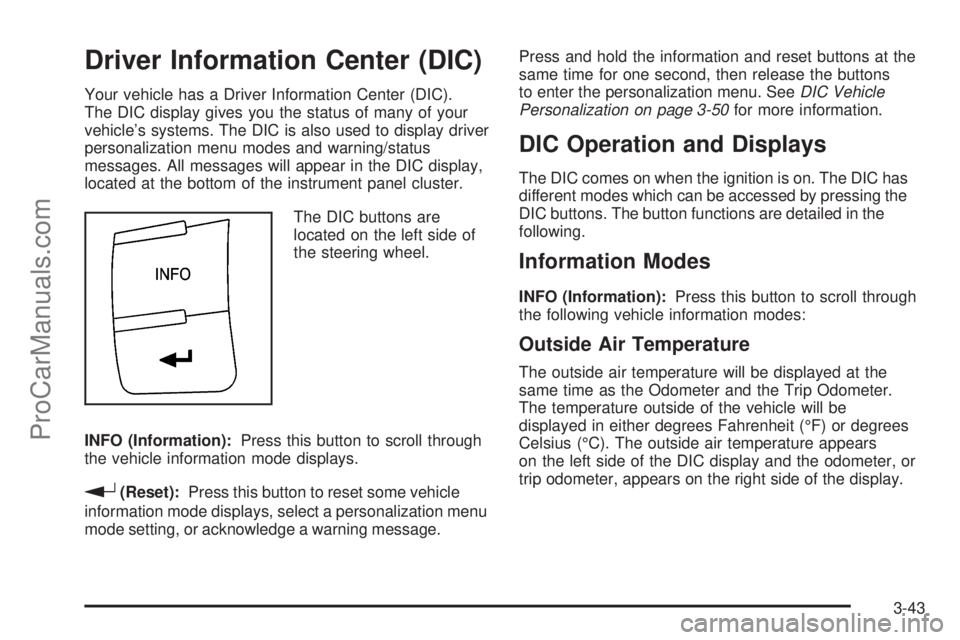
The DIC buttons are
located on the left side of
the steering wheel.
INFO (Information):Press this button to scroll through
the vehicle information mode displays.
r(Reset):Press this button to reset some vehicle
information mode displays, select a personalization menu
mode setting, or acknowledge a warning message.Press and hold the information and reset buttons at the
same time for one second, then release the buttons
to enter the personalization menu. SeeDIC Vehicle
Personalization on page 3-50for more information.
DIC Operation and Displays
The DIC comes on when the ignition is on. The DIC has
different modes which can be accessed by pressing the
DIC buttons. The button functions are detailed in the
following.
Information Modes
INFO (Information):Press this button to scroll through
the following vehicle information modes:
Outside Air Temperature
The outside air temperature will be displayed at the
same time as the Odometer and the Trip Odometer.
The temperature outside of the vehicle will be
displayed in either degrees Fahrenheit (°F) or degrees
Celsius (°C). The outside air temperature appears
on the left side of the DIC display and the odometer, or
trip odometer, appears on the right side of the display.
3-43
ProCarManuals.com
Page 174 of 408
AUTO (Automatic) LIGHTS ON
This message displays if the automatic headlamp
system is enabled with the headlamp switch. See
Automatic Headlamp System on page 3-15for more
information.
BRAKE FLUID
This message displays, while the ignition is on, when the
brake uid level is low. The brake system warning light on
the instrument panel cluster also comes on. SeeBrake
System Warning Light on page 3-33for more information.
Have the brake system serviced by your dealer/retailer as
soon as possible.
CHANGE OIL SOON
This message displays when the life of the engine oil
has expired and it should be changed.
When this message is acknowledged and cleared from
the display, the engine oil life system must still be reset
separately. SeeEngine Oil Life System on page 5-18,
Engine Oil on page 5-15, andScheduled Maintenance on
page 6-4for more information.
CHECK GAS CAP
This message displays if the fuel cap has not been fully
tightened. Recheck the fuel cap to make sure that it is on
properly. A few driving trips with the cap properly installed
should turn the message off.
CHECK TIRE PRESS (Pressure)
On vehicles with the Tire Pressure Monitor System
(TPMS), this message displays when the pressure in
one or more of the vehicle’s tires needs to be checked.
If a tire pressure message appears on the DIC, stop
as soon as you can. Have the tire pressures checked
and set to those shown on the Tire Loading Information
label. SeeTires on page 5-45,Loading the Vehicle on
page 4-21, andInflation - Tire Pressure on page 5-52.
The DIC also shows the tire pressure values. SeeDIC
Operation and Displays on page 3-43. If the tire pressure
is low, the low tire pressure warning light comes on.
SeeTire Pressure Light on page 3-36.
CRUISE ENGAGED
This message displays when the cruise control system
is active. SeeCruise Control on page 3-10for more
information.
DOOR AJAR
This message displays if one or more of the vehicle’s
doors are not closed properly. Make sure that the
door(s) are closed completely.
ENGINE DISABLED
This message displays if the starting of the engine is
disabled. Have your vehicle serviced by your dealer/
retailer immediately.
3-46
ProCarManuals.com
Page 176 of 408
LOW TRACTION
If your vehicle has the Traction Control System (TCS),
this message displays and the ESC/TCS light on the
instrument panel cluster ashes when the system is
actively limiting wheel spin. Slippery road conditions may
exist if this message is displayed, so adjust your driving
accordingly. This message stays on for a few seconds
after the system stops limiting wheel spin. SeeTraction
Control System (TCS) on page 4-8andElectronic
Stability Control (ESC)/Traction Control System (TCS)
Indicator/Warning Light on page 3-34for more
information.
LOW WASHER FLUID
This message displays when the vehicle’s windshield
washer uid is low. Fill the windshield washer uid
reservoir to the proper level as soon as possible.
SeeWindshield Washer Fluid on page 5-32.
POWER STEERING
On some vehicles, this message displays if a problem
has been detected with the electric power steering. Have
your vehicle serviced by your dealer/retailer immediately.
PUSH PARK PEDAL
This message displays if the parking brake is left
engaged. SeeParking Brake on page 2-29for more
information.
SERVICE AIR BAG
This message displays when there is a problem with the
airbag system. Have your vehicle serviced by your
dealer/retailer immediately.
SERVICE ESC (ELECTRONIC STABILITY
CONTROL)
If your vehicle has Electronic Stability Control (ESC),
this message displays and a chime sounds if there has
been a problem detected with ESC. The ESC/TCS
light also appears on the instrument panel cluster. This
light stays on solid as long as the detected problem
remains present. When this message displays, the
system is not working. Adjust your driving accordingly.
SeeElectronic Stability Control (ESC) on page 4-6
andElectronic Stability Control (ESC)/Traction Control
System (TCS) Indicator/Warning Light on page 3-34
for more information.
If this message turns on while you are driving, pull off the
road as soon as possible and stop carefully. Try resetting
the system by turning the ignition off and then back on.
If this message still stays on or turns back on again while
you are driving, your vehicle needs service. Have the
ESC inspected by your dealer/retailer as soon as
possible.
3-48
ProCarManuals.com
Page 177 of 408

SERVICE TRACTION
If your vehicle has the Traction Control System (TCS),
this message displays and a chime sounds when the
system is not functioning properly. The ESC/TCS light
also appears on the instrument panel cluster. This light
stays on solid as long as the detected problem remains
present. When this message displays, the system is not
working. Adjust your driving accordingly. SeeTraction
Control System (TCS) on page 4-8andElectronic
Stability Control (ESC)/Traction Control System (TCS)
Indicator/Warning Light on page 3-34for more
information. Have the system serviced by your dealer/
retailer as soon as possible.
SVC (Service) TIRE MONITOR
On vehicles with the Tire Pressure Monitor System
(TPMS), this message displays if a part on the TPMS is
not working properly. The tire pressure light also ashes
and then remains on during the same ignition cycle. See
Tire Pressure Light on page 3-36. Several conditions may
cause this message to appear. SeeTire Pressure Monitor
Operation on page 5-55for more information. If the
warning comes on and stays on, there may be a problem
with the TPMS. See your dealer/retailer.
TRACTION OFF
If your vehicle has the Traction Control System (TCS),
this message displays and the ESC/TCS light on the
instrument panel cluster comes on solid when the system
is turned off. Adjust your driving accordingly. SeeTraction
Control System (TCS) on page 4-8andElectronic
Stability Control (ESC)/Traction Control System (TCS)
Indicator/Warning Light on page 3-34for more
information.
TRUNK AJAR
This message displays when the trunk is not closed
completely. Make sure that the trunk is closed
completely. SeeTrunk on page 2-13for more
information.
3-49
ProCarManuals.com
Page 178 of 408
DIC Vehicle Personalization
Your vehicle has personalization capabilities that allow
you to program certain features to a preferred setting.
All of the features listed may not be available on your
vehicle. Only the features available will be displayed on
the DIC.
The default settings for the features were set when your
vehicle left the factory, but may have been changed
from their default state since that time.
To change feature settings, use the following procedure:
Entering Personalization Menu
1. Turn the ignition on while the vehicle is stopped.
To avoid excessive drain on the battery, it is
recommended that the headlamps are turned off.
2. Press and hold the information and reset buttons at
the same time for one second, then release to enter
the personalization menu.
If the vehicle speed is greater than 2 mph (3 km/h),
only the UNITS menu will be accessible.
3. Press the information button to scroll through the
available personalization menu modes.
Press the reset button to scroll through the available
settings for each mode.
If you do not make a selection within ten seconds,
the display will go back to the previous information
displayed.
Personalization Menu Modes
OIL LIFE RESET
When this feature is displayed, you can reset the engine
oil life system. To reset the system, seeEngine Oil Life
System on page 5-18. See “OIL LIFE” underDIC
Operation and Displays on page 3-43for more
information.
UNITS
This feature allows you to select the units of
measurement in which the DIC will display the vehicle
information. When UNITS appears on the display, press
and hold the reset button for at least one second to
scroll through the available settings:
ENGLISH (default in United States):All information
will be displayed in English units.
METRIC (default in Canada):All information will be
displayed in metric units.
To select a setting and move on to the next feature,
press the information button while the desired setting is
displayed on the DIC.
3-50
ProCarManuals.com
Page 183 of 408

Exiting Personalization Menu
The personalization menu will be exited when any of the
following conditions occur:
A ten second time period has elapsed.
The ignition is turned off.
The end of the personalization menu list is reached.
Audio System(s)
Determine which radio the vehicle has and read the
following pages to become familiar with its features.
{CAUTION:
Taking your eyes off the road for extended periods
could cause a crash resulting in injury or death to
you or others. Do not give extended attention to
entertainment tasks while driving.
This system provides access to many audio and non
audio listings.To minimize taking your eyes off the road while driving,
do the following while the vehicle is parked:
Become familiar with the operation and controls of
the audio system.
Set up the tone, speaker adjustments, and preset
radio stations.
For more information, seeDefensive Driving on page 4-2.
Notice:Contact your dealer/retailer before adding
any equipment.
Adding audio or communication equipment could
interfere with the operation of the vehicle’s engine,
radio, or other systems, and could damage them.
Follow federal rules covering mobile radio and
telephone equipment.
Notice:The chime signals related to safety belts,
parking brake, and other functions of your vehicle
operate through the radio/entertainment system. If
that equipment is replaced or additional equipment is
added to your vehicle, the chimes may not work.
Make sure that replacement or additional equipment
is compatible with your vehicle before installing it.
SeeAccessories and Modifications on page 5-3.
The vehicle has Retained Accessory Power (RAP). With
RAP, the audio system can be played even after the
ignition is turned off. SeeRetained Accessory Power
(RAP) on page 2-23for more information.
3-55
ProCarManuals.com
Page 184 of 408

Setting the Clock
Radio with CD (MP3) and USB Port,
and Radio with Single CD (MP3) Player
To set the time and date:
1. Turn the ignition key to ACC/ACCESSORY or
ON/RUN. Press
Oto turn the radio on.
2. Press
Hand the HR, MIN, MM, DD, YYYY
(hour, minute, month, day, and year) displays.
3. Press the softkey located below any one of the tabs
that you want to change.
4. To increase the time or date do one of the following:
Press the softkey located below the selected tab.
Press¨SEEK, or\FWD.
Turnfclockwise.
5. To decrease the time or date do one of the following:
Press©SEEK orsREV.
Turnfcounterclockwise.
The date does not automatically display. To see the
date press
Hwhile the radio is on. The date with display
times out after a few seconds and goes back to the
normal radio and time display.To change the time default setting from 12 hour to
24 hour or to change the date default setting from
month/day/year to day/month/year:
1. Press
Hand then the softkey located below the
forward arrow label. Once the time 12H and 24H,
and the date MM/DD/YYYY (month, day, and
year) and DD/MM/YYYY (day, month, and year)
displays.
2. Press the softkey located below the desired option.
3. Press
Hagain to apply the selected default, or
let the screen time out.
Six-Disc CD (MP3) Player
To set the time and date:
1. Turn the ignition key to ACC/ACCESSORY or
ON/RUN. Press
Oto turn the radio on.
2. Press MENU.
3. Press the softkey below the
Htab. The HR, MIN,
MM, DD, YYYY displays.
4. Press the softkey below any one of the tabs you
want to change.
3-56
ProCarManuals.com
Page 192 of 408

Playing a CD
If the ignition or radio is turned off with a CD in the
player it stays in the player. When the ignition or radio
is turned on, the CD starts to play where it stopped, if it
was the last selected audio source.
f(Tune):Turn to select tracks on the CD currently
playing.
©SEEK:Press to go to the start of the current track, if
more than ten seconds have played. Press and hold or
press multiple times to continue moving backward
through the tracks on the CD.
¨SEEK:Press to go to the next track. Press and hold
or press multiple times to continue moving forward
through the tracks on the CD.
sREV (Reverse):Press and hold to reverse playback
quickly within a track. Sound is heard at a reduced
volume and the elapsed time of the track displays.
Release to resume playing the track.
\FWD (Fast Forward):Press and hold to advance
playback quickly within a track. Sound is heard at a
reduced volume and the elapsed time of the track
displays. Release to resume playing the track.RDM (Random):Tracks can be listened to in random,
rather than sequential order, on one CD or all CDs
in a Six-Disc CD player.
To use random on the base radio with Single CD player:
1. Press the softkey below RDM tab until Random
Current Disc displays.
2. Press the softkey again to turn off random play.
To use random on a radio with a Six-Disc CD player:
1. To play tracks from all CDs loaded in random order,
press the softkey below the RDM tab until
Randomize All Discs displays.
2. To play tracks from the CD currently playing in
random order, press the softkey below the RDM
tab until Random Current Disc displays.
3. To turn off random, press the same softkey again.
BAND:Press to listen to the radio while a CD is playing.
The CD remains inside the radio for future listening.
CD/AUX (CD/Auxiliary):Press to play a CD while
listening to the radio. The CD icon and a message
showing the track number displays when a CD is
in the player. Press this button again and the system
automatically searches for an auxiliary input device, such
as a portable audio player. If a portable audio player is
not connected, No Aux Input Device Found may display.
3-64
ProCarManuals.com
Page 220 of 408
Backglass Antenna
The AM-FM antenna is integrated with the rear window
defogger, located in the rear window. Make sure that
the inside surface of the rear window is not scratched
and that the lines on the glass are not damaged. If the
inside surface is damaged, it could interfere with radio
reception. For proper radio reception, the antenna
connector needs to be properly attached to the post
on the glass.
If a cellular telephone antenna needs to be attached to
the glass, make sure that the grid lines for the AM-FM
antenna are not damaged. There is enough space
between the grid lines to attach a cellular telephone
antenna without interfering with radio reception.
Notice:Using a razor blade or sharp object to clear
the inside rear window can damage the rear window
antenna and/or the rear window defogger. Repairs
would not be covered by the vehicle warranty. Do not
clear the inside rear window with sharp objects.
Notice:Do not apply aftermarket glass tinting with
metallic lm. The metallic lm in some tinting
materials will interfere with or distort the incoming
radio reception. Any damage caused to your
backglass antenna due to metallic tinting materials
will not be covered by the vehicle warranty.
XM™ Satellite Radio Antenna
System
The XM Satellite Radio antenna is located on the roof of
the vehicle. Keep the antenna clear of obstructions for
clear radio reception.
If the vehicle has a sunroof, the performance of the XM
system may be affected if the sunroof is open.
Chime Level Adjustment
The radio may be used to adjust the vehicle’s chime level.
If the radio can be used to change the volume level of the
chime, press and hold the sixth FAV softkey with the
ignition on and the radio power off. The volume level
changes between Normal and Loud. The selected
volume level appears on the radio display.
Removing the radio and not replacing it with a factory
radio or chime module will disable vehicle chimes.
3-92
ProCarManuals.com