change wheel SATURN AURA 2010 User Guide
[x] Cancel search | Manufacturer: SATURN, Model Year: 2010, Model line: AURA, Model: SATURN AURA 2010Pages: 428, PDF Size: 2.78 MB
Page 234 of 428

Audio Steering Wheel Controls
Vehicles with audio
steering wheel controls
could differ depending on
the vehicle’s options.
Some audio controls can
be adjusted at the steering
wheel.
e+/e−(Volume):Press to increase or to decrease
the radio volume.
w/x(Next / Previous):Press to change radio
stations, select tracks on a CD, or to select tracks and
navigate folders on an iPod
®or USB device.
To change radio stations:
•Press and releaseworxto go to the next or
previous radio station stored as a preset.
•Press and holdworxto go to the next or
previous radio station in the selected band with a
strong signal.To select tracks on a CD:
Press and release
worxto go to the next or previous
track.
To select tracks on an iPod or USB device:
1. Press and hold
worxwhile listening to a song
until the contents of the current folder display on
the radio display.
2. Press and release
worxto scroll up or down the
list, then press and hold
wto play the highlighted
track.
To navigate folders on an iPod or USB device:
1. Press and hold
worxwhile listening to a song
until the contents of the current folder display on
the radio display.
2. Press and hold
xto go back to the previous
folder list.
3. Press and release
worxto scroll up or down
the list.
•To select a folder, press and holdwwhen the
folder is highlighted.
•To go back further in the folder list, press and
hold
x.
4-82
ProCarManuals.com
Page 240 of 428
traffic and allowing realistic following distances
eliminates a lot of unnecessary braking. That means
better braking and longer brake life.
If the engine ever stops while the vehicle is being driven,
brake normally but do not pump the brakes. If the brakes
are pumped, the pedal could get harder to push down. If
the engine stops, there will still be some power brake
assist but it will be used when the brake is applied. Once
the power assist is used up, it can take longer to stop and
the brake pedal will be harder to push.
Adding non-dealer/non-retailer accessories can affect
vehicle performance. SeeAccessories and Modications
on page 6-3.
Antilock Brake System (ABS)
This vehicle has the Antilock Brake System (ABS), an
advanced electronic braking system that helps prevent a
braking skid.
When the engine is started and the vehicle begins to
drive away, ABS checks itself. A momentary motor
or clicking noise might be heard while this test is going
on, and it might even be noticed that the brake pedal
moves a little. This is normal.If there is a problem with
ABS, this warning light
stays on. SeeAntilock
Brake System (ABS)
Warning Light on
page 4-31.
Let us say the road is wet and you are driving safely.
Suddenly, an animal jumps out in front of you. You slam
on the brakes and continue braking. Here is what
happens with ABS:
A computer senses that the wheels are slowing down. If
one of the wheels is about to stop rolling, the computer
will separately work the brakes at each wheel.
ABS can change the brake pressure to each wheel, as
required, faster than any driver could. This can help
the driver steer around the obstacle while braking hard.
As the brakes are applied, the computer keeps
receiving updates on wheel speed and controls braking
pressure accordingly.
Remember: ABS does not change the time needed to get
a foot up to the brake pedal or always decrease stopping
distance. If you get too close to the vehicle in front of you,
there will not be enough time to apply the brakes if that
vehicle suddenly slows or stops. Always leave enough
room up ahead to stop, even with ABS.
5-4
ProCarManuals.com
Page 248 of 428

Skidding
In a skid, a driver can lose control of the vehicle.
Defensive drivers avoid most skids by taking reasonable
care suited to existing conditions, and by not overdriving
those conditions. But skids are always possible.
The three types of skids correspond to the vehicle’s three
control systems. In the braking skid, the wheels are not
rolling. In the steering or cornering skid, too much speed
or steering in a curve causes tires to slip and lose
cornering force. And in the acceleration skid, too much
throttle causes the driving wheels to spin.
Remember: Any traction control system helps avoid only
the acceleration skid. If the traction control system is
off, then an acceleration skid is best handled by easing
your foot off the accelerator pedal.
If the vehicle starts to slide, ease your foot off the
accelerator pedal and quickly steer the way you want
the vehicle to go. If you start steering quickly enough,
the vehicle may straighten out. Always be ready for
a second skid if it occurs.
Of course, traction is reduced when water, snow, ice,
gravel, or other material is on the road. For safety, slow
down and adjust your driving to these conditions. It is
important to slow down on slippery surfaces because
stopping distance will be longer and vehicle control more
limited.While driving on a surface with reduced traction, try
your best to avoid sudden steering, acceleration,
or braking, including reducing vehicle speed by shifting
to a lower gear. Any sudden changes could cause
the tires to slide. You may not realize the surface is
slippery until the vehicle is skidding. Learn to recognize
warning clues — such as enough water, ice, or
packed snow on the road to make a mirrored
surface — and slow down when you have any doubt.
Remember: Any Antilock Brake System (ABS) helps
avoid only the braking skid.
Driving at Night
Night driving is more dangerous than day driving
because some drivers are likely to be impaired — by
alcohol or drugs, with night vision problems, or by
fatigue.
Night driving tips include:
•Drive defensively.
•Do not drink and drive.
•Reduce headlamp glare by adjusting the inside
rearview mirror.
•Slow down and keep more space between you and
other vehicles because headlamps can only light up
so much road ahead.
5-12
ProCarManuals.com
Page 264 of 428

of the Trailer” that appears later in this section. Trailering
is different than just driving the vehicle by itself.
Trailering means changes in handling, acceleration,
braking, durability and fuel economy. Successful, safe
trailering takes correct equipment, and it has to be used
properly.
The following information has many time-tested,
important trailering tips and safety rules. Many of these
are important for the safety of the driver and the
passengers. So please read this section carefully before
pulling a trailer.
Load-pulling components such as the engine,
transmission, axles, wheel assemblies and tires are
forced to work harder against the drag of the added
weight. The engine is required to operate at relatively
higher speeds and under greater loads, generating extra
heat. The trailer also adds considerably to wind
resistance, increasing the pulling requirements.
Pulling A Trailer
Here are some important points:
•There are many different laws, including speed limit
restrictions, having to do with trailering. Make sure
the rig will be legal, not only where you live but
also where you will be driving. A good source for
this information can be state or provincial police.
•Do not tow a trailer at all during the first 1,000 miles
(1600 km) the new vehicle is driven. The engine,
transmission or other parts could be damaged. The
repairs would not be covered by the vehicle’s
warranty.
•Then, during the first 500 miles (800 km) that a
trailer is towed, do not drive over 50 mph (80 km/h)
and do not make starts at full throttle. This helps
the engine and other parts of the vehicle wear in at
the heavier loads.
•Obey speed limit restrictions when towing a trailer.
Do not drive faster than the maximum posted
speed for trailers, or no more than 55 mph
(90 km/h), to save wear on the vehicle’s parts.
•Do not tow a trailer when the outside temperature is
above 100°F (38°C).
Three important considerations have to do with weight:
•the weight of the trailer,
•the weight of the trailer tongue
•and the total weight on the vehicle’s tires.
5-28
ProCarManuals.com
Page 268 of 428

Turn Signals When Towing a Trailer
The arrows on the instrument panel flash whenever
signaling a turn or lane change. Properly hooked up, the
trailer lamps also flash, telling other drivers the vehicle
is turning, changing lanes or stopping.
When towing a trailer, the arrows on the instrument
panel flash for turns even if the bulbs on the trailer are
burned out. For this reason you may think other
drivers are seeing the signal when they are not. It is
important to check occasionally to be sure the
trailer bulbs are still working.
Driving on Grades
Notice:Do not tow on steep continuous grades
exceeding 6 miles (9.6 km). Extended, higher
than normal engine and transmission temperatures
may result and damage the vehicle. Frequent
stops are very important to allow the engine and
transmission to cool.
Reduce speed and shift to a lower gearbeforestarting
down a long or steep downgrade. If the transmission is
not shifted down, the brakes might have to be used so
much that they would get hot and no longer work well.On a long uphill grade, shift down and reduce the
vehicle’s speed to around 45 mph (70 km/h) to reduce
the possibility of the engine and the transmission
overheating. If the engine does overheat, seeEngine
Overheating on page 6-28.
Parking on Hills
{WARNING:
Parking the vehicle on a hill with the trailer
attached can be dangerous. If something goes
wrong, the rig could start to move. People can be
injured, and both the vehicle and the trailer can be
damaged. When possible, always park the rig on a
flat surface.
If parking the rig on a hill:
1. Press the brake pedal, but do not shift into P (Park)
yet. Turn the wheels into the curb if facing downhill
or into traffic if facing uphill.
2. Have someone place chocks under the trailer
wheels.
3. When the wheel chocks are in place, release the
brake pedal until the chocks absorb the load.
5-32
ProCarManuals.com
Page 305 of 428

Properly torqued wheel nuts are necessary to help
prevent brake pulsation. When tires are rotated, inspect
brake pads for wear and evenly tighten wheel nuts in
the proper sequence to torque specifications in
Capacities and Specications on page 6-105.
Brake linings should always be replaced as complete
axle sets.
Brake Pedal Travel
See your dealer/retailer if the brake pedal does not
return to normal height, or if there is a rapid increase in
pedal travel. This could be a sign that brake service
might be required.
Brake Adjustment
Every time the brakes are applied, with or without the
vehicle moving, the brakes adjust for wear.
Replacing Brake System Parts
The braking system on a vehicle is complex. Its many
parts have to be of top quality and work well together if
the vehicle is to have really good braking. The vehicle
was designed and tested with top-quality brake parts.
When parts of the braking system are replaced — for
example, when the brake linings wear down and newones are installed — be sure to get new approved
replacement parts. If this is not done, the brakes might
not work properly. For example, if someone puts in brake
linings that are wrong for the vehicle, the balance
between the front and rear brakes can change — for the
worse. The braking performance expected can change in
many other ways if the wrong replacement brake parts
are installed.
Battery
Refer to the replacement number on the original battery
label when a new battery is needed. SeeEngine
Compartment Overview on page 6-14for battery
location.
{DANGER:
Battery posts, terminals, and related accessories
contain lead and lead compounds, chemicals
known to the State of California to cause cancer
and reproductive harm. Wash hands after
handling.
6-35
ProCarManuals.com
Page 328 of 428

Any time you notice unusual wear, rotate the tires
as soon as possible and check wheel alignment.
Also check for damaged tires or wheels. See
When It Is Time for New Tires on page 6-59and
Wheel Replacement on page 6-64.
When rotating the vehicle’s tires, always use the
correct rotation pattern shown here.
Do not include the compact spare tire in the tire
rotation.
After the tires have been rotated, adjust the
front and rear inflation pressures as shown on
the Tire and Loading Information label. See
Ination - Tire Pressure on page 6-51andLoading
the Vehicle on page 5-19.Reset the Tire Pressure Monitor System. SeeTire
Pressure Monitor Operation on page 6-54.
Make certain that all wheel nuts are properly
tightened. See “Wheel Nut Torque” under
Capacities and Specications on page 6-105.
{WARNING:
Rust or dirt on a wheel, or on the parts to
which it is fastened, can make wheel nuts
become loose after time. The wheel could
come off and cause an accident. When you
change a wheel, remove any rust or dirt from
places where the wheel attaches to the
vehicle. In an emergency, you can use a
cloth or a paper towel to do this; but be sure
to use a scraper or wire brush later, if
needed, to get all the rust or dirt off. See
Changing a Flat Tire on page 6-74.
6-58
ProCarManuals.com
Page 344 of 428

Tire Sealant and Compressor Kit
Storage
The tire sealant and compressor kit is located in the
trunk.
1. Open the trunk. SeeTrunk on page 3-11.
2. Lift the cover.
3. Turn the retainer clockwise and remove the tire
sealant and compressor kit.
To store the tire sealant and compressor kit, reverse
the steps.
Changing a Flat Tire
If a tire goes flat, avoid further tire and wheel damage
by driving slowly to a level place. Turn on the hazard
warning flashers. SeeHazard Warning Flashers
on page 4-3.
{WARNING:
Changing a tire can be dangerous. The vehicle
can slip off the jack and roll over or fall on you or
other people. You and they could be badly injured
or even killed. Find a level place to change your
tire. To help prevent the vehicle from moving:
1. Set the parking brake firmly.
2. Put the shift lever in P (Park).
3. Turn off the engine and do not restart while
the vehicle is raised.
4. Do not allow passengers to remain in the
vehicle.
WARNING: (Continued)
6-74
ProCarManuals.com
Page 345 of 428
WARNING: (Continued)
To be even more certain the vehicle will not move,
you should put blocks at the front and rear of the
tire farthest away from the one being changed.
That would be the tire, on the other side, at the
opposite end of the vehicle.
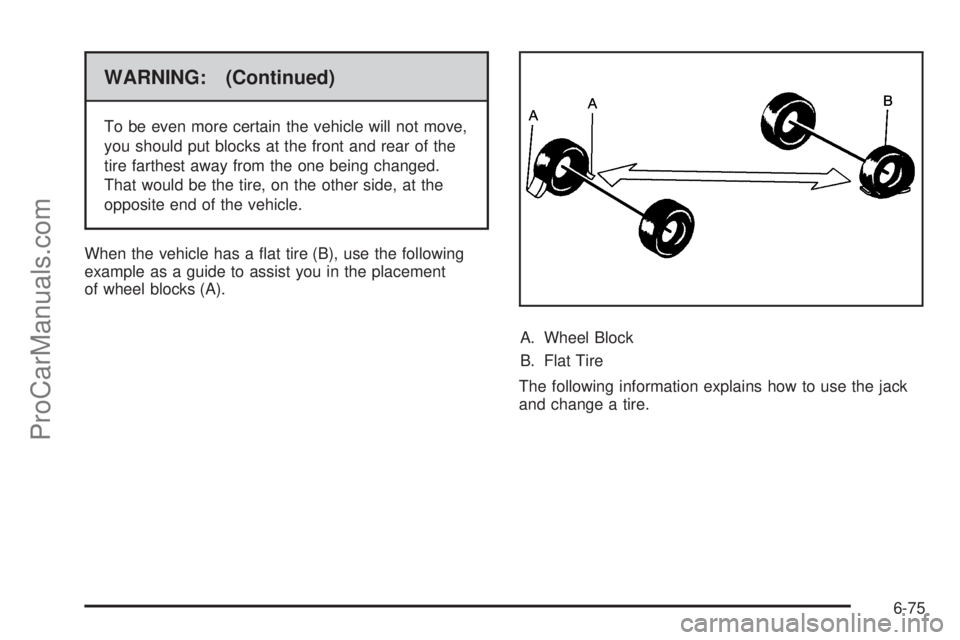
When the vehicle has a flat tire (B), use the following
example as a guide to assist you in the placement
of wheel blocks (A).
A. Wheel Block
B. Flat Tire
The following information explains how to use the jack
and change a tire.
6-75
ProCarManuals.com
Page 426 of 428

Tires.............................................................6-44
Aluminum Wheels, Cleaning..........................6-94
Buying New Tires........................................6-60
Chains.......................................................6-65
Changing a Flat Tire....................................6-74
Cleaning....................................................6-94
Compact Spare...........................................6-88
Different Size..............................................6-61
High-Speed Operation..................................6-52
If a Tire Goes Flat.......................................6-66
Inflation - Tire Pressure................................6-51
Inspection and Rotation................................6-57
Installing the Spare Tire................................6-78
Pressure Light.............................................4-34
Pressure Monitor Operation...........................6-54
Pressure Monitor System..............................6-53
Removing the Flat Tire.................................6-78
Removing the Spare Tire and Tools...............6-76
Sealant and Compressor Kit.................6-67, 6-74
Sidewall Labeling.........................................6-45
Storing a Flat or Spare Tire and Tools............6-84
Terminology and Definitions...........................6-48
Uniform Tire Quality Grading.........................6-62
Wheel Alignment and Tire Balance.................6-63
Wheel Replacement.....................................6-64
When It Is Time for New Tires......................6-59
To Use the Engine Coolant Heater....................3-22Torque Lock...................................................3-28
Total Weight on the Vehicle’s Tires....................5-30
Towing
Recreational Vehicle.....................................5-24
Towing a Trailer..........................................5-27
Your Vehicle...............................................5-24
TPMS Malfunction Light and Message...............6-55
TPMS Sensor Matching Process
.......................6-56
Traction
Control System (TCS).................................... 5-7
Traction Control Operation................................. 5-8
Traction – AA, A, B, C.....................................6-62
Trailer Brakes.................................................5-30
Transferring a Call..........................................4-76
Transmission
Fluid, Automatic...........................................6-23
Transmission Operation, Automatic....................3-23
Transportation Options...................................... 8-9
Transportation Program, Courtesy....................... 8-9
Treadwear.....................................................6-62
Treadwear 200 Traction AA Temperature A.........6-62
Trip Odometer................................................4-26
Trunk............................................................3-11
Turn and Lane-Change Signals.......................... 4-4
Turn Signal/Multifunction Lever........................... 4-4
Turn Signals When Towing a Trailer..................5-32
16
ProCarManuals.com