lock SATURN AURA 2010 Workshop Manual
[x] Cancel search | Manufacturer: SATURN, Model Year: 2010, Model line: AURA, Model: SATURN AURA 2010Pages: 428, PDF Size: 2.78 MB
Page 167 of 428

•Press the power door lock switch.
•Press the remote trunk release.
•Turn the lamp that was left on to off and then
to on again.
Accessory Power Outlet(s)
Accessory power outlets can be used to connect
auxiliary electrical equipment, such as a cellular
telephone.
There are two accessory power outlets. One accessory
power outlet is inside the center storage console and
the other is located on the center storage console below
the climate controls.
To use an outlet, lift the protective cap. When not in
use, always cover the outlet with the protective cap.
The accessory power outlet is operational at all times.
Notice:Leaving electrical equipment plugged in for
an extended period of time while the vehicle is off
will drain the battery. Power is always supplied
to the outlets. Always unplug electrical equipment
when not in use and do not plug in equipment
that exceeds the maximum 20 ampere rating.Certain electrical accessories may not be compatible
with the accessory power outlet and could result
in blown vehicle or adapter fuses. If you experience a
problem, see your retailer for additional information
on the accessory power outlet.
Notice:Adding any electrical equipment to your
vehicle can damage it or keep other components
from working as they should. The repairs would not
be covered by your warranty. Do not use equipment
exceeding maximum amperage rating of 20 amperes.
Check with your dealer/retailer before adding
electrical equipment.
When adding electrical equipment, be sure to follow the
proper installation instructions included with the
equipment.
Notice:Improper use of the power outlet can cause
damage not covered by the vehicle warranty. Do
not hang any type of accessory or accessory
bracket from the plug because the power outlets are
designed for accessory power plugs only.
4-15
ProCarManuals.com
Page 168 of 428
Climate Controls
Climate Control System
The heating, cooling and ventilation for the vehicle can
be controlled with this system.
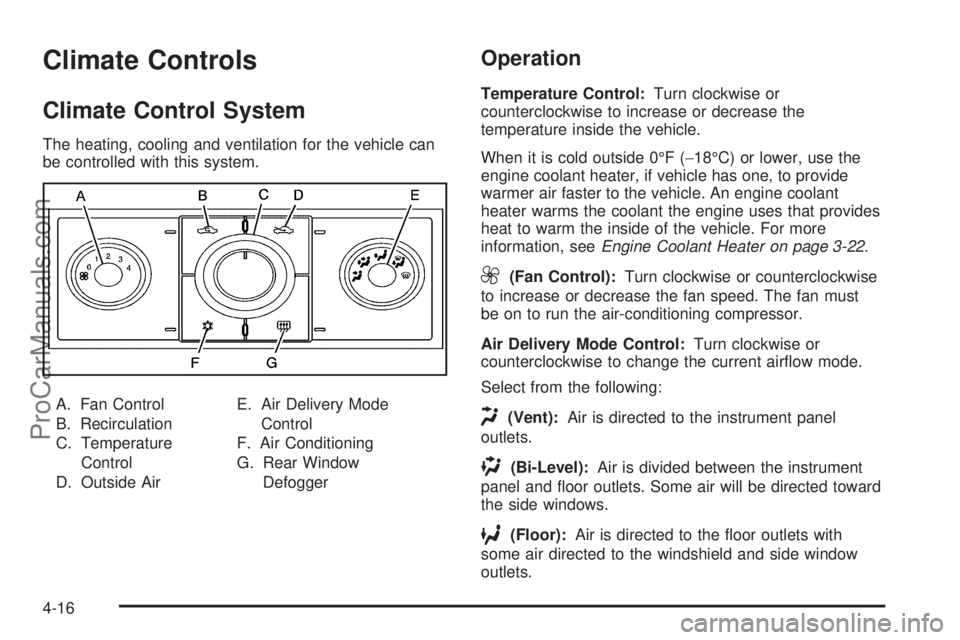
A. Fan Control
B. Recirculation
C. Temperature
Control
D. Outside AirE. Air Delivery Mode
Control
F. Air Conditioning
G. Rear Window
Defogger
Operation
Temperature Control:Turn clockwise or
counterclockwise to increase or decrease the
temperature inside the vehicle.
When it is cold outside 0°F (−18°C) or lower, use the
engine coolant heater, if vehicle has one, to provide
warmer air faster to the vehicle. An engine coolant
heater warms the coolant the engine uses that provides
heat to warm the inside of the vehicle. For more
information, seeEngine Coolant Heater on page 3-22.
9(Fan Control):Turn clockwise or counterclockwise
to increase or decrease the fan speed. The fan must
be on to run the air-conditioning compressor.
Air Delivery Mode Control:Turn clockwise or
counterclockwise to change the current airflow mode.
Select from the following:
H(Vent):Air is directed to the instrument panel
outlets.
)(Bi-Level):Air is divided between the instrument
panel and floor outlets. Some air will be directed toward
the side windows.
6(Floor):Air is directed to the floor outlets with
some air directed to the windshield and side window
outlets.
4-16
ProCarManuals.com
Page 172 of 428
Automatic Operation
AUTO (Automatic):Select AUTO on both the fan
speed control and the air delivery mode control knobs to
activate the automatic system. When automatic
operation is active the system controls the inside
temperature and air delivery.
To place the system in automatic mode do the following:
1. Turn the fan knob and the mode knob to the
AUTO position.
The current set temperature displays. When AUTO
is selected, the air conditioning operation and air
inlet is automatically controlled. The air conditioning
compressor runs while the outside temperature is
over about 40°F (4°C). The air inlet will normally be
set to outside air. If it is hot outside, the air inlet
may automatically switch to recirculate inside air to
help quickly cool down the vehicle.
2. Set the temperature.
An initial setting of 73°F (23°C) is recommended.
Allow about 20 minutes for the system to regulate.
Press
worxto adjust the temperature setting
as necessary. If the temperature is set at 60°F
(15°C) the system remains at the maximum cooling
setting. If the temperature is set at 90°F (32°C)
the system remains at the maximum heat setting.
Choosing either maximum setting does not
cause the vehicle to heat or cool any faster.Do not to cover the sensor located on the top of the
instrument panel near the windshield. This sensor
regulates air temperature based on the intensity
of the sun.
Also do not cover the sensor grille on the lower
right side of the climate control faceplate, as
this regulates the inside temperature.
To avoid blowing cold air at engine start-up in cold
weather, the system delays turning on the fan
until warm air is available. The length of delay
depends on the engine coolant temperature. Turning
the fan knob overrides this delay and changes
the fan to the selected speed.
Manual Operation
9(Off):Select this position on the fan knob to turn off
the entire climate control system. Outside air still
enters the vehicle. The airflow direction and temperature
can be adjusted.
x/wTemperature Control:Press the arrows to
increase or decrease the temperature inside the vehicle.
9(Fan Control):Turn clockwise or counterclockwise
to increase or decrease the fan speed.
Air Delivery Mode Control:Turn clockwise or
counterclockwise to change the direction of the airflow
in the vehicle.
4-20
ProCarManuals.com
Page 176 of 428

Operation Tips
•Clear away any ice, snow, or leaves from the air
inlets at the base of the windshield that can
block the flow of air into the vehicle.
•Do not use non-GM approved hood deflectors as
they could adversely affect the performance of
the system.
•Keep the path under the front seats clear of objects
to help circulate the air inside of the vehicle more
effectively.
Warning Lights, Gages, and
Indicators
Warning lights and gages can signal that something is
wrong before it becomes serious enough to cause
an expensive repair or replacement. Paying attention to
the warning lights and gages could prevent injury.
Warning lights come on when there might be or there is
a problem with one of the vehicle’s functions. Some
warning lights come on briefly when the engine is started
to indicate they are working.
Gages can indicate when there might be or there is a
problem with one of the vehicle’s functions. Often gages
and warning lights work together to indicate a problem
with the vehicle.
When one of the warning lights comes on and stays on
while driving, or when one of the gages shows there
could be a problem, check the section that explains what
to do. Follow this manual’s advice. Waiting to do
repairs can be costly and even dangerous.
4-24
ProCarManuals.com
Page 183 of 428
WARNING: (Continued)
crash. If the light is still on after the vehicle has
been pulled off the road and carefully stopped,
have the vehicle towed for service.
This light comes on briefly when the ignition key is
turned to ON/RUN. If it does not, have the vehicle
serviced by your dealer/retailer. If the system is working
normally the indicator light will then go off.
When the ignition is on, the brake system warning light
also comes on when the parking brake is set. The
light stays on if the parking brake does not fully release.
If it stays on after the parking brake is fully released,
it means there is a brake problem.
The Driver Information Center (DIC) may display a
BRAKE FLUID message. SeeDIC Warnings and
Messages on page 4-42for more information.
If the light comes on while driving, pull off the road and
stop carefully. The pedal may be harder to push or it
may go closer to the floor. It may take longer to stop. Try
turning off and restarting the vehicle one or two times,
if the light is still on, have the vehicle towed for service.
SeeTowing Your Vehicle on page 5-24.
Antilock Brake System (ABS)
Warning Light
This light comes on briefly
while the starting the
engine.
If it does not, have the vehicle serviced by the
dealer/retailer. If the system is working normally the
indicator light will then go off.
If the ABS light stays on, turn the ignition off, if the light
comes on while driving, stop as soon as it is safely
possible and turn the ignition off. Then start the engine
again to reset the system. If the ABS light still stays
on, or comes on again while driving, the vehicle needs
service. If the regular brake system warning light is
not on, the vehicle still has brakes, but it does not have
antilock brakes. If the regular brake system warning
light is also on, the vehicle does not have antilock
brakes and there is a problem with the regular brakes.
SeeBrake System Warning Light on page 4-30.
4-31
ProCarManuals.com
Page 199 of 428

REMOTE START
If your vehicle has remote start, this feature allows
remote start to be turned off or on. Remote start allows
you to start the engine from outside of the vehicle
using your Remote Keyless Entry (RKE) transmitter.
When REMOTE START appears on the display, press
and hold the reset button for at least one second to
scroll through the available settings:
OFF:The remote start feature will be disabled.
ON (default):The remote start feature will be enabled.
SeeRemote Vehicle Start on page 3-5for more
information.
To select a setting and move on to the next feature,
press the information button while the desired setting is
displayed on the DIC.
LOCK HORN
This feature, which allows the vehicle’s horn to chirp
every time the lock button on the Remote Keyless Entry
(RKE) transmitter is pressed, can be enabled or
disabled. When LOCK HORN appears on the display,
press and hold the reset button for at least one second
to scroll through the available settings:
OFF (default):The horn will not chirp on the first press
of the lock button on the RKE transmitter. The horn
will still chirp on the second press.ON:The horn will chirp on the first press of the lock
button on the RKE transmitter.
SeeRemote Keyless Entry (RKE) System Operation on
page 3-3for more information.
To select a setting and move on to the next feature,
press the information button while the desired setting is
displayed on the DIC.
UNLOCK HORN
This feature, which allows the vehicle’s horn to chirp on
the first press of the unlock button on the Remote
Keyless Entry (RKE) transmitter, can be enabled or
disabled. When UNLOCK HORN appears on the display,
press and hold the reset button for at least one second
to scroll through the available settings:
OFF (default):The horn will not chirp when the unlock
button on the RKE transmitter is pressed.
ON:The horn will chirp on the first press of the unlock
button on the RKE transmitter.
SeeRemote Keyless Entry (RKE) System Operation on
page 3-3for more information.
To select a setting and move on to the next feature,
press the information button while the desired setting is
displayed on the DIC.
4-47
ProCarManuals.com
Page 200 of 428
LIGHT FLASH
This feature, which allows the vehicle’s exterior
hazard/turn signal lighting to flash every time the lock,
unlock, or trunk release buttons on the Remote Keyless
Entry (RKE) transmitter are pressed, can be enabled
or disabled. When LIGHT FLASH appears on the
display, press and hold the reset button for at least one
second to scroll through the available settings:
OFF:The exterior hazard/turn signal lighting will not
flash when the lock, unlock, or trunk release buttons on
the RKE transmitter are pressed.
ON (default):The exterior hazard/turn signal lighting
will flash when the lock, unlock, or trunk release buttons
on the RKE transmitter are pressed.
SeeRemote Keyless Entry (RKE) System Operation on
page 3-3for more information.
To select a setting and move on to the next feature,
press the information button while the desired setting is
displayed on the DIC.
DELAY LOCK
This feature, which delays the actual locking of the
vehicle, can be enabled or disabled. When DELAY
LOCK appears on the display, press and hold the reset
button for at least one second to scroll through the
available settings:
ON (default):The doors will not lock until five seconds
after the last door is closed. You can temporarily
override delayed locking by pressing the power lock
switch or the lock button on the Remote Keyless Entry
(RKE) transmitter a second time.
OFF:The doors will lock immediately when pressing
the power lock switch or the lock button on the
RKE transmitter.
SeePower Door Locks on page 3-8,Delayed Locking
on page 3-9, andRemote Keyless Entry (RKE)
System Operation on page 3-3for more information.
To select a setting and move on to the next feature,
press the information button while the desired setting is
displayed on the DIC.
4-48
ProCarManuals.com
Page 201 of 428

AUTO UNLK (Unlock)
This feature, which allows the vehicle to automatically
unlock certain doors, can be enabled or disabled. When
AUTO UNLK appears on the display, press and hold
the reset button for at least one second to scroll through
the available settings:
ALL (default):All of the doors will automatically unlock.
DRIVER:The driver’s door will automatically unlock.
NONE:None of the doors will automatically unlock. You
will need to manually unlock the doors.
SeeProgrammable Automatic Door Locks on page 3-9
for more information.
To select a setting and move on to the next feature,
press the information button while the desired setting is
displayed on the DIC.
UNLK (Unlock)
This screen displays only if DRIVER or ALL is selected
for the AUTO UNLK feature. This feature determines
when the automatic door unlocking will occur. When
UNLK appears on the display, press and hold the reset
button for at least one second to scroll through the
available settings:
KEY OFF:The door(s) will unlock when the key is
turned off.SHIFT TO P (Park) (default):The door(s) will unlock
when the vehicle is shifted into P (Park).
SeeProgrammable Automatic Door Locks on page 3-9
for more information.
To select a setting and move on to the next feature,
press the information button while the desired setting is
displayed on the DIC.
EXT (Exterior) LIGHTS
This feature, which allows the vehicle’s exterior
perimeter lighting to turn on each time the unlock button
on the Remote Keyless Entry (RKE) transmitter is
pressed, can be enabled or disabled. When EXT
LIGHTS appears on the display, press and hold the
reset button for at least one second to scroll through the
available settings:
OFF:The exterior perimeter lighting will not turn on
when the unlock button on the RKE transmitter is
pressed.
ON (default):The exterior perimeter lighting will turn on
when the unlock button on the RKE transmitter is
pressed.
SeeRemote Keyless Entry (RKE) System Operation on
page 3-3for more information.
4-49
ProCarManuals.com
Page 203 of 428

Notice:Contact your dealer/retailer before adding
any equipment.
Adding audio or communication equipment could
interfere with the operation of the vehicle’s engine,
radio, or other systems, and could damage them.
Follow federal rules covering mobile radio and
telephone equipment.
Notice:The chime signals related to safety belts,
parking brake, and other functions of your vehicle
operate through the radio/entertainment system.
If that equipment is replaced or additional equipment
is added to your vehicle, the chimes may not
work. Make sure that replacement or additional
equipment is compatible with your vehicle before
installing it. SeeAccessories and Modifications
on page 6-3.
The vehicle has Retained Accessory Power (RAP). With
RAP, the audio system can be played even after the
ignition is turned off. SeeRetained Accessory Power
(RAP) on page 3-20for more information.Setting the Clock
To set the time and date:
1. Turn the ignition key to ACC/ACCESSORY or
ON/RUN. Press
Oto turn the radio on.
2. Press
Hand the HR, MIN, MM, DD, YYYY (hour,
minute, month, day, and year) displays.
3. Press the softkey located below any one of the tabs
that you want to change.
4. To increase the time or date do one of the following:
•Press the softkey located below the selected tab.
•Press¨SEEK, or\FWD.
•Turnfclockwise.
5. To decrease the time or date do one of the
following:
•Press©SEEK orsREV.
•Turnfcounterclockwise.
The date does not automatically display. To see the
date press
Hwhile the radio is on. The date with display
times out after a few seconds and goes back to the
normal radio and time display.
4-51
ProCarManuals.com
Page 209 of 428
Undesired XM categories can be removed through the
setup menu. To remove an undesired category:
1. Press MENU to display the radio setup menu.
2. Press the softkey below the XM CAT tab.
3. Turn
fto display the category to be removed.
4. Press the softkey below the Remove tab until the
category name along with the word Removed
displays.
5. Repeat the steps to remove additional categories.
Removed categories can be restored by pressing
the softkey under the Add tab when a removed category
displays or by pressing the softkey below the Restore
All tab.
Categories cannot be removed or added while the
vehicle is moving faster than 5 mph (8 km/h).
Radio Messages
Calibration Error:Displays if the radio is no longer
calibrated properly for the vehicle. The vehicle must be
returned to your dealer/retailer for service.
Loc or Locked:Displays when the THEFTLOCK
®
system has activated. Take the vehicle to your
dealer/retailer for service.
If any error occurs repeatedly or if an error cannot be
corrected, contact your dealer/retailer.
XM Satellite Radio Service
XM is a satellite radio service that is based in the
48 contiguous United States and 10 Canadian
provinces. XM Satellite Radio has a wide variety of
programming and commercial-free music,
coast-to-coast, and in digital-quality sound. A service
fee is required to receive the XM service. For more
information, contact XM at xmradio.com or call
1-800-929-2100 in the U.S. and xmradio.ca or call
1-877-438-9677 in Canada.
Radio Messages for XM Only
SeeXM Radio Messages on page 4-67later in this
section for further detail.
Loading a CD
Insert a CD partway into the slot, label side up. The
player pulls it in and the CD begins playing.
When the CD is inserted, the CD symbol displays. As
each new track starts to play, the track number displays.
The CD player can play the smaller 3 inch (8 cm)
single CDs with an adapter ring. Full-size CDs and the
smaller CDs are loaded in the same manner.
4-57
ProCarManuals.com