AUX SATURN ION 2004 Owners Manual
[x] Cancel search | Manufacturer: SATURN, Model Year: 2004, Model line: ION, Model: SATURN ION 2004Pages: 380, PDF Size: 2.89 MB
Page 168 of 380
Finding a Station
AM FM:Press this button to switch between FM1,
FM2, or AM. The display will show your selection.
AUX (Auxiliary):To select XM™ Satellite Radio
Service (48 contiguous US states, if equipped), perform
the following:
1. Press either CAT arrow to select different
categories.
2. Rotate the tune knob or use either SEEK arrow to
change channels.
3. Press the information button to view track title, artist
title, and channel title.
O(Tune):Turn this knob to select radio stations.
tSEEKu:Press and hold the right or left arrow to
go to the next or to the previous station and stay there.
To scan stations, press either arrow until you hear a
beep. The radio will go to a station, play for a few
seconds, then go on to the next station. Press either
arrow again to stop scanning.
To scan preset stations, press either arrow for four
seconds until you hear a beep. The radio will go to a
preset station stored on the pushbuttons, play for a few
seconds, then go on to the next station. Press either
arrow again or one of the pushbuttons to stop scanning
presets.
The radio will seek and scan only to stations that are in
the selected band and only to those with a strong signal.
3-56
ProCarManuals.com
Page 169 of 380
Setting Preset Stations
The six numbered pushbuttons let you return to your
favorite stations. You can set up to 30 stations
(six FM1, six FM2, and six AM, six XM1 and six XM2
(48 contiguous US states, if equipped) by performing the
following steps:
1. Turn the radio on.
2. Press AM FM to select FM1, FM2, or AM.
Press the AUX button to select XM1 or XM2.
3. Tune in the desired station.
4. Press the right or left AUTO EQ button to select the
equalization.
5. Press and hold one of the six numbered
pushbuttons. Preset X Stored will appear on the
display and you will hear a beep. Whenever you
press that numbered pushbutton, the station you set
will return and the equalization that you selected will
be automatically stored for that pushbutton. If the
equalization of a preset is changed while listening to
that station, the radio will automatically save the new
equalization.
6. Repeat the steps for each pushbutton.
If the battery has been disconnected or a radio fuse has
been removed, the preset stations and time of day
may need to be reset.
Using Automatic Set
Use this feature to automatically save the radio preset
pushbuttons with the stations with the strongest
radio signals.
A.SET (Automatic Set):Press and hold this button to
have the radio automatically select the rst 12 strongest
radio stations for FM and the six strongest radio stations
for AM.
To select the stations, perform the following:
1. Press AM FM to select FM1, FM2, or AM.
2. Press and hold AM FM until you hear a beep.
The radio will begin to search the current band.
The radio will store the stations, starting from
the lowest frequency, to each preset pushbutton.
A.SET will appear on the display when the radio is
nished storing the stations.
Cancelling Automatic Set
The radio retains the previously stored stations so they
can be recalled when automatic set is canceled.
Press and hold AM FM until you hear a beep. A.SET
will no longer appear on the display.
3-57
ProCarManuals.com
Page 173 of 380
rCAT (Reverse):Press and hold the left arrow to
reverse quickly within a track. Release it to play
the passage. The elapsed time of the track will appear
on the display.
CAT
[(Forward):Press and hold the right arrow to
advance quickly within a track. Release it to play
the passage. The elapsed time of the track will appear
on the display.
tSEEKu:Press the left arrow to go to the start of
the current or to the previous track. Press the right
arrow to go to the start of the next track. If you
hold either arrow or press it more than once, the player
will continue moving backward or forward through
the CD.
To scan tracks, press either SEEK arrow for four
seconds. The radio will go to the next track, play for a
few seconds, then go on to the next track. Press
either SEEK arrow again to stop scanning tracks.
O(Tune):Turn this knob to quickly change tracks.
4(Information):Press this button to view CD text
information, if available. To change the default on the
display to track name, album name, or artist name
instead of elapsed track time press this button to view
the available information. Then press and hold the
RCL button for ve seconds. The selected display will
now be the default.
AM FM:Press this button to listen to the radio when a
CD is playing. The inactive CD will remain safely
inside the radio for future listening.
AUX (Auxiliary):Press this button to play a CD or to
switch to XM1 or XM2 when listening to the radio.
X(Eject):Press this button to eject a CD. Eject may
be activated with either the ignition or radio off.
If you eject a CD, but decide that you want to listen to
it, press the CD button. This will pull the CD back in and
it will begin to play. If a CD is ejected, but not removed
from the radio, the radio will automatically reload the CD,
after 25 seconds, to prevent damage.
3-61
ProCarManuals.com
Page 176 of 380

rCAT (Reverse):Press and hold the left arrow to
rewind quickly within a track. Release it to play the
passage. The elapsed time of the track will appear on
the display.
CAT
[(Forward):Press and hold the right arrow to
advance quickly within a track. Release it to play
the passage. The elapsed time of the track will appear
on the display.
tSEEKu:Press the right or left arrow to go to the
previous or next CD.
To scan tracks on the current CD, press and hold either
SEEK arrow for more than two seconds, but less
then four seconds. The radio will go to the next track,
play for a few seconds, then go on to the next track.
Press either SEEK arrow again to stop scanning tracks.
To scan tracks on all of the CDs loaded, press and
hold either SEEK arrow for more than four seconds.
The radio will go to the next track, play for a few
seconds, then go on to the next track. Press either
SEEK arrow again to stop scanning tracks.
O(Tune):Turn this knob to quickly change tracks.
4(Information):Press this button to view CD text
information, if available. To change the default on the
display, (track name, artist name, album name, le
name, or directory), press this button to scroll through
each display. Once the desired display is shown,
press and hold the RCL button for ve seconds.
The selected display will now be the default.
AM FM:Press this button to listen to the radio when a
CD is playing. The inactive CD(s) will remain safely
inside the radio for future listening.
AUX (Auxiliary):Press this button to play a CD or to
switch to XM1 or XM2 when listening to the radio.
X(Eject):To eject one CD, press this button for less
than two seconds. Then press the pushbutton number
that corresponds to the loaded CD that you want to eject.
To eject all loaded CDs, press and hold this button for
more than two seconds.
Eject may be activated with either the ignition or radio off.
If you eject a CD, but decide that you want to listen to it,
press the CD button. This will pull the CD back in and it
will begin to play. If a CD is ejected, but not removed from
the radio, the radio will automatically reload the CD, after
25 seconds, to prevent damage.
3-64
ProCarManuals.com
Page 327 of 380
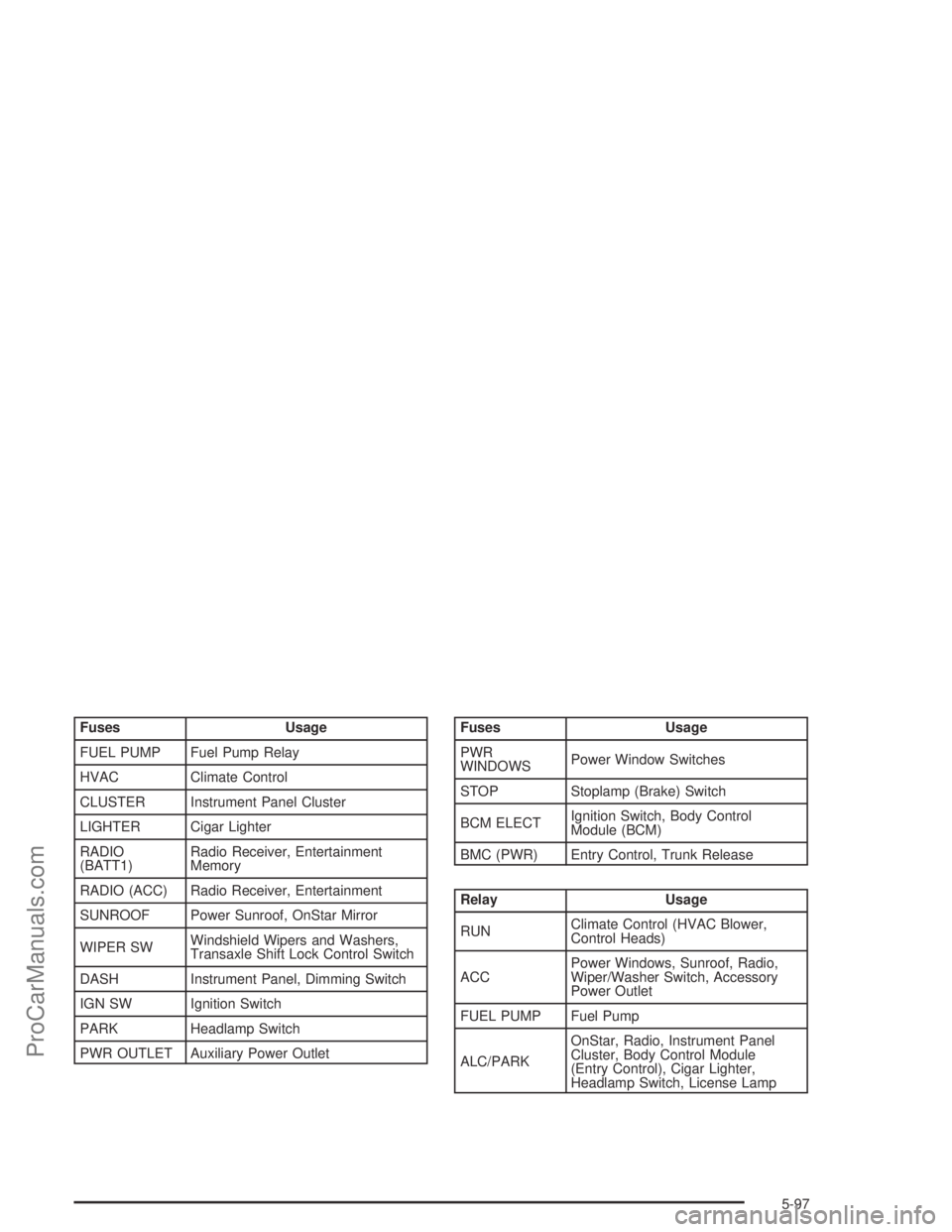
Fuses Usage
FUEL PUMP Fuel Pump Relay
HVAC Climate Control
CLUSTER Instrument Panel Cluster
LIGHTER Cigar Lighter
RADIO
(BATT1)Radio Receiver, Entertainment
Memory
RADIO (ACC) Radio Receiver, Entertainment
SUNROOF Power Sunroof, OnStar Mirror
WIPER SWWindshield Wipers and Washers,
Transaxle Shift Lock Control Switch
DASH Instrument Panel, Dimming Switch
IGN SW Ignition Switch
PARK Headlamp Switch
PWR OUTLET Auxiliary Power OutletFuses Usage
PWR
WINDOWSPower Window Switches
STOP Stoplamp (Brake) Switch
BCM ELECTIgnition Switch, Body Control
Module (BCM)
BMC (PWR) Entry Control, Trunk Release
Relay Usage
RUNClimate Control (HVAC Blower,
Control Heads)
ACCPower Windows, Sunroof, Radio,
Wiper/Washer Switch, Accessory
Power Outlet
FUEL PUMP Fuel Pump
ALC/PARKOnStar, Radio, Instrument Panel
Cluster, Body Control Module
(Entry Control), Cigar Lighter,
Headlamp Switch, License Lamp
5-97
ProCarManuals.com