low pressure port SATURN ION 2006 Owners Manual
[x] Cancel search | Manufacturer: SATURN, Model Year: 2006, Model line: ION, Model: SATURN ION 2006Pages: 392, PDF Size: 2.8 MB
Page 161 of 392

Boost Gage
If your vehicle is equipped with this gage, it is located
on the steering column.
This gage indicates vacuum during light to moderate
throttle and boost under heavier throttle.
This gage displays the air pressure level in the intake
manifold before it enters the engine’s combustion
chamber.
This gage is automatically centered at zero every time
the ignition is turned to RUN. Actual vacuum or boost
is displayed from this zero point.The boost gage is also equipped with three pairs of
lights that are located on each side of the gage. These
lights are used to indicate three different engine rpm
levels. The default setting for the lower pair of lights is
4,400 rpm, the middle pair of lights is 5,600 rpm, and the
top pair of lights is 6,200 rpm. These settings can be
adjusted by turning the stem behind each light. To have
the light pair come on at a higher rpm level, turn the stem
counterclockwise. To have the light pair come on at a
lower rpm level, turn the stem clockwise. Each turn
adjusts the settings by 100 rpm. To restore the default
settings, press and hold any stem for three seconds.
The lights will ash three times.
To turn the lights off or on, press and release any stem.Message Center
The message center is located in the instrument
panel cluster. It gives you important safety and
maintenance facts.
If there are several messages, each message will be
shown for a few seconds and will continue to repeat until
cleared. To clear a message, press the trip/reset button
while the message you want to clear is being displayed.
Many messages will also cause a chime to sound, to
alert you to the message. United States
Canada
3-43
ProCarManuals.com
Page 206 of 392

If you have the Enhanced Traction System (ETS),
remember: It helps to avoid only the acceleration skid.
SeeEnhanced Traction System (ETS) on page 4-9.Ifyou
do not have the Enhanced Traction System, or if the
system is off, then an acceleration skid is also best
handled by easing your foot off the accelerator pedal.
If your vehicle starts to slide, ease your foot off the
accelerator pedal and quickly steer the way you want
the vehicle to go. If you start steering quickly enough,
your vehicle may straighten out. Always be ready
for a second skid if it occurs.
Of course, traction is reduced when water, snow, ice,
gravel, or other material is on the road. For safety, you
will want to slow down and adjust your driving to
these conditions. It is important to slow down on slippery
surfaces because stopping distance will be longer and
vehicle control more limited.
While driving on a surface with reduced traction, try
your best to avoid sudden steering, acceleration,
or braking, including reducing vehicle speed by shifting
to a lower gear. Any sudden changes could cause
the tires to slide. You may not realize the surface is
slippery until your vehicle is skidding. Learn to recognize
warning clues — such as enough water, ice, or packed
snow on the road to make a mirrored surface — and
slow down when you have any doubt.If you have the Anti-Lock Brake System (ABS),
remember: It helps avoid only the braking skid. If you do
not have ABS, then in a braking skid, where the
wheels are no longer rolling, release enough pressure
on the brakes to get the wheels rolling again. This
restores steering control. Push the brake pedal down
steadily when you have to stop suddenly. As long as the
wheels are rolling, you will have steering control.
Racing or Other Competitive Driving
See your warranty book before using your vehicle for
racing or other competitive driving. After reviewing your
warranty book, please see the GM Performance
Parts website or catalog and contact the race
sanctioning bodies, for example Sports Car Club of
America (SCCA) or Grand American, for parts and
equipment required for racing or other competitive
driving.
4-16
ProCarManuals.com
Page 222 of 392

Tire and Loading Information Label
A vehicle specic Tire and Loading Information label is
attached to the vehicle’s center pillar (B-pillar). With
the driver’s door open, you will nd the label attached
below the door lock post (striker). The tire and
loading information label lists the number of occupant
seating positions (A), and the maximum vehicle capacity
weight (B) in kilograms and pounds.The Tire and Loading Information label also lists the
tire size of the original equipment tires (C) and the
recommended cold tire ination pressures (D). For more
information on tires and ination, seeTires on
page 5-57andInation - Tire Pressure on page 5-64.
There is also important loading information on the
Certication label. It tells you the Gross Vehicle Weight
Rating (GVWR) and the Gross Axle Weight Rating
(GAWR) for the front and rear axle, see “Certication
Label” later in this section.
Steps for Determining Correct Load Limit
1. Locate the statement “The combined weight of
occupants and cargo should never exceed
XXX kg or XXX lbs” on your vehicle’s placard.
2. Determine the combined weight of the driver and
passengers that will be riding in your vehicle.
3. Subtract the combined weight of the driver and
passengers from XXX kg or XXX lbs.
4. The resulting gure equals the available amount of
cargo and luggage load capacity. For example, if
the “XXX” amount equals 1400 lbs and there will be
ve 150 lb passengers in your vehicle, the amount
of available cargo and luggage load capacity is
650 lbs (1400−750 (5 x 150) = 650 lbs). Label Example
4-32
ProCarManuals.com
Page 295 of 392
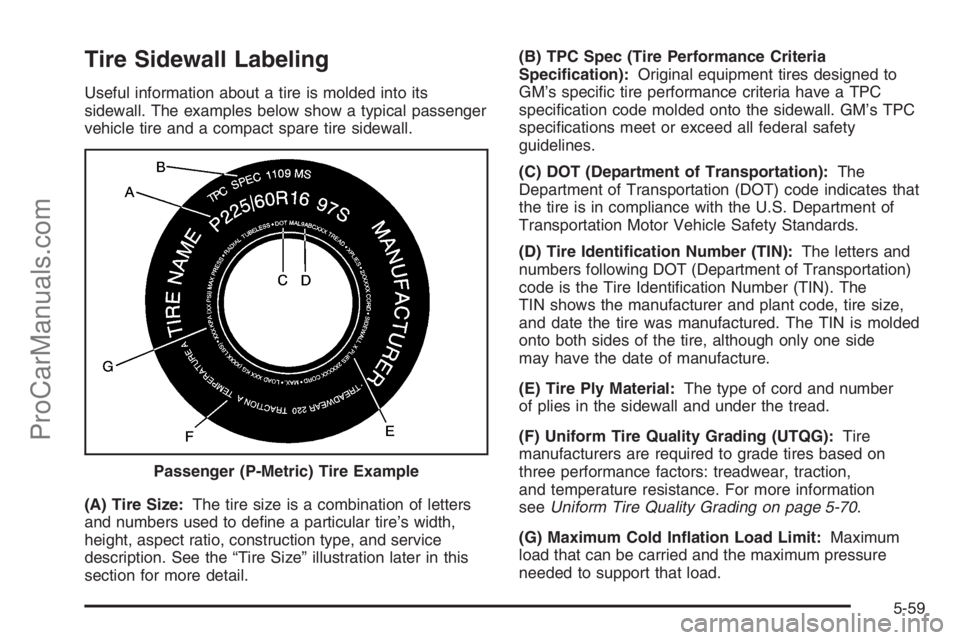
Tire Sidewall Labeling
Useful information about a tire is molded into its
sidewall. The examples below show a typical passenger
vehicle tire and a compact spare tire sidewall.
(A) Tire Size:The tire size is a combination of letters
and numbers used to dene a particular tire’s width,
height, aspect ratio, construction type, and service
description. See the “Tire Size” illustration later in this
section for more detail.(B) TPC Spec (Tire Performance Criteria
Specication):Original equipment tires designed to
GM’s specic tire performance criteria have a TPC
specication code molded onto the sidewall. GM’s TPC
specications meet or exceed all federal safety
guidelines.
(C) DOT (Department of Transportation):The
Department of Transportation (DOT) code indicates that
the tire is in compliance with the U.S. Department of
Transportation Motor Vehicle Safety Standards.
(D) Tire Identication Number (TIN):The letters and
numbers following DOT (Department of Transportation)
code is the Tire Identication Number (TIN). The
TIN shows the manufacturer and plant code, tire size,
and date the tire was manufactured. The TIN is molded
onto both sides of the tire, although only one side
may have the date of manufacture.
(E) Tire Ply Material:The type of cord and number
of plies in the sidewall and under the tread.
(F) Uniform Tire Quality Grading (UTQG):Tire
manufacturers are required to grade tires based on
three performance factors: treadwear, traction,
and temperature resistance. For more information
seeUniform Tire Quality Grading on page 5-70.
(G) Maximum Cold Ination Load Limit:Maximum
load that can be carried and the maximum pressure
needed to support that load. Passenger (P-Metric) Tire Example
5-59
ProCarManuals.com
Page 296 of 392
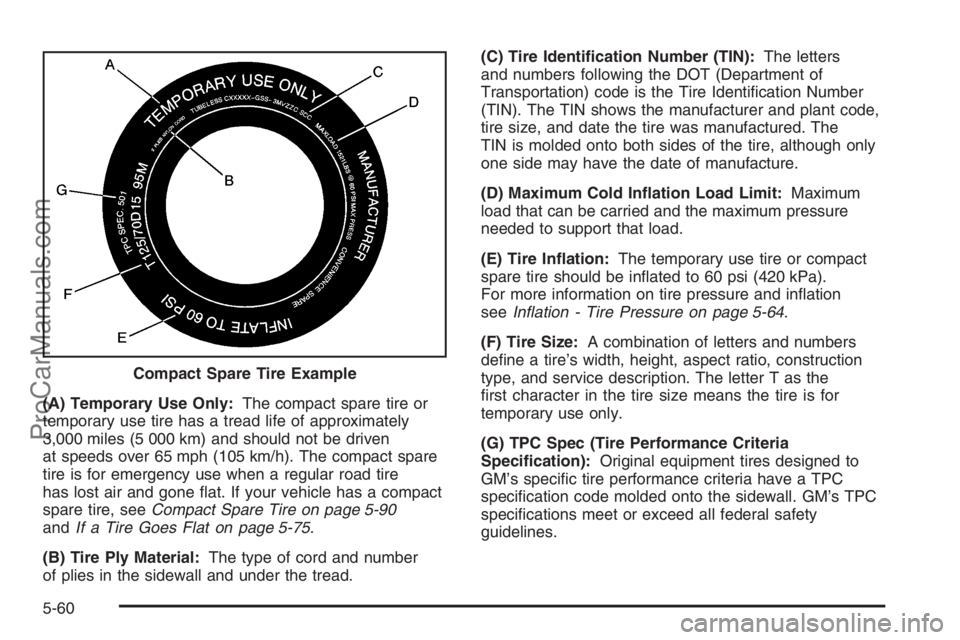
(A) Temporary Use Only:The compact spare tire or
temporary use tire has a tread life of approximately
3,000 miles (5 000 km) and should not be driven
at speeds over 65 mph (105 km/h). The compact spare
tire is for emergency use when a regular road tire
has lost air and gone at. If your vehicle has a compact
spare tire, seeCompact Spare Tire on page 5-90
andIf a Tire Goes Flat on page 5-75.
(B) Tire Ply Material:The type of cord and number
of plies in the sidewall and under the tread.(C) Tire Identication Number (TIN):The letters
and numbers following the DOT (Department of
Transportation) code is the Tire Identication Number
(TIN). The TIN shows the manufacturer and plant code,
tire size, and date the tire was manufactured. The
TIN is molded onto both sides of the tire, although only
one side may have the date of manufacture.
(D) Maximum Cold Ination Load Limit:Maximum
load that can be carried and the maximum pressure
needed to support that load.
(E) Tire Ination:The temporary use tire or compact
spare tire should be inated to 60 psi (420 kPa).
For more information on tire pressure and ination
seeInation - Tire Pressure on page 5-64.
(F) Tire Size:A combination of letters and numbers
dene a tire’s width, height, aspect ratio, construction
type, and service description. The letter T as the
rst character in the tire size means the tire is for
temporary use only.
(G) TPC Spec (Tire Performance Criteria
Specication):Original equipment tires designed to
GM’s specic tire performance criteria have a TPC
specication code molded onto the sidewall. GM’s TPC
specications meet or exceed all federal safety
guidelines. Compact Spare Tire Example
5-60
ProCarManuals.com
Page 300 of 392

Sidewall:The portion of a tire between the tread and
the bead.
Speed Rating:An alphanumeric code assigned to a
tire indicating the maximum speed at which a tire
can operate.
Traction:The friction between the tire and the road
surface. The amount of grip provided.
Tread:The portion of a tire that comes into contact
with the road.
Treadwear Indicators:Narrow bands, sometimes
called wear bars, that show across the tread of a tire
when only 1/16 inch (1.6 mm) of tread remains.
SeeWhen It Is Time for New Tires on page 5-68.
UTQGS (Uniform Tire Quality Grading Standards):
A tire information system that provides consumers
with ratings for a tire’s traction, temperature, and
treadwear. Ratings are determined by tire manufacturers
using government testing procedures. The ratings are
molded into the sidewall of the tire. SeeUniform
Tire Quality Grading on page 5-70.
Vehicle Capacity Weight:The number of designated
seating positions multiplied by 150 lbs (68 kg) plus
the rated cargo load. SeeLoading Your Vehicle
on page 4-31.Vehicle Maximum Load on the Tire:Load on an
individual tire due to curb weight, accessory weight,
occupant weight, and cargo weight.
Vehicle Placard:A label permanently attached to a
vehicle showing the vehicle’s capacity weight and
the original equipment tire size and recommended
ination pressure. See “Tire and Loading Information
Label” underLoading Your Vehicle on page 4-31.
Ination - Tire Pressure
Tires need the correct amount of air pressure to operate
effectively.
Notice:Do not let anyone tell you that
under-ination or over-ination is all right. It is not.
If your tires do not have enough air (under-ination),
you can get the following:
Too much exing
Too much heat
Tire overloading
Premature or irregular wear
Poor handling
Reduced fuel economy
5-64
ProCarManuals.com
Page 301 of 392
If your tires have too much air (over-ination), you
can get the following:
Unusual wear
Poor handling
Rough ride
Needless damage from road hazards
A Tire and Loading Information label is attached to the
vehicle’s center pillar, below the driver’s door latch
or inside the glove box. This label lists your vehicle’s
original equipment tires and their recommended cold
tire ination pressures. The recommended cold tire
ination pressure, shown on the label, is the minimum
amount of air pressure needed to support your vehicle’s
maximum load carrying capacity.
For additional information regarding how much weight
your vehicle can carry, and an example of the tire
and loading information label, seeLoading Your Vehicle
on page 4-31. How you load your vehicle affects
vehicle handling and ride comfort, never load your
vehicle with more weight than it was designed to carry.
When to Check
Check your tires once a month or more. Do not forget
to check the compact spare tire, it should be at
60 psi (420 kPa). For additional information regarding
the compact spare tire, seeCompact Spare Tire
on page 5-90.
How to Check
Use a good quality pocket-type gage to check tire
pressure. You cannot tell if your tires are properly
inated simply by looking at them. Radial tires may look
properly inated even when they’re under-inated.
Check the tire’s ination pressure when the tires are cold.
Cold means your vehicle has been sitting for at least
three hours or driven no more than 1 mile (1.6 km).
Remove the valve cap from the tire valve stem. Press
the tire gage rmly onto the valve to get a pressure
measurement. If the cold tire ination pressure matches
the recommended pressure on the Tire and Loading
Information label, no further adjustment is necessary.
If the ination pressure is low, add air until you reach the
recommended amount.
If you overll the tire, release air by pushing on the
metal stem in the center of the tire valve. Recheck the
tire pressure with the tire gage.
Be sure to put the valve caps back on the valve stems.
They help prevent leaks by keeping out dirt and
moisture.
5-65
ProCarManuals.com