manual radio set SATURN ION 2007 User Guide
[x] Cancel search | Manufacturer: SATURN, Model Year: 2007, Model line: ION, Model: SATURN ION 2007Pages: 440, PDF Size: 2.93 MB
Page 199 of 440
EQ (Equalization):Press this button to select
preset equalization settings.
To return to the manual mode, press the EQ
button until Manual displays or start to manually
adjust the bass, midrange, or treble by pressing
the tune knob.
Adjusting the Speakers (Balance/Fade)
BAL/FADE (Balance/Fade):To adjust balance
or fade, press the tune knob until the speaker
control labels appear on the display. Continue
pressing to highlight the desired label, or press the
pushbutton positioned under the desired label.
Turn the tune knob clockwise or counterclockwise
to adjust the highlighted setting. You can also
adjust the highlighted setting by pressing either the
SEEK, FWD, or REV button until the desired
levels are obtained.
To quickly adjust balance or fade to the middle
position, press the pushbutton positioned under the
BAL or FADE label for more than two seconds. A
beep sounds and the level adjusts to the middle
position.
To quickly adjust all speaker and tone controls to
the middle position, press the tune knob for more
than two seconds until a beep sounds.
Finding a Category (CAT) Station
CAT (Category):The CAT button is used to nd
XM™ stations when the radio is in the XM™
mode. To nd XM™ channels within a desired
category, perform the following:
1. Press the BAND button until the XM™
frequency is displayed. Press the CAT button
to display the category labels on the radio
display. Continue pressing the CAT button
until the desired category name is displayed.
2. Press either of the two buttons below
the desired category label to immediately tune
to the rst XM™ station associated with
that category.
3. Turn the tune knob, press the buttons below
the right or left arrows displayed, or press the
right or left SEEK buttons to go to the next
or previous XM™ station within the selected
category.
4. To exit the category search mode, press the
FAV button or BAND button to display your
favorites again.
199
ProCarManuals.com
Page 200 of 440
Undesired XM™ categories can be removed
through the setup menu. To remove an undesired
category, perform the following:
1. Press the MENU button to display the radio
setup menu.
2. Press the pushbutton located below the XM
CAT label.
3. Turn the tune knob to display the category
you want removed.
4. Press the pushbutton located under the
Remove label until the category name
along with the word Removed displays.
5. Repeat the steps to remove more categories.
Removed categories can be restored by pressing
the pushbutton under the Add label when a
removed category is displayed or by pressing the
pushbutton under the Restore All label.
The radio does not allow you to remove or add
categories while the vehicle is moving faster than
ve mph (eight km/h).Radio Messages
Calibration Error:The audio system has been
calibrated for your vehicle from the factory. If
Calibration Error displays, it means that the radio
has not been congured properly for your
vehicle and it must be returned to your retailer
for service.
Radio Messages for XM™ Only
SeeXM Radio Messages on page 212later in this
section for further detail.
Playing a CD (Single CD Player)
Insert a CD partway into the slot, label side up.
The player pulls it in and the CD should begin
playing.
200
ProCarManuals.com
Page 204 of 440
CD Messages
CHECK DISC:If this message appears on the
display and/or the CD comes out, it could be
for one of the following reasons:
It is very hot. When the temperature returns to
normal, the CD should play.
You are driving on a very rough road.
When the road becomes smoother, the CD
should play.
The CD is dirty, scratched, wet, or
upside down.
The air is very humid. If so, wait about an
hour and try again.
There may have been a problem while
burning the CD.
The label may be caught in the CD player.
If the CD is not playing correctly, for any other
reason, try a known good CD.
If any error occurs repeatedly or if an error cannot
be corrected, contact your retailer. If the radio
displays an error message, write it down and
provide it to your retailer when reporting
the problem.
Using the Auxiliary Input Jack
Your radio system has an auxiliary input jack
located on the lower right side of the faceplate.
This is not an audio output; do not plug the
headphone set into the front auxiliary input jack.
You can however, connect an external audio
device such as an iPod, laptop computer, MP3
player, CD changer, or cassette tape player, etc. to
the auxiliary input jack for use as another source
for audio listening.
Drivers are encouraged to set up any auxiliary
device while the vehicle is in park (P). See
Defensive Driving on page 218for more
information on driver distraction.
To use a portable audio player, connect a 3.5 mm
(1/8 inch) cable to the radio’s front auxiliary
input jack. When a device is connected, press the
radio CD/AUX button to begin playing audio
from the device over the car speakers.
204
ProCarManuals.com
Page 212 of 440
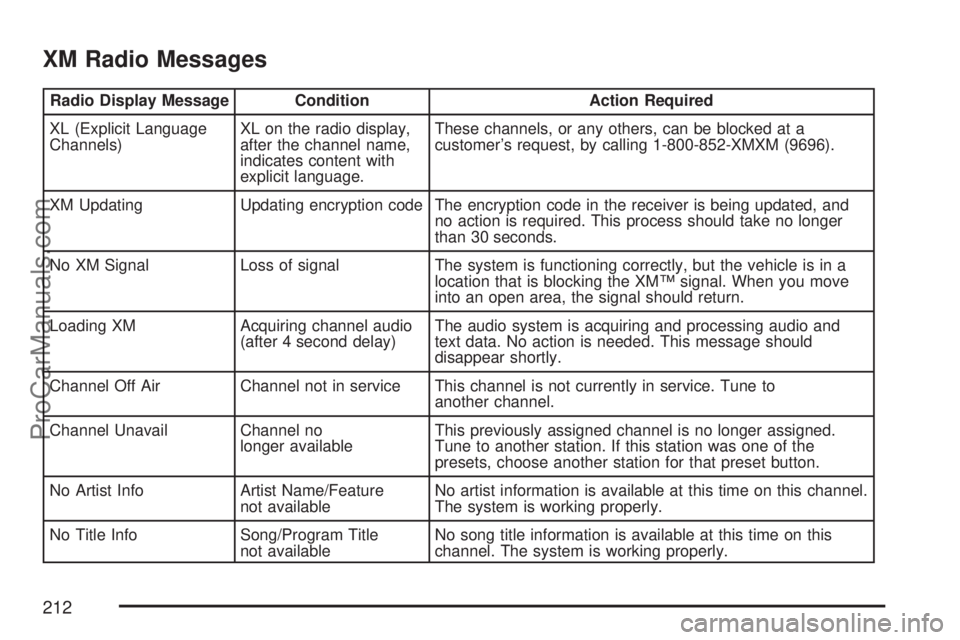
XM Radio Messages
Radio Display Message Condition Action Required
XL (Explicit Language
Channels)XL on the radio display,
after the channel name,
indicates content with
explicit language.These channels, or any others, can be blocked at a
customer’s request, by calling 1-800-852-XMXM (9696).
XM Updating Updating encryption code The encryption code in the receiver is being updated, and
no action is required. This process should take no longer
than 30 seconds.
No XM Signal Loss of signal The system is functioning correctly, but the vehicle is in a
location that is blocking the XM™ signal. When you move
into an open area, the signal should return.
Loading XM Acquiring channel audio
(after 4 second delay)The audio system is acquiring and processing audio and
text data. No action is needed. This message should
disappear shortly.
Channel Off Air Channel not in service This channel is not currently in service. Tune to
another channel.
Channel Unavail Channel no
longer availableThis previously assigned channel is no longer assigned.
Tune to another station. If this station was one of the
presets, choose another station for that preset button.
No Artist Info Artist Name/Feature
not availableNo artist information is available at this time on this channel.
The system is working properly.
No Title Info Song/Program Title
not availableNo song title information is available at this time on this
channel. The system is working properly.
212
ProCarManuals.com
Page 313 of 440

Notice:Ignoring these steps could result in
costly damage to your vehicle that would
not be covered by your warranty.
Trying to start your vehicle by pushing or
pulling it will not work, and it could damage
your vehicle.
1. Check the other vehicle. It must have a
12-volt battery with a negative ground system.
Notice:If the other vehicle’s system is not a
12-volt system with a negative ground,
both vehicles can be damaged. Only use
vehicles with 12-volt systems with negative
grounds to jump start your vehicle.
2. Get the vehicles close enough so the jumper
cables can reach, but be sure the vehicles are
not touching each other. If they are, it could
cause a ground connection you do not
want. You would not be able to start your
vehicle, and the bad grounding could damage
the electrical systems.To avoid the possibility of the vehicles rolling,
set the parking brake rmly on both vehicles
involved in the jump start procedure. Put
an automatic transaxle in PARK (P) or
a manual transaxle in NEUTRAL before
setting the parking brake.
Notice:If you leave your radio or other
accessories on during the jump starting
procedure, they could be damaged. The repairs
would not be covered by your warranty.
Always turn off your radio and other
accessories when jump starting your vehicle.
3. Turn off the ignition on both vehicles.
Unplug unnecessary accessories plugged into
the cigarette lighter or the accessory power
outlet. Turn off the radio and all lamps that are
not needed. This will avoid sparks and help
save both batteries. And it could save
the radio!
313
ProCarManuals.com
Page 428 of 440

Audio System (cont.)
Radio with CD................................190, 195
Setting the Time..............................187, 188
Understanding Radio Reception............... 214
XM™ Satellite Radio Antenna System...... 215
Automatic Headlamp System....................... 151
Automatic Transaxle
Fluid........................................................ 292
Operation................................................. 110
B
Battery........................................................ 311
Run-Down Protection............................... 153
Battery Warning Light.................................. 170
Before Leaving on a Long Trip.................... 241
Boost Gage................................................. 180
Brake
Emergencies............................................ 225
Parking.................................................... 115
Brakes........................................................ 308
System Warning Light.............................. 170
Braking....................................................... 222
Braking in Emergencies............................... 225
Break-In, New Vehicle................................. 104Bulb Replacement....................................... 318
Center High-Mounted
Stoplamp (CHMSL)............................... 324
Front Turn Signal, Parking and
Daytime Running Lamps..............322, 323
Halogen Bulbs......................................... 318
Headlamp Aiming..................................... 318
Headlamps......................................319, 320
License Plate Lamps................................ 326
Replacement Bulbs.................................. 326
Taillamps, Turn Signal, Stoplamps and
Back-up Lamps..................................... 324
Buying New Tires........................................ 341
C
Calibration..........................................122, 125
California Fuel............................................. 273
California Proposition 65 Warning................ 271
Canadian Owners........................................... 3
Capacities and Specications...................... 384
Carbon Monoxide............... 98,120, 244, 259
Care of
Safety Belts............................................. 369
Your CD Player........................................ 215
Your CDs ................................................. 215
428
ProCarManuals.com
Page 436 of 440
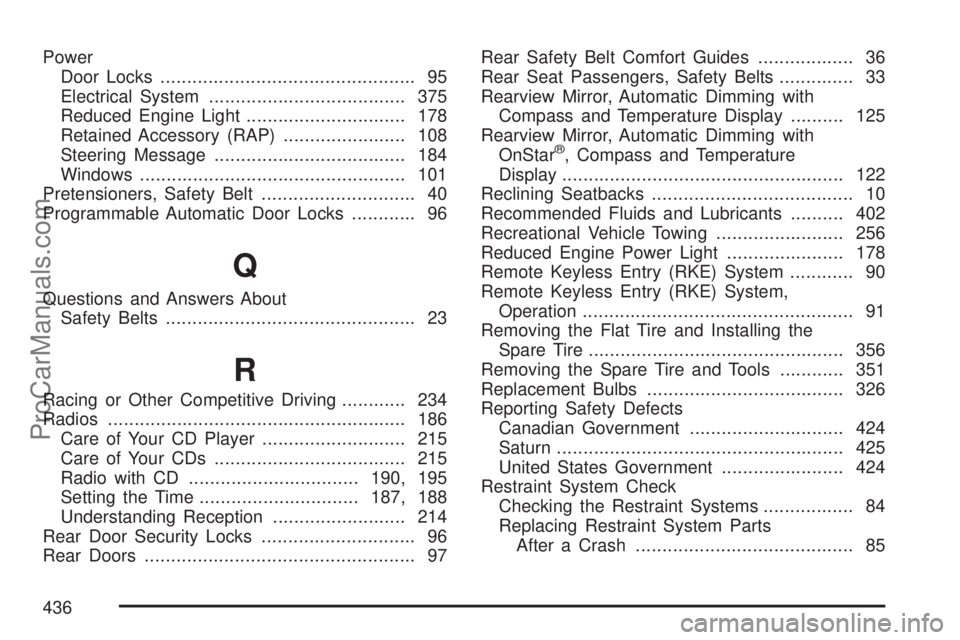
Power
Door Locks................................................ 95
Electrical System..................................... 375
Reduced Engine Light.............................. 178
Retained Accessory (RAP)....................... 108
Steering Message.................................... 184
Windows.................................................. 101
Pretensioners, Safety Belt............................. 40
Programmable Automatic Door Locks............ 96
Q
Questions and Answers About
Safety Belts............................................... 23
R
Racing or Other Competitive Driving............ 234
Radios........................................................ 186
Care of Your CD Player........................... 215
Care of Your CDs.................................... 215
Radio with CD................................190, 195
Setting the Time..............................187, 188
Understanding Reception......................... 214
Rear Door Security Locks............................. 96
Rear Doors................................................... 97Rear Safety Belt Comfort Guides.................. 36
Rear Seat Passengers, Safety Belts.............. 33
Rearview Mirror, Automatic Dimming with
Compass and Temperature Display.......... 125
Rearview Mirror, Automatic Dimming with
OnStar
®, Compass and Temperature
Display..................................................... 122
Reclining Seatbacks...................................... 10
Recommended Fluids and Lubricants.......... 402
Recreational Vehicle Towing........................ 256
Reduced Engine Power Light...................... 178
Remote Keyless Entry (RKE) System............ 90
Remote Keyless Entry (RKE) System,
Operation................................................... 91
Removing the Flat Tire and Installing the
Spare Tire................................................ 356
Removing the Spare Tire and Tools............ 351
Replacement Bulbs..................................... 326
Reporting Safety Defects
Canadian Government............................. 424
Saturn...................................................... 425
United States Government....................... 424
Restraint System Check
Checking the Restraint Systems................. 84
Replacing Restraint System Parts
After a Crash......................................... 85
436
ProCarManuals.com