roof SATURN ION 2007 User Guide
[x] Cancel search | Manufacturer: SATURN, Model Year: 2007, Model line: ION, Model: SATURN ION 2007Pages: 440, PDF Size: 2.93 MB
Page 88 of 440
Mirrors......................................................... 122
Automatic Dimming Rearview Mirror
with OnStar
®, Compass and
Temperature Display.............................. 122
Automatic Dimming Rearview Mirror with
Compass and Temperature Display........ 125
Outside Remote Control Mirror.................. 128
Outside Power Mirrors............................... 128
Outside Convex Mirror............................... 129OnStar
®System.......................................... 129
Storage Areas............................................. 133
Glove Box................................................. 133
Cupholder(s).............................................. 133
Center Console Storage Area.................... 133
Roof Rack System.................................... 134
Convenience Net....................................... 134
Sunroof....................................................... 135
Section 2 Features and Controls
88
ProCarManuals.com
Page 108 of 440
Retained Accessory Power (RAP)
Your vehicle has a Retained Accessory Power
(RAP) feature which will allow the radio, wipers,
power windows, sunroof and the rear power outlet
to work after the ignition is turned off.
Your radio will work when the ignition key is in
RUN or ACC (Accessory). Once the key is turned
from RUN to LOCK, the radio will continue to
work for up to 10 minutes or until any door
is opened.
Starting the Engine
Automatic Transaxle
Move the shift lever to PARK (P) or NEUTRAL (N).
The engine will not start in any other position — that
is a safety feature. To restart when you are already
moving, use NEUTRAL (N) only.
Notice:Shifting into PARK (P) with the vehicle
moving could damage the transaxle. Shift
into PARK (P) only when your vehicle is
stopped.
Manual Transaxle
The shift lever should be in NEUTRAL and the
parking brake engaged. Hold the clutch pedal to
the oor and start the engine. Your vehicle
will not start if the clutch pedal is not all the way
down — that is a safety feature.
Starting Procedure
1. With your foot off the accelerator pedal, turn
the ignition to START. When the engine starts,
let go of the key. The idle speed will go down
as your engine gets warm. Do not race the
engine immediately after starting it. Operate
the engine and transaxle gently until the oil
warms up and lubricates all moving parts.
Your vehicle has a Computer-Controlled
Cranking System. This feature assists in
starting the engine and protects the electrical
system. If the ignition key is turned to START,
and then released when the engine begins
cranking, the engine will continue cranking
until the vehicle starts or until it exceeds the
maximum cranking time allowed, approximately
15 seconds to prevent cranking motor damage.
108
ProCarManuals.com
Page 134 of 440
Roof Rack System
Your vehicle may have a roof rack system.
{CAUTION:
If you try to carry something on top of
your vehicle that is longer or wider than
the luggage carrier — like paneling,
plywood, a mattress and so forth — the
wind can catch it as you drive along. This
can cause you to lose control. What you
are carrying could be violently torn off,
and this could cause you or other drivers
to have a collision, and of course damage
your vehicle. You may be able to carry
something like this inside. But, never
carry something longer or wider than the
luggage carrier on top of your vehicle.Notice:Loading cargo on the luggage carrier
that weighs more than 100 lbs (45 kg) or
hangs over the rear or sides of the vehicle
may damage your vehicle. Load cargo so that
it rests on the slats as far forward as
possible and against the side rails, making
sure to fasten it securely.
Do not exceed the maximum vehicle capacity
when loading your vehicle. For more information
on vehicle capacity and loading, seeLoading Your
Vehicle on page 250.
To prevent damage or loss of cargo as you are
driving, check frequently to ensure your cargo
is securely fastened.
Convenience Net
Your vehicle may have a convenience net. It
attaches to the oor of the trunk. Put small loads
behind the net.
The net is not for heavier loads. Store them as far
forward in the trunk as you can.
See your retailer for information on obtaining a
convenience net.
134
ProCarManuals.com
Page 135 of 440

Sunroof
If the vehicle has a
sunroof, the switch that
operates it is located
on the headliner
between the map lamps.
The sunroof will only operate while the ignition is
on, or turned to ACC, or if Retained Accessory
Power (RAP) is active. SeeRetained Accessory
Power (RAP) on page 108.Press the sunroof switch rearward to open the
sunroof to the vent position. If the sunshade
is closed, it must be opened manually in the vent
position. Press and hold the switch rearward a
second time to open the sunroof. If the sunshade
is closed, it will open automatically when the
sunroof is opened.
To close the sunroof, press the switch forward and
hold it until the sunroof is closed. The sunroof
will stop if the switch is released. Close the
sunshade by hand.
The sunroof glass panel cannot be opened or
closed if the vehicle has an electrical failure.
Notice:If you force the sunshade forward of
the sliding glass panel, damage will occur
and the sunroof may not open or close
properly. Always close the glass panel before
closing the sunshade.
135
ProCarManuals.com
Page 215 of 440
Care of Your CDs
Handle CDs carefully. Store them in their original
cases or other protective cases and away from
direct sunlight and dust. The CD player scans the
bottom surface of the disc. If the surface of a
CD is damaged, such as cracked, broken,
or scratched, the CD will not play properly or not
at all. If the surface of a CD is soiled, take a
soft, lint free cloth or dampen a clean, soft cloth in
a mild, neutral detergent solution mixed with
water, and clean it. Make sure the wiping process
starts from the center to the edge.
Do not touch the bottom side of a CD while
handling it; this could damage the surface. Pick up
CDs by grasping the outer edges or the edge of
the hole and the outer edge.
Care of the CD Player
Do not use CD lens cleaners for CD players
because the lens of the CD optics can become
contaminated by lubricants.
Fixed Mast Antenna
The xed mast antenna can withstand most car
washes without being damaged. If the mast should
ever become slightly bent, straighten it out by
hand. If the mast is badly bent, replace it.
Check occasionally to make sure the mast is still
tightened to the antenna base. If tightening is
required, tighten by hand.
XM™ Satellite Radio Antenna
System
The XM™ Satellite Radio antenna is located on
the roof of your vehicle. Keep this antenna clear of
snow and ice build up for clear radio reception.
A vehicle with a sunroof might not get the
best performance from the XM™ system if the
sunroof is open.
Loading items onto the roof of your vehicle can
interfere with the performance of the XM™ system.
Make sure the XM™ Satellite Radio antenna is
not obstructed.
215
ProCarManuals.com
Page 377 of 440
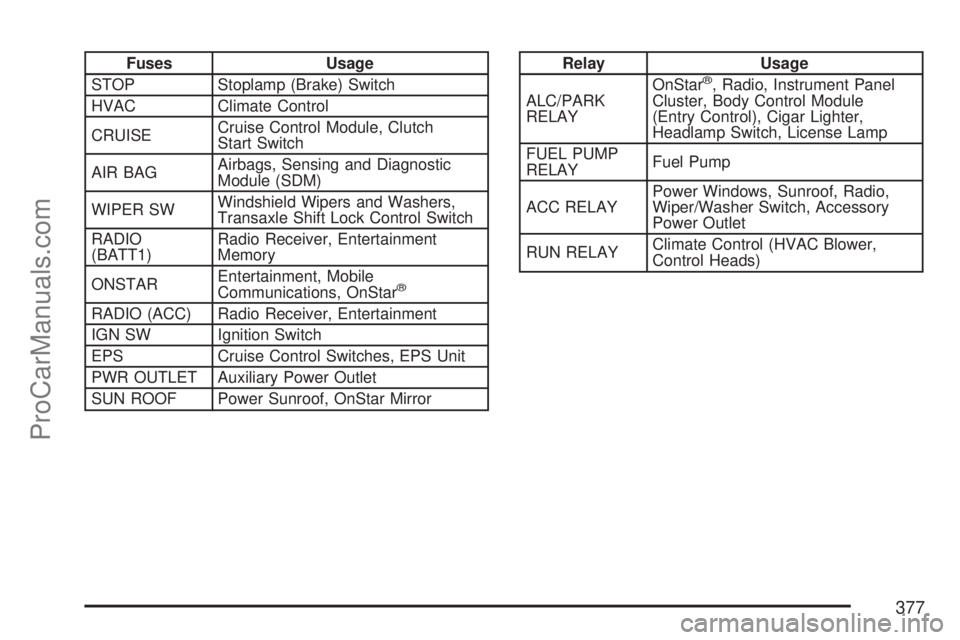
Fuses Usage
STOP Stoplamp (Brake) Switch
HVAC Climate Control
CRUISECruise Control Module, Clutch
Start Switch
AIR BAGAirbags, Sensing and Diagnostic
Module (SDM)
WIPER SWWindshield Wipers and Washers,
Transaxle Shift Lock Control Switch
RADIO
(BATT1)Radio Receiver, Entertainment
Memory
ONSTAREntertainment, Mobile
Communications, OnStar
®
RADIO (ACC) Radio Receiver, Entertainment
IGN SW Ignition Switch
EPS Cruise Control Switches, EPS Unit
PWR OUTLET Auxiliary Power Outlet
SUN ROOF Power Sunroof, OnStar Mirror
Relay Usage
ALC/PARK
RELAYOnStar®, Radio, Instrument Panel
Cluster, Body Control Module
(Entry Control), Cigar Lighter,
Headlamp Switch, License Lamp
FUEL PUMP
RELAYFuel Pump
ACC RELAYPower Windows, Sunroof, Radio,
Wiper/Washer Switch, Accessory
Power Outlet
RUN RELAYClimate Control (HVAC Blower,
Control Heads)
377
ProCarManuals.com
Page 396 of 440

(c)Visually inspect hoses and have them replaced
if they are cracked, swollen, or deteriorated.
Inspect all pipes, ttings, and clamps; replace with
genuine Saturn parts as needed. To help ensure
proper operation, a pressure test of the cooling
system and pressure cap and cleaning the outside
of the radiator and air conditioning condenser is
recommended at least once a year.
(d)Visually inspect wiper blades for wear or
cracking. Replace wiper blades that appear worn
or damaged or that streak or miss areas of
the windshield.
(e)Make sure the safety belt reminder light and all
your belts, buckles, latch plates, retractors, and
anchorages are working properly. Look for
any other loose or damaged safety belt system
parts. If you see anything that might keep a safety
belt system from doing its job, have it repaired.
Have any torn or frayed safety belts replaced. Also
look for any opened or broken airbag coverings,
and have them repaired or replaced. The
airbag system does not need regular maintenance.(f)Lubricate all key lock cylinders, door hinges
and latches, hood hinges and latches, glove box
hinges, sunroof (if the vehicle has one), and
any folding seat hardware. More frequent
lubrication may be required when exposed to a
corrosive environment. Applying silicone grease on
weatherstrips with a clean cloth will make them
last longer, seal better, and not stick or squeak.
(g)Check system for interference or binding
and for damaged or missing parts. Replace parts
as needed. Replace any components that
have high effort or excessive wear. Do not
lubricate accelerator or cruise control cables.
(h)Change automatic transaxle uid and lter if
the vehicle is mainly driven under one or more of
these conditions:
In heavy city traffic where the outside
temperature regularly reaches 90°F (32°C)
or higher.
In hilly or mountainous terrain.
When doing frequent trailer towing.
Uses such as found in taxi, police, or delivery
service.
396
ProCarManuals.com
Page 403 of 440
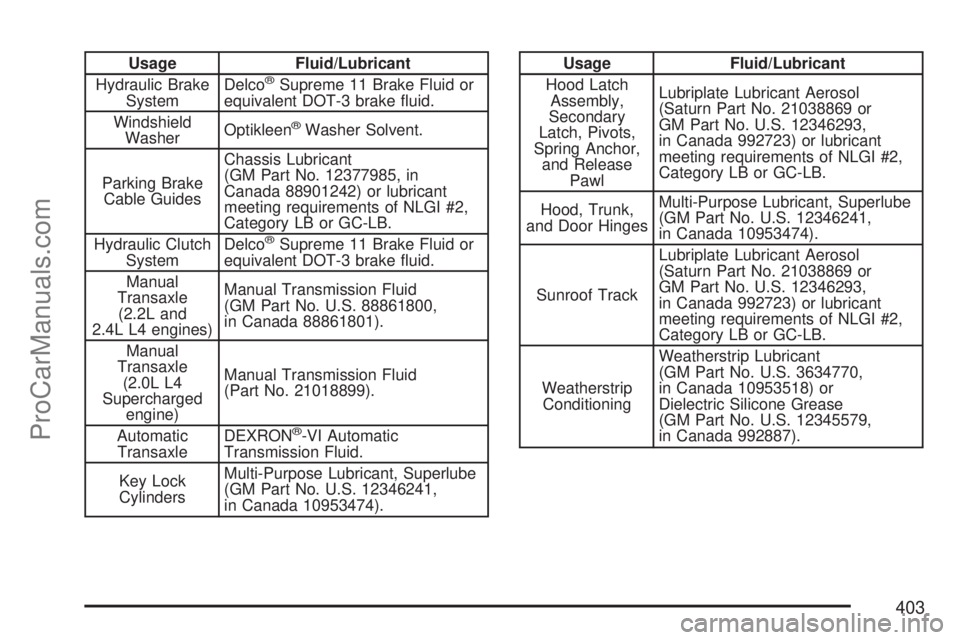
Usage Fluid/Lubricant
Hydraulic Brake
SystemDelco®Supreme 11 Brake Fluid or
equivalent DOT-3 brake uid.
Windshield
WasherOptikleen
®Washer Solvent.
Parking Brake
Cable GuidesChassis Lubricant
(GM Part No. 12377985, in
Canada 88901242) or lubricant
meeting requirements of NLGI #2,
Category LB or GC-LB.
Hydraulic Clutch
SystemDelco
®Supreme 11 Brake Fluid or
equivalent DOT-3 brake uid.
Manual
Transaxle
(2.2L and
2.4L L4 engines)Manual Transmission Fluid
(GM Part No. U.S. 88861800,
in Canada 88861801).
Manual
Transaxle
(2.0L L4
Supercharged
engine)Manual Transmission Fluid
(Part No. 21018899).
Automatic
TransaxleDEXRON
®-VI Automatic
Transmission Fluid.
Key Lock
CylindersMulti-Purpose Lubricant, Superlube
(GM Part No. U.S. 12346241,
in Canada 10953474).
Usage Fluid/Lubricant
Hood Latch
Assembly,
Secondary
Latch, Pivots,
Spring Anchor,
and Release
PawlLubriplate Lubricant Aerosol
(Saturn Part No. 21038869 or
GM Part No. U.S. 12346293,
in Canada 992723) or lubricant
meeting requirements of NLGI #2,
Category LB or GC-LB.
Hood, Trunk,
and Door HingesMulti-Purpose Lubricant, Superlube
(GM Part No. U.S. 12346241,
in Canada 10953474).
Sunroof TrackLubriplate Lubricant Aerosol
(Saturn Part No. 21038869 or
GM Part No. U.S. 12346293,
in Canada 992723) or lubricant
meeting requirements of NLGI #2,
Category LB or GC-LB.
Weatherstrip
ConditioningWeatherstrip Lubricant
(GM Part No. U.S. 3634770,
in Canada 10953518) or
Dielectric Silicone Grease
(GM Part No. U.S. 12345579,
in Canada 992887).
403
ProCarManuals.com
Page 437 of 440
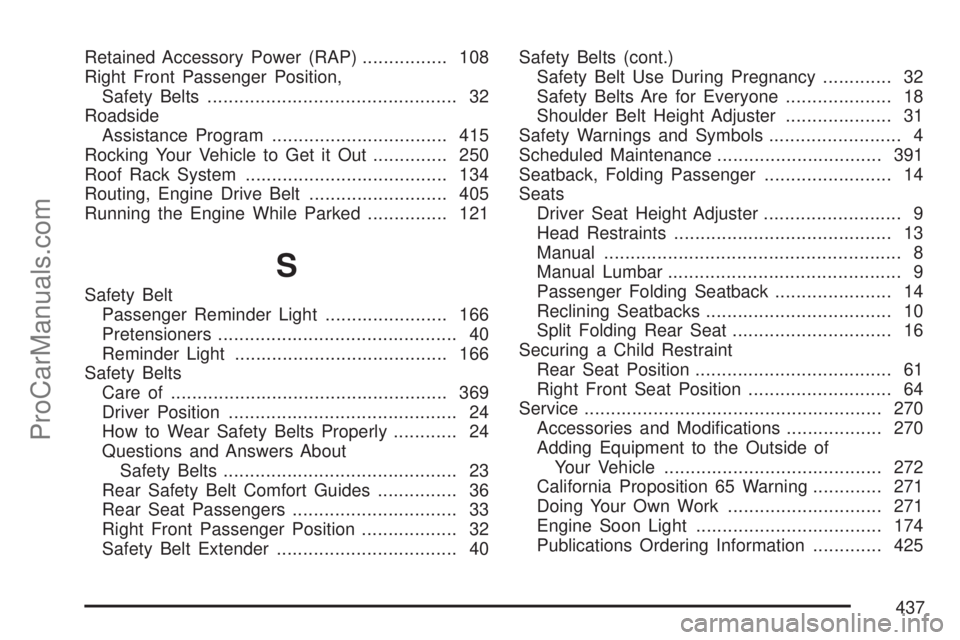
Retained Accessory Power (RAP)................ 108
Right Front Passenger Position,
Safety Belts............................................... 32
Roadside
Assistance Program................................. 415
Rocking Your Vehicle to Get it Out.............. 250
Roof Rack System...................................... 134
Routing, Engine Drive Belt.......................... 405
Running the Engine While Parked............... 121
S
Safety Belt
Passenger Reminder Light....................... 166
Pretensioners............................................. 40
Reminder Light........................................ 166
Safety Belts
Care of.................................................... 369
Driver Position........................................... 24
How to Wear Safety Belts Properly............ 24
Questions and Answers About
Safety Belts............................................ 23
Rear Safety Belt Comfort Guides............... 36
Rear Seat Passengers............................... 33
Right Front Passenger Position.................. 32
Safety Belt Extender.................................. 40Safety Belts (cont.)
Safety Belt Use During Pregnancy............. 32
Safety Belts Are for Everyone.................... 18
Shoulder Belt Height Adjuster.................... 31
Safety Warnings and Symbols......................... 4
Scheduled Maintenance............................... 391
Seatback, Folding Passenger........................ 14
Seats
Driver Seat Height Adjuster.......................... 9
Head Restraints......................................... 13
Manual........................................................ 8
Manual Lumbar............................................ 9
Passenger Folding Seatback...................... 14
Reclining Seatbacks................................... 10
Split Folding Rear Seat.............................. 16
Securing a Child Restraint
Rear Seat Position..................................... 61
Right Front Seat Position........................... 64
Service........................................................ 270
Accessories and Modications.................. 270
Adding Equipment to the Outside of
Your Vehicle......................................... 272
California Proposition 65 Warning............. 271
Doing Your Own Work............................. 271
Engine Soon Light................................... 174
Publications Ordering Information............. 425
437
ProCarManuals.com
Page 438 of 440
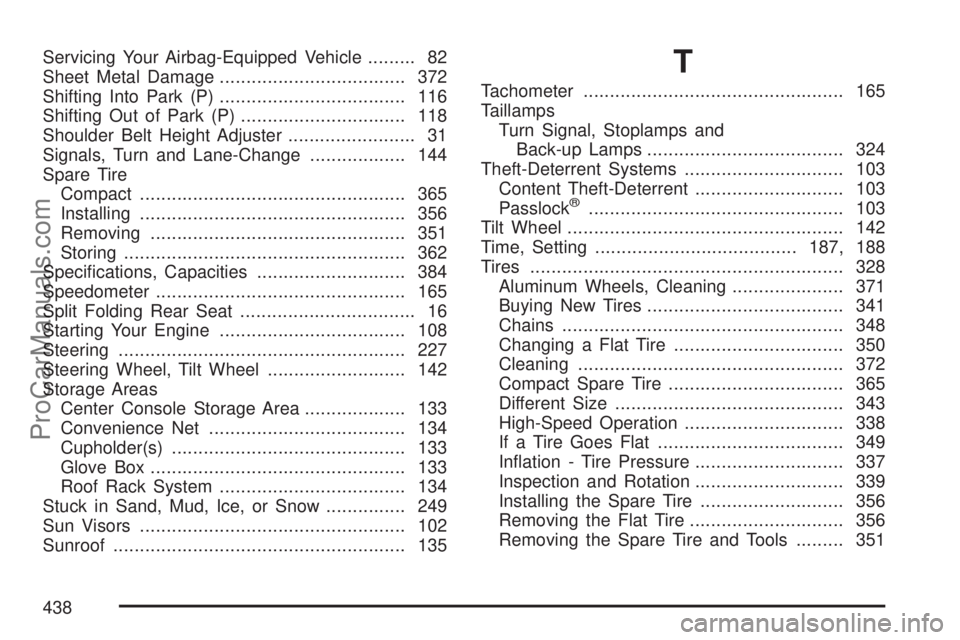
Servicing Your Airbag-Equipped Vehicle......... 82
Sheet Metal Damage................................... 372
Shifting Into Park (P)................................... 116
Shifting Out of Park (P)............................... 118
Shoulder Belt Height Adjuster........................ 31
Signals, Turn and Lane-Change.................. 144
Spare Tire
Compact.................................................. 365
Installing.................................................. 356
Removing................................................ 351
Storing..................................................... 362
Specications, Capacities............................ 384
Speedometer............................................... 165
Split Folding Rear Seat................................. 16
Starting Your Engine................................... 108
Steering...................................................... 227
Steering Wheel, Tilt Wheel.......................... 142
Storage Areas
Center Console Storage Area................... 133
Convenience Net..................................... 134
Cupholder(s)............................................ 133
Glove Box................................................ 133
Roof Rack System................................... 134
Stuck in Sand, Mud, Ice, or Snow............... 249
Sun Visors.................................................. 102
Sunroof....................................................... 135T
Tachometer................................................. 165
Taillamps
Turn Signal, Stoplamps and
Back-up Lamps..................................... 324
Theft-Deterrent Systems.............................. 103
Content Theft-Deterrent............................ 103
Passlock
®................................................ 103
Tilt Wheel.................................................... 142
Time, Setting......................................187, 188
Tires........................................................... 328
Aluminum Wheels, Cleaning..................... 371
Buying New Tires..................................... 341
Chains..................................................... 348
Changing a Flat Tire................................ 350
Cleaning.................................................. 372
Compact Spare Tire................................. 365
Different Size........................................... 343
High-Speed Operation.............................. 338
If a Tire Goes Flat................................... 349
Ination - Tire Pressure............................ 337
Inspection and Rotation............................ 339
Installing the Spare Tire........................... 356
Removing the Flat Tire............................. 356
Removing the Spare Tire and Tools......... 351
438
ProCarManuals.com