brake light SATURN OUTLOOK 2008 User Guide
[x] Cancel search | Manufacturer: SATURN, Model Year: 2008, Model line: OUTLOOK, Model: SATURN OUTLOOK 2008Pages: 488, PDF Size: 3 MB
Page 216 of 488

SERVICE ALL WHEEL DRIVE
If your vehicle has the All-Wheel Drive (AWD) system,
this message displays if there is a problem with this
system. If this message appears, stop as soon as
possible and turn off the vehicle. Restart the vehicle
after 30 seconds and check for the message on the
DIC display. If the message is still displayed or appears
again when you begin driving, the AWD system
needs service. See your dealer/retailer.
SERVICE BATTERY CHARGING
SYSTEM
On some vehicles, this message displays if there is a
problem with the battery charging system. Under certain
conditions, the charging system light may also turn on
in the instrument panel cluster. SeeCharging System
Light on page 3-43. Driving with this problem could drain
the battery. Turn off all unnecessary accessories.
Have the electrical system checked as soon as possible.
See your dealer/retailer.
SERVICE BRAKE SYSTEM
This message displays along with the brake system
warning light if there is a problem with the brake system.
SeeBrake System Warning Light on page 3-45. If this
message appears, stop as soon as possible and turn off
the vehicle. Restart the vehicle and check for the
message on the DIC display. If the message is still
displayed or appears again when you begin driving,
the brake system needs service as soon as possible.
See your dealer/retailer.
SERVICE PARK ASSIST
If your vehicle has the Ultrasonic Rear Parking Assist
(URPA) system, this message displays if there is a
problem with the URPA system. Do not use this system
to help you park. SeeUltrasonic Rear Parking Assist
(URPA) on page 2-44for more information. See your
dealer/retailer for service.
SERVICE POWER STEERING
This message displays when a problem is detected with
the power steering system. When this message is
displayed, you may notice that the effort required to
steer the vehicle increases or feels heavier, but you will
still be able to steer the vehicle. Have your vehicle
serviced by your dealer/retailer immediately.
3-70
ProCarManuals.com
Page 278 of 488

Braking
SeeBrake System Warning Light on page 3-45.
Braking action involves perception time and reaction
time. First, you have to decide to push on the brake
pedal. That is perception time. Then you have to bring
up your foot and do it. That is reaction time.
Average reaction time is about three-fourths of a
second. But that is only an average. It might be less
with one driver and as long as two or three seconds or
more with another. Age, physical condition, alertness,
coordination, and eyesight all play a part. So do alcohol,
drugs, and frustration. But even in three-fourths of a
second, a vehicle moving at 60 mph (100 km/h) travels
66 feet (20 m). That could be a lot of distance in an
emergency, so keeping enough space between
your vehicle and others is important.
And, of course, actual stopping distances vary greatly
with the surface of the road, whether it is pavement or
gravel; the condition of the road, whether it is wet, dry, or
icy; tire tread; the condition of the brakes; the weight of
the vehicle; and the amount of brake force applied.Avoid needless heavy braking. Some people drive in
spurts — heavy acceleration followed by heavy
braking — rather than keeping pace with traffic. This is
a mistake. The brakes might not have time to cool
between hard stops. The brakes will wear out much
faster if you do a lot of heavy braking. If you keep pace
with the traffic and allow realistic following distances,
you will eliminate a lot of unnecessary braking.
That means better braking and longer brake life.
If your vehicle’s engine ever stops while you are driving,
brake normally but do not pump the brakes. If you do,
the pedal could get harder to push down. If the
engine stops, you will still have some power brake
assist. But you will use it when you brake. Once the
power assist is used up, it can take longer to stop and
the brake pedal will be harder to push.
Adding non-dealer/non-retailer accessories can affect
your vehicle’s performance. SeeAccessories and
Modifications on page 5-3.
4-4
ProCarManuals.com
Page 279 of 488

Antilock Brake System (ABS)
Your vehicle has the Antilock Brake System (ABS), an
advanced electronic braking system that will help
prevent a braking skid.
When you start the engine and begin to drive away,
ABS will check itself. You might hear a momentary
motor or clicking noise while this test is going on, and
you might even notice that the brake pedal moves
a little. This is normal.
If there is a problem with
ABS, this warning light will
stay on. SeeAntilock Brake
System (ABS) Warning
Light on page 3-46.
Let us say the road is wet and you are driving safely.
Suddenly, an animal jumps out in front of you. You slam
on the brakes and continue braking. Here is what
happens with ABS:
A computer senses that wheels are slowing down.
If one of the wheels is about to stop rolling, the computer
will separately work the brakes at each wheel.ABS can change the brake pressure faster than any
driver could. The computer is programmed to make the
most of available tire and road conditions. This can
help you steer around the obstacle while braking hard.
As you brake, the computer keeps receiving updates
on wheel speed and controls braking pressure
accordingly.
Remember: ABS does not change the time you need to
get your foot up to the brake pedal or always decrease
stopping distance. If you get too close to the vehicle
in front of you, you will not have time to apply the brakes
if that vehicle suddenly slows or stops. Always leave
enough room up ahead to stop, even though you
have ABS.
Using ABS
Do not pump the brakes. Just hold the brake pedal
down rmly and let antilock work for you. You might hear
the antilock pump or motor operate, and feel the
brake pedal pulsate, but this is normal.
4-5
ProCarManuals.com
Page 280 of 488

Braking in Emergencies
With ABS, you can steer and brake at the same time.
In many emergencies, steering can help you more than
even the very best braking.
Panic Brake Assist
Your vehicle has a Panic Brake Assist feature designed
to assist the driver in stopping or decreasing vehicle
speed in emergency driving conditions. This feature uses
the Electronic Stability Control (ESC) hydraulic brake
control module to supplement the power brake system
under conditions where the driver has quickly and
forcefully applied the brake pedal in an attempt to quickly
stop or slow down the vehicle. The ESC hydraulic brake
control module increases brake pressure at each corner
of the vehicle until the Antilock Brake System (ABS)
activates. Minor brake pedal pulsations or pedal
movement during this time is normal and the driver
should continue to apply the brake pedal as the driving
situation dictates. The Panic Brake Assist feature will
automatically disengage when the brake pedal is
released or brake pedal pressure is quickly decreased.
StabiliTrak®System
Your vehicle has the StabiliTrak system which combines
antilock brake, traction and stability control systems
and helps the driver maintain directional control of the
vehicle in most driving conditions.
When you rst start your vehicle and begin to drive
away, the system performs several diagnostic checks to
ensure there are no problems. You may hear or feel the
system working. This is normal and does not mean there
is a problem with your vehicle. The system should
initialize before the vehicle reaches 20 mph (32 km/h).
In some cases, it may take approximately two miles of
driving before the system initializes.
If the system fails to turn on or activate, the StabiliTrak
light along with one of the following messages will be
displayed on the Driver Information Center (DIC):
TRACTION CONTROL OFF, SERVICE TRACTION
CONTROL, SERVICE STABILITRAK. If you see these
conditions, turn the vehicle off, wait 15 seconds, and then
turn it back on again to reset the system. If any of these
messages still appear on the Driver Information Center
(DIC), your vehicle should be taken in for service. For
more information on the DIC messages, seeDriver
Information Center (DIC) on page 3-54.
4-6
ProCarManuals.com
Page 281 of 488

The StabiliTrak light will
ash on the instrument
panel cluster when
the system is both on and
activated.
You may also feel or hear the system working; this is
normal.
The traction control disable
button is located on the
instrument panel below the
climate controls.
The traction control part of StabiliTrak can be turned
off by pressing and releasing the traction control
disable button.Traction control can be turned on by pressing and
releasing the traction control disable button if not
automatically shut off for any other reason.
When the traction control system is turned off, the
StabiliTrak light and the appropriate traction control off
message will be displayed on the DIC to warn the
driver. Your vehicle will still have brake-traction control
when traction control is off, but will not be able to
use the engine speed management system. See
“Traction Control Operation” next for more information.
When the traction control system has been turned
off, you may still hear system noises as a result of the
brake-traction control coming on.
It is recommended to leave the system on for normal
driving conditions, but it may be necessary to turn the
system off if your vehicle is stuck in sand, mud, ice or
snow, and you want to “rock” your vehicle to attempt to
free it. It may also be necessary to turn off the system
when driving in extreme off-road conditions where high
wheel spin is required. SeeIf Your Vehicle is Stuck in
Sand, Mud, Ice, or Snow on page 4-21.
4-7
ProCarManuals.com
Page 282 of 488

Traction Control Operation
The traction control system is part of the StabiliTrak
system. Traction control limits wheel spin by
reducing engine power to the wheels (engine speed
management) and by applying brakes to each individual
wheel (brake-traction control) as necessary.
The traction control system is enabled automatically
when you start your vehicle. It will activate and the
StabiliTrak light will ash if it senses that any of
the wheels are spinning or beginning to lose traction
while driving. If you turn off traction control, only
the brake-traction control portion of traction control will
work. The engine speed management will be disabled.
In this mode, engine power is not reduced automatically
and the driven wheels can spin more freely. This can
cause the brake-traction control to activate constantly.
Notice:If you allow the wheel(s) of one axle to spin
excessively while the StabiliTrak
®, ABS and brake
warning lights and the SERVICE STABILITRAK
message are displayed, you could damage thetransfer case. The repairs would not be covered by
your warranty. Reduce engine power and do not
spin the wheel(s) excessively while these lights and
this message are displayed.
The traction control system may activate on dry or
rough roads or under conditions such as heavy
acceleration while turning or abrupt upshifts/downshifts
of the transmission. When this happens, you may
notice a reduction in acceleration, or may hear a noise
or vibration. This is normal.
If your vehicle is in cruise control when the system
activates, the StabiliTrak light will ash and the cruise
control will automatically disengage. When road
conditions allow you to use cruise again, you may
re-engage the cruise control. SeeCruise Control on
page 3-12.
StabiliTrak may also turn off automatically if it
determines that a problem exists with the system.
If the problem does not clear itself after restarting the
vehicle, you should see your dealer/retailer for service.
4-8
ProCarManuals.com
Page 286 of 488
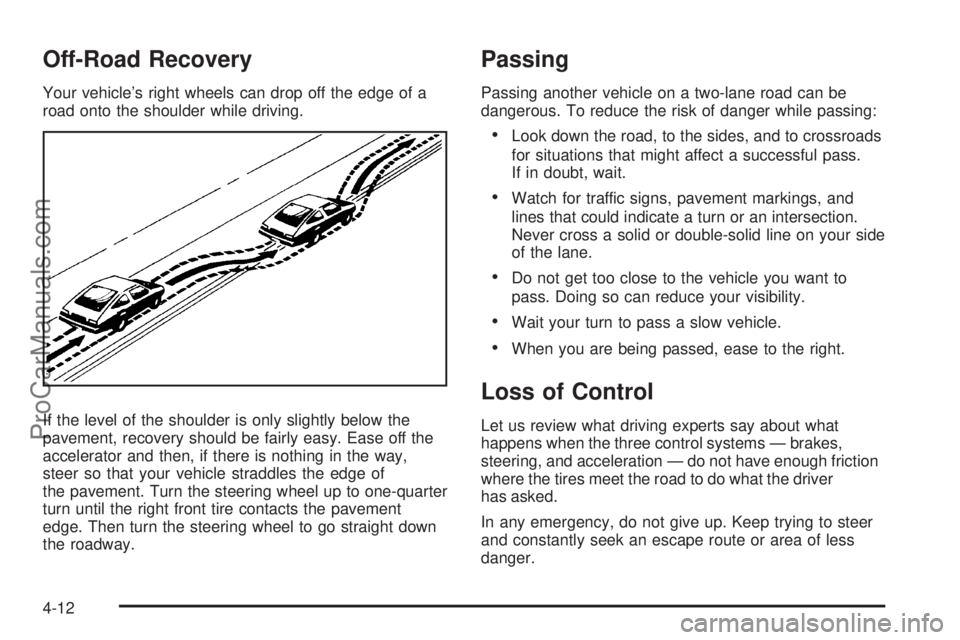
Off-Road Recovery
Your vehicle’s right wheels can drop off the edge of a
road onto the shoulder while driving.
If the level of the shoulder is only slightly below the
pavement, recovery should be fairly easy. Ease off the
accelerator and then, if there is nothing in the way,
steer so that your vehicle straddles the edge of
the pavement. Turn the steering wheel up to one-quarter
turn until the right front tire contacts the pavement
edge. Then turn the steering wheel to go straight down
the roadway.
Passing
Passing another vehicle on a two-lane road can be
dangerous. To reduce the risk of danger while passing:
Look down the road, to the sides, and to crossroads
for situations that might affect a successful pass.
If in doubt, wait.
Watch for traffic signs, pavement markings, and
lines that could indicate a turn or an intersection.
Never cross a solid or double-solid line on your side
of the lane.
Do not get too close to the vehicle you want to
pass. Doing so can reduce your visibility.
Wait your turn to pass a slow vehicle.
When you are being passed, ease to the right.
Loss of Control
Let us review what driving experts say about what
happens when the three control systems — brakes,
steering, and acceleration — do not have enough friction
where the tires meet the road to do what the driver
has asked.
In any emergency, do not give up. Keep trying to steer
and constantly seek an escape route or area of less
danger.
4-12
ProCarManuals.com
Page 289 of 488

{CAUTION:
Wet brakes can cause crashes. They might not
work as well in a quick stop and could cause
pulling to one side. You could lose control of
the vehicle.
After driving through a large puddle of water
or a car/vehicle wash, lightly apply the brake
pedal until the brakes work normally.
Flowing or rushing water creates strong
forces. Driving through owing water could
cause your vehicle to be carried away. If this
happens, you and other vehicle occupants
could drown. Do not ignore police warnings
and be very cautious about trying to drive
through owing water.
Hydroplaning
Hydroplaning is dangerous. Water can build up under
your vehicle’s tires so they actually ride on the
water. This can happen if the road is wet enough and
you are going fast enough. When your vehicle is
hydroplaning, it has little or no contact with the road.
There is no hard and fast rule about hydroplaning.
The best advice is to slow down when the road is wet.
Other Rainy Weather Tips
Besides slowing down, other wet weather driving tips
include:
Allow extra following distance.
Pass with caution.
Keep windshield wiping equipment in good shape.
Keep the windshield washer uid reservoir lled.
Have good tires with proper tread depth. SeeTires
on page 5-49.
Turn off cruise control, if equipped.
4-15
ProCarManuals.com
Page 291 of 488

{CAUTION:
If you do not shift down, the brakes could get
so hot that they would not work well. You
would then have poor braking or even none
going down a hill. You could crash. Shift down
to let the engine assist the brakes on a steep
downhill slope.
{CAUTION:
Coasting downhill in N (Neutral) or with the
ignition off is dangerous. The brakes will have
to do all the work of slowing down and they
could get so hot that they would not work well.
You would then have poor braking or even
none going down a hill. You could crash.
Always have the engine running and the
vehicle in gear when going downhill.
Stay in your own lane. Do not swing wide or cut
across the center of the road. Drive at speeds
that let you stay in your own lane.
Top of hills: Be alert — something could be in your
lane (stalled car, accident).
Pay attention to special road signs (falling rocks
area, winding roads, long grades, passing or
no-passing zones) and take appropriate action.
Winter Driving
Here are some tips for winter driving:
Have your vehicle in good shape for winter.
You might want to put winter emergency supplies in
your vehicle.
Include an ice scraper, a small brush or broom, a
supply of windshield washer uid, a rag, some winter
outer clothing, a small shovel, a ashlight, a red cloth,
and a couple of reective warning triangles. And, if
you will be driving under severe conditions, include a
small bag of sand, a piece of old carpet, or a couple of
burlap bags to help provide traction. Be sure you
properly secure these items in your vehicle.
Also seeTires on page 5-49.
4-17
ProCarManuals.com
Page 316 of 488
Basic Trailer Wiring
The trailer wiring harness, with a seven-pin connector,
is located at the rear of the vehicle and is tied to
the vehicle’s frame. The harness connector can be
plugged into a seven-pin universal heavy-duty trailer
connector available through your dealer/retailer.
The seven-wire harness contains the following trailer
circuits:
Yellow: Left Stop/Turn Signal
Dark Green: Right Stop/Turn Signal
Brown: Taillamps
Black: Ground
Light Green: Back-up Lamps
Red/Black: Battery Feed
Dark Blue: Trailer Brake*
*The fuse for this circuit is installed in the underhood
electrical center, but the wires are not connected.
They should be connected by your dealer/retailer or a
qualied service center.If the back-up lamp circuit is not functional, contact your
dealer/retailer.
If you are charging a remote (non-vehicle) battery, press
the Tow/Haul mode switch located on the center
console near the climate controls. This will boost the
vehicle system voltage and properly charge the battery.
If the trailer is too light for Tow/Haul mode, you can
turn on the headlamps (Non-HID only) as a second way
to boost the vehicle system and charge the battery.
Engine Cooling When Trailer Towing
Your cooling system may temporarily overheat during
severe operating conditions. SeeEngine Overheating on
page 5-23.
4-42
ProCarManuals.com