door lock SATURN OUTLOOK 2008 Owner's Manual
[x] Cancel search | Manufacturer: SATURN, Model Year: 2008, Model line: OUTLOOK, Model: SATURN OUTLOOK 2008Pages: 488, PDF Size: 3 MB
Page 164 of 488

Dome Lamps
The dome lamps automatically come on when a door is
opened, unless the dome lamp override button is
pressed in.
The lamps can also be turned on and off by turning the
instrument panel brightness control clockwise to the
farthest position.
Dome Lamp Override
The dome lamp override button is located next to the
exterior lamps control.
The dome lamp override sets the dome lamps to remain
off or come on automatically when a door is opened.
E(Dome Lamp Override):Press the button in
and the dome lamps remain off when a door is opened.
Press the button again to return it to the extended
position so that the dome lamps come on when a door
is opened.
Entry Lighting
For vehicles with courtesy lamps, they come on and
stay on for a set time whenever the unlock symbol
is pressed on the Remote Keyless Entry (RKE)
Transmitter, if the vehicle has one.
If a door is opened, the lamps stay on while it is open
and then turn off automatically about 25 seconds
after the door is closed. If the unlock symbol is pressed
and no door is opened, the lamps turn off after about
20 seconds.
Entry lighting includes a feature called theater dimming.
With theater dimming, the lamps do not turn off at
the end of the delay time. Instead, they slowly dim after
the delay time until they go out. The delay time is
canceled if the ignition key is turned to ON/RUN or the
power door lock switch is pressed. The lamps will
dim right away.
When the ignition is on, illuminated entry is inactive,
which means the courtesy lamps will not come on unless
a door is opened.
3-18
ProCarManuals.com
Page 165 of 488

Delayed Entry Lighting
Delayed entry lighting illuminates the interior for a
period of time after all the doors have been closed.
The ignition must be off for delayed entry lighting
to work. Immediately after all the doors have been
closed, the delayed entry lighting feature will continue to
work until one of the following occurs:
The ignition is in ON/RUN.
The doors are locked.
An illumination period of 25 seconds has elapsed.
If during the illumination period a door is opened,
the timed illumination period will be canceled and the
interior lamps will remain on because a door is open.
Delayed Exit Lighting
This feature illuminates the interior for a period of time
after the key is removed from the ignition.
The ignition must be off for delayed exit lighting to work.
When the key is removed, interior illumination will
activate and remain on until one of the following occurs:
The ignition is in ON/RUN.
The power door locks are activated.
An illumination period of 20 seconds has elapsed.
If during the illumination period a door is opened,
the timed illumination period will be canceled and the
interior lamps will remain on because a door is open.
Parade Dimming
Parade mode automatically prohibits the dimming of the
instrument panel displays during the daylight while
the headlamps are on so that the displays are still able
to be seen.
3-19
ProCarManuals.com
Page 221 of 488
DISPLAY LANGUAGE
This feature allows you to select the language in which
the DIC messages will appear.
Press the customization button until the DISPLAY
LANGUAGE screen appears on the DIC display. Press
the set/reset button once to access the settings for
this feature. Then press the customization button
to scroll through the following settings:
ENGLISH (default):All messages will appear in
English.
FRANCAIS:All messages will appear in French.
ESPANOL:All messages will appear in Spanish.
NO CHANGE:No change will be made to this feature.
The current setting will remain.
To select a setting, press the set/reset button while the
desired setting is displayed on the DIC.
You can also change the language by pressing the
trip odometer reset stem. See “Language” under DIC
Operation and Displays (Without DIC Buttons) earlier in
this section for more information.
AUTO DOOR LOCK
This feature allows you to select when the vehicle’s
doors will automatically lock. SeeProgrammable
Automatic Door Locks on page 2-11for more
information.
Press the customization button until AUTO DOOR
LOCK appears on the DIC display. Press the set/reset
button once to access the settings for this feature.
Then press the customization button to scroll through
the following settings:
SHIFT OUT OF PARK (default):The doors will
automatically lock when the vehicle is shifted out of
PARK (P).
AT VEHICLE SPEED:The doors will automatically lock
when the vehicle speed is above 8 mph (13 km/h) for
three seconds.
NO CHANGE:No change will be made to this feature.
The current setting will remain.
To select a setting, press the set/reset button while the
desired setting is displayed on the DIC.
3-75
ProCarManuals.com
Page 222 of 488

AUTO DOOR UNLOCK
This feature allows you to select whether or not to turn
off the automatic door unlocking feature. It also
allows you to select which doors and when the doors
will automatically unlock. SeeProgrammable Automatic
Door Locks on page 2-11for more information.
Press the customization button until AUTO DOOR
UNLOCK appears on the DIC display. Press the
set/reset button once to access the settings for this
feature. Then press the customization button to scroll
through the following settings:
OFF:None of the doors will automatically unlock.
DRIVER AT KEY OUT:Only the driver’s door will
unlock when the key is taken out of the ignition.
DRIVER IN PARK:Only the driver’s door will unlock
when the vehicle is shifted into PARK (P).
ALL AT KEY OUT:All of the doors will unlock when
the key is taken out of the ignition.
ALL IN PARK (default):All of the doors will unlock
when the vehicle is shifted into PARK (P).
NO CHANGE:No change will be made to this feature.
The current setting will remain.
To select a setting, press the set/reset button while the
desired setting is displayed on the DIC.
REMOTE DOOR LOCK
This feature allows you to select the type of feedback
you will receive when locking the vehicle with the
Remote Keyless Entry (RKE) transmitter. You will not
receive feedback when locking the vehicle with the RKE
transmitter if the doors are open. SeeRemote Keyless
Entry (RKE) System Operation on page 2-5for more
information.
Press the customization button until REMOTE DOOR
LOCK appears on the DIC display. Press the set/reset
button once to access the settings for this feature.
Then press the customization button to scroll through
the following settings:
OFF:There will be no feedback when you press the
lock button on the RKE transmitter.
LIGHTS ONLY:The exterior lamps will ash when you
press the lock button on the RKE transmitter.
HORN ONLY:The horn will sound on the second press
of the lock button on the RKE transmitter.
HORN & LIGHTS (default):The exterior lamps will ash
when you press the lock button on the RKE transmitter,
and the horn will sound when the lock button is pressed
again within ve seconds of the previous command.
NO CHANGE:No change will be made to this feature.
The current setting will remain.
To select a setting, press the set/reset button while the
desired setting is displayed on the DIC.
3-76
ProCarManuals.com
Page 223 of 488

REMOTE DOOR UNLOCK
This feature allows you to select the type of feedback
you will receive when unlocking the vehicle with
the Remote Keyless Entry (RKE) transmitter. You will
not receive feedback when unlocking the vehicle
with the RKE transmitter if the doors are open.
SeeRemote Keyless Entry (RKE) System Operation
on page 2-5for more information.
Press the customization button until REMOTE DOOR
UNLOCK appears on the DIC display. Press the
set/reset button once to access the settings for this
feature. Then press the customization button to scroll
through the following settings:
LIGHTS OFF:The exterior lamps will not ash when
you press the unlock button on the RKE transmitter.
LIGHTS ON (default):The exterior lamps will ash
when you press the unlock button on the RKE
transmitter.
NO CHANGE:No change will be made to this feature.
The current setting will remain.
To select a setting, press the set/reset button while the
desired setting is displayed on the DIC.
DELAY DOOR LOCK
This feature allows you to select whether or not the
locking of the vehicle’s doors and liftgate will be delayed.
When locking the doors and liftgate with the power
door lock switch and a door or the liftgate is open, this
feature will delay locking the doors and liftgate until
ve seconds after the last door is closed. You will hear
three chimes to signal that the delayed locking feature
is in use. The key must be out of the ignition for
this feature to work. You can temporarily override
delayed locking by pressing the power door lock switch
twice or the lock button on the RKE transmitter twice.
SeeDelayed Locking on page 2-11for more information.
Press the customization button until DELAY DOOR
LOCK appears on the DIC display. Press the set/reset
button once to access the settings for this feature.
Then press the customization button to scroll through
the following settings:
OFF:There will be no delayed locking of the
vehicle’s doors.
ON (default):The doors will not lock until ve seconds
after the last door or the liftgate is closed.
NO CHANGE:No change will be made to this feature.
The current setting will remain.
To select a setting, press the set/reset button while the
desired setting is displayed on the DIC.
3-77
ProCarManuals.com
Page 297 of 488
Tire and Loading Information Label
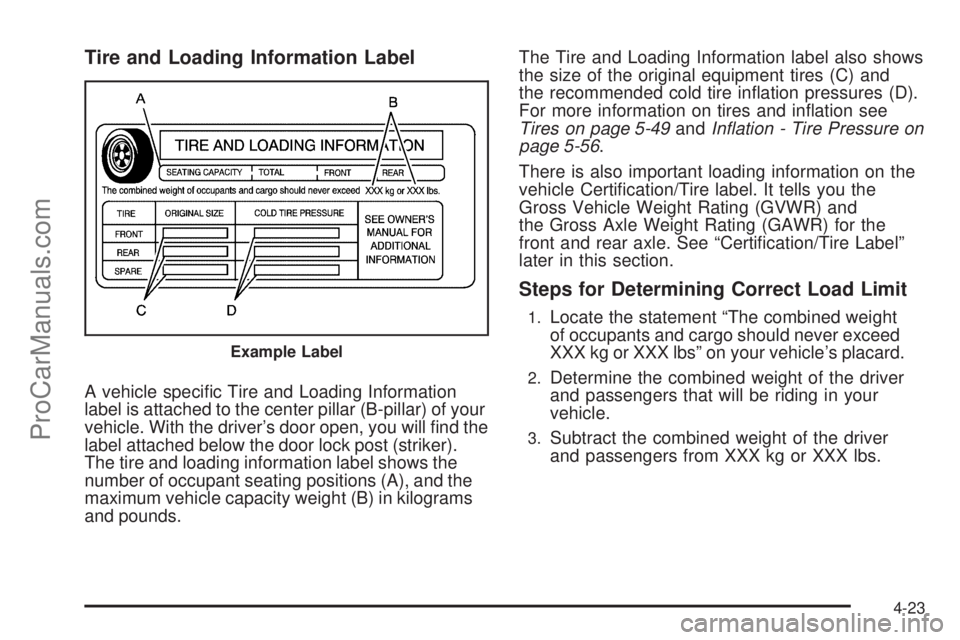
A vehicle specic Tire and Loading Information
label is attached to the center pillar (B-pillar) of your
vehicle. With the driver’s door open, you will nd the
label attached below the door lock post (striker).
The tire and loading information label shows the
number of occupant seating positions (A), and the
maximum vehicle capacity weight (B) in kilograms
and pounds.The Tire and Loading Information label also shows
the size of the original equipment tires (C) and
the recommended cold tire ination pressures (D).
For more information on tires and ination see
Tires on page 5-49andInflation - Tire Pressure on
page 5-56.
There is also important loading information on the
vehicle Certication/Tire label. It tells you the
Gross Vehicle Weight Rating (GVWR) and
the Gross Axle Weight Rating (GAWR) for the
front and rear axle. See “Certication/Tire Label”
later in this section.
Steps for Determining Correct Load Limit
1.Locate the statement “The combined weight
of occupants and cargo should never exceed
XXX kg or XXX lbs” on your vehicle’s placard.
2.Determine the combined weight of the driver
and passengers that will be riding in your
vehicle.
3.Subtract the combined weight of the driver
and passengers from XXX kg or XXX lbs.
Example Label
4-23
ProCarManuals.com
Page 325 of 488
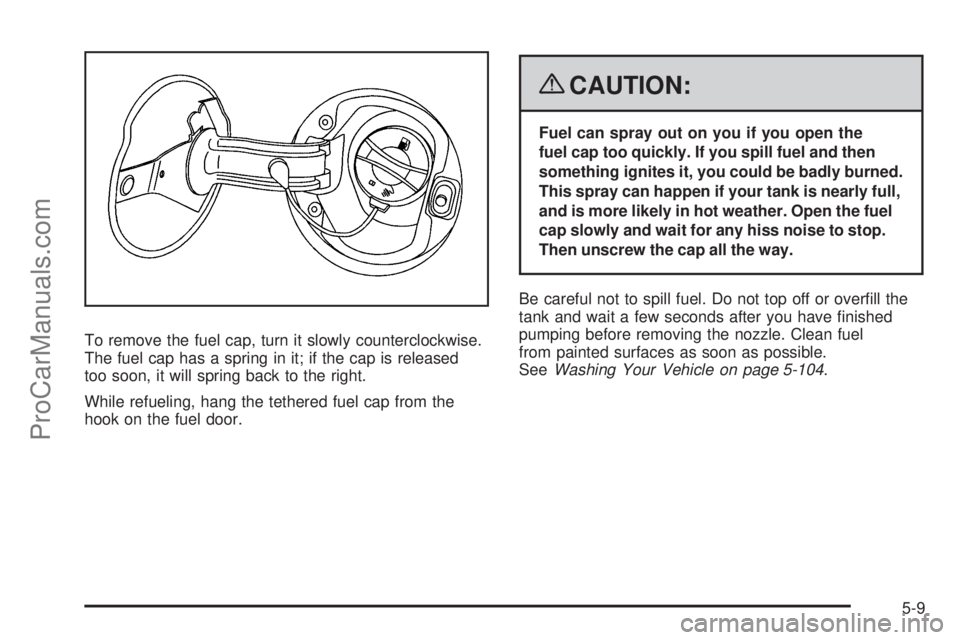
To remove the fuel cap, turn it slowly counterclockwise.
The fuel cap has a spring in it; if the cap is released
too soon, it will spring back to the right.
While refueling, hang the tethered fuel cap from the
hook on the fuel door.
{CAUTION:
Fuel can spray out on you if you open the
fuel cap too quickly. If you spill fuel and then
something ignites it, you could be badly burned.
This spray can happen if your tank is nearly full,
and is more likely in hot weather. Open the fuel
cap slowly and wait for any hiss noise to stop.
Then unscrew the cap all the way.
Be careful not to spill fuel. Do not top off or overll the
tank and wait a few seconds after you have nished
pumping before removing the nozzle. Clean fuel
from painted surfaces as soon as possible.
SeeWashing Your Vehicle on page 5-104.
5-9
ProCarManuals.com
Page 397 of 488
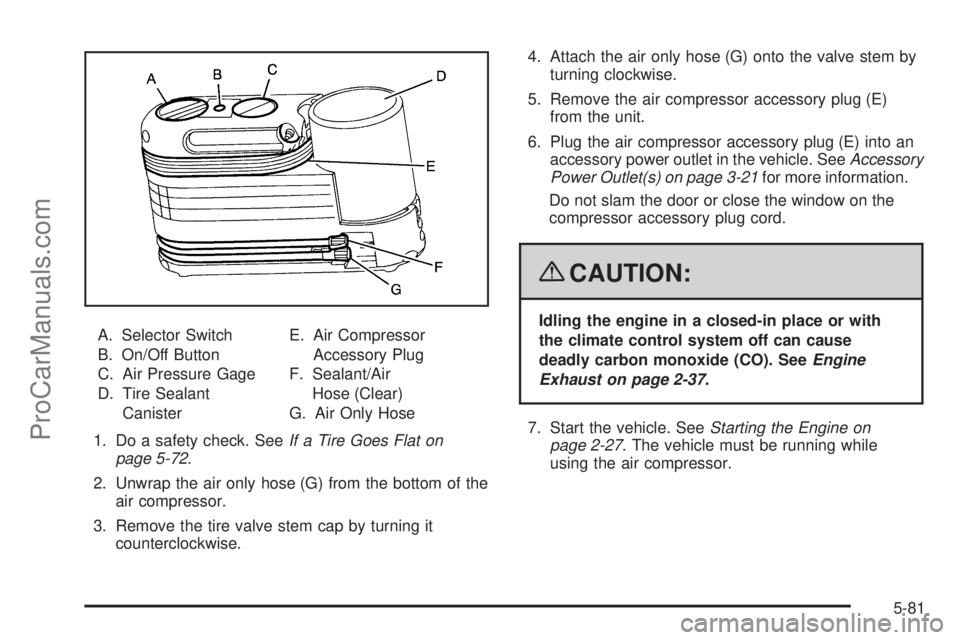
A. Selector Switch
B. On/Off Button
C. Air Pressure Gage
D. Tire Sealant
CanisterE. Air Compressor
Accessory Plug
F. Sealant/Air
Hose (Clear)
G. Air Only Hose
1. Do a safety check. SeeIf a Tire Goes Flat on
page 5-72.
2. Unwrap the air only hose (G) from the bottom of the
air compressor.
3. Remove the tire valve stem cap by turning it
counterclockwise.4. Attach the air only hose (G) onto the valve stem by
turning clockwise.
5. Remove the air compressor accessory plug (E)
from the unit.
6. Plug the air compressor accessory plug (E) into an
accessory power outlet in the vehicle. SeeAccessory
Power Outlet(s) on page 3-21for more information.
Do not slam the door or close the window on the
compressor accessory plug cord.
{CAUTION:
Idling the engine in a closed-in place or with
the climate control system off can cause
deadly carbon monoxide (CO). SeeEngine
Exhaust on page 2-37.
7. Start the vehicle. SeeStarting the Engine on
page 2-27. The vehicle must be running while
using the air compressor.
5-81
ProCarManuals.com
Page 402 of 488

Removing the Spare Tire
The compact spare tire is located under the vehicle, in
front of the rear bumper. SeeCompact Spare Tire on
page 5-100for more information about the compact
spare.
A. Rear Convenience
Center
B. Lug wrench
C. Storage
Compartment
Cap HoleD. Hoist Shaft
E. Compact Spare Tire
F. Retainer
G. Hoist Shaft
Assembly1. Open the storage compartment door of the
convenience center that is nearest the liftgate.
2. Move the carpet cutout that is located through the
hole of the storage compartment.
3. Attach the lug wrench into the hoist shaft.
4. Turn the lug wrench counterclockwise to lower
the spare tire to the ground. Continue turning
the wrench until the spare tire can be pulled out
from under the vehicle.
5. Tilt the retainer and slip it through the wheel
opening to remove the spare tire from the cable.
5-86
ProCarManuals.com
Page 428 of 488

Fuses Usage
FRT/WSW Front Windshield Wiper
SPARE Spare
HTD/SEAT Front Heated Seats
STR/WHL/
ILLUMSteering Wheel Illumination
MSM Memory Seat Module
PWR/MIRRORS Power Mirrors
DR/LCK Door Locks
AIRBAG Airbag System
LT/TRN/SIG Driver Side Turn Signal
REAR WIPER Rear Window Wiper
Fuse Side
5-112
ProCarManuals.com