battery SATURN OUTLOOK 2010 Service Manual
[x] Cancel search | Manufacturer: SATURN, Model Year: 2010, Model line: OUTLOOK, Model: SATURN OUTLOOK 2010Pages: 444, PDF Size: 4.43 MB
Page 386 of 444

10-80 Vehicle Care
{WARNING
Using a match near a battery can
cause battery gas to explode.
People have been hurt doing this,
and some have been blinded.
Use a flashlight if you need more
light.
Be sure the batteries have
enough water. You do not need to
add water to the ACDelco
®
battery (or batteries) installed in
your new vehicle. But if a battery
has filler caps, be sure the right
amount of fluid is there. If it is low,
add water to take care of that
first. If you do not, explosive gas
could be present.(Continued)
WARNING (Continued)
Battery fluid contains acid that
can burn you. Do not get it on
you. If you accidentally get it in
your eyes or on your skin, flush
the place with water and get
medical help immediately.
{WARNING
Fans or other moving engine
parts can injure you badly. Keep
your hands away from moving
parts once the engine is running.
5. Check that the jumper cables do not have loose or missing
insulation. If they do, you could
get a shock. The vehicles could
be damaged too. Before you connect the cables,
here are some basic things you
should know. Positive (+) will go
to positive (+) or to a remote
positive (+) terminal if the vehicle
has one. Negative (−) will go to a
heavy, unpainted metal engine
part or to a remote negative (−)
terminal if the vehicle has one.
Do not connect positive (+) to
negative (−) or you will get a
short that would damage the
battery and maybe other parts
too. And do not connect the
negative (−) cable to the
negative (−) terminal on the dead
battery because this can cause
sparks.
ProCarManuals.com
Page 387 of 444

Vehicle Care 10-81
6. Connect the red positive (+)cable to the positive (+) terminal
of the dead battery.
Use a remote positive (+)
terminal if the vehicle has one.
7. Do not let the other end touch metal. Connect it to the
positive (+) terminal of the
good battery. Use a remote
positive (+) terminal if the
vehicle has one. 8. Now connect the black
negative (−) cable to the
negative (−) terminal of the
good battery. Use a remote
negative (−) terminal if the
vehicle has one.
Do not let the other end touch
anything until the next step. The
other end of the negative (−)
cable does not go to the dead
battery. It goes to a heavy,
unpainted metal engine part,
or to a remote negative (−)
terminal on the vehicle with the
dead battery.9. Connect the other end of the
negative (−) cable at least
18 inches (45 cm) away from the
dead battery, but not near
engine parts that move.
The electrical connection is just
as good there, and the chance
of sparks getting back to the
battery is much less.
Your vehicle has a remote
negative (−) terminal for this
purpose.
ProCarManuals.com
Page 388 of 444
10-82 Vehicle Care
10. Now start the vehicle with thegood battery and run the
engine for a while.
11. Try to start the vehicle that had the dead battery. If it will not
start after a few tries, it
probably needs service.
Notice: If the jumper cables are
connected or removed in the
wrong order, electrical shorting
may occur and damage the
vehicle. The repairs would not be
covered by the vehicle warranty.
Always connect and remove the
jumper cables in the correct
order, making sure that the
cables do not touch each other or
other metal.
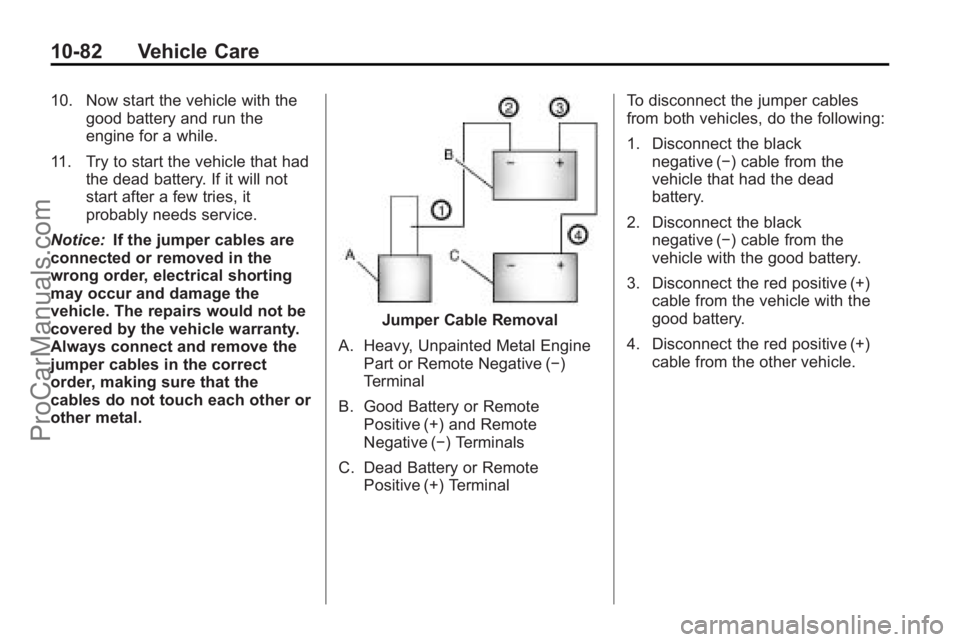
Jumper Cable Removal
A. Heavy, Unpainted Metal Engine Part or Remote Negative (−)
Terminal
B. Good Battery or Remote Positive (+) and Remote
Negative (−) Terminals
C. Dead Battery or Remote Positive (+) Terminal To disconnect the jumper cables
from both vehicles, do the following:
1. Disconnect the black
negative (−) cable from the
vehicle that had the dead
battery.
2. Disconnect the black negative (−) cable from the
vehicle with the good battery.
3. Disconnect the red positive (+) cable from the vehicle with the
good battery.
4. Disconnect the red positive (+) cable from the other vehicle.
ProCarManuals.com
Page 390 of 444

10-84 Vehicle Care
Dinghy Towing
If the vehicle is front-wheel-drive, it
can be dinghy towed from the front.
These vehicles may also be towed
by putting the front wheels on a
dolly. See“Dolly Towing” later in this
section.
If the vehicle is all-wheel-drive, it
can be dinghy towed from the front.
These vehicles can also be towed
by placing them on a platform trailer
with all four wheels off of the
ground. These vehicles cannot be
towed using a dolly. For vehicles being dinghy towed,
the vehicle should be run at the
beginning of each day and at each
RV fuel stop for about five minutes.
This will ensure proper lubrication of
transmission components. Re-install
the fuse to start the vehicle.
To tow the vehicle from the front
with all four wheels on the ground:
1. Position the vehicle to be towed,
shift the transmission to
P (Park), and turn the ignition to
LOCK/OFF.
2. Secure the vehicle to the towing vehicle.
3. Set the parking brake.
4. Turn the ignition to ACC/ ACCESSORY.
5. Shift the transmission to N (Neutral). 6. To prevent the battery from
draining while the vehicle is
being towed, remove the 50 amp
BATT1 fuse from the underhood
fuse block and store in a safe
location. See Engine
Compartment Fuse Block
on
page 10‑31.
7. Release the parking brake.
Notice: If the vehicle is towed
without performing each of the
steps listed under “Dinghy
Towing,” the automatic
transmission could be damaged.
Be sure to follow all steps of the
dinghy towing procedure prior to
and after towing the vehicle.
Notice: If 105 km/h (65 mph) is
exceeded while towing the
vehicle, it could be damaged.
Never exceed 105 km/h (65 mph)
while towing the vehicle.
ProCarManuals.com
Page 422 of 444
13-6 Customer Information
Calling for Assistance
When calling Roadside Assistance,
have the following information
ready:
.Your name, home address, and
home telephone number
.Telephone number of your
location
.Location of the vehicle
.Model, year, color, and license
plate number of the vehicle
.Odometer reading, Vehicle
Identification Number (VIN), and
delivery date of the vehicle
.Description of the problem
Coverage
Services are provided up to 5 years/
100,000 miles (160 000 km),
whichever comes first.
In the U.S., anyone driving the
vehicle is covered. In Canada, a
person driving the vehicle without
permission from the owner is not
covered.Roadside Assistance is not a part of
the New Vehicle Limited Warranty.
Saturn and General Motors of
Canada Limited reserve the right to
make any changes or discontinue
the Roadside Assistance program at
any time without notification.
Saturn and General Motors of
Canada Limited reserve the right to
limit services or payment to an
owner or driver if they decide the
claims are made too often, or the
same type of claim is made many
times.
Services Provided
.Emergency Fuel Delivery:
Delivery of enough fuel for the
vehicle to get to the nearest
service station.
.Lock-Out Service:
Service is
provided to unlock the vehicle if
you are locked out. A remote
unlock may be available if you
have OnStar
®. For security
reasons, the driver must present
identification before this service
is given.
.Emergency Tow From a Public
Road or Highway: Tow to the
nearest Saturn retailer for
warranty service, or if the vehicle
was in a crash and cannot be
driven. Assistance is also given
when the vehicle is stuck in
sand, mud, or snow.
.Flat Tire Change: Service is
provided to change a flat tire
with the spare tire. The spare
tire, if equipped, must be in good
condition and properly inflated.
It is the owner's responsibility for
the repair or replacement of the
tire if it is not covered by the
warranty.
.Battery Jump Start: Service is
provided to jump start a dead
battery.
Services Not Included in
Roadside Assistance
.Impound towing caused by
violation of any laws.
.Legal fines.
ProCarManuals.com
Page 433 of 444
INDEX i-1
A
Accessories andModifications . . . . . . . . . . . . . . . . . 10-3
Accessory Power . . . . . . . . . . . . . . 9-17
Add-On Electrical Equipment . . . . . . . . . . . . . . . . . . . 9-54
Adding Equipment to the
Airbag-Equipped Vehicle . . . . . 3-42
Adjustments Lumbar, Front Seats . . . . . . . . . . . 3-5
Air Cleaner/Filter, Engine . . . . . 10-12
Air Vents . . . . . . . . . . . . . . . . . . . . . . 8-12
Airbag System
Check . . . . . . . . . . . . . . . . . . . . . . . . 3-43
How Does an AirbagRestrain? . . . . . . . . . . . . . . . . . . . 3-35
Passenger Sensing System . . . . . . . . . . . . . . . . . . . . . . 3-37
What Makes an Airbag Inflate? . . . . . . . . . . . . . . . . . . . . . . 3-34
What Will You See After an Airbag Inflates? . . . . . . . . . . 3-35
When Should an Airbag Inflate? . . . . . . . . . . . . . . . . . . . . . . 3-33
Where Are the Airbags? . . . . . . 3-31 Airbags
Adding Equipment to the
Vehicle . . . . . . . . . . . . . . . . . . . . . . 3-42
Passenger Status Indicator . . . 5-16
Readiness Light . . . . . . . . . . . . . . 5-15
Servicing Airbag-Equipped Vehicles . . . . . . . . . . . . . . . . . . . . . 3-41
System Check . . . . . . . . . . . . . . . . 3-29
Alarm System Anti-Theft . . . . . . . . . . . . . . . . . . . . . 2-13
All-Wheel Drive . . . . . . . . . 10-25, 9-25
AM-FM Radio . . . . . . . . . . . . . . . . . . . 7-6
Antenna
Multi-Band . . . . . . . . . . . . . . . . . . . . 7-11
Anti-Theft Alarm System . . . . . . . . . . . . . . . . 2-13
Alarm System Messages . . . . . 5-38
Antilock Brake System (ABS) . . . . . . . . . . . . . . . . 9-26
Warning Light . . . . . . . . . . . . . . . . . 5-21
Appearance Care
Exterior . . . . . . . . . . . . . . . . . . . . . 10-86
Interior . . . . . . . . . . . . . . . . . . . . . . 10-90
Armrest Stoarge . . . . . . . . . . . . . . . . 4-1
Assistance Program, Roadside . . . . . . . . . . . . . . . . . . . . . 13-5 Audio Players . . . . . . . . . . . . . . . . . 7-12
CD . . . . . . . . . . . . . . . . . . . . . . . . . . . 7-12
MP3 . . . . . . . . . . . . . . . . . . . . 7-21, 7-27
Audio System Radio Reception . . . . . . . . . . . . . . 7-11
Rear Seat (RSA) . . . . . . . . . . . . . 7-43
Theft-Deterrent Feature . . . . . . . . 7-2
Automatic Door Locks . . . . . . . . . . . . . . . . . . . . 2-8
Automatic Transmission . . . . . . . 9-22 Fluid . . . . . . . . . . . . . . . . . . . . . . . . 10-12
Manual Mode . . . . . . . . . . . . . . . . . 9-24
Shiftlock Control System
Check . . . . . . . . . . . . . . . . . . . . . 10-25
Auxiliary Devices . . . . . . . . . . . . . . 7-33
B
Battery . . . . . . . . . . . . . . . . . . . . . . . 10-24 Jump Starting . . . . . . . . . . . . . . . 10-78
Load Management . . . . . . . . . . . . . 6-7
Power Protection . . . . . . . . . . . . . . 6-8
Voltage and ChargingMessages . . . . . . . . . . . . . . . . . . . 5-33
Blade Replacement, Wiper . . . 10-26
Bluetooth . . . . . . . . . . . . . . . . . . . . . . 7-45
ProCarManuals.com
Page 439 of 444

INDEX i-7
M
MaintenanceRecords . . . . . . . . . . . . . . . . . . . . . . 11-9
Maintenance Schedule Recommended Fluids andLubricants . . . . . . . . . . . . . . . . . . . 11-7
Scheduled Maintenance . . . . . . 11-2
Malfunction Indicator Lamp . . . . 5-17
Manual Mode . . . . . . . . . . . . . . . . . . 9-24
Messages Airbag System . . . . . . . . . . . . . . . . 5-38
Anti-Theft Alarm System . . . . . . 5-38
Battery Voltage and
Charging . . . . . . . . . . . . . . . . . . . . 5-33
Brake System . . . . . . . . . . . . . . . . 5-34
Door Ajar . . . . . . . . . . . . . . . . . . . . . 5-34
Engine Cooling System . . . . . . . 5-35
Engine Oil . . . . . . . . . . . . . . . . . . . . 5-36
Engine Power . . . . . . . . . . . . . . . . 5-36
Fuel System . . . . . . . . . . . . . . . . . . 5-36
Key and Lock . . . . . . . . . . . . . . . . . 5-37
Lamp . . . . . . . . . . . . . . . . . . . . . . . . . 5-37
Object Detection System . . . . . 5-37 Messages (cont.)
Ride Control System . . . . . . . . . . 5-38
Service Vehicle . . . . . . . . . . . . . . . 5-39
Tire . . . . . . . . . . . . . . . . . . . . . . . . . . . 5-39
Transmission . . . . . . . . . . . . . . . . . 5-40
Vehicle . . . . . . . . . . . . . . . . . . . . . . . 5-33
Vehicle Reminder . . . . . . . . . . . . . 5-41
Vehicle Speed . . . . . . . . . . . . . . . . 5-41
Washer Fluid . . . . . . . . . . . . . . . . . 5-41
Mirrors Automatic DimmingRearview . . . . . . . . . . . . . . . . . . . . 2-18
Convex . . . . . . . . . . . . . . . . . . . . . . . 2-16
Folding . . . . . . . . . . . . . . . . . . . . . . . 2-16
Heated . . . . . . . . . . . . . . . . . . . . . . . 2-17
Manual Rearview . . . . . . . . . . . . . 2-18
Outlets . . . . . . . . . . . . . . . . . . . . . . . . 5-9
Park Tilt . . . . . . . . . . . . . . . . . . . . . . 2-18
Power . . . . . . . . . . . . . . . . . . . . . . . . 2-16
Monitor System, Tire Pressure . . . . . . . . . . . . . . . . . . . . 10-44
MP3 . . . . . . . . . . . . . . . . . . . . . 7-21, 7-27
Multi-Band Antenna . . . . . . . . . . . . 7-11
N
Navigation System Vehicle Data Recordingand Privacy . . . . . . . . . . . . . . . 13-15
Net, Convenience . . . . . . . . . . . . . . 4-3
New Vehicle Break-In . . . . . . . . . . 9-15
O
Object Detection System Messages . . . . . . . . . . . . . . . . . . . . 5-37
Odometer . . . . . . . . . . . . . . . . . . . . . . 5-13
Off-Road Recovery . . . . . . . . . . . . . . . . . . . . . . 9-5
Oil Engine . . . . . . . . . . . . . . . . . . . . . . . . 10-8
Engine Oil Life System . . . . . 10-10
Messages . . . . . . . . . . . . . . . . . . . . 5-36
Pressure Light . . . . . . . . . . . . . . . . 5-23
Older Children, Restraints . . . . . 3-44
Online Owner Center . . . . . . . . . . 13-5
Operation, Infotainment System . . . . . . . . . . . . . . . . . . . . . . . . 7-2
ProCarManuals.com
Page 440 of 444

i-8 INDEX
OutletsPower . . . . . . . . . . . . . . . . . . . . . . . . . 5-9
Overheated Engine Protection
Operating Mode . . . . . . . . . . . . . 10-20
Overheating, Engine . . . . . . . . . . 10-18
P
Parade Dimming . . . . . . . . . . . . . . . . 6-7
Park Shifting Into . . . . . . . . . . . . . . . . . . . 9-19
Shifting Out of . . . . . . . . . . . . . . . . 9-20
Park Tilt Mirrors . . . . . . . . . . . . . . . . 2-18
Parking
Assist, Ultrasonic . . . . . . . . . . . . . 9-32
Brake . . . . . . . . . . . . . . . . . . . . . . . . . 9-27
Brake and P (Park)Mechanism Check . . . . . . . . 10-26
Over Things That Burn . . . . . . . 9-21
Passenger Airbag Status Indicator . . . . . . . . . . . . . . . . . . . . . 5-16
Passenger Sensing System . . . 3-37 Perchlorate Materials
Requirements, California . . . . . 10-3
Phone Bluetooth . . . . . . . . . . . . . . . . . . . . . 7-45
Power Door Locks . . . . . . . . . . . . . . . . . . . . 2-7
Mirrors . . . . . . . . . . . . . . . . . . . . . . . . 2-16
Protection, Battery . . . . . . . . . . . . . 6-8
Retained Accessory (RAP) . . . 9-17
Seat Adjustment . . . . . . . . . . . . . . . 3-3
Steering Fluid . . . . . . . . . . . . . . . 10-20
Windows . . . . . . . . . . . . . . . . . . . . . 2-20
Pregnancy, Using Safety Belts . . . . . . . . . . . . . . . . . . . . . . . . . 3-28
Privacy Radio Frequency
Identification (RFID) . . . . . . . 13-16
Program Courtesy Transportation . . . . . . 13-8
Proposition 65 Warning, California . . . . . . . . . . . . . . . . . . . . . 10-3
R
Radio Frequency
Identification (RFID) . . . . . . . . 13-16
Statement . . . . . . . . . . . . . . . . . . 13-16
Radios AM-FM Radio . . . . . . . . . . . . . . . . . . 7-6
CD/DVD Player . . . . . . . . . . . . . . . 7-14
Reception . . . . . . . . . . . . . . . . . . . . 7-11
Satellite . . . . . . . . . . . . . . . . . . . . . . . . 7-7
Reading Lamps . . . . . . . . . . . . . . . . . 6-6
Rear Climate Control System . . . . . . . . . . . . . . . . . 8-10, 8-11
Rear Seat Audio (RSA) System . . . . . . . . . . . . . . . . . . . . . . . 7-43
Rear Seat Entertainment System . . . . . . . . . . . . . . . . . . . . . . . 7-35
Rear Seat Audio (RSA) . . . . . . . 7-43
Rear Seats . . . . . . . . . . . . . . . . . . . . . 3-9
Rear Vision Camera (RVC) . . . . 9-34
Rear Window Washer/Wiper . . . . 5-6
Rearview Mirrors . . . . . . . . . . . . . . 2-18 Automatic Dimming . . . . . . . . . . . 2-18
ProCarManuals.com