horn SATURN OUTLOOK 2010 Owners Manual
[x] Cancel search | Manufacturer: SATURN, Model Year: 2010, Model line: OUTLOOK, Model: SATURN OUTLOOK 2010Pages: 444, PDF Size: 4.43 MB
Page 9 of 444
In Brief 1-3
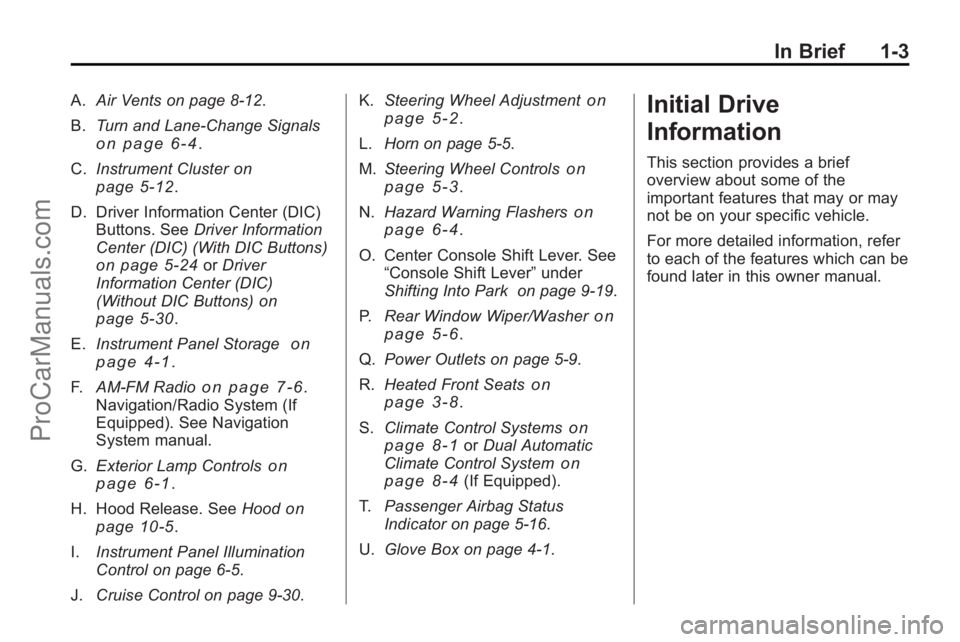
A.Air Vents on page 8‑12.
B. Turn and Lane-Change Signals
on page 6‑4.
C. Instrument Cluster
on
page 5‑12.
D. Driver Information Center (DIC) Buttons. See Driver Information
Center (DIC) (With DIC Buttons)
on page 5‑24or Driver
Information Center (DIC)
(Without DIC Buttons)
on
page 5‑30.
E. Instrument Panel Storage
on
page 4‑1.
F. AM-FM Radio
on page 7‑6.
Navigation/Radio System (If
Equipped). See Navigation
System manual.
G. Exterior Lamp Controls
on
page 6‑1.
H. Hood Release. See Hood
on
page 10‑5.
I. Instrument Panel Illumination
Control on page 6‑5.
J. Cruise Control on page 9‑30. K.
Steering Wheel Adjustment
on
page 5‑2.
L. Horn on page 5‑5.
M. Steering Wheel Controls
on
page 5‑3.
N. Hazard Warning Flashers
on
page 6‑4.
O. Center Console Shift Lever. See “Console Shift Lever” under
Shifting Into Park on page 9‑19.
P. Rear Window Wiper/Washer
on
page 5‑6.
Q. Power Outlets on page 5‑9.
R. Heated Front Seats
on
page 3‑8.
S. Climate Control Systems
on
page 8‑1or Dual Automatic
Climate Control Systemon
page 8‑4(If Equipped).
T. Passenger Airbag Status
Indicator on page 5‑16.
U. Glove Box on page 4‑1.
Initial Drive
Information
This section provides a brief
overview about some of the
important features that may or may
not be on your specific vehicle.
For more detailed information, refer
to each of the features which can be
found later in this owner manual.
ProCarManuals.com
Page 33 of 444
Keys, Doors and Windows 2-3
If there is a decrease in the RKE
operating range:
.Check the distance. The
transmitter may be too far from
the vehicle.
.Check the location. Other
vehicles or objects may be
blocking the signal.
.Check the transmitter's battery.
See“Battery Replacement” later
in this section.
.If the transmitter is still not
working correctly, see your
dealer/retailer or a qualified
technician for service.
Remote Keyless Entry
(RKE) System Operation
The Remote Keyless Entry (RKE)
transmitter functions work up to
60 m (195 feet) away from the
vehicle. There are other conditions which
can affect the performance of the
transmitter. See
Remote Keyless
Entry (RKE) System on page 2‑2.
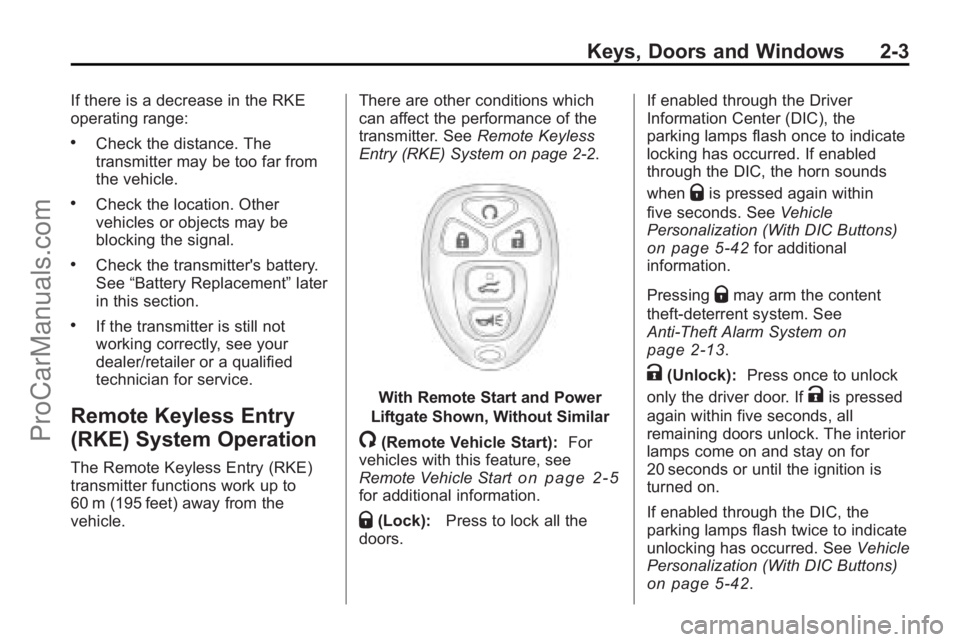
With Remote Start and Power
Liftgate Shown, Without Similar
/(Remote Vehicle Start): For
vehicles with this feature, see
Remote Vehicle Start
on page 2‑5for additional information.
Q(Lock): Press to lock all the
doors. If enabled through the Driver
Information Center (DIC), the
parking lamps flash once to indicate
locking has occurred. If enabled
through the DIC, the horn sounds
when
Qis pressed again within
five seconds. See Vehicle
Personalization (With DIC Buttons)
on page 5‑42for additional
information.
Pressing
Qmay arm the content
theft-deterrent system. See
Anti-Theft Alarm System
on
page 2‑13.
K(Unlock): Press once to unlock
only the driver door. If
Kis pressed
again within five seconds, all
remaining doors unlock. The interior
lamps come on and stay on for
20 seconds or until the ignition is
turned on.
If enabled through the DIC, the
parking lamps flash twice to indicate
unlocking has occurred. See Vehicle
Personalization (With DIC Buttons)
on page 5‑42.
ProCarManuals.com
Page 34 of 444

2-4 Keys, Doors and Windows
PressingKon the RKE transmitter
disarms the content theft-deterrent
system. See Anti-Theft Alarm
System on page 2‑13.
&(Power Liftgate): Press and
hold until the liftgate begins to move
to open or close the liftgate. The
taillamps flash and a chime sounds
to indicate when the liftgate is
opening or closing.
L(Vehicle Locator/Panic
Alarm): Press and release to
locate the vehicle. The parking
lamps flash and the horn sounds
three times.
Press and hold
Lfor more than
two seconds to activate the panic
alarm. The parking lamps flash and
the horn sounds repeatedly for
30 seconds. The alarm turns off
when the ignition is moved to ON/
RUN or
Lis pressed again. The
ignition must be in LOCK/OFF for
the panic alarm to work.
Programming Transmitters to
the Vehicle
Only RKE transmitters programmed
to this vehicle will work. If a
transmitter is lost or stolen, a
replacement can be purchased and
programmed through your dealer/
retailer. When the replacement
transmitter is programmed to this
vehicle using the DIC, all remaining
transmitters must also be
reprogrammed. Any lost or stolen
transmitters will no longer work
once the new transmitter is
programmed. Each vehicle can
have up to eight transmitters
programmed to it. See “Relearn
Remote Key” underDriver
Information Center (DIC) (With DIC
Buttons)
on page 5‑24or Driver
Information Center (DIC) (Without
DIC Buttons)
on page 5‑30for
instructions on how to program
transmitters to this vehicle.
Battery Replacement
Replace the battery if the REPLACE
BATTERY IN REMOTE KEY
message displays in the DIC.
Notice: When replacing the
battery, do not touch any of the
circuitry on the transmitter. Static
from your body could damage the
transmitter.
1. Separate the transmitter with a flat, thin object inserted into the
notch on the side.
2. Remove the old battery. Do not use a metal object.
ProCarManuals.com
Page 43 of 444
Keys, Doors and Windows 2-13
Vehicle Security
Vehicle theft is big business,
especially in some cities. This
vehicle has theft-deterrent features,
however, they do not make it
impossible to steal.
Anti-Theft Alarm System
On vehicles with an anti-theft alarm
system, to activate the system:
.PressQon the Remote Keyless
Entry (RKE) transmitter or the
power door lock switch when
any door is open.
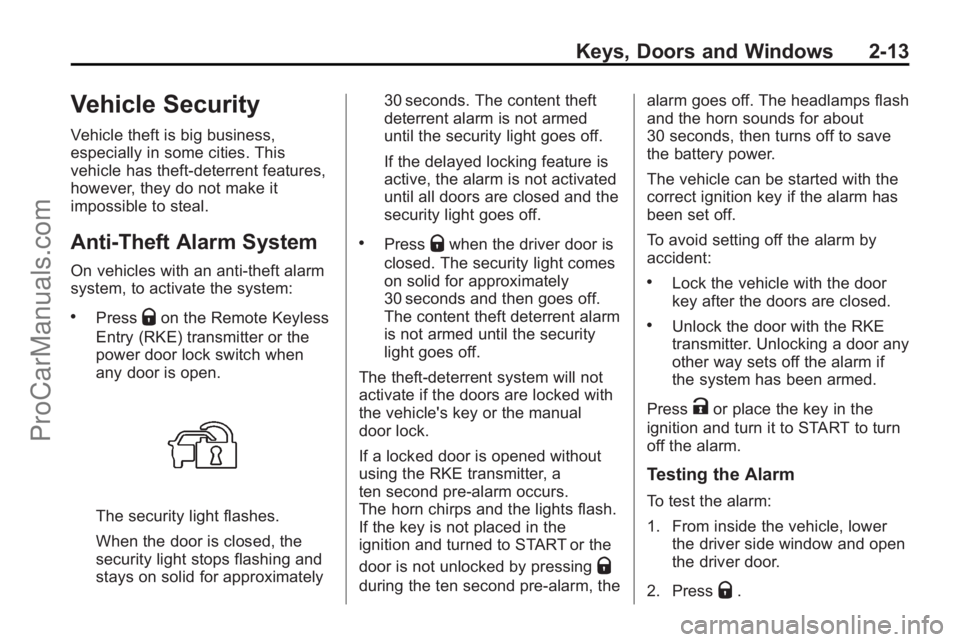
The security light flashes.
When the door is closed, the
security light stops flashing and
stays on solid for approximately 30 seconds. The content theft
deterrent alarm is not armed
until the security light goes off.
If the delayed locking feature is
active, the alarm is not activated
until all doors are closed and the
security light goes off.
.PressQwhen the driver door is
closed. The security light comes
on solid for approximately
30 seconds and then goes off.
The content theft deterrent alarm
is not armed until the security
light goes off.
The theft-deterrent system will not
activate if the doors are locked with
the vehicle's key or the manual
door lock.
If a locked door is opened without
using the RKE transmitter, a
ten second pre-alarm occurs.
The horn chirps and the lights flash.
If the key is not placed in the
ignition and turned to START or the
door is not unlocked by pressing
Q
during the ten second pre-alarm, the alarm goes off. The headlamps flash
and the horn sounds for about
30 seconds, then turns off to save
the battery power.
The vehicle can be started with the
correct ignition key if the alarm has
been set off.
To avoid setting off the alarm by
accident:
.Lock the vehicle with the door
key after the doors are closed.
.Unlock the door with the RKE
transmitter. Unlocking a door any
other way sets off the alarm if
the system has been armed.
Press
Kor place the key in the
ignition and turn it to START to turn
off the alarm.
Testing the Alarm
To test the alarm:
1. From inside the vehicle, lower the driver side window and open
the driver door.
2. Press
Q.
ProCarManuals.com
Page 44 of 444

2-14 Keys, Doors and Windows
3. Get out of the vehicle, close thedoor and wait for the security
light to go out.
4. Then reach in through the window, unlock the door with the
manual door lock and open the
door. This should set off the
alarm.
If the alarm does not sound when it
should, but the vehicle's headlamps
flash, check to see if the horn
works. The horn fuse may be blown.
To replace the fuse, see Fuses and
Circuit Breakers on page 10‑31.
If the alarm does not sound or the
vehicle's headlamps do not flash,
see your dealer/retailer for service.
Immobilizer
See Radio Frequency Statementon
page 13‑16for information regarding
Part 15 of the Federal
Communications Commission (FCC)
Rules and RSS-210/211 of Industry
and Science Canada.
Immobilizer Operation
This vehicle has PASS-Key®III+
(Personalized Automotive Security
System) theft-deterrent system.
PASS-Key
®III+ is a passive
theft-deterrent system.
The system is automatically armed
when the key is removed from the
ignition.
The system is automatically
disarmed when the key is turned to
ON/RUN, ACC/ACCESSORY or
START from the LOCK/OFF
position.
You do not have to manually arm or
disarm the system.
The security light comes on if there
is a problem with arming or
disarming the theft-deterrent
system.
When the PASS-Key
®III+ system
senses an incorrect key, the vehicle
does not start. Anyone using a
trial-and-error method to start the vehicle will be discouraged because
of the high number of electrical key
codes.
If the engine does not start and the
security light on the instrument
panel comes on when trying to start
the vehicle, there may be a problem
with your theft-deterrent system.
Turn the ignition off and try again.
If the engine still does not start, and
the key appears to be undamaged,
try another ignition key and check
the fuses. See
Fuses and Circuit
Breakers
on page 10‑31for
additional information. If the engine
still does not start with the other key,
the vehicle needs service. If the
vehicle does start, the first key may
be faulty. See your dealer/retailer
who can service the PASS-Key
®III+
to have a new key made. In an
emergency, contact Roadside
Assistance. See Roadside
Assistance Program on page 13‑5.
It is possible for the PASS-Key
®III+
decoder to learn the transponder
value of a new or replacement key.
ProCarManuals.com
Page 123 of 444

Instruments and Controls 5-1
Instruments and
Controls
Controls
Steering Wheel Adjustment . . . 5-2
Steering Wheel Controls . . . . . . 5-3
Horn . . . . . . . . . . . . . . . . . . . . . . . . . . 5-5
Windshield Wiper/Washer . . . . . 5-5
Rear Window Wiper/Washer . . . . . . . . . . . . . . . . . . . . . . 5-6
Compass . . . . . . . . . . . . . . . . . . . . . 5-6
Clock . . . . . . . . . . . . . . . . . . . . . . . . . 5-8
Power Outlets . . . . . . . . . . . . . . . . . 5-9
Warning Lights, Gages, and
Indicators
Warning Lights, Gages, and Indicators . . . . . . . . . . . . . . . . . . . 5-11
Instrument Cluster . . . . . . . . . . . 5-12
Speedometer . . . . . . . . . . . . . . . . 5-13
Odometer . . . . . . . . . . . . . . . . . . . . 5-13
Tachometer . . . . . . . . . . . . . . . . . . 5-13
Fuel Gage . . . . . . . . . . . . . . . . . . . 5-13
Engine Coolant Temperature Gage . . . . . . . . . 5-14
Voltmeter Gage . . . . . . . . . . . . . . 5-14
Safety Belt Reminders . . . . . . . 5-15 Airbag Readiness Light . . . . . . 5-15
Passenger Airbag Status
Indicator . . . . . . . . . . . . . . . . . . . . 5-16
Charging System Light . . . . . . 5-17
Malfunction Indicator Lamp . . . . . . . . . . . . . 5-17
Brake System Warning Light . . . . . . . . . . . . . . . . . . . . . . . 5-20
Antilock Brake System (ABS) Warning Light . . . . . . . . . . . . . . 5-21
Tow/Haul Mode Light . . . . . . . . 5-21
StabiliTrak
®Indicator Light . . . 5-21
Engine Coolant Temperature Warning Light . . . . . . . . . . . . . . 5-22
Tire Pressure Light . . . . . . . . . . 5-22
Engine Oil Pressure Light . . . . 5-23
Security Light . . . . . . . . . . . . . . . . 5-23
High-Beam on Light . . . . . . . . . 5-23
Fog Lamp Light . . . . . . . . . . . . . . 5-24
Cruise Control Light . . . . . . . . . 5-24
Information Displays
Driver Information Center (DIC) (With DIC Buttons) . . . 5-24
Driver Information Center (DIC) (Without DIC
Buttons) . . . . . . . . . . . . . . . . . . . . 5-30
Vehicle Messages
Vehicle Messages . . . . . . . . . . . 5-33
Battery Voltage and ChargingMessages . . . . . . . . . . . . . . . . . . 5-33
Brake System Messages . . . . 5-34
Cruise Control Messages . . . . 5-34
Door Ajar Messages . . . . . . . . . 5-34
Engine Cooling System Messages . . . . . . . . . . . . . . . . . . 5-35
Engine Oil Messages . . . . . . . . 5-36
Engine Power Messages . . . . 5-36
Fuel System Messages . . . . . . 5-36
Key and Lock Messages . . . . . 5-37
Lamp Messages . . . . . . . . . . . . . 5-37
Object Detection System Messages . . . . . . . . . . . . . . . . . . 5-37
Ride Control System Messages . . . . . . . . . . . . . . . . . . 5-38
Airbag System Messages . . . . 5-38
Anti-Theft Alarm System Messages . . . . . . . . . . . . . . . . . . 5-38
Service Vehicle Messages . . . 5-39
Tire Messages . . . . . . . . . . . . . . . 5-39
Transmission Messages . . . . . 5-40
Vehicle Reminder Messages . . . . . . . . . . . . . . . . . . 5-41
Vehicle Speed Messages . . . . 5-41
Washer Fluid Messages . . . . . 5-41
ProCarManuals.com
Page 127 of 444
Instruments and Controls 5-5
Press¨to select a track or a
folder when navigating folders on an
iPod or USB device.
For vehicles with a navigation
system:
1. Press and hold
¨until a beep
is heard, to place the radio into
SCAN mode, a station will play
for five seconds before moving
to the next station.
2. To stop the SCAN function, press
¨again.
3. In CD/DVD, iPod, or AUX USB, press and hold to quickly move
forward through the tracks.
Release to stop on the desired
track.
+
e−e(Volume): Press to
increase or to decrease the volume.
Horn
Press near or on the horn symbols
on the steering wheel pad to sound
the horn.
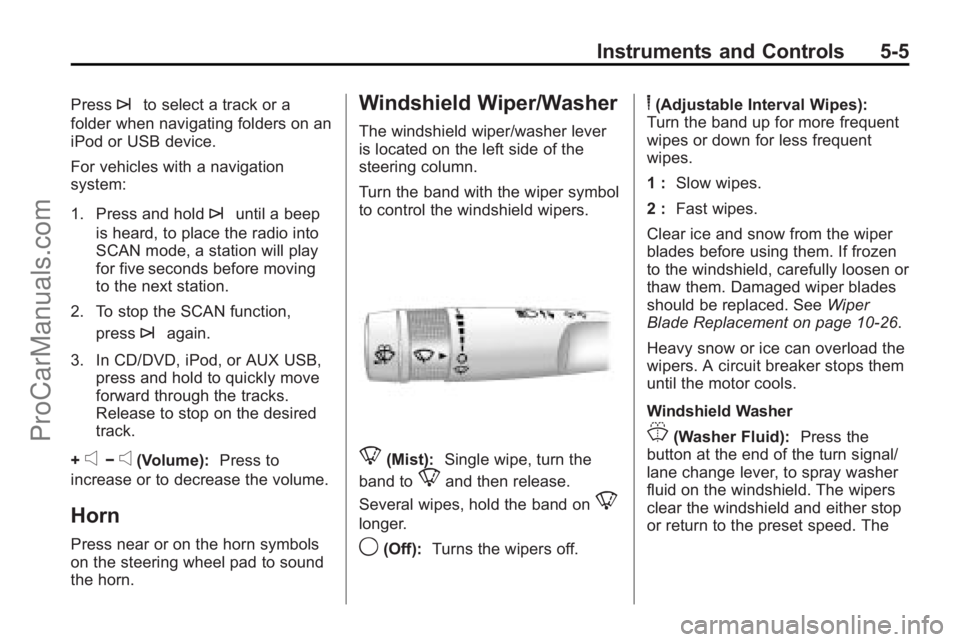
Windshield Wiper/Washer
The windshield wiper/washer lever
is located on the left side of the
steering column.
Turn the band with the wiper symbol
to control the windshield wipers.
8(Mist): Single wipe, turn the
band to
8and then release.
Several wipes, hold the band on
8
longer.
9(Off): Turns the wipers off.
6(Adjustable Interval Wipes):
Turn the band up for more frequent
wipes or down for less frequent
wipes.
1 : Slow wipes.
2 : Fast wipes.
Clear ice and snow from the wiper
blades before using them. If frozen
to the windshield, carefully loosen or
thaw them. Damaged wiper blades
should be replaced. See Wiper
Blade Replacement on page 10‑26.
Heavy snow or ice can overload the
wipers. A circuit breaker stops them
until the motor cools.
Windshield Washer
J(Washer Fluid): Press the
button at the end of the turn signal/
lane change lever, to spray washer
fluid on the windshield. The wipers
clear the windshield and either stop
or return to the preset speed. The
ProCarManuals.com
Page 166 of 444

5-44 Instruments and Controls
DRIVER IN PARK:Only the
driver's door will unlock when the
vehicle is shifted into P (Park) .
ALL AT KEY OUT: All of the doors
will unlock when the key is taken
out of the ignition.
ALL IN PARK (default): All of the
doors will unlock when the vehicle is
shifted into P (Park).
NO CHANGE: No change will be
made to this feature. The current
setting will remain.
To select a setting, press the set/
reset button while the desired
setting is displayed on the DIC.
REMOTE DOOR LOCK
This feature allows you to select the
type of feedback you will receive
when locking the vehicle with the
Remote Keyless Entry (RKE)
transmitter. You will not receive
feedback when locking the vehicle
with the RKE transmitter if the doors
are open. See Remote Keyless
Entry (RKE) System Operation
on
page 2‑3for more information. Press the customization button until
REMOTE DOOR LOCK appears on
the DIC display. Press the set/reset
button once to access the settings
for this feature. Then press the
customization button to scroll
through the following settings:
OFF:
There will be no feedback
when you press the lock button on
the RKE transmitter.
LIGHTS ONLY: The exterior lamps
will flash when you press the lock
button on the RKE transmitter.
HORN ONLY: The horn will sound
on the second press of the lock
button on the RKE transmitter.
HORN & LIGHTS (default): The
exterior lamps will flash when you
press the lock button on the RKE
transmitter, and the horn will sound
when the lock button is pressed
again within five seconds of the
previous command.
NO CHANGE: No change will be
made to this feature. The current
setting will remain. To select a setting, press the set/
reset button while the desired
setting is displayed on the DIC.
REMOTE DOOR UNLOCK
This feature allows you to select the
type of feedback you will receive
when unlocking the vehicle with the
Remote Keyless Entry (RKE)
transmitter. You will not receive
feedback when unlocking the
vehicle with the RKE transmitter if
the doors are open. See
Remote
Keyless Entry (RKE) System
Operation
on page 2‑3for more
information.
Press the customization button until
REMOTE DOOR UNLOCK appears
on the DIC display. Press the set/
reset button once to access the
settings for this feature. Then press
the customization button to scroll
through the following settings:
LIGHTS OFF: The exterior lamps
will not flash when you press the
unlock button on the RKE
transmitter.
ProCarManuals.com
Page 339 of 444

Vehicle Care 10-33
FusesUsage
EMISSION 2 Emission 2
EVEN COILS Even Injector Coils
FAN 1 Cooling Fan 1
FAN 2 Cooling Fan 2
FOG LAMP Fog Lamps
FSCM Fuel System
Control Module
HORN Horn
HTD MIR Heated Outside
Rearview Mirror
HVAC BLWR Heating, Ventilation
and Air
Conditioning
Blower
LT HI BEAM Left High-Beam
Headlamp
LT LO BEAM Left Low-Beam
Headlamp
LT PRK Left Parking Lamp Fuses
Usage
LT TRLR
STOP/TRN Trailer Left
Stoplamp and Turn
Signal
ODD COILS Odd Injector Coils
PCM IGN Powertrain Control
Module Ignition
PWR L/GATE Power Liftgate PWR
OUTLET Power Outlet
REAR
CAMERA Rear Camera
RR APO Rear Accessory
Power Outlet
RR DEFOG Rear Defogger
RR HVAC Rear Climate
Control System
RT HI BEAM Right High-Beam
Headlamp
RT LO BEAM Right Low-Beam
Headlamp Fuses
Usage
RT PRK Right
Parking Lamp
RT TRLR
STOP/TRN Trailer Right
Stoplamp and Turn
Signal
RVC SNSR Regulated Voltage
Control Sensor
S/ROOF/
SUNSHADE Sunroof
SERVICE Service Repair SPARE Spare
Stop Lamps
(China Only) Stop Lamps
(China Only)
STRTR Starter
TCM Transmission
Control Module
TRANS Transmission TRLR
BCK/UP Trailer Back-up
Lamps
TRLR BRK Trailer Brake
ProCarManuals.com
Page 340 of 444
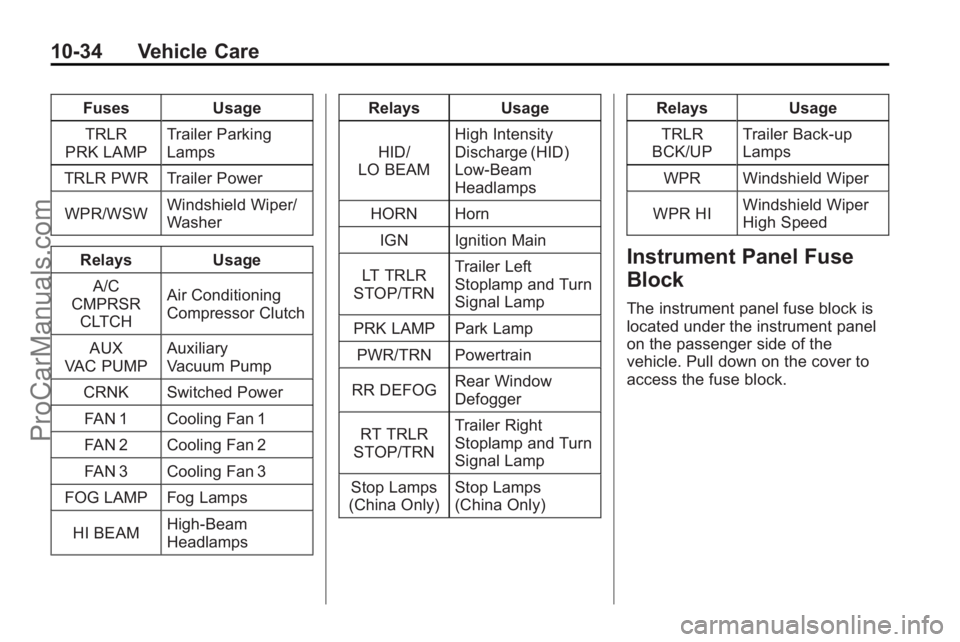
10-34 Vehicle Care
FusesUsage
TRLR
PRK LAMP Trailer Parking
Lamps
TRLR PWR Trailer Power
WPR/WSW Windshield Wiper/
Washer
Relays Usage
A/C
CMPRSR CLTCH Air Conditioning
Compressor Clutch
AUX
VAC PUMP Auxiliary
Vacuum Pump
CRNK Switched Power FAN 1 Cooling Fan 1
FAN 2 Cooling Fan 2
FAN 3 Cooling Fan 3
FOG LAMP Fog Lamps
HI BEAM High-Beam
Headlamps Relays
Usage
HID/
LO BEAM High Intensity
Discharge (HID)
Low-Beam
Headlamps
HORN Horn
IGN Ignition Main
LT TRLR
STOP/TRN Trailer Left
Stoplamp and Turn
Signal Lamp
PRK LAMP Park Lamp PWR/TRN Powertrain
RR DEFOG Rear Window
Defogger
RT TRLR
STOP/TRN Trailer Right
Stoplamp and Turn
Signal Lamp
Stop Lamps
(China Only) Stop Lamps
(China Only) Relays
Usage
TRLR
BCK/UP Trailer Back-up
Lamps
WPR Windshield Wiper
WPR HI Windshield Wiper
High Speed
Instrument Panel Fuse
Block
The instrument panel fuse block is
located under the instrument panel
on the passenger side of the
vehicle. Pull down on the cover to
access the fuse block.
ProCarManuals.com