Controls SATURN SKY 2007 User Guide
[x] Cancel search | Manufacturer: SATURN, Model Year: 2007, Model line: SKY, Model: SATURN SKY 2007Pages: 384, PDF Size: 2.47 MB
Page 106 of 384
Security Light............................................ 142
Fog Lamp Light......................................... 142
Highbeam On Light................................... 142
Trunk Ajar Light........................................ 142
Fuel Gage................................................. 143
Low Fuel Warning Light............................ 143
Driver Information Center (DIC).................. 144
DIC Operation and Displays...................... 144
DIC Warnings and Messages.................... 147
DIC Vehicle Personalization....................... 152Audio System(s)......................................... 158
Setting the Time (Without Date Display).... 159
Setting the Time (With Date Display)......... 160
Radio with CD (Base)............................... 162
Radio with CD (MP3)................................ 168
Using an MP3........................................... 179
XM Radio Messages................................. 186
Theft-Deterrent Feature............................. 188
Audio Steering Wheel Controls.................. 188
Radio Reception........................................ 189
Care of Your CDs..................................... 190
Care of the CD Player.............................. 190
Fixed Mast Antenna.................................. 190
XM™ Satellite Radio Antenna System....... 190
Section 3 Instrument Panel
106
ProCarManuals.com
Page 109 of 384

The main components of your instrument panel are the following:
A. Side Window Outlets. SeeClimate Control
System on page 122.
B. Air Outlets. SeeOutlet Adjustment on page 126.
C. Turn Signal/Multifunction Lever. SeeTurn
Signal/Multifunction Lever on page 111.
D. Cruise Control Buttons (If Equipped).
SeeCruise Control on page 115.
E. Instrument Panel Cluster. SeeInstrument
Panel Cluster on page 128.
F. Audio Steering Wheel Controls (If Equipped).
SeeAudio Steering Wheel Controls on
page 188.
G. Hazard Warning Flashers Button. SeeHazard
Warning Flashers on page 110.
H. Fog Lamp Button. SeeFog Lamps on page 120.
I. Instrument Panel Brightness Control. See
Instrument Panel Brightness on page 120.
J. Driver Information Center (DIC) Controls. See
Driver Information Center (DIC) on page 144.
K. Horn. SeeHorn on page 110.
L. Windshield Wiper/Washer Controls. See
Windshield Wipers on page 113and
Windshield Washer on page 114.M. Climate Controls. SeeClimate Control System
on page 122.
N. Passenger Air Bag Status Indicator. See
Passenger Airbag Status Indicator on page 131.
O. Shift Lever. SeeManual Transmission
Operation on page 85. SeeAutomatic
Transmission Operation on page 82
(If Equipped).
P. Parking Brake Lever. SeeParking Brake
on page 86.
Q. Audio System. SeeAudio System(s) on
page 158.
R. Electronic Stability Control/Traction Control
System Button. SeeElectronic Stability Control
on page 201.
S. Cigarette Lighter (If Equipped). Accessory
Power Outlet (If Equipped). SeeAshtray(s) and
Cigarette Lighter on page 122andAccessory
Power Outlet(s) on page 121.
T. Cupholder. SeeCupholder(s) on page 99.
U. Trunk Release. SeeTrunk on page 68.
V. Glove Box. SeeGlove Box on page 99.
109
ProCarManuals.com
Page 122 of 384

Ashtray(s) and Cigarette Lighter
Your vehicle may have a removable muffin
tin ashtray and cigarette lighter. The muffin tin
ashtray can be placed into the front console side
cupholder. To use the lighter, located on the
instrument panel to the left side of the glove box
door, push it in all the way and let go. When
it is ready, it will pop back out by itself.
Notice:Holding a cigarette lighter in while it
is heating will not allow the lighter to back
away from the heating element when it is hot.
Damage from overheating may occur to the
lighter or heating element, or a fuse could be
blown. Do not hold a cigarette lighter in
while it is heating.
Notice:If you put papers, pins, or other
ammable items in the ashtray, hot cigarettes
or other smoking materials could ignite
them and possibly damage your vehicle.
Never put ammable items in the ashtray.
Climate Controls
Climate Control System
With this system you can control the heating,
cooling, and ventilation of the vehicle. Set
the control between modes to get a combination
of the two modes.
Temperature:Turn the left knob on the control
panel to adjust the temperature of the air in
the vehicle. Turn the knob clockwise or
counterclockwise to increase or decrease the
temperature.
Climate Control System
122
ProCarManuals.com
Page 138 of 384

Malfunction Indicator Lamp
Check Engine Light
Your vehicle has a
computer which
monitors operation of
the fuel, ignition,
and emission control
systems.
This system is called OBD II (On-Board
Diagnostics-Second Generation) and is intended to
assure that emissions are at acceptable levels for
the life of the vehicle, helping to produce a cleaner
environment. The check engine light comes on to
indicate that there is a problem and service is
required. Malfunctions often will be indicated by the
system before any problem is apparent. This may
prevent more serious damage to your vehicle. This
system is also designed to assist your service
technician in correctly diagnosing any malfunction.Notice:If you keep driving your vehicle with
this light on, after awhile, your emission
controls may not work as well, your fuel
economy may not be as good, and your engine
may not run as smoothly. This could lead to
costly repairs that may not be covered by your
warranty.
Notice:Modications made to the engine,
transmission, exhaust, intake, or fuel system
of your vehicle or the replacement of the
original tires with other than those of the same
Tire Performance Criteria (TPC) can affect
your vehicle’s emission controls and may
cause this light to come on. Modications to
these systems could lead to costly repairs not
covered by your warranty. This may also
result in a failure to pass a required Emission
Inspection/Maintenance test. SeeAccessories
and Modifications on page 233.
138
ProCarManuals.com
Page 158 of 384
Audio System(s)
Determine which radio your vehicle has and then
read the pages following to familiarize yourself
with its features.
Driving without distraction is a necessity for a
safer driving experience. SeeDefensive Driving on
page 192. By taking a few moments to read this
manual and get familiar with your vehicle’s
audio system, you can use it with less effort, as
well as take advantage of its features. While your
vehicle is parked, set up your audio system by
presetting your favorite radio stations, setting the
tone and adjusting the speakers. Then, when
driving conditions permit, you can tune to
your favorite stations using the presets and
steering wheel controls if the vehicle has them.
{CAUTION:
This system provides you with a far greater
access to audio stations and song listings.
Giving extended attention to entertainment
CAUTION: (Continued)
CAUTION: (Continued)
tasks while driving can cause a crash and
you or others can be injured or killed.
Always keep your eyes on the road and
your mind on the drive — avoid engaging
in extended searching while driving.
Keeping your mind on the drive is important for
safe driving. For more information, seeDefensive
Driving on page 192.
Here are some ways in which you can help avoid
distraction while driving.
While your vehicle is parked:
Familiarize yourself with all of its controls.
Familiarize yourself with its operation.
Set up your audio system by presetting your
favorite radio stations, setting the tone, and
adjusting the speakers. Then, when driving
conditions permit, you can tune to your favorite
radio stations using the presets and steering
wheel controls if the vehicle has them.
158
ProCarManuals.com
Page 170 of 384
Finding a Station
BAND:Press this button to switch between AM,
FM, or XM™ (if equipped). The display shows
the selection.
f(Tune):Turn this knob to select radio stations.
©SEEK¨:Press the right or left SEEK
arrow to go to the next or to the previous station
and stay there.
To scan stations, press and hold either SEEK
arrow for a few seconds until a beep sounds. The
radio goes to a station, plays for a few seconds,
then goes to the next station. Press either
SEEK arrow again to stop scanning.
The radio only seeks and scans stations with a
strong signal that are in the selected band.
4(Information) (XM™ Satellite Radio Service,
MP3, and RDS Features):Press the information
button to display additional text information related
to the current FM-RDS or XM™ station, or MP3
song. A choice of additional information such as:
Channel, Song, Artist, and CAT may appear.
Continue pressing the information button to
highlight the desired label, or press the pushbutton
positioned under any one of the labels and the
information about that label is displayed.
While information is not available, No Info displays.
Storing a Radio Station as a Favorite
Drivers are encouraged to set up their radio station
favorites while the vehicle is parked. Tune to
your favorite stations using the presets, favorites
button, and steering wheel controls if the
vehicle has this feature. SeeDefensive Driving
on page 192.
170
ProCarManuals.com
Page 172 of 384

Setting the Tone
(Bass/Midrange/Treble)
BASS/MID/TREB (Bass, Midrange, or Treble):
To adjust bass, midrange, or treble, press the tune
knob until the tone control labels appear on the
display. Continue pressing to highlight the desired
label, or press the pushbutton positioned under
the desired label. Turn the tune knob clockwise
or counterclockwise to adjust the highlighted
setting. You can also adjust the highlighted setting
by pressing either the SEEK, FWD (forward) or
REV (reverse) button until the desired levels
are obtained. If a station’s frequency is weak,
or if there is static, decrease the treble.
To quickly adjust bass, midrange, or treble to the
middle position, press the pushbutton positioned
under the BASS, MID, or TREB label for more than
two seconds. A beep sounds and the level
adjusts to the middle position.
To quickly adjust all tone and speaker controls to
the middle position, press the tune knob for
more than two seconds until a beep sounds.
EQ (Equalization):Press this button to select
preset equalization settings.To return to the manual mode, press the EQ
button until Manual displays or start to manually
adjust the bass, midrange, or treble by pressing
the tune knob.
Adjusting the Speakers (Balance/Fade)
BAL/FADE (Balance/Fade):To adjust balance
or fade, press the tune knob until the speaker
control labels appear on the display. Continue
pressing to highlight the desired label, or press the
pushbutton positioned under the desired label.
Turn the tune knob clockwise or counterclockwise
to adjust the highlighted setting. You can also
adjust the highlighted setting by pressing either the
SEEK, FWD, or REV button until the desired
levels are obtained.
To quickly adjust balance or fade to the middle
position, press the pushbutton positioned under the
BAL or FADE label for more than two seconds.
A beep sounds and the level adjusts to the middle
position.
To quickly adjust all speaker and tone controls to
the middle position, press the tune knob for
more than two seconds until a beep sounds.
172
ProCarManuals.com
Page 188 of 384

Theft-Deterrent Feature
THEFTLOCK®is designed to discourage theft
of your vehicle’s radio. The feature works
automatically by learning a portion of the Vehicle
Identication Number (VIN). If the radio is
moved to a different vehicle, it will not operate and
LOCK or LOCKED will appear on the display.
With THEFTLOCK
®activated, the radio will
not operate if stolen.
Audio Steering Wheel Controls
Radio controls are
located on the right side
of the steering wheel
and if your vehicle
has this feature, some
audio controls can
be adjusted at
this location. They
include the following.
xw:Press the up or the down arrow to go to
the next or to the previous stored radio station and
stay there. Press and hold the up or down arrow
longer than three-quarters of a second to advance
to the next or previous station with a strong
signal in the selected band.
When a CD is playing, press the up or the down
arrow to go to the next or previous track. Press
and hold the up or down arrow longer than
three-quarters of a second to continue advancing
ahead or reversing back, to other tracks within
the disc.
+−(Volume):Press the plus or minus button to
increase or to decrease the volume.
g(Mute/Voice Activation):Press this button to
silence the system. Press this button again to
turn the sound on. If your vehicle has OnStar
®,
press and hold this button for two seconds
to initiate the OnStar system. SeeOnStar
®System
on page 94in this manual for more information.
188
ProCarManuals.com
Page 198 of 384
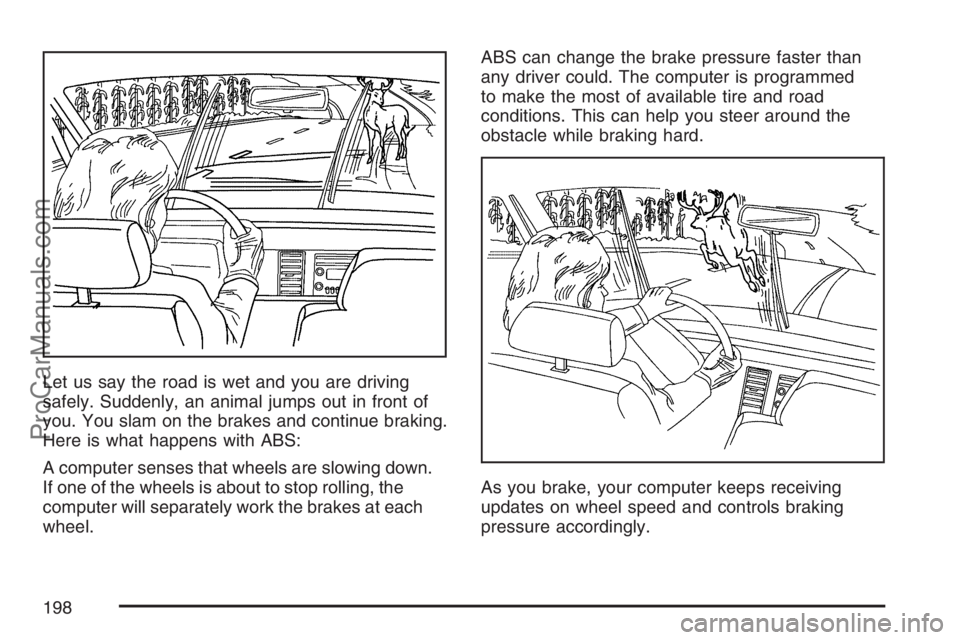
Let us say the road is wet and you are driving
safely. Suddenly, an animal jumps out in front of
you. You slam on the brakes and continue braking.
Here is what happens with ABS:
A computer senses that wheels are slowing down.
If one of the wheels is about to stop rolling, the
computer will separately work the brakes at each
wheel.ABS can change the brake pressure faster than
any driver could. The computer is programmed
to make the most of available tire and road
conditions. This can help you steer around the
obstacle while braking hard.
As you brake, your computer keeps receiving
updates on wheel speed and controls braking
pressure accordingly.
198
ProCarManuals.com
Page 327 of 384

Fuses Usage
6 Amplier
7 Cluster
8 Ignition Switch, PassKey III+
9 Stoplamp
10Climate Control System,
PassKey III+
11 Empty
12 Spare
13 Airbag
14 Spare
15 Wiper
16Climate Control System,
Automatic Occupant Sensing
Module, Clutch Switch, Crank
Relay, Instrument Panel Cluster
17 Empty
18 EmptyFuses Usage
19Electric Power Steering,
Steering Wheel Controls
20 Spare
21 Spare
22 Empty
23 Radio
24 Sensing and Diagnostic Module
25Engine Control Module,
Transmission Control Module
26 Door Locks
27 Interior Lamps
28 Steering Wheel Control Backlighting
29 Power Windows
30 Climate Control System
31 Empty
32 Retained Accessory Power
327
ProCarManuals.com