door lock SATURN SKY 2008 User Guide
[x] Cancel search | Manufacturer: SATURN, Model Year: 2008, Model line: SKY, Model: SATURN SKY 2008Pages: 342, PDF Size: 5.53 MB
Page 74 of 342

Key In the Ignition
Never leave your vehicle with the keys inside, as it is an
easy target for joy riders or thieves. If you leave the
key in the ignition and park your vehicle, a chime
will sound, when you open the driver’s door. Always
remember to remove your key from the ignition and take
it with you. This will lock your ignition and transmission.
Also, always remember to lock the doors.
The battery could be drained if you leave the key in the
ignition while your vehicle is parked. You may not be
able to start your vehicle after it has been parked for an
extended period of time.
Retained Accessory Power (RAP)
These vehicle accessories can be used for up to
10 minutes after the engine is turned off:
Audio System
Power Windows
The radio will work when the key is in ON/RUN or
ACC/ACCESSORY. Once the key is turned off, power
to the radio and windows will continue to work for
up to 10 minutes or until any door is opened.
Starting the Engine
Place the transmission in the proper gear.
Automatic Transmission
Move the shift lever to PARK (P) or NEUTRAL (N).
The engine will not start in any other position — this is
a safety feature. To restart when you are already
moving, use NEUTRAL (N) only.
Notice:Do not try to shift to PARK (P) if your
vehicle is moving. If you do, you could damage the
transmission. Shift to PARK (P) only when your
vehicle is stopped.
Manual Transmission
The shift lever should be in neutral position and the
parking brake engaged. Hold the clutch pedal down to
the oor and start the engine. Your vehicle will not
start if the clutch pedal is not all the way down. That is
a safety feature.
2-18
ProCarManuals.com
Page 86 of 342
OnStar®System
OnStar uses several innovative technologies and live
advisors to provide you with a wide range of safety,
security, information, and convenience services. If your
airbags deploy, the system is designed to make an
automatic call to OnStar Emergency advisors who can
request emergency services be sent to your location.
If you lock your keys in the vehicle, call OnStar at
1-888-4-ONSTAR and they can send a signal to unlock
your doors. If you need roadside assistance, press
the OnStar button and they can contact Roadside
Service for you.
OnStar service is provided to you subject to the
OnStar Terms and Conditions. You may cancel your
OnStar service at any time by contacting OnStar.A complete OnStar Owner’s Guide and the OnStar
Terms and Conditions are included in the vehicle’s
OnStar Subscriber glove box literature. For more
information, visit onstar.com or onstar.ca, contact
OnStar at 1-888-4-ONSTAR (1-888-466-7827) or
TTY 1-877-248-2080, or press the OnStar button to
speak with an OnStar advisor 24 hours a day,
7 days a week.
Not all OnStar features are available on all vehicles.
To check if your vehicle is equipped to provide the
services described below, or for a full description of
OnStar services and system limitations, see the OnStar
Owner’s Guide in your glove box or visit onstar.com.
OnStar Services
For new vehicles with OnStar, the Safe & Sound Plan,
or the Directions & Connections Plan is included for
one year from the date of purchase. You can extend this
plan beyond the rst year, or upgrade to the Directions
& Connections Plan. For more information, press the
OnStar button to speak with an advisor. Some OnStar
services (such as Remote Door Unlock or Stolen
Vehicle Location Assistance) may not be available until
you register with OnStar.
2-30
ProCarManuals.com
Page 87 of 342

Available Services with Safe & Sound Plan
Automatic Notication of Airbag Deployment
Advanced Automatic Crash Notication (AACN)
(If equipped)
Link to Emergency Services
Roadside Assistance
Stolen Vehicle Location Assistance
AccidentAssist
Remote Door Unlock/Vehicle Alert
OnStar Vehicle Diagnostics
GM Goodwrench®On Demand Diagnostics
OnStar Hands-Free Calling with 30 complimentary
minutes
OnStar Virtual Advisor (U.S. Only)
Available Services included with
Directions & Connections Plan
All Safe and Sound Plan Services
Driving Directions - Advisor delivered or OnStar
Turn-by-Turn Navigation (If equipped)
RideAssist
Information and Convenience Services
OnStar Hands-Free Calling
OnStar Hands-Free Calling allows eligible OnStar
subscribers to make and receive calls using voice
commands. Hands-Free Calling is fully integrated into
the vehicle, and can be used with OnStar Pre-Paid
Minute Packages. Hands-Free Calling may also be
linked to a Verizon Wireless service plan in the U.S. or
a Bell Mobility service plan in Canada, depending
on eligibility. To nd out more, refer to the OnStar
Owner’s Guide in the vehicle’s glove box, visit
www.onstar.com or www.onstar.ca, or speak with an
OnStar advisor by pressing the OnStar button or calling
1-888-4-ONSTAR (1-888-466-7827).
OnStar Virtual Advisor
OnStar Virtual Advisor is a feature of OnStar
Hands-Free Calling that uses your minutes to access
location-based weather, local traffic reports, and
stock quotes. By pressing the phone button and giving
a few simple voice commands, you can browse
through the various topics. See the OnStar Owner’s
Guide for more information (Only available in the
continental U.S.).
2-31
ProCarManuals.com
Page 109 of 342

The fog lamps will turn off while the high-beam
headlamps are turned on.
Some localities have laws that require the headlamps to
be on along with the fog lamps.
Instrument Panel Brightness
The control for this feature is located on the instrument
panel to the left of the steering wheel.
Turn the thumbwheel up to brighten the lights or down
to dim them.
Entry/Exit Lighting
The lamps inside your vehicle will go on when you open
any door. These lamps will fade out after about
20 seconds after all of the doors have been closed or
when the ignition is turned on. These lamps will also go
on when you press the trunk release, unlock symbol
button or the horn symbol on the Remote Keyless Entry
System (RKE) Transmitter.
The lamps inside the vehicle will stay on for about
20 seconds after the key is removed from the ignition to
provide an illuminated exit.
Mirror Reading Lamps
Your vehicle has reading lamps on the rearview
mirror. Push the button to turn the reading lamps
on and off.
Battery Run-Down Protection
Your vehicle has a battery saver feature designed to
protect the vehicle’s battery.
When any interior lamp is left on and the ignition is
turned off, the battery rundown protection system
automatically turns the lamp off after 20 minutes.
This prevents draining of the battery.
3-15
ProCarManuals.com
Page 142 of 342
AUTO UNLK (Unlock)
This feature, which allows the vehicle to automatically
unlock certain doors, can be enabled or disabled.
When AUTO UNLK appears on the display, press and
hold the reset button for at least one second to
scroll through the available settings:
ALL (default):All of the doors will automatically unlock.
DRIVER:The driver’s door will automatically unlock.
NONE:None of the doors will automatically unlock.
You will need to manually unlock the doors.
If you have a manual transmission vehicle, the door(s)
will automatically unlock when the key is turned off.
If you have an automatic transmission vehicle, you can
select when the automatic unlocking will occur.
See “UNLK (Unlock) (Automatic Transmission Only)”
following.
SeeProgrammable Automatic Door Unlock on page 2-7
for more information.
To select a setting and move on to the next feature,
press the information button while the desired setting is
displayed on the DIC.
UNLK (Unlock)
(Automatic Transmission Only)
This screen displays only if your vehicle has an
automatic transmission and DRIVER or ALL is selected
for the AUTO UNLK feature. This feature determines
when the automatic door unlocking will occur. When
UNLK appears on the display, press and hold the reset
button for at least one second to scroll through the
available settings:
KEY OFF:The door(s) will unlock when the key is
turned off.
SHIFT TO P (Park) (default):The door(s) will unlock
when the vehicle is shifted into PARK (P).
SeeProgrammable Automatic Door Unlock on page 2-7
for more information.
To select a setting and move on to the next feature,
press the information button while the desired setting is
displayed on the DIC.
3-48
ProCarManuals.com
Page 202 of 342
Filling the Tank
{CAUTION:
Fuel vapor burns violently and a fuel re can
cause bad injuries. To help avoid injuries to you
and others, read and follow all the instructions
on the pump island. Turn off your engine when
you are refueling. Do not smoke if you are near
fuel or refueling your vehicle. Do not use
cellular phones. Keep sparks, ames, and
smoking materials away from fuel. Do not leave
the fuel pump unattended when refueling your
vehicle. This is against the law in some places.
Do not re-enter the vehicle while pumping fuel.
Keep children away from the fuel pump; never
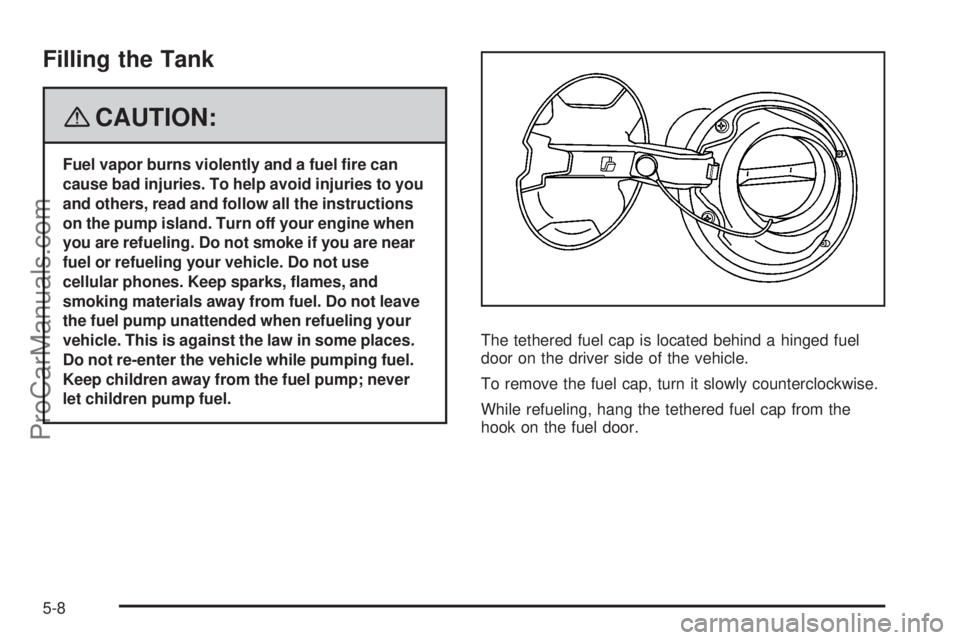
let children pump fuel.The tethered fuel cap is located behind a hinged fuel
door on the driver side of the vehicle.
To remove the fuel cap, turn it slowly counterclockwise.
While refueling, hang the tethered fuel cap from the
hook on the fuel door.
5-8
ProCarManuals.com
Page 271 of 342
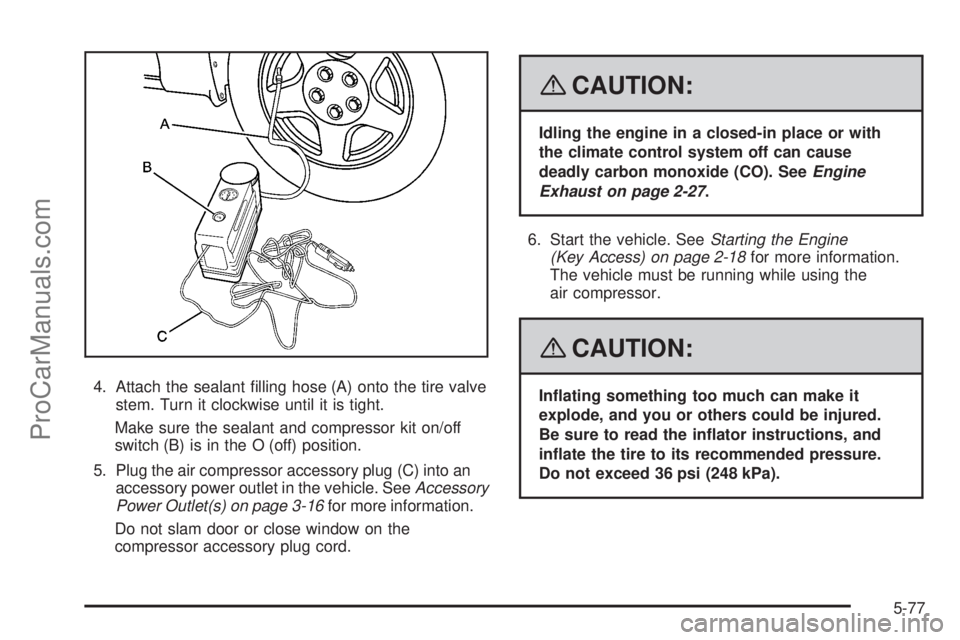
4. Attach the sealant lling hose (A) onto the tire valve
stem. Turn it clockwise until it is tight.
Make sure the sealant and compressor kit on/off
switch (B) is in the O (off) position.
5. Plug the air compressor accessory plug (C) into an
accessory power outlet in the vehicle. SeeAccessory
Power Outlet(s) on page 3-16for more information.
Do not slam door or close window on the
compressor accessory plug cord.
{CAUTION:
Idling the engine in a closed-in place or with
the climate control system off can cause
deadly carbon monoxide (CO). SeeEngine
Exhaust on page 2-27.
6. Start the vehicle. SeeStarting the Engine
(Key Access) on page 2-18for more information.
The vehicle must be running while using the
air compressor.
{CAUTION:
Inating something too much can make it
explode, and you or others could be injured.
Be sure to read the inator instructions, and
inate the tire to its recommended pressure.
Do not exceed 36 psi (248 kPa).
5-77
ProCarManuals.com
Page 272 of 342

7. Push the On/Off switch to the I (on) position.
The sealant and compressor kit injects sealant and
air into the tire. Sealant could leak from the
puncture until the vehicle is driven and the puncture
has sealed.
8. The pressure gage will initially show a high pressure
while the compressor pushes the sealant into the
tire. Once the sealant is completely dispersed in
the tire, the pressure will quickly drop and start to
rise again as the tire inates.
9. Inate the tire to the recommended ination
pressure, found on the Tire and Loading Information
label located on the vehicle’s center pillar (B-pillar)
below the vehicle’s door latch, using the air
pressure gage on the top of the unit.
The pressure gage reads high while the compressor
is running. Turn the compressor off to get an
accurate pressure reading.
Notice:If the recommended pressure cannot be
reached after 15 minutes, the vehicle should not be
driven. The tire is too severely damaged and
cannot be inated or sealed with the tire sealant
and compressor kit. Remove the air compressor
accessory plug from the accessory power outlet and
unscrew the sealant lling hose from the tire
valve or tire pressure monitoring sensor valve.
SeeRoadside Assistance Program on page 7-7.10. Push the sealant and compressor kit switch to
the O (off) position.
11. The tire is not sealed and will continue to leak air
until the vehicle is driven and the sealant is
distributed in the tire.
Steps 12 through 20 must be done right after
Step 11.
12. Unplug the air compressor accessory plug from the
accessory power outlet in the vehicle.
13. Disconnect the sealant lling hose from the tire
valve stem, by turning it counterclockwise, and
replace the tire valve stem cap.
Be careful when handling the tire inator
components as they could be hot after usage.
14. Wrap the sealant lling hose around the air
compressor channel to stow it in its original location.
5-78
ProCarManuals.com
Page 290 of 342
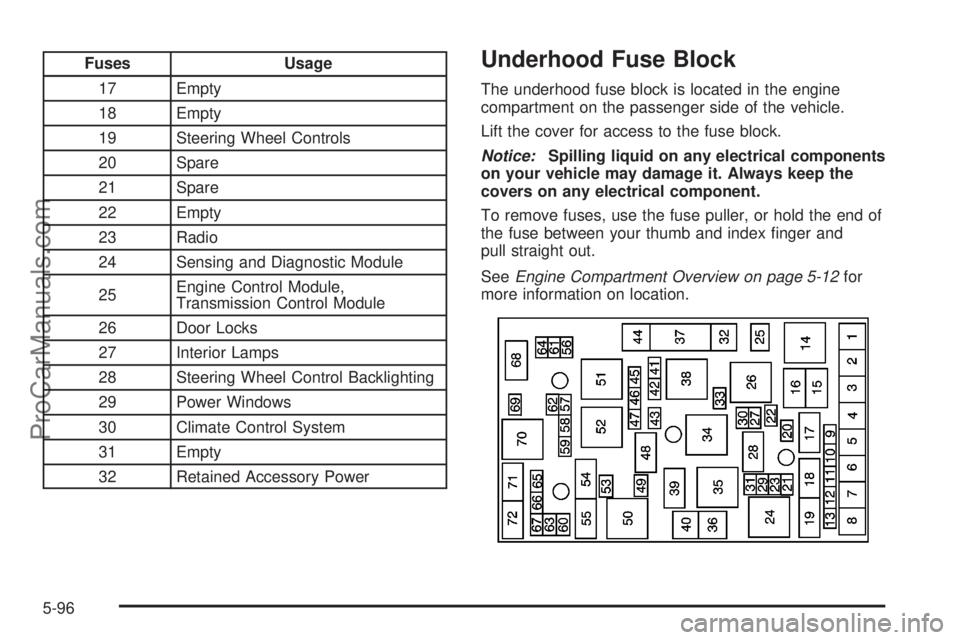
Fuses Usage
17 Empty
18 Empty
19 Steering Wheel Controls
20 Spare
21 Spare
22 Empty
23 Radio
24 Sensing and Diagnostic Module
25Engine Control Module,
Transmission Control Module
26 Door Locks
27 Interior Lamps
28 Steering Wheel Control Backlighting
29 Power Windows
30 Climate Control System
31 Empty
32 Retained Accessory PowerUnderhood Fuse Block
The underhood fuse block is located in the engine
compartment on the passenger side of the vehicle.
Lift the cover for access to the fuse block.
Notice:Spilling liquid on any electrical components
on your vehicle may damage it. Always keep the
covers on any electrical component.
To remove fuses, use the fuse puller, or hold the end of
the fuse between your thumb and index nger and
pull straight out.
SeeEngine Compartment Overview on page 5-12for
more information on location.
5-96
ProCarManuals.com
Page 301 of 342

Maintenance Footnotes
(a)Visually inspect brake lines and hoses for proper
hook-up, binding, leaks, cracks, chafing, etc. Inspect
disc brake pads for wear and rotors for surface
condition. Inspect drum brake linings/shoes for wear or
cracks. Inspect other brake parts, including drums,
wheel cylinders, calipers, parking brake, etc.
(b)Visually inspect front and rear suspension and
steering system for damaged, loose, or missing parts or
signs of wear. Inspect power steering lines and hoses
for proper hook-up, binding, leaks, cracks, chafing, etc.
(c)Visually inspect hoses and have them replaced if
they are cracked, swollen, or deteriorated. Inspect
all pipes, fittings, and clamps; replace with genuine parts
as needed. To help ensure proper operation, a pressure
test of the cooling system and pressure cap and cleaning
the outside of the radiator and air conditioning condenser
is recommended at least once a year.
(d)Inspect wiper blades for wear, cracking, or
contamination. Clean the windshield and wiper blades,
if contaminated. Replace wiper blades that are worn
or damaged. See Windshield Wiper Blade Replacement
on page 5-49andWindshield and Wiper Blades on
page 5-89for more information.(e)Make sure the safety belt reminder light and safety
belt assemblies are working properly. Look for any
other loose or damaged safety belt system parts.
If you see anything that might keep a safety belt system
from doing its job, have it repaired. Have any torn or
frayed safety belts replaced. Also see Checking the
Restraint Systems on page 1-50.
(f)Lubricate all key lock cylinders. Lubricate all hinges
and latches, including those for the body doors, hood,
secondary latch, pivots, spring anchor, release pawl, rear
compartment, glove box door, and console door. More
frequent lubrication may be required when exposed to a
corrosive environment. Applying silicone grease on
weatherstrips with a clean cloth will make them last
longer, seal better, and not stick or squeak.
(g)Visually inspect belt for fraying, excessive cracks, or
obvious damage. Replace belt if necessary.
(h)If you drive regularly under dusty conditions, inspect
the filter at each engine oil change.
(i)Drain, flush, and refill cooling system. This service
can be complex; you should have your dealer/retailer
perform this service. See Engine Coolant on page 5-24
for what to use. Inspect hoses. Clean radiator,
condenser, pressure cap, and filler neck. Pressure test
the cooling system and pressure cap.
6-7
ProCarManuals.com