fuel SATURN SKY 2008 Owners Manual
[x] Cancel search | Manufacturer: SATURN, Model Year: 2008, Model line: SKY, Model: SATURN SKY 2008Pages: 342, PDF Size: 5.53 MB
Page 1 of 342
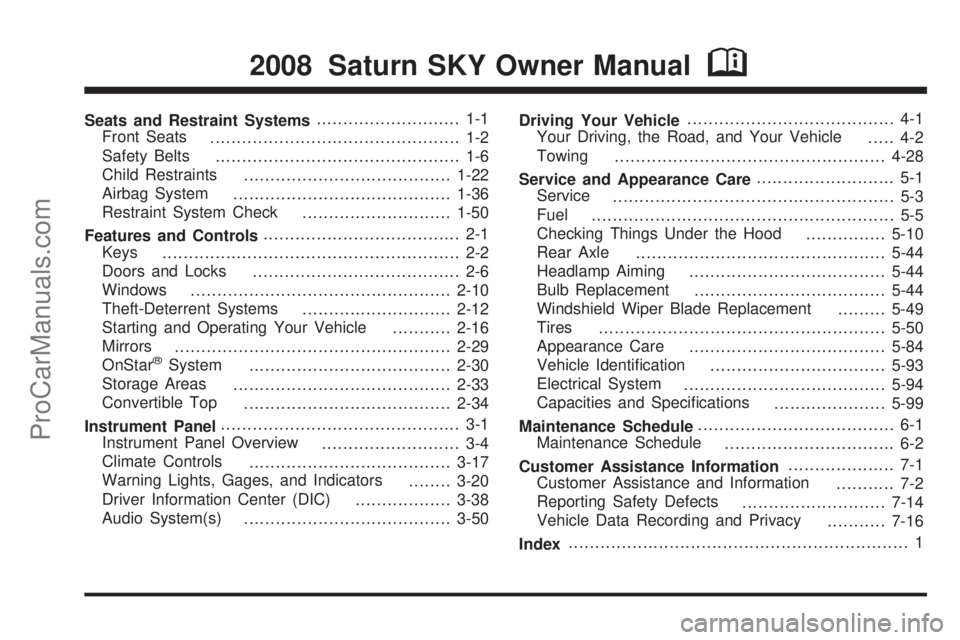
Seats and Restraint Systems........................... 1-1
Front Seats
............................................... 1-2
Safety Belts
.............................................. 1-6
Child Restraints
.......................................1-22
Airbag System
.........................................1-36
Restraint System Check
............................1-50
Features and Controls..................................... 2-1
Keys
........................................................ 2-2
Doors and Locks
....................................... 2-6
Windows
.................................................2-10
Theft-Deterrent Systems
............................2-12
Starting and Operating Your Vehicle
...........2-16
Mirrors
....................................................2-29
OnStar
®System
......................................2-30
Storage Areas
.........................................2-33
Convertible Top
.......................................2-34
Instrument Panel............................................. 3-1
Instrument Panel Overview
.......................... 3-4
Climate Controls
......................................3-17
Warning Lights, Gages, and Indicators
........3-20
Driver Information Center (DIC)
..................3-38
Audio System(s)
.......................................3-50Driving Your Vehicle....................................... 4-1
Your Driving, the Road, and Your Vehicle
..... 4-2
Towing
...................................................4-28
Service and Appearance Care.......................... 5-1
Service
..................................................... 5-3
Fuel
......................................................... 5-5
Checking Things Under the Hood
...............5-10
Rear Axle
...............................................5-44
Headlamp Aiming
.....................................5-44
Bulb Replacement
....................................5-44
Windshield Wiper Blade Replacement
.........5-49
Tires
......................................................5-50
Appearance Care
.....................................5-84
Vehicle Identication
.................................5-93
Electrical System
......................................5-94
Capacities and Specications
.....................5-99
Maintenance Schedule..................................... 6-1
Maintenance Schedule
................................ 6-2
Customer Assistance Information.................... 7-1
Customer Assistance and Information
........... 7-2
Reporting Safety Defects
...........................7-14
Vehicle Data Recording and Privacy
...........7-16
Index................................................................ 1
2008 Saturn SKY Owner ManualM
ProCarManuals.com
Page 78 of 342

DRIVE (D):This position is for normal driving. It
provides better fuel economy for your vehicle. If you
need more power for passing, and you are:
Going less than 35 mph (55 km/h), push the
accelerator pedal about halfway down.
Going about 35 mph (55 km/h) or more, push the
accelerator all the way down.
The transmission will shift down to a lower gear
and have more power.
Downshifting the transmission in slippery road conditions
could result in skidding, see “Skidding” underLoss of
Control on page 4-13.
Notice:If your vehicle seems to start up rather
slowly or not shift gears when you go faster, and
you continue to drive your vehicle that way, you
could damage the transmission. Have your vehicle
serviced right away. You can drive in LOW (L)
when you are driving less than 35 mph (55 km/h)
and DRIVE (D) for higher speeds until then.
FOURTH (4):This position is also used for normal
driving. However, it reduces vehicle speed more than
DRIVE (D) without using your brakes. You might choose
FOURTH (4) instead of DRIVE (D) when driving on
hilly, winding roads and when going down a steep hill.INTERMEDIATE (I):This position is also used for
normal driving. However, it reduces the vehicle’s speed
without using your brakes, for slight downgrades
where the vehicle would otherwise accelerate due to
steepness of grade. If constant upshifting or
downshifting occurs while driving on steep hills, this
position can be used to prevent repetitive types of shifts.
You might choose INTERMEDIATE (I) instead of
DRIVE (D) when driving on hilly and winding roads.
LOW (L):This position reduces vehicle speed more
than INTERMEDIATE (I) without using your brakes.
You can use it on very steep hills, or in deep snow or
mud. If the shift lever is put in LOW (L), the transmission
will not shift into low gear until the vehicle is going
slowly enough.
Notice:Spinning the tires or holding the vehicle in
one place on a hill using only the accelerator
pedal may damage the transmission. If you are
stuck, do not spin the tires. When stopping on a hill,
use the brakes to hold the vehicle in place.
2-22
ProCarManuals.com
Page 96 of 342
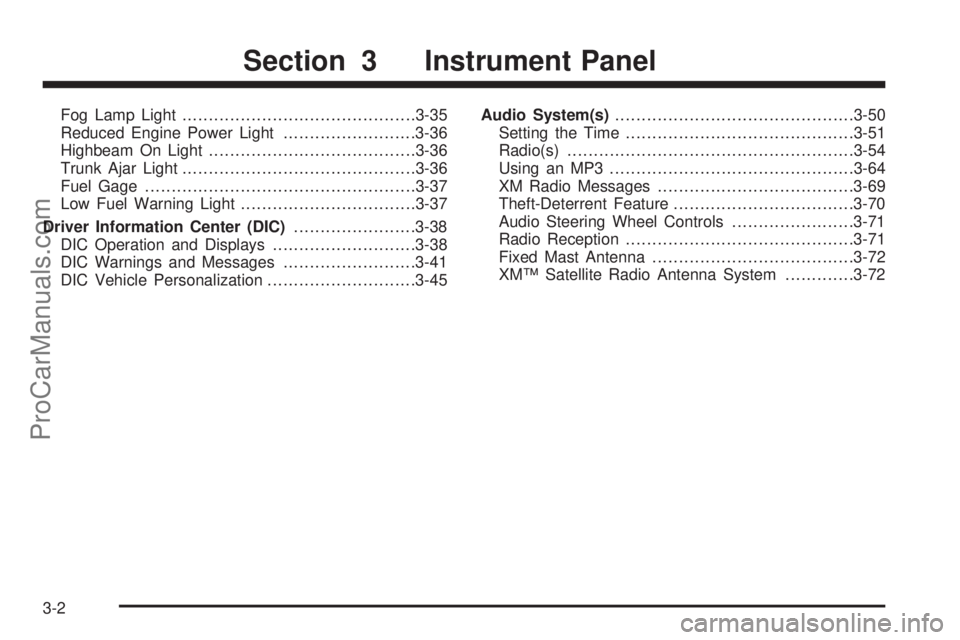
Fog Lamp Light............................................3-35
Reduced Engine Power Light.........................3-36
Highbeam On Light.......................................3-36
Trunk Ajar Light............................................3-36
Fuel Gage...................................................3-37
Low Fuel Warning Light.................................3-37
Driver Information Center (DIC).......................3-38
DIC Operation and Displays...........................3-38
DIC Warnings and Messages.........................3-41
DIC Vehicle Personalization............................3-45Audio System(s).............................................3-50
Setting the Time...........................................3-51
Radio(s)......................................................3-54
Using an MP3..............................................3-64
XM Radio Messages.....................................3-69
Theft-Deterrent Feature..................................3-70
Audio Steering Wheel Controls.......................3-71
Radio Reception...........................................3-71
Fixed Mast Antenna......................................3-72
XM™ Satellite Radio Antenna System.............3-72
Section 3 Instrument Panel
3-2
ProCarManuals.com
Page 111 of 342

Climate Controls
Climate Control System
The heating, cooling, and ventilation of the vehicle can
be controlled with this system. Set the control
between modes to get a combination of the two modes.
Temperature:Turn the left knob on the control panel
to adjust the temperature of the air in the vehicle.
Turn the knob clockwise or counterclockwise to increase
or decrease the temperature.
#(Air Conditioning):Press the left knob on the
control panel to turn the air conditioning system
on or off. An indicator light on the button comes on
to show that the air conditioning is activated.
When the system is on, this setting cools and
dehumidies the air entering the vehicle.
The air conditioning will not function if the fan is turned
off. If air conditioning is selected with fan off, the
indicator light ashes three times and then turns off.
There could be a slight change in engine performance
when the air conditioning compressor turns off and turns
on again. This is normal. The system is designed to
make adjustments to help with fuel economy while still
maintaining the selected temperature.
The air conditioning system removes moisture from the
air, so a small amount of water can drip underneath
your vehicle while idling or after turning off the engine.
This is normal.
Air conditioning does not operate at temperature
below 40°F (4°C). In temperatures above 40°F (4°C),
the air conditioning cannot be turned off in defrost,
oor/defog, and recirculation modes because it helps to
remove moisture from the vehicle. It also helps to
keep the windows clear.
3-17
ProCarManuals.com
Page 115 of 342

Instrument Panel Cluster
Your instrument panel cluster is designed to let you know at a glance how your vehicle is running. You will know
how fast you are going, about how much fuel is left in the tank, and many other things you will need to drive safely
and economically.
United States Base Cluster shown, Canada and Uplevel similar
3-21
ProCarManuals.com
Page 126 of 342

Malfunction Indicator Lamp
Check Engine Light
A computer system called OBD II (On-Board
Diagnostics-Second Generation) monitors operation of
the fuel, ignition, and emission control systems. It makes
sure that emissions are at acceptable levels for the
life of the vehicle, helping to produce a cleaner
environment.
The check engine light
comes on to indicate that
there is an OBD II
problem and service is
required.
Malfunctions often are indicated by the system before
any problem is apparent. This can prevent more serious
damage to your vehicle. This system is also designed
to assist your service technician in correctly diagnosing
any malfunction.Notice:If you keep driving your vehicle with this
light on, after a while, the emission controls
might not work as well, your vehicle’s fuel economy
might not be as good, and the engine might not
run as smoothly. This could lead to costly repairs
that might not be covered by your warranty.
Notice:Modications made to the engine,
transmission, exhaust, intake, or fuel system of
your vehicle or the replacement of the original tires
with other than those of the same Tire Performance
Criteria (TPC) can affect your vehicle’s emission
controls and can cause this light to come on.
Modications to these systems could lead to costly
repairs not covered by your warranty. This could
also result in a failure to pass a required Emission
Inspection/Maintenance test. SeeAccessories
and Modifications on page 5-3.
3-32
ProCarManuals.com
Page 127 of 342

This light comes on, as a check to show it is working,
when the ignition is turned to ON/RUN but the engine is
not running. If the light does not come on, have it
repaired. This light also comes on during a malfunction
in one of two ways:
Light Flashing— A misre condition has been
detected. A misre increases vehicle emissions and
could damage the emission control system on your
vehicle. Diagnosis and service might be required.
Light On Steady— An emission control system
malfunction has been detected on your vehicle.
Diagnosis and service might be required.
If the Light is Flashing
The following can prevent more serious damage to
your vehicle:
Reduce vehicle speed.
Avoid hard accelerations.
Avoid steep uphill grades.
If the light stops ashing and remains on steady,
see “If the Light Is On Steady” following.If the light continues to ash, when it is safe to do so,
stop the vehicle. Find a safe place to park the vehicle.
Turn the key off, wait at least 10 seconds, and restart
the engine. If the light remains on steady, see “If the
Light Is On Steady” following. If the light is still ashing,
follow the previous steps and see your dealer/retailer
for service as soon as possible.
If the Light Is On Steady
You might be able to correct the emission system
malfunction by considering the following:
Did you recently put fuel into your vehicle?
If so, reinstall the fuel cap, making sure to fully
install the cap. SeeFilling the Tank on page 5-8.
The diagnostic system can determine if the fuel cap has
been left off or improperly installed. A loose or missing
fuel cap allows fuel to evaporate into the atmosphere.
A few driving trips with the cap properly installed should
turn the light off.
Did you just drive through a deep puddle of water?
If so, your vehicle’s electrical system might be wet.
The condition is usually corrected when the electrical
system dries out. A few driving trips should turn the
light off.
3-33
ProCarManuals.com
Page 128 of 342

Have you recently changed brands of fuel?
If so, be sure to fuel your vehicle with quality fuel.
SeeGasoline Octane on page 5-5. Poor fuel quality
causes the engine not to run as efficiently as designed.
You might notice this as stalling after start-up,
stalling when you put the vehicle into gear, misring,
hesitation on acceleration, or stumbling on
acceleration — these conditions might go away once
the engine is warmed up. This will be detected by
the system and cause the light to turn on.
If you experience one or more of these conditions,
change the fuel brand you use. It will require at least
one full tank of the proper fuel to turn the light off.
If none of the above steps have made the light
turn off, your dealer/retailer can check the vehicle.
Your dealer/retailer has the proper test equipment and
diagnostic tools to x any mechanical or electrical
problems that might have developed.Emissions Inspection and Maintenance
Programs
Some state/provincial and local governments have or
might begin programs to inspect the emission control
equipment on your vehicle. Failure to pass this
inspection could prevent you from getting a vehicle
registration.
Here are some things you need to know to help your
vehicle pass an inspection:
Your vehicle will not pass this inspection if the check
engine light is on or not working properly.
Your vehicle will not pass this inspection if the OBD
(on-board diagnostic) system determines that critical
emission control systems have not been completely
diagnosed by the system. The vehicle would be
considered not ready for inspection. This can happen
if you have recently replaced the battery or if the battery
has run down. The diagnostic system is designed to
evaluate critical emission control systems during normal
driving. This can take several days of routine driving.
If you have done this and your vehicle still does not pass
the inspection for lack of OBD system readiness, your
dealer/retailer can prepare the vehicle for inspection.
3-34
ProCarManuals.com
Page 131 of 342
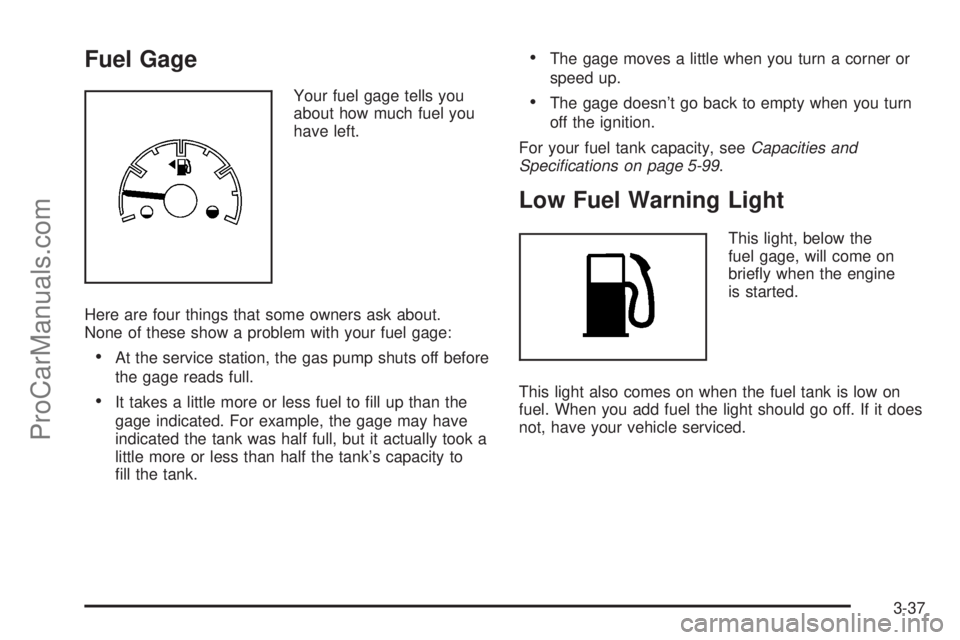
Fuel Gage
Your fuel gage tells you
about how much fuel you
have left.
Here are four things that some owners ask about.
None of these show a problem with your fuel gage:
At the service station, the gas pump shuts off before
the gage reads full.
It takes a little more or less fuel to ll up than the
gage indicated. For example, the gage may have
indicated the tank was half full, but it actually took a
little more or less than half the tank’s capacity to
ll the tank.
The gage moves a little when you turn a corner or
speed up.
The gage doesn’t go back to empty when you turn
off the ignition.
For your fuel tank capacity, seeCapacities and
Specifications on page 5-99.
Low Fuel Warning Light
This light, below the
fuel gage, will come on
briey when the engine
is started.
This light also comes on when the fuel tank is low on
fuel. When you add fuel the light should go off. If it does
not, have your vehicle serviced.
3-37
ProCarManuals.com
Page 133 of 342
TRIP A or TRIP B
Press the information button until TRIP A or TRIP B
display. These modes show the current distance
traveled since the last reset for each trip odometer in
either miles (mi) or kilometers (km). Both odometers can
be used at the same time.
To reset the trip odometer to zero, press and hold the
reset button for a few seconds while the desired
trip odometer is displayed.
FUEL RANGE
Press the information button until FUEL RANGE
displays. This mode shows the remaining distance you
can drive without refueling in either miles (mi) or
kilometers (km). It is based on fuel economy and the
fuel remaining in the tank.
When the fuel level is low, FUEL RANGE LOW displays.
The fuel economy data used to determine fuel range
is an average of recent driving conditions. As your
driving conditions change, this data is gradually updated.
The FUEL RANGE mode cannot be reset.
MPG (L/100 KM) AVG (Average)
Press the information button until MPG (L/100 KM)
AVG displays. This mode shows how many miles per
gallon (mpg) or liters per 100 kilometers (L/100 km) your
vehicle is getting based on current and past driving
conditions.
To reset the average fuel economy, press and hold the
reset button while MPG (L/100 KM) AVG is displayed.
Average fuel economy is then calculated starting
from that point. If the average fuel economy is not reset,
it is continually updated each time you drive.
MPG (L/100 KM) INST (Instantaneous)
Press the information button until MPG (L/100 KM) INST
displays. This mode shows the current fuel economy
at a particular moment and changes frequently as
driving conditions change. This mode shows the
instantaneous fuel economy in miles per gallon (mpg) or
liters per 100 kilometers (L/100 km). Unlike average
fuel economy, this screen cannot be reset.
3-39
ProCarManuals.com