key Seat Alhambra 2007 Owner's Guide
[x] Cancel search | Manufacturer: SEAT, Model Year: 2007, Model line: Alhambra, Model: Seat Alhambra 2007Pages: 291, PDF Size: 9.13 MB
Page 103 of 291
Unlocking and locking101
Safety First
Operating instructions
Tips and Maintenance
Te c h n i c a l D a t a
−
If the ignition is switched on, the electric equipment could be acti-
vated with risk of injury, for example, in the electric windows.
− The doors can be locked using the remote control key. This could
result in people being trapped in the vehicle in an emergency.
− Always take the key with you when you leave the vehicle.
•
The electric windows will work unti l the ignition has been switched off
and one of the front doors has been opened.
•
If necessary, use the safety switch to disable the rear electric windows.
Make sure that they have been disabled.Note
If the window is not able to close because it is stiff or because of an obstruc-
tion, the window will automatically open again ⇒page 102. If this happens,
check why the window could not be clos ed before attempting to close it
again.One-touch closing and opening
One-touch opening and closing means you do not have to
hold down the button.The one-touch closing and opening of the electric windows can only
be controlled with the switches on the driver's door. The buttons
⇒ page 100, fig. 64 and have two levels for opening the
front windows and two for closing. This makes it easier to open or
close windows to the desired position. One-touch closing
– Pull up the button for the window briefly to the second position.
The window closes fully.
One-touch opening
– Push down the button for the window briefly to the second posi- tion. The window opens fully.
Restoring one-touch opening and closing
– The one-touch opening and closing function is not active after the vehicle battery has been disconnected or is empty and will
have to be reset.
– Close all windows and doors.
– Use the key to lock the vehicle from outside and hold the key in the lock position for at least one second. The one-touch function
is now ready for operation.
If you push (or pull) a button to the first stage, the window will open (or close)
until you release the button. If you push or lift the button briefly to the second
stage, the window will open (one-touch opening) or close (one-touch closing)
automatically. If you operate the button while the window is opening or
closing, it stops at this position.
The one-touch opening and closing function will not function once the igni-
tion has been switched off.
The one-touch function and roll-back function will not work if there is a
malfunction in the electric windows. Contact an Authorised Service Centre.
WARNING (continued)
A1
A2
alhambra ingles.book Seite 101 Donnerstag, 19. April 2007 4:04 16
Page 104 of 291
Unlocking and locking
102Roll-back function on electric windows
The windows have a roll-back function. This reduces the risk
of injuries when the windows are closing.•
If a window is obstructed when closing automatically, the window stops
at this point and opens immediately ⇒.
•
If this happens, check immediately (within 10 seconds) why the window
could not be closed before attempting to close it again. After 10 seconds, the
window's closing force is automatically increased.
•
If the window is still obstructed, the window stops at this point.
•
If there is no obvious reason why the window cannot be closed, try to
close it again within five seconds. The roll-back function is now deactivated.
The window closes with maximum force.
If more than 5 seconds pass, the window will open fully when you operate one
of the buttons. One-touch closing is reactivated.
The one-touch function and roll-back fu nction will not work if there is a
malfunction in the electric windows. Co ntact an Authorised Service Centre.
WARNING
Incorrect use of the electric windows can result in injury.•
Always take the key with you when leaving the vehicle, even if you only
intend to be gone for a short time. Please ensure that children are never left
unsupervised in the vehicle.
•
The electric windows will work until the ignition has been switched off
and one of the front doors has been opened.
•
Never close the windows without observ ing and ensuring it is clear, to
do otherwise could cause serious injury to you and others. Make sure that
no one is in the path of a window.
•
Never allow people to remain in th e vehicle when you close the vehicle
from the outside. The windows cannot be opened even in an emergency.
•
The roll-back function does not prev ent fingers or other parts of the
body getting pinched against the window frame. Risk of accident.Note
The roll-back function is deactivate d if the windows are closed from the
outside of the vehicle using the ignition key for convenience closing
⇒ page 105.Convenience opening and closing
The windows can be opened and closed centrally from
outside the vehicle.– Via the door lock: Hold the key in the door lock of the driver's
door in either the locking or the unlocking position until all
windows with electric function are either opened or closed.
– Release the key to interrupt this function.
WARNING
Never close the windows without observing and ensuring it is clear, to do
otherwise could cause serious injury to you and others. The windows will
be closed with the rollback function if the convenience closing function is
used. Make sure that no one is in the path of a window.
WARNING (continued)
alhambra ingles.book Seite 102 Donnerstag, 19. April 2007 4:04 16
Page 105 of 291
Unlocking and locking103
Safety First
Operating instructions
Tips and Maintenance
Te c h n i c a l D a t a
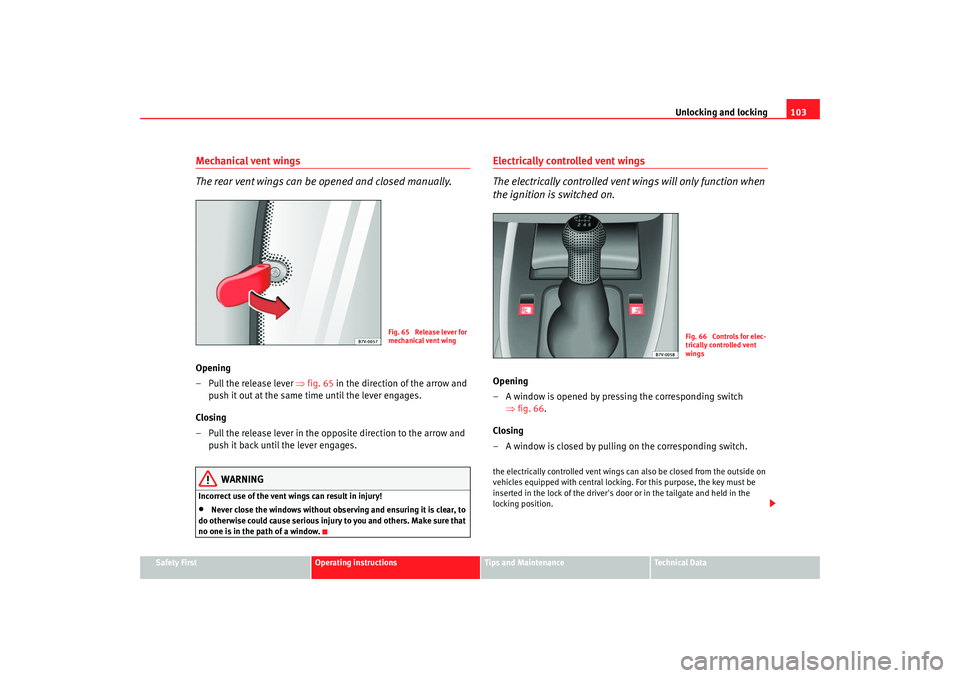
Mechanical vent wings
The rear vent wings can be opened and closed manually.Opening
– Pull the release lever ⇒fig. 65 in the direction of the arrow and
push it out at the same time until the lever engages.
Closing
– Pull the release lever in the opposite direction to the arrow and push it back until the lever engages.
WARNING
Incorrect use of the vent wings can result in injury!•
Never close the windows without observ ing and ensuring it is clear, to
do otherwise could cause serious injury to you and others. Make sure that
no one is in the path of a window.
Electrically controlled vent wings
The electrically controlled vent wings will only function when
the ignition is switched on.Opening
– A window is opened by pressing the corresponding switch ⇒fig. 66 .
Closing
– A window is closed by pulling on the corresponding switch.the electrically controlled vent wings ca n also be closed from the outside on
vehicles equipped with central locki ng. For this purpose, the key must be
inserted in the lock of the driver's door or in the tailgate and held in the
locking position.
Fig. 65 Release lever for
mechanical vent wing
Fig. 66 Controls for elec-
trically controlled vent
wings
alhambra ingles.book Seite 103 Donnerstag, 19. April 2007 4:04 16
Page 106 of 291
Unlocking and locking
104
WARNING
Incorrect use of the electrically controlled vent wings can result in injury!•
Never close the windows without observ ing and ensuring it is clear, to
do otherwise could cause serious injury to you and others. Make sure that
no one is in the path of a window.
Sliding/tilting sun roof Opening and closing the sliding/tilting roof
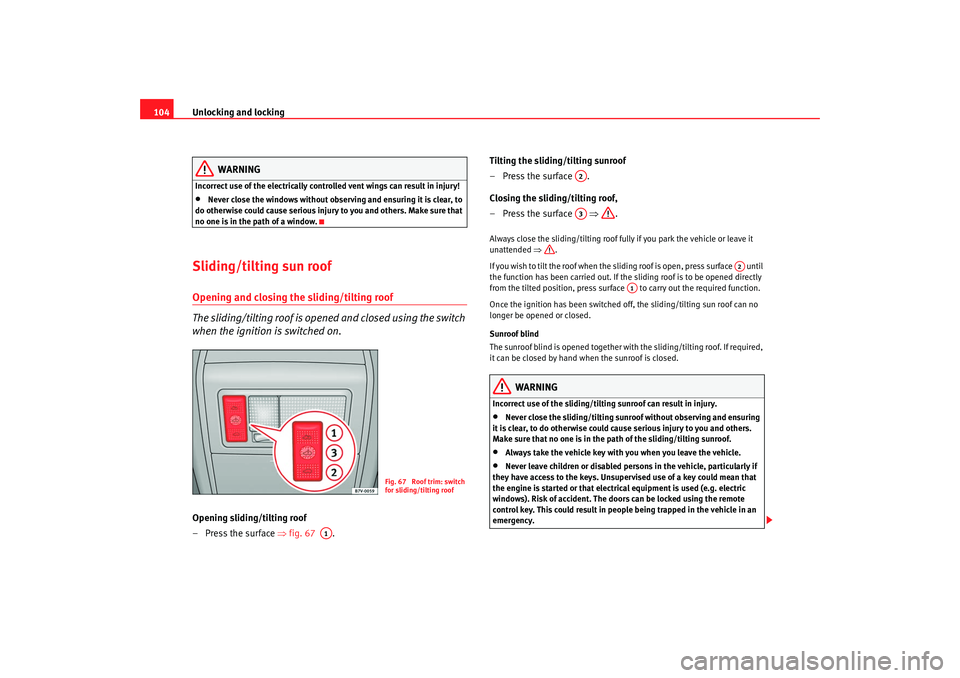
The sliding/tilting roof is opened and closed using the switch
when the ignition is switched on.Opening sliding/tilting roof
– Press the surface ⇒fig. 67 . Tilting the sliding/tilting sunroof
–Press the surface .
Closing the sliding/tilting roof,
–Press the surface
⇒.
Always close the sliding/tilting roof fully if you park the vehicle or leave it
unattended ⇒.
If you wish to tilt the roof when the sliding roof is open, press surface until
the function has been carried out. If the sliding roof is to be opened directly
from the tilted position, press surface to carry out the required function.
Once the ignition has been switched off, the sliding/tilting sun roof can no
longer be opened or closed.
Sunroof blind
The sunroof blind is opened together with the sliding/tilting roof. If required,
it can be closed by hand when the sunroof is closed.
WARNING
Incorrect use of the sliding/tilting sunroof can result in injury.•
Never close the sliding/tilting sunroof without observing and ensuring
it is clear, to do otherwise could c ause serious injury to you and others.
Make sure that no one is in the path of the sliding/tilting sunroof.
•
Always take the vehicle key with you when you leave the vehicle.
•
Never leave children or disabled persons in the vehicle, particularly if
they have access to the keys. Unsupervised use of a key could mean that
the engine is started or that electric al equipment is used (e.g. electric
windows). Risk of accident. The doors can be locked using the remote
control key. This could result in people being trapped in the vehicle in an
emergency.
Fig. 67 Roof trim: switch
for sliding/tilting roof
A1
A2A3
A2
A1
alhambra ingles.book Seite 104 Donnerstag, 19. April 2007 4:04 16
Page 107 of 291
Unlocking and locking105
Safety First
Operating instructions
Tips and Maintenance
Te c h n i c a l D a t a
•
The sliding/tilting sunroof operates as long as the ignition is switched
on.Note
The roof can be closed by hand if the system is defective.Convenience closing*– Via door lock: Hold the key in the door lo ck of the driver's door in
the locking position until the sliding/tilting roof is closed.
– Release the key to interrupt this function.During convenience closing, first the windows and then the sliding roof will
be closed.
WARNING
Never close the sliding/tilting sunroof without observing and ensuring it is
clear, to do otherwise could cause serious injury to you and others. The
sliding/tilting sunroof closes with the roll-back function activated.
However, always make sure that no one is in the path of the sliding/tilting
sunroof.
Note
The sliding/tilting sunroof rotary button remains in the last position selected
if the roof is closed using convenience closing from outside the vehicle and
will have to be re-positio ned the next time you drive.
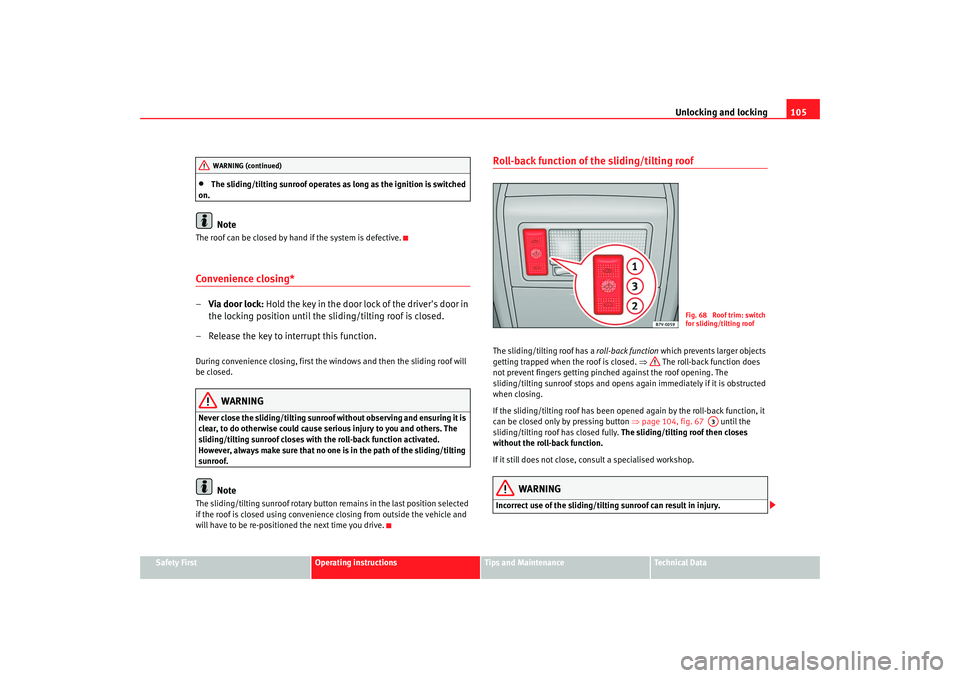
Roll-back function of the sliding/tilting roofThe sliding/tilting roof has a roll-back function which prevents larger objects
getting trapped when the roof is closed. ⇒ The roll-back function does
not prevent fingers getting pinched against the roof opening. The
sliding/tilting sunroof stops and opens again immediately if it is obstructed
when closing.
If the sliding/tilting roof has been opened again by the roll-back function, it
can be closed only by pressing button ⇒page 104, fig. 67 until the
sliding/tilting roof has closed fully. The sliding/tilting roof then closes
without the roll-back function.
If it still does not close, consult a specialised workshop.
WARNING
Incorrect use of the sliding/tilting sunroof can result in injury.
WARNING (continued)
Fig. 68 Roof trim: switch
for sliding/tilting roof
A3
alhambra ingles.book Seite 105 Donnerstag, 19. April 2007 4:04 16
Page 111 of 291
Lights and visibility109
Safety First
Operating instructions
Tips and Maintenance
Te c h n i c a l D a t a
If you are towing a trailer equipped with a rear fog light on a vehicle with a
factory-fitted
towing bracket
17), the rear fog light on the car will automatically
be switched off.
WARNING
•
Never drive with just the side lights on. Risk of accident. The side lights
are not bright enough to illuminate the road ahead and to ensure that other
road users are able to see you. Always use your dipped headlights if it is
dark or if visibility is poor.Note
•
If the lights are left on after the key has been taken out of the ignition lock,
a buzzer sounds when the driver door is opened. This is a reminder to switch
off the lights.
•
The rear fog light is so bright that it can dazzle drivers behind you. You
should use the rear fog light only when visibility is very poor.
•
If you are towing a trailer equipped with a rear fog light on a vehicle with
a factory-fitted towing bracket, the rear fog light on the car will automatically
be switched off.
•
The use of the lighting described here is subject to the relevant statutory
requirements.
Coming Home function (guide lights)*
The Coming Home function (guide lights) allows the vehicle
lights to stay on for approximately 3 minutes after the ignition
is switched off.To activate the Coming Home function the vehicle lights should have
already been switched on. – Switch off vehicle lights.
– Switch off ignition.
– Keep all doors closed.
– Briefly pull the turn signal lever towards the steering wheel
within a maximum of 2 minutes after switching off the lights.
– Open the driver door.
When the driver's door is opened, the ve hicle lights automatically light up for
approx. 3 minutes If the door is closed within 3 minutes, the guide lights will
stay on for approximately. 30 seconds. If the door is closed after 3 minutes,
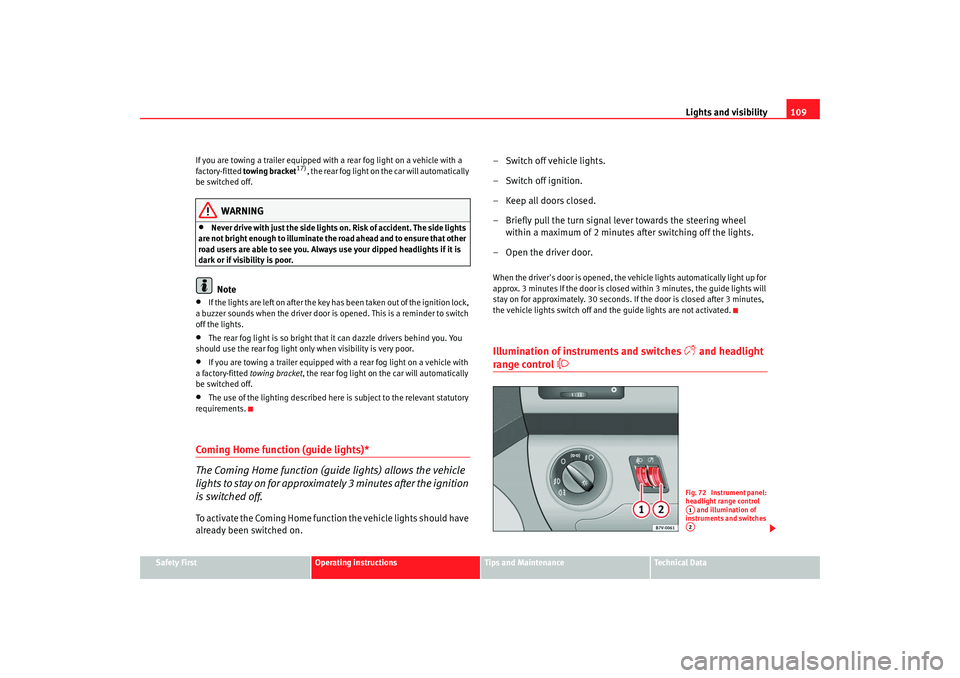
the vehicle lights switch off and the guide lights are not activated.Illumination of instruments and switches
and headlight
range control
Fig. 72 Instrument panel:
headlight range control and illumination of
instruments and switches A1A2
alhambra ingles.book Seite 109 Donnerstag, 19. April 2007 4:04 16
Page 113 of 291
Lights and visibility111
Safety First
Operating instructions
Tips and Maintenance
Te c h n i c a l D a t a
3. Switch the engine off.
4. Apply the handbrake firmly.
5. On a manual gearbox engage 1st gear. On an automatic move
the selector lever to P .
6. Use the warning triangle to draw the attention of other road users
to your vehicle.
7. Always take the key with you when you leave the vehicle.You should switch on the hazard warning lights to warn other road users, for
instance when:•
reaching the tail end of a traffic jam
•
there is an emergency
•
your vehicle breaks down due to a technical defect
•
you are towing another vehicle or your vehicle is being towed.
All turn signals flash simultaneously when the hazard warning lights are
switched on. The turn signal lights
and the button warning light
will
also flash. The hazard warning lights also work when the ignition is switched
off.
WARNING
•
The risk of an accident increases if your vehicle breaks down. Always
use the hazard warning lights and a warning triangle to draw the attention
of other road users to your stationary vehicle.
•
Never park where the catalytic converter could come into contact with
inflammable materials under the vehicle, for example dry grass or spilt
petrol. This could start a fire!
Note
•
The battery will run down if the hazard warning lights are left on for a long
time - even if the ignition is switched off.
•
If the hazard warning lights are not working, you must use an alternative
method of drawing attention to your ve hicle. This method must comply with
traffic legislation.
•
The use of the hazard warning lights de scribed here is subject to the rele-
vant statutory requirements.
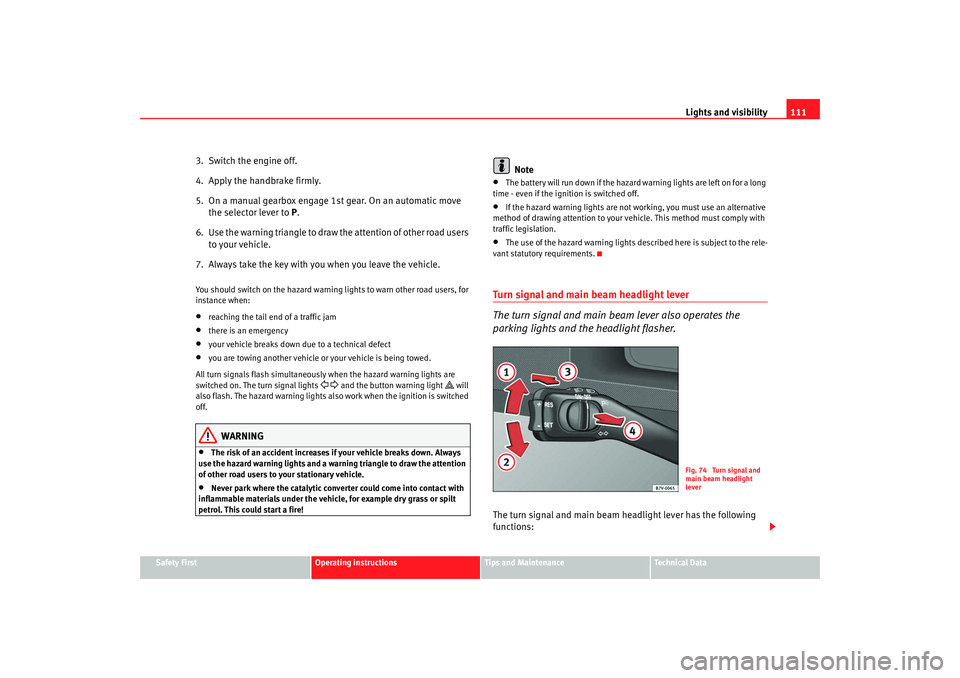
Turn signal and main beam headlight lever
The turn signal and main beam lever also operates the
parking lights and the headlight flasher.The turn signal and main beam headlight lever has the following
functions:
Fig. 74 Turn signal and
main beam headlight
lever
alhambra ingles.book Seite 111 Donnerstag, 19. April 2007 4:04 16
Page 114 of 291
Lights and visibility
112
Switching on the turn signals
– Move the lever all the way up ⇒page 111, fig. 74 to indicate
right , and all the way down to indicate left.
Signalling a lane change
– Move the lever upwards or downwards to change lanes.
Switching main beam on and off
– Turn the light switch to position
⇒ page 108, fig. 71 .
– Press the lever forward to switch on the main beams.
– Pull the lever back towards you to switch the main beam head- lights off again.
Headlight flasher
– Pull the lever towards the steering wheel to operate the flasher.
Switching on parking lights
– Switch off the ignition and remove the key from the lock.
– Move the lever up or down to turn on the right or left-hand parking lights respectively.
WARNING
The main beam can dazzle other drivers. Risk of accident! Never use the
main beam headlights or the headlight flasher if they could dazzle other
drivers.
Note
•
The turn signals only work when the ignition is switched on. The corre-
sponding warning lamp or flashes in the combi-instrument. The warning
lamp 20) flashes when the turn signals are operated, provided a trailer is
correctly attached and connected to the vehicle. If a turn signal bulb is defec-
tive, the warning lamp flashes at double speed. If the trailer turn signal bulbs
are damaged, warning lamp does not light up. You should have the bulbs
replaced.
•
Both warning lamps will flash at the same time when the hazard warning
lights are switched on.
•
If one turn signal fails, whether that of the vehicle or of the trailer, the
warning lamp will start flashing twice as fast.
•
The main beam headlights can only be switched on if the dipped beam
headlights are already on. The warning lamp
then comes on in the combi-
instrument.
•
The headlight flasher comes on for as long as you pull the lever – even if
no other lights are switch ed on. The warning lamp
then comes on in the
combi-instrument.
•
When the parking light is switched on, the front side light and the rear
light of the corresponding side of the ve hicle stay lit. The parking lights will
only work if the key is removed from the ignition.
•
If the turn signal lever is left on after the key has been taken out of the
ignition lock, a buzzer sounds when th e driver door is opened. This is a
reminder to switch off the turn signal, unless of course you wish to leave the
parking light on.
A1
A2
A1
A2
A3
A4
20)Optional equipment
alhambra ingles.book Seite 112 Donnerstag, 19. April 2007 4:04 16
Page 116 of 291
Lights and visibility
114
Note•
If not all the vehicle doors are closed, the interior lights will be switched
off after approx. 10 minutes, providing the key has been removed and the
courtesy light position selected. This prevents the battery discharging.
•
Reading lights function independently of the interior lights and must be
switched off manually to prevent the battery being drained when the engine
is switched off.
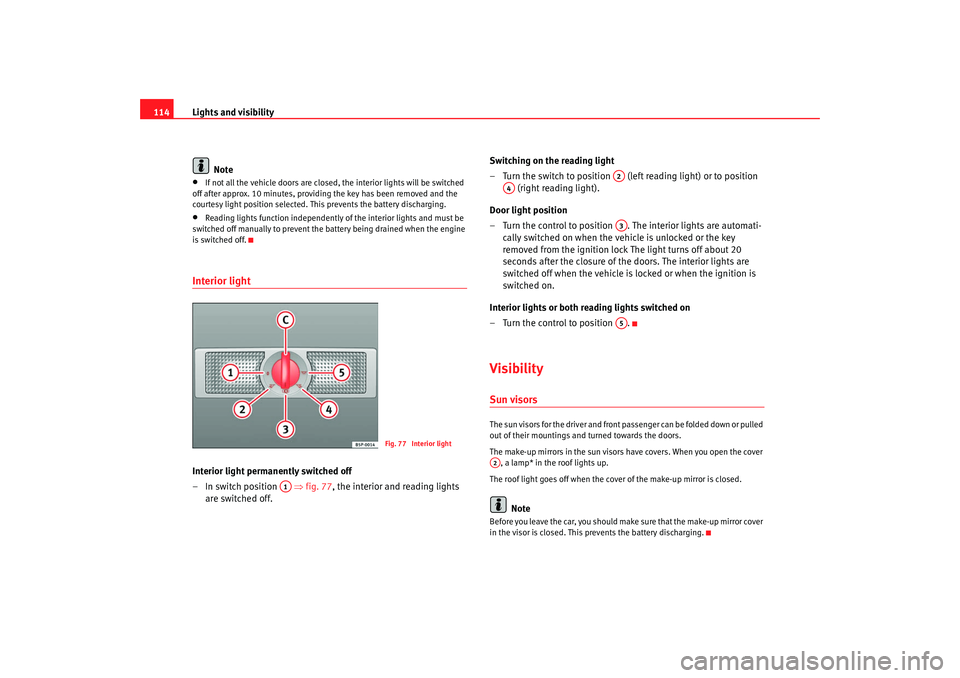
Interior light Interior light permanently switched off
–In switch position ⇒ fig. 77, the interior and reading lights
are switched off. Switching on the reading light
– Turn the switch to position (left reading light) or to position
(right reading light).
Door light position
– Turn the control to position . The interior lights are automati- cally switched on when the vehicle is unlocked or the key
removed from the ignition lock The light turns off about 20
seconds after the closure of the doors. The interior lights are
switched off when the vehicle is locked or when the ignition is
switched on.
Interior lights or both reading lights switched on
– Turn the control to position .
VisibilitySun visorsThe sun visors for the driver and front passenger can be folded down or pulled
out of their mountings and turned towards the doors.
The make-up mirrors in the sun visors have covers. When you open the cover
, a lamp* in the roof lights up.
The roof light goes off when the cover of the make-up mirror is closed.
Note
Before you leave the car, you should make sure that the make-up mirror cover
in the visor is closed. This prevents the battery discharging.
Fig. 77 Interior light
A1
A2
A4
A3A5
A2
alhambra ingles.book Seite 114 Donnerstag, 19. April 2007 4:04 16
Page 132 of 291
Seats and stowage
130
– Place the seat frame ⇒page 129, fig. 94 between the
retaining bolts in the floor anchorings and release both bars.
– Pull the seat up to ensure that it is properly engaged in the front floor anchorings
– Fold the seat back until it engages in the rear floor anchorings.
– Fold the backrest back and adjust the head restraint to suit body size.Covers for the floor anchorings
After removing the seats in the passenger compartment, it is possible to fix
covers to the floor anchorings to stop dirt getting into them, for example. You
will receive 12 covers delivered with the vehicle.
Guide the cover into the floor anchoring and press it in.
The covers will have to be removed by levering them off with the vehicle key
before you can install the seats.
WARNING
Please observe safety recommendations concerning seats ⇒page 131.
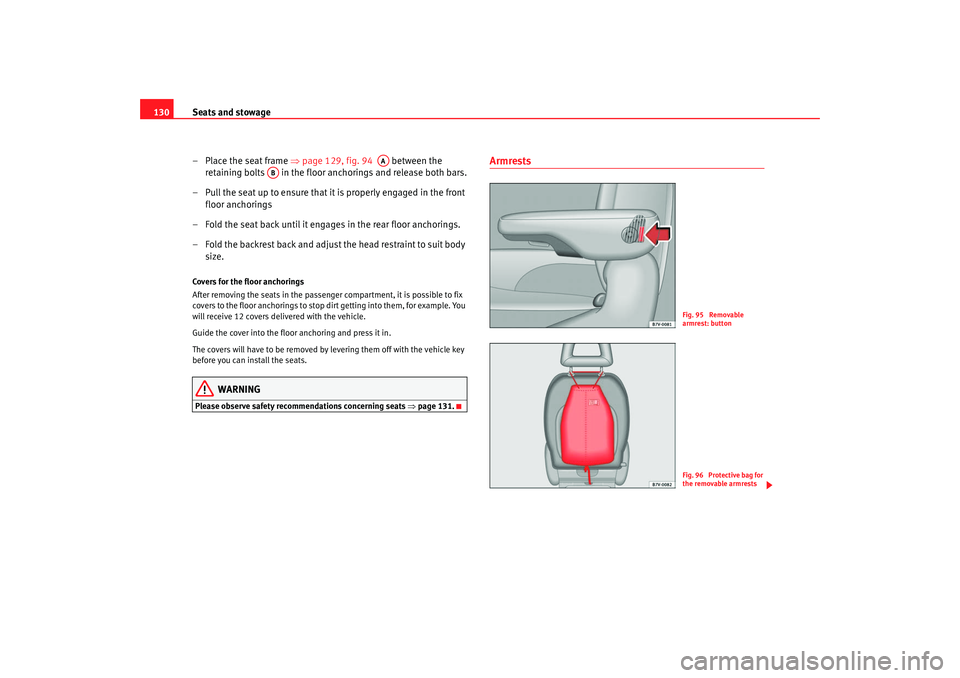
Armrests
AA
AB
Fig. 95 Removable
armrest: buttonFig. 96 Protective bag for
the removable armrests
alhambra ingles.book Seite 130 Donnerstag, 19. April 2007 4:04 16