warning lights Seat Alhambra 2007 Owner's Guide
[x] Cancel search | Manufacturer: SEAT, Model Year: 2007, Model line: Alhambra, Model: Seat Alhambra 2007Pages: 291, PDF Size: 9.13 MB
Page 92 of 291
Unlocking and locking
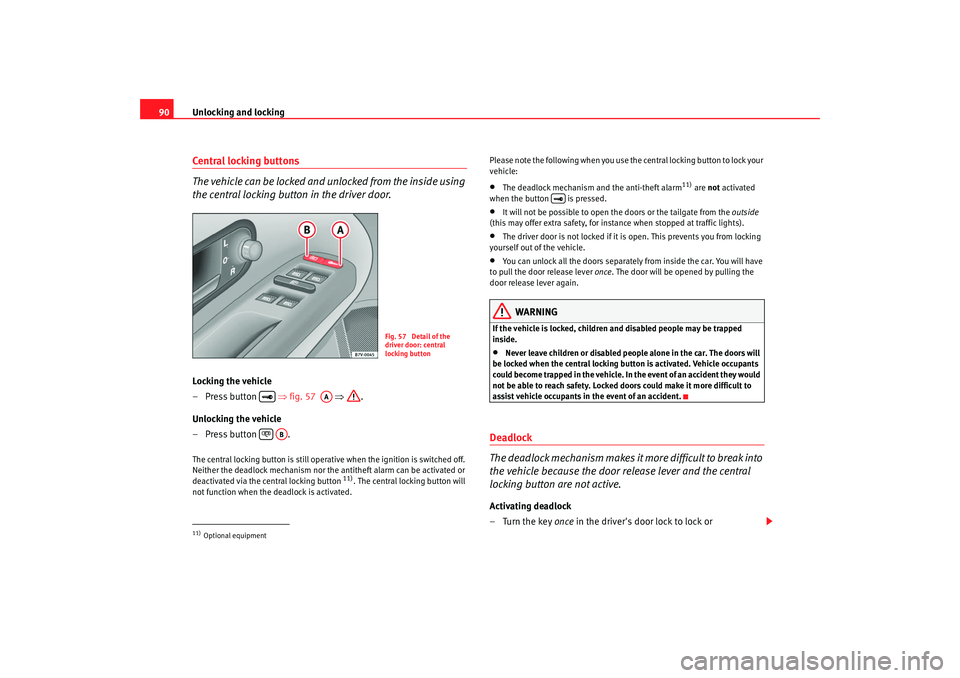
90Central locking buttons
The vehicle can be locked and unlocked from the inside using
the central locking button in the driver door.Locking the vehicle
– Press button ⇒fig. 57 ⇒ .
Unlocking the vehicle
– Press button .The central locking button is still operative when the ignition is switched off.
Neither the deadlock mechanism nor the antitheft alarm can be activated or
deactivated via the central locking button
11). The central locking button will
not function when the deadlock is activated. Please note the following when you use the central locking button to lock your
vehicle:
•
The deadlock mechanism and the anti-theft alarm
11) are
not activated
when the button is pressed.
•
It will not be possible to open the doors or the tailgate from the outside
(this may offer extra safety, for instance when stopped at traffic lights).
•
The driver door is not locked if it is open. This prevents you from locking
yourself out of the vehicle.
•
You can unlock all the doors separately from inside the car. You will have
to pull the door release lever once. The door will be opened by pulling the
door release lever again.
WARNING
If the vehicle is locked, children and disabled people may be trapped
inside.•
Never leave children or disabled people alone in the car. The doors will
be locked when the central locking bu tton is activated. Vehicle occupants
could become trapped in the vehicle. In the event of an accident they would
not be able to reach safety. Locked doors could make it more difficult to
assist vehicle occupants in the event of an accident.
Deadlock
The deadlock mechanism makes it more difficult to break into
the vehicle because the door release lever and the central
locking button are not active.Activating deadlock
–Turn the key once in the driver's door lock to lock or
11)Optional equipment
Fig. 57 Detail of the
driver door: central
locking button
AA
AB
alhambra ingles.book Seite 90 Donnerstag, 19. April 2007 4:04 16
Page 99 of 291
Unlocking and locking97
Safety First
Operating instructions
Tips and Maintenance
Te c h n i c a l D a t a
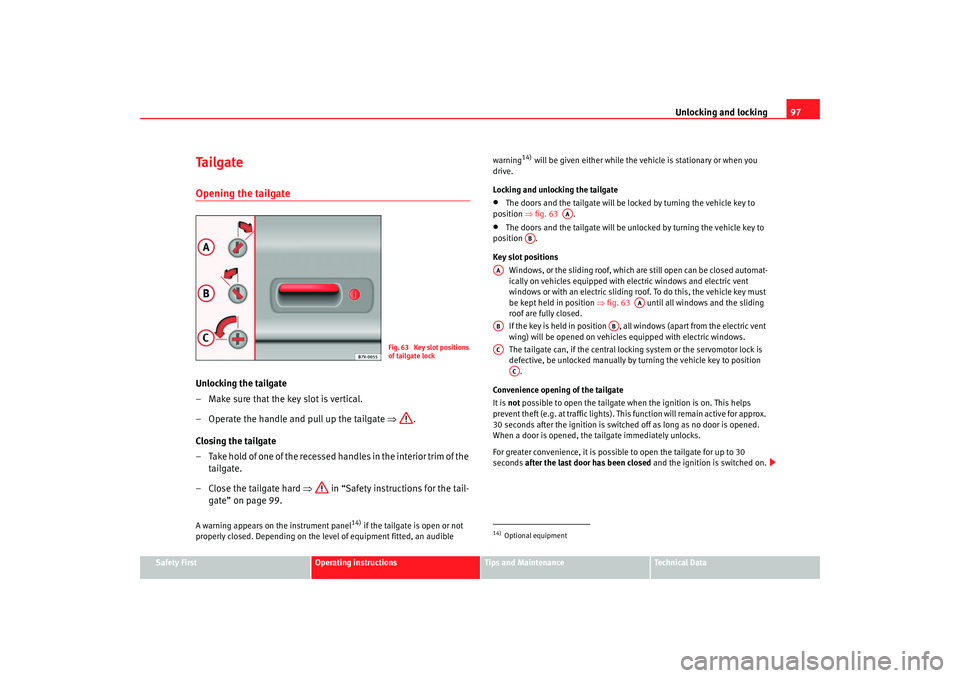
Ta i l g a t eOpening the tailgateUnlocking the tailgate
– Make sure that the key slot is vertical.
– Operate the handle and pull up the tailgate ⇒ .
Closing the tailgate
– Take hold of one of the recessed handles in the interior trim of the tailgate.
–Close the tailgate hard ⇒ in “Safety instructions for the tail-
gate” on page 99.A warning appears on the instrument panel
14) if the tailgate is open or not
properly closed. Depending on the leve l of equipment fitted, an audible warning
14) will be given either while the vehicle is stationary or when you
drive.
Locking and unlocking the tailgate
•
The doors and the tailgate will be locked by turning the vehicle key to
position ⇒fig. 63 .
•
The doors and the tailgate will be unlocked by turning the vehicle key to
position .
Key slot positions
Windows, or the sliding roof, which ar e still open can be closed automat-
ically on vehicles equipped with elec tric windows and electric vent
windows or with an electric sliding r oof. To do this, the vehicle key must
be kept held in position ⇒fig. 63 until all windows and the sliding
roof are fully closed.
If the key is held in position , all windows (apart from the electric vent
wing) will be opened on vehicles equipped with electric windows.
The tailgate can, if the central locking system or the servomotor lock is
defective, be unlocked manually by turning the vehicle key to position .
Convenience opening of the tailgate
It is not possible to open the tailgate when the ignition is on. This helps
prevent theft (e.g. at traffic lights). This function will remain active for approx.
30 seconds after the ignition is switched off as long as no door is opened.
When a door is opened, the tailgate immediately unlocks.
For greater convenience, it is possible to open the tailgate for up to 30
seconds after the last door has been closed and the ignition is switched on.
Fig. 63 Key slot positions
of tailgate lock
14)Optional equipment
AA
AB
AA
AA
AB
AB
AC
AC
alhambra ingles.book Seite 97 Donnerstag, 19. April 2007 4:04 16
Page 110 of 291
Lights and visibility
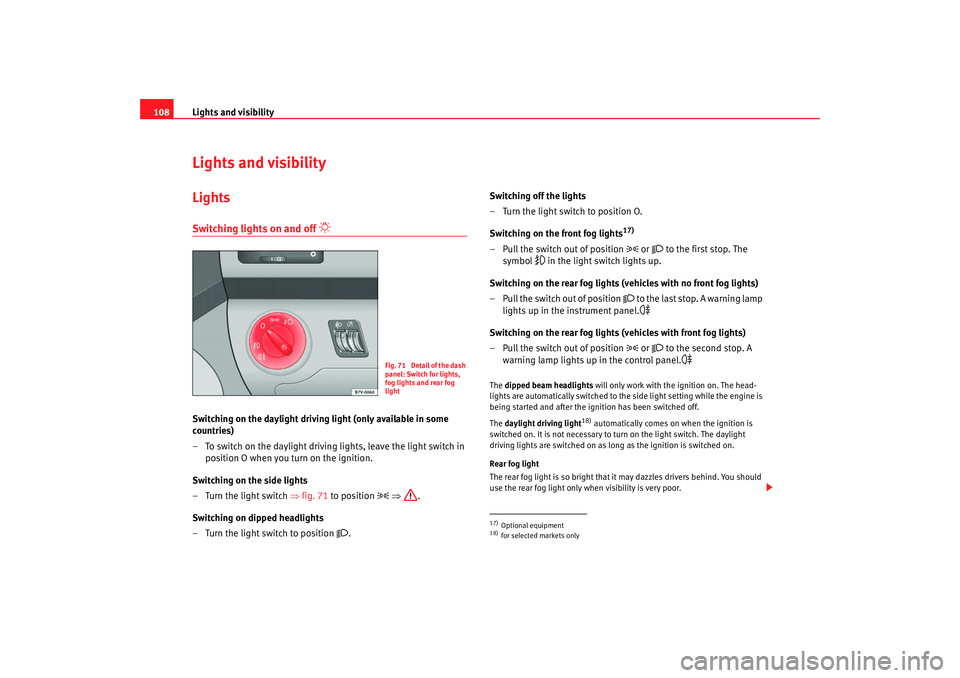
108Lights and visibilityLightsSwitching lights on and off
Switching on the daylight driving light (only available in some
countries)
– To switch on the daylight driving lights, leave the light switch in
position O when you turn on the ignition.
Switching on the side lights
– Turn the light switch ⇒fig. 71 to position
⇒ .
Switching on dipped headlights
– Turn the light switch to position
. Switching off the lights
– Turn the light switch to position O.
Switching on the front fog lights
17)
– Pull the switch out of position
or
to the first stop. The
symbol
in the light switch lights up.
Switching on the rear fog lights (vehicles with no front fog lights)
– Pull the switch out of position
to the last stop. A warning lamp
lights up in the instrument panel.
Switching on the rear fog lights (vehicles with front fog lights)
– Pull the switch out of position
or
to the second stop. A
warning lamp lights up in the control panel.
The dipped beam headlights will only work with the ignition on. The head-
lights are automatically switched to the side light setting while the engine is
being started and after the ignition has been switched off.
The daylight driving light
18) automatically comes on when the ignition is
switched on. It is not necessary to turn on the light switch. The daylight
driving lights are switched on as lo ng as the ignition is switched on.
Rear fog light
The rear fog light is so bright that it may dazzles drivers behind. You should
use the rear fog light only when visibility is very poor.
Fig. 71 Detail of the dash
panel: Switch for lights,
fog lights and rear fog
light
17)Optional equipment18)for selected markets only
alhambra ingles.book Seite 108 Donnerstag, 19. April 2007 4:04 16
Page 111 of 291
Lights and visibility109
Safety First
Operating instructions
Tips and Maintenance
Te c h n i c a l D a t a
If you are towing a trailer equipped with a rear fog light on a vehicle with a
factory-fitted
towing bracket
17), the rear fog light on the car will automatically
be switched off.
WARNING
•
Never drive with just the side lights on. Risk of accident. The side lights
are not bright enough to illuminate the road ahead and to ensure that other
road users are able to see you. Always use your dipped headlights if it is
dark or if visibility is poor.Note
•
If the lights are left on after the key has been taken out of the ignition lock,
a buzzer sounds when the driver door is opened. This is a reminder to switch
off the lights.
•
The rear fog light is so bright that it can dazzle drivers behind you. You
should use the rear fog light only when visibility is very poor.
•
If you are towing a trailer equipped with a rear fog light on a vehicle with
a factory-fitted towing bracket, the rear fog light on the car will automatically
be switched off.
•
The use of the lighting described here is subject to the relevant statutory
requirements.
Coming Home function (guide lights)*
The Coming Home function (guide lights) allows the vehicle
lights to stay on for approximately 3 minutes after the ignition
is switched off.To activate the Coming Home function the vehicle lights should have
already been switched on. – Switch off vehicle lights.
– Switch off ignition.
– Keep all doors closed.
– Briefly pull the turn signal lever towards the steering wheel
within a maximum of 2 minutes after switching off the lights.
– Open the driver door.
When the driver's door is opened, the ve hicle lights automatically light up for
approx. 3 minutes If the door is closed within 3 minutes, the guide lights will
stay on for approximately. 30 seconds. If the door is closed after 3 minutes,
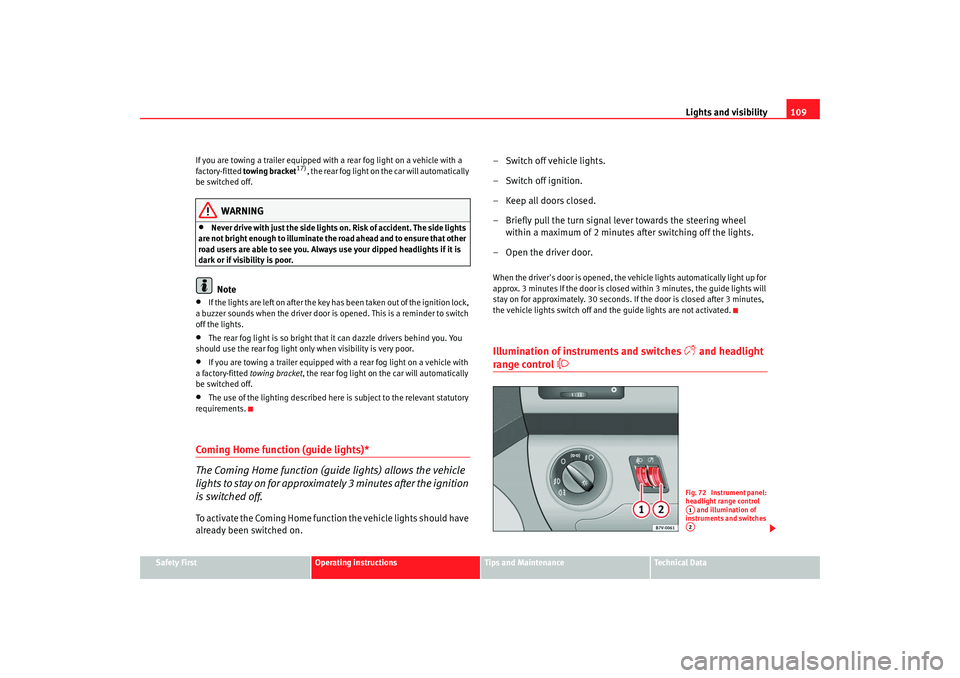
the vehicle lights switch off and the guide lights are not activated.Illumination of instruments and switches
and headlight
range control
Fig. 72 Instrument panel:
headlight range control and illumination of
instruments and switches A1A2
alhambra ingles.book Seite 109 Donnerstag, 19. April 2007 4:04 16
Page 112 of 291
Lights and visibility
110Illumination of instruments and switches
When the headlights are switched on, the brightness of the instruments and
switch lighting can be regulated to suit your requirements by turning the
switch ⇒page 109, fig. 72 .
Headlight range control
Using the headlight range control, you can adjust the headlight range to the
l o ad l ev el that is b e i ng ca r r i e d in t he ve h ic l e . In t h is way i t is p o ssi ble to a vo i d
dazzling oncoming traffic more than necessary. At the same time, the driver
has the best possible lighting for the road ahead using the correct headlight
settings.
The headlights can only be adjusted when the dipped beam is switched on.
To lower the beam, turn the switch down from the basic setting 0.
If the vehicle load does not correspond to those shown in the table, it is
possible to select intermediary positions.
Dynamic headlight range control
Vehicles with gas discharge lamps
19) (“xenon lamps”) are equipped with
dynamic headlight range control. When the dipped light is switched on, the
range of the headlights adjusts to the vehicle load condition. In these vehi-
cles, the control is not available.
WARNING
In order not to dazzle other drivers, the dipped light should be adjusted
according to the vehicle load using the headlight range control. If not, an
accident may occur.•
Use the switch to lower the light cone, depending on the vehicle load.
Hazard warning lights
The hazard warning lights are used to draw the attention of
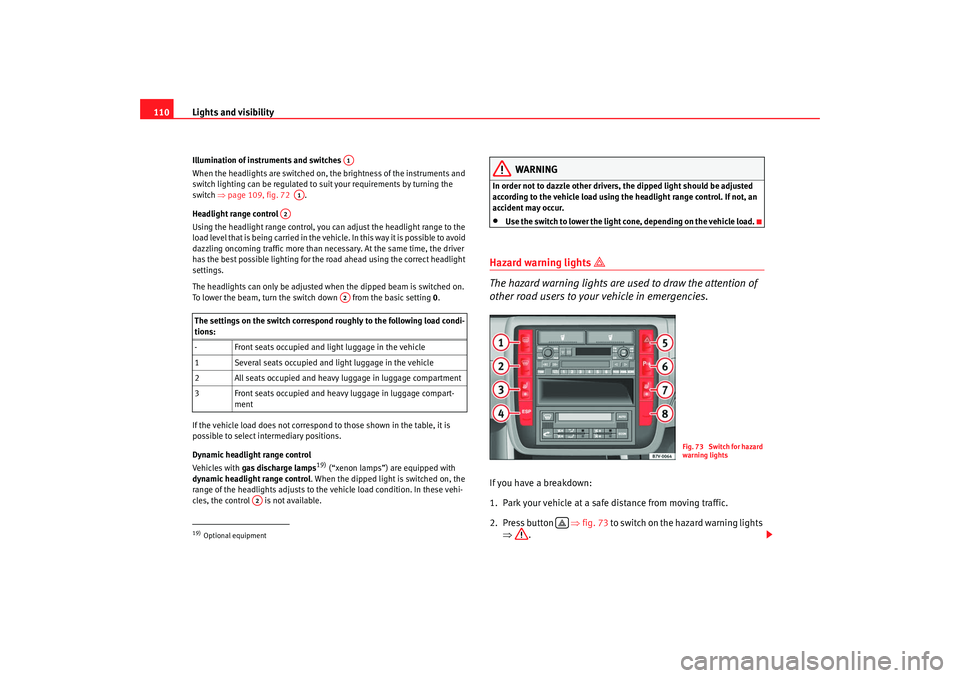
other road users to your vehicle in emergencies.If you have a breakdown:
1. Park your vehicle at a safe distance from moving traffic.
2. Press button ⇒fig. 73 to switch on the hazard warning lights
⇒ .
The settings on the switch correspond roughly to the following load condi-
tions:
- Front seats occupied and light luggage in the vehicle
1 Several seats occupied and light luggage in the vehicle
2 All seats occupied and heavy luggage in luggage compartment
3 Front seats occupied and heavy luggage in luggage compart- ment19)Optional equipment
A1
A1
A2
A2
A2
Fig. 73 Switch for hazard
warning lights
alhambra ingles.book Seite 110 Donnerstag, 19. April 2007 4:04 16
Page 113 of 291
Lights and visibility111
Safety First
Operating instructions
Tips and Maintenance
Te c h n i c a l D a t a
3. Switch the engine off.
4. Apply the handbrake firmly.
5. On a manual gearbox engage 1st gear. On an automatic move
the selector lever to P .
6. Use the warning triangle to draw the attention of other road users
to your vehicle.
7. Always take the key with you when you leave the vehicle.You should switch on the hazard warning lights to warn other road users, for
instance when:•
reaching the tail end of a traffic jam
•
there is an emergency
•
your vehicle breaks down due to a technical defect
•
you are towing another vehicle or your vehicle is being towed.
All turn signals flash simultaneously when the hazard warning lights are
switched on. The turn signal lights
and the button warning light
will
also flash. The hazard warning lights also work when the ignition is switched
off.
WARNING
•
The risk of an accident increases if your vehicle breaks down. Always
use the hazard warning lights and a warning triangle to draw the attention
of other road users to your stationary vehicle.
•
Never park where the catalytic converter could come into contact with
inflammable materials under the vehicle, for example dry grass or spilt
petrol. This could start a fire!
Note
•
The battery will run down if the hazard warning lights are left on for a long
time - even if the ignition is switched off.
•
If the hazard warning lights are not working, you must use an alternative
method of drawing attention to your ve hicle. This method must comply with
traffic legislation.
•
The use of the hazard warning lights de scribed here is subject to the rele-
vant statutory requirements.
Turn signal and main beam headlight lever
The turn signal and main beam lever also operates the
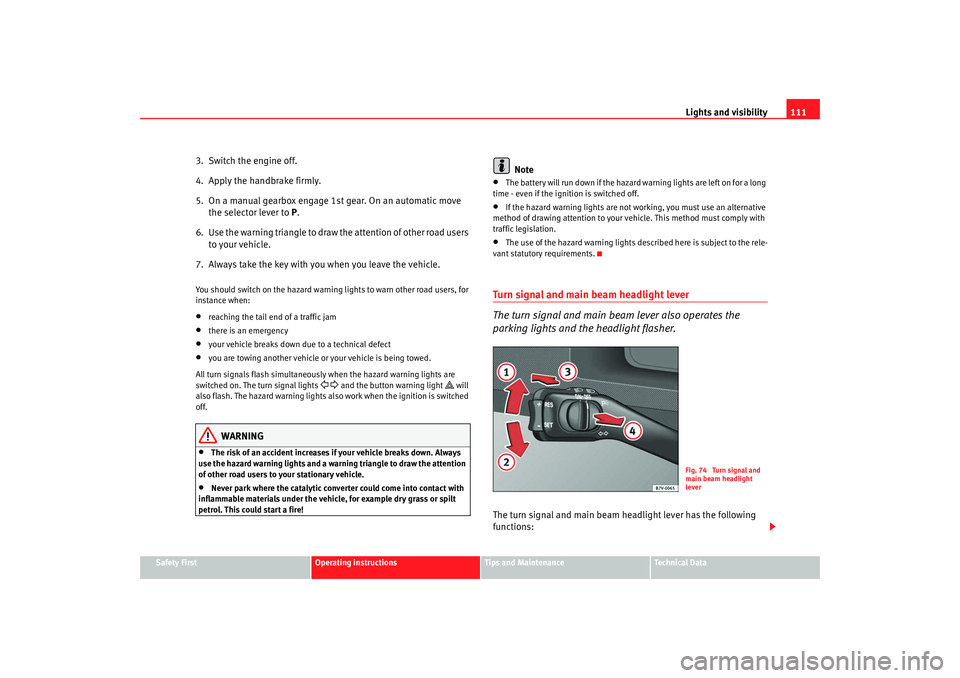
parking lights and the headlight flasher.The turn signal and main beam headlight lever has the following
functions:
Fig. 74 Turn signal and
main beam headlight
lever
alhambra ingles.book Seite 111 Donnerstag, 19. April 2007 4:04 16
Page 114 of 291
Lights and visibility
112
Switching on the turn signals
– Move the lever all the way up ⇒page 111, fig. 74 to indicate
right , and all the way down to indicate left.
Signalling a lane change
– Move the lever upwards or downwards to change lanes.
Switching main beam on and off
– Turn the light switch to position
⇒ page 108, fig. 71 .
– Press the lever forward to switch on the main beams.
– Pull the lever back towards you to switch the main beam head- lights off again.
Headlight flasher
– Pull the lever towards the steering wheel to operate the flasher.
Switching on parking lights
– Switch off the ignition and remove the key from the lock.
– Move the lever up or down to turn on the right or left-hand parking lights respectively.
WARNING
The main beam can dazzle other drivers. Risk of accident! Never use the
main beam headlights or the headlight flasher if they could dazzle other
drivers.
Note
•
The turn signals only work when the ignition is switched on. The corre-
sponding warning lamp or flashes in the combi-instrument. The warning
lamp 20) flashes when the turn signals are operated, provided a trailer is
correctly attached and connected to the vehicle. If a turn signal bulb is defec-
tive, the warning lamp flashes at double speed. If the trailer turn signal bulbs
are damaged, warning lamp does not light up. You should have the bulbs
replaced.
•
Both warning lamps will flash at the same time when the hazard warning
lights are switched on.
•
If one turn signal fails, whether that of the vehicle or of the trailer, the
warning lamp will start flashing twice as fast.
•
The main beam headlights can only be switched on if the dipped beam
headlights are already on. The warning lamp
then comes on in the combi-
instrument.
•
The headlight flasher comes on for as long as you pull the lever – even if
no other lights are switch ed on. The warning lamp
then comes on in the
combi-instrument.
•
When the parking light is switched on, the front side light and the rear
light of the corresponding side of the ve hicle stay lit. The parking lights will
only work if the key is removed from the ignition.
•
If the turn signal lever is left on after the key has been taken out of the
ignition lock, a buzzer sounds when th e driver door is opened. This is a
reminder to switch off the turn signal, unless of course you wish to leave the
parking light on.
A1
A2
A1
A2
A3
A4
20)Optional equipment
alhambra ingles.book Seite 112 Donnerstag, 19. April 2007 4:04 16
Page 118 of 291
Lights and visibility
116Windscreen washersWindscreen wiper
The windscreen wiper lever controls the windscreen wipers
and the automatic wash and wipe.
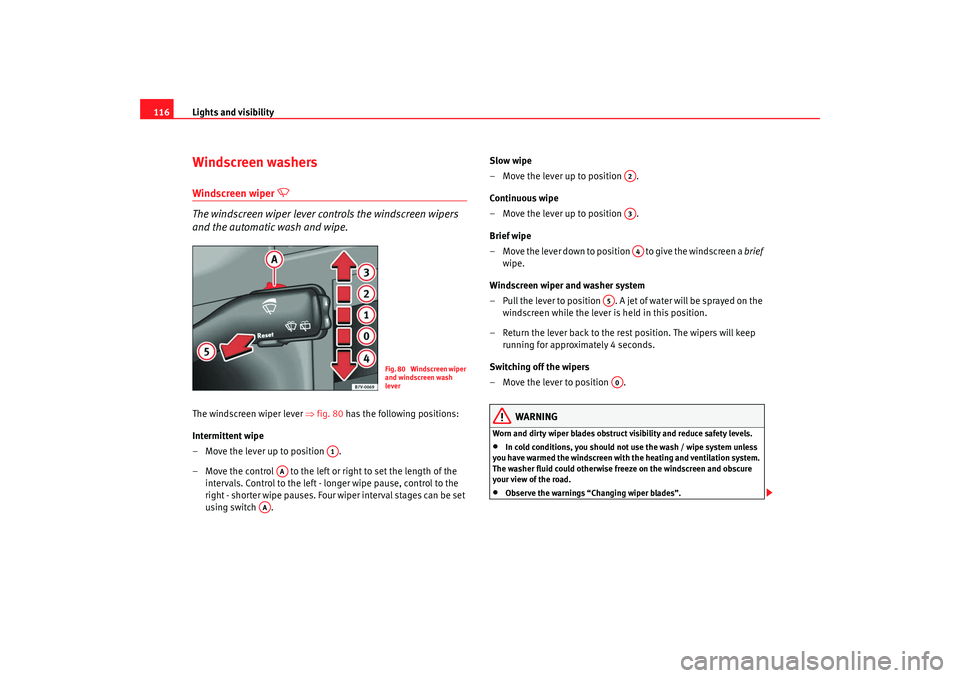
The windscreen wiper lever ⇒fig. 80 has the following positions:
Intermittent wipe
– Move the lever up to position .
– Move the control to the left or right to set the length of the intervals. Control to the left - longer wipe pause, control to the
right - shorter wipe pauses. Four wiper interval stages can be set
using switch . Slow wipe
– Move the lever up to position .
Continuous wipe
– Move the lever up to position .
Brief wipe
– Move the lever down to position to give the windscreen a
brief
wipe.
Windscreen wiper and washer system
– Pull the lever to position . A jet of water will be sprayed on the windscreen while the lever is held in this position.
– Return the lever back to the rest position. The wipers will keep running for approximately 4 seconds.
Switching off the wipers
– Move the lever to position .
WARNING
Worn and dirty wiper blades obstruct visibility and reduce safety levels.•
In cold conditions, you should not use the wash / wipe system unless
you have warmed the windscreen with the heating and ventilation system.
The washer fluid could otherwise fr eeze on the windscreen and obscure
your view of the road.
•
Observe the warnings “Changing wiper blades”.
Fig. 80 Windscreen wiper
and windscreen wash
lever
A1
AA
AA
A2A3A4
A5A0
alhambra ingles.book Seite 116 Donnerstag, 19. April 2007 4:04 16
Page 119 of 291
Lights and visibility117
Safety First
Operating instructions
Tips and Maintenance
Te c h n i c a l D a t a
Caution
In icy conditions, always check that th e wiper blades are not frozen to the
glass before using the wipers for the fi rst time. If you switch on the wipers
when the wiper blades are frozen to the windscreen, you could damage both
the wiper blades and the wiper motor.Rear window wiper
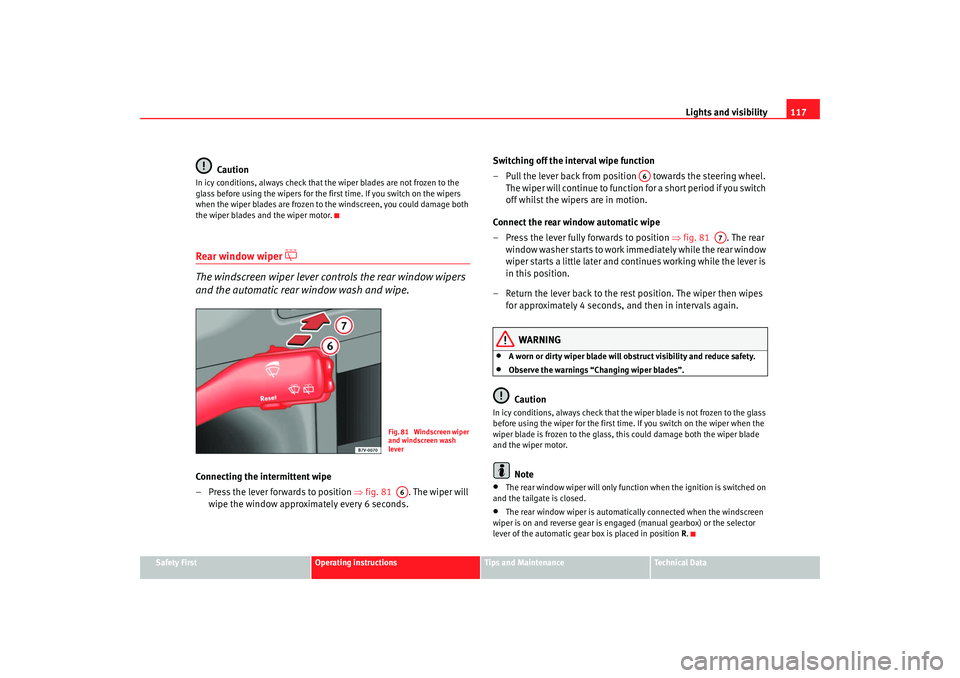
The windscreen wiper lever controls the rear window wipers
and the automatic rear window wash and wipe.Connecting the intermittent wipe
– Press the lever forwards to position ⇒fig. 81 . The wiper will
wipe the window approximately every 6 seconds. Switching off the interval wipe function
– Pull the lever back from position towards the steering wheel.
T h e wi p e r will co n t i n u e to fun c t i o n fo r a s h o r t p e r i o d i f yo u s wi tch
off whilst the wipers are in motion.
Connect the rear window automatic wipe
– Press the lever fully forwards to position ⇒fig. 81 . The rear
wi n d o w w a s h e r s ta r t s t o w o r k i m mediately while the rear window
wiper starts a little later and continues working while the lever is
in this position.
– Return the lever back to the rest position. The wiper then wipes for approximately 4 seconds, and then in intervals again.
WARNING
•
A worn or dirty wiper blade will obstruct visibility and reduce safety.
•
Observe the warnings “Changing wiper blades”.Caution
In icy conditions, always check that the wiper blade is not frozen to the glass
before using the wiper for the first time. If you switch on the wiper when the
wiper blade is frozen to the glass, this could damage both the wiper blade
and the wiper motor.
Note
•
The rear window wiper will only function when the ignition is switched on
and the tailgate is closed.
•
The rear window wiper is automatically connected when the windscreen
wiper is on and reverse gear is engaged (manual gearbox) or the selector
lever of the automatic gear box is placed in position R.
Fig. 81 Windscreen wiper
and windscreen wash
leverA6
A6
A7
alhambra ingles.book Seite 117 Donnerstag, 19. April 2007 4:04 16
Page 121 of 291
Lights and visibility119
Safety First
Operating instructions
Tips and Maintenance
Te c h n i c a l D a t a
This function can be activated and deactivated by pressing the rearview
mirror switch
⇒page 118, fig. 82 . When it is activated, the warning lamp
lights up .
Exterior mirrors
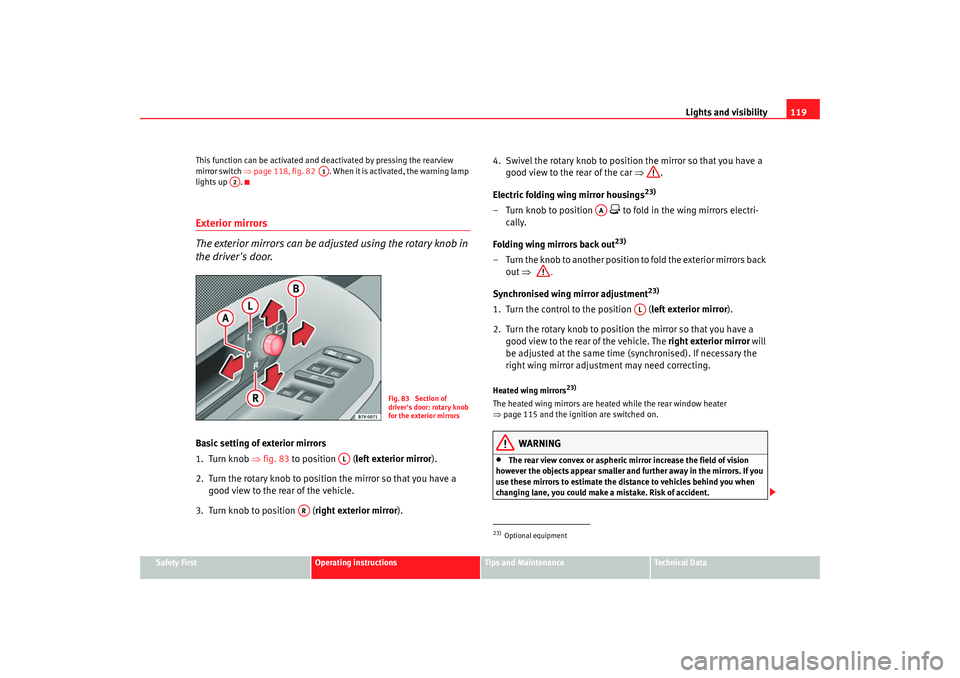
The exterior mirrors can be adjusted using the rotary knob in
the driver's door.Basic setting of exterior mirrors
1. Turn knob ⇒fig. 83 to position ( left exterior mirror ).
2. Turn the rotary knob to position the mirror so that you have a good view to the rear of the vehicle.
3. Turn knob to position ( right exterior mirror). 4. Swivel the rotary knob to position the mirror so that you have a
good view to the rear of the car ⇒ .
Electric folding wing mirror housings
23)
– Turn knob to position
to fold in the wing mirrors electri-
cally.
Folding wing mirrors back out23)
– Turn the knob to another position to fold the exterior mirrors back out ⇒ .
S y
nchroni sed wing mirror ad
justm
ent
23)
1. Turn the control to the position ( left exterior mirror).
2. Turn the rotary knob to position the mirror so that you have a good view to the rear of the vehicle. The right exterior mirror will
be adjusted at the same time (synchronised). If necessary the
right wing mirror adjustment may need correcting.Heated wing mirrors
23)
The heated wing mirrors are heated while the rear window heater
⇒ page 115 and the ignition are switched on.
WARNING
•
The rear view convex or aspheric mirror increase the field of vision
however the objects appear smaller and further away in the mirrors. If you
use these mirrors to estimate the distance to vehicles behind you when
changing lane, you could make a mistake. Risk of accident.
A1
A2
Fig. 83 Section of
driver's door: rotary knob
for the exterior mirrors
AL
AR
23)Optional equipment
AA
AL
alhambra ingles.book Seite 119 Donnerstag, 19. April 2007 4:04 16