brakes Seat Alhambra 2007 Owner's Manual
[x] Cancel search | Manufacturer: SEAT, Model Year: 2007, Model line: Alhambra, Model: Seat Alhambra 2007Pages: 291, PDF Size: 9.13 MB
Page 5 of 291
Contents3
ContentsThe structure of this manual
. . . . .
Content
. . . . . . . . . . . . . . . . . . . . . . . . . . . . . . . .
Safety First
. . . . . . . . . . . . . . . . . . . . . . . . . . .
Safe driving
. . . . . . . . . . . . . . . . . . . . . . . . . . . . . .
Brief introduction . . . . . . . . . . . . . . . . . . . . . . . .
Proper sitting position for occupants . . . . . . . . .
Pedal area . . . . . . . . . . . . . . . . . . . . . . . . . . . . . .
Stowing luggage . . . . . . . . . . . . . . . . . . . . . . . . .
Seat belts
. . . . . . . . . . . . . . . . . . . . . . . . . . . . . . . .
Introduction . . . . . . . . . . . . . . . . . . . . . . . . . . . . .
Why wear seat belts? . . . . . . . . . . . . . . . . . . . . . .
Seat belts . . . . . . . . . . . . . . . . . . . . . . . . . . . . . . .
Belt tension devices . . . . . . . . . . . . . . . . . . . . . .
Airbag system
. . . . . . . . . . . . . . . . . . . . . . . . . . . .
Brief introduction . . . . . . . . . . . . . . . . . . . . . . . .
Front airbags . . . . . . . . . . . . . . . . . . . . . . . . . . . .
Side airbags . . . . . . . . . . . . . . . . . . . . . . . . . . . . .
Curtain airbags . . . . . . . . . . . . . . . . . . . . . . . . . .
Deactivating airbags* . . . . . . . . . . . . . . . . . . . . .
Child safety
. . . . . . . . . . . . . . . . . . . . . . . . . . . . . .
Brief introduction . . . . . . . . . . . . . . . . . . . . . . . .
Child seats . . . . . . . . . . . . . . . . . . . . . . . . . . . . . .
Installation of child seats in vehicle seats . . . . .
Integrated child seat . . . . . . . . . . . . . . . . . . . . . .
Operating instructions
. . . . . . . . . . . .
Cockpit
. . . . . . . . . . . . . . . . . . . . . . . . . . . . . . . . . . .
Overview . . . . . . . . . . . . . . . . . . . . . . . . . . . . . . .
Instruments . . . . . . . . . . . . . . . . . . . . . . . . . . . . .
Display in the instrument panel . . . . . . . . . . . . .
Warning lamps . . . . . . . . . . . . . . . . . . . . . . . . . . .
On board computer with multifunction display*
Navigation system * . . . . . . . . . . . . . . . . . . . . . .
Steering wheel controls
. . . . . . . . . . . . . . . . . . .
Steering wheel . . . . . . . . . . . . . . . . . . . . . . . . . . .
Unlocking and locking
. . . . . . . . . . . . . . . . . . . .
Keys . . . . . . . . . . . . . . . . . . . . . . . . . . . . . . . . . . .
Central locking . . . . . . . . . . . . . . . . . . . . . . . . . . .
Key with remote control . . . . . . . . . . . . . . . . . . .
Anti-theft alarm system . . . . . . . . . . . . . . . . . . . .
Tailgate . . . . . . . . . . . . . . . . . . . . . . . . . . . . . . . . .
Windows . . . . . . . . . . . . . . . . . . . . . . . . . . . . . . .
Sliding/tilting sun roof . . . . . . . . . . . . . . . . . . . .
Lights and visibility
. . . . . . . . . . . . . . . . . . . . . . .
Lights . . . . . . . . . . . . . . . . . . . . . . . . . . . . . . . . . .
Visibility . . . . . . . . . . . . . . . . . . . . . . . . . . . . . . . .
Windscreen washers . . . . . . . . . . . . . . . . . . . . . .
Mirrors . . . . . . . . . . . . . . . . . . . . . . . . . . . . . . . . .
Seats and stowage
. . . . . . . . . . . . . . . . . . . . . . .
The importance of correct seat adjustment . . . .
Head restraints . . . . . . . . . . . . . . . . . . . . . . . . . .
Front seats . . . . . . . . . . . . . . . . . . . . . . . . . . . . . .
Rear seats . . . . . . . . . . . . . . . . . . . . . . . . . . . . . .
Stowage compartments . . . . . . . . . . . . . . . . . . .
Ashtrays, cigarette lighter and electrical sockets
Hazard warning triangles and first aid kit . . . . .
Luggage compartment . . . . . . . . . . . . . . . . . . . . Roof carrier . . . . . . . . . . . . . . . . . . . . . . . . . . . . . .
Cooling and heating box* . . . . . . . . . . . . . . . . . .
Heating, Ventilation and Air conditioning
. .
Climatronic . . . . . . . . . . . . . . . . . . . . . . . . . . . . . .
Driving
. . . . . . . . . . . . . . . . . . . . . . . . . . . . . . . . . . .
Steering . . . . . . . . . . . . . . . . . . . . . . . . . . . . . . . .
Safety . . . . . . . . . . . . . . . . . . . . . . . . . . . . . . . . . .
Ignition lock . . . . . . . . . . . . . . . . . . . . . . . . . . . . .
Starting and stopping the engine . . . . . . . . . . .
Manual gearbox . . . . . . . . . . . . . . . . . . . . . . . . . .
Automatic gearbox . . . . . . . . . . . . . . . . . . . . . . .
Handbrake . . . . . . . . . . . . . . . . . . . . . . . . . . . . . .
Parking distance warning system . . . . . . . . . . . .
Cruise control system (CCS) . . . . . . . . . . . . . . . .
Tips and Maintenance
. . . . . . . . . . . . .
Intelligent technology
. . . . . . . . . . . . . . . . . . . . .
Brakes . . . . . . . . . . . . . . . . . . . . . . . . . . . . . . . . .
Driving and the environment
. . . . . . . . . . . . . .
Running-in . . . . . . . . . . . . . . . . . . . . . . . . . . . . . .
Exhaust gas emission control system . . . . . . . .
Driving abroad . . . . . . . . . . . . . . . . . . . . . . . . . . .
Trailer towing . . . . . . . . . . . . . . . . . . . . . . . . . . . .
Driving economically and with respect for the
environment . . . . . . . . . . . . . . . . . . . . . . . . . . . . .
Cleaning and caring for your vehicle
. . . . . . .
General notes . . . . . . . . . . . . . . . . . . . . . . . . . . .
Care of the vehicle exterior . . . . . . . . . . . . . . . . .
Care of the vehicle interior . . . . . . . . . . . . . . . . .
5
6
7
7
7
9
14
14
17
17
19
22
30
32
32
36
39
41
43
45
45
47
49
52 61
61
61
62
67
70
79
83
84
84
86
86
87
93
95
97
100
104
108
108
114
116
118
121
121
122
124
126
133
139
142
142 147
148
151
151
159
159
160
161
163
165
166
172
173
175
179
179
179
185
185
186
187
188
191
193
193
194
199
alhambra ingles.book Seite 3 Donnerstag, 19. April 2007 4:04 16
Page 73 of 291
Cockpit71
Safety First
Operating instructions
Tips and Maintenance
Te c h n i c a l D a t a
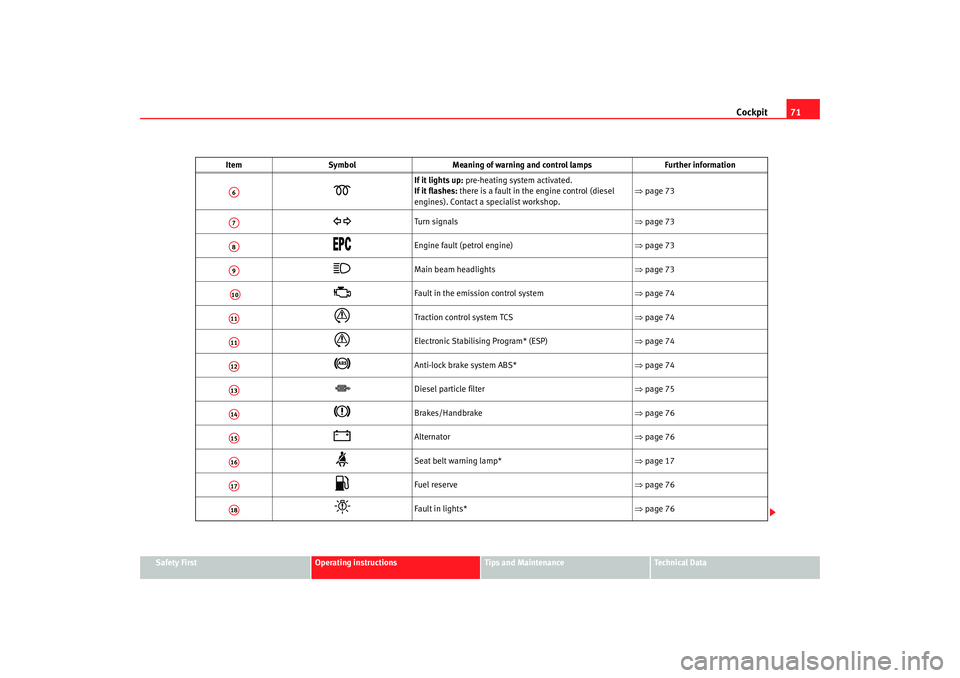
If it lights up: pre-heating system activated.
If it flashes: there is a fault in the engine control (diesel
engines). Contact a specialist workshop. ⇒
page 73
Turn signals ⇒page 73
Engine fault (petrol engine) ⇒page 73
Main beam headlights ⇒page 73
Fault in the emission control system ⇒page 74
Traction control system TCS ⇒page 74
Electronic Stabilising Program* (ESP) ⇒page 74
Anti-lock brake system ABS*
⇒page 74
Diesel particle filter ⇒page 75
Brakes/Handbrake ⇒page 76
Alternator ⇒page 76
Seat belt warning lamp* ⇒page 17
Fuel reserve ⇒page 76
Fault in lights* ⇒page 76
Item
Symbol Meaning of warning and control lamps Further information
A6A7A8A9A10A11A11A12A13A14A15A16A17A18
alhambra ingles.book Seite 71 Donnerstag, 19. April 2007 4:04 16
Page 82 of 291
Cockpit
80Where one or more faults exist, th e warning disappears some 15 seconds
after the engine is started, and the corresponding fault symbols with their
respective text messages appear on the display.
For all vehicles
A sound signal is emitted in the event of a fault:•
Priority 1 - three buzzes
•
Priority 2 - one buzz
If priority 1 and 2 faults occur at the same time, three buzzes are emitted.
In the event of a fault, the symbol with the corresponding text message is
displayed.Note
Priority 2 faults are displayed after repair ing or eliminating priority 1 faults.Priority 1 (red symbols)
Priority 1 symbols warn of a dangerous situation. Therefore
the engine should be stopped and switched off.Where various priority 1 faults exist, the symbols appear one by one for
approx 2 seconds The symbols will keep flashing until the faults have been
rectified.
The following priority 1 warnings or faults may appear:
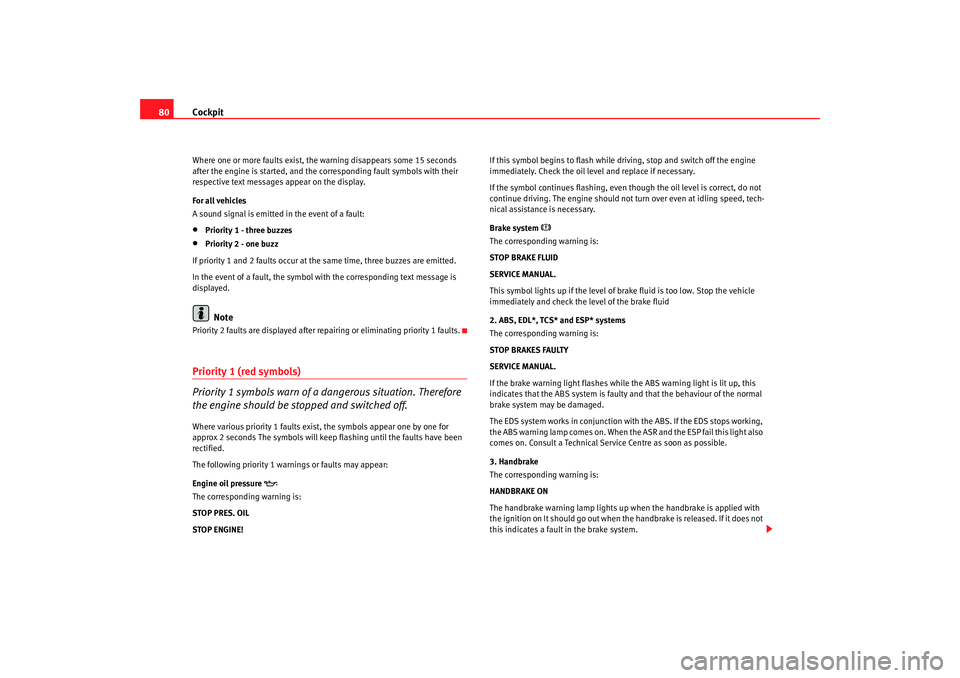
Engine oil pressure
The corresponding warning is:
STOP PRES. OIL
STOP ENGINE! If this symbol begins to flash while dr
iving, stop and switch off the engine
immediately. Check the oil level and replace if necessary.
If the symbol continues flashing, even th ough the oil level is correct, do not
continue driving. The engine should not tu rn over even at idling speed, tech-
nical assistance is necessary.
Brake system
The corresponding warning is:
STOP BRAKE FLUID
SERVICE MANUAL.
This symbol lights up if the level of brake fluid is too low. Stop the vehicle
immediately and check the level of the brake fluid
2. ABS, EDL*, TCS* and ESP* systems
The corresponding warning is:
STOP BRAKES FAULTY
SERVICE MANUAL.
If the brake warning light flashes while the ABS warning light is lit up, this
indicates that the ABS system is faulty and that the behaviour of the normal
brake system may be damaged.
The EDS system works in conjunction with the ABS. If the EDS stops working,
the ABS warning lamp comes on. When the ASR and the ESP fail this light also
comes on. Consult a Technical Service Centre as soon as possible.
3. Handbrake
The corresponding warning is:
HANDBRAKE ON
The handbrake warning lamp lights up when the handbrake is applied with
the ignition on It should go out when th e handbrake is released. If it does not
this indicates a fault in the brake system.
alhambra ingles.book Seite 80 Donnerstag, 19. April 2007 4:04 16
Page 170 of 291
Driving
168
– Press and hold the lock button, move the selector lever to P and
release the lock button.
Driving up and down hills
– Press the selector lever from position D to the right into the
“Tiptronic” selector gate.
– Lightly press the selector lever back to change down.
Holding the car on a hill
– You should always hold the vehicle in position with the footbrake
to stop it from “rolling backwards” ⇒. Do not try to prevent
the vehicle from “rolling backwards” by increasing the engine
speed while a range of gears is selected
Moving away on an incline
– With a gear engaged, take your foot from the brake and depress the accelerator.The steeper the gradient, the lower the gear you will need. This increases the
braking effect of the engine. For example, you should drive down a very steep
slope in 3rd gear. If the engine brake effect is not sufficient, the vehicle will
gain speed. The automatic gearbox / direct shift gearbox automatically
changes up to prevent the engine over revving. Use the foot brake to reduce
speed and change into 3rd gear using “Tiptronic” ⇒.
Your vehicle has an automatic interlock which prevents the selector lever
being put into a position for driving forwards or in reverse from positions P or
N if the brake pedal is not depressed.
The ignition key cannot be removed unl ess the selector lever is in position P.
WARNING
•
As a driver you should never leave your vehicle if the engine is running
and a gear is engaged. If you have to leave your vehicle while the engine is
running, you must apply the parking brake and engage parking lock P.
•
If the engine is running and if D, S or R is engaged, you will need to hold
the car on the foot brake. The car will creep forward as the power transmis-
sion is not fully interrupted even when the engine is idling.
•
Never press the accelerator when you move the selector lever. Risk of
accident.
•
Never move the selector lever to R or P when driving. Risk of accident!
•
Before you drive down a steep gradient, reduce your speed and use
“Tiptronic” to select a low gear.
•
If you have to stop the vehicle on a gradient, always hold the vehicle in
position using the foot brake to stop it from rolling back.
•
Never allow the brake to rub and do not use the brake pedal too often
or for long periods. Constant braking will cause the brakes to overheat and
will considerably reduce the brake effect. This increases the braking
distance and could cause the brake system to fail.
•
Never allow the car to roll down a gradient with the gear in neutral N, or
in selector lever position D, even if the engine is not running.Caution
•
If you stop the vehicle on a gradient, do not attempt to stop it from rolling
by depressing the accelerator when a gear has been selected. Otherwise, the
automatic gearbox /direct shift gearbox* may overheat causing damage. Pull
the handbrake on fully or depress the brake pedal to prevent the vehicle from
rolling away.
•
If you allow the car to roll with the selector lever in position N with the
engine switched off, the automatic gearbox / direct shift gearbox* will be
damaged as it will not be lubricated.
alhambra ingles.book Seite 168 Donnerstag, 19. April 2007 4:04 16
Page 172 of 291
Driving
170N - neutral (idling)
If this position is selected, the gearbox is in neutral. Power is not transmitted
to the wheels and the engine does not have a braking function.
Never use the N position to drive down a hill. The engine does not function as
a brake and the brakes are subjected to excessive stain.
You could damage the automatic gearbox if you drive down hills with the
selector lever in position N and the engine switched off.
D - Drive (forwards)
In this position the gearbox automatically changes automatically to a longer
or shorter gear, according to the driving style and speed. The braking effect
of the engine when driving downhill is very limited when the selector is in this
position. The display also shows which gear has been selected in addition to
position D.
If position N has been selected and you wish to select D, you must press the
foot brake if the vehicle is stationary, or travelling at under 5 km/h (approx.
3 km/h) ⇒.
WARNING
•
Never move the selector lever to R or P when driving. Risk of accident!
•
Never drive the vehicle with the engine and the ignition switched off.
You could loose control of the vehicle. The brake servo only functions when
the engine is running as does the elector-mechanical steering system. You
need more strength to steer and brake the vehicle when the engine and the
ignition are switched off. As you cannot steer and brake in the normal
manner, there is a greater risk of accidents and serious injury.Caution
If you allow the car to roll with the selector lever in position N with the engine
switched off, the automatic gearbox will be damaged as it will not be lubri-
cated.
Note
If the lever is moved accidentally to N when driving, take your foot off the
accelerator and let the engine speed drop to idling before selecting D
again.
alhambra ingles.book Seite 170 Donnerstag, 19. April 2007 4:04 16
Page 174 of 291
Driving
172•
Be particularly careful, therefore, when using the kick-down function on
slippery road surfaces.
•
You should use the kick-down func tion only when traffic and weather
conditions allow it to be used safely.
HandbrakeUsing the handbrake
The handbrake should be applied firmly to prevent the
vehicle from accidentally rolling away.Always apply the handbrake when you leave your vehicle and when
you park.
Using the handbrake
– Firmly pull the handbrake lever up all the way.
Releasing the handbrake
– Firmly pull the handbrake lever up all the way.
– Push in the lock button on the handbrake lever.
– Keep the locking knob pressed and push the lever all the way down ⇒ .The handbrake is located at the side of the driver seat. Always apply the
handbrake firmly. This prevents you driving with the handbrake applied
⇒ . The handbrake warning lamp
lights up when the handbrake is applied
and the ignition switched on. The warning lamp goes out when the hand-
brake is released.
WARNING
•
Never use the handbrake to slow down the vehicle when it is in motion.
The braking distance is considerably longer, as braking is only applied to
the rear wheels. Risk of accident!
•
Never drive with the handbrake slightly applied. This could cause the
rear brakes to overheat and lose thei r braking efficiency. Risk of accident.
This also causes premature wear on the rear brake pads/linings.Caution
Always apply the handbrake before you leave the vehicle. On cars with a
manual gearbox engage 1st gear, or on an automatic move the selector lever
to P .Parking
The handbrake should always be firmly applied when the
vehicle is parked.Always note the following points when parking the vehicle:
– Use the foot brake to stop the vehicle.
–Apply the handbrake firmly.
– On a manual gearbox engage 1st gear. On an automatic move
the selector lever to P.
WARNING (continued)
alhambra ingles.book Seite 172 Donnerstag, 19. April 2007 4:04 16
Page 181 of 291
Intelligent technology179
Safety First
Operating instructions
Tips and Maintenance
Te c h n i c a l D a t a
Tips and MaintenanceIntelligent technologyBrakesBrake servoThe brake servo supplements the pressure you exert on the brake pedal. It
works only when the engine is running .
If the brake servo does not operate, for example, when the vehicle is being
towed or due to a fault in the system, the brake pedal must be depressed
harder.
WARNING
The braking distance can also be affected by external factors.•
Never let the vehicle coast with the engine switched off. Failure to do so
could result in an accident. The braking distance is increased considerably
as the brake servo does not function.
•
If the brake servo is out of action, for example if the car is being towed,
you will have to press the brake pedal considerably harder than normal.
Brake pads wear display
If this light comes on, check the brake pads immediately.
At the same time, a text message or the necessary operations may appear on
the instrument panel.
WARNING
If the warning lamp lights up
or the corresponding message appears on
the instrument panel, immediately have the brake pads checked and
replaced, if necessary, at a specialised workshop.
Brake warning lamp
If the warning lamp comes on, this may be caused by the
following reasons:•
With the handbrake on the warning light comes on
on the instrument
panel. If you are travelling at over 6 km/h with the hand brake on, a text
message or the required operations ma y appear on the instrument panel. In
addition a warning signal is heard.
•
In the event of insufficient brake fluid the warning lamp lights up
on
the instrument panel. At the same time, a text message or the necessary oper-
ations may appear on the instrument panel. Stop the vehicle immediately
and check the level of the brake fluid ⇒page 221.
•
In the event of a fault in the brake system the warning lamp lights up
on the instrument panel and three buzz es are emitted. At the same time, a
text message or the necessary operations may appear on the instrument
panel. Stop the vehicle and do not dr ive on. You should obtain professional
assistance. This warning lamp
can light up together with the anti-locking
brake system warning lamp
⇒ .
alhambra ingles.book Seite 179 Donnerstag, 19. April 2007 4:04 16
Page 187 of 291
Driving and the environment185
Safety First
Operating instructions
Tips and Maintenance
Te c h n i c a l D a t a
Driving and the environmentRunning-inRunning in a new engine
The engine needs to be run-in over the first 1,500 km.Up to 1,000 kilometres
– Do not drive faster than three quarters of top speed.
– Do not use full throttle.
– Avoid high engine revolutions.
– Do not tow a trailer.
From 1000 to 1500 km
–Speeds can be gradually increased to the maximum road speed
or maximum permissible engine speed (rpm).During its first few hours of running, the internal fric tion in the engine is
greater than later on when all the moving parts have bedded down.
For the sake of the environment
If the engine is run in gently, the life of the engine will be increased and its oil
consumption reduced.
Running in tyres and brake pads
New tyres should be run-in carefully for the first 500 km. New
brake pads should be run-in carefully for the first 200 km.During the first 200 km, you can compensate for the reduced braking effect
by applying more pressure to the brake pedal. If you need to make an emer-
gency stop, the braking distance will be longer with new brake pads than with
brake pads that have been run-in.
WARNING
•
New tyres do not give maximum grip to start with, and need running in.
This may cause an accident. Drive particularly carefully in the first 500 km.
•
New brake pads must be “run in” and do not have the correct friction
properties during the first 200 km. However, you can compensate for the
slightly reduced braking effect by applying more pressure on the brake
pedal.
Braking effect and braking distance
The braking effect and braking distance are influenced by
driving situations and road conditions.The efficiency of the brakes depends directly on the brake pad wear. The rate
of wear of the brake pads depends to a great extent on the conditions under
which the vehicle is operated and the way the vehicle is driven. If you often
drive in town traffic, drive short distances or have a sporty driving style, we
recommend that you have the thickness of your brake pads checked by SEAT
Service more frequently than reco mmended in the service schedule.
alhambra ingles.book Seite 185 Donnerstag, 19. April 2007 4:04 16
Page 188 of 291
Driving and the environment
186If you drive with wet brakes, for example after driving through water, after
heavy rainfall or after washing the car, the braking effect will be reduced as
the brake discs will be wet, or possibly frozen (in winter): the brakes must be
“dried” through careful braking.
WARNING
Longer braking distances and faults in the brake system increase the risk
of accidents.•
New brake pads must be run in and do not have the correct friction
during the first 200 km. The slightly reduced braking effect can be compen-
sated for by increasing pressure on the brake pedal. This also applies when
new brake pads are fitted.
•
If brakes are wet or frozen, or if you are driving on roads which have
been gritted with salt, braking power may set in later than normal.
•
When driving downhill, the brakes wo rk hard and get hot very quickly.
Before driving down a long steep gradient, it is advisable to reduce speed
and change to a lower gear (or move the selector lever to a lower gear if
your vehicle has automatic transmission). In this way you will make use of
the engine braking effect and relieve the load on the brakes.
•
Never let the brakes “rub” by only applying light pressure. Continuous
braking will cause the brakes to overheat and will increase the braking
distance. Apply and then release the brakes alternately.
•
Never let the vehicle coast with the engine switched off. The braking
distance is increased considerably as the brake servo does not work.
•
Very heavy use of the brakes may cause a vapour lock if the brake fluid
is left in the system for too long. This impairs the braking effect.
•
Non-standard or damaged front spoilers could restrict the airflow to the
brakes and cause them to overheat. Observe the notes ⇒page 202 before
buying accessories.
•
If a brake circuit fails, the braking distance will be increased consider-
ably. Contact a qualified workshop immediately and avoid unnecessary
journeys.
Exhaust gas emission control systemCatalytic converter*To conserve the useful life of the catalytic converter
– Always use unleaded petrol.
– Do not run the fuel tank dry.
– For engine oil changes, do not replenish with too much engine oil ⇒page 215, “Topping up engine oil ”.
– Never tow the vehicle to start it, use jump leads if necessary ⇒page 249.If you notice misfiring, uneven running or loss of power when the vehicle is
moving, reduce speed immediately and have the vehicle inspected at the
nearest qualified workshop. These symptoms are communicated by the
exhaust gas warning lamp ⇒page 70. If this happens, unburnt fuel can enter
the exhaust system and escape into the environment. The catalytic converter
can also be damaged by overheating.
WARNING
The catalytic converter reaches very high temperatures! Fire hazard!•
Never park where the catalytic convert er could come into contact with
dry grass or inflammable materials under the vehicle.
•
Do not apply additional underseal or anti-corrosion coatings to the
exhaust pipes, catalytic converter or the heat shields on the exhaust
system, because the heat from the engine could ignite them.
alhambra ingles.book Seite 186 Donnerstag, 19. April 2007 4:04 16
Page 192 of 291
Driving and the environment
190
Storing towing bracket in the luggage compartment
– First tension the towing bracket.
– Place the towing bracket in its casing on the right-hand side of the luggage compartment. The bracket engages and the tension
is released ⇒ .
– Check that it is correctly fitted.The ball coupling is provided with in structions on fitting and removing the
ball coupling of the towing bracket.
If the ball coupling is fitted it s possible to store the cover of the tow-bar in a
plastic bag next to the tools.
WARNING
The towing bracket ball coupling must be stored securely to prevent it
being flung through the vehicle and causing injury.•
When the pretensed towing bracket is being fitted, there is a risk of
injury in the event that the wheel goes back on itself.Note
By law, the ball coupling must be remo ved if a trailer is not being towed and
it obscures the number plate.•
When placing the towing bracket in the casing check that it is no longer
tensed and securely fastened.
Driving tips
Driving with a trailer always requires extra care.Weight distribution
The weight distribution of a loaded trailer with an unladen vehicle is very
unfavourable. However, if this cannot be avoided, drive extra slowly to allow
for the unbalanced weight distribution.
Speed
The stability of the car and trailer is reduced with increasing speed. For this
reason it is advisable not to drive at the maximum permissible top speed in
unfavourable road, weather or wind conditions. This applies especially when
driving downhill.
You should always reduce speed immediately if the trailer shows the slightest
sign of snaking . Never try to stop the “snaking” by increasing speed.
Always brake in good time. If the trailer has an overrun brake, apply the
brakes gently at first and then firmly. This will prevent the jerking that can be
caused by the trailer wheels locking. Select a low gear (in both manual and
automatic gearboxes) in good time before going down a steep hill. This
enables you to use the engine braking effect to slow down the vehicle.
Overheating
At very high temperatures and during prolonged ascents, driving in a low gear
and high engine speed, always moni tor the temperature indicator for the
coolant.
Electronic Stabilisation Program
Do not switch off the ESP when towing a trailer. The ESP makes it easier to
stabilise if the trailer starts to snake.
alhambra ingles.book Seite 190 Donnerstag, 19. April 2007 4:04 16