tailgate Seat Alhambra 2008 Owner's Manual
[x] Cancel search | Manufacturer: SEAT, Model Year: 2008, Model line: Alhambra, Model: Seat Alhambra 2008Pages: 295, PDF Size: 7.83 MB
Page 5 of 295
Contents3
ContentsThe structure of this manual
. . . . .
Content
. . . . . . . . . . . . . . . . . . . . . . . . . . . . . . . .
Safety First
. . . . . . . . . . . . . . . . . . . . . . . . . . .
Safe driving
. . . . . . . . . . . . . . . . . . . . . . . . . . . . . .
Brief introduction . . . . . . . . . . . . . . . . . . . . . . . .
Proper sitting position for occupants . . . . . . . . .
Pedal area . . . . . . . . . . . . . . . . . . . . . . . . . . . . . .
Stowing luggage . . . . . . . . . . . . . . . . . . . . . . . . .
Seat belts
. . . . . . . . . . . . . . . . . . . . . . . . . . . . . . . .
Introduction . . . . . . . . . . . . . . . . . . . . . . . . . . . . .
Why wear seat belts? . . . . . . . . . . . . . . . . . . . . . .
Seat belts . . . . . . . . . . . . . . . . . . . . . . . . . . . . . . .
Belt tension devices . . . . . . . . . . . . . . . . . . . . . .
Airbag system
. . . . . . . . . . . . . . . . . . . . . . . . . . . .
Brief introduction . . . . . . . . . . . . . . . . . . . . . . . .
Front airbags . . . . . . . . . . . . . . . . . . . . . . . . . . . .
Side airbags . . . . . . . . . . . . . . . . . . . . . . . . . . . . .
Curtain airbags . . . . . . . . . . . . . . . . . . . . . . . . . .
Deactivating airbags* . . . . . . . . . . . . . . . . . . . . .
Child safety
. . . . . . . . . . . . . . . . . . . . . . . . . . . . . .
Brief introduction . . . . . . . . . . . . . . . . . . . . . . . .
Child seats . . . . . . . . . . . . . . . . . . . . . . . . . . . . . .
Installation of child seats in vehicle seats . . . . .
Integrated child seat . . . . . . . . . . . . . . . . . . . . . .
Operating instructions
. . . . . . . . . . . .
Cockpit
. . . . . . . . . . . . . . . . . . . . . . . . . . . . . . . . . . .
Overview . . . . . . . . . . . . . . . . . . . . . . . . . . . . . . .
Instruments . . . . . . . . . . . . . . . . . . . . . . . . . . . . .
Display in the instrument panel . . . . . . . . . . . . .
Warning lamps . . . . . . . . . . . . . . . . . . . . . . . . . . .
On board computer with multifunction display .
Steering wheel controls . . . . . . . . . . . . . . . . . . .
Telephone* . . . . . . . . . . . . . . . . . . . . . . . . . . . . .
Unlocking and locking
. . . . . . . . . . . . . . . . . . . .
Keys . . . . . . . . . . . . . . . . . . . . . . . . . . . . . . . . . . .
Central locking . . . . . . . . . . . . . . . . . . . . . . . . . . .
Key with remote control . . . . . . . . . . . . . . . . . . .
Anti-theft alarm system . . . . . . . . . . . . . . . . . . . .
Tailgate . . . . . . . . . . . . . . . . . . . . . . . . . . . . . . . . .
Windows . . . . . . . . . . . . . . . . . . . . . . . . . . . . . . .
Sliding/tilting sun roof . . . . . . . . . . . . . . . . . . . .
Lights and visibility
. . . . . . . . . . . . . . . . . . . . . . .
Lights . . . . . . . . . . . . . . . . . . . . . . . . . . . . . . . . . .
Visibility . . . . . . . . . . . . . . . . . . . . . . . . . . . . . . . .
Windscreen washers . . . . . . . . . . . . . . . . . . . . . .
Mirrors . . . . . . . . . . . . . . . . . . . . . . . . . . . . . . . . .
Seats and stowage
. . . . . . . . . . . . . . . . . . . . . . .
The importance of correct seat adjustment . . . .
Head restraints . . . . . . . . . . . . . . . . . . . . . . . . . .
Front seats . . . . . . . . . . . . . . . . . . . . . . . . . . . . . .
Rear seats . . . . . . . . . . . . . . . . . . . . . . . . . . . . . .
Stowage compartments . . . . . . . . . . . . . . . . . . .
Ashtrays, cigarette lighter and electrical sockets
AUX-IN Input . . . . . . . . . . . . . . . . . . . . . . . . . . . . .
Hazard warning triangles and first aid kit . . . . .
Luggage compartment . . . . . . . . . . . . . . . . . . . . Roof carrier . . . . . . . . . . . . . . . . . . . . . . . . . . . . . .
Cooling and heating box* . . . . . . . . . . . . . . . . . .
Heating, Ventilation and Air conditioning
. .
Climatronic . . . . . . . . . . . . . . . . . . . . . . . . . . . . . .
Driving
. . . . . . . . . . . . . . . . . . . . . . . . . . . . . . . . . . .
Address . . . . . . . . . . . . . . . . . . . . . . . . . . . . . . . .
Safety . . . . . . . . . . . . . . . . . . . . . . . . . . . . . . . . . .
Ignition lock . . . . . . . . . . . . . . . . . . . . . . . . . . . . .
Starting and stopping the engine . . . . . . . . . . .
Manual gearbox . . . . . . . . . . . . . . . . . . . . . . . . . .
Automatic gearbox . . . . . . . . . . . . . . . . . . . . . . .
Handbrake . . . . . . . . . . . . . . . . . . . . . . . . . . . . . .
Parking distance warning system* . . . . . . . . . . .
Cruise control system (CCS) . . . . . . . . . . . . . . . .
Tips and Maintenance
. . . . . . . . . . . . .
Intelligent technology
. . . . . . . . . . . . . . . . . . . . .
Brakes . . . . . . . . . . . . . . . . . . . . . . . . . . . . . . . . .
Driving and the environment
. . . . . . . . . . . . . .
Running-in . . . . . . . . . . . . . . . . . . . . . . . . . . . . . .
Exhaust gas emission control system . . . . . . . .
Economical and environmentally friendly driving
Driving abroad . . . . . . . . . . . . . . . . . . . . . . . . . . .
Trailer towing . . . . . . . . . . . . . . . . . . . . . . . . . . . .
Cleaning and caring for your vehicle
. . . . . . .
General notes . . . . . . . . . . . . . . . . . . . . . . . . . . .
Care of the vehicle exterior . . . . . . . . . . . . . . . . .
Care of the vehicle interior . . . . . . . . . . . . . . . . .
5
6
7
7
7
9
14
14
17
17
19
22
30
32
32
36
39
41
43
45
45
47
49
52 61
61
61
62
67
70
79
84
85
87
87
88
94
96
98
101
104
108
108
114
116
118
121
121
122
124
126
133
139
142
143
143 148
149
152
152
160
160
161
162
164
166
167
173
174
176
179
179
179
185
185
186
187
189
190
193
193
194
199
alhambra_ingles_0708 Seite 3 Mittwoch, 10. September 2008 10:55 10
Page 17 of 295

Safe driving15
Safety First
Operating instructions
Tips and Maintenance
Te c h n i c a l D a t a
– Distribute the load evenly in the luggage compartment.
– Lay and stow heavy luggage as far forward as possible in the
luggage compartment.
– Stow heavy luggage as low as possible in the luggage compart- ment.
– Secure heavy objects to the fitted fastening rings ⇒page 15.
WARNING
•
Loose luggage and other objects in the luggage compartment can
cause serious injuries.
•
Always stow objects in the luggage compartment and secure them on
the fastening rings.
•
Use suitable specialist straps to secure heavy objects.
•
During sudden manoeuvres or accidents, loose objects can be thrown
forward, injuring vehicle occupants or passers-by. This increased risk of
injury will be further increased if a lo ose object is struck by an inflating
airbag. If this happens, objects can be transformed into “missiles”. Risk of
fatal injury.
•
Please note that the centre of gravity may shift when transporting
heavy objects; this may affect the vehicle's handling and lead to an acci-
dent. Therefore, it is essential to adjust your speed and driving style
accordingly, to avoid accidents.
•
Never exceed the allowed axle loads or allowed maximum weight. If the
allowed axle load or the allowed total weight is exceeded, the driving char-
acteristics of the vehicle may change, leading to accidents, injuries and
damage to the vehicle.
•
Never leave your vehicle unattended, especially when the tailgate is
open. Children could climb into the luggage compartment closing the door behind them; they will remain trapped without help and there is a mortal
risk.
•
Never allow children to play in or around the vehicle. Close and lock
both the tailgate and all the doors when you leave the vehicle. Before you
lock the vehicle, make sure that there are no adults or children in the
vehicle.
•
Never transport passengers in the luggage compartment. Every
passenger must be properly belted in ⇒ page 17.Note
•
Air circulation in the vehicle helps reduce fogging of the windows. Used
air escapes through ventilation slits in the side trim of the luggage compart-
ment. Ensure that the ventilation slits are never covered.
•
Straps for securing the load to the fastening rings are commercially
available.
Fastening rings
There are four fastening rings in the luggage compartment
which can be used to secure luggage and other objects.– Always use suitable and undama ged straps to secure luggage
and other objects to the fastening rings ⇒ in “Loading the
luggage compartment” on page 14.
– Pull up the fastening rings to attach the straps.
WARNING (continued)
alhambra_ingles_0708 Seite 15 Mittwoch, 10. September 2008 10:55 10
Page 79 of 295
Cockpit77
Safety First
Operating instructions
Tips and Maintenance
Te c h n i c a l D a t a
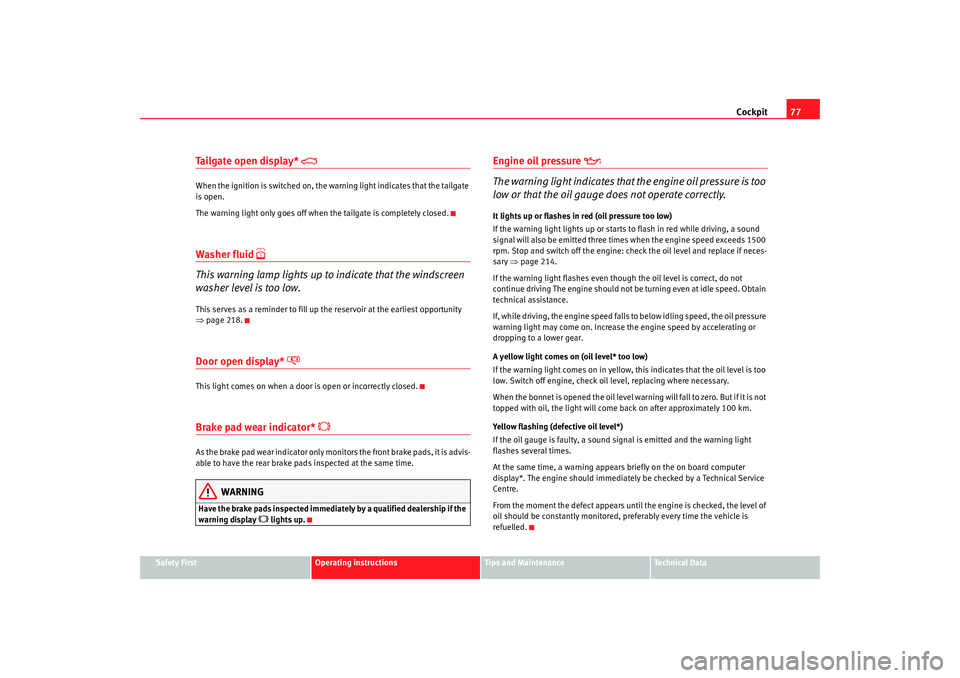
Tailgate open display*
When the ignition is switched on, the warning light indicates that the tailgate
is open.
The warning light only goes off when the tailgate is completely closed.Washer fluid
This warning lamp lights up to indicate that the windscreen
washer level is too low.This serves as a reminder to fill up the reservoir at the earliest opportunity
⇒ page 218.Door open display*
This light comes on when a door is open or incorrectly closed.Brake pad wear indicator*
As the brake pad wear indicator only monitors the front brake pads, it is advis-
able to have the rear brake pads inspected at the same time.
WARNING
Have the brake pads inspected immediately by a qualified dealership if the
warning display
lights up.
Engine oil pressure
The warning light indicates that the engine oil pressure is too
low or that the oil gauge does not operate correctly.It lights up or flashes in red (oil pressure too low)
If the warning light lights up or starts to flash in red while driving, a sound
signal will also be emitted three times when the engine speed exceeds 1500
rpm. Stop and switch off the engine: check the oil level and replace if neces-
sary ⇒page 214.
If the warning light flashes even though the oil level is correct, do not
continue driving The engine should not be turning even at idle speed. Obtain
technical assistance.
If, while driving, the engine speed falls to below idling speed, the oil pressure
warning light may come on. Increase the engine speed by accelerating or
dropping to a lower gear.
A yellow light comes on (oil level* too low)
If the warning light comes on in yellow, this indicates that the oil level is too
low. Switch off engine, check oil level, replacing where necessary.
When the bonnet is opened the oil level warning will fall to zero. But if it is not
topped with oil, the light will come back on after approximately 100 km.
Yellow flashing (defective oil level*)
If the oil gauge is faulty, a sound signal is emitted and the warning light
flashes several times.
At the same time, a warning appears briefly on the on board computer
display*. The engine should immediately be checked by a Technical Service
Centre.
From the moment the defect appears until the engine is checked, the level of
oil should be constantly monitored, preferably every time the vehicle is
refuelled.
alhambra_ingles_0708 Seite 77 Mittwoch, 10. September 2008 10:55 10
Page 84 of 295

Cockpit
82•
To protect your face, hands and arms from hot steam or fluid, cover the
fan cap with a large cloth in order to open it.
•
Take care to avoid coolant spilling on the exhaust pipe or any other hot
component as antifreeze is inflammable.
Priority 2 (yellow symbols)If a yellow symbol appears, a sound signal is emitted. The symbols indicate
a dangerous situation. The function shown should be controlled as fast as
possible. If various faults occur at the same time, the symbols will be
displayed one by one for approx. 2 seconds.
Oil level too low
The corresponding warning is:
CHECK LEVEL OIL
If the symbol lights up: stop, switch off the engine and check the oil level,
topping up where necessary.
Oil level too low
The corresponding warning is:
OIL SENSOR WORKSHOP!
If the symbol flashes this probably means that the oil level sensor is defec-
tive. The vehicle should immediately be taken to a Technical Service Centre.
It is possible to continue driving, but the oil level should be continually moni-
tored, e.g. every time the vehicle is refuelled.
Engine fault
- Petrol engine
- Diesel engine
The corresponding warning is:
ENGINE FAULT WORKSHOP!
If a fault in the running of the engine arises while driving, the corresponding
light will come on (petrol engine) or flash (diesel engine). In this case the
engine should be checked immediately by a Technical Service Centre.
Anti-lock brake system (ABS)
The corresponding warning is:
ABS FAULT
A fault in the ABS system is shown in the following manner:
If the ABS warning light comes on separately, it is possible to brake the
vehicle using the normal brake system (without ABS). Consult a Technical
Service Centre as soon as possible.
Electronic immobiliser
The corresponding warning is:
IMMOBILIS.ACTIVE
When the ignition is switched on, the vehicle key data is automatically
consulted. The warning light will flash to confirm that the data is being
checked
If an unauthorised key is used, the warning light will flash constantly. It will
not be possible to start the vehicle.
Tailgate/bonnet open display *
The corresponding warning is:
TA ILGATE OPEN
This warning light only indicates that the tailgate is open.
WARNING (continued)
alhambra_ingles_0708 Seite 82 Mittwoch, 10. September 2008 10:55 10
Page 85 of 295
Cockpit83
Safety First
Operating instructions
Tips and Maintenance
Te c h n i c a l D a t a
The warning light only goes off when the tailgate is completely closed ( to the
second position)
Windscreen washer*
The corresponding warning is:
TOP UP WASHER FLUID
This symbol lights up to indicate that the windscreen washer level is too low.
Top up windscreen and headlight washer fluid*
Fuel level low
The corresponding warning is:
PLEASE REFUELNavigation system*
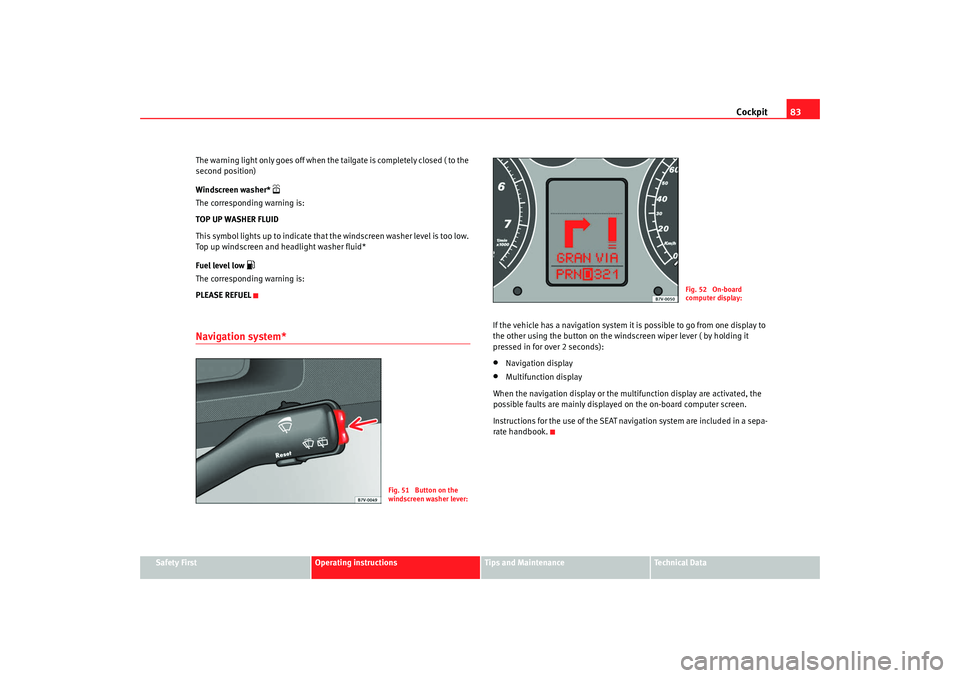
If the vehicle has a navigation system it is possible to go from one display to
the other using the button on the windscreen wiper lever ( by holding it
pressed in for over 2 seconds):•
Navigation display
•
Multifunction display
When the navigation display or the multifunction display are activated, the
possible faults are mainly displayed on the on-board computer screen.
Instructions for the use of the SEAT navigation system are included in a sepa-
rate handbook.
Fig. 51 Button on the
windscreen washer lever:
Fig. 52 On-board
computer display:
alhambra_ingles_0708 Seite 83 Mittwoch, 10. September 2008 10:55 10
Page 90 of 295
Unlocking and locking
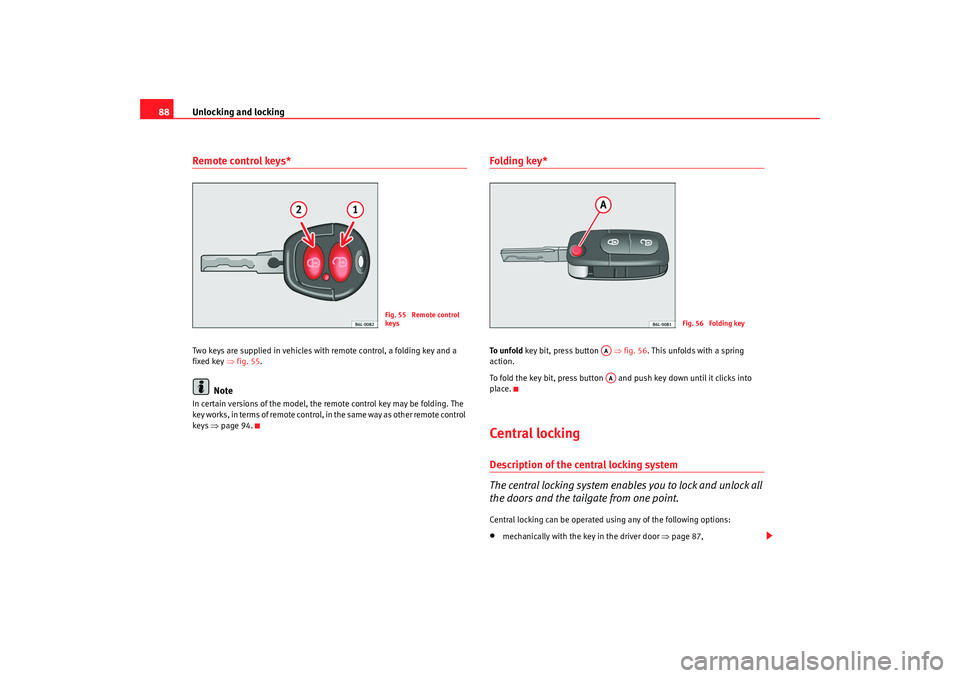
88Remote control keys*Two keys are supplied in vehicles with remote control, a folding key and a
fixed key ⇒fig. 55 .
Note
In certain versions of the model, the remote control key may be folding. The
key works, in terms of remote control, in the same way as other remote control
keys ⇒page 94.
Folding key*To u n f o l d key bit, press button ⇒fig. 56 . This unfolds with a spring
action.
To fold the key bit, press button and push key down until it clicks into
place.Central lockingDescription of the central locking system
The central locking system enables you to lock and unlock all
the doors and the tailgate from one point.Central locking can be operated using any of the following options:•
mechanically with the key in the driver door ⇒page 87,
Fig. 55 Remote control
keys
Fig. 56 Folding key
AAAA
alhambra_ingles_0708 Seite 88 Mittwoch, 10. September 2008 10:55 10
Page 91 of 295
Unlocking and locking89
Safety First
Operating instructions
Tips and Maintenance
Te c h n i c a l D a t a
•
the key with remote control
9) ⇒ page 94,
•
with the central locking button ⇒ page 91.
Individual opening of doors
9)
An Authorised SEAT Service Centre can programme the individual opening of
doors.
When the key is turned once in the driver's door lock, in the direction of
opening, or when button ⇒page 94, fig. 61 on the remote control key is
pressed, only the driver's door will unlock.
When the key is turned a second time or the button is pressed a second
time, all the doors and the tailgate are unlocked.
WARNING
•
Do not leave anyone in the car if it has been locked from the outside. It
is not possible to open the doors from the inside. Locked doors could delay
assistance in an emergency. People could become trapped inside in an
emergency.
•
Never close the doors without observing and ensuring it is clear, to do
otherwise could cause serious injury to you and others. Make sure that no
one is in the path of the door.Note
The entire vehicle is unlocked if the airbags are triggered during an accident.
The vehicle cannot be locked from the inside unless the ignition is first
switched off and back on. Following an accident, the vehicle cannot be locked
from the outside. Contact an Authorised Service Centre.
Opening and closing the doors with the keyOpening the doors
– Insert the key in the lock on the driver door.
– Turn the key to the open position. The doors and the tailgate are unlocked.
Closing the doors
– Insert the key in the lock on the driver door.
– First turn the key once to the locking position ⇒. The doors
and the tailgate are locked.Notes on unlocking
The following applies if you wish to unlock your vehicle manually using the
key:•
The deadlock mechanism, the interior monitoring system
10) and the anti-
theft alarm
10) will be deactivated immediately. The deactivation is confirmed
by the turn signals flashing briefly twice.
•
The interior lights in the courtesy position will be switched on for approx-
imately 20 seconds when the vehicle is unlocked.
•
If the key is held in the unlocking position, all windows (apart from the
electric vent wing at the rear) will be opened on vehicles equipped with elec-
tric windows.
Notes on locking
The following applies if you wish to lock your vehicle manually using the key:
9)Optional equipment
A1
10)Optional equipment
alhambra_ingles_0708 Seite 89 Mittwoch, 10. September 2008 10:55 10
Page 92 of 295
Unlocking and locking
90•
The deadlock mechanism, the interior monitoring system
10) and the anti-
theft alarm
10) will be activated immediately if the key is turned once in the
lock. The activation is confirmed by the turn signals flashing briefly.
•
The deadlock mechanism, the interior monitoring system and the anti-
theft alarm will not be activated if the key is turned in the lock twice within
one second. All the doors and the tailgate will, however, be locked. The doors
can be unlocked from the inside if the deadlock mechanism has not been
activated. To do this, operate the door opening lever on the door in question.
The alarm will go off.
•
When locking the vehicle, the interior lights in the courtesy switch posi-
tion will be switched off
•
A warning lamp in the driver door flashes to indicate the deadlock is
working. The warning lamp will switch off after 14 days. This is to prevent the
vehicle battery from discharging completely when the vehicle is not used for
a longer period. The system is still active.
•
Windows, or the sliding roof, which are still open can be closed automat-
ically on vehicles equipped with electric windows and electric vent windows
or with an electric sliding roof. To do this, the key must be kept held in the
locking position until all windows and the sliding roof are fully closed.
WARNING
If the vehicle is locked, children and disabled people may be trapped
inside.•
Never leave children or disabled persons in the vehicle; in case of emer-
gency they may not be able to leave the vehicle or look after themselves.
•
Always take you car keys with you when you leave the vehicle. Misuse
of the keys, for example, by children, may result in serious damage and
accident.
−The engine may accidentally be started and be out of control.
− If the ignition is switched on, the electric equipment could be acti-
vated with risk of injury, for example, in the electric windows. −
The doors can be locked using the remote control key. This could
result in people being trapped in the vehicle in an emergency.
− Always take the key with you when you leave the vehicle.
•
Never remove the key from the ignition if the vehicle is in motion. Risk
of accident. The steering lock could engage suddenly, and you would not be
able to steer the vehicle.Caution
Each key contains electronic components. Protect the keys from moisture and
excessive vibration.
Note
•
Any SEAT Service centre can programme the central locking system so that
only the driver's door is unlocked when the key is turned once to open.WARNING (continued)
alhambra_ingles_0708 Seite 90 Mittwoch, 10. September 2008 10:55 10
Page 93 of 295
Unlocking and locking91
Safety First
Operating instructions
Tips and Maintenance
Te c h n i c a l D a t a
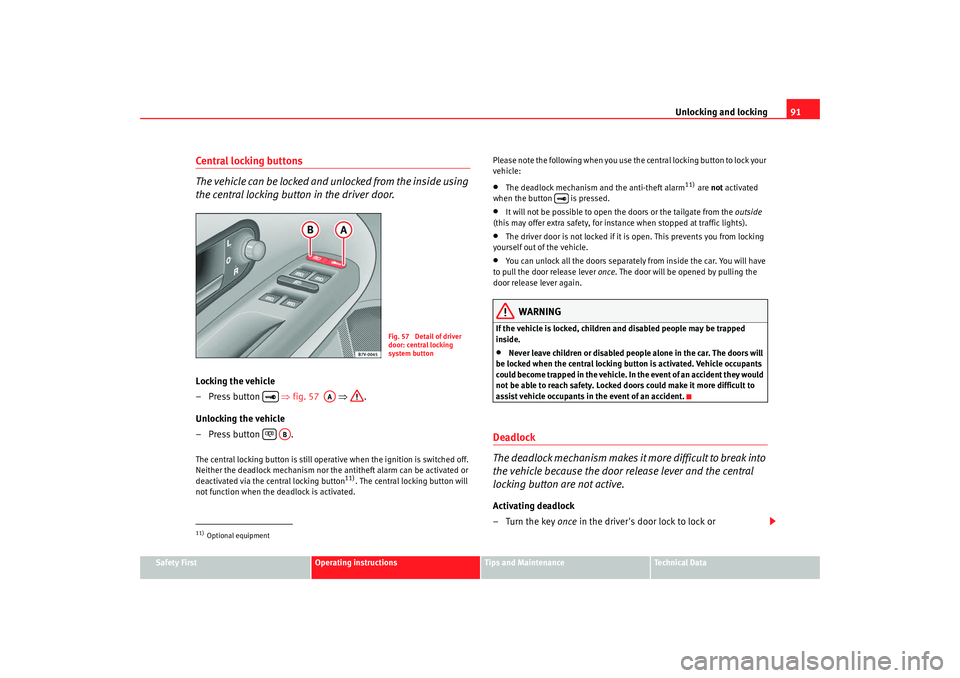
Central locking buttons
The vehicle can be locked and unlocked from the inside using
the central locking button in the driver door.Locking the vehicle
– Press button ⇒fig. 57 ⇒ .
Unlocking the vehicle
– Press button .The central locking button is still operative when the ignition is switched off.
Neither the deadlock mechanism nor the antitheft alarm can be activated or
deactivated via the central locking button
11). The central locking button will
not function when the deadlock is activated. Please note the following when you use the central locking button to lock your
vehicle:
•
The deadlock mechanism and the anti-theft alarm
11) are not
activated
when the button is pressed.
•
It will not be possible to open the doors or the tailgate from the outside
(this may offer extra safety, for instance when stopped at traffic lights).
•
The driver door is not locked if it is open. This prevents you from locking
yourself out of the vehicle.
•
You can unlock all the doors separately from inside the car. You will have
to pull the door release lever once. The door will be opened by pulling the
door release lever again.
WARNING
If the vehicle is locked, children and disabled people may be trapped
inside.•
Never leave children or disabled people alone in the car. The doors will
be locked when the central locking button is activated. Vehicle occupants
could become trapped in the vehicle. In the event of an accident they would
not be able to reach safety. Locked doors could make it more difficult to
assist vehicle occupants in the event of an accident.
Deadlock
The deadlock mechanism makes it more difficult to break into
the vehicle because the door release lever and the central
locking button are not active.Activating deadlock
–Turn the key once in the driver's door lock to lock or
11)Optional equipment
Fig. 57 Detail of driver
door: central locking
system button
AA
AB
alhambra_ingles_0708 Seite 91 Mittwoch, 10. September 2008 10:55 10
Page 94 of 295
Unlocking and locking
92
–press once the locking button on the remote control
12)
. A red
warning lamp in the driver door flashes to indicate the deadlock
is working.
Deactivating deadlock when the vehicle is locked
–Turn the key twice in the driver's door lock to lock or
–press twice the locking button on the remote control12)
. The
vehicle is locked without activating the deadlock.
The doors can be unlocked from the inside if the deadlock mechanism has not
been activated. You will have to pull the door release lever once. The door will
be opened by pulling the door release lever again. When the deadlock is
deactivated, the anti-theft alarm
12) ⇒ page 96 and the interior monitoring
system are also deactivated
12).
WARNING
Nobody should remain in the vehicle if the deadlock mechanism has been
activated. It is not possible to open the doors from the inside. Locked doors
could delay assistance in an emergency. People could become trapped
inside in an emergency.
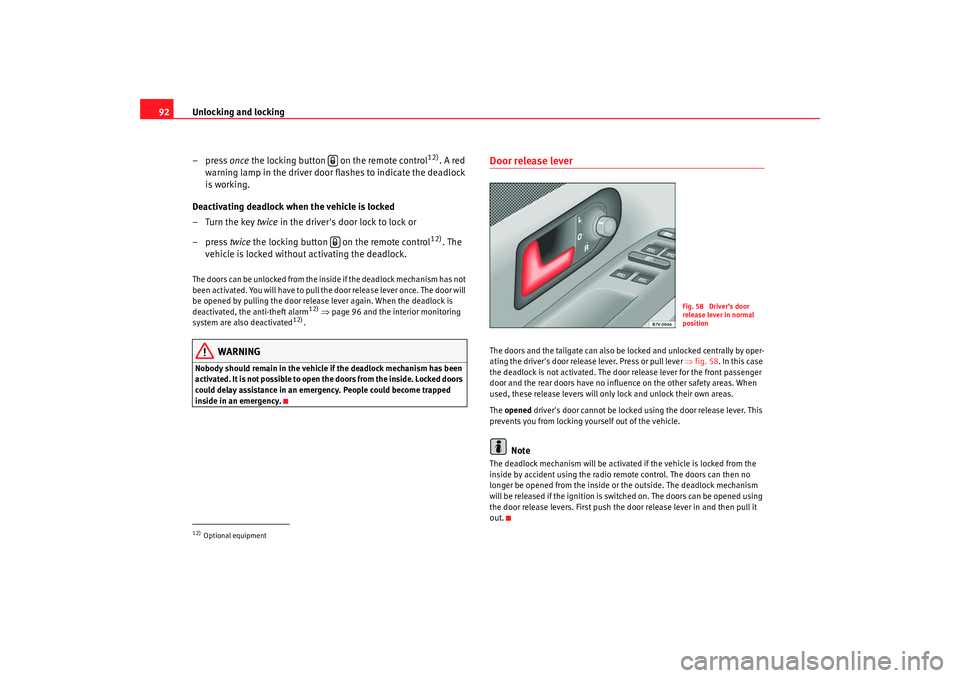
Door release lever The doors and the tailgate can also be locked and unlocked centrally by oper-
ating the driver's door release lever. Press or pull lever ⇒fig. 58 . In this case
the deadlock is not activated. The door release lever for the front passenger
door and the rear doors have no influence on the other safety areas. When
used, these release levers will only lock and unlock their own areas.
The opened driver's door cannot be locked using the door release lever. This
prevents you from locking yourself out of the vehicle.
Note
The deadlock mechanism will be activated if the vehicle is locked from the
inside by accident using the radio remote control. The doors can then no
longer be opened from the inside or the outside. The deadlock mechanism
will be released if the ignition is switched on. The doors can be opened using
the door release levers. First push the door release lever in and then pull it
out.
12)Optional equipment
Fig. 58 Driver's door
release lever in normal
position
alhambra_ingles_0708 Seite 92 Mittwoch, 10. September 2008 10:55 10