dead battery Seat Alhambra 2015 Owner's Manual
[x] Cancel search | Manufacturer: SEAT, Model Year: 2015, Model line: Alhambra, Model: Seat Alhambra 2015Pages: 305, PDF Size: 5.46 MB
Page 58 of 305
Operation
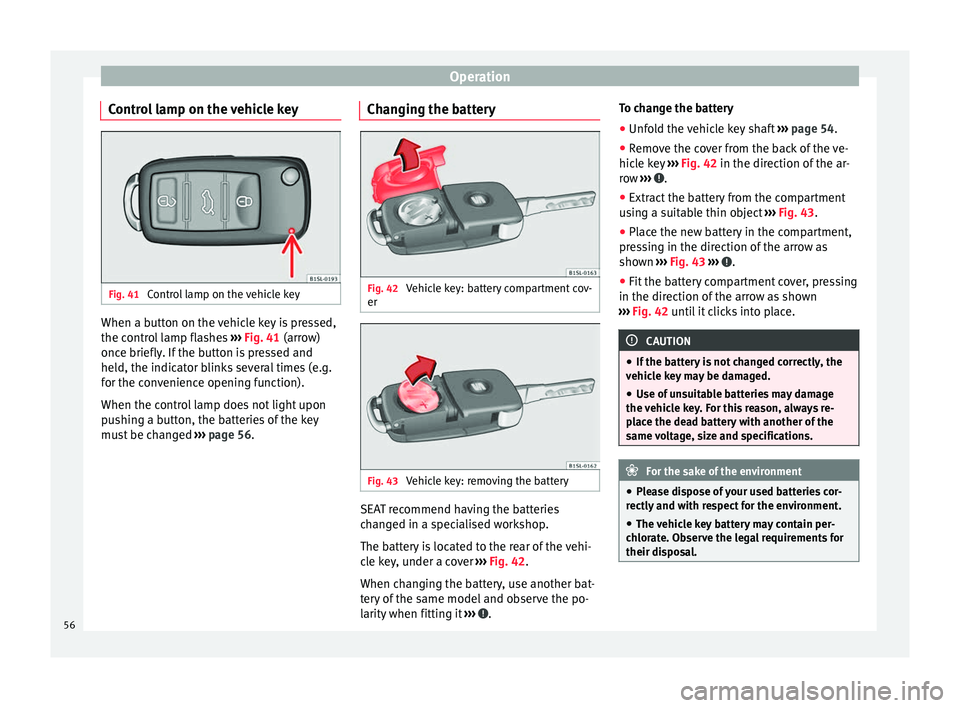
Control lamp on the vehicle key Fig. 41
Control lamp on the vehicle key When a button on the vehicle key is pressed,
the control lamp flashes
››› Fig. 41 (arrow)
onc e briefly
. If the button is pressed and
held, the indicator blinks several times (e.g.
for the convenience opening function).
When the control lamp does not light upon
pushing a button, the batteries of the key
must be changed ››› page 56. Changing the battery Fig. 42
Vehicle key: battery compartment cov-
er Fig. 43
Vehicle key: removing the battery SEAT recommend having the batteries
changed in a specialised workshop.
The battery is located to the rear of the vehi-
cle key, under a cover
››› Fig. 42 .
When c h
anging the battery, use another bat-
tery of the same model and observe the po-
larity when fitting it ››› .To change the battery
●
Unfold the vehicle key shaft ››› page 54.
● Remove the cover from the back of the ve-
hicle key ››› Fig. 42 in the direction of the ar-
r o
w ››› .
● Extract the battery from the compartment
using a suitable thin object ››› Fig. 43 .
● Plac
e the new battery in the compartment,
pressing in the direction of the arrow as
shown ››› Fig. 43 ››› .
● Fit the battery compartment cover, pressing
in the direction of the arrow as shown
››› Fig. 42 until it clicks into place. CAUTION
● If the battery is not changed correctly, the
vehicle key may be damaged.
● Use of unsuitable batteries may damage
the vehicle key. For this reason, always re-
place the dead battery with another of the
same voltage, size and specifications. For the sake of the environment
● Please dispose of your used batteries cor-
rectly and with respect for the environment.
● The vehicle key battery may contain per-
chlorate. Observe the legal requirements for
their disposal. 56
Page 63 of 305
Opening and closing
few seconds on the lock sensor surface
››› Fig. 47 B located on the exterior part of
the driver or passenger door handle until the
windows and roof close.
Opening the doors by touching the sensor
s ur
face on the handle takes places in accord-
ance with the settings activated on the menu
Configuration - Convenience ››› page 47. CAUTION
The sensor surfaces on the door handles
could engage if hit with a water jet or high
pressure steam if there is a valid vehicle key
in the nearby area. If at least one of the win-
dows is open and the sensor surface B on
one of the handle permanently activates, all
windows will close. If the water jet or steam
is briefly moved away from the sensor sur-
face A on one of the handles and then poin-
ted at it again, all the windows will probably
open ››› page 60, Convenience functions. Note
● If the vehicle battery has little or no charge,
or the vehicle key battery is almost or entire-
ly out of charge, it is likely that the vehicle
will not be able to be lock or unlocked with
the Keyless Access system. The vehicle can
be unlocked or locked manually ››› page 259.
● If there is no valid key inside the vehicle or
the system fails to detect one, a warning will
display on the dash panel screen. This could
happen if any other radio frequency signal in- terferes with the key signal (e.g. from a mo-
bile device accessory) or if the key is covered
by another object (e.g. an aluminium case).
● If the sensors are very dirty, e.g. have a lay-
er of salt, how the sensors on the door han-
dles operate may be affected. If this is the
case, wash the vehicle ››› page 195.
● If the vehicle is equipped with an automatic
gearbox, it may only be locked in the gear
stick is in position P. Deadlock
FunctionNecessary operations
Locks the vehicle with
the "Safe" security sys-
tem.Press the button once on
the vehicle key.
Locks the vehicle with-
out the "Safe" security
system.
Press the button twice on
the vehicle key.
Touch the Keyless Access
close and ignition lock sensor
surface located on the exteri-
or part of the door handle
twice ››› page 59.
Press the central locking but-
ton on the driver door
once. Depending on the vehicle, when disabling
the ignition, a warning on the dash panel
screen may display stating that the "safe" se-curity system is activated (
Lock SAFE or SAFE-
L OCK
).
Disabling the "safe" security system
The "safe" security system may be disable in
one of the following ways:
● Press the button on the vehicle key
twice .
● Touc
h the Keyless Access close and igni-
tion lock sensor surface located on the exteri-
or part of the door handle twice ››› p
age 59.
● Switch the ignition on.
● Press the ignition push button of the
Keyless Access lock and ignition system.
When the “safe” security system is disabled,
the following needs to be taken into account:
● The vehicle can be opened and unlocked
from the inside using an inside door handle.
● The anti-theft alarm is activated.
● The vehicle interior monitoring system and
the anti-tow system are disabled. WARNING
Careless use of the “Safe” security system
can cause serious injury.
● Never leave anybody inside the vehicle if it
has been locked using the key. When the
"Safe" security system is activated, doors
cannot be opened from the inside! » 61
Technical specifications
Advice
Operation
Safety