ignition Seat Alhambra 2016 User Guide
[x] Cancel search | Manufacturer: SEAT, Model Year: 2016, Model line: Alhambra, Model: Seat Alhambra 2016Pages: 324, PDF Size: 5.93 MB
Page 33 of 324
The essentialsRear vision
mirror ad-
justmentTilts passenger mirror downwards when
reverse gear is engaged. This enables
the driver to see the edge of the pave-
ment, for example
››› page 139.
Exterior mir-
ror adjust.If synchronised adjustment is selec-
ted, when the driver side exterior mirror
is adjusted, the passenger exterior mir-
ror is also moved.
Factory set-
tingsSome functions of the Convenience
submenu will be reset to the factory val-
ue.
BackThe Configuration menu is dis-
played again. Lights & visibility
submenu
Coming
HomeThis permits the adjustment of the time
the headlamps stay on after locking or
unlocking the vehicle, the function can
also be connected or disconnected here
››› page 133.
Leaving
Home
Footwell
lightThis permits the adjustment of the
brightness of the footwell lighting when
the doors are open, the function can al-
so be connected or disconnected here
Convenience
turn signals
Switching convenience turn signals on
and off When the convenience turn sig-
nals are connected,, these flash at least
three times when the turn signal is
switched on ››› page 130.
Factory set-
tingsAll the configurations in the submenu
Lights & visibility are reset to
the predefined factory values.
Tourist light
Headlamp adjustment for countries in
which vehicles are driven on the other
side of the road. When the mark is acti-
vated, the headlamps of a left-hand
drive vehicle are adjusted for driving on
the left. This function must only be used
for a short period.
BackThe Configuration menu is dis-
played again. Personal convenience settings
When two people use a vehicle, SEAT recom-
mend
s
th
at each person always uses “their”
own remote control key. When the ignition is
switched off, or the vehicle is locked, the per-
sonal convenience settings are stored and
automatically allocated to the vehicle key
››› page 26.
The values of the personalised convenience
settings of the following menu options are al-
located to the vehicle key: ■ Parking heating menu
■ Configuration Menu
■ Time
■ Language
■ Units
■ Convenience settings menu■
Door unloc
k (individual opening, Auto
Lock)
■ Convenience handling of windows
■ Rear vision mirror adjustment
■ Lights & visibility settings
menu
■ Coming home and leaving home
■ Footwell light
■ Convenience turn signals
The stored settings are automatically activa-
ted, at the latest when the ignition is switch-
ed on. Please refer to the information and
tips relating to the seat memory
››› page 146. 31
Page 35 of 324
The essentials
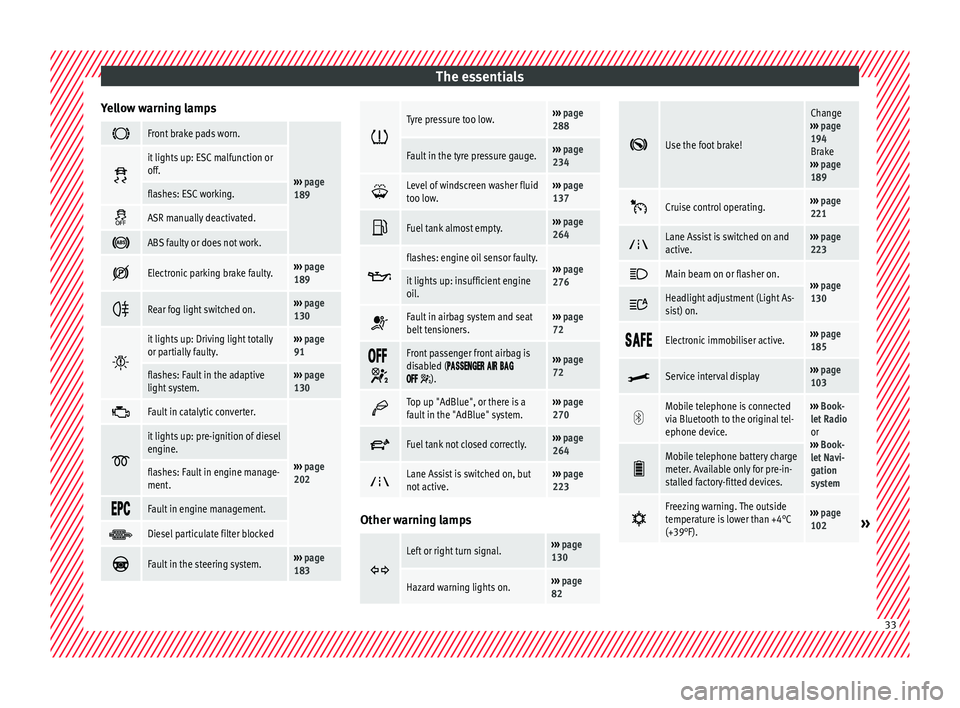
Yellow warning lamps Front brake pads worn.
›››
page
189
it lights up: ESC malfunction or
off.
flashes: ESC working.
ASR manually deactivated.
ABS faulty or does not work.
Electronic parking brake faulty.›››
page
189
Rear fog light switched on.›››
page
130
it lights up: Driving light totally
or partially faulty.›››
page
91
flashes: Fault in the adaptive
light system.››› page
130
Fault in catalytic converter.
›››
page
202
it lights up: pre-ignition of diesel
engine.
flashes: Fault in engine manage-
ment.
Fault in engine management.
Diesel particulate filter blocked
Fault in the steering system.›››
page
183
Tyre pressure too low.›››
page
288
Fault in the tyre pressure gauge.››› page
234
Level of windscreen washer fluid
too low.›››
page
137
Fuel tank almost empty.›››
page
264
flashes: engine oil sensor faulty.›››
page
276it lights up: insufficient engine
oil.
Fault in airbag system and seat
belt tensioners.›››
page
72
Front passenger front airbag is
disabled (
).
››› page
72
Top up "AdBlue", or there is a
fault in the "AdBlue" system.›››
page
270
Fuel tank not closed correctly.›››
page
264
Lane Assist is switched on, but
not active.›››
page
223 Other warning lamps
Left or right turn signal.›››
page
130
Hazard warning lights on.››› page
82
Use the foot brake!
Change
››› page
194
Brake
››› page
189
Cruise control operating.›››
page
221
Lane Assist is switched on and
active.›››
page
223
Main beam on or flasher on.›››
page
130 Headlight adjustment (Light As-
sist) on.
Electronic immobiliser active.›››
page
185
Service interval display›››
page
103
Mobile telephone is connected
via Bluetooth to the original tel-
ephone device.›››
Book-
let Radio
or
››› Book-
let Navi-
gation
system
Mobile telephone battery charge
meter. Available only for pre-in-
stalled factory-fitted devices.
Freezing warning. The outside
temperature is lower than +4°C
(+39°F).›››
page
102» 33
Page 37 of 324
The essentials
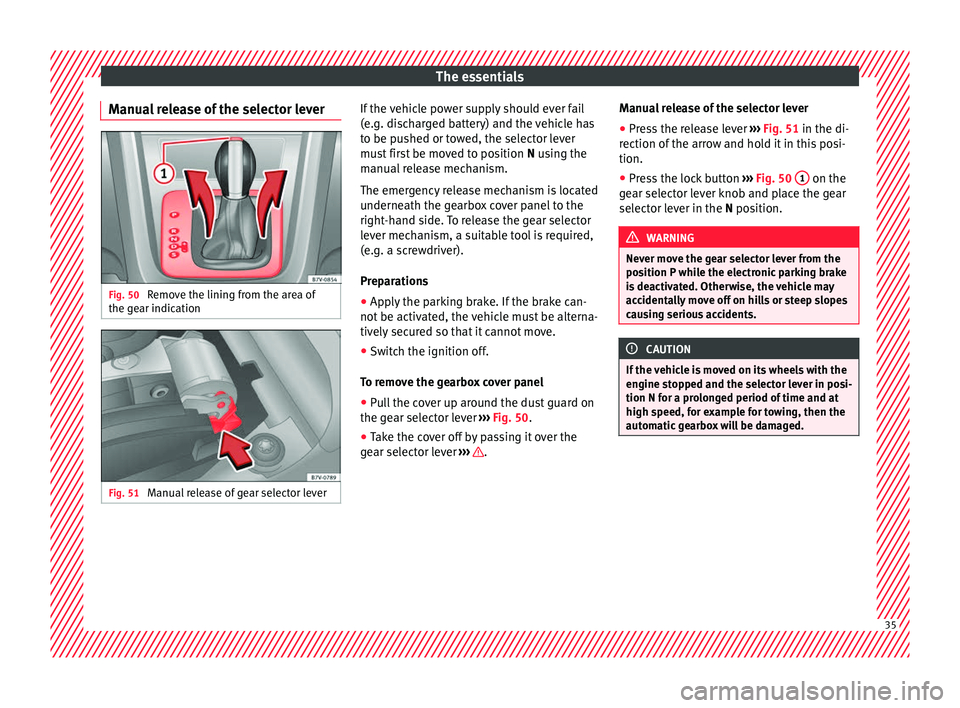
Manual release of the selector lever Fig. 50
Remove the lining from the area of
the g e
ar indic
ation Fig. 51
Manual release of gear selector lever If the vehicle power supply should ever fail
(e.
g. di
s
charged battery) and the vehicle has
to be pushed or towed, the selector lever
must first be moved to position N using the
manual release mechanism.
The emergency release mechanism is located
underneath the gearbox cover panel to the
right-hand side. To release the gear selector
lever mechanism, a suitable tool is required,
(e.g. a screwdriver).
Preparations
● Apply the parking brake. If the brake can-
not be activat
ed, the vehicle must be alterna-
tively secured so that it cannot move.
● Switch the ignition off.
To remo
ve the gearbox cover panel
● Pull the cover up around the dust guard on
the gear sel
ector lever ››› Fig. 50.
● Take the cover off by passing it over the
gear sel
ector lever ››› .Manual release of the selector lever
●
Press the release lever ››
›
Fig. 51 in the di-
rection of the arrow and hold it in this posi-
tion.
● Press the lock button ›››
Fig. 50 1 on the
g e
ar sel
ector lever knob and place the gear
selector lever in the N position. WARNING
Never move the gear selector lever from the
pos ition P whi
le the electronic parking brake
is deactivated. Otherwise, the vehicle may
accidentally move off on hills or steep slopes
causing serious accidents. CAUTION
If the vehicle is moved on its wheels with the
engine s t
opped and the selector lever in posi-
tion N for a prolonged period of time and at
high speed, for example for towing, then the
automatic gearbox will be damaged. 35
Page 40 of 324
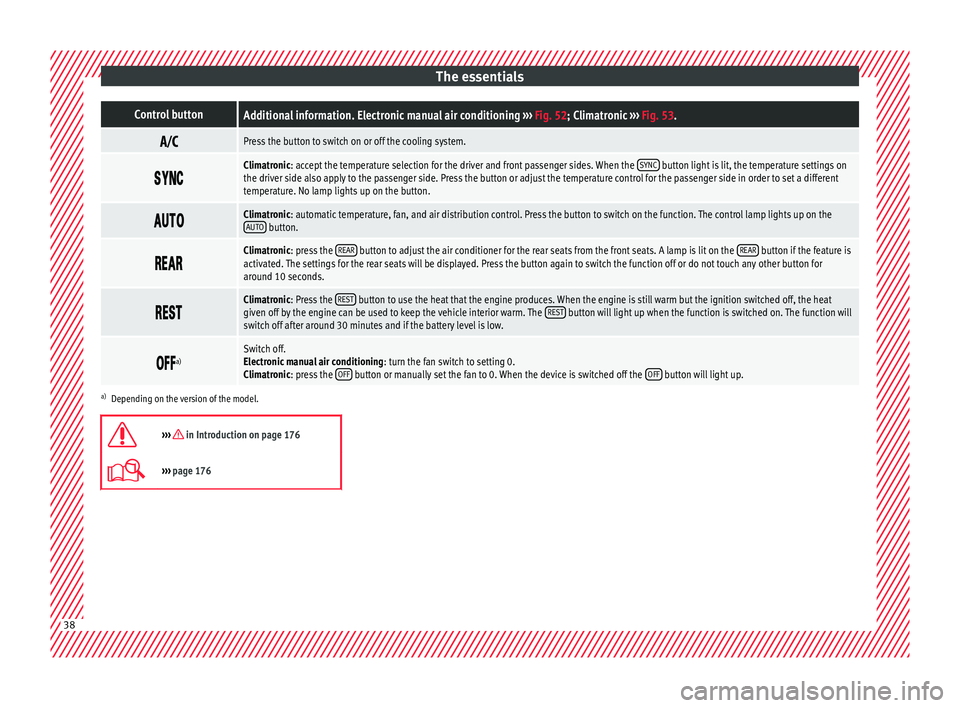
The essentialsControl buttonAdditional information. Electronic manual air conditioning
››› Fig. 52; Climatronic ››› Fig. 53.
Press the button to switch on or off the cooling system.
Climatronic: accept the temperature selection for the driver and front passenger sides. When the
SYNC button light is lit, the temperature settings on
the driver side also apply to the passenger side. Press the button or adjust the temperature control for the passenger side in order to set a different
temperature. No lamp lights up on the button.
Climatronic: automatic temperature, fan, and air distribution control. Press the button to switch on the function. The control lamp lights up on the
AUTO button.
Climatronic: press the
REAR button to adjust the air conditioner for the rear seats from the front seats. A lamp is lit on the REAR button if the feature is
activated. The settings for the rear seats will be displayed. Press the button again to switch the function off or do not touch any other button for
around 10 seconds.
Climatronic: Press the
REST button to use the heat that the engine produces. When the engine is still warm but the ignition switched off, the heat
given off by the engine can be used to keep the vehicle interior warm. The REST button will light up when the function is switched on. The function will
switch off after around 30 minutes and if the battery level is low.
a)Switch off.
Electronic manual air conditioning
: turn the fan switch to setting 0.
Climatronic: press the OFF
button or manually set the fan to 0. When the device is switched off the OFF button will light up.
a)
Depending on the version of the model.
››› in Introduction on page 176
››› page 176 38
Page 41 of 324
The essentials
Level control Fi l
lin
g capacities
Tank level
70 litres. 8 litre reserve
Capacity of the windscreen washer fluid con-
tainer
Versions without head-
light washer system3.5 litres
Versions with headlight
washer system6 litres Fuel
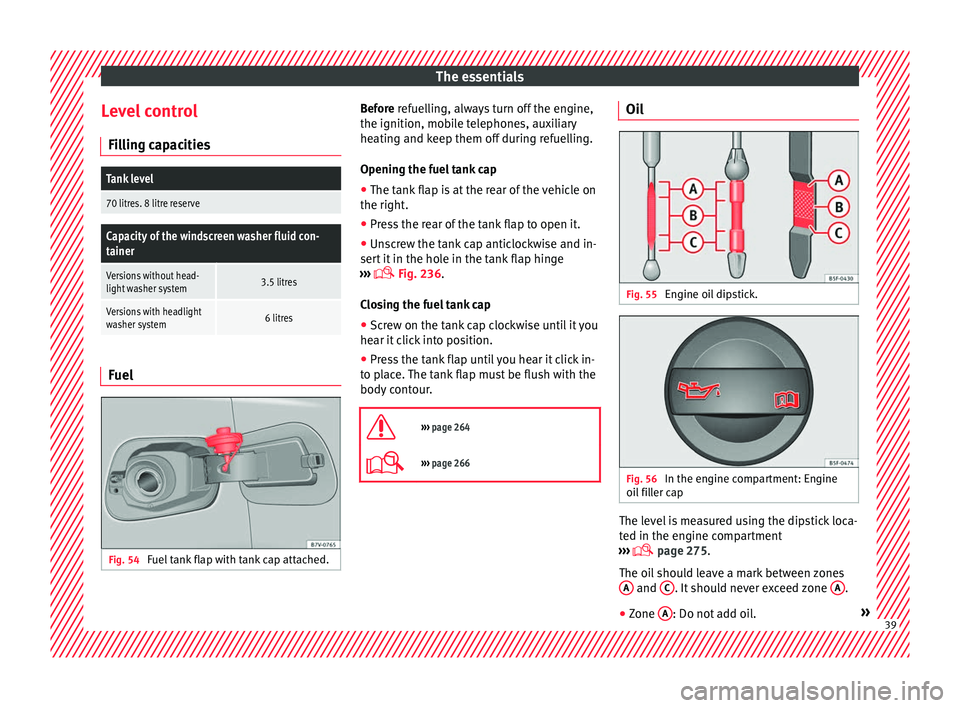
Fig. 54
Fuel tank flap with tank cap attached. Before r
efuelling, always turn off the engine,
the ignition, mo b
ile telephones, auxiliary
heating and keep them off during refuelling.
Opening the fuel tank cap
● The tank flap is at the rear of the vehicle on
the right.
● Pre
ss the rear of the tank flap to open it.
● Unscrew the tank cap anticlockwise and in-
sert it
in the hole in the tank flap hinge
››› Fig. 236.
Closing the fuel tank cap ● Screw on the tank cap clockwise until it you
hear it c
lick into position.
● Press the tank flap until you hear it click in-
to pl
ace. The tank flap must be flush with the
body contour.
››› page 264
››› page 266 Oil
Fig. 55
Engine oil dipstick. Fig. 56
In the engine compartment: Engine
oi l
fi
ller cap The level is measured using the dipstick loca-
t
ed in the en
gine c
ompartment
››› page 275.
The oil should leave a mark between zones A and
C . It should never exceed zone
A .
● Zone A : Do not add oil.
» 39
Page 45 of 324
The essentials
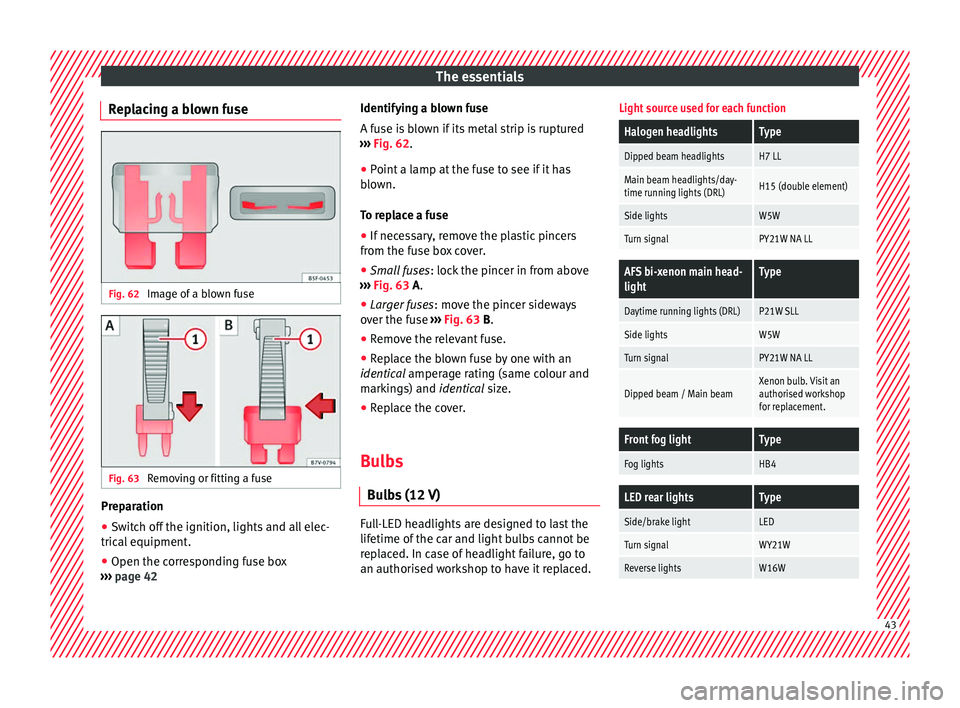
Replacing a blown fuse Fig. 62
Image of a blown fuse Fig. 63
Removing or fitting a fuse Preparation
● Switch off the ignition, lights and all elec-
tric al
equipment
.
● Open the corresponding fuse box
›››
page 42 Identifying a blown fuse
A fuse i
s blown if its metal strip is ruptured
››› Fig. 62.
● Point a lamp at the fuse to see if it has
blown.
T
o replace a fuse
● If necessary, remove the plastic pincers
from the fu
se box cover.
● Small fuses: lock the pinc
er in from above
››› Fig. 63 A.
● Larger fuses : move the pinc
er sideways
over the fuse ››› Fig. 63 B.
● Remove the relevant fuse.
● Replace the blown fuse by one with an
identica
l amperage rating (same colour and
markings) and identical size.
● Replace the cover.
Bulbs Bul
bs (12 V) Full-LED headlights are designed to last the
lif
etime of
the c
ar and light bulbs cannot be
replaced. In case of headlight failure, go to
an authorised workshop to have it replaced.
Light source used for each function
Halogen headlightsType
Dipped beam headlightsH7 LL
Main beam headlights/day-
time running lights (DRL)H15 (double element)
Side lightsW5W
Turn signalPY21W NA LL
AFS bi-xenon main head-
lightType
Daytime running lights (DRL)P21W SLL
Side lightsW5W
Turn signalPY21W NA LL
Dipped beam / Main beamXenon bulb. Visit an
authorised workshop
for replacement.
Front fog lightType
Fog lightsHB4
LED rear lightsType
Side/brake lightLED
Turn signalWY21W
Reverse lightsW16W 43
Page 53 of 324
The essentials
● Do not t
o
w further than 50 km (30 miles).
● If a breakdown truck is used, the vehicle
must
be towed with the front wheels raised.
Note the following instructions for towing
four all-wheel drive vehicles.
Instructions for towing all-wheel drive vehi-
cles
All-wheel drive vehicles can be towed using a
toolbar or tow rope. If the vehicle is towed
with the front or rear axle raised, the engine
must be turned off to avoid transmission
damage.
For vehicles with a double clutched DSG ®
(di-
rect shift gearbox) the instructions for towing
vehicles with an automatic gearbox apply
››› page 50.
Situations in which a vehicle should not be
towed
In the following cases, the vehicle should not
be towed but transported on a trailer or spe-
cial vehicle: ● If the vehicle gearbox does not contain lu-
bricant due t
o a fault.
● If the vehicle battery is flat and, as a result,
the electronic
steering lock and electronic
parking brake cannot be disengaged if ap-
plied. ●
If the v
ehicle to be towed has an automatic
gearbox and the distance to be covered is
greater than 50 km (30 miles).
››› in Introduction on page 87
››› page 87 Tow-starting
In general, the vehicle should not be started
b
y
t
owing. Jump-starting is much more pref-
erable ››› page 51.
For technical reasons, the following vehicles
can not be tow started:
● Vehicles with an automatic gearbox.
● Vehicles with the Keyless Access locking
and ignition syst
em, since the electronic
steering lock may not unlock.
● Vehicles with an electronic parking brake,
given that
it is possible that the brake will
not be disengaged.
● If the vehicle battery is flat, it is possible
that the en
gine control units do not operate
correctly.
However, if your vehicle must absolutely be
tow-started (manual gearbox):
● Put it into second or third gear. ●
Keep the clut
ch pressed down.
● Switch on the ignition and the hazard warn-
ing lights.
● Rel
ease the clutch when both vehicles are
movin
g.
● As soon as the engine starts, press the
clutc
h and move the gear lever into neutral.
This helps to prevent a collision with the tow-
ing vehicle.
How to jump start
Jump lea
ds If the engine fails to start because of a dis-
c
h
ar
ged battery, the battery of another vehi-
cle can be used to start the engine. Before
starting, check the magic eye on the battery
››› page 284.
For starting assistance, jump lead cables con-
forming to the standard DIN 72553 are re-
quired (see the cable manufacturer instruc-
tions). The jump lead cable must be at least
25 mm 2
in section (0.038 inches 2
) for petrol
engines, and 35 mm 2
(0.054 inches 2
) for die-
sel engines.
For vehicles whose battery is not in the en-
gine compartment, the jump leads should
only be connected to the starting assistance
connection points in the engine compart-
ment. » 51
Page 54 of 324
The essentials
WARNING
Incorrect use of jump leads and incorrectly
jump st ar
ting could cause the battery to ex-
plode resulting in serious injury. Please ob-
serve the following rules to minimise the risk
of a battery explosion:
● The battery providing current must have
the same v
oltage (12V) and approximately
the same capacity (see markings on battery)
as the flat battery.
● Never charge a frozen or recently thawed
batter
y. A flat battery can also freeze at tem-
peratures close to 0°C (+32°F).
● If a battery is frozen and/or has been frozen
then it mus
t be replaced.
● A highly explosive mixture of gases is re-
lea
sed when the battery is being charged. Al-
ways keep lit cigarettes, flames, sparks and
fire far from the battery. Never use a mobile
telephone when connecting and removing the
jump leads.
● Charge the battery only in well ventilated
area
s given that when the battery is charged
by outside assistance, it creates a mix of
highly explosive gases.
● Jump leads should never enter into contact
with mov
ing parts in the engine compart-
ment.
● Never switch the positive and negative
pole
s or connect the jump leads incorrectly.
● Note the instruction manual provided by
the manufact
urer of the jump leads. CAUTION
To avoid considerable damage to the vehicle
electric a
l system, note the following careful-
ly:
● If the jump leads are incorrectly connected,
this c
ould result in a short circuit.
● The vehicles must not touch each other,
otherwi
se electricity could flow as soon as
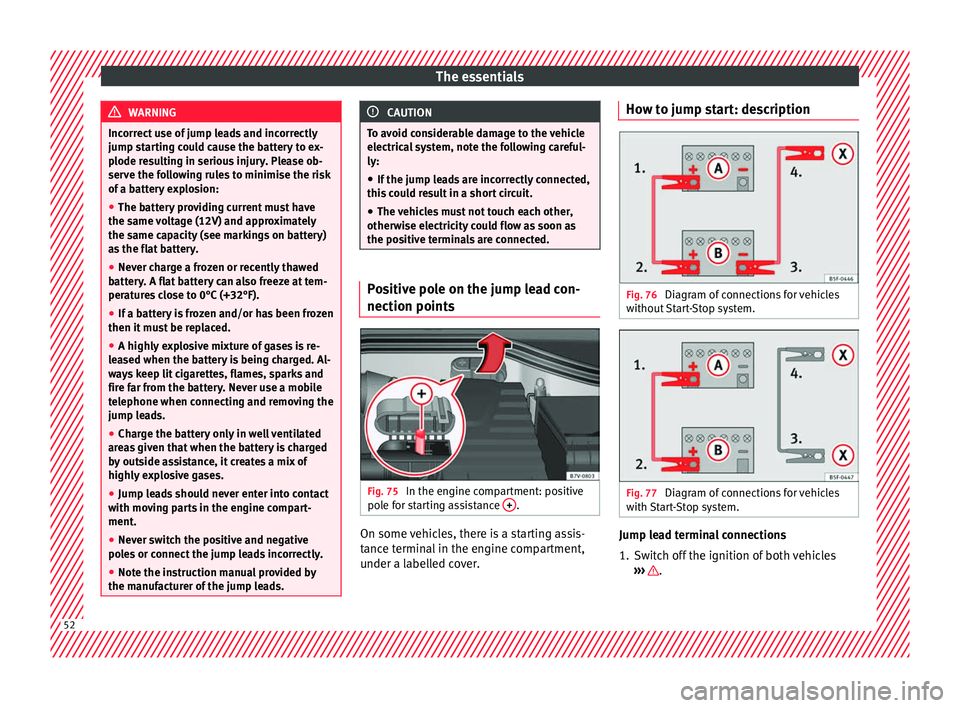
the positive terminals are connected. Positive pole on the jump lead con-
nection point
s Fig. 75
In the engine compartment: positive
po l
e f
or starting assistance + .
On some vehicles, there is a starting assis-
t
anc
e t
erminal in the engine compartment,
under a labelled cover. How to jump start: description
Fig. 76
Diagram of connections for vehicles
w ithout
Start-Stop system. Fig. 77
Diagram of connections for vehicles
w ith
St
art-Stop system. Jump lead terminal connections
1. Switch off the ignition of both vehicles
››
›
.
52
Page 56 of 324
The essentials
Note
The vehicles must not touch each other, oth-
erw i
se electricity could flow as soon as the
positive terminals are connected. Changing windscreen wipers
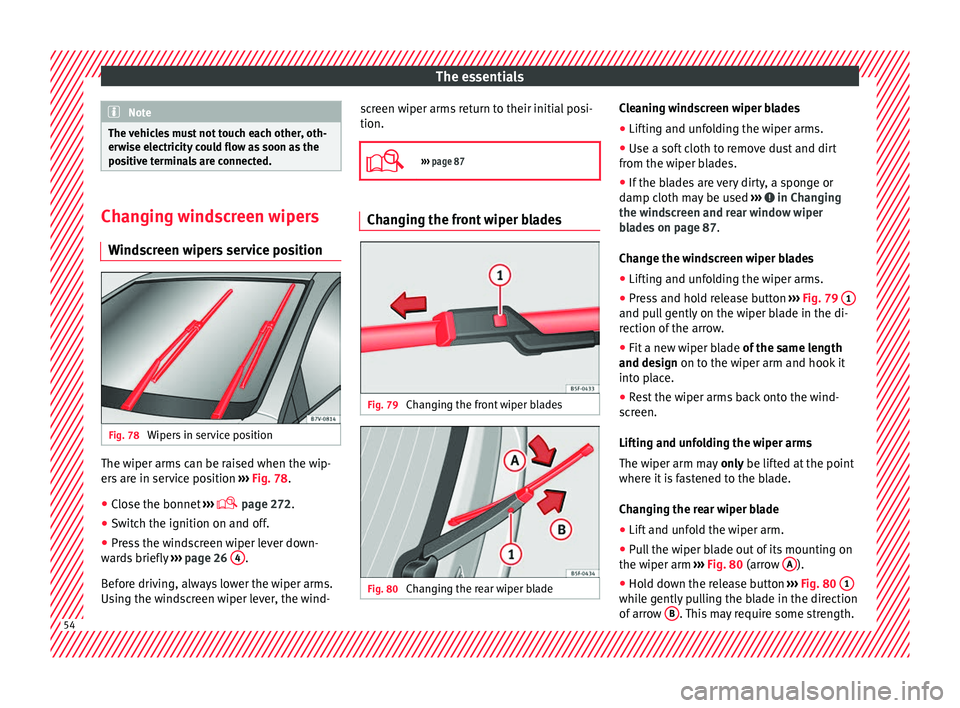
Wind s
creen wipers service position Fig. 78
Wipers in service position The wiper arms can be raised when the wip-
er
s
ar
e in service position ››› Fig. 78.
● Close the bonnet ›››
page 272.
● Switch the ignition on and off.
● Press the windscreen wiper lever down-
ward
s briefly ››› page 26 4 .
B ef
or
e driving, always lower the wiper arms.
Using the windscreen wiper lever, the wind- screen wiper arms return to their initial posi-
tion.
››› page 87 Changing the front wiper blades
Fig. 79
Changing the front wiper blades Fig. 80
Changing the rear wiper blade Cleaning windscreen wiper blades
● Lifting and unfolding the wiper arms.
● Use a soft cloth to remove dust and dirt
fr om the w iper b
lades.
● If the blades are very dirty, a sponge or
damp cloth m
ay be used ››› in Changing
the w ind
s
creen and rear window wiper
blades on page 87.
Change the windscreen wiper blades
● Lifting and unfolding the wiper arms.
● Press and hold release button ›››
Fig. 79 1 and pull gently on the wiper blade in the di-
r
ection of
the arr
ow.
● Fit a new wiper blade of the same l
ength
and design on to the wiper arm and hook it
into place.
● Rest the wiper arms back onto the wind-
scr
een.
Lifting and unfolding the wiper arms
The wiper arm may only be lifted at the point
where it is fastened to the blade.
Changing the rear wiper blade
● Lift and unfold the wiper arm.
● Pull the wiper blade out of its mounting on
the wiper arm ››
› Fig. 80 (arrow A ).
● Hold down the release button ›
››
Fig. 80 1 while gently pulling the blade in the direction
of
arr
o
w B . This may require some strength.
54
Page 64 of 324
Safety
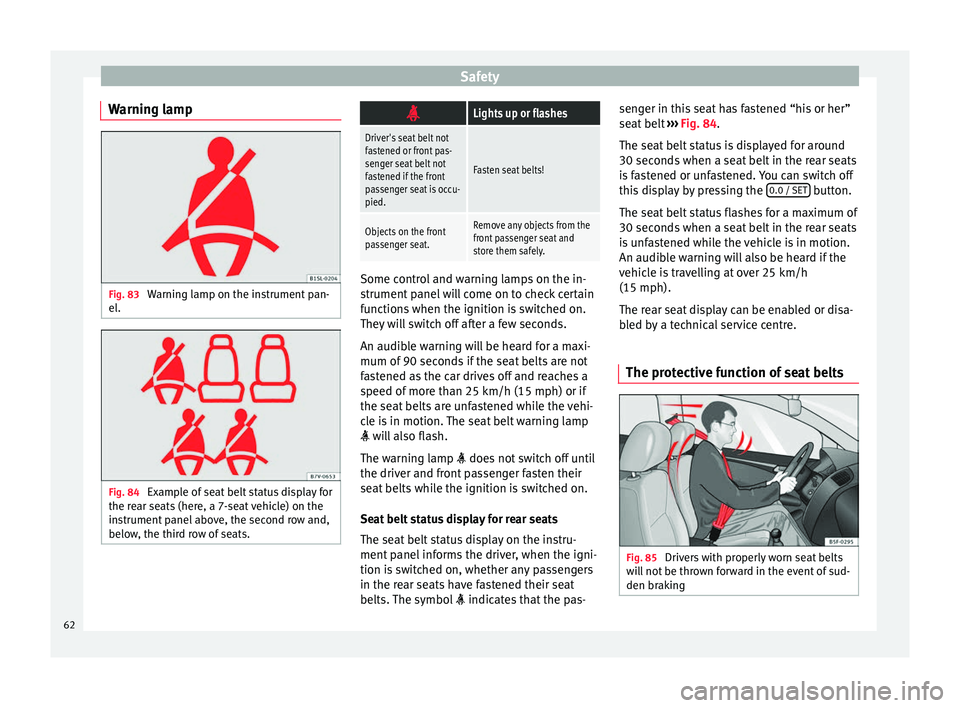
Warning lamp Fig. 83
Warning lamp on the instrument pan-
el . Fig. 84
Example of seat belt status display for
the r ear se
ats (here, a 7-seat vehicle) on the
instrument panel above, the second row and,
below, the third row of seats.
Lights up or flashes
Driver's seat belt not
fastened or front pas-
senger seat belt not
fastened if the front
passenger seat is occu-
pied.
Fasten seat belts!
Objects on the front
passenger seat.Remove any objects from the
front passenger seat and
store them safely.
Some control and warning lamps on the in-
strument
p
anel will come on to check certain
functions when the ignition is switched on.
They will switch off after a few seconds.
An audible warning will be heard for a maxi-
mum of 90 seconds if the seat belts are not
fastened as the car drives off and reaches a
speed of more than 25 km/h (15 mph) or if
the seat belts are unfastened while the vehi-
cle is in motion. The seat belt warning lamp
will also flash.
The warning lamp does not switch off until
the driver and front passenger fasten their
seat belts while the ignition is switched on.
Seat belt status display for rear seats
The seat belt status display on the instru-
ment panel informs the driver, when the igni-
tion is switched on, whether any passengers
in the rear seats have fastened their seat
belts. The symbol indicates that the pas- senger in this seat has fastened “his or her”
seat
belt
››› Fig. 84.
The seat belt status is displayed for around
30 seconds when a seat belt in the rear seats
is fastened or unfastened. You can switch off
this display by pressing the 0.0 / SET button.
The se at
belt
status flashes for a maximum of
30 seconds when a seat belt in the rear seats
is unfastened while the vehicle is in motion.
An audible warning will also be heard if the
vehicle is travelling at over 25 km/h
(15 mph).
The rear seat display can be enabled or disa-
bled by a technical service centre.
The protective function of seat belts Fig. 85
Drivers with properly worn seat belts
w i
l
l not be thrown forward in the event of sud-
den braking 62