lock Seat Alhambra 2016 User Guide
[x] Cancel search | Manufacturer: SEAT, Model Year: 2016, Model line: Alhambra, Model: Seat Alhambra 2016Pages: 324, PDF Size: 5.93 MB
Page 29 of 324
The essentials
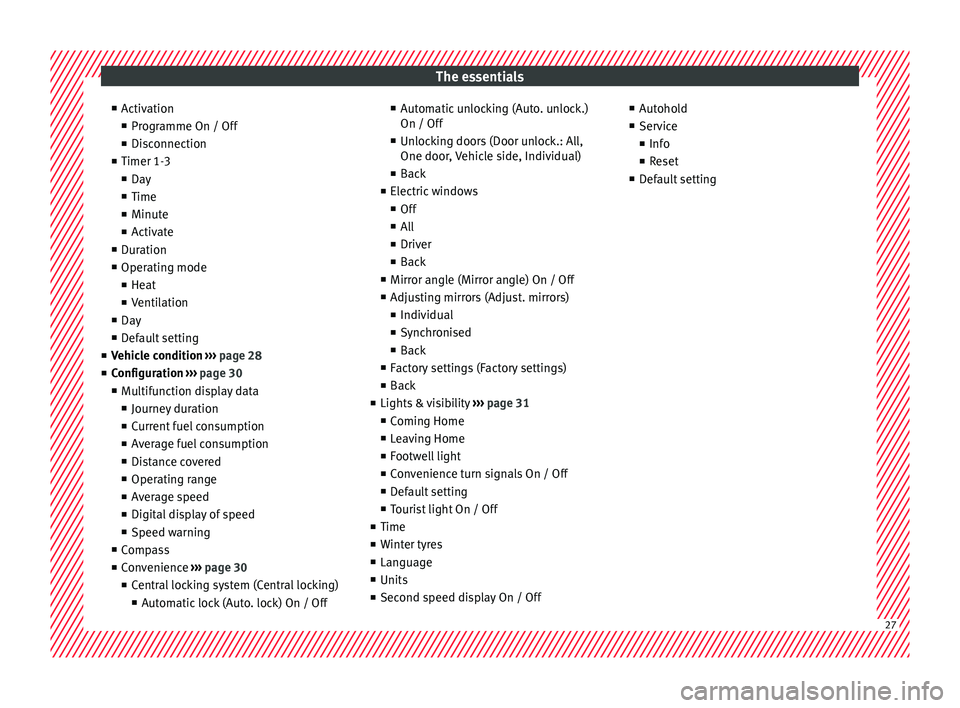
■ Activ
ation
■ Pr
ogramme On / Off
■ Disconnection
■ Timer 1-3
■ Day
■ Time
■ Minute
■ Activate
■ Duration
■ Operating mode
■ Heat
■ Ventilation
■ Day
■ Default setting
■ Vehicle condition ››› page 28
■ Configuration ››› page 30
■ Multifunction display data
■ Journey duration
■ Current fuel consumption
■ Average fuel consumption
■ Distance covered
■ Operating range
■ Average speed
■ Digital display of speed
■ Speed warning
■ Compass
■ Convenience ››› page 30
■ Central locking system (Central locking)
■Automatic lock (Auto. lock) On / Off ■
Automatic unlocking (Auto. unlock.)
On / Off
■ Unlocking doors (Door unlock.: All,
One door, Vehicle side, Individual)
■ Back
■ Electric windows
■ Off
■ All
■ Driver
■ Back
■ Mirror angle (Mirror angle) On / Off
■ Adjusting mirrors (Adjust. mirrors)
■ Individual
■ Synchronised
■ Back
■ Factory settings (Factory settings)
■ Back
■ Lights & visibility ››› page 31
■ Coming Home
■ Leaving Home
■ Footwell light
■ Convenience turn signals On / Off
■ Default setting
■ Tourist light On / Off
■ Time
■ Winter tyres
■ Language
■ Units
■ Second speed display On / Off ■
Autohol d
■ Service
■ Info
■ Reset
■ Default setting 27
Page 32 of 324
The essentials
press OK again or wait a few seconds. The
s peed i
s
stored and the warning activated.
● To switch off , pres
s OK . The stored speed is
del et
ed.
M
anually erasing memory 1 or 2
● Select the memory that you wish to erase.
● Hold down OK for approximately 2 sec-
ond s.
P er
sonalising the displays
It is possible to select which of the displays
in the multifunction display you wish to see
on the instrument panel in the settings
menu. The units of measurement can also be
modified ››› page 30.
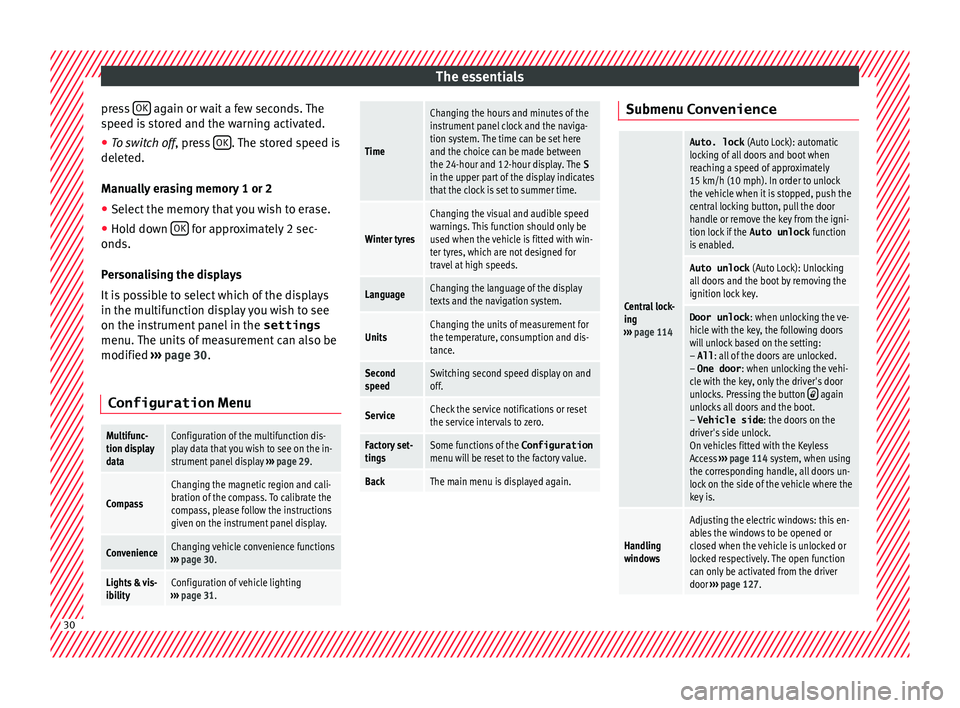
Configuration Menu
Multifunc-
tion display
dataConfiguration of the multifunction dis-
play data that you wish to see on the in-
strument panel display ››› page 29.
Compass
Changing the magnetic region and cali-
bration of the compass. To calibrate the
compass, please follow the instructions
given on the instrument panel display.
ConvenienceChanging vehicle convenience functions
››› page 30.
Lights & vis-
ibilityConfiguration of vehicle lighting
››› page 31.
Time
Changing the hours and minutes of the
instrument panel clock and the naviga-
tion system. The time can be set here
and the choice can be made between
the 24-hour and 12-hour display. The S
in the upper part of the display indicates
that the clock is set to summer time.
Winter tyres
Changing the visual and audible speed
warnings. This function should only be
used when the vehicle is fitted with win-
ter tyres, which are not designed for
travel at high speeds.
LanguageChanging the language of the display
texts and the navigation system.
UnitsChanging the units of measurement for
the temperature, consumption and dis-
tance.
Second
speedSwitching second speed display on and
off.
ServiceCheck the service notifications or reset
the service intervals to zero.
Factory set-
tingsSome functions of the Configuration
menu will be reset to the factory value.
BackThe main menu is displayed again. Submenu Convenience
Central lock-
ing
››› page 114
Auto. lock (Auto Lock): automatic
locking of all doors and boot when
reaching a speed of approximately
15 km/h (10 mph). In order to unlock
the vehicle when it is stopped, push the
central locking button, pull the door
handle or remove the key from the igni-
tion lock if the Auto unlock function
is enabled.
Auto unlock (Auto Lock): Unlocking
all doors and the boot by removing the
ignition lock key.
Door unlock : when unlocking the ve-
hicle with the key, the following doors
will unlock based on the setting:
– All : all of the doors are unlocked.
– One door : when unlocking the vehi-
cle with the key, only the driver's door
unlocks. Pressing the button
again
unlocks all doors and the boot.
– Vehicle side : the doors on the
driver's side unlock.
On vehicles fitted with the Keyless
Access ››› page 114 system, when using
the corresponding handle, all doors un-
lock on the side of the vehicle where the
key is.
Handling
windows
Adjusting the electric windows: this en-
ables the windows to be opened or
closed when the vehicle is unlocked or
locked respectively. The open function
can only be activated from the driver
door ››› page 127. 30
Page 33 of 324
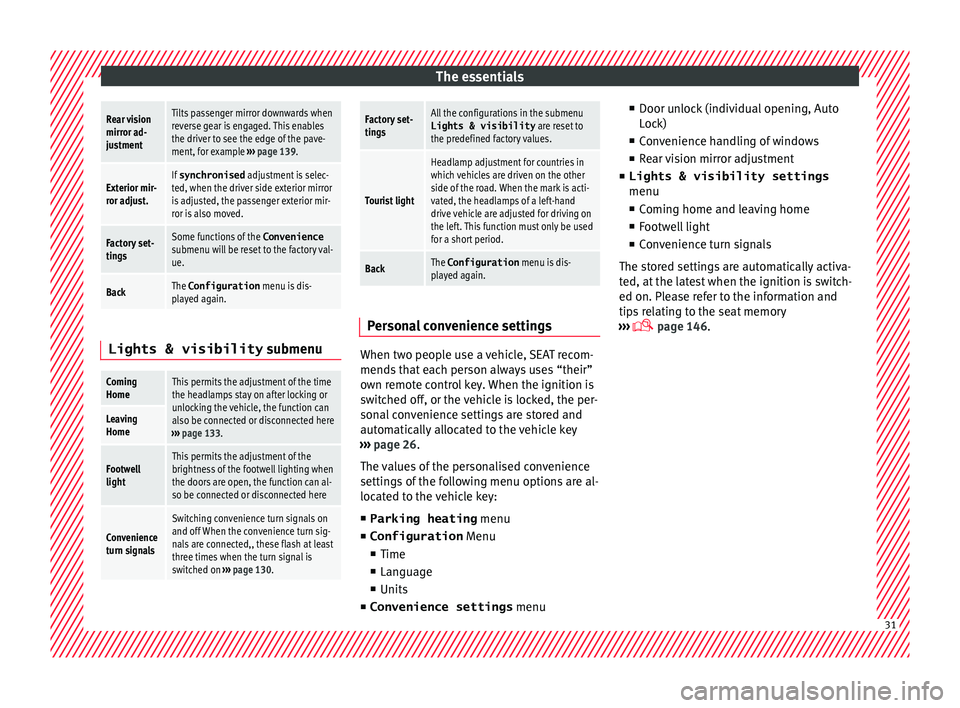
The essentialsRear vision
mirror ad-
justmentTilts passenger mirror downwards when
reverse gear is engaged. This enables
the driver to see the edge of the pave-
ment, for example
››› page 139.
Exterior mir-
ror adjust.If synchronised adjustment is selec-
ted, when the driver side exterior mirror
is adjusted, the passenger exterior mir-
ror is also moved.
Factory set-
tingsSome functions of the Convenience
submenu will be reset to the factory val-
ue.
BackThe Configuration menu is dis-
played again. Lights & visibility
submenu
Coming
HomeThis permits the adjustment of the time
the headlamps stay on after locking or
unlocking the vehicle, the function can
also be connected or disconnected here
››› page 133.
Leaving
Home
Footwell
lightThis permits the adjustment of the
brightness of the footwell lighting when
the doors are open, the function can al-
so be connected or disconnected here
Convenience
turn signals
Switching convenience turn signals on
and off When the convenience turn sig-
nals are connected,, these flash at least
three times when the turn signal is
switched on ››› page 130.
Factory set-
tingsAll the configurations in the submenu
Lights & visibility are reset to
the predefined factory values.
Tourist light
Headlamp adjustment for countries in
which vehicles are driven on the other
side of the road. When the mark is acti-
vated, the headlamps of a left-hand
drive vehicle are adjusted for driving on
the left. This function must only be used
for a short period.
BackThe Configuration menu is dis-
played again. Personal convenience settings
When two people use a vehicle, SEAT recom-
mend
s
th
at each person always uses “their”
own remote control key. When the ignition is
switched off, or the vehicle is locked, the per-
sonal convenience settings are stored and
automatically allocated to the vehicle key
››› page 26.
The values of the personalised convenience
settings of the following menu options are al-
located to the vehicle key: ■ Parking heating menu
■ Configuration Menu
■ Time
■ Language
■ Units
■ Convenience settings menu■
Door unloc
k (individual opening, Auto
Lock)
■ Convenience handling of windows
■ Rear vision mirror adjustment
■ Lights & visibility settings
menu
■ Coming home and leaving home
■ Footwell light
■ Convenience turn signals
The stored settings are automatically activa-
ted, at the latest when the ignition is switch-
ed on. Please refer to the information and
tips relating to the seat memory
››› page 146. 31
Page 35 of 324
The essentials
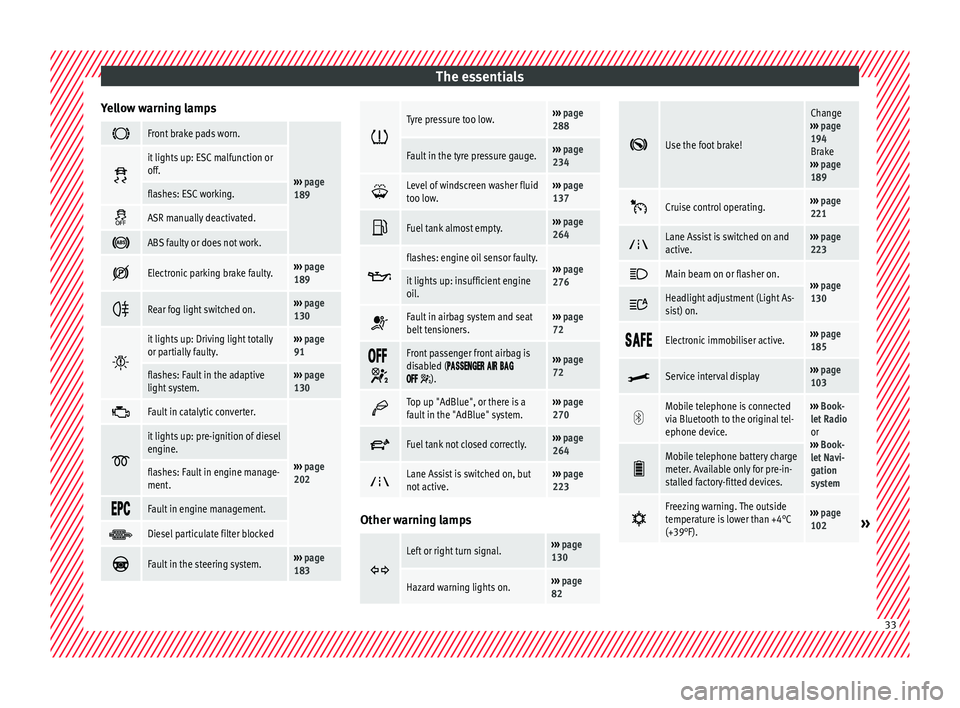
Yellow warning lamps Front brake pads worn.
›››
page
189
it lights up: ESC malfunction or
off.
flashes: ESC working.
ASR manually deactivated.
ABS faulty or does not work.
Electronic parking brake faulty.›››
page
189
Rear fog light switched on.›››
page
130
it lights up: Driving light totally
or partially faulty.›››
page
91
flashes: Fault in the adaptive
light system.››› page
130
Fault in catalytic converter.
›››
page
202
it lights up: pre-ignition of diesel
engine.
flashes: Fault in engine manage-
ment.
Fault in engine management.
Diesel particulate filter blocked
Fault in the steering system.›››
page
183
Tyre pressure too low.›››
page
288
Fault in the tyre pressure gauge.››› page
234
Level of windscreen washer fluid
too low.›››
page
137
Fuel tank almost empty.›››
page
264
flashes: engine oil sensor faulty.›››
page
276it lights up: insufficient engine
oil.
Fault in airbag system and seat
belt tensioners.›››
page
72
Front passenger front airbag is
disabled (
).
››› page
72
Top up "AdBlue", or there is a
fault in the "AdBlue" system.›››
page
270
Fuel tank not closed correctly.›››
page
264
Lane Assist is switched on, but
not active.›››
page
223 Other warning lamps
Left or right turn signal.›››
page
130
Hazard warning lights on.››› page
82
Use the foot brake!
Change
››› page
194
Brake
››› page
189
Cruise control operating.›››
page
221
Lane Assist is switched on and
active.›››
page
223
Main beam on or flasher on.›››
page
130 Headlight adjustment (Light As-
sist) on.
Electronic immobiliser active.›››
page
185
Service interval display›››
page
103
Mobile telephone is connected
via Bluetooth to the original tel-
ephone device.›››
Book-
let Radio
or
››› Book-
let Navi-
gation
system
Mobile telephone battery charge
meter. Available only for pre-in-
stalled factory-fitted devices.
Freezing warning. The outside
temperature is lower than +4°C
(+39°F).›››
page
102» 33
Page 36 of 324

The essentials
››› in Warning and indication lamps on
page 105
››› page 105 Gearbox lever
M anua
l
gearbox Fig. 48
Gear shift pattern of a 6-speed man-
ual g
e
arbox The position of the gears is indicated on the
g
e
arbo
x lever ››› Fig. 48.
● Press the clutch pedal and keep your foot
right down.
● Mo
ve the gearbox lever to the required po-
sition.
● Rel
ease the clutch. Selecting reverse gear
●
Press the clutch pedal and keep your foot
right down.
● W
ith the gearbox lever in neutral, push it
upwar
ds, move it to the left as far as it will go
and then forwards to select reverse ››› Fig. 48
R .
● Release the clutch.
››› in Manual gear change on page 195
››› page 195 Automatic gear box*
Fig. 49
Automatic gearbox: selector lever po-
s ition
s. Parking lock
R
ev
er
se gear
P
R Neutral (idling)
Drive (for
ward)
Tiptronic mode: pull the lever forwards
(+) to go up a gear or backwards ( –) to
go down a gear.
››› in Automatic gear change* on
page 197
››› page 196
››› page 35 N
D/S
+/–
34
Page 37 of 324
The essentials
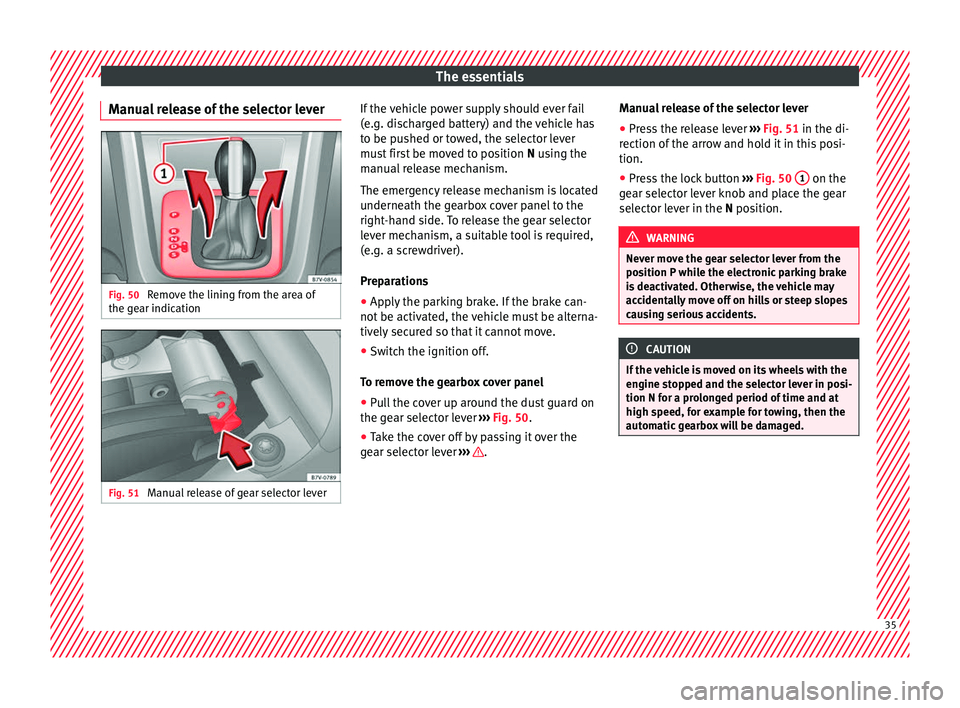
Manual release of the selector lever Fig. 50
Remove the lining from the area of
the g e
ar indic
ation Fig. 51
Manual release of gear selector lever If the vehicle power supply should ever fail
(e.
g. di
s
charged battery) and the vehicle has
to be pushed or towed, the selector lever
must first be moved to position N using the
manual release mechanism.
The emergency release mechanism is located
underneath the gearbox cover panel to the
right-hand side. To release the gear selector
lever mechanism, a suitable tool is required,
(e.g. a screwdriver).
Preparations
● Apply the parking brake. If the brake can-
not be activat
ed, the vehicle must be alterna-
tively secured so that it cannot move.
● Switch the ignition off.
To remo
ve the gearbox cover panel
● Pull the cover up around the dust guard on
the gear sel
ector lever ››› Fig. 50.
● Take the cover off by passing it over the
gear sel
ector lever ››› .Manual release of the selector lever
●
Press the release lever ››
›
Fig. 51 in the di-
rection of the arrow and hold it in this posi-
tion.
● Press the lock button ›››
Fig. 50 1 on the
g e
ar sel
ector lever knob and place the gear
selector lever in the N position. WARNING
Never move the gear selector lever from the
pos ition P whi
le the electronic parking brake
is deactivated. Otherwise, the vehicle may
accidentally move off on hills or steep slopes
causing serious accidents. CAUTION
If the vehicle is moved on its wheels with the
engine s t
opped and the selector lever in posi-
tion N for a prolonged period of time and at
high speed, for example for towing, then the
automatic gearbox will be damaged. 35
Page 41 of 324
The essentials
Level control Fi l
lin
g capacities
Tank level
70 litres. 8 litre reserve
Capacity of the windscreen washer fluid con-
tainer
Versions without head-
light washer system3.5 litres
Versions with headlight
washer system6 litres Fuel
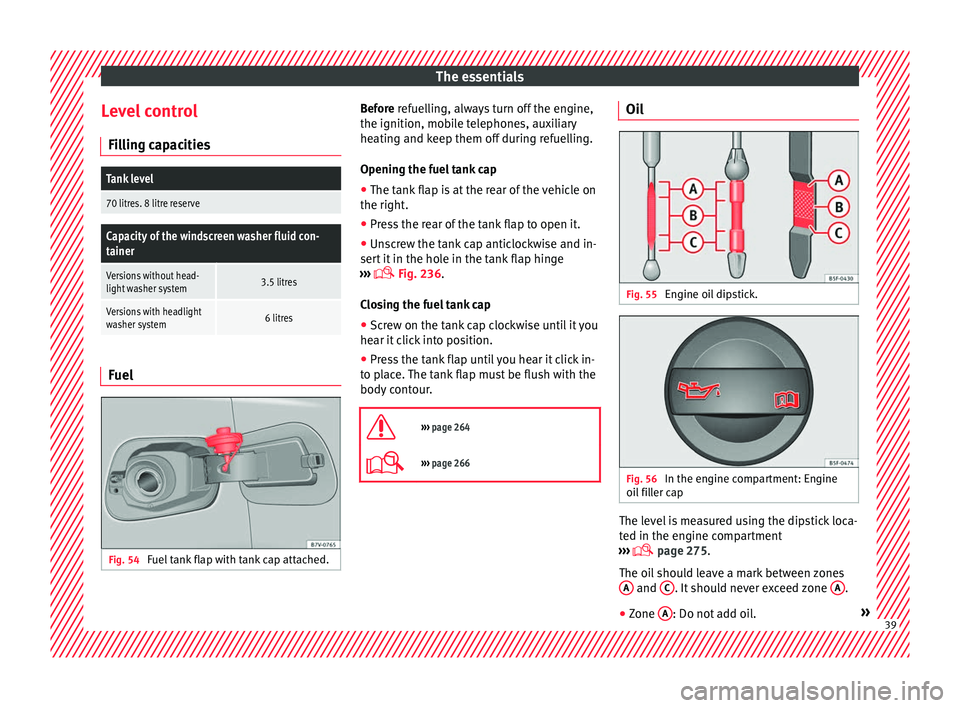
Fig. 54
Fuel tank flap with tank cap attached. Before r
efuelling, always turn off the engine,
the ignition, mo b
ile telephones, auxiliary
heating and keep them off during refuelling.
Opening the fuel tank cap
● The tank flap is at the rear of the vehicle on
the right.
● Pre
ss the rear of the tank flap to open it.
● Unscrew the tank cap anticlockwise and in-
sert it
in the hole in the tank flap hinge
››› Fig. 236.
Closing the fuel tank cap ● Screw on the tank cap clockwise until it you
hear it c
lick into position.
● Press the tank flap until you hear it click in-
to pl
ace. The tank flap must be flush with the
body contour.
››› page 264
››› page 266 Oil
Fig. 55
Engine oil dipstick. Fig. 56
In the engine compartment: Engine
oi l
fi
ller cap The level is measured using the dipstick loca-
t
ed in the en
gine c
ompartment
››› page 275.
The oil should leave a mark between zones A and
C . It should never exceed zone
A .
● Zone A : Do not add oil.
» 39
Page 45 of 324
The essentials
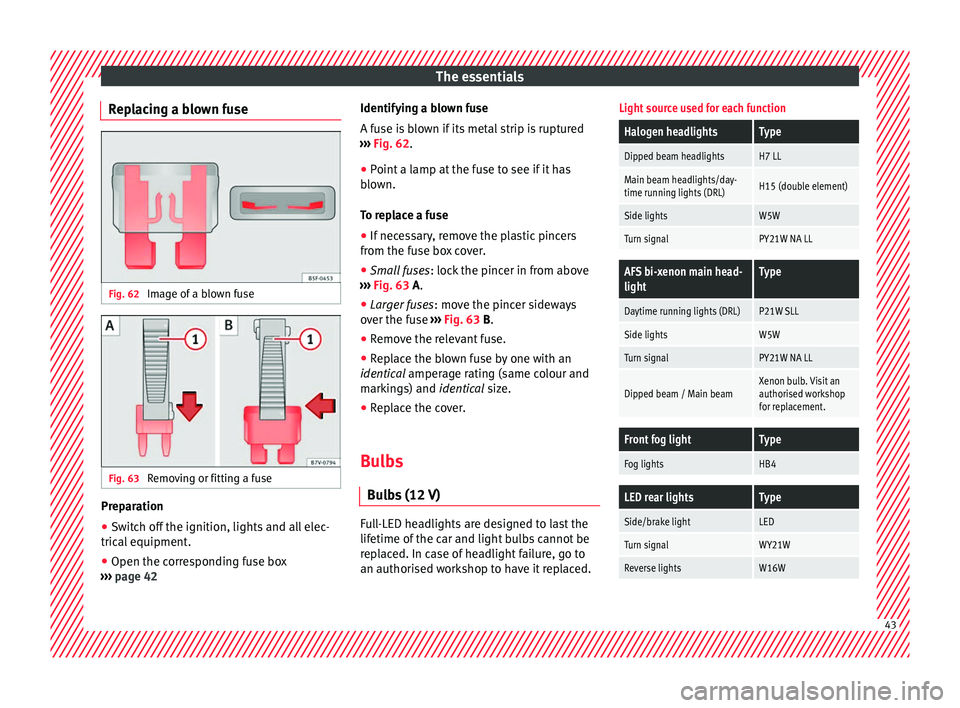
Replacing a blown fuse Fig. 62
Image of a blown fuse Fig. 63
Removing or fitting a fuse Preparation
● Switch off the ignition, lights and all elec-
tric al
equipment
.
● Open the corresponding fuse box
›››
page 42 Identifying a blown fuse
A fuse i
s blown if its metal strip is ruptured
››› Fig. 62.
● Point a lamp at the fuse to see if it has
blown.
T
o replace a fuse
● If necessary, remove the plastic pincers
from the fu
se box cover.
● Small fuses: lock the pinc
er in from above
››› Fig. 63 A.
● Larger fuses : move the pinc
er sideways
over the fuse ››› Fig. 63 B.
● Remove the relevant fuse.
● Replace the blown fuse by one with an
identica
l amperage rating (same colour and
markings) and identical size.
● Replace the cover.
Bulbs Bul
bs (12 V) Full-LED headlights are designed to last the
lif
etime of
the c
ar and light bulbs cannot be
replaced. In case of headlight failure, go to
an authorised workshop to have it replaced.
Light source used for each function
Halogen headlightsType
Dipped beam headlightsH7 LL
Main beam headlights/day-
time running lights (DRL)H15 (double element)
Side lightsW5W
Turn signalPY21W NA LL
AFS bi-xenon main head-
lightType
Daytime running lights (DRL)P21W SLL
Side lightsW5W
Turn signalPY21W NA LL
Dipped beam / Main beamXenon bulb. Visit an
authorised workshop
for replacement.
Front fog lightType
Fog lightsHB4
LED rear lightsType
Side/brake lightLED
Turn signalWY21W
Reverse lightsW16W 43
Page 46 of 324
The essentials
Action in the event of a punc-
t ur
e
Wh
at to do first ●
Park the vehicle on a horizontal surface
and in a saf e p
lace as far away from traffic as
possible.
● Apply the handbrake.
● Switch on the hazard warning lights.
● Manual gearbox: select the 1s
t gear.
● Automatic gearbox: Move the sel
ector lever
to position P.
● If you are towing a trailer, unhitch it from
your v
ehicle.
● Keep the vehicle tool kit ready*
›››
page 82.
● Observe the applicable legislation for each
countr
y (reflective vest, warning triangles,
etc.).
● All occupants should leave the vehicle and
wait in a s
afe place (for instance behind the
roadside crash barrier). WARNING
● Alw a
ys observe the above steps and pro-
tect yourself and other road users.
● If you change the wheel on a slope, block
the wheel on the oppo
site side of the car with
a stone or similar to prevent the vehicle from
moving. Repairing a tyre with the anti-punc-
t
ur
e k
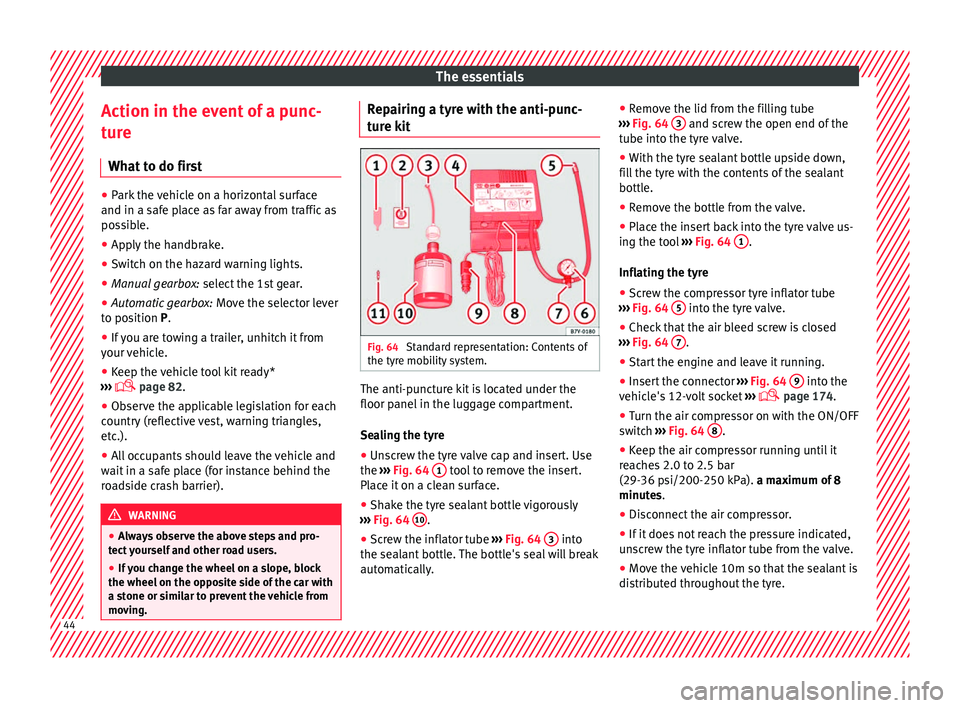
it Fig. 64
Standard representation: Contents of
the ty r
e mo
bility system. The anti-puncture kit is located under the
floor p
anel
in the lug
gage compartment.
Sealing the tyre
● Unscrew the tyre valve cap and insert. Use
the ›››
Fig. 64 1 tool to remove the insert.
Pl ac
e it
on a clean surface.
● Shake the tyre sealant bottle vigorously
›››
Fig. 64 10 .
● Screw the inflator tube ››
›
Fig. 64 3 into
the se al
ant
bottle. The bottle's seal will break
automatically. ●
Remov
e the lid from the filling tube
››› Fig. 64 3 and screw the open end of the
t ube int
o the ty
re valve.
● With the tyre sealant bottle upside down,
fill
the tyre with the contents of the sealant
bottle.
● Remove the bottle from the valve.
● Place the insert back into the tyre valve us-
ing the too
l ››› Fig. 64 1 .
Infl atin
g the ty
re
● Screw the compressor tyre inflator tube
›››
Fig. 64 5 into the tyre valve.
● Check that the air bleed screw is closed
› ›
›
Fig. 64 7 .
● Start the engine and leave it running.
● Insert the connector ››
›
Fig. 64 9 into the
v ehic
l
e's 12-volt socket ›››
page 174.
● Turn the air compressor on with the ON/OFF
switc
h ››› Fig. 64 8 .
● Keep the air compressor running until it
r e
ac
hes 2.0 to 2.5 bar
(29-36 psi/200-250 kPa). a maximum of 8
minutes.
● Disconnect the air compressor.
● If it does not reach the pressure indicated,
uns
crew the tyre inflator tube from the valve.
● Move the vehicle 10m so that the sealant is
dis trib
uted throughout the tyre.44
Page 47 of 324
The essentials
● Sc r
ew the c
ompressor tyre inflator into the
valve.
● Repeat the inflation process.
● If the indicated pressure still cannot be
reac
hed, the tyre is too badly damaged. Stop
and request assistance from an authorised
technician.
● Disconnect the air compressor. Unscrew
the tyre infl
ator tube from the tyre valve.
● When the tyre pressure is between 2.5 and
2.0 bars, c
ontinue driving without exceeding
80 km/h (50 mph).
● Check the pressure again after 10 minutes
›››
page 86.
››› in TMS (Tyre Mobility System)* on
page 85
››› page 85 Changing a wheel
V ehic
l
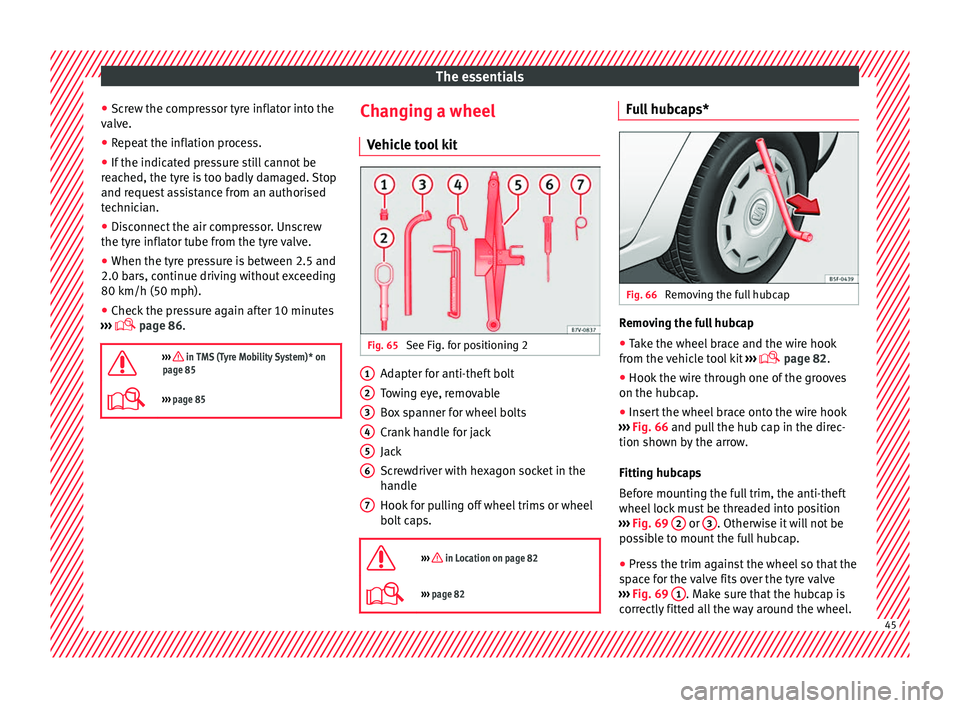
e tool kit Fig. 65
See Fig. for positioning 2 Adapter for anti-theft bolt
T
o
w
ing eye, removable
Box spanner for wheel bolts
Crank handle for jack
Jack
Screwdriver with hexagon socket in the
handle
Hook for pulling off wheel trims or wheel
bolt caps.
››› in Location on page 82
››› page 82 1
2
3
4
5
6
7 Full hubcaps*
Fig. 66
Removing the full hubcap Removing the full hubcap
● Take the wheel brace and the wire hook
fr om the
v
ehicle tool kit ›››
page 82.
● Hook the wire through one of the grooves
on the hubcap.
● In
sert the wheel brace onto the wire hook
›››
Fig. 66 and pull the hub cap in the direc-
tion shown by the arrow.
Fitting hubcaps
Before mounting the full trim, the anti-theft
wheel lock must be threaded into position
››› Fig. 69 2 or
3 . Otherwise it will not be
po s
s
ible to mount the full hubcap.
● Press the trim against the wheel so that the
spac
e for the valve fits over the tyre valve
››› Fig. 69 1 . Make sure that the hubcap is
c orr
ectly
fitted all the way around the wheel. 45